Xamarincommunitytoolkit: [Bug] [Expander] Expander does not resize to fit changed contents
Description
The Expander control does not appear to resize itself when the size of it's contents are changed. Perhaps it works in other scenarios but in the scenario demonstrated in the steps it does not.
Steps to Reproduce
- Add an Expander
- Set the contents to various bindable properties, some of which can be set to not visible if they are null
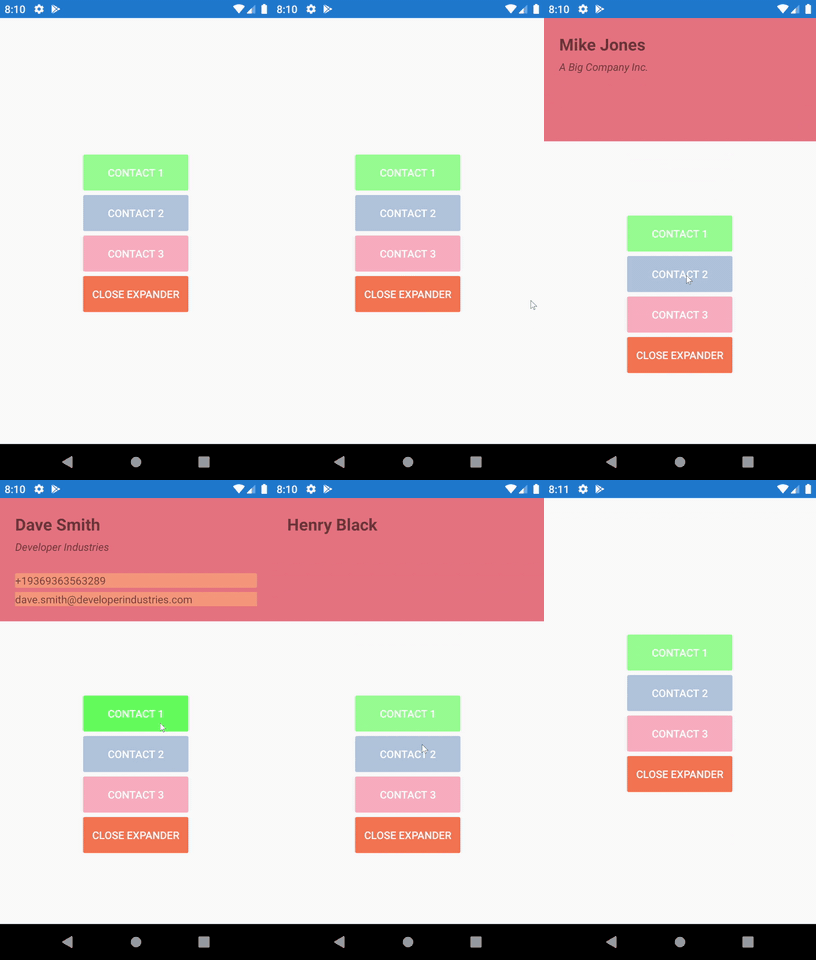
- Change the bindable properties and observe that the expander is always set to the largest size and does not shrink when the contents become smaller.
Expected Behavior
Expander should always fit the size of the contents within. Much the same as the Auto property on a Grid row.
Actual Behavior
Expander does not appear to resize but seems to fit the largest case scenario. I have not tested extensively many scenarios but in the sample app this can be observed using the method above.
Basic Information
- Version with issue: v4.7.0.813-pre2
- Last known good version: n/a
- IDE: Visual Studio 2019
- Platform Target Frameworks:
- iOS: iOS 13 tested
- Android: Api 28 tested
- UWP: not tested
- Android Support Library Version: n/a
- Nuget Packages: n/a
- Affected Devices: n/a
Screenshots
Reproduction Link
https://github.com/varyamereon/ExpanderGridTest
Workaround
Haven't found a workaround but would be interested.
 varyamereon
All 4 comments
Hi, @varyamereon your scenario describes the purpose of adding ForceUpdateSizeCommand property to Expander control. So, you should use it.
On your sample it will look like:
public ICommand? ForceUpdateSizeCommand { get; set; } // define the command
public Contact? CurrentContact
{
    get => currentContact;
    set
    {
        SetProperty(ref currentContact, value);
        ForceUpdateSizeCommand?.Execute(null); // call the command
    }
}
Add binding in xaml (This binding work in OneWayToSource mode)
<Expander BackgroundColor="LightCoral"
                   ForceUpdateSizeCommand="{Binding ForceUpdateSizeCommand}"
                   IsExpanded="True">
 AndreiMisiukevich
on 10 Jun 2020
AndreiMisiukevich
on 10 Jun 2020
@jsuarezruiz @samhouts that's not a bug
AndreiMisiukevich
on 10 Jun 2020
Thanks @AndreiMisiukevich, that does indeed work and seems to be the way this control is designed. I find it unusual that a container control needs such a convoluted method to resize to it's contents, most other controls such as Grid, StackLayout etc. etc. just resize automatically.
varyamereon
on 10 Jun 2020
As I mentioned ForceUpdateSizeCommand should be used in such cases.
AndreiMisiukevich
on 10 Oct 2020
Related issues
 jfversluis
·
4Comments
jfversluis
·
4Comments
 acuntex
·
4Comments
jfversluis
·
5Comments
jfversluis
·
6Comments
acuntex
·
4Comments
jfversluis
·
5Comments
jfversluis
·
6Comments
 mallibone
·
6Comments
mallibone
·
6Comments
Most helpful comment
Hi, @varyamereon your scenario describes the purpose of adding ForceUpdateSizeCommand property to Expander control. So, you should use it.
On your sample it will look like:
Add binding in xaml (This binding work in OneWayToSource mode)