Xamarin-macios: [xcode11-support] XI/XM packages can't be installed without override in System Preferences (Security) (signing?)
Steps to Reproduce
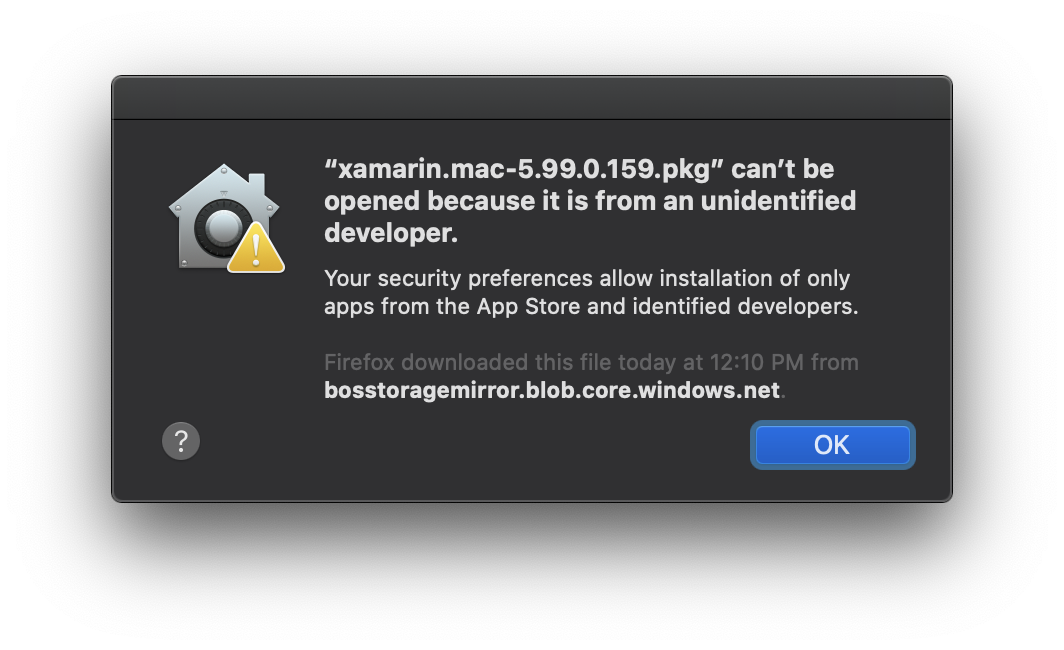
- Download https://bosstoragemirror.blob.core.windows.net/wrench/jenkins/xcode11/903c3eec31bc7c9f819f958df5f2a567b2d30631/64/package/xamarin.mac-5.99.0.159.pkg
- Try to install
Expected Behavior
Installing cleanly
Actual Behavior
Dialog that require override to pass
Environment
10.15 Beta
 chamons
All 11 comments
I can confirm this happens on a clean installation of Catalina
 dalexsoto
on 27 Jun 2019
dalexsoto
on 27 Jun 2019
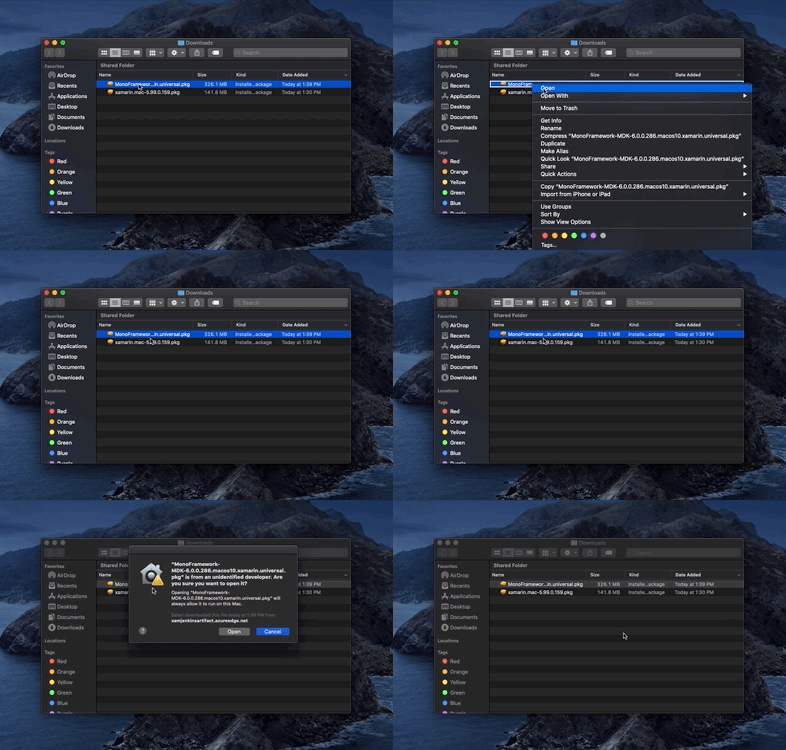
As a workaround you can follow these steps:
- Right click on the installer file (.pkg).
- Click
Open(The very first option of the right click menu). - Click
Openin the presented dialog. - Follow on screen instructions to install.
dalexsoto
on 27 Jun 2019
The workaround worked for xamarin.mac-5.99.0.159.pkg
But I still cannot install xamarin.ios-12.99.0.159.pkg
Error: This package is incompatible with this version of macOs. The package us trying to install content to the system volume...
macOS Catalina 10.15 beta 3 (19A501i)
 Sevenish
on 5 Jul 2019
Sevenish
on 5 Jul 2019
This seems solved for Xamarin.Mac but not Xamarin.iOS? Any timeline?
 aphex3k
on 24 Jul 2019
aphex3k
on 24 Jul 2019
@aphex3k Could you try the following package?
dalexsoto
on 24 Jul 2019
@dalexsoto, That one worked without problem. It gave me a prompt to access my download folder though...
aphex3k
on 25 Jul 2019
I believe it prompts based where the file is located. If you moved it to Desktop I'd expect a prompt there.
chamons
on 25 Jul 2019
That would make sense...
aphex3k
on 25 Jul 2019
@dalexsoto Can you provide a download link for Xamarin.iOS-12.99.2.40.pkg just like you did for 12.99.2.16 please?
aphex3k
on 23 Aug 2019
@aphex3k xamarin.ios-12.99.2.40.pkg
 rolfbjarne
on 26 Aug 2019
rolfbjarne
on 26 Aug 2019
This is working now that we have notarized packages.
rolfbjarne
on 3 Sep 2019
Related issues
 cwrea
·
55Comments
cwrea
·
55Comments
 jfversluis
·
72Comments
jfversluis
·
72Comments
 simeon052
·
114Comments
simeon052
·
114Comments
 lilleydnSub
·
45Comments
lilleydnSub
·
45Comments
 kodejack
·
170Comments
kodejack
·
170Comments
Most helpful comment
As a workaround you can follow these steps:
Open(The very first option of the right click menu).Openin the presented dialog.