Xamarin-macios: Using --warn-on-type-ref shows MT1502 warnings that can be confusing
For full backstory see this Forms issue: https://github.com/xamarin/Xamarin.Forms/issues/10967
Steps to Reproduce
- Create Forms project on VSWin
- Do all the flags and right settings to strip out the UIWebView reference (
set --optimize=experimental-xforms-product-typeand--warn-on-type-ref=UIKit.UIWebViewflags) - Build and observe that there are warnings for the type still being found in the binaries
From various tests, I have found that the functionality does actually work, but the warnings seem to be false positives.
While talking to @PureWeen we came to the conclusion that the reference probably still shows up on the Windows output folder since they won't contain the linked binaries. While that sounds plausible, one scenario then still seems strange.
A project created on Windows, then copied to a Mac and built with VSMac, still seems to show the reference warning.
Expected Behavior
Warnings should not be shown as the references have disappeared, or at least some note is shown to the user that the results aren't available/reliable on Windows.
Actual Behavior
Warnings are shown in the build output while references are actually linked out
Environment
VSMac
Visual Studio Enterprise 2019 for Mac (Preview)
Version 8.7 Preview (8.7 build 1459)
Installation UUID: 685de015-5e4d-4da4-8f89-f84bfe7e8fb1
    GTK+ 2.24.23 (Raleigh theme)
    Xamarin.Mac 6.18.0.23 (d16-6 / 088c73638)

    Package version: 612000074

Mono Framework MDK
Runtime:
    Mono 6.12.0.74 (2020-02/e9d3af508e4) (64-bit)
    Package version: 612000074

Roslyn (Language Service)
3.7.0-3.20273.2+57af2cd3596ec490ee1208ad7285b8f018b1432a

NuGet
Version: 5.6.0.6591

.NET Core SDK
SDK: /usr/local/share/dotnet/sdk/3.1.300/Sdks
SDK Versions:
    3.1.300
    3.1.200
    3.1.102
    3.1.100
    3.1.100-preview3-014645
    3.1.100-preview1-014459
    3.0.100
    3.0.100-rc1-014190
    3.0.100-preview8-013656
    2.2.300
    2.2.203
    2.1.505
MSBuild SDKs: /Library/Frameworks/Mono.framework/Versions/6.12.0/lib/mono/msbuild/Current/bin/Sdks

.NET Core Runtime
Runtime: /usr/local/share/dotnet/dotnet
Runtime Versions:
    3.1.4
    3.1.2
    3.1.0
    3.1.0-preview3.19553.2
    3.1.0-preview1.19506.1
    3.0.3
    3.0.0
    3.0.0-rc1-19456-20
    3.0.0-preview8-28405-07
    2.2.7
    2.2.5
    2.2.4
    2.1.18
    2.1.16
    2.1.15
    2.1.14
    2.1.13
    2.1.9

Xamarin.Profiler
Version: 1.6.13.1
Location: /Applications/Xamarin Profiler.app/Contents/MacOS/Xamarin Profiler

Updater
Version: 11

Apple Developer Tools
Xcode 11.5 (16139)
Build 11E608c

Xamarin Designer
Version: 16.7.0.370
Hash: d0db7acb1
Branch: remotes/origin/d16-7
Build date: 2020-05-21 04:20:32 UTC

Xamarin.Mac
Version: 6.20.1.4 (Visual Studio Enterprise)
Hash: 52a30b9fe
Branch: d16-7
Build date: 2020-05-27 14:11:12-0400

Xamarin.iOS
Version: 13.20.1.4 (Visual Studio Enterprise)
Hash: 52a30b9fe
Branch: d16-7
Build date: 2020-05-27 14:11:13-0400

Xamarin.Android
Version: 10.3.99.259 (Visual Studio Enterprise)
Commit: xamarin-android/d16-7/feabf52
Android SDK: /Users/jfversluis/Library/Developer/Xamarin/android-sdk-macosx
    Supported Android versions:
        5.0 (API level 21)
        7.0 (API level 24)
        7.1 (API level 25)
        8.0 (API level 26)
        8.1 (API level 27)

SDK Tools Version: 26.1.1
SDK Platform Tools Version: 29.0.6
SDK Build Tools Version: 29.0.2

Build Information:
Mono: 075c3f0
Java.Interop: xamarin/java.interop/d16-7@d6024f1
ProGuard: Guardsquare/proguard/proguard6.2.2@ebe9000
SQLite: xamarin/sqlite/3.31.1@49232bc
Xamarin.Android Tools: xamarin/xamarin-android-tools/d16-7@23c4fe0

Microsoft OpenJDK for Mobile
Java SDK: /Users/jfversluis/Library/Developer/Xamarin/jdk/microsoft_dist_openjdk_1.8.0.25
1.8.0-25
Android Designer EPL code available here:
https://github.com/xamarin/AndroidDesigner.EPL

Android SDK Manager
Version: 16.6.0.56
Hash: c4cd6b3
Branch: remotes/origin/dev/joj/167bumpremote~4
Build date: 2020-05-15 22:03:24 UTC

Android Device Manager
Version: 16.6.0.115
Hash: 15b9321
Branch: remotes/origin/dev/joj/bumps~3
Build date: 2020-05-15 22:03:44 UTC

Build Information
Release ID: 807001459
Git revision: f3a5b882b2a011e0e6c3583ddef5091433e6aa5a
Build date: 2020-06-05 13:35:23-04
Build branch: master
Xamarin extensions: f3a5b882b2a011e0e6c3583ddef5091433e6aa5a

Operating System
Mac OS X 10.15.5
Darwin 19.5.0 Darwin Kernel Version 19.5.0
    Thu Apr 30 18:25:59 PDT 2020
    root:xnu-6153.121.1~7/RELEASE_X86_64 x86_64

Enabled user installed extensions
DeepClean 1.2.5
Visual Studio for Mac Extension for Tizen 1.1
Xamarin Hot Reload 20190904.3
VSWin
Microsoft Visual Studio Enterprise 2019 Int Preview
Version 16.7.0 Preview 3.0 [30125.9.master]
VisualStudio.16.IntPreview/16.7.0-pre.3.0+30125.9.master
Microsoft .NET Framework
Version 4.8.04084

Installed Version: Enterprise

Visual C++ 2019   00435-60000-00000-AA327
Microsoft Visual C++ 2019

ADL Tools Service Provider   1.0
This package contains services used by Data Lake tools

ASA Service Provider   1.0

ASP.NET and Web Tools 2019   16.7.275.39088
ASP.NET and Web Tools 2019

ASP.NET Core Razor Language Services   16.1.0.2026502+be7fa794c68ffbe3816d1fa9ba6ed98d83756e39
Provides languages services for ASP.NET Core Razor.

ASP.NET Web Frameworks and Tools 2019   16.7.275.39088
For additional information, visit https://www.asp.net/

Azure App Service Tools v3.0.0   16.7.275.39088
Azure App Service Tools v3.0.0

Azure Data Lake Node   1.0
This package contains the Data Lake integration nodes for Server Explorer.

Azure Data Lake Tools for Visual Studio   2.4.6000.0
Microsoft Azure Data Lake Tools for Visual Studio

Azure Functions and Web Jobs Tools   16.7.275.39088
Azure Functions and Web Jobs Tools

Azure Stream Analytics Tools for Visual Studio   2.4.6000.0
Microsoft Azure Stream Analytics Tools for Visual Studio

C# Tools   3.7.0-3.20273.2+57af2cd3596ec490ee1208ad7285b8f018b1432a
C# components used in the IDE. Depending on your project type and settings, a different version of the compiler may be used.

Common Azure Tools   1.10
Provides common services for use by Azure Mobile Services and Microsoft Azure Tools.

Extensibility Message Bus   1.2.6 (master@34d6af2)
Provides common messaging-based MEF services for loosely coupled Visual Studio extension components communication and integration.

Fabric.DiagnosticEvents   1.0
Fabric Diagnostic Events

IntelliCode Extension   1.0
IntelliCode Visual Studio Extension Detailed Info

Microsoft Azure HDInsight Azure Node   2.4.6000.0
HDInsight Node under Azure Node

Microsoft Azure Hive Query Language Service   2.4.6000.0
Language service for Hive query

Microsoft Azure Service Fabric Tools for Visual Studio   16.0
Microsoft Azure Service Fabric Tools for Visual Studio

Microsoft Azure Stream Analytics Language Service   2.4.6000.0
Language service for Azure Stream Analytics

Microsoft Azure Stream Analytics Node   1.0
Azure Stream Analytics Node under Azure Node

Microsoft Azure Tools   2.9
Microsoft Azure Tools for Microsoft Visual Studio 2019 - v2.9.30415.2

Microsoft Continuous Delivery Tools for Visual Studio   0.4
Simplifying the configuration of Azure DevOps pipelines from within the Visual Studio IDE.

Microsoft JVM Debugger   1.0
Provides support for connecting the Visual Studio debugger to JDWP compatible Java Virtual Machines

Microsoft Library Manager   2.1.79+ge3567815aa.RR
Install client-side libraries easily to any web project

Microsoft MI-Based Debugger   1.0
Provides support for connecting Visual Studio to MI compatible debuggers

Microsoft Visual C++ Wizards   1.0
Microsoft Visual C++ Wizards

Microsoft Visual Studio Tools for Containers   1.1
Develop, run, validate your ASP.NET Core applications in the target environment. F5 your application directly into a container with debugging, or CTRL + F5 to edit & refresh your app without having to rebuild the container.

Microsoft Visual Studio VC Package   1.0
Microsoft Visual Studio VC Package

Mono Debugging for Visual Studio   16.7.2 (c19c9c3)
Support for debugging Mono processes with Visual Studio.

NuGet Package Manager   5.7.0
NuGet Package Manager in Visual Studio. For more information about NuGet, visit https://docs.nuget.org/

ProjectServicesPackage Extension   1.0
ProjectServicesPackage Visual Studio Extension Detailed Info

Snapshot Debugging Extension   1.0
Snapshot Debugging Visual Studio Extension Detailed Info

SQL Server Data Tools   16.0.62005.01040
Microsoft SQL Server Data Tools

ToolWindowHostedEditor   1.0
Hosting json editor into a tool window

TypeScript Tools   16.0.20520.2001
TypeScript Tools for Microsoft Visual Studio

Visual Basic Tools   3.7.0-3.20273.2+57af2cd3596ec490ee1208ad7285b8f018b1432a
Visual Basic components used in the IDE. Depending on your project type and settings, a different version of the compiler may be used.

Visual F# Tools 10.10.0.0 for F# 4.7   16.7.0-beta.20230.7+082844d9aaa5d2893680b05a1fe0b77ee18719dd
Microsoft Visual F# Tools 10.10.0.0 for F# 4.7

Visual Studio Code Debug Adapter Host Package   1.0
Interop layer for hosting Visual Studio Code debug adapters in Visual Studio

Visual Studio Container Tools Extensions (Preview)   1.0
View, manage, and diagnose containers within Visual Studio.

Visual Studio Tools for Containers   1.0
Visual Studio Tools for Containers

Visual Studio Tools for Kubernetes   1.0
Visual Studio Tools for Kubernetes

VisualStudio.DeviceLog   1.0
Information about my package

VisualStudio.Foo   1.0
Information about my package

VisualStudio.Mac   1.0
Mac Extension for Visual Studio

Xamarin   16.7.000.200 (master@c631c2f)
Visual Studio extension to enable development for Xamarin.iOS and Xamarin.Android.

Xamarin Designer   16.7.0.340 (remotes/origin/d16-7@f61b59c2e)
Visual Studio extension to enable Xamarin Designer tools in Visual Studio.

Xamarin Templates   16.6.61 (87c64b8)
Templates for building iOS, Android, and Windows apps with Xamarin and Xamarin.Forms.

Xamarin.Android SDK   10.3.99.259 (d16-7/feabf52)
Xamarin.Android Reference Assemblies and MSBuild support.
    Mono: 075c3f0
    Java.Interop: xamarin/java.interop/d16-7@d6024f1
    ProGuard: Guardsquare/proguard/proguard6.2.2@ebe9000
    SQLite: xamarin/sqlite/3.31.1@49232bc
    Xamarin.Android Tools: xamarin/xamarin-android-tools/d16-7@23c4fe0


Xamarin.iOS and Xamarin.Mac SDK   13.20.0.22 (c2a220d84)
Xamarin.iOS and Xamarin.Mac Reference Assemblies and MSBuild support.
Build Logs
Example Project (If Possible)
Project created with VSWin, but gives warnings on VSMac: https://github.com/xamarin/Xamarin.Forms/files/4736423/UIWebKitTest.zip
Project created with VSMac, gives no warnings on VSMac, does give warnings on VSWin: https://github.com/xamarin/Xamarin.Forms/files/4745643/TestShellWebview.zip
 jfversluis
All 72 comments
the reference probably still shows up on the Windows output folder since they won't contain the linked binaries.
I'm not 100% sure but I don't think assemblies are copied back to the Windows machine.
Look inside the .app for the final versions of the assemblies. This is what will be submitted to Apple (compressed into the .ipa)
 spouliot
on 9 Jun 2020
spouliot
on 9 Jun 2020
Sorry if it wasn't clear :)
That is what I tried to say. The assemblies don't seem to be copied back to Windows, my guess is that is why VS will still show the reference warning.
If I unzip the ipa that is going to Apple, or even send it to Apple, I don't find any reference/do not get any warning email.
jfversluis
on 9 Jun 2020
Output from building UIWebKitTest on VSMac, set --optimize=experimental-xforms-product-type, --warn-on-type-ref=UIKit.UIWebView, -v -v -v -v : here
Output from building TestShellWebView on VSMac, set --optimize=experimental-xforms-product-type, --warn-on-type-ref=UIKit.UIWebView, -v -v -v -v : here
Building both projects results in warnings. @jfversluis can you confirm that both flags are set in the project? It looks like they might not have been set (at least in the files you uploaded) since I had to manually add them to the mtouch arguments for TestShellWebview but not for UIWebKitTest.
 whitneyschmidt
on 9 Jun 2020
whitneyschmidt
on 9 Jun 2020
Note that you will have to build the Release|iPhone configuration. In your scenario above you see warnings because the optimize flag is overruled since the linker is disabled
jfversluis
on 9 Jun 2020
VS will still show the reference warning.
The code that issue the warning is run on the mac (only) so it should not matter. The copying part is only important if you're trying to check manually for the symbols on the local (windows) files.
spouliot
on 9 Jun 2020
This is supposed to be a science and not guesswork.....We build, we add the switches and we still find the references.
I cannot have a process that "guesses" it will be accepted by Apple.
There is no legitimate reason to have it in your assemblies any longer so how about we just take them out of the Xamarin code and then when we see the results of grep or findstr we are SURE there is an issue that needs to be resolved and it WILL BE REJECTED and not "maybe" ?
To reiterate from the thread that spawned this one ....
I start a command prompt
change to the project output directory ..UIWebKitTest.iOS\bin\iPhone\Release>
run this command "FINDSTR /M /s /i uiwebview . > uiwebviewresults.txt"
get this output in the file
Xamarin.Forms.Platform.iOS.dll_
This is an out of the box bare bones Xamarin.Forms Shell app ... there should be no reference whatsoever .....
 stephenhauck
on 10 Jun 2020
stephenhauck
on 10 Jun 2020
The best way to avoid _guessing_ it to do the correct things, step-by-step. Providing us partial data is not always helpful because it might be incorrect (even it it sounds fine by the reporter). In _science_ it's called data validation.
This is why (for removing guesses) we asked for the build logs. Due to how things are build there should not be any difference between the results from the Mac and Windows (that logic is only present and executed on the mac side). If there are confirmed differences then it need to be investigated first (since bad input will lead to bad output).
{project}\bin\iPhone\Release
This is the path of the C# compiler (csc) output files. It contains the compiled sources and also required references (like this is the case for Xamarin.Forms.Platform.iOS.dll).
However this is not the path of the files that are included inside the .app directory that is submitted to Apple's App Store. Any data you gathered on that location is incorrect since it's a copy of the original.
The C# compiler output files acts as one of the input to mtouch which is responsible to build the application bundle (.app), which includes running the linker (to remove unused stuff) and to warn, when asked, about type references.
This is very easy to confirm just by looking at the file sizes and dates
Sebastiens-iMac:runtime poupou$ l /Users/poupou/Downloads/UIWebKitTest/UIWebKitTest/UIWebKitTest.iOS/bin/iPhone/Release/Xamarin.Forms.Platform.dll
-rwxr--r--@ 1 poupou  staff  18560 16 May 20:12 /Users/poupou/Downloads/UIWebKitTest/UIWebKitTest/UIWebKitTest.iOS/bin/iPhone/Release/Xamarin.Forms.Platform.dll

Sebastiens-iMac:runtime poupou$ l /Users/poupou/Downloads/UIWebKitTest/UIWebKitTest/UIWebKitTest.iOS/bin/iPhone/Release/UIWebKitTest.Xamarin.Forms.Platform.dll
-rw-r--r--  1 poupou  staff  10240 10 Jun 08:58 /Users/poupou/Downloads/UIWebKitTest/UIWebKitTest/UIWebKitTest.iOS/bin/iPhone/Release/UIWebKitTest.iOS.app/Xamarin.Forms.Platform.dll
The size difference here implies the linker has executed against the library.
A quick analysis of both assemblies shows
$ dotnet run t /Users/poupou/Downloads/UIWebKitTest/UIWebKitTest/UIWebKitTest.iOS/bin/iPhone/Release/Xamarin.Forms.Platform.dll | grep UIWebView
      TR: UIKit.IUIWebViewDelegate
      TR: UIKit.UIWebView
      TR: UIKit.UIWebViewDelegate
      TR: UIKit.UIWebViewNavigationType

$ dotnet run t
/Users/poupou/Downloads/UIWebKitTest/UIWebKitTest/UIWebKitTest.iOS/bin/iPhone/Release/UIWebKitTest.iOS.app/Xamarin.Forms.Platform.dll | grep UIWebView
So the final, submitted version of Xamarin.Forms.Platform.dll does not include references to UIWebView.
I do see a MT1503 warning
MTOUCH : warning MT1503: One or more reference(s) to type 'UIKit.UIWebView' still exists inside 'Xamarin.Forms.Platform.iOS, Version=2.0.0.0, Culture=neutral, PublicKeyToken=null' after linking
so there's likely a bug in the logic that is not caught in the feature (warning) tests. That will be investigated and fixed properly but it's still a separate issue than having different results from Mac and Windows, so our requests for the build logs remains important.
spouliot
on 10 Jun 2020
To confirm:
- You want build logs from the Mac
- You want build logs from the Windows machine
Are there any options you want to turn on when I build beyond the settings below
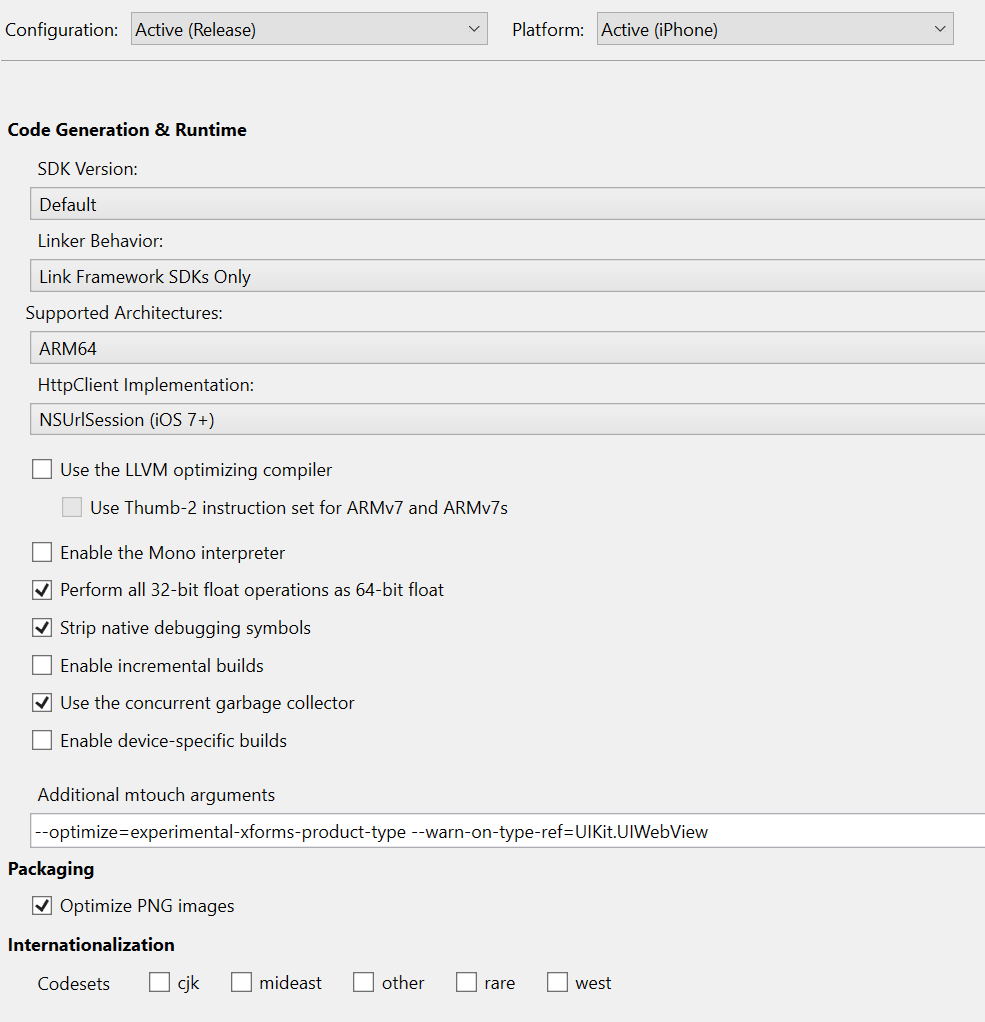
stephenhauck
on 10 Jun 2020
@stephenhauck please add -v -v -v -v to the Additional mtouch arguments
This extra level of verbosity can provide us hints to see different intermediate results along the build.
Thanks!
spouliot
on 10 Jun 2020
Here is the one from the Windows machine
If it's not wha
XamarinLogs_6_10_2020.zip
t you're looking for let me know
stephenhauck
on 10 Jun 2020
I just logged into my Mac and I'm getting this error again!
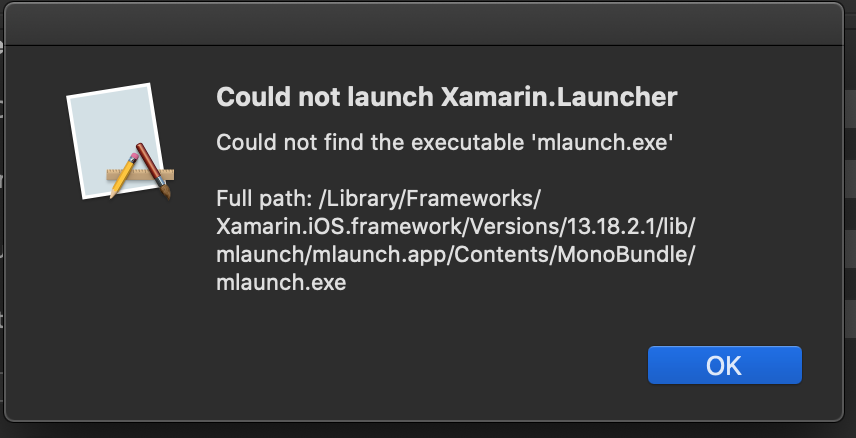
I updated yesterday and last time this happened I had uninstall and reinstall ...
THIS IS REALLY ANNOYING!
There is nothing in the logs directory but here is the build output
stephenhauck
on 10 Jun 2020
@stephenhauck That looks like this issue related to antivirus software blocking mlaunch.exe: https://github.com/xamarin/xamarin-macios/issues/8736
There's a workaround in the issue link and we are actively investigating the problem. If following the workaround steps in the link doesn't work, please post there with more information.
whitneyschmidt
on 10 Jun 2020
I had that configured but somehow after upgrading it no longer honors it ?
And there is no way to "repair" a VS install on Mac is there ?
stephenhauck
on 10 Jun 2020
Are the logs I supplied what you need or can I get you more information ?
This is a critical issue for us since we have a lot of projects that get created (started) on Windows.
stephenhauck
on 10 Jun 2020
@stephenhauck If you've completed the vendor instructions here for Symantec and here for Norton on how to exclude mlaunch.exe from your antivirus scanner, you can "repair" VSMac by following the instructions below.
Once you have added an exclusion, a re-installation will be required to restore the missing files. The current simplest way to do this is switch channels in the updater:
- Visual Studio menu > Check for updates
- Select a different update channel in the dropdown and hit the “Switch channel” button
- Wait for updates to download
- Switch back to original channel and install updates
If that doesn't work, please comment on https://github.com/xamarin/xamarin-macios/issues/8736 and we can investigate in a separate thread there :)
whitneyschmidt
on 10 Jun 2020
Any update on this, it's a critical problem for us?
Do you need anything more from me ... can I help in any way ?
Thanks!
stephenhauck
on 12 Jun 2020
@stephenhauck I see that you uploaded the Windows build logs 👍
Could you also upload the full build logs with verbosity -v -v -v -v to the Additional mtouch arguments from your Mac machine (now that we've found a workaround for blocking antivirus problem)?
@spouliot Did we need any other information to investigate?
whitneyschmidt
on 12 Jun 2020
I attached the build output and there was nothing in the logs directory on my Mac, I will check again today.
stephenhauck
on 16 Jun 2020
Here are some logs...
8.0.zip
Still getting the warning and updated VS Mac this morning .. two different projects ...
This is a critical issue for us.
Done building project "UIWebKitTest.iOS.csproj".
Build succeeded.
MTOUCH : warning MT1502: One or more reference(s) to type 'UIKit.UIWebView' already exists inside 'Xamarin.Forms.Platform.iOS, Version=2.0.0.0, Culture=neutral, PublicKeyToken=null' before linking
MTOUCH : warning MT1503: One or more reference(s) to type 'UIKit.UIWebView' still exists inside 'Xamarin.Forms.Platform.iOS, Version=2.0.0.0, Culture=neutral, PublicKeyToken=null' after linking
2 Warning(s)
0 Error(s)
stephenhauck
on 25 Jun 2020
Here is my VS Mac information
=== Visual Studio Community 2019 for Mac ===
Version 8.6.5 (build 23)
Installation UUID: 80ff7793-23ec-4ee4-86c6-c39810a3eb76
GTK+ 2.24.23 (Raleigh theme)
Xamarin.Mac 6.18.0.23 (d16-6 / 088c73638)
Package version: 610000104
=== Mono Framework MDK ===
Runtime:
Mono 6.10.0.104 (2019-12/5d03a6fe116) (64-bit)
Package version: 610000104
=== Roslyn (Language Service) ===
3.6.0-3.20210.9+4eafdcb1bcbd8d3573f2ba6065e56d9b9ce4f8a3
=== NuGet ===
Version: 5.6.0.6591
=== .NET Core SDK ===
SDK: /usr/local/share/dotnet/sdk/3.1.301/Sdks
SDK Versions:
3.1.301
3.1.300
3.1.202
3.1.200
3.1.102
3.1.101
3.1.100
3.0.101
3.0.100
2.1.701
2.1.700
2.1.505
2.1.504
2.1.503
2.1.302
2.1.301
2.1.4
2.0.0
MSBuild SDKs: /Library/Frameworks/Mono.framework/Versions/6.10.0/lib/mono/msbuild/Current/bin/Sdks
=== .NET Core Runtime ===
Runtime: /usr/local/share/dotnet/dotnet
Runtime Versions:
3.1.5
3.1.4
3.1.2
3.1.1
3.1.0
3.0.1
3.0.0
2.1.19
2.1.18
2.1.17
2.1.16
2.1.15
2.1.14
2.1.13
2.1.12
2.1.11
2.1.9
2.1.8
2.1.7
2.1.2
2.1.1
2.0.5
2.0.0
=== Xamarin.Profiler ===
Version: 1.6.15.68
Location: /Applications/Xamarin Profiler.app/Contents/MacOS/Xamarin Profiler
=== Updater ===
Version: 11
=== Xamarin Designer ===
Version: 16.6.0.329
Hash: d4f8bcd13
Branch: remotes/origin/d16-6
Build date: 2020-04-24 02:16:02 UTC
=== Apple Developer Tools ===
Xcode 11.5 (16139)
Build 11E608c
=== Xamarin.Mac ===
Version: 6.18.2.1 (Visual Studio Community)
Hash: 29c4ea731
Branch: d16-6
Build date: 2020-05-26 17:03:04-0400
=== Xamarin.Android ===
Version: 10.3.1.4 (Visual Studio Community)
Commit: xamarin-android/d16-6/3a10de9
Android SDK: /Users/stephenhauck/Library/Developer/Xamarin/android-sdk-macosx
Supported Android versions:
5.1 (API level 22)
6.0 (API level 23)
7.0 (API level 24)
7.1 (API level 25)
8.1 (API level 27)
SDK Tools Version: 26.1.1
SDK Platform Tools Version: 29.0.6
SDK Build Tools Version: 29.0.2
Build Information:
Mono: 165f4b0
Java.Interop: xamarin/java.interop/d16-6@2cab35c
ProGuard: xamarin/proguard/master@905836d
SQLite: xamarin/sqlite/3.31.1@49232bc
Xamarin.Android Tools: xamarin/xamarin-android-tools/d16-6@bfb66f3
=== Microsoft OpenJDK for Mobile ===
Java SDK: /Users/stephenhauck/Library/Developer/Xamarin/jdk/microsoft_dist_openjdk_8.0.25
1.8.0-25
Android Designer EPL code available here:
https://github.com/xamarin/AndroidDesigner.EPL
=== Android SDK Manager ===
Version: 16.6.0.50
Hash: 5901879
Branch: remotes/origin/d16-6
Build date: 2020-06-10 22:42:50 UTC
=== Android Device Manager ===
Version: 16.6.0.96
Hash: 6e8b80b
Branch: remotes/origin/d16-6
Build date: 2020-06-10 22:43:28 UTC
=== Xamarin.iOS ===
Version: 13.18.2.1 (Visual Studio Community)
Hash: 29c4ea731
Branch: d16-6
Build date: 2020-05-26 17:03:05-0400
=== Build Information ===
Release ID: 806050023
Git revision: 5289d413b99fddfc20b4ecf3e445ccb822213427
Build date: 2020-06-18 12:08:30-04
Build branch: release-8.6
Xamarin extensions: 5289d413b99fddfc20b4ecf3e445ccb822213427
=== Operating System ===
Mac OS X 10.15.5
Darwin 19.5.0 Darwin Kernel Version 19.5.0
Tue May 26 20:41:44 PDT 2020
root:xnu-6153.121.2~2/RELEASE_X86_64 x86_64
=== Enabled user installed extensions ===
MFractor 4.2.6
stephenhauck
on 25 Jun 2020
Here is my Xcode info
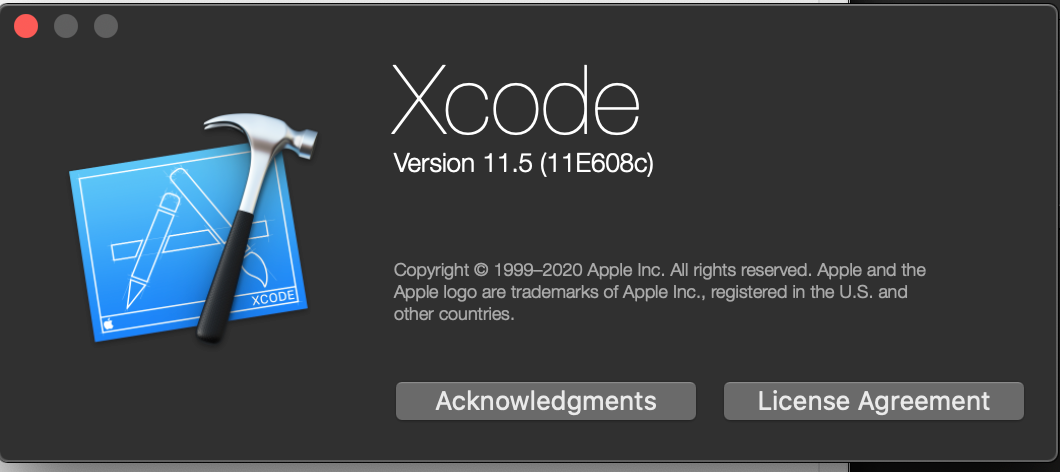
stephenhauck
on 25 Jun 2020
Here is my OSX Info
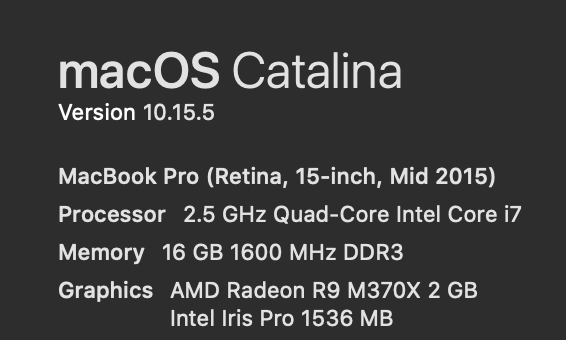
stephenhauck
on 25 Jun 2020
The version info is useful, but I don't see a full build log (full verbosity) and/or an example project.
 chamons
on 29 Jun 2020
chamons
on 29 Jun 2020
The logs were attached that were generated when the extra parameters were added to the project.
I have previously (in this thread or the one it spawned from) described the steps to reproduce the issue and the source code.
I am sorry but someone with familiarity with the generation and structure of projects in VS Windows and VS Mac plus some MS Build knowledge could probably locate the difference / issue in a matter of hours.
I don;t mean to be rude or curt but this is a critical issue for anyone that creates a project on a Windows machine using Visual Studio and is easily reproducible, close it if you want to.
stephenhauck
on 30 Jun 2020
Anyone ....
stephenhauck
on 8 Jul 2020
Can I pay an MS engineer to spend 30 minutes resolving this issue ?
stephenhauck
on 9 Jul 2020
This issue is on our triage queue still. Between the work of Xcode 12 and recent traffic, I'm sorry it has not been resolved as of yet.
As noted on our forums:
If you want one on one support via email (business hours only) or need to provide private code or other sensitive info, then please submit a support request to the Xamarin support team at this link.
chamons
on 9 Jul 2020
I appreciate it's in "triage" that but it's easily reproduced ...
Is there anything else I can do to speed an answer to this ?
stephenhauck
on 9 Jul 2020
I REALLY need a resolution to this issue ....
I updated everything ....
Created a new Shell app for Android and iOS .. NO NEW CODE ADDED!
Made the changes to the iOS build like so
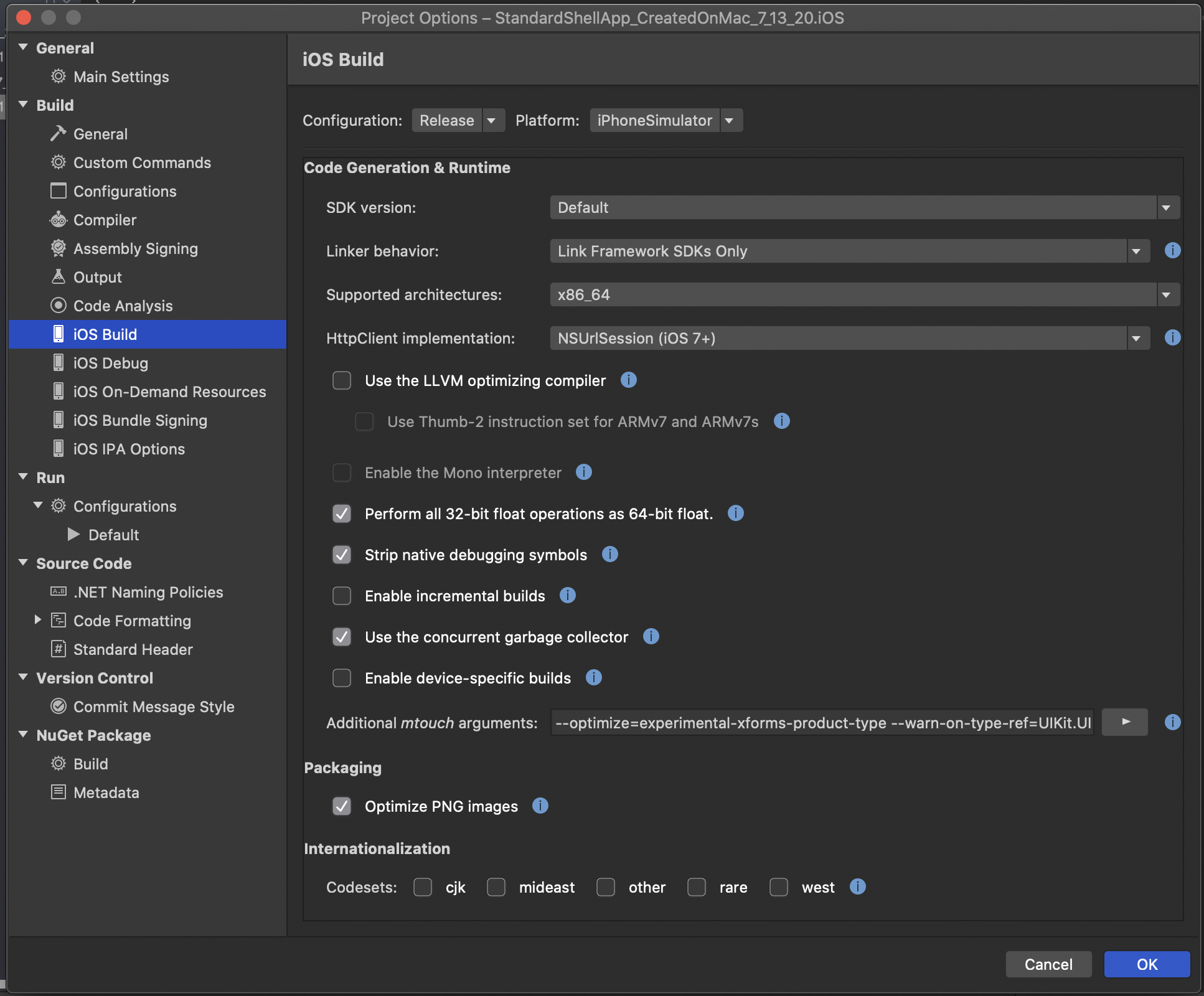
Right clicked and selected "Rebuild.." like so

Still get the warnings ...
_Done building project "StandardShellApp_CreatedOnMac_7_13_20.iOS.csproj".
Build succeeded.
MTOUCH : warning MT1502: One or more reference(s) to type 'UIKit.UIWebView' already exists inside 'Xamarin.Forms.Platform.iOS, Version=2.0.0.0, Culture=neutral, PublicKeyToken=null' before linking
MTOUCH : warning MT1503: One or more reference(s) to type 'UIKit.UIWebView' still exists inside 'Xamarin.Forms.Platform.iOS, Version=2.0.0.0, Culture=neutral, PublicKeyToken=null' after linking
2 Warning(s)
0 Error(s)_
stephenhauck
on 13 Jul 2020
OK, ran an extra test ...
Neither of these work on VS Mac with the additional MTouch arguments


Also just ported the source over to Windows machine ... fails there as well ...
stephenhauck
on 13 Jul 2020
So I did some poking around on this, and this is what I found:
- I can reproduce warn-on-type-ref warning on Debug by default, which makes sense as by default Debug doesn't enable the linker (and thus we don't drop the type)
- The trouble is that
--optimize=experimental-xforms-product-typeis the pre-released version of the flag. In the release notes it is noted as now--optimize=force-rejected-types-removalwhich also works for me in both Debug and Release.
Give that a try and report back.
chamons
on 13 Jul 2020
Sorry for chiming in, but I have the same issue and have been digging around on this for the past couple of days and just found this thread (and the one that spawned it). My project started on and is still on Windows. It also uses the new XF Shell (if it matters). I added in the linker flag that was mentioned.
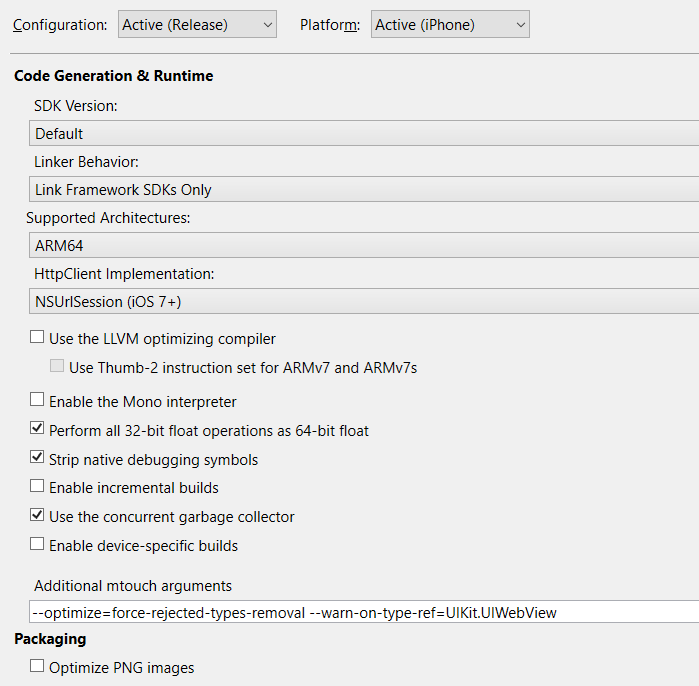
After a clean/rebuild:

In my project folder:
findstr /s /i /m UIWebView .

This should take care of finding anything in the 3rd party iOS specific libs I use. It didn't appear to.
Various environment info:
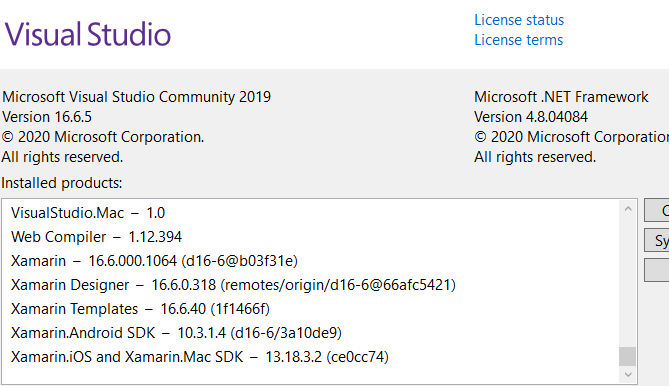
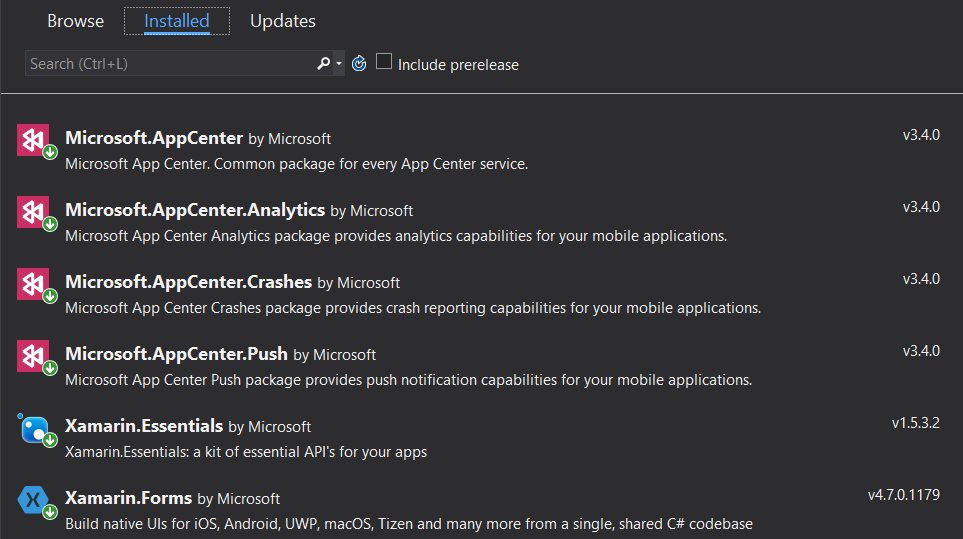
iOS project nuget info:
I use VS to push to the AppStore right now. When I choose the Archive option I don't see any warnings that indicate a UIWebView issue.
Distributing/uploading to the AppStore seems fine.
Until a few minutes later I get the Dear Developer email...
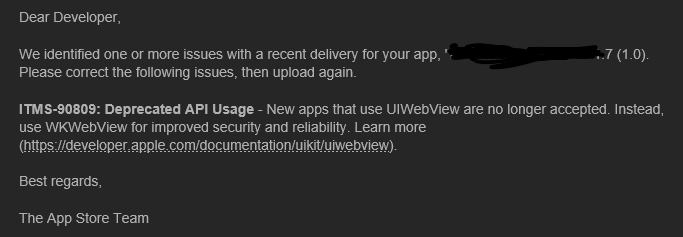
Confirming their scan, I Open the folder and copy the *.ipa file to a new folder and unzip it. Again run the findstr command in that folder and it lists: Payload\
I used VS Find All in my solution, so it's not me or any code I have access to.

I'm not sure if any of this helps, other than to verify it's not specific to a machine, it's reproducible on a machine that is running all the current software with the current flags from the release notes and it's not just one person seeing it. I haven't done as much digging @stephenhauck who has been very thorough, but we've both come back to the same spot I think.
I did try building with the -v -v -v -v mtouch option but got some sort of a compiler error saying it didn't know the -v option.
If I can help further let let me know as this is a release blocker at the moment since we can't side-load a file to our testers very easily.
Thanks for any help anyone can provide.
 tschlarman
on 30 Jul 2020
tschlarman
on 30 Jul 2020
@tschlarman, I did reach out to the people I know having the issue earlier today and they have to build and release on a Mac to get it to pass ..... it's a hack to say the least.
My guess is that most need a Mac to build so they just build on the Mac and this is just showing up.
I think it's simply something in the MSBUILD settings / project files ...
It's time to put someone on this issue and get it resolved ASAP.
stephenhauck
on 30 Jul 2020
EVERYTHING is current on both platforms ....
Here is a test app today and one from a while back ...
WinCreated_7_29_20.zip
StandardShellApp_CreatedOnMac_7_13_20.zip
stephenhauck
on 30 Jul 2020
Hi @stephenhauck
I pulled down your 2 files. As I'm sure you know there are only a couple of differences in the csproj files between the 2 projects.
It looks like in Release|iPhone there are no changes between the 2. Only in Release|iPhone Simulator where the mac csproj has the updated params and linker setting and the windows csproj doesn't.
No other changes of note in that file or any other for that matter. I doubt its a csproj file issue.
The only things I can think of after this are:
- Linker bug on windows not honoring the command line option --optimize=force-rejected-types-removal (or is a different command line option or is case sensitive, etc.), but does on work mac
- What VS generates for msbuild is somehow different between VS mac and VS 2019
- Differences in the Xamarin libraries between win and mac
- An issue in the archive/packaging process
tschlarman
on 30 Jul 2020
@tschlarman, yep those are the only differences besides one project was created on a Mac and one on Windows 10.
The items you listed are the same items I have felt from the beginning were the issue but just like me .... if the QA people or the business / user can't reproduce the issue then it doesn't exist.
While I feel your pain and feel for you I am happy that someone else is experiencing this issue.
stephenhauck
on 30 Jul 2020
Ok, I did some digging and I believe this might be expected.
Let's compare MT1502 and MT1503 in our docs:
MT1502 is references _before_ linking and MT1503 _after_linking. force-rejected-types-removal forces removal during linking, so it makes sense that you'll see the pre-linking but not post linking warning.
chamons
on 30 Jul 2020
Now I will agree the UX of this is less than ideal. I'll let @spouliot comment when he returns, so I won't close this.
Now you can force MT1502 errors to be ignore via --nowarn:1502 and optionally add --warnaserror:1503 to convert those to errors.
chamons
on 30 Jul 2020
if you look at @tschlarman post above he still got the warning from Apple on submission.
My client gets it and I get it too ... Were not crazy .. something's wrong ...
stephenhauck
on 30 Jul 2020
@chamons I don't think the essence isn't whether the messages are confusing. The essence of the issue is that we can't publish a Xamarin app to the Apple AppStore from VS2019 on windows and get it approved because of the UIWebView reference inside Xamarin Forms.
We have some circumstantial evidence projects can be built and published under VS mac and get approved. I'm trying that out today.
tschlarman
on 30 Jul 2020
If I choose "release" build then why isn't the extra "mtouch" command line option simply applied by Microsoft by default ?
stephenhauck
on 30 Jul 2020
@tschlarman - Can you post a sample project showing this?
I tried @stephenhauck 's sample projects and didn't see the warning post link. Confirm that you are using the newer optimziation (non prototype) flag.
You need force-rejected-types-removal.
chamons
on 30 Jul 2020
@chamons, if you scroll back up you can see he has that in his additional mtouch arguments ...
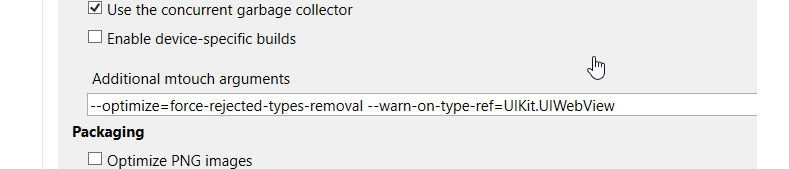
Again .. why must we do this ....
stephenhauck
on 30 Jul 2020
I understand that he has it in his args, that doesn't help me reproduce his issue and look into it. I can't determine if the issue is user error or a bug, and fix that bug if it exists, without being able to see it.
chamons
on 30 Jul 2020
@chamons, it's not about the warning post link .. it's about the fact that the reference is still in the app and Apple rejects it .
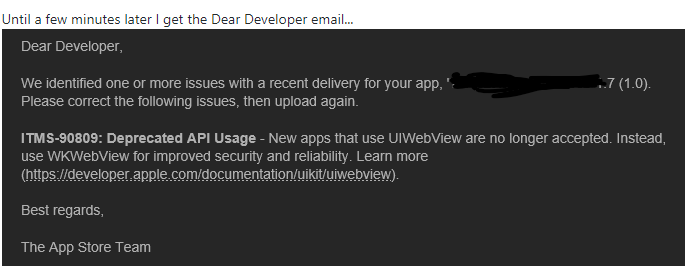
the remove directive is not being honored
stephenhauck
on 30 Jul 2020
@chamons, can you please change the title accordingly ...
Build on VS Mac and Apple accepts it
Build same app on VS Windows and Apple rejects it because the deprecated feature remains in the ipa file somehow
stephenhauck
on 30 Jul 2020
Here's what I'm trying to get across:
MT1502 = Noise assuming you have force-rejected-types-removal (it warns on usage before linking)
MT1503 = If reports you will likely be rejected.
The important thing is not being rejected. The 1503 warning points towards that, but is not necessarily that.
The samples attached here only show 1502 and to my knowledge are not rejected.
If someone can attach a sample that uses force-rejected-types-removal and either shows 1503 AND or is rejected, I can dig into what's going on.
There should be no difference between VS Mac and VS Windows on this. If someone tells me "this sample works, but only on macOS not Windows" I can work with that.
chamons
on 30 Jul 2020
@chamons, thank you for taking time to look into this ...
This issue has been going on for far too long already ...
It just too hard ... I will simply keep putting my apps onto the Mac and building for distribution there ...
Eventually it will be fixed somewhere down the road ....
You can close the issue as far as I'm concerned.
stephenhauck
on 30 Jul 2020
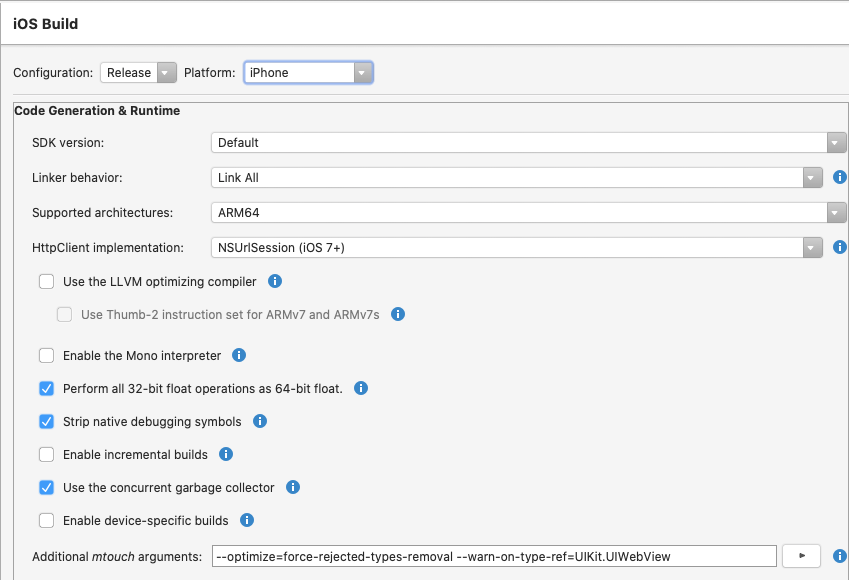
So building my same project on macos, VSmac says the publish succeeded, but I get the same Dear Developer email complaining about UIWebView from Apple. So just a simple 'rebuild my project' on macos doesn't appear to work in my case.
build settings from vsmac:
tschlarman
on 30 Jul 2020
Back on windows. If this is not the command line you'd like me to use, please reply with what I should be using verbatim.
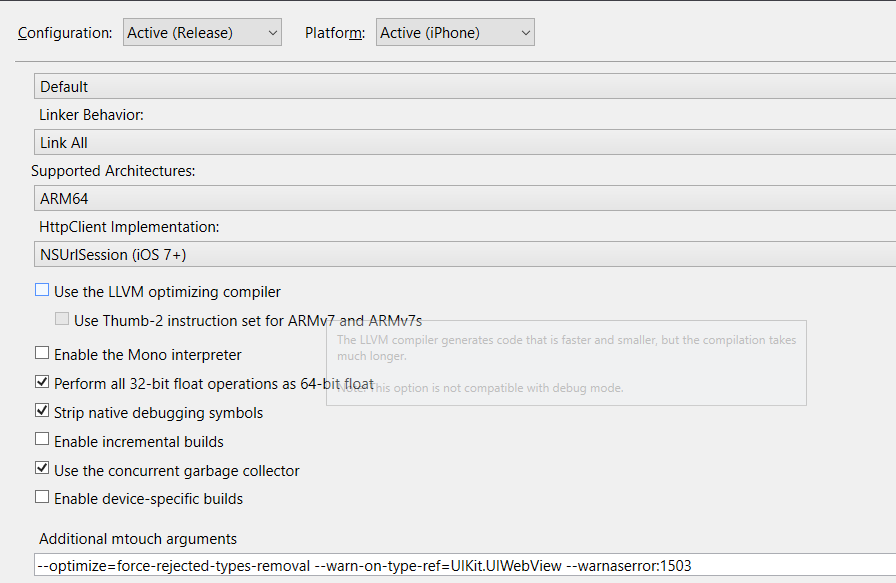
and the warning:

It is not listed as an error so does that mean UIWebView is a pre-linker warning and is not supposed to be in the output?
If that's the case, findstr says otherwise:

Since I haven't been able to get around this on mac or windows, I'm going to stick with windows for the time being. What should I try next?
tschlarman
on 30 Jul 2020
@tschlarman - :thinking: - warnaserror should for a build error if the type remains. If it doesn't, i don't know what Apple is finding.
Given the fact that thousands of forms developers aren't pounding my door down, and I haven't been able to reproduce it yet, there must me some condition I'm not fulfilling yet.
I'm going to try a few more things, but a sample project is worth a thousand words here.
chamons
on 30 Jul 2020
Just a thought. Since 'Link All' is specified, should the file Xamarin.Forms.Platform,iOS.dll exist at all? Shouldn't it be linked in as a part of the main app?
tschlarman
on 31 Jul 2020
I created a new app in the app store, used the stock Xamarin shell template and it uploaded from VS2019 on Windows just fine and passed their initial tests.

Now I'll start by adding in the dependencies and see what happens.
tschlarman
on 31 Jul 2020
@chamons Thanks for your help. I fell back to creating a test app and added all the dependencies 1 by 1 and kept submitting to the app store until I found the one that caused the issue. Sent the issue to the third party for fixing. I wonder why their libraries didn't register the UIWebView usage.
tschlarman
on 31 Jul 2020
Anyone else have this issue and want to spend some time tracking it down, or should I close this issue?
chamons
on 31 Jul 2020
I did submit a Forms app to try to reproduce locally and didn't have any luck, so right now I think it's project specific somehow.
chamons
on 31 Jul 2020
So ....
Because the additional settings string needs to be added to the project ANYONE can build an assembly and share it and create this problem for anyone using Xamarin and building for iOS ?
How / what setting do we put into the additional mtouch arguments that strips any referenced assemblies using deprecated features as well to guarantee it is accepted by Apple ?
stephenhauck
on 31 Jul 2020
@ chamons, @ tschlarman .. let's use this as a teachable moment ... how do we "scan" NuGet packages and such ?
Trial and error is not effective or repeatable.
As more people migrate code bases this will be a bigger issue .....
Question .. if I am doing an enterprise certificate this will get through and cause issues eventually ?
stephenhauck
on 31 Jul 2020
Even though mine appears to be a 3rd party thing, maybe a new issue could be opened for the VS XF templates that would include the above mtouch arguments and linker setting by default. That would help with any new folks having to go thru some of the same ground we went through just to end up here.
Another fix that could be helpful is an update for the top ranked blog entry on this topic by @jfversluis that still shows the old --optimize entry. It needs to be updated to show the new flag from the release notes. (https://devblogs.microsoft.com/xamarin/uiwebview-deprecation-xamarin-forms/)
This would at least save people some research and trial and error time.
Still the best advice (but not time effective or any fun) on this issue seems to be: create a new project, add the project settings above and submit to Apple. If it passes (it should), add all your dependencies 1 by 1 and submit to Apple after each until something fails. Then you know who to contact.
Also a suggestion to those who follow us and who are lucky enough to have a new XF project, before you get into writing a bunch of code, submit the base templates to the stores first, then add code. Then you can find out what breaks.
tschlarman
on 31 Jul 2020
Why doesn't the linker remove deprecated content automatically ... the additional settings and the ability to create multiple build configurations it's a management issue that can be resolved by Microsoft simply adding it as a setting in Visual Studio project setting
stephenhauck
on 31 Jul 2020
Sounds like a really good idea. The pit of success.
tschlarman
on 31 Jul 2020
Let me attempt to clarify for you @stephenhauck .
- At one point Apple provided UIWebView for programmers to use
- They later decided it was not good anymore, and reject applications that use it.
- Xamarin.iOS projects tend to be linker safe, so unless your application uses the type directly, linker enabled builds will strip it away. Xamarin.Forms however is not linker safe, at least currently.
- Libraries that have strict API compatibility, such as Xamarin.iOS and Xamarin.Forms can not remove the type.
- This means C# libraries and applications can reference UIWebView, which will be rejected at submission time. This specifically happens most often in Forms applications.
force-rejected-types-removal and warn-on-type-ref are our (the SDK) two part solution to address Apple's hard removal of a commonly used type.
- force-rejected-types-removal tells the linker to rename the type in your application, which will cause all references to UIWebView to both:
- Pass the Apple check
- Fail at runtime if used
- warn-on-type-ref will yell if an assembly references has a reference before or after linking, so you can track down which _managed_ assemblies reference the now Apple forbidden type.
If you have 3rd party libraries, specifically native one, it is possible that force-rejected-types-removal is insufficient. Any reference to the type, directly in your code, in a library that you depend on, etc, will cause Apple to reject your application.
No one here is able to reproduce the issue to know if either:
- There is a corner case in force-rejected-types-removal that it is missing a managed reference
OR - There is something project specific in your application that is triggering this.
As of now, there is no evidence that there is "trial or error" or that macOS vs Windows has any effect.
If you'd like to suggest Xamarin.Forms change their template feel free to file an issue.
I'll suggest updating the blog post, that's a good idea.
If you want assistance, we need a sample project showing your specific issue to proceed.
chamons
on 31 Jul 2020
Thanks for the detailed reply !
"trial and error" refers to adding and submitting until failure is reached ... This is impossible on an existing code base.
Is there not some tool (even if it costs money) to look at all references even the native libraries ?
you mentioned .."Libraries that have strict API compatibility, such as Xamarin.iOS and Xamarin.Forms can not remove the type."
Why not ?
If Apple has removed it then you remove it and create a hard error ... that's the stopping point for people using deprecated API's.
If I have time to create an example that fails I will look this thread back up but right now the hack seems to be to build on a Mac for some reason.
stephenhauck
on 31 Jul 2020
@chamons thank for the insight. The native reference explains why my 3rd party issue got by and the linker warning didn't scream at it. Agreed this doesn't seem to be a Mac vs Windows thing nor is it a project thing AFAICT.
Thanks for the link to file an issue. I will do that.
@chamons thanks for being patient with us and we try and slog thru this.
tschlarman
on 31 Jul 2020
Reasonable questions.
Libraries that have strict API compatibility, such as Xamarin.iOS and Xamarin.Forms can not remove the type. - Why?
If you change the contract for a .NET assembly, by removing existing methods or types, entire libraries may no longer be loadable. Some of those libraries may be commercial libraries, or the source unavailable for rebuild, or nugets with many downloads. Customers many have no option to move forward until their dependencies also move forward.
Thus forcing an API break is flatly unacceptable for our customers, unless Apple strictly forces it (such as the 32-bit to 64-bit migration a number of years back).
Why doesn't the linker remove deprecated content automatically
Unless something is a hard build break, where applications can not build or link (example: QTKit removal on macOS), we tend to follow Apple's lead here.
There could be enterprise customer shipping applications via channels other than the App Store using that type, and we'd be more strict than Apple here.
Now if Apple actually removed the types from binaries, or dropped the headers, we'd reconsider.
chamons
on 31 Jul 2020
Customers many have no option to move forward until their dependencies also move forward.
This is pretty typical in the Apple ecosystem however. Look how many times they've broken Swift compatibility. I hadn't thought of the enterprise shipping route. Didn't know you could anything on an Apple phone except via their store.
tschlarman
on 31 Jul 2020
Yep - but when Xamarin can do better we absolutely strive to.
This get complicated with enterprise accounts, and there is more than one way of shipping internal apps. I believe newer / preferred was is via the app store, but I know there are other/older options.
chamons
on 31 Jul 2020
Agreed. Sorry for getting off topic. 😃
Thank you @chamons for your insight. Much appreciated.
tschlarman
on 31 Jul 2020
@chamons
Xamarin.Forms however is not linker safe, at least currently.
I don't think this is true
https://github.com/xamarin/Xamarin.Forms/blob/main/Xamarin.Forms.Platform.iOS/Properties/AssemblyInfo.cs#L65
It's been Linker Safe since 4.5
force-rejected-types-removal
AFAIK this flag won't have any effect on Xamarin.Forms itself. The only reason to add this flag would be if you are using a 3rd party library that still uses UIWebview but in that case you might get a runtime exception. So does it widen the pit of success? Or does it just shift the same pit to the left a little bit?
warn-on-type-ref
I could see possibly adding this flag though there are a lot of comments here about that flag and I'm not sure if just adding it will have the intended result? Was @jfversluis initial concern addressed? If we add this flag will it tell users what 3rd party library is referencing UIWebView and not confuse users on Windows?
Existing templates
There's a few things going on here that are mainly just due to a lot of pre-release bits that haven't caught up with stable yet
The following flag is all you really need to set as it relates to XF --optimize=experimental-xforms-product-type. This flag is on by default in VS 8.7 right @chamons ?
So once VS 8.7 stable lands then everything should just link out using the default templates and changing nothing
I tested the following steps on 8.6
- creating a Xamarin forms shell app on vsmac
- changed the settings to Release/Generic Device
- set this flag
--optimize=experimental-xforms-product-type - right click "Archive for publishing"
If you check the dlls produced by this process they don't include a UIWebView
So I think most of this will all just be resolved once VS 8.7 hits stable
 PureWeen
on 4 Aug 2020
PureWeen
on 4 Aug 2020
That is great news @PureWeen! I was out of the loop on the forms specific bits.
Sebastien handled most of that, and he's out right now so I couldn't double check before my posts.
chamons
on 4 Aug 2020
I tested with the recently stable VS MAC 8.7 and the--optimize=experimental-xforms-product-type flag was no longer needed.
The default XF template with VS MAC 8.7 should now strip UIWebView out with no additional user steps required.
PureWeen
on 6 Aug 2020
OK so I updated VS on the Mac and VS on Windows 10
I took an example app from Microsoft that accesses Azure (attached)
The Mac is paired and connected.
Now I am getting VERY strange warnings and errors I never got before ...
msgraph-training-xamarin.zip
Solution_RebuildAll.txt
Solution_CLean.txt
I updated the NuGet packages
There are some old hits on the errors out on the web but here's the issue ... I did not have these issue BEFORE I updated to the latest stable release on both platforms ...
I copied it to the Mac and here are the clean and rebuild outputs
Clean_ON_Mac.txt
Rebuild_On_Mac.txt
If you need more detailed logs or information feel free to ask but don't let it stop you ... you should see the same results on your end.
Also, can we make sure we are building on a separate Windows 10 and Mac and not in a VM of some kind ?
stephenhauck
on 10 Aug 2020
Related issues
 ThumbGen
·
43Comments
ThumbGen
·
43Comments
 mingxli
·
35Comments
chamons
·
49Comments
mingxli
·
35Comments
chamons
·
49Comments
 GribovAlexander
·
35Comments
GribovAlexander
·
35Comments
 lilleydnSub
·
45Comments
lilleydnSub
·
45Comments
Most helpful comment
@chamons
I don't think this is true
https://github.com/xamarin/Xamarin.Forms/blob/main/Xamarin.Forms.Platform.iOS/Properties/AssemblyInfo.cs#L65
It's been Linker Safe since 4.5
AFAIK this flag won't have any effect on Xamarin.Forms itself. The only reason to add this flag would be if you are using a 3rd party library that still uses UIWebview but in that case you might get a runtime exception. So does it widen the pit of success? Or does it just shift the same pit to the left a little bit?
I could see possibly adding this flag though there are a lot of comments here about that flag and I'm not sure if just adding it will have the intended result? Was @jfversluis initial concern addressed? If we add this flag will it tell users what 3rd party library is referencing UIWebView and not confuse users on Windows?
There's a few things going on here that are mainly just due to a lot of pre-release bits that haven't caught up with stable yet
The following flag is all you really need to set as it relates to XF
--optimize=experimental-xforms-product-type. This flag is on by default in VS 8.7 right @chamons ?So once VS 8.7 stable lands then everything should just link out using the default templates and changing nothing
I tested the following steps on 8.6
--optimize=experimental-xforms-product-typeIf you check the dlls produced by this process they don't include a UIWebView
So I think most of this will all just be resolved once VS 8.7 hits stable