Xamarin-macios: Close button disappeared
Steps to Reproduce
- Instal Mac OS 10.14 Beta(18A336e)
- Build this sample.
¥https://github.com/xamarin/mac-samples/tree/master/yosemite/VisualEffectPlayground - Build and Run as attached
Expected Behavior
Close button appeared any time.
Actual Behavior
Close button disappear some times.
Screen shot are there < https://forums.xamarin.com/discussion/129703/is-this-a-bug-of-10-14-beta-4#latest >
Environment
=== Visual Studio Community 2017 for Mac ===
Version 7.5.4 (build 3)
Installation UUID: 064307da-9059-45c8-a951-3647e8ac6ac0
Runtime:
Mono 5.10.1.57 (2017-12/ea8a24b1bbf) (64-bit)
GTK+ 2.24.23 (Raleigh theme)
Xamarin.Mac 4.4.1.178 (master / eeaeb7e6)
Package version: 510010057
=== NuGet ===
Version: 4.3.1.4445
=== .NET Core ===
Runtime: /usr/local/share/dotnet/dotnet
Runtime Versions:
2.1.1
2.0.5
2.0.0
SDK: /usr/local/share/dotnet/sdk/2.1.301/Sdks
SDK Versions:
2.1.301
2.1.4
2.0.0
MSBuild SDKs: /Library/Frameworks/Mono.framework/Versions/5.10.1/lib/mono/msbuild/15.0/bin/Sdks
=== Xamarin.Profiler ===
Version: 1.6.2
Location: /Applications/Xamarin Profiler.app/Contents/MacOS/Xamarin Profiler
=== Apple Developer Tools ===
Xcode 9.4.1 (14161)
Build 9F2000
=== Xamarin.Mac ===
Version: 4.4.1.193 (Visual Studio Community)
=== Xamarin.iOS ===
Version: 11.12.0.4 (Visual Studio Community)
Hash: 64fece5f
Branch: d15-7
Build date: 2018-05-29 20:00:44-0400
=== Xamarin.Android ===
Version: 8.3.3.2 (Visual Studio Community)
Android SDK: /Users/matsussa/Library/Developer/Xamarin/android-sdk-macosx
Supported Android versions:
6.0 (API level 23)
7.0 (API level 24)
7.1 (API level 25)
SDK Tools Version: 25.2.5
SDK Platform Tools Version: 25.0.3
SDK Build Tools Version: 25.0.1
Java SDK: /usr
java version "1.8.0_101"
Java(TM) SE Runtime Environment (build 1.8.0_101-b13)
Java HotSpot(TM) 64-Bit Server VM (build 25.101-b13, mixed mode)
Android Designer EPL code available here:
https://github.com/xamarin/AndroidDesigner.EPL
=== Xamarin Inspector ===
Version: 1.4.0
Hash: b3f92f9
Branch: master
Build date: Fri, 19 Jan 2018 22:00:34 GMT
Client compatibility: 1
=== Build Information ===
Release ID: 705040003
Git revision: 6ae731889c896d6733efb8ff5117f5bf5b17b509
Build date: 2018-07-19 13:07:45-04
Xamarin addins: 417fed09624e1e1f76ab0a11e8b97ffd8bbf91e1
Build lane: monodevelop-lion-d15-7
=== Operating System ===
Mac OS X 10.14.0
Darwin 18.0.0 Darwin Kernel Version 18.0.0
Thu Jul 12 19:03:47 PDT 2018
root:xnu-4903.200.304.41.2~2/RELEASE_X86_64 x86_64
=== Enabled user installed addins ===
Internet of Things (IoT) development (Preview) 7.5
Build Logs
No error on Log
Example Project (If Possible)
https://github.com/xamarin/mac-samples/tree/master/yosemite/VisualEffectPlayground
 simeon052
All 114 comments
Brad was able to reproduce a similar issue. Might be related to 10.14.
 therealjohn
on 27 Jul 2018
therealjohn
on 27 Jul 2018
Hi, did you reproduce it locally?
I heard Mr.Brad can’t reproduce button disappear issue on sample as screenshot?
Windows 10 Phone から送信
差出人: John Miller notifications@github.com
送信日r: Friday, July 27, 2018 7:11:51 AM
宛先: xamarin/xamarin-macios
CC: SIMEON; Author
件名: Re: [xamarin/xamarin-macios] Close button disappeared (#4509)
Brad was able to reproduce a similar issue. Might be related to 10.14.
―
You are receiving this because you authored the thread.
Reply to this email directly, view it on GitHubhttps://github.com/xamarin/xamarin-macios/issues/4509#issuecomment-408251041, or mute the threadhttps://github.com/notifications/unsubscribe-auth/AKxWWOHcAawMfWu7Ad2hMp9O0VTsq7zmks5uKj6ngaJpZM4Vh6zm.
simeon052
on 30 Jul 2018
Hi there,
I'm suffering from more or less the same issues on Mojave DP (build 18A389).
Here's what I did to reproduce the problem:
- Download https://github.com/xamarin/mac-samples
- Open VisualEffectPlayground in VS 7.7 build 1282 with Mono 5.14.0.177
- Run project
- Click Vibrant Colors button
- Start resizing the window
Here's how this looks:

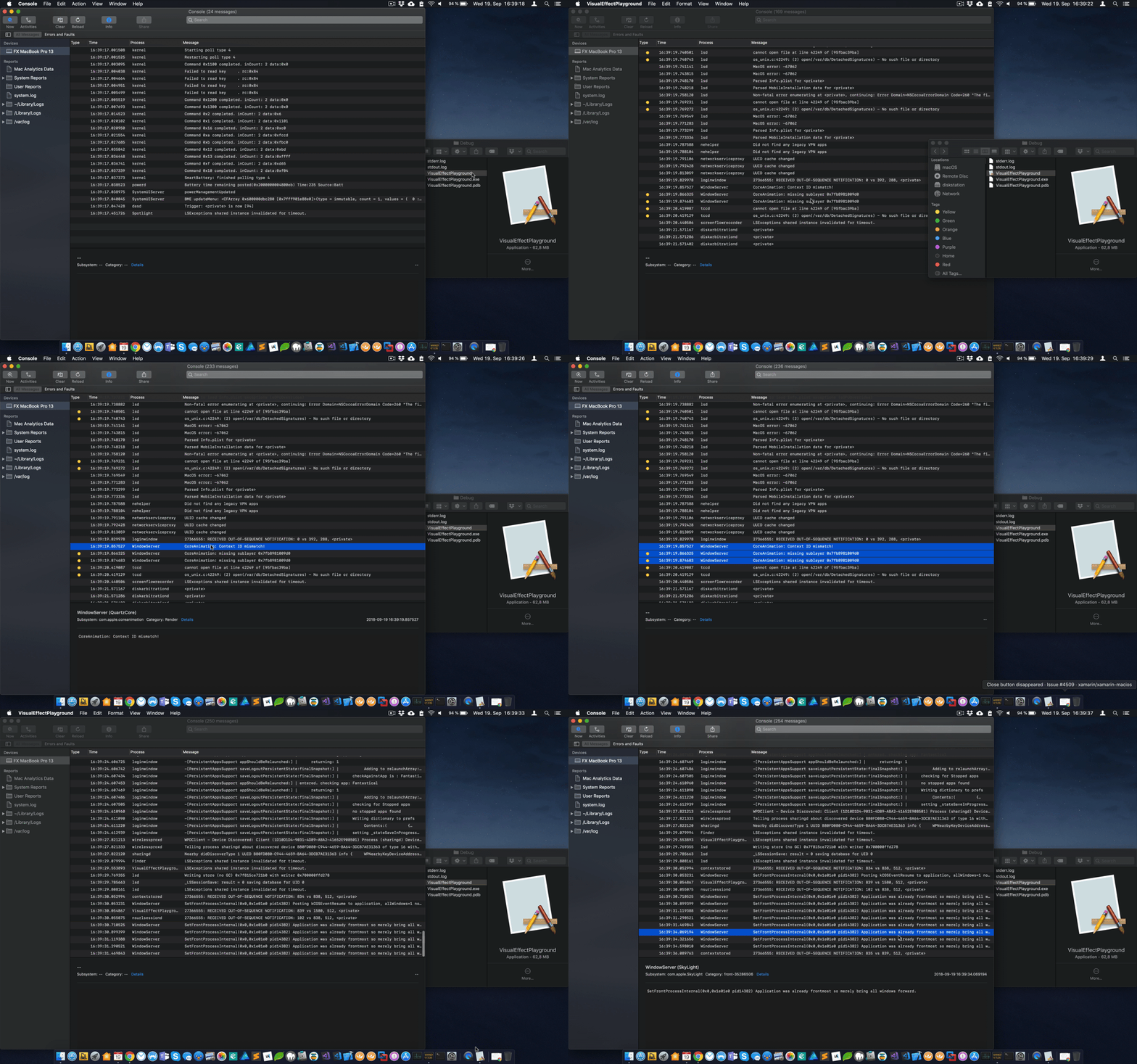
Note that the window is not resized correctly, there are visual artifacts (kind of a shadow) around the areas where it's resized and various error log messages by WindowServer (CoreAnimation: Context ID mismatch).
Now the really interesting part: I'm 100% certain that this is not an issue in Xamarin.Mac but probably in the mono runtime. The reason I'm so sure about that is that my app, Royal TSX suffers from the very same problems. Royal TSX is based on mono and custom fork of Monobjc. It doesn't use Xamarin.Mac at all. Unfortunately, the issues appear randomly and are not as easily reproducible as with the VisualEffectPlayground. I also struggled to provide a reduced test case until I found this thread. With the sample project the problem is reproducible 100% of the time which is at least something.
I previously filed a radar with Apple about this because I suspected some defect in the OS. Instead, they pointed to mono's use of thread_suspend. I'm not sure what's wrong with it but they seem to believe it's somehow related. Unfortunately the radar was closed as it appeared that upgrading to a newer mono release fixes the issue. This doesn't seem to be the case though.
I will also post this in the mono bug tracker and hope that someone from the Xamarin or mono teams can look into it as it appears to effect every single application built using mono on Mojave.
thx,
felix
 lemonmojo
on 19 Sep 2018
lemonmojo
on 19 Sep 2018
I am not sure who mono threading could interfere with this but it might be possible. @chamons could you guys to try to reproduce the issue?
 marek-safar
on 19 Sep 2018
marek-safar
on 19 Sep 2018
When launching the app without VS (from Finder or the dock), not even the main window appears and the same log entries are present in Console.app. I also observed similar behavior in my app.
lemonmojo
on 19 Sep 2018
Here's another one:
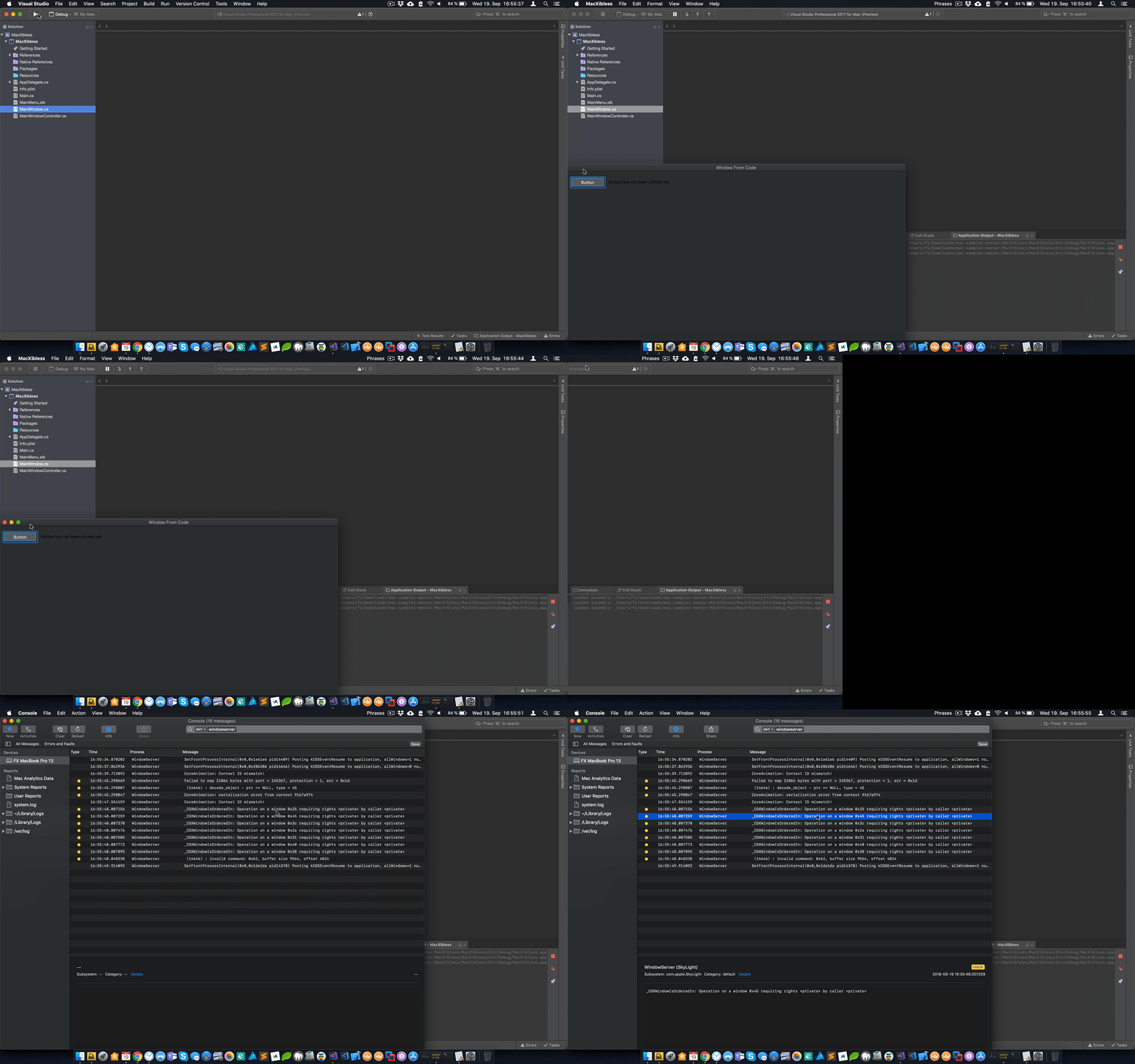
In this case you can see the original missing stoplights issue. But there's more: The animation when entering full screen is also incorrect and there are additional log entries.
This is the "MacXibless" sample project from the same repo. I didn't touch any of the code, just compiled and ran it.
lemonmojo
on 19 Sep 2018
And one more: This is the NSOutlineViewAndTableView sample from the same repo.
First, when started from VS, the window resizing issue:
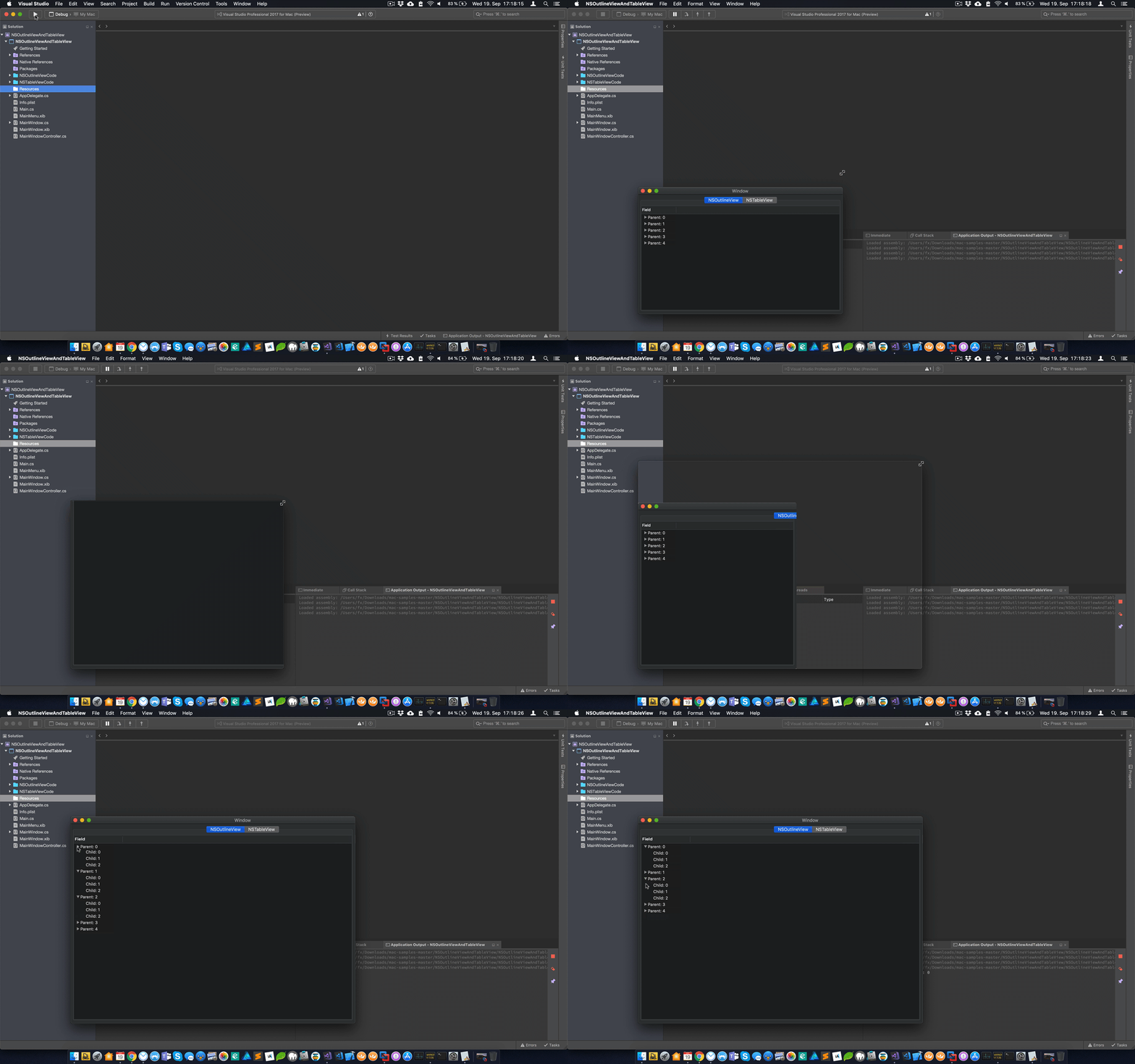
When started via Dock, the outline view items cannot be expanded but window resizing works properly:

lemonmojo
on 19 Sep 2018
I test my application on MacOS Mojave for 3 weeks and there are problems.
My application works perfectly on MacOS High Sierra but Mojave, there are problems refresh. Boxes of messages that appears but completely empty (we see nothing). With datagrids, I also see problems.
I click on a line of the datagrid, it works normally a few times then I do not know why, the clique does not answer anymore, the datagrid refreshes itself.
I tried to debug and see what happens but it's impossible, there is no logic to the problem. For me, there is a problem Mono or MacOS because it is incomprehensible.
it joins the problem that I read above.
Alain
 Rogister
on 20 Sep 2018
Rogister
on 20 Sep 2018
Here's a demo repo I just set up: https://github.com/lemonmojo/MonoOnMojave
Basically it contains 3 projects:
- A Xamarin.Mac app
- A native Cocoa app
- A native Cocoa framework
All of the actual code lives in the .framework which both, the native as well as the Xamarin.Mac apps use. While the native app works just fine, the Xamarin.Mac app shows the issues previously described.
There are instructions included on how to reproduce the problem.
lemonmojo
on 20 Sep 2018
I just updated the demo repo with additional information. The issues don't seem to occur when the app is not activated by launch services. So when starting it from the console with open -g XamarinMacMojaveTest2/bin/Debug/XamarinMacMojaveTest2.app it works fine.
lemonmojo
on 20 Sep 2018
Can anyone from Xamarin/MS at least confirm that you can reproduce the problem? @chamons @rolfbjarne @marek-safar @therealjohn? Anyone?
If you cannot reproduce it, I'd be happy to provide additional information.
lemonmojo
on 20 Sep 2018
@lemonmojo Yes, I can reproduce strangeness with your MonoOnMojave sample.
This really smells like a macOS bug though 😒
 rolfbjarne
on 20 Sep 2018
rolfbjarne
on 20 Sep 2018
@rolfbjarne Well, yeah, that's why I originally filed a radar with Apple. At the same time I was using a 4.x version of Mono and thought that this might be the issue. Upgrading to Mono 5.x took me around two months in total and for quite some time it seemed like this did indeed fix the issue. As we know now, it unfortunately doesn't.
Here's a snippet from the radar:
We can’t reproduce the backtrace you showed above but the attached basically says we’re waiting for the GPU to finish. Usually, this means you have too many things to render. Metal or driver does not generate any work, Application or CI generates the workload.
And in a later reply:
We’ve addressed several issues possibly related to this report. It would be interesting if you could check if either your old or new version of mono is using thread_suspend.
Then the radar got closed because it looked like updating mono did fix the issue.
lemonmojo
on 20 Sep 2018
/cc @luhenry
marek-safar
on 20 Sep 2018
I'm attempting to reproduce the repro here: https://github.com/lemonmojo/MonoOnMojave
It would not build due to a bad xcode project path until I did this: https://git.io/fAQbr
 chamons
on 20 Sep 2018
chamons
on 20 Sep 2018
- I can not reproduce the issue with 10.14 latest and stable (https://gist.github.com/chamons/2e895cc5cd697f41b935bfded6bbddfd).
- I can expand items, full screen, and the other behaviors and I'm not seeing it.
- @rolfbjarne What machine kind are you testing on?
- ~Checking xcode10 branch now~ Same for me.
- Checking more up to date xcode10 and xcode94
chamons
on 20 Sep 2018
@chamons I just fixed the Info.plist path and now use PROJECT_DIR instead of SRCROOT.
I can reproduce the issue on a 2016 MacBook Pro 13" and a 2018 MacBook Pro 15". I've also had many users that reported these issues since the very first Mojave DP.
Here's my VS about info.
Did you try the other sample projects I mentioned previously (VisualEffectPlayground, NSOutlineViewAndTableView and MacXibless)?
Also, did you launch the app from the dock (not from VS)?
lemonmojo
on 20 Sep 2018
Update, I can reproduce it (managed XM app doing strange things) with xcode 9.4 locally.
chamons
on 20 Sep 2018
@chamons So you cannot reproduce it with Xcode 10 GM?
lemonmojo
on 20 Sep 2018
I haven't gotten that far yet. I have found an additional console log in the failing use case:
error 12:50:39.558801 -0500 XamarinMacMojaveTest2 AEGetDescData of non-desc type 'reco' not a good idea
I have no clue yet what it means.
https://gist.github.com/chamons/2d3e8b3225d1aef3751dbc81d1b40477
chamons
on 20 Sep 2018
Ok, that log is a red herring. With Xcode 10 GM I see the log but don't see the bad behavior. Going to try a number of different combinations and report back.
chamons
on 20 Sep 2018
🤔 Hmm, setting the xcode to use in VSfM to anything before Xcode 10 gives me a managed app that has no "buttons". Swapping it to Xcode 10 works.
I can then open the unmanaged sample with xcode 9.4 and it works.
Trying to find a difference now.
chamons
on 20 Sep 2018
So, assuming Xcode 9.4 for a moment, I can triggerprevent the strange behavior by commenting out this one line in the unmanaged code:
// scrollView.documentView = outlineView;
Without it, I get the "buttons" in my window in my XM app, which makes zero sense. More digging....
edit
I can simplify the obj-c to this: https://gist.github.com/chamons/3aa36d78649e775436db3146989e1569
and still reproduce the buttons disappering.... 🤔
chamons
on 20 Sep 2018
Ok...I've gotten it reduce to a single C# file in your managed project
https://gist.github.com/chamons/b6bc277c78ca60198e8567ea74dd3f58
I'm going to try it in a new project try to figure out what's special about that.
Somehow it appears to be related to MainMenu.xib . If I replace main with:
            NSApplication.Init ();
            NSApplication.SharedApplication.Delegate = new AppDelegate ();
            NSApplication.SharedApplication.Run ();
I have buttons again it seems? Why does ObjC work with it?
chamons
on 20 Sep 2018
@chamons I intentionally set up this repo project to have 99% native code and only the bare bones app startup in C# so that it's clear that the problem does not have anything to do with Xamarin's ObjC bindings. That's also why I've chosen to share the xib file between the native app and Xamarin.Mac app. When compiled with Xcode, there's no problem with the xib so I really don't think the xib is the reason.
Also, I've been through what you're currently doing multiple times since DP1 was released. I changed something in code or IB and magically the problem went away only to re-occur in a slightly different form after another set of changes. I'm not saying that you should stop digging, but don't get excited too soon. ;)
The big question here is, why does all of this work just fine when only ObjC is involved but as soon as mono is in the game, the strange behavior occurs?
lemonmojo
on 20 Sep 2018
Well of course, that is the important question I'm trying to solve. :)
When I have no clue what's up, I start by reducing the test case as much as possible, then start bisecting the known good towards that mini repro case.
I now have your project reproducing the issue with nothing but the c# project. Now I'm trying to make a brand new XM project reproduce that way. Once I figure out the delta between the two, I might have a guess what I need to do to the ObjC project to make it fail (assuming it isn't a XM bug).
chamons
on 20 Sep 2018
I actually started the repo project using two separate implementations. One in Xamarin.Mac/C# and one in ObjC. Until I realized it would be even more interesting to know if the same native code causes issues when run with the mono runtime vs. just ObjC. And well, that's exactly the case here. Of course we can't be 100% until all C# code is eliminated but the fact that in Royal TSX I'm not even using Xamarin.Mac but Monobjc leaves just mono or a Cocoa bug as potential bug sources. I'll be damned if this really is a Cocoa bug. I don't think so to be honest. But let's see where it goes...
lemonmojo
on 20 Sep 2018
Ok, a few things I've discovered, and a possible work around, and I have a really wild guess what's going on.
- If I replace the xib with a storyboard from a new XM project, it appears to go away
- If I have no xib or storyboard and just use this:
            NSApplication.Init ();
            NSApplication.SharedApplication.Delegate = new AppDelegate ();
            NSApplication.SharedApplication.Run ();
it appears to work
- If I add this line
Window.ContentView.WantsLayer = true;orself.window.contentView.wantsLayer = YES;to things, they appear to work in all of the tests I try. I've only been able to reproduce some of the weird behavior though...
@lemonmojo @Rogister - Try that and report back your findings
The data points I have so far:
- We know 10.14 changed a bunch of behavior associated with layers. See "Layer-Backed Views" in release notes.
- It appears that compiling against older SDKs has this issue and the newer SDK appears to make it go away.
- It appears that avoiding the xib, either using a storyboard or raw, makes the issue go away.
- It appears that forcing layers makes it go away.
- The issues appears to happen more often when you launch from Finder and less often from the IDE
So my wild guess:
- Apple changed AppKit drawing under the hood somehow in 10.14 and has a subtle bug we're hitting
- There are some cases where AppKit is forcing Layers, and our xibs example is not getting it.
- Somehow though, the xcode project with xib _is_ getting that behavior. Maybe the differences in building?
- Somehow different launching behaviors trigger this "should we force layers" logic to guess differently?
- In any case, forcing layers to be on "solves" the issue.
- Maybe there is some logic in AppKit that defaults all non-xib projects to layers, expecting "modern" apps to not have xibs?
- In the newer SDK there are some better checks or logic to catch this use case, which is why compiling against it "fixes" it as well.
Things that still don't make sense
- Trying to force
self.window.contentView.wantsLayer = NO;doesn't break objc
Tomorrow I will test the samples noted here and https://github.com/mono/mono/issues/10689 with both layers force and with xcode 9.4 and 10 to see if my theory holds.
chamons
on 20 Sep 2018
@chamons The storyboard thing is interesting and definitely worth trying with the other repo cases I previously mentioned.
The layer backing idea is definitely not the solution. I tried this at multiple occasions and it basically just made one issue go away and another come up. Your assumption that the XM xib isn't getting layer-backed by default on Mojave isn't true either.
Here's how you can verify that:
- Run the app (from dock)
- Open Xcode and any project (doesn't matter which one)
- Go to "Debug - Attach to Process"
- Select the demo app's process
- Wait until the debugger is attached
- Click "Debug View Hierachy"
- Now inspect the window's content view or any other view
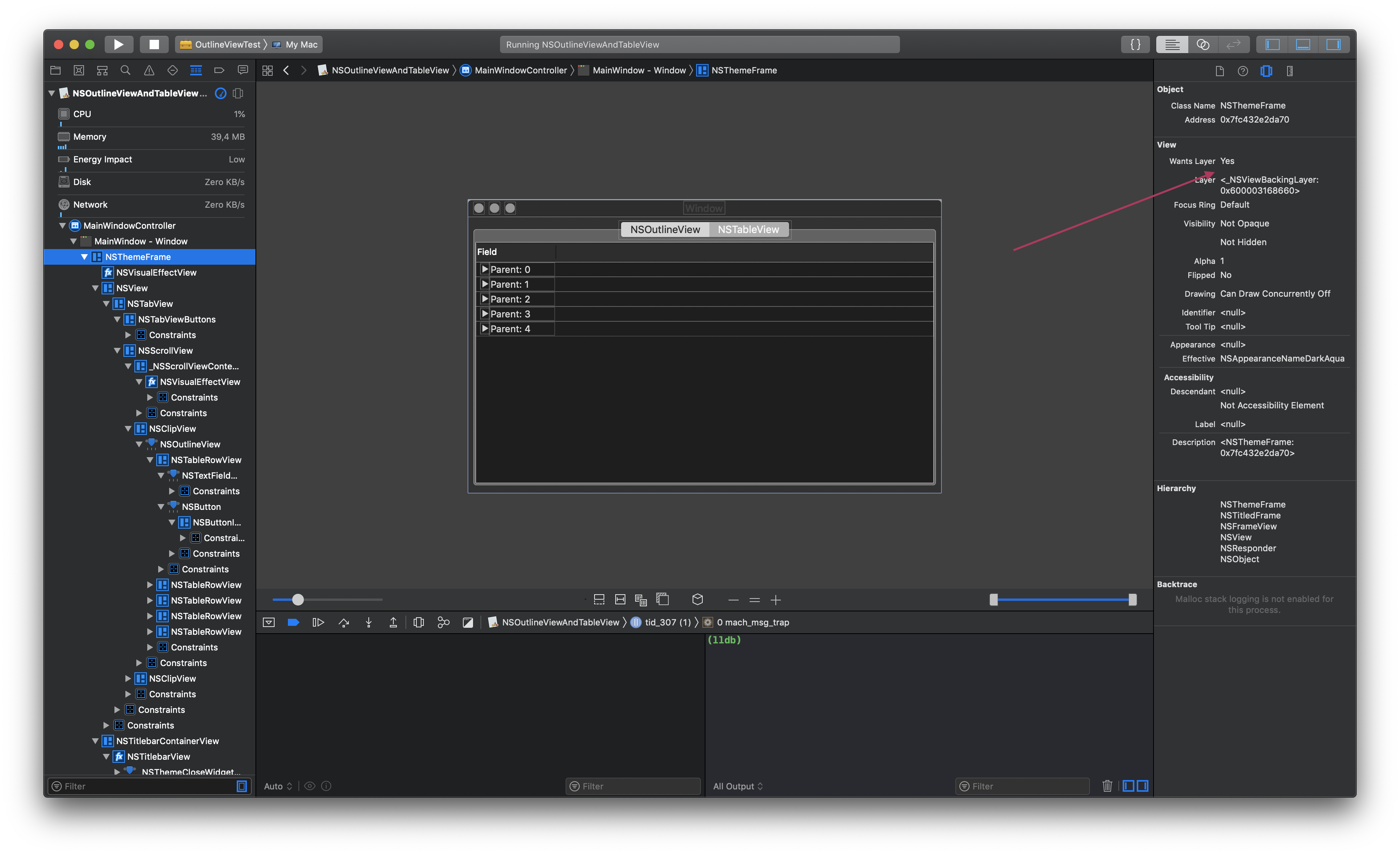
- Although "Wants Layer" is "No" for all of them because we didn't explictly ask for one...
- ... the "Layer" property is always set to an
_NSViewBackingLayer
If you do the same thing on High Sierra, there won't be any layers in this demo app.
lemonmojo
on 20 Sep 2018
Another data point that might've got lost in the discussion is that the problems are not reproducible (at least for me) in VMs but only on real hardware.
And I think it's really important to note that I haven't been able to reproduce any of the issues when launching via open -g appbundle.app from the command line. @chamons Can you confirm that?
lemonmojo
on 20 Sep 2018
Well I never said it was a solution - it was a workaround at best and a clue at worst. :)
I can confirm that open -g makes the title bar appear for both your sample and the VisualEffectPlayground sample.
A few more things I've noticed:
- If I add this to one of the VisualEffectPlayground sample controllers:
            TopImageView.WantsLayer = true;
            TopImageView.Layer.BackgroundColor = NSColor.Red.CGColor;
the issue goes away there. If I debug it I get an _NSTitlebarDecorationView that has a layer inside a NSTitlebarContainerView that has a layer inside a NSThemeFrame that does not have a lyer.
- When I "force" a layer in the case above, the NSThemeFrame does have a layer!
- The VisualEffectPlayground sample does use xibs
- When I build with xcode10 NSThemeFrame does have a layer as well.
So my refined hypothesis is that having NSThemeFrame not having a layer on macOS 10.14 is causing at least some of the drawing weirdness. It is null in the case I can reproduce (Xcode 9.4 with nibs) and not null when it is gone (Xcode 10, or with a layer hack).
I'm unsure if the other drawing issues are also in views that don't have a layer. (I can not reproduce those drawing issues locally yet, please try, check layer status and report back).
Now _why_ I'm somewhat clueless. I'm going to take the ObjC and force it to be layer less and see if it shows up with the same drawing corruptions. If so, it's the leaf cause, and we can work backwards.
chamons
on 21 Sep 2018
Some additional research found https://bugs.chromium.org/p/chromium/issues/detail?id=350325 with this snippet:
The problem has to do with the fact that the NSThemeFrame doesn't have a layer, but its sub-views do have layers (including the [NSWindow contentsView] and its superview). It looks like there are just bugs in the windowing system with respect to how to handle this.
and their hack Window.ContentView.Superview.WantsLayer = true; "works" for me (and is a cousin to my hack).
@lemonmojo please try ^ on your test apps and try to confirm.
chamons
on 21 Sep 2018
@chamons Unfortunately that doesn't work for me.
I just added self.window.contentView.superview.wantsLayer = YES to my Xcode framework project. Built everything and ran from VS and dock. In both cases the strangeness is still there.
Also, even if it would work around the strangeness it wouldn't be a viable solution. The problem being that when requesting a layer for the contentView (or it's superview) makes all child views layer-backed as well. Now you might think that this isn't a problem because on Mojave all views are layer-backed anyway. The thing is, there's a difference between explicitly requesting layers using wantsLayer vs. implicitly getting layer-backed by the OS. I don't know what exactly Apple is doing in this case but they seem to be running in some kind of compatibility mode in this case.
I know this because I have some NSViews provided by third party libraries that have issues when wantsLayer is enabled on them or their superviews but they are perfectly fine when getting layers implicitly by Mojave. Note that this has nothing to do with mono as I get these issues in native projects as well.
lemonmojo
on 21 Sep 2018
Idem for me.
I tried this and my viewcontroller already has the layer checked in the Xib file.
I also put the line of code to try but it does not change anything.
Looks like there is something blocking after the display of the alertview and nothing else happens properly
Rogister
on 21 Sep 2018
Hmm, can you provide an additional test case showing the bug w that hack? I can't reproduce the issues locally with the hack enabled.
Also, does rebuilding with xcode10 GM fix it locally for you?
Your issues with the fix was noted in the Chome bug I linked, but they went for it fwict anyway:
https://codereview.chromium.org/646703002/patch/690001/700007
I currently believe this is an AppKit bug, but plan on looking into it further (trying to get the objc version to fail).
chamons
on 21 Sep 2018
@chamons I just pushed the changes to my demo repo: https://github.com/lemonmojo/MonoOnMojave
With explicitly requesting a layer for the content view's superview I still see all the weirdness.
I use Xcode 10 all the time for testing.
lemonmojo
on 21 Sep 2018
@lemonmojo Do you also have Xcode 10 selected when you compile your Xamairn.Mac project? Preferences -> Projects -> SDK Locations -> Apple
chamons
on 21 Sep 2018
@chamons I don't even have Xcode 9 installed. ;) So yes, the setting points to Xcode 10.
I can also still reproduce the strangeness™️ with the NSOutlineViewAndTableView sample even when making the NSThemeView layer-backed.
See this video:
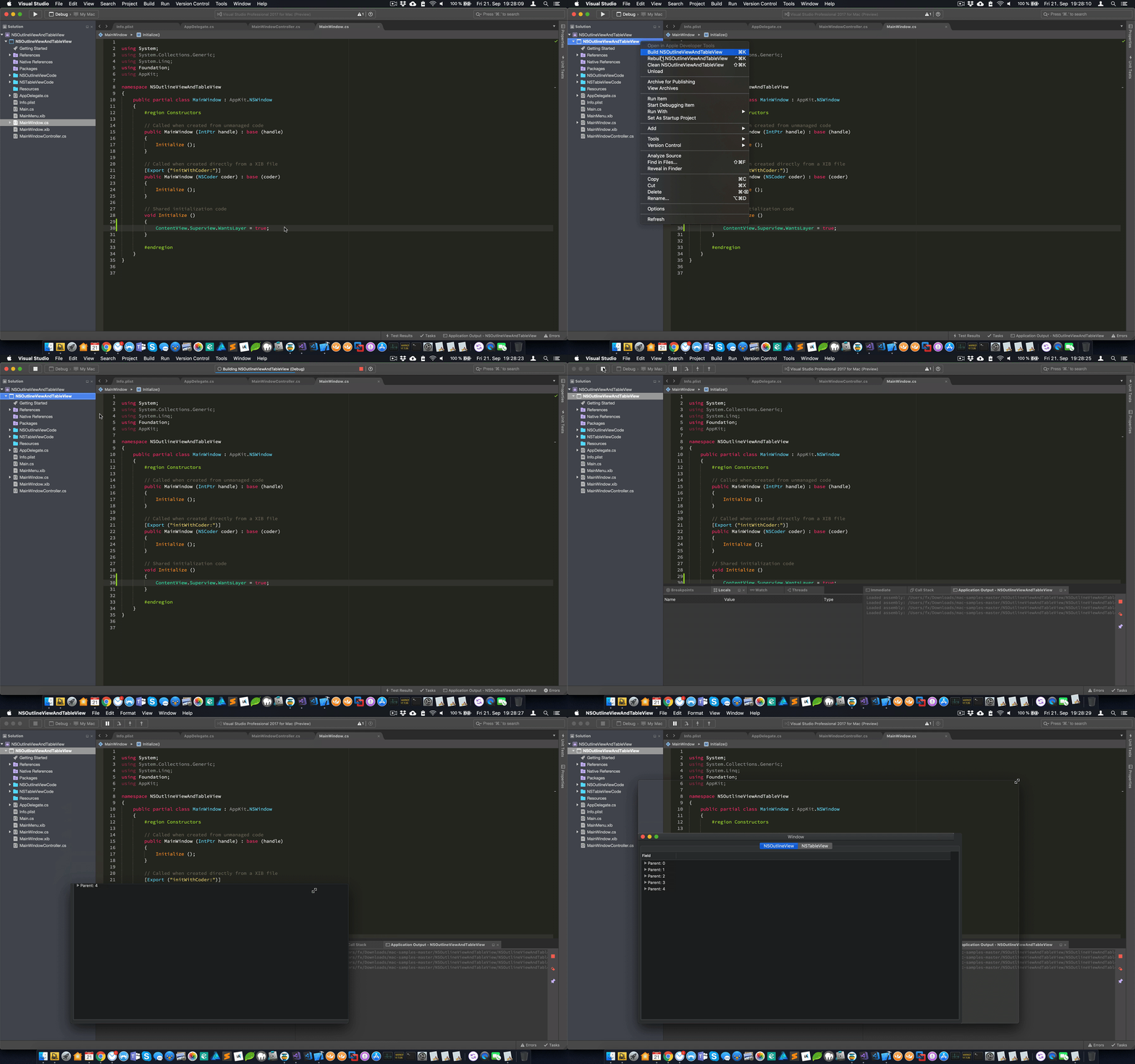
As previously state I tried making the whole window layer-backed in previous attempts to fix the problem and multiple customers came back to me and told me that it didn't help although I wasn't able to reproduce the issue anymore. I think it's just a coincidence that it sometimes happen to work around the strangeness™️.
lemonmojo
on 21 Sep 2018
I'm unable to reproduce your example repro with Xcode 10 GM VSfM set to use Xcode 10.
I'm trying the other samples noted here next. I'm asking "obvious" questions because none of this is making sense outside of an AppKit bug. We don't have _that much_ code running in these samples to be royally messing with things.
chamons
on 21 Sep 2018
Well, I'm with you that this smells like an AppKit bug. I haven't ever been able to reproduce it with only native tools though so there must be something in mono that triggers it.
We can rule out Xamarin.Mac because as previously mentioned I don't use it in Royal TSX. Instead I use mono and a custom fork of Monobjc. So that leaves mono and Cocoa/AppKit.
Apple seems to believe it's somehow related to mono's threading. I think this makes sense to some degree as the problem appears to be timing sensitive.
Sometimes it takes many many tries for the issue to show up. For instance, I also encountered scroll views that stall (refusing to scroll). This particular issue sometimes required me scrolling for 5 minutes constantly to show up. When it occurred I had the same CoreAnimation log entries in Console.app.
I was just lucky to find a repro case that shows the issue so consistently...
lemonmojo
on 21 Sep 2018
That gives me an idea. Let me integrate mono into the objc sample and see if that triggers it....
chamons
on 21 Sep 2018
I have exactly the same phenomena with the tableview.
Rogister
on 21 Sep 2018
I've been unable so far to reproduce any failure in C# that hacking in ContentView.Superview.WantsLayer = true; andor ContentView.WantsLayer = true; hasn't fixed yet.
I'm still trying to get the ObjC sample to fail by adding mono to no avail. :(
@lemonmojo since I can't repro it, you might have to strip down your app w mono to a sample that reproduces it and send it over.
chamons
on 21 Sep 2018
@chamons Have you tried the NSOutlineViewAndTableView sample?
Also, try switching to another machine. I've also observed that the issue sometimes goes away after a reboot only to occur again after some time of use. Maybe in your case rebooting does the opposite and bring it back?
lemonmojo
on 21 Sep 2018
Yes, it (NSOutlineViewAndTableView) fails for me locally if I compile against xcode 94 but then ContentView.Superview.WantsLayer = true; ContentView.WantsLayer = true; "fixes" it, or I can use xcode 10.
I'm updating my 2nd machine to 10.14 now.
chamons
on 21 Sep 2018
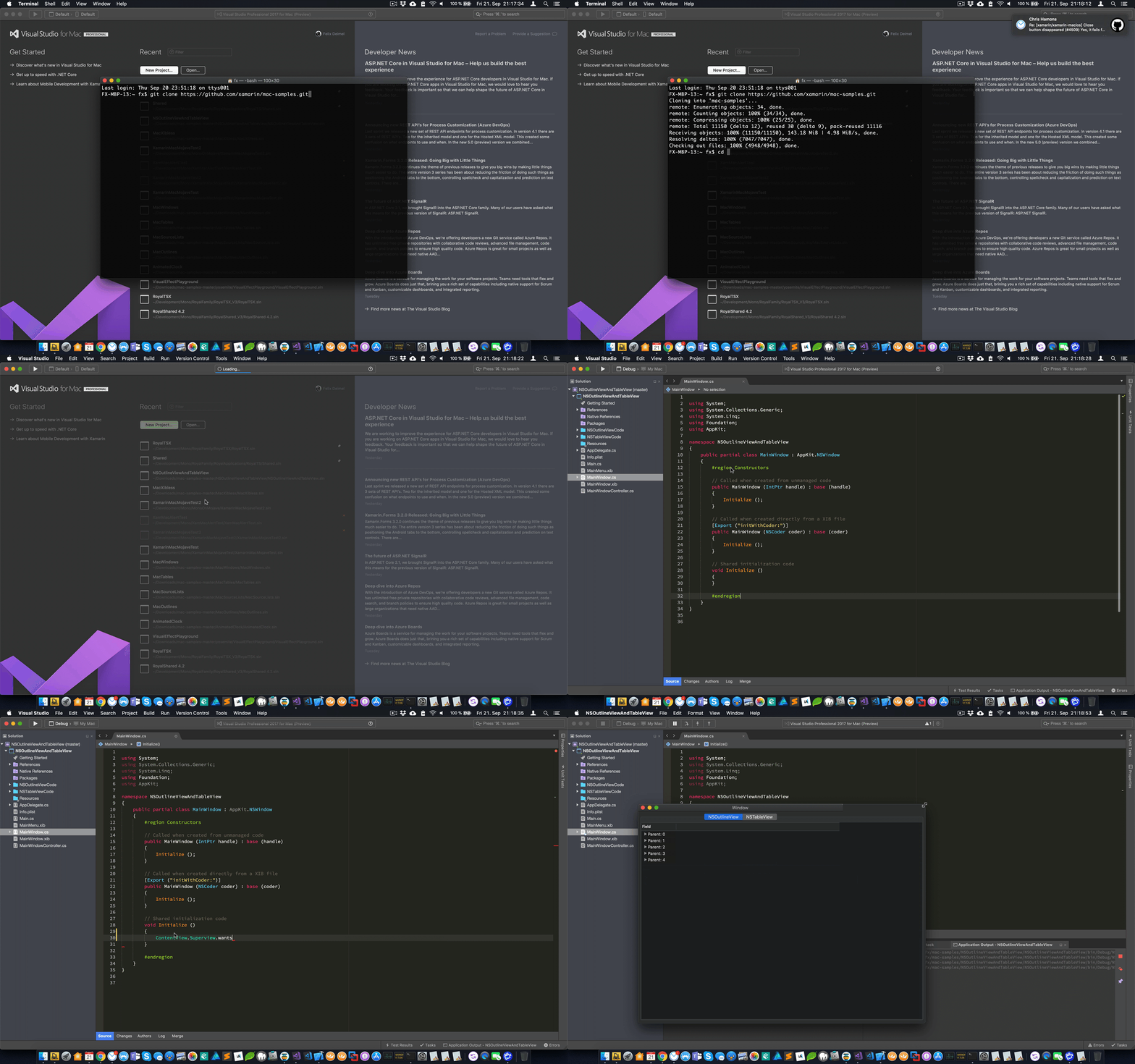
I trimmed the video a bit to shorten the download and build wait times.
- Fresh clone of the mac-samples
- Open NSOutlineViewAndTableView solution
- Only change: Add
ContentView.Superview.WantsLayer = true;to MainWindow.cs - Run and resize window -> The strangeness™
Inspecting the window in Xcode's view debugger:
lemonmojo
on 21 Sep 2018
Yep, and I do that locally and "nothing" ™️
Tried both xcode94 and 10GM with both light and dark mode.
10.14 (18A389)
chamons
on 21 Sep 2018
That's the worst thing about the strangeness™; it comes and goes whenever it decides to do so. I can't tell you how many times I thought I fixed it for good only to let a couple customers tell me the exact opposite on the next day after a new beta release.
Anyway, what kind of machine are you currently using? I can consistently reproduce it using my repro project and the NSOutlineViewAndTableView project on a 2016 MacBook Pro 13". I actually hesitated to update my iMac Pro to 10.14 before the release on Monday but I seriously consider doing it this weekend to gather more data before this goes live and I drown in support tickets...
lemonmojo
on 21 Sep 2018
While your 2nd machine is updating, can you share the modified native project with mono embedded? I'd like to give this a try on my machine.
lemonmojo
on 21 Sep 2018
The test is far from complete but https://github.com/chamons/MonoOnMojave/commit/db0b803fe5776607be93b93eda47683bb9823760
You'll need to edit:
MonoAssembly *assembly = mono_domain_assembly_open (domain, "/Users/donblas/tmp/2nd/MonoOnMojave/foo.dll");
to a more reasonable path. The lib is checked into the repro.
chamons
on 21 Sep 2018
Just got this running after fixing all the paths.
At first try, the problems didn't occur. Then I moved the DoMono call into main.c, just before NSApplicationMain and boom, the strangeness™.
lemonmojo
on 21 Sep 2018
Just updated my repro case: https://github.com/lemonmojo/MonoOnMojave/commit/05cb2afa461022e1e81105e45598aba205c63298
Calling mono_jit_init just before NSApplicationMain is enough to trigger the problem.
On my machine the only effect I see is when switching to/from full screen. And this only happens when launched from the dock or finder, not from Xcode.
In Console.app, there are several CoreAnimation errors:
error   00:01:35.194495 +0200   WindowServer    Failed to map 21064 bytes with port = 246935, protection = 1, err = 0x1d
error   00:01:35.194639 +0200   WindowServer     (13378) : decode_object - ptr == NULL, type = 45
error   00:01:35.194677 +0200   WindowServer    CoreAnimation: serialization error from context 9d3ec095
When commenting out the call to mono_jit_init, the full screen animation works properly and no CoreAnimation errors show up in Console.app.
lemonmojo
on 22 Sep 2018
Here's a short video that shows what works and what doesn't work:
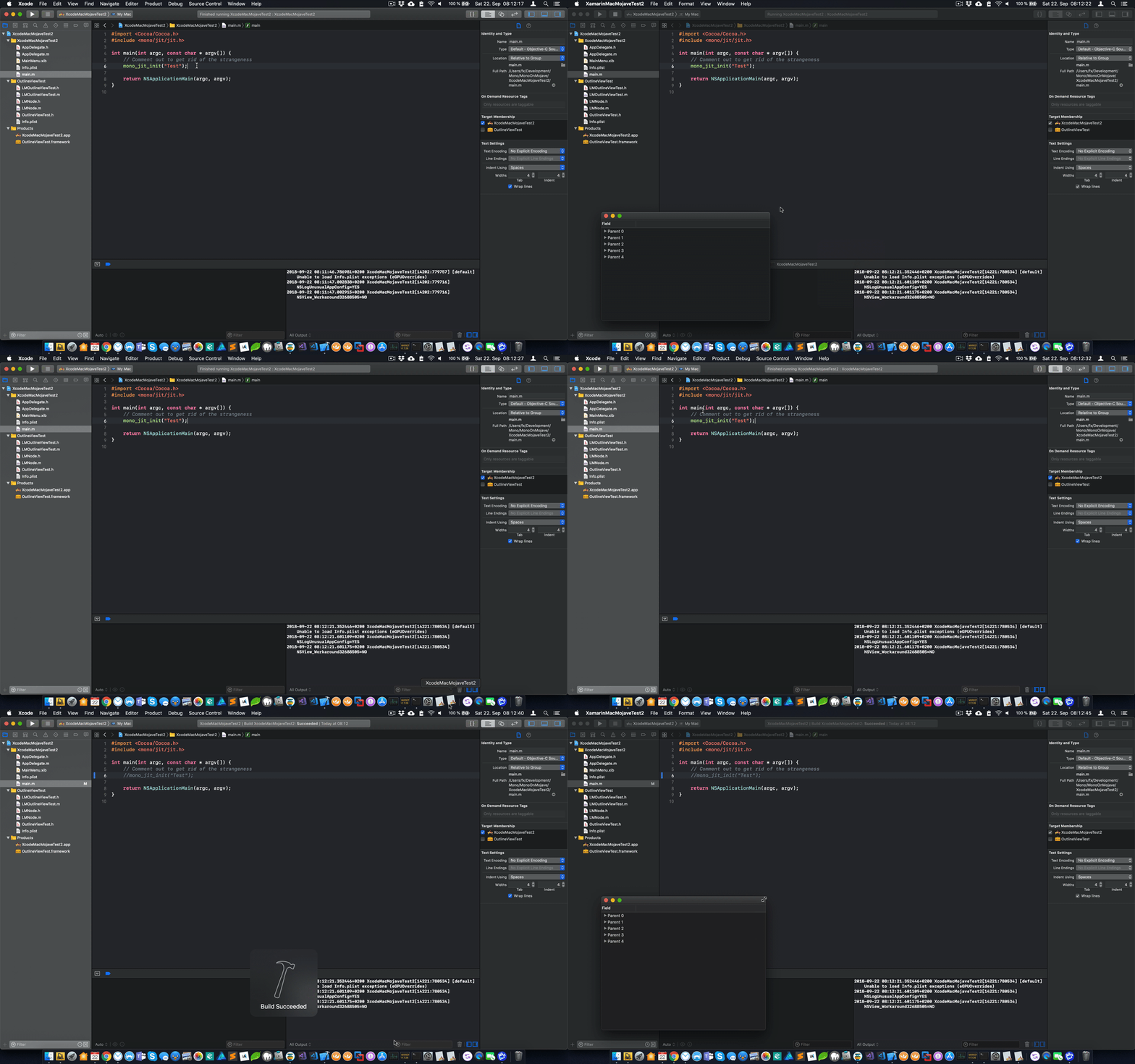
mono_jit_initcalled, launched from Xcode: Goodmono_jit_initcalled, launched from Dock: NOT goodmono_jit_initNOT called, launched from Dock: Good
Note that I commented out the wantsLayer = YES call as it reduces (but doesn't get rid of) the effects of the strangeness.
lemonmojo
on 22 Sep 2018
I just found a fix/workaround that seems to do the trick in all my repro cases!
Check the updated demo repo: https://github.com/lemonmojo/MonoOnMojave
Calling NSApplicationLoad (documentation) in main gets rid of all the strangeness in my testing.
This works from native as well as from managed. Also, it works when apps are launched from VS, Xcode, the Dock or Finder. I haven't yet been able to reproduce any of the strangeness with this enabled.
I tested this with my demo repo (MonoOnMojave) with the native and managed projects, the NSOutlineViewAndTableView demo and the VisualEffectPlayground demo from Xamarin.
With this enabled I CANNOT reproduce any of the following effects in all tested projects:
- Window resizing artifacts
- Missing stoplights
- Incorrect/missing enter/exit full screen animation
- Unable to expand outline view nodes
- CoreAnimation errors in Console.app
Documentation states that the API is actually for Carbon apps that want to make use of Cocoa APIs. Whatever it does, it seems to set things straight when mono is involved. Also, it doesn't seem to make a difference if it is called before or after loading mono which makes it easier to implement as a workaround in managed apps until it is integrated in mono.
lemonmojo
on 22 Sep 2018
Some additional information...
The Apple docs for NSApplicationLoad (documentation) are pretty vague about what exactly the API does. Info on the internet is scarce as well but here's what I was able to find:
- http://mail.openjdk.java.net/pipermail/macosx-port-dev/2011-December/001796.html
- https://lists.apple.com/archives/cocoa-dev///2008/Feb/msg00050.html
- https://el-tramo.be/blog/mixing-cocoa-and-qt/
- https://stackoverflow.com/questions/7421983/memory-corruption-after-using-nsopenpanel#comment8973177_7421983
- https://forums.macrumors.com/threads/using-cocoa-elements-through-dylib-in-c-app.565107/
lemonmojo
on 22 Sep 2018
One inconvenient side effect I found when calling NSApplicationLoad is that applicationWillFinishLaunching: is not called anymore. I guess the problem is that the call to NSApplicationLoad instantiates an NSApplication object whose delegate is nil and only later when NSApplicationMain is run and loads the main nib file the delegate is set. At this point though it's probably too late for applicationWillFinishLaunching:.
Obviously, this is not good. It's preferable over all the other weirdness though as it can be worked around.
lemonmojo
on 22 Sep 2018
@chamons Any news from your side?
lemonmojo
on 23 Sep 2018
My last update was at end of my day on Friday, I did not look at it over the weekend. :)
I plan on looking at this some more this afternoon.
chamons
on 24 Sep 2018
@chamons Don't mean to sound rude, but don't you think you should put more resources into this?
I mean, there's strong evidence that this affects every single mono app that uses Cocoa on Mojave. The macOS update will be out later today and while the user base of mono-based Cocoa apps might be small compared to native apps, it will still be a sizeable chunk that will be affected by this later today and in the days ahead.
It also isn't just the latest version of mono that's affected, I've been able to reproduce this with mono 4.2.1+. Furthermore, as demonstrated by my MonoOnMojave repro case it also affects apps that are mainly native but just include mono for i.e. scripting or similar stuff.
From my point of view this is a serious defect which needs to be fixed ASAP. While the origin might actually be a Cocoa/AppKit/macOS bug, it's mono users who'll be affected by it.
lemonmojo
on 24 Sep 2018
I understand your frustration, this issue is frustrating as it is both somewhat random, inconsistent, and really hard to pin down.
I currently do not have a way of reproducing the issues you are seeing locally after applying the layer hack to any project, nor have I been able to convert the ObjC example to fail locally by including mono. My QA colleague was unable to reproduce the issue after applying the layer hack either.
I plan on trying on my laptop this afternoon to hope for better luck there.
This issue is and has been the top issue on my plate since I became aware of it last Thursday. I'd like to remind you that the previous two days were the weekend.
In any case, consider isolating attempting to isolate an Objective-C sample using mono that triggers the issue locally. Assuming that I am unable to reproduce your additional behaviors on my laptop, that will be my next avenue of attack as well.
chamons
on 24 Sep 2018
@chamons I don't want to hijack this thread nor should I say to switch tacks, But I just want to point out the bug NSAlertView on Mojave appears blank #4848 seems to be related, and has simple test.
I have tried the Layer fix and I saw improvement in the amount times the NSAlert was displayed but it was not 100 percent
However I have tried the NSApplicationLoad and this appeared to fix it 100% and my application appears to be running nicely.
 lilleydnSub
on 24 Sep 2018
lilleydnSub
on 24 Sep 2018
Chris,
I have already reported this problem for several weeks. I found problems totally random. I put a comment on the forum and you answered me.
I do not understand that during your tests, you have not seen any problems because the problem with the alertsview is still obvious.
I think that all applications developed with Mono will have a problem on Mojave
I tried the following solution in my program:
[DllImport ("/ System / Library / Frameworks / Cocoa.framework / Cocoa", EntryPoint = "NSApplicationLoad")]
private static extern bool NSApplicationLoad ();
And by doing that, everything works normally. I do not know why and I do not understand the problem of @lemonmojo.
What I think is that it's not normal that we have to do that so that our program works on Mojave and we have to fix that.
Alain
Rogister
on 24 Sep 2018
@chamons I appreciate your efforts! But as you stated, since the issue is random, inconsistent, etc. IMHO it makes sense to add additional people into the loop and have them try to reproduce it locally. The more the better.
There are several users in the other discussion (in the mono repo) which can reproduce the problem and also found the NSApplicationLoad workaround to fix it. I understand that a handful of confirmations isn't enough but it's a start.
Regarding your inability to reproduce the issue currently: When I still had wantsLayer = YES in my code, the only effect of the issue I saw was the (missing) animation when entering/exiting full screen. And that also only happened when the app was launched from Dock or Finder.
Users in the other discussion also mentioned that requesting a layer-backed contentView didn't fix the problem for them. Same for users of Royal TSX. I once shipped a beta update which included a fully layer-backed main window. While I wasn't able to reproduce the issue anymore with that tweak, my users were still experiencing the issues. I understand that you need to explore every possible workaround, but at this point I think it's pretty certain that this isn't fully fixing the problem.
Please try entering/exiting full screen with my repro case (when launched from Dock) and look for CoreAnimation errors in Console.app after doing so.
lemonmojo
on 24 Sep 2018
Sorry, wrong link, I actually was referring to the discussion mentioned by @lilleydnSub over here: https://github.com/xamarin/xamarin-macios/issues/4848
lemonmojo
on 24 Sep 2018
@chamons Here's the most basic repro case I can think of: https://github.com/lemonmojo/MonoOnMojaveSimple
It's based on the info from @lilleydnSub and just modally runs an alert in applicationDidFinishLaunching:.
When this is run from dock, here's how the alert looks like (photographed with iPhone as the window server is unable to properly capture the real appearance of the alert):
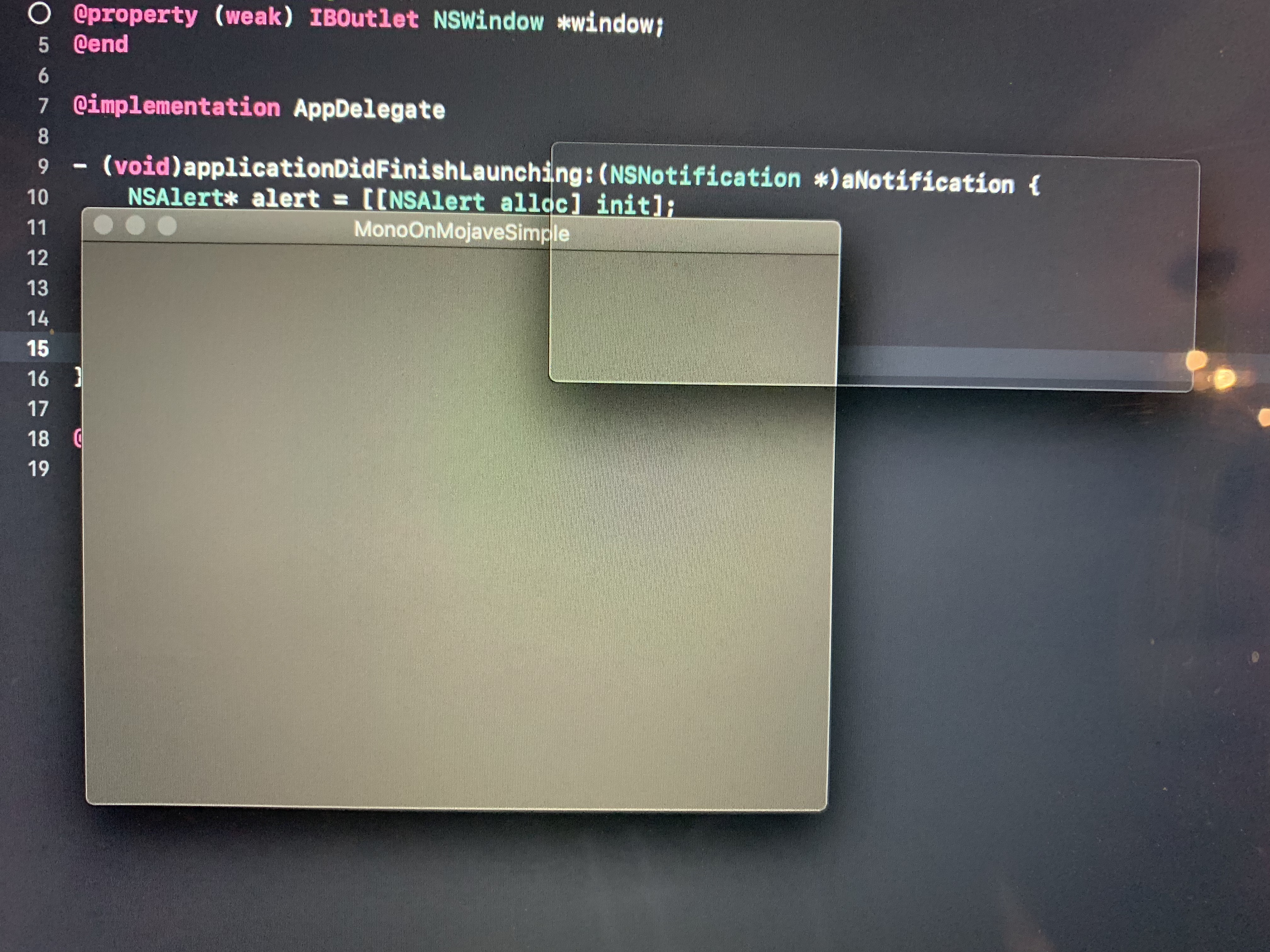
To get rid of the problem, either comment out the call to mono_jit_init or comment in the call to NSApplicationLoad in main.cs.
lemonmojo
on 24 Sep 2018
From my observation from my test case. It may show a NSAlert properly a few times. Thats why I added a button to close and reopen it. As on the N th time it may fail.
lilleydnSub
on 24 Sep 2018
Here's the same sample with Xamarin.Mac instead of native: https://github.com/lemonmojo/MonoOnMojaveSimpleXam
lemonmojo
on 24 Sep 2018
I've updated both samples to keep showing alerts in a loop until Cancel is clicked (if you can still see the button ;)
lemonmojo
on 24 Sep 2018
I'm going to look at your latest samples now, but I just tested the existing sample cases I had locally (Xcode 9.4 with your original sample with no superview hack) and they don't reproduce now on the final 10.14 build.
Please update to 10.14 and report back.
chamons
on 24 Sep 2018
MonoOnMojaveSimple works fine for me on final 10.14 when built with Xcode94 and 10GM on two different machines.
Here's to hoping the problem is fixed, and if not more information on how I can reproduce this again.
chamons
on 24 Sep 2018
Nah, still alive and kicking... I just updated my iMac Pro from 10.13 to 10.14, ran https://github.com/lemonmojo/MonoOnMojaveSimple and got an empty NSAlert.
lemonmojo
on 25 Sep 2018
@chamons we have made Mojave specific change at https://github.com/mono/mono/issues/9210 it might be worth testing if it has any effect here
marek-safar
on 25 Sep 2018
@marek-safar @chamons So I just compiled mono from git to get https://github.com/mono/mono/pull/9419, reconfigured my sample projects to use the compiled libs and still run into the same issues. I compiled using default options. Is there anything else required to enable this?
lemonmojo
on 25 Sep 2018
I have updated my Mac Book Pro to the new version and Freshly installed to a Mac mini and found the following:
https://github.com/lemonmojo/MonoOnMojaveSimple
Also my AlertTest
Xcode 10 Showed Empty Windows
Xcode 9.41 Did not show empty windows
However playing around with my app, I did get a window that was Empty on 9.41 so the solution is not simply to use 9.41. It appears it is just easy to get an Empty window on Xcode 10.
lilleydnSub
on 25 Sep 2018
I'm finally able to reproduce it locally!
I had to write a script to automate trying different versions and build from the command line.
chamons
on 25 Sep 2018
Fun fact:
This does not reproduce for me:
./build/Debug/MonoOnMojaveSimple.app/Contents/MacOS/MonoOnMojaveSimple
This does:
open ./build/Debug/MonoOnMojaveSimple.app/
@chamons I already mentioned that 5 days ago: https://github.com/xamarin/xamarin-macios/issues/4509#issuecomment-423150886. It's also described in the readme of https://github.com/lemonmojo/MonoOnMojave.
In the meantime I was able to find a few lines of code in mono that when commented out fix the problem for me while still allowing managed assemblies to be loaded and a sample class to be instantiated properly. I will post the link to my fork in a few minutes.
lemonmojo
on 25 Sep 2018
With this change to the mono framework I'm unable to reproduce the strangeness in MonoOnMojaveSimple and MonoOnMojave.
lemonmojo
on 25 Sep 2018
I'm building mono locally to confirm and working with the runtime team now.
chamons
on 25 Sep 2018
I can confirm that commenting out those lines "fix" it for me.
chamons
on 25 Sep 2018
@chamons Glad you can reproduce that. Took me the whole day to isolate the issue to that piece of code. Hope it leads to something!
lemonmojo
on 25 Sep 2018
@lemonmojo You'll never believe what I found (it is amazing what one can do when you can reproduce issues consistently).
I can reproduce the issue with no mono at all, just some math and an mprotect call:
https://gist.github.com/chamons/911807ae6bd7f63acbb00dd44cc1c53f
_but_ you need to have a xib not a storyboard in your project...
chamons
on 25 Sep 2018
This is my project if anyone wants to reproduce.
rm -fr build/ && xcodebuild -project MonoOnMojaveSimple.xcodeproj/
open ./build/Release/MonoOnMojaveSimple.app
I've filed radar://44763485 on this with Apple and https://github.com/mono/mono/issues/10802 with mono.
We'll keep this open to track this until some work around in mono or a fix in macOS is released.
chamons
on 25 Sep 2018
http://man7.org/linux/man-pages/man2/mprotect.2.html
mprotect(): POSIX.1-2001, POSIX.1-2008, SVr4. POSIX says that the behavior of mprotect() is unspecified if it is applied to a region of memory that was not obtained via mmap(2).
Isn't that the case here?
lemonmojo
on 25 Sep 2018
Also see here: https://stackoverflow.com/a/50691513
lemonmojo
on 25 Sep 2018
@chamons Do you mind posting your radar on openradar so I can file a duplicate with Apple?
lemonmojo
on 25 Sep 2018
chamons
on 25 Sep 2018
@chamons Just duplicated the radar.
lemonmojo
on 26 Sep 2018
Sorry but I did not understand everything in your search for the bug.
I saw that you posted a radar at APPLE but what should we do now to make it work in our Xamarin.MAC application.
Currently, I put the following lines of code and the problem seems solved:
[DllImport ("/ System / Library / Frameworks / Cocoa.framework / Cocoa", EntryPoint = "NSApplicationLoad")]
private static extern bool NSApplicationLoad ();
static void Main (string [] args)
{
NSApplicationLoad ();
NSApplication.Init ();
NSApplication.Main (args);
}
But by pushing further tests, I still sometimes have empty alertsview.
So, my question, will this be solved and fixed in a future Xamarin.MAC version?
Thank you
Alain
Rogister
on 26 Sep 2018
@Rogister What exactly are you doing to get empty NSAlerts with the NSApplicationLoad workaround in place?
lemonmojo
on 26 Sep 2018
I am presuming we are going to get a Mono update pretty soon with a work around ?
lilleydnSub
on 26 Sep 2018
I try to reproduce but it does not happen anymore. I was in a modaldialog and I display the alertview.
Rogister
on 26 Sep 2018
I can have the problem. It's every time I'm in a modal dialog box and want to display the alertview. BUT it does not happen all the time. Sometimes I do it, I have the empty alertview and then I redo it afterwards, I have the correct box.[](url)
Rogister
on 26 Sep 2018
@Rogister and you have that with the NSApplicationLoad workaround in place?
lemonmojo
on 26 Sep 2018
Yes, here is my code below:
static class MainClass
{
[DllImport ("/ System / Library / Frameworks / Cocoa.framework / Cocoa", EntryPoint = "NSApplicationLoad")]
private static extern bool NSApplicationLoad ();
static void Main (string [] args)
{
AppDomain.CurrentDomain.UnhandledException + = AppDomain_CurrentDomain_UnhandledException;
NSApplicationLoad ();
NSApplication.Init ();
NSApplication.Main (args);
}
static void AppDomain_CurrentDomain_UnhandledException (object sender, UnhandledExceptionEventArgs e)
{
System.Diagnostics.Process.Start ( "/ Applications / Medinect.app");
}
}
Rogister
on 26 Sep 2018
@Rogister Try moving NSApplicationLoad above your unhandled exception handler. Does that help?
lemonmojo
on 26 Sep 2018
I did what you say but it does not change anything.
I still have the problem sometimes.
What I'm sure of is that your solution solves a lot of things because before I had any sort of problem that was going on what I do not have anymore, but here there is still this little problem
Rogister
on 26 Sep 2018
@Rogister Please provide a full sample showing your issue, saying "I still have the problem sometimes" with the snippets of code you are posting screenshot is not helpful.
Also, please stop spamming this issue. You've posted 5 times in 4 hours, and it notifies every single person on the thread.
chamons
on 26 Sep 2018
It's just to show that there is still a small problem and that this solution does not solve everything.
Rogister
on 26 Sep 2018
Then please provide a sample or steps to reproduce.
All issues I personally can reproduce right now are covered by radar://44763485 mono/mono#10802
chamons
on 26 Sep 2018
Hi,
I installed yesterday the BETA 1 of MacOS Mojave.
I tested my application and I see that everything is working properly. I have no problem (AlertView, ...)
I then tested by removing the line of code NSApplicationLoad (); in main.cs to try and I see everything is working fine now without this line.
Can you on your side confirm that?
Thank you
Alain
Rogister
on 27 Sep 2018
@Rogister Interesting. I posted in the other thread yesterday that I also updated to 10.14.1 beta and can still reproduce the problem. Did you test with any of the repo cases I or @chamons provided?
lemonmojo
on 27 Sep 2018
No, I only tested with my application. I will try this
Rogister
on 27 Sep 2018
I confirm that with my application, I have no problem with BETA 1 anymore.
I work with Xcode 10 and Xamarin.MAC 4.99 under MacOS Mojave 10.14.1
I will test Chris's app.
Rogister
on 27 Sep 2018
@lemonmojo: I just tested Chris's app and for me it works fine too.
At home, it does not work ?
Rogister
on 27 Sep 2018
I come back to you for this problem.
I'm going crazy. Today, I'm still testing my application and everything is working properly. I'm not doing anything special.
And then, I do not know why, all the problems come back. Blank alertview, ...
I restart my macbook and I try again with the lines of code in Main.cs and it works again correctly. I then remove these lines of code and now it works fine.
Rogister
on 28 Sep 2018
See https://github.com/xamarin/xamarin-macios/issues/4848 for a package to test with a potential fix
chamons
on 5 Oct 2018
I'm experiencing an issue where the contents of an NSPopover fail to render. The controls inside exist and respond to scroll and click events but the contents aren't rendered.
Here is an example:

What I have found is:
- Running from Visual Studio in ANY configuration (Debug, Release) the popover will always appear and render content.
- Running from
- Running the
<project>.app/Contents/MacOS/<project>will always render the content.
Is this something similiar, or should I raise a new issue?
Edit:
I'm using the latest Visual Studio for Mac from the 'Stable' channel and am running Mac OSX Mojave. This still occurs on Mojave Developer Beta 2.
 projectgoav
on 8 Oct 2018
projectgoav
on 8 Oct 2018
Have you tried using the package linked from https://github.com/xamarin/xamarin-macios/issues/4848#issuecomment-427405971 and seeing if that changes behavior?
chamons
on 8 Oct 2018
Sorry, I was linked here from another project and didn't see the other issue. Downloaded and installed that patch and I'm now seeing the popover render everytime! :)
projectgoav
on 8 Oct 2018
No worries, there are a sea of github issues about this :)
Glad to hear another 👍 on that fix working. It will go out at some point to a stable channel, subscribe to https://github.com/xamarin/xamarin-macios/issues/4848#issuecomment-427405971 for notification when that happens.
chamons
on 8 Oct 2018
I'm going to close this as a duplicate of https://github.com/xamarin/xamarin-macios/issues/4848 as everyone here appears to have the same exact issue, with different "strange" drawing behaviors.
chamons
on 8 Oct 2018
@chamons
I installed the fix and everything seems to work properly. Thank you very much
I note that sometimes I still have empty boxes. It's almost impossible to reproduce. Sometimes (extremely rarely, the box is empty and if I do it again soon after, no problem).
Rogister
on 9 Oct 2018
Related issues
 wjk
·
37Comments
wjk
·
37Comments
 cwrea
·
55Comments
cwrea
·
55Comments
 FlxGen
·
34Comments
FlxGen
·
34Comments
 kodejack
·
170Comments
kodejack
·
170Comments
 CerealGuy93
·
43Comments
CerealGuy93
·
43Comments