Xamarin-android: java.lang.UnsatisfiedLinkError Google Play Console Crash
Steps to Reproduce
We have some App Crashes in Google Play in java.lang.UnsatisfiedLinkError at mono.MonoPackageManager.LoadApplication that we don't know how to explain as in backtrace we can not see any relation to our code
Expected Behavior
App loads without any problems during startup
Actual Behavior
App crashes with java.lang.UnsatisfiedLinkError
java.lang.UnsatisfiedLinkError:
at java.lang.Runtime.loadLibrary (Runtime.java:367)
at java.lang.System.loadLibrary (System.java:1076)
at mono.MonoPackageManager.LoadApplication (MonoPackageManager.java:34)
at mono.MonoRuntimeProvider.attachInfo (MonoRuntimeProvider.java:22)
at android.app.ActivityThread.installProvider (ActivityThread.java:5459)
at android.app.ActivityThread.installContentProviders (ActivityThread.java:5011)
at android.app.ActivityThread.handleBindApplication (ActivityThread.java:4951)
at android.app.ActivityThread.-wrap1 (ActivityThread.java)
at android.app.ActivityThread$H.handleMessage (ActivityThread.java:1560)
at android.os.Handler.dispatchMessage (Handler.java:111)
at android.os.Looper.loop (Looper.java:207)
at android.app.ActivityThread.main (ActivityThread.java:5765)
at java.lang.reflect.Method.invoke (Native Method)
at com.android.internal.os.ZygoteInit$MethodAndArgsCaller.run (ZygoteInit.java:789)
at com.android.internal.os.ZygoteInit.main (ZygoteInit.java:679)
Version Information
Microsoft Visual Studio Professional 2017
Version 15.8.5
VisualStudio.15.Release/15.8.5+28010.2036
Microsoft .NET Framework
Version 4.7.03056
Installierte Version: Professional
Visual C++ 2017 00369-60000-00001-AA603
Microsoft Visual C++ 2017
Allgemeine Azure-Tools 1.10
Bietet allgemeine Dienste für die Verwendung durch Azure Mobile Services und Microsoft Azure-Tools.
Application Insights-Tools für Visual Studio-Paket 8.13.10627.1
Application Insights-Tools für Visual Studio
ASP.NET and Web Tools 2017 15.8.05085.0
ASP.NET and Web Tools 2017
ASP.NET Core Razor Language Services 15.8.31590
Provides languages services for ASP.NET Core Razor.
ASP.NET Web Frameworks and Tools 2017 5.2.60618.0
For additional information, visit https://www.asp.net/
Azure App Service Tools v3.0.0 15.8.05023.0
Azure App Service Tools v3.0.0
Azure Functions und Webauftragstools 15.8.05023.0
Azure Functions und Webauftragstools
C#-Tools 2.9.0-beta8-63208-01
C#-Komponenten, die in der IDE verwendet werden. Je nach Projekttyp und Einstellungen kann eine andere Compilerversion verwendet werden.
Dotfuscator Professional Edition 4.33.0.6680-ece88ab84
Dotfuscator for Visual Studio. Copyright (C) 2002-2017 PreEmptive Solutions LLC
Extensibility Message Bus 1.1.49 (remotes/origin/d15-8@ee674f3)
Provides common messaging-based MEF services for loosely coupled Visual Studio extension components communication and integration.
JavaScript-Sprachdienst 2.0
JavaScript-Sprachdienst
Microsoft Azure-Tools 2.9
Microsoft Azure-Tools für Microsoft Visual Studio 2017 – v2.9.10730.2
Microsoft Continuous Delivery Tools für Visual Studio 0.4
Die Konfiguration von Azure DevOps-Pipelines von der Visual Studio-IDE aus wird vereinfacht.
Microsoft JVM Debugger 1.0
Provides support for connecting the Visual Studio debugger to JDWP compatible Java Virtual Machines
Microsoft MI-Based Debugger 1.0
Provides support for connecting Visual Studio to MI compatible debuggers
Microsoft Visual C++-Assistenten 1.0
Microsoft Visual C++-Assistenten
Microsoft Visual Studio-Tools für Container 1.1
Jetzt können Sie Ihre ASP.NET Core-Anwendung in der Zielumgebung entwickeln, ausführen und überprüfen. Drücken Sie F5, um die Anwendung direkt in einem Container mit Debugfunktionen auszuführen, oder STRG+F5 zum Bearbeiten und Aktualisieren Ihrer Anwendung, ohne den Container erneut erstellen zu müssen.
MLGen Package Extension 1.0
MLGen Package Visual Studio Extension Detailed Info
Mono Debugging for Visual Studio 4.11.11-pre (8fb558f)
Support for debugging Mono processes with Visual Studio.
NuGet-Paket-Manager 4.6.0
NuGet-Paket-Manager in Visual Studio. Weitere Informationen zu NuGet finden Sie unter "http://docs.nuget.org/".
ProjectServicesPackage Extension 1.0
ProjectServicesPackage Visual Studio Extension Detailed Info
ResourcePackage-Erweiterung 1.0
Detaillierte Informationen zur ResourcePackage-Erweiterung von Visual Studio
ResourcePackage-Erweiterung 1.0
Detaillierte Informationen zur ResourcePackage-Erweiterung von Visual Studio
SQL Server Data Tools 15.1.61808.07020
Microsoft SQL Server Data Tools
Test Adapter for Boost.Test 1.0
Enables Visual Studio's testing tools with unit tests written for Boost.Test. The use terms and Third Party Notices are available in the extension installation directory.
Testadapter für Google Test 1.0
Ermöglicht die Verwendung von Visual Studio-Testtools mit Komponententests, die für Google Test geschrieben wurden. Die Nutzungsbedingungen und Drittanbieterhinweise stehen im Installationsverzeichnis der Erweiterung zur Verfügung.
TypeScript-Tools 15.8.20822.2001
TypeScript-Tools für Microsoft Visual Studio
VC-Paket für Microsoft Visual Studio 1.0
VC-Paket für Microsoft Visual Studio
Visual Basic-Tools 2.9.0-beta8-63208-01
Visual Basic-Komponenten, die in der IDE verwendet werden. Je nach Projekttyp und Einstellungen kann eine andere Version des Compilers verwendet werden.
Visual C++ für plattformübergreifende Mobile-Entwicklung 15.0.27924.00
Visual C++ für plattformübergreifende Mobile-Entwicklung
Visual C++ für plattformübergreifende Mobile-Entwicklung (iOS) 15.0.27825.00
Visual C++ für plattformübergreifende Mobile-Entwicklung (iOS)
Visual F# Tools 10.2 für F# 4.5 15.8.0.0. Commit Hash: 55a3dc3231c95c77f81ee53f7d29152029da7408.
Microsoft Visual F# Tools 10.2 für F# 4.5
Visual Studio-Tools für CMake 1.0
Visual Studio-Tools für CMake
Visual Studio-Tools für Container 1.0
Visual Studio-Tools für Container
Visual Studio Code-Debugadapter-Hostpaket 1.0
Interopebene zum Hosten der Visual Studio Code-Adapter in Visual Studio
VisualStudio.Mac 1.0
Mac Extension for Visual Studio
Xamarin 4.11.0.776 (d15-8@1ae9b59d7)
Visual Studio-Erweiterung, um Entwicklung für Xamarin.iOS und Xamarin.Android zu ermöglichen.
Xamarin Designer 4.15.9 (d000f568b)
Visual Studio extension to enable Xamarin Designer tools in Visual Studio.
Xamarin Templates 1.1.116 (9619170)
Templates for building iOS, Android, and Windows apps with Xamarin and Xamarin.Forms.
Xamarin.Android SDK 9.0.0.19 (HEAD/a8a3b0ec7)
Xamarin.Android Reference Assemblies and MSBuild support.
Xamarin.iOS and Xamarin.Mac SDK 12.0.0.15 (84552a4)
Xamarin.iOS and Xamarin.Mac Reference Assemblies and MSBuild support.
Log File
 MarvinFrankenfeld
All 36 comments
@MarvinFrankenfeld can you give some information on the device models and API levels you are seeing this on?
Can you reproduce it yourself? (Maybe not)
 jonathanpeppers
on 15 Oct 2018
jonathanpeppers
on 15 Oct 2018
Lenovo TB3-X70F (TB3-X70F), Android 6.0
Lenovo TAB3 X70L (TB3-X70L), Android 6.0
Cubot MAX (x6069_cubot_5365u), Android 6.0
We have bought the Cubot MAX to check if we can reproduce it, but App is running fine.
We have no idea how to reproduce or even get close to the problem.
MarvinFrankenfeld
on 15 Oct 2018
@MarvinFrankenfeld the crash you are getting means that the app can't load libmonodroid.so: https://github.com/xamarin/xamarin-android/blob/91a39725b1932b87103d2fed6228083e08a216b4/src/Xamarin.Android.Build.Tasks/Resources/MonoPackageManager.java#L49
If you open up the APK file in 7zip (or some zip tool), you should see this file inside in several locations such as:
lib\armeabi-v7a\libmonodroid.solib\x86\libmonodroid.so
Do you see this file for each Android architecture your app supports?
jonathanpeppers
on 15 Oct 2018
@jonathanpeppers we only support armeabi-v7a and there we can see the file
MarvinFrankenfeld
on 16 Oct 2018
@MarvinFrankenfeld a quick google search of the devices listed show they are 64-bit devices.
They are _supposed_ to also support armeabi-v7a, but hey... Android is Android. Apparently if _any_ 64-bit so file is loaded, you could get this error if only the 32-bit version is present for _other_ so files? Example here: https://github.com/realm/realm-java/issues/2507
An idea is to add arm64-v8a support in your app, and see if these crashes go away... I saw some people recommending this when Googling for this issue.
jonathanpeppers
on 16 Oct 2018
@jonathanpeppers Adding 64-bit support in our App is not an option at the moment as we have our own .so files and building them for 64-bit would mean a lot of additional testing. If the app crashes because the phone is not able to do the 32-bit conversion correctly it should be Xamarin's responsibility to handle the exception and avoid crashes as libmonodroid.so is shipped by Xamarin. Is there any other possible solution to avoid the crashes?
MarvinFrankenfeld
on 25 Oct 2018
@MarvinFrankenfeld if loadLibrary fails like this with libmonodroid.so, it's going to fail on your 32-bit sos as well... I'm not sure there is an exception that can possibly be handled here and your app be able to start, as mono isn't running yet.
I think we need more info to know what is going on. But I am not sure what to try, @grendello do you have any ideas?
A couple thoughts:
- From what I've read, this would happen if the process loaded a 64-bit library before
libmonodroid.so. - So what would cause this to happen? A rooted device? A non-standard flavor of Android? Some extension?
- Could the language/country of the device matter?
jonathanpeppers
on 25 Oct 2018
@jonathanpeppers Language is always german, the app is available in Germany, Switzerland, Austria, Liechtenstein. The crashes always happen in Android 6. Maybe that is an useful hint?
MarvinFrankenfeld
on 7 Nov 2018
@jonathanpeppers any news on this one?
MarvinFrankenfeld
on 20 Nov 2018
I've got a slightly different issue. but I'm wondering if it is also related to this one. App crash in my case happens only on Android Oreo devices (8.0 and 8.1) and it complains about my custom BackupAgent.
The stacktrace is as follows:
java.lang.UnsatisfiedLinkError:
at mono.android.Runtime.register (Native Method)
at md5f3dc63ecaad575af71bd7a9b1622f75b.n.(n.java:20)
at java.lang.Class.newInstance (Native Method)
at android.app.ActivityThread.handleCreateBackupAgent (ActivityThread.java:3431)
at android.app.ActivityThread.-wrap3 (Unknown Source)
at android.app.ActivityThread$H.handleMessage (ActivityThread.java:1813)
at android.os.Handler.dispatchMessage (Handler.java:105)
at android.os.Looper.loop (Looper.java:180)
at android.app.ActivityThread.main (ActivityThread.java:6944)
at java.lang.reflect.Method.invoke (Native Method)
at com.android.internal.os.Zygote$MethodAndArgsCaller.run (Zygote.java:240)
at com.android.internal.os.ZygoteInit.main (ZygoteInit.java:835)
I'm using Xamarin.Android with Visual Studio for my development, and the app is targeting for Android Pie (API 28).
The class n in the stacktrace is my implementation of BackupAgent. This happens once everyday or every 2 days, and it seems (not 100% sure yet) that Auto Backup is still running without problem with the error.
The problem has been around for almost a month, and I tried a couple of things but they don't seem to make any difference:
- Releasing with and without arm64-v8a
- This eliminates the cause from mono library for 64-bit support
- Releasing with and without obfuscation
- I'm using Dotfuscator Community Edition
- Same crash reports but just the class name is revealed
- Installing the app through Play Store and locally with signed APK
- This suggests that there is nothing to do with the installation method
I hope this could add value to the investigation.
 elvis824
on 12 Dec 2018
elvis824
on 12 Dec 2018
@jonathanpeppers , any news here? Still seeing crashes. It happens multiple times per user so this is influencing the android vital's multi-crash rate in a bad way. We are out of knowledge here on how to fix the issue.
MarvinFrankenfeld
on 29 Dec 2018
@MarvinFrankenfeld I'm afraid I don't know what we can do here...
From your stacktrace, this line: https://github.com/xamarin/xamarin-android/blob/3f360c09739a2c83056bb6753d357e8b9b734de4/src/Xamarin.Android.Build.Tasks/Resources/MonoPackageManager.java#L49
If this throws, and the native library cannot be loaded, then any native C code isn't able to run! That means the native code in Xamarin.Android that runs Mono won't run either.
If you can give us a way to see this behavior, we can look further. It seems like a problem with Android and how its loading native libraries on certain devices. If you are trying to improve your crash rate, can you exclude that specific device from Google Play?
@elvis824's problem looks a bit different, since the stacktrace is in a different place. @elvis824 file a new issue related to that issue, with an example, and we can look into that one.
jonathanpeppers
on 2 Jan 2019
Same issue here, but I know this started to happen after enabling AOT in the build:
<AotAssemblies>true</AotAssemblies>
<AndroidAotAdditionalArguments>no-write-symbols,nodebug</AndroidAotAdditionalArguments>
<EnableLLVM>false</EnableLLVM>
<EnableProguard>false</EnableProguard>
<AndroidManagedSymbols>true</AndroidManagedSymbols>
<AndroidUseSharedRuntime>false</AndroidUseSharedRuntime>
<EmbedAssembliesIntoApk>true</EmbedAssembliesIntoApk>
<AndroidTlsProvider>btls</AndroidTlsProvider>
<AndroidSupportedAbis>armeabi-v7a</AndroidSupportedAbis>
Happened 3 times on this phone:
Sony Xperia XA (F3111), Android 7.0
java.lang.UnsatisfiedLinkError:
at java.lang.Runtime.loadLibrary0 (Runtime.java:972)
at java.lang.System.loadLibrary (System.java:1530)
at mono.MonoPackageManager.LoadApplication (MonoPackageManager.java:34)
at mono.MonoRuntimeProvider.attachInfo (MonoRuntimeProvider.java:22)
at android.app.ActivityThread.installProvider (ActivityThread.java:6084)
at android.app.ActivityThread.installContentProviders (ActivityThread.java:5655)
at android.app.ActivityThread.handleBindApplication (ActivityThread.java:5594)
at android.app.ActivityThread.-wrap2 (ActivityThread.java)
at android.app.ActivityThread$H.handleMessage (ActivityThread.java:1640)
at android.os.Handler.dispatchMessage (Handler.java:110)
at android.os.Looper.loop (Looper.java:203)
at android.app.ActivityThread.main (ActivityThread.java:6361)
at java.lang.reflect.Method.invoke (Native Method)
at com.android.internal.os.ZygoteInit$MethodAndArgsCaller.run (ZygoteInit.java:1063)
at com.android.internal.os.ZygoteInit.main (ZygoteInit.java:924)
 xleon
on 14 Jan 2019
xleon
on 14 Jan 2019
We have AOT enabled as well. So maybe that is a hint to the problem @jonathanpeppers ?
MarvinFrankenfeld
on 14 Jan 2019
@MarvinFrankenfeld @xleon to give us something else to go on, could you give us a list of your APK's contents?
Just something like zipinfo yourapk.apk would be fine.
jonathanpeppers
on 15 Jan 2019
xleon
on 15 Jan 2019
By any chance does your app use directBootAware? (Issue #2621)
If you're able to reproduce the crash locally, would you be able to provide the adb logcat which contains the process creation? It's odd/annoying that the UnsatisfiedLinkError doesn't provide an actual error message, and it makes me wonder if the problem is that our libmonodroid.so has a symbol reference which cannot be resolved. It would be nice to be able to prove or disprove this hypothesis, and additional logcat output might help.
 jonpryor
on 15 Jan 2019
jonpryor
on 15 Jan 2019
Here is our apk's content.
https://www.dropbox.com/s/mgx6cd74t2w1nok/apkContent.txt?dl=0
We don't use directBootAware. This is available in Android 7 right? We can see crashes in Android 6 as well. Sadly we cannot reproduce the crash.
MarvinFrankenfeld
on 16 Jan 2019
I couldn´t reproduce this and I couldn´t find logcats for it, but in case it helps, it only happens on these devices:
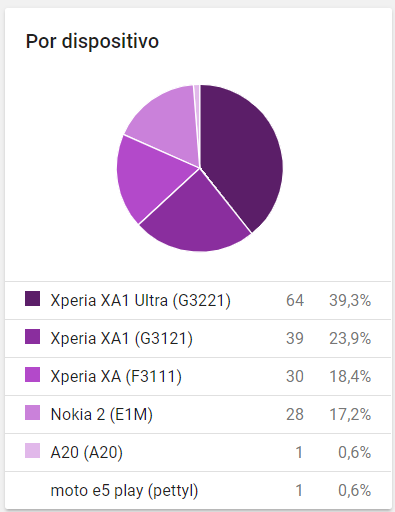
xleon
on 25 Jan 2019
This is annoying! The last update achieved that we get thousands of uninstallations. From what bridge can I throw myself?
Target SDK: 27
Platform: arm64-v8a

 malexandersalazar
on 15 Mar 2019
malexandersalazar
on 15 Mar 2019
@MAlexanderSalazar. I have the same "java.lang.UnsatisfiedLinkError" problem that the owner came from HUAWEI android 8 (Oreo) device, have you solved the problem? Do you have any solution?
 chanhbc
on 4 Apr 2019
chanhbc
on 4 Apr 2019
@MAlexanderSalazar. I have the same "java.lang.UnsatisfiedLinkError" problem that the owner came from HUAWEI android 8 (Oreo) device, have you solved the problem? Do you have any solution?
@chanhbc I just remove the .apk for arm64-v8a and x64 and problem solved. The error was because my native components were not built to work with 64, only for 32.
malexandersalazar
on 4 Apr 2019
Interesting @MAlexanderSalazar
Do you remember which native components you are using that were not built to work with 64?
Thanks
 AntRemo
on 5 Apr 2019
AntRemo
on 5 Apr 2019
@AntRemo don't know but here are all my packages.
<package id="AndroidIconics.Xamarin.Droid" version="2.7.0.1" targetFramework="monoandroid80" />
<package id="Bolts" version="1.4.0.1" targetFramework="monoandroid81" />
<package id="Clancey.SimpleAuth" version="1.0.49" targetFramework="monoandroid80" />
  <package id="Clancey.SimpleAuth.Google.Droid" version="1.0.12" targetFramework="monoandroid81" />
  <package id="Epicalsoft.Reach.Api.Client.Net" version="1.3.10.41" targetFramework="monoandroid81" />
  <package id="FastAdapter.Xamarin.Droid" version="1.6.0.2" targetFramework="monoandroid80" />
  <package id="GoogleGson" version="2.8.1" targetFramework="monoandroid80" />
  <package id="GoogleMaterialTypeface.Xamarin.Droid" version="2.2.0.3" targetFramework="monoandroid80" />
  <package id="Karamunting.Android.HDodenhof.CircleImageView" version="2.2.0" targetFramework="monoandroid80" />
  <package id="libphonenumber-csharp" version="8.10.8" targetFramework="monoandroid81" />
  <package id="Lsjwzh.MaterialLoadingProgressBar.Xamarin.Android" version="0.5.6" targetFramework="monoandroid50" />
  <package id="MaterialDrawer.Xamarin.Droid" version="5.3.6.2" targetFramework="monoandroid80" />
  <package id="Materialize.Xamarin.Droid" version="0.9.0.2" targetFramework="monoandroid80" />
  <package id="Microsoft.AppCenter" version="1.14.0" targetFramework="monoandroid81" />
  <package id="Microsoft.AppCenter.Analytics" version="1.14.0" targetFramework="monoandroid81" />
  <package id="Microsoft.AppCenter.Crashes" version="1.14.0" targetFramework="monoandroid81" />
  <package id="Microsoft.AspNet.SignalR.Client" version="2.4.0" targetFramework="monoandroid81" />
  <package id="Microsoft.CSharp" version="4.5.0" targetFramework="monoandroid81" />
  <package id="Microsoft.NETCore.Platforms" version="2.2.0" targetFramework="monoandroid81" />
  <package id="Microsoft.Win32.Primitives" version="4.3.0" targetFramework="monoandroid50" />
  <package id="Naxam.Jakewharton.Timber" version="4.7.1" targetFramework="monoandroid81" />
  <package id="Naxam.Mapbox.Droid" version="6.4.0.1" targetFramework="monoandroid81" />
  <package id="Naxam.Mapbox.MapboxAndroidCore" version="0.2.1.3" targetFramework="monoandroid81" />
  <package id="Naxam.Mapbox.MapboxJavaCore" version="2.2.10" targetFramework="monoandroid80" />
  <package id="Naxam.Mapbox.MapboxJavaGeojson" version="2.2.10" targetFramework="monoandroid80" />
  <package id="Naxam.Mapbox.Services.Android.Telemetry" version="3.1.5.3" targetFramework="monoandroid81" />
  <package id="Naxam.MapboxGestures.Droid" version="0.2.0" targetFramework="monoandroid81" />
  <package id="Naxam.MapboxSdkCore.Droid" version="3.4.0" targetFramework="monoandroid81" />
  <package id="Naxam.MapboxSdkGeojson.Droid" version="3.4.0" targetFramework="monoandroid81" />
  <package id="Naxam.Mapzen.Lost.Droid" version="3.0.4" targetFramework="monoandroid80" />
  <package id="Naxam.Retrofit2.ConvertGson.Droid" version="2.4.0" targetFramework="monoandroid81" />
  <package id="Naxam.SquareUp.OkHttp3.LoggingInterceptor" version="3.11.0" targetFramework="monoandroid81" />
  <package id="NETStandard.Library" version="2.0.3" targetFramework="monoandroid81" />
  <package id="Newtonsoft.Json" version="12.0.1" targetFramework="monoandroid81" />
  <package id="Square.OkHttp3" version="3.8.1" targetFramework="monoandroid80" />
  <package id="Square.OkIO" version="1.13.0" targetFramework="monoandroid71" />
  <package id="Square.Retrofit2" version="2.3.0" targetFramework="monoandroid80" />
  <package id="System.AppContext" version="4.3.0" targetFramework="monoandroid50" />
  <package id="System.Collections" version="4.3.0" targetFramework="monoandroid50" />
  <package id="System.Collections.Concurrent" version="4.3.0" targetFramework="monoandroid50" />
  <package id="System.ComponentModel.TypeConverter" version="4.3.0" targetFramework="monoandroid50" />
  <package id="System.Console" version="4.3.1" targetFramework="monoandroid81" />
  <package id="System.Diagnostics.Debug" version="4.3.0" targetFramework="monoandroid50" />
  <package id="System.Diagnostics.Process" version="4.3.0" targetFramework="monoandroid50" />
  <package id="System.Diagnostics.Tools" version="4.3.0" targetFramework="monoandroid50" />
  <package id="System.Diagnostics.Tracing" version="4.3.0" targetFramework="monoandroid50" />
  <package id="System.Drawing.Common" version="4.5.1" targetFramework="monoandroid81" />
  <package id="System.Globalization" version="4.3.0" targetFramework="monoandroid50" />
  <package id="System.Globalization.Calendars" version="4.3.0" targetFramework="monoandroid50" />
  <package id="System.IO" version="4.3.0" targetFramework="monoandroid50" />
  <package id="System.IO.Compression" version="4.3.0" targetFramework="monoandroid50" />
  <package id="System.IO.Compression.ZipFile" version="4.3.0" targetFramework="monoandroid50" />
  <package id="System.IO.FileSystem" version="4.3.0" targetFramework="monoandroid50" />
  <package id="System.IO.FileSystem.Primitives" version="4.3.0" targetFramework="monoandroid50" />
  <package id="System.Linq" version="4.3.0" targetFramework="monoandroid50" />
  <package id="System.Linq.Expressions" version="4.3.0" targetFramework="monoandroid50" />
  <package id="System.Net.Http" version="4.3.4" targetFramework="monoandroid81" />
  <package id="System.Net.Primitives" version="4.3.0" targetFramework="monoandroid50" />
  <package id="System.Net.Requests" version="4.3.0" targetFramework="monoandroid50" />
  <package id="System.Net.Sockets" version="4.3.0" targetFramework="monoandroid50" />
  <package id="System.ObjectModel" version="4.3.0" targetFramework="monoandroid50" />
  <package id="System.Reflection" version="4.3.0" targetFramework="monoandroid50" />
  <package id="System.Reflection.Extensions" version="4.3.0" targetFramework="monoandroid50" />
  <package id="System.Reflection.Primitives" version="4.3.0" targetFramework="monoandroid50" />
  <package id="System.Reflection.TypeExtensions" version="4.5.1" targetFramework="monoandroid81" />
  <package id="System.Resources.ResourceManager" version="4.3.0" targetFramework="monoandroid50" />
  <package id="System.Runtime" version="4.3.1" targetFramework="monoandroid81" />
  <package id="System.Runtime.Extensions" version="4.3.1" targetFramework="monoandroid81" />
  <package id="System.Runtime.Handles" version="4.3.0" targetFramework="monoandroid50" />
  <package id="System.Runtime.InteropServices" version="4.3.0" targetFramework="monoandroid50" />
  <package id="System.Runtime.InteropServices.RuntimeInformation" version="4.3.0" targetFramework="monoandroid50" />
  <package id="System.Runtime.Numerics" version="4.3.0" targetFramework="monoandroid50" />
  <package id="System.Runtime.Serialization.Formatters" version="4.3.0" targetFramework="monoandroid50" />
  <package id="System.Runtime.Serialization.Primitives" version="4.3.0" targetFramework="monoandroid50" />
  <package id="System.Security.Cryptography.Algorithms" version="4.3.1" targetFramework="monoandroid71" />
  <package id="System.Security.Cryptography.Encoding" version="4.3.0" targetFramework="monoandroid50" />
  <package id="System.Security.Cryptography.Primitives" version="4.3.0" targetFramework="monoandroid50" />
  <package id="System.Security.Cryptography.X509Certificates" version="4.3.2" targetFramework="monoandroid71" />
  <package id="System.Text.Encoding" version="4.3.0" targetFramework="monoandroid50" />
  <package id="System.Text.Encoding.Extensions" version="4.3.0" targetFramework="monoandroid50" />
  <package id="System.Text.RegularExpressions" version="4.3.0" targetFramework="monoandroid50" />
  <package id="System.Threading" version="4.3.0" targetFramework="monoandroid50" />
  <package id="System.Threading.Tasks" version="4.3.0" targetFramework="monoandroid50" />
  <package id="System.Threading.Timer" version="4.3.0" targetFramework="monoandroid50" />
  <package id="System.Xml.ReaderWriter" version="4.3.1" targetFramework="monoandroid71" />
  <package id="System.Xml.XDocument" version="4.3.0" targetFramework="monoandroid50" />
  <package id="System.Xml.XmlDocument" version="4.3.0" targetFramework="monoandroid50" />
  <package id="Validation" version="2.4.22" targetFramework="monoandroid81" />
  <package id="Xam.Plugins.Settings" version="3.1.1" targetFramework="monoandroid71" />
  <package id="Xamarin.Android.Arch.Core.Common" version="1.1.1.1" targetFramework="monoandroid81" />
  <package id="Xamarin.Android.Arch.Core.Runtime" version="1.1.1.1" targetFramework="monoandroid81" />
  <package id="Xamarin.Android.Arch.Lifecycle.Common" version="1.1.1.1" targetFramework="monoandroid81" />
  <package id="Xamarin.Android.Arch.Lifecycle.Extensions" version="1.1.1.1" targetFramework="monoandroid81" />
  <package id="Xamarin.Android.Arch.Lifecycle.Runtime" version="1.1.1.1" targetFramework="monoandroid81" />
  <package id="Xamarin.Android.Support.Animated.Vector.Drawable" version="28.0.0.1" targetFramework="monoandroid81" />
  <package id="Xamarin.Android.Support.Annotations" version="28.0.0.1" targetFramework="monoandroid81" />
  <package id="Xamarin.Android.Support.Compat" version="28.0.0.1" targetFramework="monoandroid81" />
  <package id="Xamarin.Android.Support.Core.UI" version="28.0.0.1" targetFramework="monoandroid81" />
  <package id="Xamarin.Android.Support.Core.Utils" version="28.0.0.1" targetFramework="monoandroid81" />
  <package id="Xamarin.Android.Support.CustomTabs" version="28.0.0.1" targetFramework="monoandroid81" />
  <package id="Xamarin.Android.Support.Design" version="28.0.0.1" targetFramework="monoandroid81" />
  <package id="Xamarin.Android.Support.Emoji" version="28.0.0.1" targetFramework="monoandroid81" />
  <package id="Xamarin.Android.Support.Emoji.AppCompat" version="28.0.0.1" targetFramework="monoandroid81" />
  <package id="Xamarin.Android.Support.Emoji.Bundled" version="28.0.0.1" targetFramework="monoandroid81" />
  <package id="Xamarin.Android.Support.Fragment" version="28.0.0.1" targetFramework="monoandroid81" />
  <package id="Xamarin.Android.Support.Media.Compat" version="28.0.0.1" targetFramework="monoandroid81" />
  <package id="Xamarin.Android.Support.Transition" version="28.0.0.1" targetFramework="monoandroid81" />
  <package id="Xamarin.Android.Support.v4" version="28.0.0.1" targetFramework="monoandroid81" />
  <package id="Xamarin.Android.Support.v7.AppCompat" version="28.0.0.1" targetFramework="monoandroid81" />
  <package id="Xamarin.Android.Support.v7.CardView" version="28.0.0.1" targetFramework="monoandroid81" />
  <package id="Xamarin.Android.Support.v7.RecyclerView" version="28.0.0.1" targetFramework="monoandroid81" />
  <package id="Xamarin.Android.Support.Vector.Drawable" version="28.0.0.1" targetFramework="monoandroid81" />
  <package id="Xamarin.Bindings.UniversalImageLoader" version="1.0.4" targetFramework="monoandroid71" />
  <package id="Xamarin.Build.Download" version="0.4.11" targetFramework="monoandroid81" />
  <package id="Xamarin.Facebook.Common.Android" version="4.40.0" targetFramework="monoandroid81" />
  <package id="Xamarin.Facebook.Core.Android" version="4.40.0" targetFramework="monoandroid81" />
  <package id="Xamarin.Facebook.Login.Android" version="4.40.0" targetFramework="monoandroid81" />
  <package id="Xamarin.Firebase.Common" version="60.1142.1" targetFramework="monoandroid81" />
  <package id="Xamarin.Firebase.Iid" version="60.1142.1" targetFramework="monoandroid81" />
  <package id="Xamarin.Firebase.Messaging" version="60.1142.1" targetFramework="monoandroid81" />
  <package id="Xamarin.Google.ZXing.Core" version="3.3.0" targetFramework="monoandroid81" />
  <package id="Xamarin.GooglePlayServices.Auth" version="60.1142.1" targetFramework="monoandroid80" />
  <package id="Xamarin.GooglePlayServices.Auth.Api.Phone" version="60.1142.1" targetFramework="monoandroid80" />
  <package id="Xamarin.GooglePlayServices.Auth.Base" version="60.1142.1" targetFramework="monoandroid80" />
  <package id="Xamarin.GooglePlayServices.Base" version="60.1142.1" targetFramework="monoandroid80" />
  <package id="Xamarin.GooglePlayServices.Basement" version="60.1142.1" targetFramework="monoandroid80" />
  <package id="Xamarin.GooglePlayServices.Location" version="60.1142.1" targetFramework="monoandroid80" />
  <package id="Xamarin.GooglePlayServices.Tasks" version="60.1142.1" targetFramework="monoandroid80" />
Thank you, but the application is on a user's computer installed via google play, I cannot tell the user to uninstall and reinstall from the beginning.
chanhbc
on 5 Apr 2019
@MarvinFrankenfeld could you try with Visual Studio 2019 16.1 and let us know if you're still seeing this?
jonathanpeppers
on 12 Jun 2019
@jonathanpeppers we haven't upgraded to VS 2019 yet. This crash happens randomly in productive app in Google Play for some barely known devices. Sadly we are not able to reproduce this crash on a local device, so we cannot easily test whether the crash will be resolved with VS 2019. How is VS2019 supposed to help in this crash anyway? Shouldn't the app run the same way on the phone regardless of using VS 2017 or VS 2019?
MarvinFrankenfeld
on 13 Jun 2019
Mainly seeing what we can do to move this forward--there are quite a few changes in Mono/Xamarin.Android in VS 2019.
@MarvinFrankenfeld looking through the history your app is 32-bit only, and these were 64-bit devices? Since Google Play is requiring 64-bit support in apps now, have you added that to your app?
Since the crash is on startup, on the very first loadLibrary call, it seems like this could be solved if your app had a 64-bit slice?
jonathanpeppers
on 13 Jun 2019
@MarvinFrankenfeld closing since we haven't had activity on this.
Let me know if you get a chance to try VS 2019, add 64-bit support to your app, or have a way to reproduce it... We would love to track this down if we knew what was going on, thanks!
jonathanpeppers
on 17 Jul 2019
@jonathanpeppers I am facing this issue with VS 2019, Xamarin.Android 9.4.1.0
App crash after user update from play store.
 dationguyen
on 19 Sep 2019
dationguyen
on 19 Sep 2019
@dationguyen file a new issue? See if you can get adb logcat output or if you can get it to happen on your device/emulator.
The problem with this issue before, was that nobody had reproduced it. We only had a report from Google Play and not much to go one otherwise 😞
jonathanpeppers
on 19 Sep 2019
I'm using VS 2019, but no way to reproduce it. This is annoying :(!
Obtener Outlook para Androidhttps://aka.ms/ghei36
From: Jonathan Peppers notifications@github.com
Sent: Thursday, September 19, 2019 8:31:45 AM
To: xamarin/xamarin-android xamarin-android@noreply.github.com
Cc: M. Alexander Salazar Vila malex_sv92@hotmail.com; Mention mention@noreply.github.com
Subject: Re: [xamarin/xamarin-android] java.lang.UnsatisfiedLinkError Google Play Console Crash (#2292)
@dationguyenhttps://github.com/dationguyen file a new issue? See if you can get adb logcat outputhttps://docs.microsoft.com/en-us/xamarin/android/deploy-test/debugging/android-debug-log?tabs=windows#accessing-from-the-command-line or if you can get it to happen on your device/emulator.
The problem with this issue before, was that nobody had reproduced it. We only had a report from Google Play and not much to go one otherwise 😞
—
You are receiving this because you were mentioned.
Reply to this email directly, view it on GitHubhttps://github.com/xamarin/xamarin-android/issues/2292?email_source=notifications&email_token=ABUWZSNKTSLY3IAPR3AW5N3QKN5MDA5CNFSM4F3EXXZ2YY3PNVWWK3TUL52HS4DFVREXG43VMVBW63LNMVXHJKTDN5WW2ZLOORPWSZGOD7DPFAI#issuecomment-533131905, or mute the threadhttps://github.com/notifications/unsubscribe-auth/ABUWZSM57FR2YVDRZZIA7S3QKN5MDANCNFSM4F3EXXZQ.
malexandersalazar
on 19 Sep 2019
@jonathanpeppers I think it may relate to cache files when updating the app. if the user cleans the app data. it will back to work.
dationguyen
on 20 Sep 2019
I am starting to see these crash reports since my last app update, when I switched to .aab bundles? Anyone else seeing this issue? Affected devices are Galaxy A50, Galaxy J4+, LG G6, Galaxy S10
 tipa
on 11 Dec 2019
tipa
on 11 Dec 2019
@tipa can you file a new issue with new information? This was opened in Oct 2018, when App Bundle support didn't exist yet in Xamarin.Android.
jonathanpeppers
on 12 Dec 2019
Sure, filed a new issue here: https://github.com/xamarin/xamarin-android/issues/4028
tipa
on 12 Dec 2019
Related issues
 Golemanova
·
55Comments
Golemanova
·
55Comments
 ddobrev
·
60Comments
ddobrev
·
60Comments
 johnthiriet
·
61Comments
tipa
·
60Comments
johnthiriet
·
61Comments
tipa
·
60Comments
 YJH16120
·
43Comments
YJH16120
·
43Comments