Xamarin-android: Support of AppBundles
Hello,
As we will soon have to support 64 bits as well as 32 bits applications (https://android-developers.googleblog.com/2019/01/get-your-apps-ready-for-64-bit.html, the support of Android AppBundles will become more and more necessary. I know we can compile an APK per ABIs but it is nothing as convenient as AppBundles.
Also, it seems like the Play Store will support upload 500MB AppBundles (https://android-developers.googleblog.com/2018/10/playtime-2018.html) but this feature will maybe not be opened to traditional APKs.
The support of AppBundles will be a real game changing for us so please share any plan you have.
Thanks,
 johnthiriet
All 61 comments
We maintain several apps and are concerned about having APK size increase significantly to fulfil the 64 bit requirement. App bundle support would help us a lot with that!
 tomcurran
on 19 Feb 2019
tomcurran
on 19 Feb 2019
This will help to maintain the size after AOT builds and multiple abi inside single appbundle.
Flutter just included it in 1.2 launch https://developers.googleblog.com/2019/02/launching-flutter-12-at-mobile-world.html
 muhaym
on 26 Feb 2019
muhaym
on 26 Feb 2019
After doing an initial read though of the documents on App Bundle it seems we will need a bit of work to implement this particular feature. Users should be following googles recommendations on organising resources to prepare for this set of features.
We cannot use the aapt2 which is shipped with the sdk. The docs say the sdk version does not support the required --proto-format argument.
We need to ship the bundletool from github which is the tool that is needed to generate the aab files which are then used to generate the apk.
We also need to do the bindings for Google Play Core . This provides the support for delivering dynamic features.
We need to figure out how to support building the aab files. Should it be opt-in or automatic. There are other publishing stores which probably don't use this tooling to we need to make sure we can still produce an apk. We also need to figure out how best to expose this to the end user. Should it be a new set of project types. It should support being able to break up the app into features somehow.
The features stuff will probably cause all sorts or issues itself. Looking at the sample we might need to figure out how to support this in the mono runtime itself. Normally assemblies are loaded by the runtime at startup. With this new feature we will need to be able to dynamically load new assemblies as they are installed by the feature system.
 dellis1972
on 27 Feb 2019
dellis1972
on 27 Feb 2019
A note for our future selves com.google.android.play.core.splitinstall.SplitInstallStateUpdatedListener does have status’s which would inform of when a new feature is installed https://github.com/googlesamples/android-dynamic-features/blob/master/app/src/main/java/com/google/android/samples/dynamicfeatures/MainActivity.kt#L54
dellis1972
on 27 Feb 2019
In my opinion the aab building should be opt-in since as you correctly said, some stores won't probably use this tooling.
I know this whole thing will require lot of work, let me know if I can help on some things though if it involves the mono runtime I will probably not be of a great help.
johnthiriet
on 10 Mar 2019
Hopefully this will be released before August 2019 since Google Play had demanded all apps to support 64 bit natively before August.
 zijianhuang
on 21 May 2019
zijianhuang
on 21 May 2019
Thanks for progressing @jonathanpeppers @jonpryor
tomcurran
on 31 May 2019
We can probably close this when this one is merged: https://github.com/xamarin/xamarin-android/pull/3146
We are hoping we can get this in a preview soon. We should have a blog post explaining how to try it when it's ready, thanks!
 jonathanpeppers
on 31 May 2019
jonathanpeppers
on 31 May 2019
@jonathanpeppers it seems that PR is merged... is there a way we can try this out? I know Google seems to be complaining about this for an app I'm trying to get into beta. Would love to be able to use this in my CI process even if it means installing a CI/Alpha SDK on the build host.
 dansiegel
on 5 Jun 2019
dansiegel
on 5 Jun 2019
@dansiegel you should be able to download a visx from our CI system via the Build Status section of our README.md (see https://github.com/xamarin/xamarin-android#build-status) and then picking a Job and going to the Azure Artifacts page. Or just use this to get the latest stable build https://jenkins.mono-project.com/view/Xamarin.Android/job/xamarin-android/lastStableBuild/Azure/
Note that these will be the Open Source bits only. So some things (like fast deployment) won't work. But if you are building a release app that should be ok.
dellis1972
on 5 Jun 2019
@dellis1972 yeah I'm only worried about trying it out for a release build to upload to Google Play so seems like I should be able to install that stable build and try this out. Thanks
dansiegel
on 6 Jun 2019
@dellis1972, I installed the latest (vsix) from jenkins, Since then I am not able to build, getting .NET Standard Projects (x.dll.mdb) does not exist, should we update mono too with this?
muhaym
on 8 Jun 2019
@dansiegel You can publish to ALPHA in Google Play Console in that regard, test it without affecting your current user base?
 Dooks123
on 12 Jun 2019
Dooks123
on 12 Jun 2019
Is there an official ETA? I cant upload any XA App without the bundle on, nor for ALPHA nor INTERNAL. Tried to run and compile the last Mono with Build Task but it seems theres a problem in the git. We are running out of time and seems Google is making it mandatory and cannot find a XAM SDK builded with this support.
 ShadowDrone
on 14 Jun 2019
ShadowDrone
on 14 Jun 2019
Is there an official ETA? I cant upload any XA App without the bundle on, nor for ALPHA nor INTERNAL.
@ShadowDrone NOT mandatory. You can still publish. Did it just now, it only warns you that you don't make use of Bundled apps. But you just continue to review and publish.
https://forums.xamarin.com/discussion/138216/android-app-bundle-dynamic-delivery
Just continue as per normal whilst this is being sorted out by the Xamarin team.
Dooks123
on 14 Jun 2019
No, I cant, the Launch button is greyed out and I cannot continue. This is a brand new App(new package name).
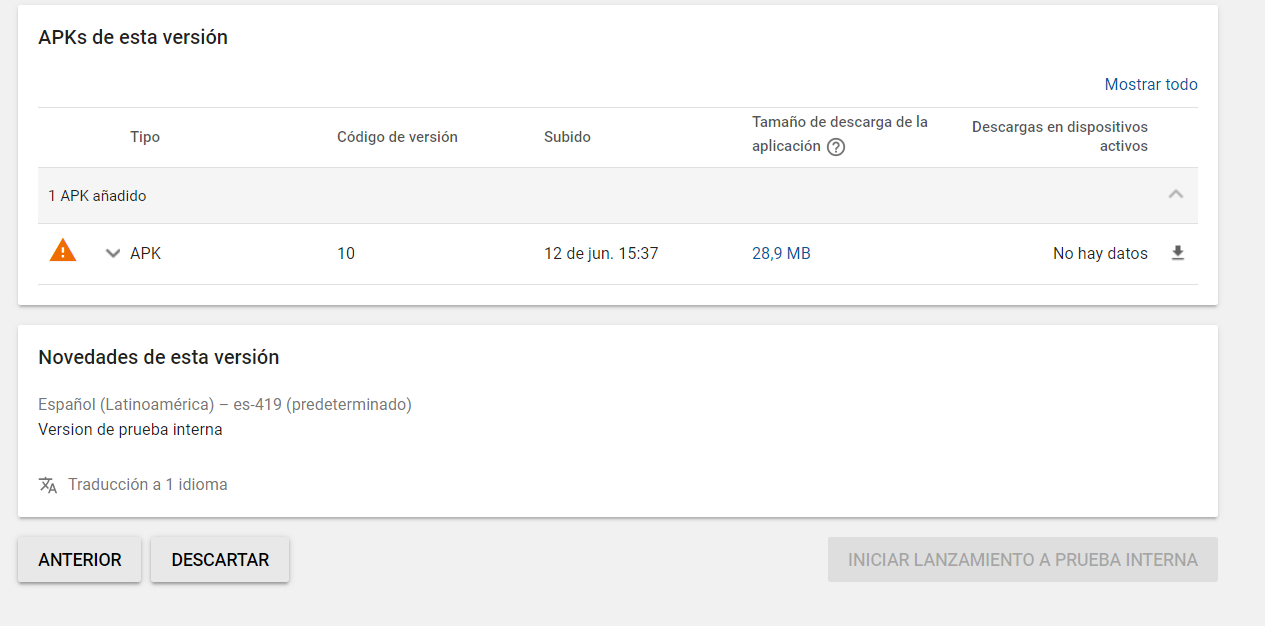
ShadowDrone
on 14 Jun 2019
What are the warnings you get when clicking on the apk?
Dooks123
on 14 Jun 2019
same as everyone(posted in Spanish now)
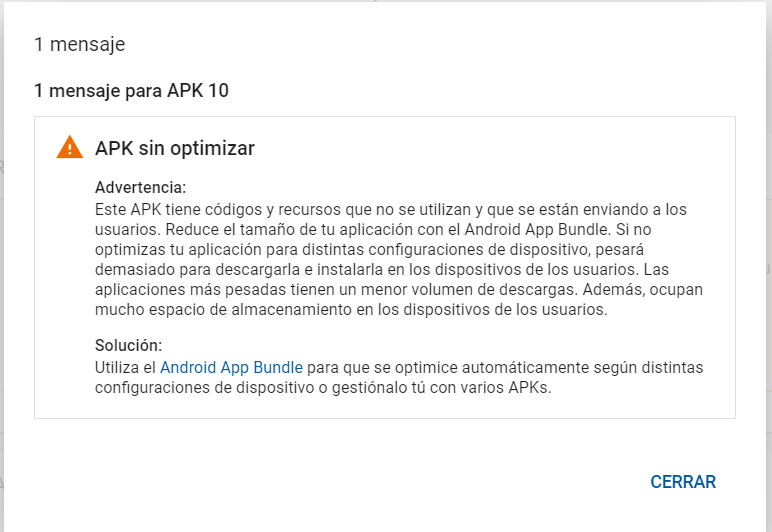
ShadowDrone
on 14 Jun 2019
You have probably some other problem. App bundles are not required. I can publish new or existing app without bundles.
 EmilAlipiev
on 14 Jun 2019
EmilAlipiev
on 14 Jun 2019
When VS 2019 16.2 Preview 3 ships, I will close this issue and give a quick explanation on how you can use it. We don't have full publishing UI/workflow for this feature yet.
Unfortunately that release date isn't public, but Preview 2 is currently out now.
@ShadowDrone can you copy/paste the text from that screenshot or change your language? I need to see it in English--run through Google Translate.
jonathanpeppers
on 14 Jun 2019
Warning: This APK has codes and resources that are not used and that are
being sent to users. Reduce the size of your application with the Android
App Bundle. If you do not optimize your application for different device
configurations, it will weigh too much to download and install it on users'
devices. The heavier applications have a lower volume of downloads. In
addition, they take up a lot of storage space on users' devices. Solution:
Use the Android App Bundle to optimize automatically according to different
On Fri, Jun 14, 2019, 18:03 Jonathan Peppers notifications@github.com
wrote:
When VS 2019 16.2 Preview 3 ships, I will close this issue and give a
quick explanation on how you can use it. We don't have full publishing
UI/workflow for this feature yet.Unfortunately that release date isn't public, but Preview 2 is currently
out now.@ShadowDrone https://github.com/ShadowDrone can you copy/paste the text
from that screenshot or change your language? I need to see it in
English--run through Google Translate.—
You are receiving this because you are subscribed to this thread.
Reply to this email directly, view it on GitHub
https://github.com/xamarin/xamarin-android/issues/2727?email_source=notifications&email_token=ABSNYCIVOPICG75OUWFXCODP2OXKRA5CNFSM4GW724QKYY3PNVWWK3TUL52HS4DFVREXG43VMVBW63LNMVXHJKTDN5WW2ZLOORPWSZGODXXBXDY#issuecomment-502143887,
or mute the thread
https://github.com/notifications/unsubscribe-auth/ABSNYCPV2O26VELBFYPPSFLP2OXKRANCNFSM4GW724QA
.
 maxkoshevoi
on 14 Jun 2019
maxkoshevoi
on 14 Jun 2019
yup
Tried everything, checkout unused permissions, resources, device separation, multi DEX, proguard, Link user assemblies and sdk.
Now Im trying to create one from scratch but I have to put the Link on NONE, because an error on Mono.Cecil, with the same results.
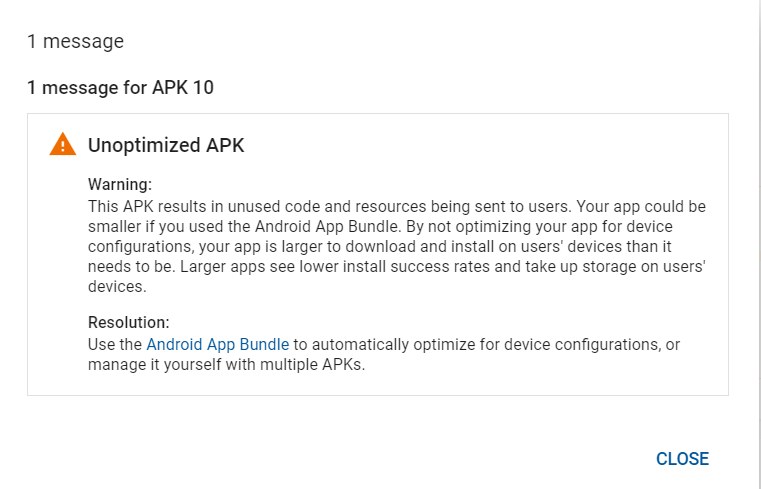
ShadowDrone
on 14 Jun 2019
Visual Studio 2017 Community 15.9.7
Xamarin Forms 4.0.0.482894
Xamarin Android SDK 9.2.3 Previwsly 9.1.7 with same results.
Xamarin.Android Reference Assemblies and MSBuild support.
Mono: mono/mono/2018-08-rc@5ac37ccd385
Java.Interop: xamarin/java.interop/d16-0@c987483
LibZipSharp: grendello/LibZipSharp/d16-1@44de300
LibZip: nih-at/libzip/rel-1-5-1@b95cf3f
MXE: xamarin/mxe/xamarin@b9cbb535
ProGuard: xamarin/proguard/master@905836d
SQLite: xamarin/sqlite/3.26.0@325e91a
Xamarin.Android Tools: xamarin/xamarin-android-tools/d16-0@0a7edd6
ShadowDrone
on 14 Jun 2019
@maxkoshevoi or @ShadowDrone am I correct in understanding this message is a warning? You can continue to use APKs, but Google is now "strongly encouraging" users to use app bundles.
There are similar posts about this, and they say it's a warning:
jonathanpeppers
on 14 Jun 2019
Yep, I also see as a warning, but the Start Rollout to Internal Test is disabled, then I cannot continue
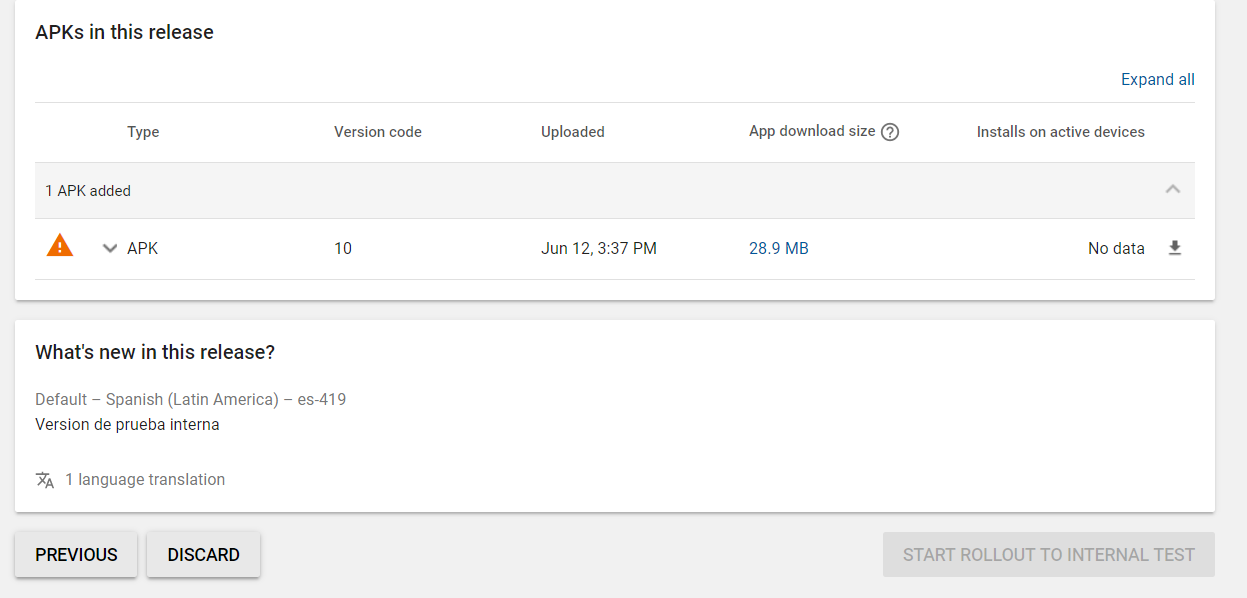
ShadowDrone
on 14 Jun 2019
Okay, I have not all the GREEN checkboxs on, but at first the Store was showing me what I needed. I'm going to complete the missing ones(don't have all the screenshots) and see if I can rollout.
ShadowDrone
on 14 Jun 2019
Yea, was that, sorry folks, missing 1 screenshot and the Feature Graphic
ShadowDrone
on 14 Jun 2019
Yea, was that, sorry folks, missing 1 screenshot and the Feature Graphic
Oh so you probably didn't complete the
- Store Listing
- Pricing & Distribution
- Content Rating
Dooks123
on 18 Jun 2019
When VS 2019 16.2 Preview 3 ships, I will close this issue and give a quick explanation on how you can use it. We don't have full publishing UI/workflow for this feature yet.
Looks like it was released today
https://docs.microsoft.com/en-us/visualstudio/releases/2019/release-notes-preview#--visual-studio-2019-version-162-preview-3-
 TomSoderling
on 25 Jun 2019
TomSoderling
on 25 Jun 2019
Will this ever come to VS2017?
Dooks123
on 25 Jun 2019
@Dooks123 frankly the important part is the underlying tooling so that it can be generated in CI.. as for any UI helpers to configure such things, I would have to argue that the team should focus on people moving to the newer version of VS not bringing to features to a previous version of the IDE... it's not like it costs you extra for moving from VS17 to VS19 or VSvNext
dansiegel
on 26 Jun 2019
@Dooks123 I believe 2017 is in "maintenance mode" which means it gets security related fixes only. So if you want to use this new feature you will need to migrate to VS2019.
That said, the six installer we produce as part of our build system might install against VS 2017. You might want to try to give that a go https://github.com/xamarin/xamarin-android#downloads
dellis1972
on 26 Jun 2019
If you want to try out Android App Bundles today;
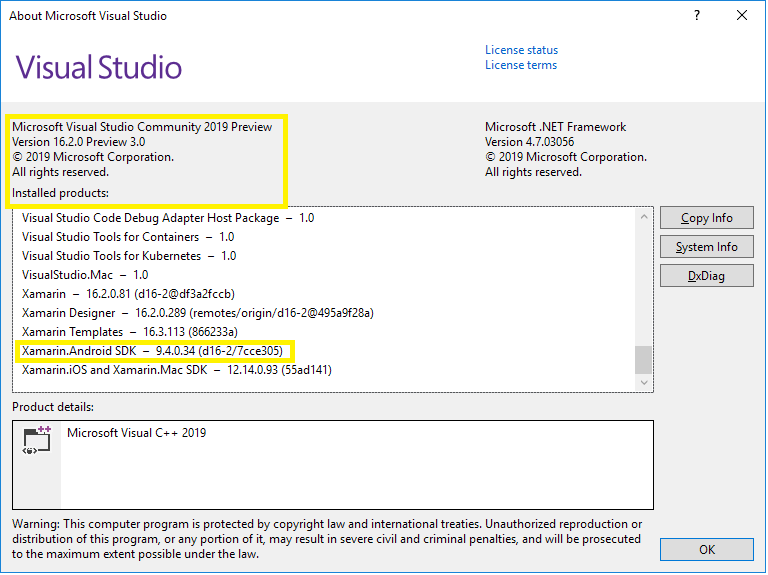
- Install the latest VS 2019 Preview, you will need at least Xamarin.Android 9.4.0.34
- Edit your Android app's
.csprojfile, adding<AndroidPackageFormat>to yourReleaseconfiguration:
  <PropertyGroup Condition=" '$(Configuration)|$(Platform)' == 'Release|AnyCPU' ">
    ...
    <AndroidPackageFormat>aab</AndroidPackageFormat>
  </PropertyGroup>
I would not recommend adding this to your Debug builds, since creating/deploying an App Bundle is significantly slower than an APK.
From here you can just deploy in the IDE to test things locally; this will use the default debug keystore file. You'll find the App Bundle in:
bin\Release\com.yourcompany.yourapp-Signed.aab
If you want to distribute the App Bundle on Google Play for testing, you can configure signing in your csproj file as usual:
<AndroidKeyStore>True</AndroidKeyStore>
<AndroidSigningKeyStore>foo.keystore</AndroidSigningKeyStore>
<AndroidSigningStorePass>foo</AndroidSigningStorePass>
<AndroidSigningKeyAlias>foo</AndroidSigningKeyAlias>
<AndroidSigningKeyPass>foo</AndroidSigningKeyPass>
For an extended description of these, see the Microsoft Docs.
Or if you need to do this on CI, these can be set command-line:
msbuild YourApp.Android.csproj /t:SignAndroidPackage /p:Configuration=Release /p:AndroidKeyStore=True /p:AndroidSigningKeyStore=foo.keystore /p:AndroidSigningStorePass=foo /p:AndroidSigningKeyAlias=foo /p:AndroidSigningKeyPass=foo
We are working on the publishing workflows, so will be able to do this from the IDE in future releases.
Open new Github issues if you run into any problems.
If anyone has screenshots of the size savings in their app, please post here -- or @ me on twitter, thanks!
jonathanpeppers
on 26 Jun 2019
Hi @jonathanpeppers,
I'm tested a clear instalation of vs2019 version 16.2 preview 3.0 and cannot create an aab output. When i try to Archive the project Xamarin output sais:
Archiving App Bundle 'AIV.Mobile.Android'...
Creating archive directory 'AIV.Mobile.Android'...
Creating directory 'C:\Users\xxxx\AppData\Local\Xamarin\Mono for Android\Archives\2019-07-10\AIV.Mobile.Android 7-10-19 6.34 PM.apkarchive'...
Deleting files '*.apk'...
Packaging 'AIV.Mobile.Android'...
Creating metadata 'AIV.Mobile.Android'...
Copying icons 'AIV.Mobile.Android'...
Creating directory 'app-icons'...
Copying drawable icons...
Copying mipmap icons...
Copying apks 'AIV.Mobile.Android'...
Copying mdbs and mSYM files for 'AIV.Mobile.Android'...
Invalid Android Archive (no .APK files)
Failed to create App archive 'AIV.Mobile.Android'.
If i remove the <AndroidPackageFormat>aab</AndroidPackageFormat> tag, the Archive command found ok.
 toruiwatani
on 10 Jul 2019
toruiwatani
on 10 Jul 2019
From here you can just deploy in the IDE to test things locally; this will use the default debug keystore file.
@toruiwatani Did you try to use Deploy instead of Archive?
Dooks123
on 11 Jul 2019
@toruiwatani my guess is the IDE is expecting to see an .apk when the archive command it run. They have some additional code in the IDE's which probably needs updating to take aab files into account.
//cc @joj
dellis1972
on 11 Jul 2019
From here you can just deploy in the IDE to test things locally; this will use the default debug keystore file.
@toruiwatani Did you try to use
Deployinstead ofArchive?
Hi @Dooks123,
Deploy's not generate any aab file. It's only installs the apk in the phone or emulator.
toruiwatani
on 11 Jul 2019
@toruiwatani my guess is the IDE is expecting to see an .apk when the archive command it run. They have some additional code in the IDE's which probably needs updating to take
aabfiles into account.//cc @joj
Hi @dellis1972,
Ok, but how i can generate aab file? i'm building the app in release config mode and the output (binRelease) only generates *.dll. The only action thats generates an aab file is Archive or exist another command?
toruiwatani
on 11 Jul 2019
from the command line you can call
msbuild <csproj> /t:SignAndroidPackage /p:Configuration=Release
and if your project is setup for aab that will build one for you and sign it. you can then upload that output to google play.
You can also do
msbuild <csproj> /t:SignAndroidPackage /p:Configuration=Release /p: AndroidPackageFormat=aab
after uploading app bundle to play store, I get this error message "You can't roll out this release because it doesn't allow any existing users to upgrade to the newly added APKs.". anyone else seeing it? It doesn't allow me to release it, although I am trying this on "closed beta track", not sure if it can be related
EmilAlipiev
on 29 Jul 2019
Beside that my app bundle shows that app install size is 22.3-24mb size. my apk size is also 24mb. it doesn't seem that I didn't gain anything. I expected at least, I gain some size from the translations. because I have 6 languages with 6 resx files, a lot of translations. So my question, is there any guide to adjust that user gets only his OS language. and even how about temporary data handling. is there any guide for those in xamarin or we just create abb based on Abis so far?
EmilAlipiev
on 29 Jul 2019
The google play tooling will not know anything about .net assemblies since its designed to work with java and resources. So I assume it will include all the resx assemblies in the final package.
@jonathanpeppers are you aware of any way of letting the app bundle tooling know what files are for specific cultures? I suspect that kind of thing would be very helpful when shipping games for example.
I suspect this might be part of the "dynamic feature" stuff which we cannot implement yet as it will require changes to the mono runtime to support it.
We should create a test app and see what we can to with the root directory and see if there is a way to package the language resources in such a way that they will not always be included.
[1] https://developer.android.com/guide/app-bundle/
[2] https://developer.android.com/studio/command-line/bundletool
dellis1972
on 29 Jul 2019
App Bundles will split up by culture, dpi, etc. for AndroidResource files. I don't think they have ways to declare custom files as another language. Dynamic Feature Modules are probably the only way to do that, which we don't support yet.
I would also guess that @EmilAlipiev is only shipping 1 ABI in the app? I seems odd to not have any size improvement, because all of our so files should be getting split up.
jonathanpeppers
on 29 Jul 2019
@jonathanpeppers i usually split apks per abi and each are around 24 mb but aab is around 80mb once i uploaded to google play store, it shows that app install size is 22.3-24mb size for different resolutions.
EmilAlipiev
on 29 Jul 2019
Hi I need some help and ill try to explain as much as i can as im new to all this and new to coding.
So i have this script and I really need to make it an .aab file with visual studio.
I have downloaded the preview that was mentioned above.
I have edited the csproj file and input <AndroidPackageFormat>aab</AndroidPackageFormat>
and i get errors and failed to compile.
So i tried using the nuget package manager console (think this is the command line your talking about) and i input msbuild <csproj> /t:SignAndroidPackage /p:Configuration=Release
and it returned with the error
- msbuild
/t:SignAndroidPackage /p:Configuration=Release /p: A ... - ~
The '<' operator is reserved for future use.
Is there a step by step instruction as i may seem to be missing something and I'm in desperate need of help.
Heres two screenshots


So you can see what versions etc i am on.
 andrew1d
on 1 Aug 2019
andrew1d
on 1 Aug 2019
Hi I need some help and ill try to explain as much as i can as im new to all this and new to coding.
So i have this script and I really need to make it an .aab file with visual studio.I have downloaded the preview that was mentioned above.
I have edited the csproj file and input<AndroidPackageFormat>aab</AndroidPackageFormat>
and i get errors and failed to compile.So i tried using the nuget package manager console (think this is the command line your talking about) and i input
msbuild <csproj> /t:SignAndroidPackage /p:Configuration=Release
and it returned with the error
- msbuild /t:SignAndroidPackage /p:Configuration=Release /p: A ...
~The '<' operator is reserved for future use.
Is there a step by step instruction as i may seem to be missing something and I'm in desperate need of help.
Heres two screenshots
So you can see what versions etc i am on.
Update: So i have managed to sort out the command line side of things however when i run the commands such as:
msbuild myapp.csproj /t:SignAndroidPackage /p:Configuration=Release /p: AndroidPackageFormat=aab
or
msbuild QuickDate.csproj /t:SignAndroidPackage /p:Configuration=Release
I get a lot of errors which i dont get in the normal visual studio when building an apk.
andrew1d
on 1 Aug 2019
You will need to add /restore to the command if you are using Nuget packages.
msbuild /restore myapp.csproj /t:SignAndroidPackage /p:Configuration=Release /p:AndroidPackageFormat=aab
You will need to add
/restoreto the command if you are using Nuget packages.msbuild /restore myapp.csproj /t:SignAndroidPackage /p:Configuration=Release /p: AndroidPackageFormat=aab
Hi dellis1972
Thanks ever so much for the reply its really much appreciated.
When i run that command i get this error:
MSBUILD : error MSB1005: Specify a property and its value.
Switch: /p:
Im not sure what that actually means?
andrew1d
on 1 Aug 2019
@andrew1d there should not be a space after /p:
jonathanpeppers
on 1 Aug 2019
@jonathanpeppers
Hi Jonathan.
Thanks for your reply matey its really appreciated, so i went ahead and removed the space and now im getting errors like this:
"C:\Users\User\Downloads\Compressed\My App\appmy\myappp.csproj" (SignAndroidPackage target) (1:7) ->
(_CompileResources target) ->
Resources\values-ar\strings.xml(4): error APT0000: duplicate value for resource 'string/Lbl_WorkStatus' with config 'ar'. [C:\Users\User\Downloads\Compressed\My App\appmy\myappp.csproj]
Resources\values-ar\strings.xml(4): error APT0000: resource previously defined here. [C:\Users\User\Downloads\Compressed\My App\appmy\myappp.csproj]
Resources\values-ar\strings.xml(4): error APT0000: duplicate value for resource 'string/Lbl_Users' with config 'ar'. [C:\Users\User\Downloads\Compressed\My App\appmy\myappp.csproj]
Resources\values-ar\strings.xml(4): error APT0000: resource previously defined here. [C:\Users\User\Downloads\Compressed\My App\appmy\myappp.csproj]
Resources\values-ar\strings.xml(4): error APT0000: duplicate value for resource 'string/Lbl_Likes' with config 'ar'. [C:\Users\User\Downloads\Compressed\My App\appmy\myappp.csproj]
Resources\values-ar\strings.xml(4): error APT0000: resource previously defined here. [C:\Users\User\Downloads\Compressed\My App\appmy\myappp.csproj]
Resources\values-ar\strings.xml(4): error APT0000: duplicate value for resource 'string/Lbl_Message' with config 'ar'. [C:\Users\User\Downloads\Compressed\My App\appmy\myappp.csproj]
Resources\values-ar\strings.xml(4): error APT0000: resource previously defined here. [C:\Users\User\Downloads\Compressed\My App\appmy\myappp.csproj]
Resources\values-ar\strings.xml(4): error APT0000: duplicate value for resource 'string/Lbl_Logout' with config 'ar'. [C:\Users\User\Downloads\Compressed\My App\appmy\myappp.csproj]
Resources\values-ar\strings.xml(4): error APT0000: resource previously defined here. [C:\Users\User\Downloads\Compressed\My App\appmy\myappp.csproj]
Resources\values-ar\strings.xml(4): error APT0000: duplicate value for resource 'string/Lbl_DeleteAccount' with config 'ar'. [C:\Users\User\Downloads\Compressed\My App\appmy\myappp.csproj]
Resources\values-ar\strings.xml(4): error APT0000: resource previously defined here. [C:\Users\User\Downloads\Compressed\My App\appmy\myappp.csproj]
Resources\values-ar\strings.xml : error APT0000: file failed to compile. [C:\Users\User\Downloads\Compressed\My App\appmy\myappp.csproj]
Resources\values-de\strings.xml(4): error APT0000: duplicate value for resource 'string/Lbl_WorkStatus' with config 'de'. [C:\Users\User\Downloads\Compressed\My App\appmy\myappp.csproj]
Resources\values-de\strings.xml(4): error APT0000: resource previously defined here. [C:\Users\User\Downloads\Compressed\My App\appmy\myappp.csproj]
Resources\values-de\strings.xml(4): error APT0000: duplicate value for resource 'string/Lbl_Users' with config 'de'. [C:\Users\User\Downloads\Compressed\My App\appmy\myappp.csproj]
Resources\values-de\strings.xml(4): error APT0000: resource previously defined here. [C:\Users\User\Downloads\Compressed\My App\appmy\myappp.csproj]
Resources\values-de\strings.xml(4): error APT0000: duplicate value for resource 'string/Lbl_Likes' with config 'de'. [C:\Users\User\Downloads\Compressed\My App\appmy\myappp.csproj]
Resources\values-de\strings.xml(4): error APT0000: resource previously defined here. [C:\Users\User\Downloads\Compressed\My App\appmy\myappp.csproj]
Resources\values-de\strings.xml(4): error APT0000: duplicate value for resource 'string/Lbl_Message' with config 'de'. [C:\Users\User\Downloads\Compressed\My App\appmy\myappp.csproj]
8 Warning(s)
20 Error(s)
Which i dont understand simply because if i remove the
So any clue on what i can do with this?
andrew1d
on 1 Aug 2019
I can't believe or something must be wrong ?!
I just started to learn and use Xamarin.Forms and tried to publish my first app in IOS and Android even in WatchOS.
On this journey there were lot of work and problem. Even lot of people told me that choosing Xamarin platform totally wrong choice, I struggled and come to end.
Everything works in development environment.
I just tried to publish IOS app using AppCenter and hit the wall. No Provisioning supported for IOS extension and this support in roadmap... So I gave up and take a break and tried to publish Android app.
AppCenter has a suprise again, can't publish first app using AppCenter. It OK.
Then tried to publish my Android app using Google Console and hit second wall. Error: UnOptimized APK.
And today I learned that Android Bundle does not supported by Xamarin yet.
Well all these are real ?
Or really I do something wrong?
All these path, spend weeks are trash ?
Could you please tell me what is wrong ? What is my fault ?
 meliheran
on 15 Aug 2019
meliheran
on 15 Aug 2019
@meliheran if you are having issues with App Center, file bug reports with them: https://docs.microsoft.com/en-us/appcenter/general/support-center
This repository is for Xamarin.Android issues, which you can file here: https://github.com/xamarin/xamarin-android/issues
We'll need more information such as logs, etc. if you file one, thanks!
jonathanpeppers
on 15 Aug 2019
@meliheran don't confuse your lack of understanding something with something not being possible. For instance it is very much possible to create App Bundles today and to upload them to Google Play. I should know as I've already done it.
dansiegel
on 15 Aug 2019
I am also having the same problem.
Invalid Android Archive (no .APK files)
I am on 16.2.2 and having the same problem.
I tried removing:
<AndroidPackageFormat>aab</AndroidPackageFormat>
and it works for the archive but then Google Play throws this error when uploading the apk file:
You uploaded an APK that is not zip aligned. You will need to run a zip align tool on your APK and upload it again.
This problem happened recently only when I updated the VS.
Please help..
 jrahma
on 19 Aug 2019
jrahma
on 19 Aug 2019
@jrahma I've just had that earlier. Test AAB yesterday and all was fine. But had to do a quick apk build and saw that error while archiving.
Removed the line you did and then had to close the project and remove the bin and obj files. Cleaned/build/archive... Google.play was very happy and no errors.
Try to remove the folders above and clean the project properly before building and archiving back to apk and see how you get on.
Best of luck!
 AntvissMedia
on 19 Aug 2019
AntvissMedia
on 19 Aug 2019
after uploading app bundle to play store, I get this error message "You can't roll out this release because it doesn't allow any existing users to upgrade to the newly added APKs.". anyone else seeing it? It doesn't allow me to release it, although I am trying this on "closed beta track", not sure if it can be related
You need to make sure that the app version code is higher than all releases in all tracks not just internal.
When you build apks for each ABI, a 1 or 2 or 3 etc is prepended to the app version. When you build an aab that doesn't happen so the version is automatically a lot lower. You can add a 6 in front of your version in the manifest and Google play will see that the version is higher and won't complain.
Hope this helps
AntvissMedia
on 19 Aug 2019
properly
@AntvissMedia
- I removed the line AndroidPackageFormat
- Closed the project
- Deleted all obj and bin folders
- Opened the project
- Clean
- Build
- Archive
file was successfully uploaded Google :)
I'll wait for it to be processed and will update you guys
But that means I had to get rid of the aab :(
Hope there will be a solution for it
jrahma
on 19 Aug 2019
@jrahma great news!
Unfortunately, that's correct. It's either one or the other. I'm sure there will come a time very soon when aab will be part of visual studio out of the box and we'll be able to rely on it. For the time being its still in preview and we have to understand that it's not 100% perfect.
I'm happy to say I was able to build AABs for Google play succesfuly 7/9 times I tried. That's a good percentage for a preview functionality. I wouldn't use it for production just yet as it might throw a lot of red herrings when troubleshooting crashes and such. But I'm happy with what the guys did and thank them for it!
AntvissMedia
on 19 Aug 2019
I have an issue. I dont know if that is Xamarin/Visual Studio related or Google Console related. Please let me know if i should create a new issue for this. here is the problem
- I have an existing app signed by my own keystore
- I created appbundle using VS 2019
- On play console i changed to be signed by google as it is requirement for appbundles
- I followed google steps and all successful. i have my private key and upload keystore.
- I signed my appbundle using VS2019 and using previously used keystore file and published on console.
- Google says "You uploaded an APK or Android App Bundle with invalid or missing signing information for some of its files. You need to create a valid signed APK or Android App Bundle."
I have done exactly same steps with APK and used the same keystore file to sign my apk and it works fine. Is there a problem with signing process for appbundles?
EmilAlipiev
on 4 Jan 2020
@EmilAlipiev I have the same problem:
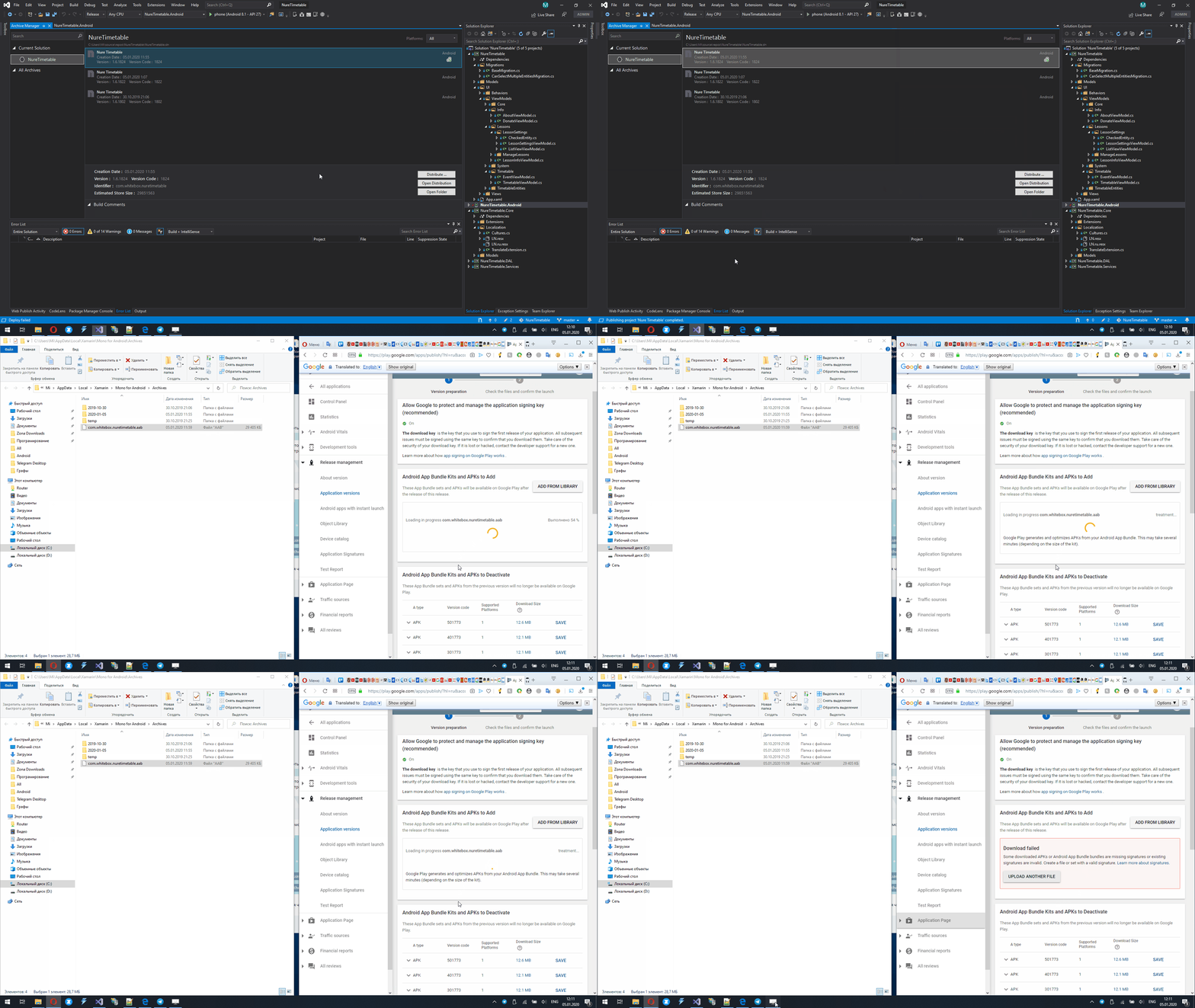
And here me uploading apk that is signed with the same key:

maxkoshevoi
on 5 Jan 2020
@EmilAlipiev @maxkoshevoi I think you are hitting a different issue, a manual workaround is here: https://github.com/xamarin/xamarin-android/issues/3993#issuecomment-567027495
File a new issue if you think it is something else, thanks!
jonathanpeppers
on 6 Jan 2020
Related issues
 glintpursuit
·
4Comments
glintpursuit
·
4Comments
 KSemenenko
·
3Comments
KSemenenko
·
3Comments
 Panasjuk
·
4Comments
Panasjuk
·
4Comments
 rusanov-vladimir
·
4Comments
rusanov-vladimir
·
4Comments
 lin-zy1229
·
3Comments
lin-zy1229
·
3Comments
Most helpful comment
We can probably close this when this one is merged: https://github.com/xamarin/xamarin-android/pull/3146
We are hoping we can get this in a preview soon. We should have a blog post explaining how to try it when it's ready, thanks!