Xamarin-android: Fast deployment not working / very slow
Happens since VS 16.9 and the changes to the Fast deployment
Steps to Reproduce
- Create standard Android app in VS
- Build & deploy
- Make C# code change
- Redeploy
Expected Behavior
Fast build & deploy
Actual Behavior
Slow deploy.
The attached demo app takes a whopping 40 secs to recompile, apply the change and launch this barebone app in the simulator
Version Information
VS 16.9.0
Xamarin.Android 11.2.0.21
Log File
Build started...
1>------ Build started: Project: App1, Configuration: Debug Any CPU ------
1>  App1 -> C:\Users\***\Desktop\App1\bin\Debug\App1.dll
2>Starting deployment to Pixel_4_API_29 ...
2>Deploying to Pixel_4_API_29 ...
Build started.
Project "App1.csproj" (Install target(s)):
Found Java SDK version 1.8.0.
Found Java SDK version 1.8.0.
  PackageName: com.companyname.app1
Dex Fast Deployment Enabled: False
MonoAndroid Tools: C:\Program Files (x86)\Microsoft Visual Studio\2019\Enterprise\MSBuild\Xamarin\Android\
Android Platform API level: 30
TargetFrameworkVersion: v11.0
Android NDK: E:\android-sdk
dk-bundle\
Android SDK: E:\android-sdk\
Android SDK Build Tools: E:\android-sdk\build-tools\30.0.2\
Java SDK: C:\Program Files\Android\jdk\microsoft_dist_openjdk_1.8.0.25\
Application Java class: android.app.Application
Touching "obj\Debug\110\stamp\_ResolveLibraryProjectImports.stamp".
Skipping target "_BuildLibraryImportsCache" because all output files are up-to-date with respect to the input files.
Skipping target "_GenerateLayoutBindings" because it has no outputs.
Touching "obj\Debug\110\stamp\_ConvertResourcesCases.stamp".
Touching "obj\Debug\110\R.cs.flag".
  Adding assembly reference for App1, recursively...
  Adding assembly reference for Java.Interop, recursively...
  Adding assembly reference for Mono.Android, recursively...
    Adding assembly reference for System.Net.Http, recursively...
    Adding assembly reference for System.Drawing.Common, recursively...
    Adding assembly reference for System.Runtime.Serialization, recursively...
      Adding assembly reference for System.ServiceModel.Internals, recursively...
  Adding assembly reference for mscorlib, recursively...
  Adding assembly reference for System.Core, recursively...
  Adding assembly reference for System, recursively...
    Adding assembly reference for Mono.Security, recursively...
  Adding assembly reference for System.Numerics, recursively...
  Adding assembly reference for System.Numerics.Vectors, recursively...
  Adding assembly reference for System.Runtime, recursively...
    Adding assembly reference for System.ComponentModel.Composition, recursively...
  Adding assembly reference for System.Xml, recursively...
  Adding assembly reference for Xamarin.AndroidX.Activity, recursively...
  Adding assembly reference for Xamarin.AndroidX.Annotation, recursively...
  Adding assembly reference for Xamarin.AndroidX.AppCompat.AppCompatResources, recursively...
  Adding assembly reference for Xamarin.AndroidX.AppCompat, recursively...
  Adding assembly reference for Xamarin.AndroidX.Arch.Core.Common, recursively...
  Adding assembly reference for Xamarin.AndroidX.Arch.Core.Runtime, recursively...
  Adding assembly reference for Xamarin.AndroidX.AsyncLayoutInflater, recursively...
  Adding assembly reference for Xamarin.AndroidX.Browser, recursively...
  Adding assembly reference for Xamarin.AndroidX.CardView, recursively...
  Adding assembly reference for Xamarin.AndroidX.Collection, recursively...
  Adding assembly reference for Xamarin.AndroidX.CoordinatorLayout, recursively...
  Adding assembly reference for Xamarin.AndroidX.Core, recursively...
  Adding assembly reference for Xamarin.AndroidX.CursorAdapter, recursively...
  Adding assembly reference for Xamarin.AndroidX.CustomView, recursively...
  Adding assembly reference for Xamarin.AndroidX.DocumentFile, recursively...
  Adding assembly reference for Xamarin.AndroidX.DrawerLayout, recursively...
  Adding assembly reference for Xamarin.AndroidX.Fragment, recursively...
  Adding assembly reference for Xamarin.AndroidX.Interpolator, recursively...
  Adding assembly reference for Xamarin.AndroidX.Legacy.Support.Core.UI, recursively...
  Adding assembly reference for Xamarin.AndroidX.Legacy.Support.Core.Utils, recursively...
  Adding assembly reference for Xamarin.AndroidX.Lifecycle.Common, recursively...
  Adding assembly reference for Xamarin.AndroidX.Lifecycle.LiveData.Core, recursively...
  Adding assembly reference for Xamarin.AndroidX.Lifecycle.Runtime, recursively...
  Adding assembly reference for Xamarin.AndroidX.Lifecycle.ViewModel, recursively...
  Adding assembly reference for Xamarin.AndroidX.Lifecycle.ViewModelSavedState, recursively...
  Adding assembly reference for Xamarin.AndroidX.Loader, recursively...
  Adding assembly reference for Xamarin.AndroidX.LocalBroadcastManager, recursively...
  Adding assembly reference for Xamarin.AndroidX.MultiDex, recursively...
  Adding assembly reference for Xamarin.AndroidX.Print, recursively...
  Adding assembly reference for Xamarin.AndroidX.RecyclerView, recursively...
  Adding assembly reference for Xamarin.AndroidX.SavedState, recursively...
  Adding assembly reference for Xamarin.AndroidX.SlidingPaneLayout, recursively...
  Adding assembly reference for Xamarin.AndroidX.SwipeRefreshLayout, recursively...
  Adding assembly reference for Xamarin.AndroidX.Transition, recursively...
  Adding assembly reference for Xamarin.AndroidX.VectorDrawable.Animated, recursively...
  Adding assembly reference for Xamarin.AndroidX.VectorDrawable, recursively...
  Adding assembly reference for Xamarin.AndroidX.VersionedParcelable, recursively...
  Adding assembly reference for Xamarin.AndroidX.ViewPager, recursively...
  Adding assembly reference for Xamarin.Essentials, recursively...
  Adding assembly reference for Xamarin.Google.Android.Material, recursively...
  Adding assembly reference for Xamarin.Google.Guava.ListenableFuture, recursively...
Skipping target "_CopyConfigFiles" because it has no inputs.
Skipping target "_ConvertPdbFiles" because it has no outputs.
Skipping target "_CopyConfigFiles" because it has no inputs.
Skipping target "_ConvertPdbFiles" because it has no outputs.
Touching "obj\Debug\110\stamp\_GenerateJavaStubs.stamp".
C:\Program Files\Android\jdk\microsoft_dist_openjdk_1.8.0.25\bin\java.exe -cp "C:\Program Files (x86)\Microsoft Visual Studio\2019\Enterprise\MSBuild\Xamarin\Android\manifestmerger.jar" com.xamarin.manifestmerger.Main obj\Debug\110\android\manifestmerger.rsp
Skipping target "_ConvertCustomView" because all output files are up-to-date with respect to the input files.
Copying file from "C:\Program Files (x86)\Microsoft Visual Studio\2019\Enterprise\Common7\IDE\ReferenceAssemblies\Microsoft\Framework\MonoAndroid\v11.0\mono.android.jar" to "C:\Users\***\Desktop\App1\obj\Debug\110\android\bin\mono.android.jar".
Touching "obj\Debug\110\android\bin\mono.android.jar".
Touching "obj\Debug\110\static.flag".
Touching "obj\Debug\110\stamp\_GeneratePackageManagerJava.stamp".
Skipping target "_GenerateAndroidAssetsDir" because it has no outputs.
Touching "obj\Debug\110\android\bin\packaged_resources".
Skipping target "_CompileJava" because all output files are up-to-date with respect to the input files.
Deleting file "obj\Debug\110\android\bin\classes.dex".
C:\Program Files\Android\jdk\microsoft_dist_openjdk_1.8.0.25\bin\java.exe -Xmx1G -classpath "C:\Program Files (x86)\Microsoft Visual Studio\2019\Enterprise\MSBuild\Xamarin\Android\r8.jar" com.android.tools.r8.D8 --debug --min-api 23 --output obj\Debug\110\android\bin\ --lib E:\android-sdk\platforms\android-30\android.jar obj\Debug\110\android\bin\classes.zip "C:\Program Files (x86)\Microsoft Visual Studio\2019\Enterprise\Common7\IDE\ReferenceAssemblies\Microsoft\Framework\MonoAndroid\v11.0\mono.android.jar" "C:\Program Files (x86)\Microsoft Visual Studio\2019\Enterprise\MSBuild\Xamarin\Android\\java_runtime.jar" C:\Users\***\.nuget\packages\xamarin.google.guava.listenablefuture\1.0.0.2\buildTransitive\monoandroid50\guava-listenablefuture.jar C:\Users\***\.nuget\packages\xamarin.androidx.annotation\1.1.0.7\buildTransitive\monoandroid90\..\..\jar\androidx.annotation.annotation.jar C:\Users\***\.nuget\packages\xamarin.androidx.collection\1.1.0.5\buildTransitive\monoandroid90\..\..\jar\androidx.collection.collection.jar C:\Users\***\.nuget\packages\xamarin.androidx.lifecycle.common\2.2.0.3\buildTransitive\monoandroid90\..\..\jar\androidx.lifecycle.lifecycle-common.jar C:\Users\***\.nuget\packages\xamarin.androidx.arch.core.common\2.1.0.6\buildTransitive\monoandroid90\..\..\jar\androidx.arch.core.core-common.jar obj\Debug\110\lp\41\jl\classes.jar obj\Debug\110\lp\42\jl\classes.jar obj\Debug\110\lp\43\jl\classes.jar obj\Debug\110\lp\44\jl\classes.jar obj\Debug\110\lp\45\jl\classes.jar obj\Debug\110\lp\46\jl\classes.jar obj\Debug\110\lp\47\jl\classes.jar obj\Debug\110\lp\48\jl\classes.jar obj\Debug\110\lp\49\jl\classes.jar obj\Debug\110\lp\50\jl\classes.jar obj\Debug\110\lp\51\jl\classes.jar obj\Debug\110\lp\52\jl\classes.jar obj\Debug\110\lp\53\jl\classes.jar obj\Debug\110\lp\54\jl\classes.jar obj\Debug\110\lp\55\jl\classes.jar obj\Debug\110\lp\56\jl\classes.jar obj\Debug\110\lp\57\jl\classes.jar obj\Debug\110\lp\58\jl\classes.jar obj\Debug\110\lp\59\jl\classes.jar obj\Debug\110\lp\60\jl\classes.jar obj\Debug\110\lp\61\jl\classes.jar obj\Debug\110\lp\62\jl\classes.jar obj\Debug\110\lp\63\jl\classes.jar obj\Debug\110\lp\64\jl\classes.jar obj\Debug\110\lp\65\jl\classes.jar obj\Debug\110\lp\66\jl\classes.jar obj\Debug\110\lp\67\jl\classes.jar obj\Debug\110\lp\68\jl\classes.jar obj\Debug\110\lp\69\jl\classes.jar obj\Debug\110\lp\70\jl\classes.jar obj\Debug\110\lp\71\jl\classes.jar obj\Debug\110\lp\72\jl\classes.jar obj\Debug\110\lp\73\jl\classes.jar obj\Debug\110\lp\74\jl\classes.jar
Warning in obj\Debug\110\lp\74\jl\classes.jar:androidx/browser/browseractions/BrowserServiceFileProvider.class:
  Type `androidx.concurrent.futures.ResolvableFuture` was not found, it is required for default or static interface methods desugaring of `Landroidx/browser/browseractions/BrowserServiceFileProvider;saveBitmap(Landroid/content/Context;Landroid/graphics/Bitmap;Ljava/lang/String;I)Landroidx/concurrent/futures/ResolvableFuture;`
Warning in obj\Debug\110\lp\74\jl\classes.jar:androidx/browser/trusted/ConnectionHolder.class:
  Type `androidx.concurrent.futures.CallbackToFutureAdapter` was not found, it is required for default or static interface methods desugaring of `Landroidx/browser/trusted/ConnectionHolder;getServiceWrapper()Lcom/google/common/util/concurrent/ListenableFuture;`
Warning in synthesized for lambda desugaring:
  Type `androidx.concurrent.futures.CallbackToFutureAdapter$Resolver` was not found, it is required for default or static interface methods desugaring of `androidx.browser.trusted.-$$Lambda$ConnectionHolder$Rp3Hxy1AUk9cWatAvfzHyT3B2KI`
Touching "obj\Debug\110\stamp\_CompileToDalvik.stamp".
Deleting file "bin\Debug\com.companyname.app1.apk".
Copying file from "C:\Users\***\Desktop\App1\obj\Debug\110\android\bin\com.companyname.app1.apk" to "C:\Users\***\Desktop\App1\bin\Debug\com.companyname.app1.apk".
Creating "obj\Debug\110\android_debug_keystore.flag" because "AlwaysCreate" was specified.
Deleting file "C:\Users\***\Desktop\App1\bin\Debug\com.companyname.app1-Signed.apk".
E:\android-sdk\build-tools\30.0.2\zipalign.exe -p 4 "C:\Users\***\Desktop\App1\obj\Debug\110\android\bin\com.companyname.app1.apk" "bin\Debug\\com.companyname.app1-Signed.apk"
C:\Program Files\Android\jdk\microsoft_dist_openjdk_1.8.0.25\bin\java.exe -jar "C:\Program Files (x86)\Microsoft Visual Studio\2019\Enterprise\MSBuild\Xamarin\Android\apksigner.jar" sign --ks "C:\Users\***\AppData\Local\Xamarin\Mono for Android\debug.keystore" --ks-pass pass:android --ks-key-alias androiddebugkey --key-pass pass:android --min-sdk-version 23 --max-sdk-version 30  C:\Users\***\Desktop\App1\bin\Debug\com.companyname.app1-Signed.apk
Signed android package 'bin\Debug\com.companyname.app1-Signed.apk'
Using cached value from RegisterTaskObject
Found device: emulator-5554
Creating "obj\Debug\110\upload.flag" because "AlwaysCreate" was specified.
Done building project "App1.csproj".
Build succeeded.
2>Deployment was successful to Pixel_4_API_29.
========== Build: 1 succeeded, 0 failed, 0 up-to-date, 0 skipped ==========
========== Deploy: 1 succeeded, 0 failed, 0 skipped ==========
Also, 2 questions:
- It seems like the
Shared RuntimeandXamarin.Android API-XX Supportpackages are no longer installed onto the device. I've seen in this PR that this is expected behavior for theShared Runtime. Is it also for theXamarin.Android API-XX Supportpackages? - I've seen that the Visual Studio UI doesn't offer a toggle for the "Use shared runtime" settings which toggles the
AndroidUseSharedRuntimeproperty in the csproj. Is this property now obsolete and can be removed? The default template still includes it
 tipa
tipa
All 60 comments
@tipa
I suspect you are hitting the same problem as https://github.com/xamarin/xamarin-android/issues/5532#issuecomment-793620890.
We found that on certain devices (mostly Samsung) the broadcast which gets the external directory was taking 30+ seconds to complete.
This broadcast is no longer required since the removal of the SharedRuntime.
There are some patched files attached to that issue which include the changes we made to remove the broadcast.
You can give those a try if you are willing. If you do remember to backup the existing files.
If it is still a problem we will need a full diagnostic deployment log in order to figure out where the slowdown is.
The following command should produce a msbuild.binlog file which the required data.
msbuild <foo.csproj> /restore /t:Install /bl /p=_FastDeploymentDiagnosticLogging=true
Please attach the file to this issue (you might have to zip it first).
You are correct the AndroidUseSharedRuntime is now redundant.
 dellis1972
on 9 Mar 2021
dellis1972
on 9 Mar 2021
The Xamarin.Android API-XX Support package are also redundant. So that is expected behaviour as well
dellis1972
on 9 Mar 2021
The fixed files we included in main by https://github.com/xamarin/xamarin-android/pull/5696
dellis1972
on 9 Mar 2021
Thanks for your quick replay.
I do not experience any hangs and the problem occurs on various devices, I tested on the default simulator mainly.
I replaced the files anyways, but this caused VS to not start correctly any more. Errors like these seem to cause the problem:
A MEF Component threw an exception at runtime: Microsoft.VisualStudio.Composition.CompositionFailedException: An exception was thrown while initializing part "Xamarin.VisualStudio.Android.AndroidVirtualDeviceProvider". ---> System.IO.FileLoadException: Could not load file or assembly 'Mono.AndroidTools, Version=1.0.0.0, Culture=neutral, PublicKeyToken=0cb85e4f39dfce87' or one of its dependencies. Operation is not supported. (Exception from HRESULT: 0x80131515) ---> System.IO.FileLoadException: Could not load file or assembly 'file:///C:\PROGRAM FILES (X86)\MICROSOFT VISUAL STUDIO\2019\ENTERPRISE\COMMON7\IDE\EXTENSIONS\XAMARIN.VISUALSTUDIO\Mono.AndroidTools.dll' or one of its dependencies. Operation is not supported. (Exception from HRESULT: 0x80131515) ---> System.NotSupportedException: An attempt was made to load an assembly from a network location which would have caused the assembly to be sandboxed in previous versions of the .NET Framework. This release of the .NET Framework does not enable CAS policy by default, so this load may be dangerous. If this load is not intended to sandbox the assembly, please enable the loadFromRemoteSources switch. See http://go.microsoft.com/fwlink/?LinkId=155569 for more information.
   --- End of inner exception stack trace ---
   at System.Reflection.RuntimeAssembly._nLoad(AssemblyName fileName, String codeBase, Evidence assemblySecurity, RuntimeAssembly locationHint, StackCrawlMark& stackMark, IntPtr pPrivHostBinder, Boolean throwOnFileNotFound, Boolean forIntrospection, Boolean suppressSecurityChecks)
   at System.Reflection.RuntimeAssembly.nLoad(AssemblyName fileName, String codeBase, Evidence assemblySecurity, RuntimeAssembly locationHint, StackCrawlMark& stackMark, IntPtr pPrivHostBinder, Boolean throwOnFileNotFound, Boolean forIntrospection, Boolean suppressSecurityChecks)
   at System.Reflection.RuntimeAssembly.InternalLoadAssemblyName(AssemblyName assemblyRef, Evidence assemblySecurity, RuntimeAssembly reqAssembly, StackCrawlMark& stackMark, IntPtr pPrivHostBinder, Boolean throwOnFileNotFound, Boolean forIntrospection, Boolean suppressSecurityChecks)
   at System.Reflection.RuntimeAssembly.InternalLoadFrom(String assemblyFile, Evidence securityEvidence, Byte[] hashValue, AssemblyHashAlgorithm hashAlgorithm, Boolean forIntrospection, Boolean suppressSecurityChecks, StackCrawlMark& stackMark)
   at System.Reflection.Assembly.LoadFrom(String assemblyFile)
   at Microsoft.VisualStudio.Platform.VsAppDomainManager.FindAssembly(String name, IEnumerable`1 probingPaths, Boolean logTelemetry)
   at Microsoft.VisualStudio.Platform.VsAppDomainManager.InnerResolveHandler(String name)
   at Microsoft.VisualStudio.Platform.VsAppDomainManager.ResolveHandler(Object sender, ResolveEventArgs args)
   at System.AppDomain.OnAssemblyResolveEvent(RuntimeAssembly assembly, String assemblyFullName)
--- End of stack trace from previous location where exception was thrown ---
   at Microsoft.VisualStudio.Telemetry.WindowsErrorReporting.WatsonReport.GetClrWatsonExceptionInfo(Exception exceptionObject)
   --- End of inner exception stack trace ---
   at Xamarin.VisualStudio.Android.AndroidVirtualDeviceProvider..ctor(IAndroidProperties androidProperties, IAndroidVirtualDeviceProviderConfiguration config, IAndroidToolsService androidService, ITimerFactory timerFactory, IProcessManager processManager, JoinableTaskContext taskContext, ISolutionState solutionState, IEventStream stream, IAccelerationManager accelerationManager, IAndroidDeviceManagerTool deviceManagerTool, IBuildService buildService)
   --- End of inner exception stack trace ---
   at Microsoft.VisualStudio.Composition.RuntimeExportProviderFactory.RuntimeExportProvider.RuntimePartLifecycleTracker.CreateValue()
   at Microsoft.VisualStudio.Composition.ExportProvider.PartLifecycleTracker.Create()
   at Microsoft.VisualStudio.Composition.ExportProvider.PartLifecycleTracker.MoveNext(PartLifecycleState nextState)
   at Microsoft.VisualStudio.Composition.ExportProvider.PartLifecycleTracker.MoveToState(PartLifecycleState requiredState)
   at Microsoft.VisualStudio.Composition.ExportProvider.PartLifecycleTracker.GetValueReadyToExpose()
   at Microsoft.VisualStudio.Composition.RuntimeExportProviderFactory.RuntimeExportProvider.<>c__DisplayClass15_0.<GetExportedValueHelper>b__0()
   at Microsoft.VisualStudio.Composition.RuntimeExportProviderFactory.RuntimeExportProvider.GetValueForImportElement(RuntimePartLifecycleTracker importingPartTracker, RuntimeImport import, RuntimeExport export, Func`3 lazyFactory)
   at Microsoft.VisualStudio.Composition.RuntimeExportProviderFactory.RuntimeExportProvider.GetValueForImportSite(RuntimePartLifecycleTracker importingPartTracker, RuntimeImport import)
   at Microsoft.VisualStudio.Composition.RuntimeExportProviderFactory.RuntimeExportProvider.RuntimePartLifecycleTracker.<CreateValue>b__11_0(RuntimeImport import)
   at System.Linq.Enumerable.WhereSelectArrayIterator`2.MoveNext()
   at System.Linq.Buffer`1..ctor(IEnumerable`1 source)
   at System.Linq.Enumerable.ToArray[TSource](IEnumerable`1 source)
   at Microsoft.VisualStudio.Composition.RuntimeExportProviderFactory.RuntimeExportProvider.RuntimePartLifecycleTracker.CreateValue()
   at Microsoft.VisualStudio.Composition.ExportProvider.PartLifecycleTracker.Create()
   at Microsoft.VisualStudio.Composition.ExportProvider.PartLifecycleTracker.MoveNext(PartLifecycleState nextState)
   at Microsoft.VisualStudio.Composition.ExportProvider.PartLifecycleTracker.MoveToState(PartLifecycleState requiredState)
   at Microsoft.VisualStudio.Composition.ExportProvider.PartLifecycleTracker.GetValueReadyToExpose()
   at Microsoft.VisualStudio.Composition.RuntimeExportProviderFactory.RuntimeExportProvider.<>c__DisplayClass15_0.<GetExportedValueHelper>b__0()
Here's the binlog:
msbuild.zip
tipa
on 9 Mar 2021
@tipa what version of VS 2019 d16-9 are you running?
Did you replace the files in all the locations mentioned? It looks like there is one missing.
I'll take a look at the build log
dellis1972
on 9 Mar 2021
I am running 16.9.0 - the latest stable
I replaced all the files in all 4 folders but I will try again
tipa
on 9 Mar 2021
@tipa
Looking at the build log that is for a fresh install of the app, was that a redeploy after a change?.
DEBUG RunShellCommand 4e2486ed "run-as" "com.companyname.app1" "pwd". [7ms] (TaskId:250)
Package com.companyname.app1 was not installed. (TaskId:250)
First deploys we expect would be slow as it will be like installing the Shared Runtime and Platform Package and the App all at the same time. The new system now has to deploy all the runtime files.
This should only happen on the first install of the app. If you do a C# change it should not reinstall the apk and just install the changed assemblies.
dellis1972
on 9 Mar 2021
Also , do you have the "preserve data/cache between application deploys" setting enabled in the IDE Options/Preferences?
dellis1972
on 9 Mar 2021
I replaced all the files in all 4 folders but I will try again
Tried again but VS still won't open.
Looking at the build log that is for a fresh install of the app, was that a redeploy after a change?.
Perhaps. I now built and deployed the app via VS19.
Then I made a code change and saved it.
Then I executed the following command via Powershell:
& 'C:\Program Files (x86)\Microsoft Visual Studio\2019\Enterprise\MSBuild\Current\Bin\MSBuild.exe' C:\Users\timop\Desktop\App1\App1.csproj /restore /t:Install /bl /p:_FastDeploymentDiagnosticLogging=true
Binlog: msbuild.zip
But it didn't deploy the app to the simulator ...
I then deployed the app manually and ran the command again, this time it ran much longer. binlog:
msbuild (2).zip
But again it didn't deploy the app to the simulator and doing so manually took quite a while as well
Also , do you have the "preserve data/cache between application deploys" setting enabled in the IDE Options/Preferences?
Where do I find that setting?
tipa
on 9 Mar 2021
@tipa according to the https://github.com/xamarin/xamarin-android/files/6109463/msbuild.zip it installed the app successfully and copied over files and only those changed
FastDev of obj\Debug\110\android\assets\App1.dll returned: wrote [131072] recieved [75222] time [6189114]
   (TaskId:155)
  NotifySync CopyFile obj\Debug\110\android\assets\App1.dll. [76ms] (TaskId:155)
  Local Modified Time '1615303024399' is newer than '1615302937712'. (TaskId:155)
  NotifySync SkipCopyFile obj\Debug\110\android\assets\Java.Interop.dll=>Java.Interop.dll file is up to date. [0ms] (TaskId:155)
  NotifySync SkipCopyFile obj\Debug\110\android\assets\Mono.Android.dll=>Mono.Android.dll file is up to date. [0ms] (TaskId:155)
So its strange you are seeing it not deploying.
you can access the Preserve setting via Tools->Xamarin->Android Settings. It should be on by default.
I tested those dll's against this version of VS 2019 d16-9
Microsoft Visual Studio Professional 2019
Version 16.9.0
VisualStudio.16.Release/16.9.0+31025.194
Microsoft .NET Framework
Version 4.8.03752

Installed Version: Professional

Visual C++ 2019   00435-60000-00000-AA432
Microsoft Visual C++ 2019

ADL Tools Service Provider   1.0
This package contains services used by Data Lake tools

ASA Service Provider   1.0

ASP.NET and Web Tools 2019   16.9.687.37626
ASP.NET and Web Tools 2019

ASP.NET Core Razor Language Services   16.1.0.2107702+c4adaa061f13292143de82a96c71341e50bc4032
Provides languages services for ASP.NET Core Razor.

ASP.NET Web Frameworks and Tools 2019   16.9.687.37626
For additional information, visit https://www.asp.net/

Azure App Service Tools v3.0.0   16.9.687.37626
Azure App Service Tools v3.0.0

Azure Data Lake Node   1.0
This package contains the Data Lake integration nodes for Server Explorer.

Azure Data Lake Tools for Visual Studio   2.6.1000.0
Microsoft Azure Data Lake Tools for Visual Studio

Azure Functions and Web Jobs Tools   16.9.687.37626
Azure Functions and Web Jobs Tools

Azure Stream Analytics Tools for Visual Studio   2.6.1000.0
Microsoft Azure Stream Analytics Tools for Visual Studio

C# Tools   3.9.0-6.21124.20+db94f4cc8c78a7cd8cf9cfdae091158d2ba9d974
C# components used in the IDE. Depending on your project type and settings, a different version of the compiler may be used.

Common Azure Tools   1.10
Provides common services for use by Azure Mobile Services and Microsoft Azure Tools.

Dotfuscator Community Edition   5.44.0.10087-6530a8d80a
PreEmptive Protection - Dotfuscator CE

Extensibility Message Bus   1.2.6 (master@34d6af2)
Provides common messaging-based MEF services for loosely coupled Visual Studio extension components communication and integration.

Fabric.DiagnosticEvents   1.0
Fabric Diagnostic Events

ILSpy.AddIn   1.0
Integration of the ILSpy Decompiler into Visual Studio.

IntelliCode Extension   1.0
IntelliCode Visual Studio Extension Detailed Info

Microsoft Azure HDInsight Azure Node   2.6.1000.0
HDInsight Node under Azure Node

Microsoft Azure Hive Query Language Service   2.6.1000.0
Language service for Hive query

Microsoft Azure Service Fabric Tools for Visual Studio   16.0
Microsoft Azure Service Fabric Tools for Visual Studio

Microsoft Azure Stream Analytics Language Service   2.6.1000.0
Language service for Azure Stream Analytics

Microsoft Azure Stream Analytics Node   1.0
Azure Stream Analytics Node under Azure Node

Microsoft Azure Tools   2.9
Microsoft Azure Tools for Microsoft Visual Studio 2019 - v2.9.40218.1

Microsoft Continuous Delivery Tools for Visual Studio   0.4
Simplifying the configuration of Azure DevOps pipelines from within the Visual Studio IDE.

Microsoft JVM Debugger   1.0
Provides support for connecting the Visual Studio debugger to JDWP compatible Java Virtual Machines

Microsoft Library Manager   2.1.113+g422d40002e.RR
Install client-side libraries easily to any web project

Microsoft MI-Based Debugger   1.0
Provides support for connecting Visual Studio to MI compatible debuggers

Microsoft Visual C++ Wizards   1.0
Microsoft Visual C++ Wizards

Microsoft Visual Studio Tools for Containers   1.1
Develop, run, validate your ASP.NET Core applications in the target environment. F5 your application directly into a container with debugging, or CTRL + F5 to edit & refresh your app without having to rebuild the container.

Microsoft Visual Studio VC Package   1.0
Microsoft Visual Studio VC Package

Mono Debugging for Visual Studio   16.9.7 (df23ba6)
Support for debugging Mono processes with Visual Studio.

NuGet Package Manager   5.9.0
NuGet Package Manager in Visual Studio. For more information about NuGet, visit https://docs.nuget.org/

Project System Tools   1.0
Tools for working with C#, VisualBasic, and F# projects.

ProjectServicesPackage Extension   1.0
ProjectServicesPackage Visual Studio Extension Detailed Info

SQL Server Data Tools   16.0.62102.01130
Microsoft SQL Server Data Tools

Test Adapter for Boost.Test   1.0
Enables Visual Studio's testing tools with unit tests written for Boost.Test.  The use terms and Third Party Notices are available in the extension installation directory.

Test Adapter for Google Test   1.0
Enables Visual Studio's testing tools with unit tests written for Google Test.  The use terms and Third Party Notices are available in the extension installation directory.

ToolWindowHostedEditor   1.0
Hosting json editor into a tool window

TypeScript Tools   16.0.30201.2001
TypeScript Tools for Microsoft Visual Studio

Visual Basic Tools   3.9.0-6.21124.20+db94f4cc8c78a7cd8cf9cfdae091158d2ba9d974
Visual Basic components used in the IDE. Depending on your project type and settings, a different version of the compiler may be used.

Visual F# Tools   16.9.0-beta.21102.9+7ce7132f1459095e635194d09d6f73265352029a
Microsoft Visual F# Tools

Visual Studio Code Debug Adapter Host Package   1.0
Interop layer for hosting Visual Studio Code debug adapters in Visual Studio

Visual Studio Container Tools Extensions   1.0
View, manage, and diagnose containers within Visual Studio.

Visual Studio Tools for CMake   1.0
Visual Studio Tools for CMake

Visual Studio Tools for Containers   1.0
Visual Studio Tools for Containers

Visual Studio Tools for Kubernetes   1.0
Visual Studio Tools for Kubernetes

VisualStudio.DeviceLog   1.0
Information about my package

VisualStudio.Foo   1.0
Information about my package

VisualStudio.Mac   1.0
Mac Extension for Visual Studio

Xamarin   16.9.000.271 (d16-9@863670b)
Visual Studio extension to enable development for Xamarin.iOS and Xamarin.Android.

Xamarin Designer   16.9.0.316 (remotes/origin/d16-9@fdbf64026)
Visual Studio extension to enable Xamarin Designer tools in Visual Studio.

Xamarin Templates   16.9.68 (8e9b569)
Templates for building iOS, Android, and Windows apps with Xamarin and Xamarin.Forms.

Xamarin.Android SDK   11.2.0.21 (d16-9/93eab59)
Xamarin.Android Reference Assemblies and MSBuild support.
    Mono: 5e9cb6d
    Java.Interop: xamarin/java.interop/d16-9@d6d86b2
    ProGuard: Guardsquare/proguard/v7.0.1@912d149
    SQLite: xamarin/sqlite/3.34.1@daff8f4
    Xamarin.Android Tools: xamarin/xamarin-android-tools/d16-9@9d8924d


Xamarin.iOS and Xamarin.Mac SDK   14.14.2.5 (3836759d4)
Xamarin.iOS and Xamarin.Mac Reference Assemblies and MSBuild support.
Looks like its deploying to a device. (4e2486ed) not an emulator?
Found device: 4e2486ed (TaskId:251)
@tipa according to the https://github.com/xamarin/xamarin-android/files/6109463/msbuild.zip it installed the app successfully and copied over files and only those changed
FastDev of obj\Debug\110\android\assets\App1.dll returned: wrote [131072] recieved [75222] time [6189114]
   (TaskId:155)
  NotifySync CopyFile obj\Debug\110\android\assets\App1.dll. [76ms] (TaskId:155)
  Local Modified Time '1615303024399' is newer than '1615302937712'. (TaskId:155)
  NotifySync SkipCopyFile obj\Debug\110\android\assets\Java.Interop.dll=>Java.Interop.dll file is up to date. [0ms] (TaskId:155)
  NotifySync SkipCopyFile obj\Debug\110\android\assets\Mono.Android.dll=>Mono.Android.dll file is up to date. [0ms] (TaskId:155)
So its strange you are seeing it not deploying.
I apologize, I had a physical device plugged in to which the script deployed, while in VS the simulator was selected. Now the script updates and pushes the new version to the simulator within seconds, but the slow builds persist when using the build+deploy button within VS
you can access the Preserve setting via
Tools->Xamarin->Android Settings. It should be on by default.
Yes this setting was and is enabled
tipa
on 9 Mar 2021
@tipa one question did you "unblock" the zip file which had the new dll's in it before extracting them? I'm just wondering if the system is blocking them somehow. The error is very strange
Could not load file or assembly 'file:///C:\PROGRAM FILES (X86)\MICROSOFT VISUAL STUDIO\2019\ENTERPRISE\COMMON7\IDE\EXTENSIONS\XAMARIN.VISUALSTUDIO\Mono.AndroidTools.dll' or one of its dependencies. Operation is not supported. (Exception from HRESULT: 0x80131515) --->
System.NotSupportedException: An attempt was made to load an assembly from a network location which would have caused the assembly to be sandboxed in previous versions of the .NET Framework.
This release of the .NET Framework does not enable CAS policy by default, so this load may be dangerous.
If this load is not intended to sandbox the assembly, please enable the loadFromRemoteSources switch.
See http://go.microsoft.com/fwlink/?LinkId=155569 for more information.
What do you mean with "unblock" / how can I do that?
tipa
on 9 Mar 2021
Right Click on the XamarinAndroidDebuggerHangPatch.zip file you downloaded. Go to Properties and right at the bottom of that Properties window is a little checkbox called "Unblock" , check it then click ok.
Its a safety measure windows has to stop unknown executables running. That might be causing the problem.
Once you've done that reextract the files and then copy them into place.
dellis1972
on 9 Mar 2021
That in fact worked - thanks! Now VS launches with the replaced files.
However the original problem persists, builds after code changes triggered through VS are still slow.
As I said, they are fast when using the command line
tipa
on 9 Mar 2021
@tipa so I'm going to need the Diagnostic build log for the Deployment from within the IDE and all the other Xamarin/Xamarin Diagnostics logs from the Output Window.
You will need to add
<_FastDeploymentDiagnosticLogging>true</_FastDeploymentDiagnosticLogging>
to the first <PropertyGroup> section in your csproj. So that we get the additional log information.
You will also need to change your default Build Log Verbosity to Diagnostic.
Set Tools > Options > Project and Solutions [section] > Build and Run [subsection] > MSBuild project build output verbosity to Diagnostic.
dellis1972
on 9 Mar 2021
Is it still required to keep the new .dll files? I am struggling getting the app to build at all now. Visual Studio constantly freezes completely or - after killing it via the Task Manager - fails to run the build or errors out with
The build was cancelled because another Xamarin operation is running. Please try again in a moment.
Impossible to get anything done in this state
tipa
on 9 Mar 2021
It's a complete nightmare when using _FastDeploymentDiagnosticLogging or Diagnostic logging - permanent freezes.
Even though I copied back all the .dll it feels like my VS installation is bricked now.
This is the only log I was able to gather, with "normal" diagnostics:
Build started...
1>------ Build started: Project: App1, Configuration: Debug Any CPU ------
1>  App1 -> C:\Users\timop\Desktop\App1\bin\Debug\App1.dll
2>Starting deployment to OnePlus A5000 ...
2>Deploying to OnePlus A5000 ...
Build started.
Project "App1.csproj" (Install target(s)):
Found Java SDK version 1.8.0.
Found Java SDK version 1.8.0.
  PackageName: com.companyname.app1
Dex Fast Deployment Enabled: False
MonoAndroid Tools: C:\Program Files (x86)\Microsoft Visual Studio\2019\Enterprise\MSBuild\Xamarin\Android\
Android Platform API level: 30
TargetFrameworkVersion: v11.0
Android NDK: E:\android-sdk
dk-bundle\
Android SDK: E:\android-sdk\
Android SDK Build Tools: E:\android-sdk\build-tools\30.0.2\
Java SDK: C:\Program Files\Android\jdk\microsoft_dist_openjdk_1.8.0.25\
Application Java class: android.app.Application
Touching "obj\Debug\110\stamp\_ResolveLibraryProjectImports.stamp".
Skipping target "_BuildLibraryImportsCache" because all output files are up-to-date with respect to the input files.
Skipping target "_GenerateLayoutBindings" because it has no outputs.
Touching "obj\Debug\110\stamp\_ConvertResourcesCases.stamp".
Touching "obj\Debug\110\R.cs.flag".
  Adding assembly reference for App1, recursively...
  Adding assembly reference for Java.Interop, recursively...
  Adding assembly reference for Mono.Android, recursively...
    Adding assembly reference for System.Net.Http, recursively...
    Adding assembly reference for System.Drawing.Common, recursively...
    Adding assembly reference for System.Runtime.Serialization, recursively...
      Adding assembly reference for System.ServiceModel.Internals, recursively...
  Adding assembly reference for mscorlib, recursively...
  Adding assembly reference for System.Core, recursively...
  Adding assembly reference for System, recursively...
    Adding assembly reference for Mono.Security, recursively...
  Adding assembly reference for System.Numerics, recursively...
  Adding assembly reference for System.Numerics.Vectors, recursively...
  Adding assembly reference for System.Runtime, recursively...
    Adding assembly reference for System.ComponentModel.Composition, recursively...
  Adding assembly reference for System.Xml, recursively...
  Adding assembly reference for Xamarin.AndroidX.Activity, recursively...
  Adding assembly reference for Xamarin.AndroidX.Annotation, recursively...
  Adding assembly reference for Xamarin.AndroidX.AppCompat.AppCompatResources, recursively...
  Adding assembly reference for Xamarin.AndroidX.AppCompat, recursively...
  Adding assembly reference for Xamarin.AndroidX.Arch.Core.Common, recursively...
  Adding assembly reference for Xamarin.AndroidX.Arch.Core.Runtime, recursively...
  Adding assembly reference for Xamarin.AndroidX.AsyncLayoutInflater, recursively...
  Adding assembly reference for Xamarin.AndroidX.Browser, recursively...
  Adding assembly reference for Xamarin.AndroidX.CardView, recursively...
  Adding assembly reference for Xamarin.AndroidX.Collection, recursively...
  Adding assembly reference for Xamarin.AndroidX.CoordinatorLayout, recursively...
  Adding assembly reference for Xamarin.AndroidX.Core, recursively...
  Adding assembly reference for Xamarin.AndroidX.CursorAdapter, recursively...
  Adding assembly reference for Xamarin.AndroidX.CustomView, recursively...
  Adding assembly reference for Xamarin.AndroidX.DocumentFile, recursively...
  Adding assembly reference for Xamarin.AndroidX.DrawerLayout, recursively...
  Adding assembly reference for Xamarin.AndroidX.Fragment, recursively...
  Adding assembly reference for Xamarin.AndroidX.Interpolator, recursively...
  Adding assembly reference for Xamarin.AndroidX.Legacy.Support.Core.UI, recursively...
  Adding assembly reference for Xamarin.AndroidX.Legacy.Support.Core.Utils, recursively...
  Adding assembly reference for Xamarin.AndroidX.Lifecycle.Common, recursively...
  Adding assembly reference for Xamarin.AndroidX.Lifecycle.LiveData.Core, recursively...
  Adding assembly reference for Xamarin.AndroidX.Lifecycle.Runtime, recursively...
  Adding assembly reference for Xamarin.AndroidX.Lifecycle.ViewModel, recursively...
  Adding assembly reference for Xamarin.AndroidX.Lifecycle.ViewModelSavedState, recursively...
  Adding assembly reference for Xamarin.AndroidX.Loader, recursively...
  Adding assembly reference for Xamarin.AndroidX.LocalBroadcastManager, recursively...
  Adding assembly reference for Xamarin.AndroidX.MultiDex, recursively...
  Adding assembly reference for Xamarin.AndroidX.Print, recursively...
  Adding assembly reference for Xamarin.AndroidX.RecyclerView, recursively...
  Adding assembly reference for Xamarin.AndroidX.SavedState, recursively...
  Adding assembly reference for Xamarin.AndroidX.SlidingPaneLayout, recursively...
  Adding assembly reference for Xamarin.AndroidX.SwipeRefreshLayout, recursively...
  Adding assembly reference for Xamarin.AndroidX.Transition, recursively...
  Adding assembly reference for Xamarin.AndroidX.VectorDrawable.Animated, recursively...
  Adding assembly reference for Xamarin.AndroidX.VectorDrawable, recursively...
  Adding assembly reference for Xamarin.AndroidX.VersionedParcelable, recursively...
  Adding assembly reference for Xamarin.AndroidX.ViewPager, recursively...
  Adding assembly reference for Xamarin.Essentials, recursively...
  Adding assembly reference for Xamarin.Google.Android.Material, recursively...
  Adding assembly reference for Xamarin.Google.Guava.ListenableFuture, recursively...
Skipping target "_CopyConfigFiles" because it has no inputs.
Skipping target "_ConvertPdbFiles" because it has no outputs.
Skipping target "_CopyConfigFiles" because it has no inputs.
Skipping target "_ConvertPdbFiles" because it has no outputs.
Touching "obj\Debug\110\stamp\_GenerateJavaStubs.stamp".
C:\Program Files\Android\jdk\microsoft_dist_openjdk_1.8.0.25\bin\java.exe -cp "C:\Program Files (x86)\Microsoft Visual Studio\2019\Enterprise\MSBuild\Xamarin\Android\manifestmerger.jar" com.xamarin.manifestmerger.Main obj\Debug\110\android\manifestmerger.rsp
Skipping target "_ConvertCustomView" because all output files are up-to-date with respect to the input files.
Copying file from "C:\Program Files (x86)\Microsoft Visual Studio\2019\Enterprise\Common7\IDE\ReferenceAssemblies\Microsoft\Framework\MonoAndroid\v11.0\mono.android.jar" to "C:\Users\timop\Desktop\App1\obj\Debug\110\android\bin\mono.android.jar".
Touching "obj\Debug\110\android\bin\mono.android.jar".
Touching "obj\Debug\110\static.flag".
Touching "obj\Debug\110\stamp\_GeneratePackageManagerJava.stamp".
Skipping target "_GenerateAndroidAssetsDir" because it has no outputs.
Touching "obj\Debug\110\android\bin\packaged_resources".
Skipping target "_CompileJava" because all output files are up-to-date with respect to the input files.
Deleting file "obj\Debug\110\android\bin\classes.dex".
C:\Program Files\Android\jdk\microsoft_dist_openjdk_1.8.0.25\bin\java.exe -Xmx1G -classpath "C:\Program Files (x86)\Microsoft Visual Studio\2019\Enterprise\MSBuild\Xamarin\Android\r8.jar" com.android.tools.r8.D8 --debug --min-api 23 --output obj\Debug\110\android\bin\ --lib E:\android-sdk\platforms\android-30\android.jar obj\Debug\110\android\bin\classes.zip "C:\Program Files (x86)\Microsoft Visual Studio\2019\Enterprise\Common7\IDE\ReferenceAssemblies\Microsoft\Framework\MonoAndroid\v11.0\mono.android.jar" "C:\Program Files (x86)\Microsoft Visual Studio\2019\Enterprise\MSBuild\Xamarin\Android\\java_runtime.jar" C:\Users\timop\.nuget\packages\xamarin.google.guava.listenablefuture\1.0.0.2\buildTransitive\monoandroid50\guava-listenablefuture.jar C:\Users\timop\.nuget\packages\xamarin.androidx.annotation\1.1.0.7\buildTransitive\monoandroid90\..\..\jar\androidx.annotation.annotation.jar C:\Users\timop\.nuget\packages\xamarin.androidx.collection\1.1.0.5\buildTransitive\monoandroid90\..\..\jar\androidx.collection.collection.jar C:\Users\timop\.nuget\packages\xamarin.androidx.lifecycle.common\2.2.0.3\buildTransitive\monoandroid90\..\..\jar\androidx.lifecycle.lifecycle-common.jar C:\Users\timop\.nuget\packages\xamarin.androidx.arch.core.common\2.1.0.6\buildTransitive\monoandroid90\..\..\jar\androidx.arch.core.core-common.jar obj\Debug\110\lp\41\jl\classes.jar obj\Debug\110\lp\42\jl\classes.jar obj\Debug\110\lp\43\jl\classes.jar obj\Debug\110\lp\44\jl\classes.jar obj\Debug\110\lp\45\jl\classes.jar obj\Debug\110\lp\46\jl\classes.jar obj\Debug\110\lp\47\jl\classes.jar obj\Debug\110\lp\48\jl\classes.jar obj\Debug\110\lp\49\jl\classes.jar obj\Debug\110\lp\50\jl\classes.jar obj\Debug\110\lp\51\jl\classes.jar obj\Debug\110\lp\52\jl\classes.jar obj\Debug\110\lp\53\jl\classes.jar obj\Debug\110\lp\54\jl\classes.jar obj\Debug\110\lp\55\jl\classes.jar obj\Debug\110\lp\56\jl\classes.jar obj\Debug\110\lp\57\jl\classes.jar obj\Debug\110\lp\58\jl\classes.jar obj\Debug\110\lp\59\jl\classes.jar obj\Debug\110\lp\60\jl\classes.jar obj\Debug\110\lp\61\jl\classes.jar obj\Debug\110\lp\62\jl\classes.jar obj\Debug\110\lp\63\jl\classes.jar obj\Debug\110\lp\64\jl\classes.jar obj\Debug\110\lp\65\jl\classes.jar obj\Debug\110\lp\66\jl\classes.jar obj\Debug\110\lp\67\jl\classes.jar obj\Debug\110\lp\68\jl\classes.jar obj\Debug\110\lp\69\jl\classes.jar obj\Debug\110\lp\70\jl\classes.jar obj\Debug\110\lp\71\jl\classes.jar obj\Debug\110\lp\72\jl\classes.jar obj\Debug\110\lp\73\jl\classes.jar obj\Debug\110\lp\74\jl\classes.jar
Warning in obj\Debug\110\lp\74\jl\classes.jar:androidx/browser/browseractions/BrowserServiceFileProvider.class:
  Type `androidx.concurrent.futures.ResolvableFuture` was not found, it is required for default or static interface methods desugaring of `Landroidx/browser/browseractions/BrowserServiceFileProvider;saveBitmap(Landroid/content/Context;Landroid/graphics/Bitmap;Ljava/lang/String;I)Landroidx/concurrent/futures/ResolvableFuture;`
Warning in obj\Debug\110\lp\74\jl\classes.jar:androidx/browser/trusted/ConnectionHolder.class:
  Type `androidx.concurrent.futures.CallbackToFutureAdapter` was not found, it is required for default or static interface methods desugaring of `Landroidx/browser/trusted/ConnectionHolder;getServiceWrapper()Lcom/google/common/util/concurrent/ListenableFuture;`
Warning in synthesized for lambda desugaring:
  Type `androidx.concurrent.futures.CallbackToFutureAdapter$Resolver` was not found, it is required for default or static interface methods desugaring of `androidx.browser.trusted.-$$Lambda$ConnectionHolder$Rp3Hxy1AUk9cWatAvfzHyT3B2KI`
Touching "obj\Debug\110\stamp\_CompileToDalvik.stamp".
Deleting file "bin\Debug\com.companyname.app1.apk".
Copying file from "C:\Users\timop\Desktop\App1\obj\Debug\110\android\bin\com.companyname.app1.apk" to "C:\Users\timop\Desktop\App1\bin\Debug\com.companyname.app1.apk".
Creating "obj\Debug\110\android_debug_keystore.flag" because "AlwaysCreate" was specified.
Deleting file "C:\Users\timop\Desktop\App1\bin\Debug\com.companyname.app1-Signed.apk".
E:\android-sdk\build-tools\30.0.2\zipalign.exe -p 4 "C:\Users\timop\Desktop\App1\obj\Debug\110\android\bin\com.companyname.app1.apk" "bin\Debug\\com.companyname.app1-Signed.apk"
C:\Program Files\Android\jdk\microsoft_dist_openjdk_1.8.0.25\bin\java.exe -jar "C:\Program Files (x86)\Microsoft Visual Studio\2019\Enterprise\MSBuild\Xamarin\Android\apksigner.jar" sign --ks "C:\Users\timop\AppData\Local\Xamarin\Mono for Android\debug.keystore" --ks-pass pass:android --ks-key-alias androiddebugkey --key-pass pass:android --min-sdk-version 23 --max-sdk-version 30  C:\Users\timop\Desktop\App1\bin\Debug\com.companyname.app1-Signed.apk
Signed android package 'bin\Debug\com.companyname.app1-Signed.apk'
Using cached value from RegisterTaskObject
Found device: 4e2486ed
Touching "obj\Debug\110\upload.flag".
Done building project "App1.csproj".
Build succeeded.
2>Deployment was successful to OnePlus A5000.
========== Build: 1 succeeded, 0 failed, 0 up-to-date, 0 skipped ==========
========== Deploy: 1 succeeded, 0 failed, 0 skipped ==========
Btw, slightly unrelated, I've seen that this section references Enhanced Fast Deployment but the link is not working
tipa
on 9 Mar 2021
@tipa
The _FastDeploymentDiagnosticLogging does produce a lot of data, it is probably that setting which is causing the lockup. So Turn that off/remove it from your cproj. If the new dll's didn't help then you can put the old versions back.
We could use this command instead. It should replicate the issue you get in the IDE
msbuild <foo.csproj> /restore "/t:Install;_Run" /bl /p:_FastDeploymentDiagnosticLogging=true
Just let this command run until is completes. It should produce a msbuild.binlog as the other command line one did.
dellis1972
on 9 Mar 2021
Fails with this error but attached the log files anyways:
"C:\Users\timop\Desktop\App1\App1.csproj" (Install;Run target) (1:7) ->
(Run target) ->
  C:\Program Files (x86)\Microsoft Visual Studio\2019\Enterprise\MSBuild\Current\Bin\Microsoft.Common.CurrentVersion.targets(1093,5): error : Cannot run 'C:\Users\timop\Desktop\App1\bin
\Debug\App1.dll' because project output type is not '.exe' [C:\Users\timop\Desktop\App1\App1.csproj]

    0 Warning(s)
    1 Error(s)
I might have been able to build & run through the IDE now, with _FastDeploymentDiagnosticLogging in the csproj, but Diagnostics logging disabled in the VS settings - but where do I find the binlogs?
tipa
on 9 Mar 2021
The target should have been _Run instead of Run. This in an internal target to Xamarin.Android that is used to start android apps. The normal Run target will attempt to launch the app as a console app.
dellis1972
on 9 Mar 2021
That works. However it's fast - under 4 sec to build & deploy. So even if I did find the logs I doubt that they would reveal the problem that happens when deploying inside the IDE
tipa
on 9 Mar 2021
@tipa
Did the app launch when you ran the command from the command line?
If the app didn't launch when you ran it before it's probably because it only ran the Install target. The _Run bit is more than likely where the issue is.
this can happen when you are specifying multiple targets and you con't put them in quotes
/t:Install;_Run vs "/t:Install;_Run"
But now the app is on the device can you try just the run command on its own.
msbuild <foo.csproj> /restore /t:_Run /bl
Sorry if I haven't been clear.
So the current state is that the app quickly builds and deploys/runs using the command prompt.
But in the IDE, it still takes forever. I was able to build & deploy through the IDE with the _FastDeploymentDiagnosticLogging in the .csproj, but now I cannot find the binlog file that it should have created.
tipa
on 9 Mar 2021
@tipa
So when building in the IDE it doesn't output a binlog, it will dump the Deployment to the Output Window. There will be a dropdown in the OutputWindow which allows you to select "Build", "Deploy" , "Xamarin", "Xamarin Diagnostics". If you have output in those for a slow deploy, then that would be helpful.
the other option is to install the Project system Tools Extension from the Tools->Extensions menu.
you can then use it to get access to the builds that VS does https://github.com/dotnet/project-system-tools#features.
@joj any ideas on how we can diagnostic this issue? The fix I did for https://github.com/xamarin/xamarin-android/issues/5532#issuecomment-793620890 didn't seem to work.
dellis1972
on 9 Mar 2021
So when building in the IDE it doesn't output a binlog,
I don't know - maybe it does output a binlog, but I don't know where I can find it. It's not located in the project folder at least.
I built the app with Log level "Detailed" (it would hang when selecting "Diagnostics") and here's the logs from the output window (there was no "Deploy" the dropdown and the "Xamarin" one was empty):
logs.zip
tipa
on 10 Mar 2021
@tipa
looking at those logs it seems that the apk it being installed every time.
If the IDE locks when using diagnostic then the only way to get us the logs we need is to use the Project System Tools extension
https://marketplace.visualstudio.com/items?itemName=VisualStudioProductTeam.ProjectSystemTools
Once installed you can go to View->Other Windows->Build Logging and it will open a new build logging area.
Hit this play button to start recording, then cause the issue:

And you should be able to right-click to save a log. You will need to look for ones which call the Install target.
dellis1972
on 10 Mar 2021
@joj any ideas on how we can diagnostic this issue? The fix I did for #5532 (comment) didn't seem to work.
I always recommend ProjectSystemTools for build issues, so your latest recommendation is what I would do :)
 joj
on 10 Mar 2021
joj
on 10 Mar 2021
App1_Evaluation_2021-03-10T14_36_14.6157779+01_00.zip
Here's those logs
tipa
on 10 Mar 2021
@joj it seems the install target does not appear in the Project System Tools list any ideas why?
dellis1972
on 10 Mar 2021
I'm looking at the code, and we only wait for the device to be ready and then install. I understood from the conversation that the app is actually deployed. Is that right? If it is, Project System Tools should show the Install target, as long as it's started.
joj
on 10 Mar 2021
@joj I just tested it and its not appearing, the Build appears but the Install does. The install log does however appear in the Build tab of the Output Window. But I suspect if we turn on diagnostic logging we will get the hang that has already been reported.
dellis1972
on 10 Mar 2021
Would it be worth trying to reinstall VS given that it only seems to affect me and noone else?
tipa
on 11 Mar 2021
@tipa I don't think reinstalling will help.
One other thing to try can you try turning the logging down to Minimal in Visual Studio. See if that effects anything.
I am wondering if you are seeing the same issue as https://github.com/xamarin/xamarin-android/issues/5609 specifically https://github.com/xamarin/xamarin-android/issues/5609#issuecomment-794581051
dellis1972
on 11 Mar 2021
I have the logging verbosity at "Minimal" by default.
My issue is not that VS hangs - that only happens when I set the logging verbosity to "Diagnostics"
tipa
on 11 Mar 2021
@tipa
What emulator are you using btw? (I assume it happens on device too).
dellis1972
on 11 Mar 2021
I am using the "standard" emulators installed via Android Studio.
It also happens when deploying to my physical test device (OnePlus 5)
tipa
on 11 Mar 2021
@tipa
just to reassure you we've not forgotten about this :)
So the problem we have is that we need the diagnostic logs from the IDE when you deploy. Since the project tools extension is not showing that log (which is weird..) we cannot use it which is a shame because it would be the best option.
What I suspect is happening is that for some reason the fast deployment system _thinks_ that apk needs re-installing and as a result it is redeploying all the assemblies again, that would account for the 40 second delay. The odd thing is this does not seem to happen on the command line.
So what I am going to suggest is that when you take a break for lunch or something (something with a decent interval say an hour) you turn your logging verbosity up to Diagnostic, and set the _FastDeploymentDiagnosticLogging property to true in the csproj. The deploy the app as you normally would during a debug session. The leave it until you come back. I know it looks like the IDE has hung when doing a diagnostic build but it is probably just the main thread being overloaded, it should complete eventually with all the logging data we need.
That data should be in the Output Window and available when you select the Debug dropdown. But if would be safer to grab all the output from all the drop downs, Build, Debug, Xamarin and Xamarin Diagnostics.
If by the time you come back its still hung then we are going to have to try to figure out something else to try and get the diagnostic data we need.
dellis1972
on 16 Mar 2021
Thanks for reassuring me :)
I now was really patient during VS (seemed to) hang and after 10-15 min the build actually finished, with these settings:


Attached the output from the VS extension:
App1_Debug_AnyCPU_Build_2021-03-16T13_55_23.5939075+01_00.zip
RoslynLog-61eb397e-28fa-459b-a57d-8ff9fecc4081.txt
Also copy-pasted the output from all the tabs (that had any content) of the Output Window:
Output Window.zip
I hope this contains any useful information.
I did not wait for an hour like you suggested but I can try to go through the procedure again if your ask me to.
tipa
on 16 Mar 2021
@tipa
That is exactly the kind of stuff we need :)
Looking at the log we see
Target "_Upload" in file "C:\Program Files (x86)\Microsoft Visual Studio\2019\Enterprise\MSBuild\Xamarin\Android\Xamarin.Android.Common.Debugging.targets" from project "C:\Users\timop\Desktop\App1\App1.csproj" (target "Install" depends on it):
Building target "_Upload" completely.
Output file "obj\Debug\110\upload.flag" does not exist.
Was this from a clean build? If so I would expect that to produce a full install of both the apk and all the assemblies.
This can take some time since it is similar to installing the old shared runtime as well as the platform packages.
If this wasn't from a clean build , then the only way our system would remove the upload.flag would be if it detects the
app was uninstalled from the device. This can happen if you manually remove it or if you do a deploy, then switch to another device which doesn't have anything installed.
So the next thing is we need the same kind of logs but we need to do this for an "incremental" build.
This is where we deploy to the device, but then make one small change in some C# code and then deploy again to the same device.
If no other changes are made it should deploy just that assembly that was changed.
There are a few things that might cause this not to happen and produce a full install. For example if the app is not installed on the device or is an old deployment, or if the csproj is modified in some way or if an AndroidResource item is changed (this will cause a full apk install).
So when you collect these logs just try to make sure that only the C# code was changed. I normally just add a space somewhere or add a Console.WriteLine call.
Still keep the Diagnostic and FastDev logging on for this so we get the same kind of information.
dellis1972
on 16 Mar 2021
Happy to hear there was some useful info in there!
It should have been an incremental build, but maybe it didn't work because I changed the csproj and added the property, so I did the test again:
- First I hit the deploy button, to make sure the app is installed and app launched immediately in the simulator:

- Then I did a code change and saved the source file
- Then I started logging in the extension:
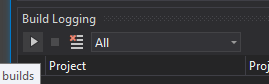
- Then I clicked the deploy button (see above) again.
- ... long time waiting ... (after 30min I went for a walk and when I came back 20min later, the app was finally deployed)
- stopped build logging and collected all the logs:
output window.zip
build logging.zip
tipa
on 16 Mar 2021
@tipa
OK looks like what is happening is the _CleanIntermediateIfNeeded target is running. This is only normally run if something in the build settings change, such as the device or the supported abi's or things like EmbedAssembliesIntoApk.
So it looks like our _CreatePropertiesCache target thinks the build.props file changes which kicks all this stuff off.
I'm not sure why unless the WriteLinesToFile task suddenly became case sensitive...
I'll dig into it a bit more, but I think we are on track now.
dellis1972
on 16 Mar 2021
I'm still not sure I follow what is going on here, the build log took 16 seconds, not 20 minutes! There might be something making build.props trigger more than it should, but that doesn't seem like it accounts for the full time.
The XamarinVS extension seems like it must be doing something here.
This is printed a lot:
[D:RunShellCommand]: emulator-5554 ps -A
But also, could this command be hanging?
[D:RunShellCommand]: emulator-5554 am broadcast -a "mono.android.intent.action.EXTERNAL_STORAGE_DIRECTORY" -n "Mono.Android.DebugRuntime/com.xamarin.mono.android.ExternalStorageDirectory"
 jonathanpeppers
on 16 Mar 2021
jonathanpeppers
on 16 Mar 2021
I tried two fresh emulators API 30 & 28, and a small C# code change is taking only 2-3 seconds to build, deploy, & launch.
I do see this printed constantly, but I'm not hitting a hang:
[D:RunShellCommand]: emulator-5554 ps -A
@tipa do you hit the same issue on a fresh emulator?
jonathanpeppers
on 16 Mar 2021
@joj I notice the Install target doesn't show up in Project System Tools anymore in 16.9, but that was working in 16.8.
Did something change with that?
jonathanpeppers
on 16 Mar 2021
@jonathanpeppers The long 20 min time are due to the full diagnostic logging and fast dev logging being enabled. the main problem was a 40 second debug, which I suspect is the build.props issue.
@tipa
If you get a moment, can you do the same procedure as before (deploy, code change, deploy) but this time can you do a backup of the obj\Debug\110\build.props file between each deploy. Just take a copy and then take another (with a different filename). It so we can compare the two and see what might be different between them.
dellis1972
on 16 Mar 2021
As @dellis1972 said, those 20 minute hangs with VS becoming unresponsive only happen because I enabled diagnostic logging level in Visual Studio and _FastDeploymentDiagnosticLogging in the csproj.
With "normal" logging level, a rebuild "just" takes 40-50seconds. Also just did set up a fresh emulator and the same problem happens.
Given that no-one else seems to have this problem I have the gut feeling that it is related with my installation (however, it happens on both my PC & laptop).
If I remember correctly I installed & updated all the android-sdk stuff via Android Studio only and then point VS to the right folder in the settings, maybe that non-standard usage has something to do with it?
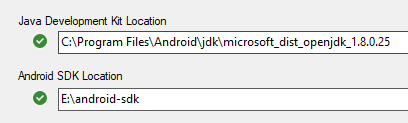
Here are the build.props, didnt use "Diagnostics" logging this time:
build_props.zip
they look identical
However, while I did this I noticed something. The build.props seems to be written twice while rebuilding.
First, shortly after hitting the rebuild button, the build.props has this line:
androidndkpath=
Then (after the 30-40 seconds) the build props instead has this line:
androidndkpath=e:\android-sdk\ndk-bundle\
build_props2.zip
tipa
on 16 Mar 2021
However, while I did this I noticed something. The build.props seems to be written twice while rebuilding.
First, shortly after hitting the rebuild button, the build.props has this line:
androidndkpath=
Then (after the 30-40 seconds) the build props instead has this line:
androidndkpath=e:\android-sdk\ndk-bundle\
build_props2.zip
This would probably do it. If that file changes at all between builds it will trigger a full build/deploy.
dellis1972
on 16 Mar 2021
Ok, I was comparing your log to mine, and in the _CreatePropertiesCache target I see:

If you use the Android SDK that VS installs does the problem go away? C:\Program Files (x86)\Android\android-sdk\
Maybe something is happening where Build has the value blank and Install has it non-blank?
jonathanpeppers
on 16 Mar 2021
If you use the Android SDK that VS installs does the problem go away?
C:\Program Files (x86)\Android\android-sdk\
I don't have an Android folder under Program Files (x86). Maybe VS didn't install it because I pointed it to the existing folder when installing Xamarin.Android? Or I moved it to the other disk after VS was installed?
tipa
on 16 Mar 2021
Hmm, the Xamarin workload should install the Android SDK:
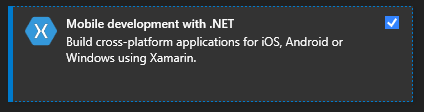
You might try checking this Android SDK setup box to see what happens:
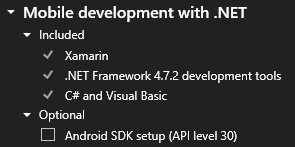
This would install API-30, but C:\Program Files (x86)\Android\android-sdk\ would not be something that is optional.
jonathanpeppers
on 16 Mar 2021
You might try checking this
Android SDK setupbox to see what happens:
That did create the folder and builds/deploys are now blazing fast!
So, what should I do from here? Is pointing to another android-sdk folder not supported any more as it was? It worked fine with VS16.8 and before. I want to keep the android-sdk on a separate disk as it is really large with all those emulators etc.
tipa
on 16 Mar 2021
I'm going to try using my Android Studio's Android SDK--there is a bug we should fix here.
jonathanpeppers
on 16 Mar 2021
@tipa glad you are finally getting the build/deploy experience you were supposed to :)
You should be able to use a different sdk, there is a us case where we have a problem with though.
As @jonathanpeppers said there is a bug in there somewhere which we will look at and fix.
dellis1972
on 16 Mar 2021
So I could reproduce this by setting my Android SDK in the IDE to: %localappdata%\Android\Sdk
Inside the IDE, I can reproduce the problem, but I'm having trouble reproducing it at the command-line.
What is compounding this issue is that I don't see the Install target show up in Project System Tools anymore. So I'm not sure what is going on, but I suspect that maybe the IDE isn't passing the same AndroidSdkDirectory to the Install target and so it triggers rebuilds every time.
I will keep digging.
jonathanpeppers
on 18 Mar 2021
Different appears to be Build on the left, Install on the right:

jonathanpeppers
on 18 Mar 2021
Any updates on this? :)
tipa
on 12 May 2021
I filed an internal issue, so we could get the Install target showing up again in Project System Tools. I'll ping them again.
Without that, I'm not sure I can figure out what is going wrong here.
jonathanpeppers
on 12 May 2021
Related issues
 jonpryor
·
3Comments
jonpryor
·
3Comments
 EDMIStephen
·
4Comments
EDMIStephen
·
4Comments
 srdmnc
·
3Comments
srdmnc
·
3Comments
 jamesmontemagno
·
3Comments
jamesmontemagno
·
3Comments
 glintpursuit
·
4Comments
glintpursuit
·
4Comments