Wsl: I have installed the Linux kernel update package,but when run " wsl --set-version Ubuntu 2" I still have this message :"WSL 2 需要更新其内核组件。有关信息,请访问 https://aka.ms/wsl2kernel"
I have installed the Linux kernel update package,but when run " wsl --set-version Ubuntu 2" I still have this message :"WSL 2 需要更新其内核组件。有关信息,请访问 https://aka.ms/wsl2kernel"
Document Details
⚠ Do not edit this section. It is required for docs.microsoft.com ➟ GitHub issue linking.
- ID: 5d720f69-aff2-38d8-f0c6-9909e94acaa2
- Version Independent ID: 9d121625-e741-6d20-f3de-201a939290b8
- Content: Updating the WSL 2 Linux kernel
- Content Source: WSL/wsl2-kernel.md
- Product: dev-environment
- Technology: windows-subsystem-for-linux
- GitHub Login: @craigloewen-msft
- Microsoft Alias: crloewen
 717009629
All 33 comments
Please try running wsl --set-version Ubuntu-18.04 2 or with the version you are using
 blackfan23
on 14 Mar 2020
blackfan23
on 14 Mar 2020
Please try running
wsl --set-version Ubuntu-18.04 2or with the version you are using
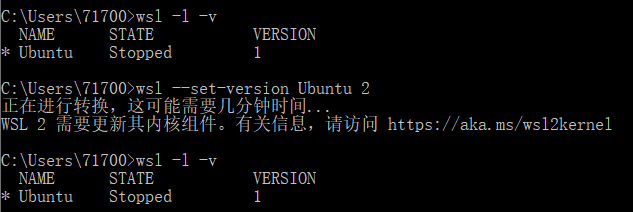
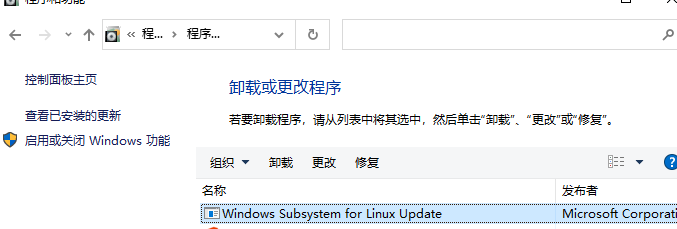
And I have installed the Linux kernel update package.
717009629
on 15 Mar 2020
Uninstall Ubuntu again. And choose another flavor/distribution and try once more.
blackfan23
on 15 Mar 2020
Uninstall Ubuntu again. And choose another flavor/distribution and try once more.
I uninstall Ubuntu and then reinstall it ,I have the same message.


717009629
on 15 Mar 2020
Then I am at a loss. You could try to install the kernel update again as well (link in the error message). Have you activated virtualization? I cant read the exact message due to my language shortcomings though.
blackfan23
on 15 Mar 2020
Then I am at a loss. You could try to install the kernel update again as well (link in the error message). Have you activated virtualization? I cant read the exact message due to my language shortcomings though.
I have reinstalled the kernel update and activated virtualization ,but it do not work.
The message is " The WSL2 requires an update to its kernel component .For more information pLease visit https: / aka. ms/wsl2kernel"
717009629
on 15 Mar 2020
Alright, but I am at a loss, sorry. Hope this gets resolved for you soon.
blackfan23
on 15 Mar 2020
:: get the latest (slow ring) Windows 10 update via Windows Insider
https://docs.microsoft.com/nl-nl/windows/wsl/wsl2-install
C:\Users\user1>ver
Microsoft Windows [Version 10.0.19041.153]
C:\Users\user1>wsl --set-version Ubuntu-18.04 2
Conversion in progress, this may take a few minutes...
WSL 2 requires an update to its kernel component. For information please visit https://aka.ms/wsl2kernel
::Install the WSL2 Linux kernel update package
https://wslstorestorage.blob.core.windows.net/wslblob/wsl_update_x64.msi
C:\Users\user1>wsl --set-version Ubuntu-18.04 2
Conversion in progress, this may take a few minutes... (takes 6 minutes at least)
For information on key differences with WSL 2 please visit https://aka.ms/wsl2
Conversion complete.
C:\Users\user1>wsl --list --verbose
NAME STATE VERSION
- Ubuntu-18.04 Stopped 2
:: open Windows Terminal (Preview) and start a Ubuntu session
https://www.microsoft.com/en-us/p/windows-terminal-preview/9n0dx20hk701?activetab=pivot:overviewtab
:: session is running
user1@SURFACE:/mnt/c/Users/user1$
:: state is running in version 2
C:\Users\user1>wsl --list --verbose
NAME STATE VERSION
- Ubuntu-18.04 Running 2
 eHealtho
on 15 Mar 2020
eHealtho
on 15 Mar 2020
C:\Users\user1>ver
Microsoft Windows [Version 10.0.19041.153]C:\Users\user1>wsl --set-version Ubuntu-18.04 2
Conversion in progress, this may take a few minutes...
WSL 2 requires an update to its kernel component. For information please visit https://aka.ms/wsl2kernel::Install the WSL2 Linux kernel update package
https://wslstorestorage.blob.core.windows.net/wslblob/wsl_update_x64.msiC:\Users\user1>wsl --set-version Ubuntu-18.04 2
Conversion in progress, this may take a few minutes... (takes 6 minutes at least)
For information on key differences with WSL 2 please visit https://aka.ms/wsl2
Conversion complete.C:\Users\user1>wsl --list --verbose
NAME STATE VERSION
- Ubuntu-18.04 Stopped 2
:: open Windows Terminal (Preview) and start a Ubuntu session
https://www.microsoft.com/en-us/p/windows-terminal-preview/9n0dx20hk701?activetab=pivot:overviewtabuser1@SURFACE:/mnt/c/Users/user1$
C:\Users\lemay>wsl --list --verbose
NAME STATE VERSION
- Ubuntu-18.04 Running 2
My windows version is 10.0.19041.153.
I have installed "wsl_update_x64.msi",but I still have the mssage:"WSL 2 requires an update to its kernel component. "
717009629
on 15 Mar 2020
I have the same problem @10.0.19041.153.
When I have check with wsl -l -v. All wsl are stop running so I run bash.exe (maybe ubuntu.exe) the powershell directly. It will work. I got the wsl back and still work file.
 wornut
on 15 Mar 2020
wornut
on 15 Mar 2020
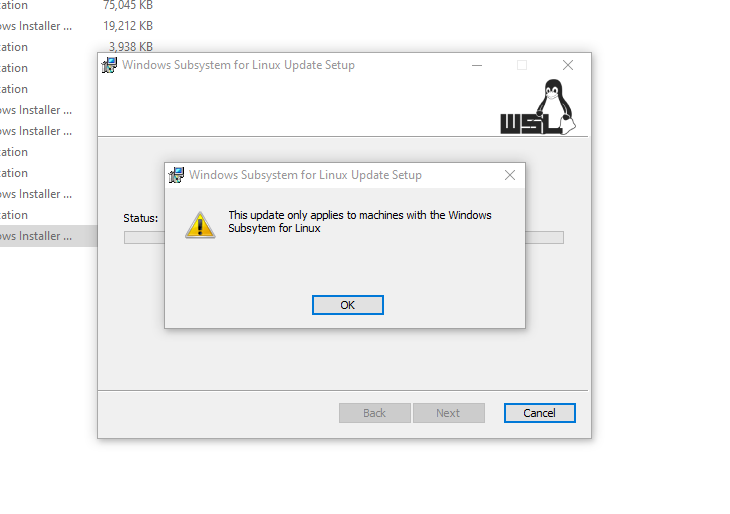
I am also facing the same issue. I tried to update the version before and after stopping the distro without any luck. If I try to install the wsl2 update again I get the error message that update is applicable only for machines with Windows Subsytem for Linux as shown below
 aramis4791
on 15 Mar 2020
aramis4791
on 15 Mar 2020
In case you have problem launching WSL2 after Kernel Update (saying it needs an update). Right click on MSI -> Uninstall. Then you can install Kernel update again and you should be able to launch WSL2 again.
 mario-lukic
on 16 Mar 2020
mario-lukic
on 16 Mar 2020
In case you have problem launching WSL2 after Kernel Update (saying it needs an update). Right click on MSI -> Uninstall. Then you can install Kernel update again and you should be able to launch WSL2 again.
I tried to unistall and install Kernel update ,it does not work .
When i run " wsl --set-default-version 2" ,I still have the message "WSL 2 需要更新其内核组件。有关信息,请访问 https://aka.ms/wsl2kernel"
717009629
on 16 Mar 2020
I have solved the problem
I Install and reinstall the Kernel Update ,but there is no "kernel" file in "C:\Windows\System32\lxss\tools".
I Extract the "wsl_update_x64.msi" file, then I get The "Kernel" file ,then I copy it to "C:\Windows\System32\lxss\tools". Then I can update wsl2.
The extract command is : msiexec /a "wsl_update_x64.msi" /qb TARGETDIR="D:\xx"
717009629
on 16 Mar 2020
Thanks. It solved the issue I was facing in upgrading to WSL 2.
aramis4791
on 16 Mar 2020
I have solved the problem
I Install and reinstall the Kernel Update ,but there is no "kernel" file in "C:\Windows\System32\lxss\tools".
I Extract the "wsl_update_x64.msi" file, then I get The "Kernel" file ,then I copy it to "C:\Windows\System32\lxss\tools". Then I can update wsl2.The extract command is :
msiexec /a "wsl_update_x64.msi" /qb TARGETDIR="D:\xx"
I met the same problem and solved by this way.
 lwqwag
on 15 May 2020
lwqwag
on 15 May 2020
wsl --set-version Ubuntu
I think that
I am also facing the same issue. I tried to update the version before and after stopping the distro without any luck. If I try to install the wsl2 update again I get the error message that update is applicable only for machines with Windows Subsytem for Linux as shown below
Run from cmd as admin (I have the same confiuson)...
 karol-preiskorn
on 18 May 2020
karol-preiskorn
on 18 May 2020
I have solved the problem
I Install and reinstall the Kernel Update ,but there is no "kernel" file in "C:\Windows\System32\lxss\tools".
I Extract the "wsl_update_x64.msi" file, then I get The "Kernel" file ,then I copy it to "C:\Windows\System32\lxss\tools". Then I can update wsl2.The extract command is :
msiexec /a "wsl_update_x64.msi" /qb TARGETDIR="D:\xx"
This should be added to the instructions page. PLEASE! or fix the installer to copy the kernel file over and apply changes. This saved a lot of time.
 khpatel4991
on 20 May 2020
khpatel4991
on 20 May 2020
@khpatel4991 This is a hideous bug and it should be fixed ASAP not to be put on the instructions page.
 UkrainianCitizen
on 26 May 2020
UkrainianCitizen
on 26 May 2020
Same thing, still haven't tried fix yet though
 Bdoom
on 26 May 2020
Bdoom
on 26 May 2020
@Bdoom It seems that it worked for everyone who has tried it in this thread.
UkrainianCitizen
on 26 May 2020
msiexec /a "wsl_update_x64.msi" /qb TARGETDIR="D:\xx"
This command doesn't work to me and I can't extract the kernel, can someone help me please?
This is the error that I get when i tried running the command:

 PasqualeT-Git
on 28 May 2020
PasqualeT-Git
on 28 May 2020
Use ZIP to extract wsl_update_x64.msi to any folder. Copy FID_LXSS_KERNEL from extracted location to C:\Windows\System32\lxss\tools\ and rename this file to "kernel"
After this wsl2 works.
 nadddy
on 28 May 2020
nadddy
on 28 May 2020
I had this issue. Now fixed..
HOWEVER I was wanting to move all my dev work from 18.04 to 20.04 anyway. so
I uninstalled all distros.
Disabled WSL in windows features.
Rebooted
Re-enabled WSL
Re-booted
Install Distro and all is good.
 etrimbymchd
on 29 May 2020
etrimbymchd
on 29 May 2020
I had this issue. Now fixed..
HOWEVER I was wanting to move all my dev work from 18.04 to 20.04 anyway. so
I uninstalled all distros.
Disabled WSL in windows features.
Rebooted
Re-enabled WSL
Re-booted
Install Distro and all is good.
I tried this but still installer did not detect WSL and I had to copy file manually.
Strange that MS is not fixing the installer even after GA release.
nadddy
on 29 May 2020
I had this issue. Now fixed..
HOWEVER I was wanting to move all my dev work from 18.04 to 20.04 anyway. so
I uninstalled all distros.
Disabled WSL in windows features.
Rebooted
Re-enabled WSL
Re-booted
Install Distro and all is good.I tried this but still installer did not detect WSL and I had to copy file manually.
Strange that MS is not fixing the installer even after GA release.
When you say installer are you referring to the kernel upgrade installer? If you are on 2004 the kernel would be up to date, and running the upgrade with an up to date kernel seems to give the error that WSL is not installed.
I did not run the kernel upgrader after disabling and re-enabling WSL.
etrimbymchd
on 29 May 2020
I had the same issue after upgrading to the latest Windows 10 (Enterprise) today. For those of you who are struggling to extract the MSI file from the command line or using Winzip, you can download 7zip instead and right-click extract. It works well.
 ajensenwaud
on 3 Jun 2020
ajensenwaud
on 3 Jun 2020
I had the same issue and moving the unzipped contents did not resolve the issue for me.
Uninstalling Ubuntu, Deactivating the wsl feature, and reactivating and reinstall worked. (System reboots between each step)
The only "weird" thing in my setup is that I don't have my storage/location settings to C: drive, in case that matters to figure it out (if it's still getting looked at)
Ubuntu 20.04 as well, in case that matters.
 SquidPony
on 8 Jun 2020
SquidPony
on 8 Jun 2020
@717009629,
If you don't mind, this issue should be re-opened. Upstream has not fixed this bug yet.
 KayLeung
on 13 Jun 2020
KayLeung
on 13 Jun 2020
Download the Linux kernel update package
Please download the latest WSL2 Linux kernel update package for x64 machines.
Note;
If you're using an ARM64 machine, please download the ARM64 package instead.
Install the Linux kernel update package
To install the Linux kernel update package:
- Run the update package downloaded in the previous step.
- You will be prompted for elevated permissions, select ‘yes’ to approve this installation.
- Once the installation is complete, you are ready to begin using WSL2!
 YoungStoney
on 19 Jun 2020
YoungStoney
on 19 Jun 2020
same problem. I've tried all methods above but still fail.
Installing, this may take a few minutes...
WslRegisterDistribution failed with error: 0x80070057
Error: 0x80070057 The parameter is incorrect.
 tigercosmos
on 21 Jun 2020
tigercosmos
on 21 Jun 2020
Use ZIP to extract wsl_update_x64.msi to any folder. Copy FID_LXSS_KERNEL from extracted location to C:\Windows\System32\lxss\tools\ and rename this file to "kernel"
After this wsl2 works.
That really worked for me! Thanks a lot. I've been trying just reinstalling the .msi kernel updating file but I was getting the message to install de kernel update every time. Thanks a lot. These steps for extracting the .msi and manually "installing" on the lxss folder helped me.
 LeonardoSSev
on 1 Oct 2020
LeonardoSSev
on 1 Oct 2020
**Download the Linux kernel update package**请下载适用于x64计算机的最新WSL2 Linux内核更新程序包。
注意;
如果您使用的是ARM64计算机,请改为下载ARM64软件包。
安装Linux内核更新程序包要安装Linux内核更新软件包:
- 运行在上一步中下载的更新程序包。
- 系统将提示您提升权限,选择“是”以批准此安装。
- 安装完成后,就可以开始使用WSL2了!
thank you! 这解决了我的问题。
 solider245
on 5 Oct 2020
solider245
on 5 Oct 2020
Related issues
 mattgif
·
6Comments
mattgif
·
6Comments
 JaKXz
·
6Comments
JaKXz
·
6Comments
 shaunluttin
·
6Comments
shaunluttin
·
6Comments
 Oxfos
·
3Comments
Oxfos
·
3Comments
 aoxiangwu
·
5Comments
aoxiangwu
·
5Comments
Most helpful comment
I have solved the problem
I Install and reinstall the Kernel Update ,but there is no "kernel" file in "C:\Windows\System32\lxss\tools".
I Extract the "wsl_update_x64.msi" file, then I get The "Kernel" file ,then I copy it to "C:\Windows\System32\lxss\tools". Then I can update wsl2.
The extract command is :
msiexec /a "wsl_update_x64.msi" /qb TARGETDIR="D:\xx"