Wsl: --set-default-version not recognized as an argument to wsl
wsl --set-default-version 2
is mentioned multiple times in the linked doc, but does not work at time of writing for what I believe to be the latest updates to my system. Please let me know if/how I can provide any more needed information.
Document Details
⚠ Do not edit this section. It is required for docs.microsoft.com ➟ GitHub issue linking.
- ID: b7a1833a-3461-2d9e-bb1e-de5d0ee3fe33
- Version Independent ID: bd4b2627-60c7-1bfe-7831-1dbde906e287
- Content: Install Windows Subsystem for Linux (WSL) on Windows 10
- Content Source: WSL/install-win10.md
- Product: dev-environment
- Technology: windows-subsystem-for-linux
- GitHub Login: @craigloewen-msft
- Microsoft Alias: crloewen
 JaKXz
JaKXz
All 6 comments
the correct syntax is "--setdefault 2"
 Ahmad-Al-Ali
on 1 Jul 2020
Ahmad-Al-Ali
on 1 Jul 2020
wsl --setdefault
throws an error
"There is no distribution with the supplied name"
I have follow the docs to the T and deleted and reinstalled 3 times now. WSL works, but it doens't seem to be WSL 2 no matter how many times and which way I run the update.
 shortpoet
on 2 Jul 2020
shortpoet
on 2 Jul 2020
@shortpoet
--set-default (or -s) is not what you're looking for here, it's to specify which distro should be your default distro (that launches if you run wsl without specifying one), that's why it wants you to supply a name.
--set-default-version should work though, if your Windows version is new enough 🤔
 jonaskuske
on 5 Jul 2020
jonaskuske
on 5 Jul 2020
Yeah - I tried using the windows update assistant tool, but I wasn't able to install the latest updates for some reason. I think the regular Windows Update tool from the control panel (settings) said that my computer is compatible but 🤷
I'm not super familiar with the windows world so if anyone knows the equivalent of npx envinfo to print system information to share and help debug that would be great.
JaKXz
on 5 Jul 2020
If you press (Windows) + R, type winver and hit Enter it should display both the Windows version and Build number.
To use WSL2 you need Version 2004 (should be Build 19041), so you could check that :)
jonaskuske
on 5 Jul 2020
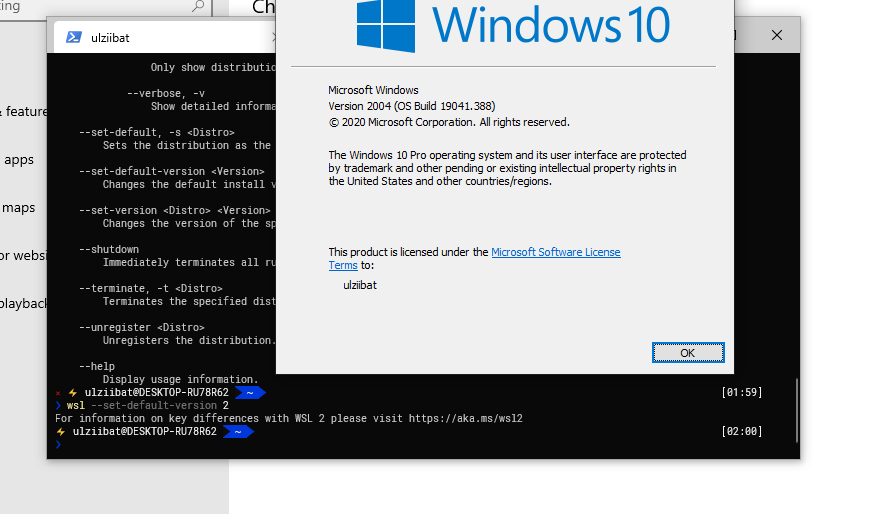
I have problem for update wsl 1 to wsl 2
 ulziibat-n
on 22 Jul 2020
ulziibat-n
on 22 Jul 2020
Related issues
 SetTrend
·
4Comments
SetTrend
·
4Comments
 shaunluttin
·
6Comments
shaunluttin
·
6Comments
 CeciAc
·
5Comments
CeciAc
·
5Comments
 Lemmmy
·
9Comments
Lemmmy
·
9Comments
 jplew
·
5Comments
jplew
·
5Comments