Wsl: Is Hyper-V necessary or not for WSL2? Can it be activated on Windows 10 Home?
SITUATION
I'm trying to install WSL 2.
I have Microsoft Windows 10 Home [Version 10.0.19041.508]
I already have WSL 1 and Ubuntu 18.04 working.
I have followed all instructions here and tried solutions explained here to no avail (see results below).
My features

Some trials and outcomes


REMARKS
If Hyper-V is indeed required for WSL 2, I discovered here that on Windows 10 Home it cannot be activated:

However, the FAQ here says:

QUESTIONS
- Is Hyper-V required or not for WSL 2?
- Can Hyper-V be activated or not on Windows 10 Home?
Thank you for any suggestion.
Document Details
⚠ Do not edit this section. It is required for docs.microsoft.com ➟ GitHub issue linking.
- ID: 57e78ef3-d2eb-1708-d319-be5c4d72274b
- Version Independent ID: 3f3f241f-6e72-859d-3d93-e115e2de0bfb
- Content: WSL 2 Frequently Asked Questions
- Content Source: WSL/wsl2-faq.md
- Product: dev-environment
- Technology: windows-subsystem-for-linux
- GitHub Login: @craigloewen-msft
- Microsoft Alias: crloewen
 Oxfos
Oxfos
All 3 comments
- No, for WSL2 you only need "Virtual Machine Platform" (a subset of Hyper-V) and "Windows Subsystem for Linux" features, both available in Home edition.
- No. Full Hyper-V is not available in Home.
"Please enable the Virtual Machine Platform windows feature and ensure virtualization is enabled in the BIOS" could be a misleading error message. What's your CPU?
If the CPU lacks some capabilities like SLAT it won't work. https://github.com/microsoft/WSL/issues/4709
 onomatopellan
on 10 Sep 2020
onomatopellan
on 10 Sep 2020
@onomatopellan thank you.
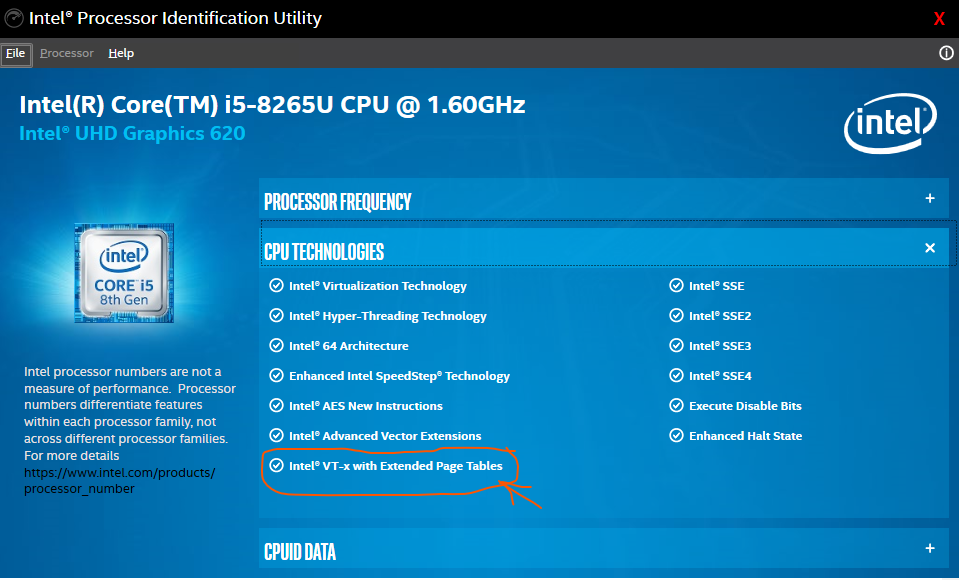
CPU: Intel Core i5-8265U CPU @ 1.60 GHz
In addition:

I run the Intel Processor Identification Utility. It indicates that SLAT is supported:
Oxfos
on 11 Sep 2020
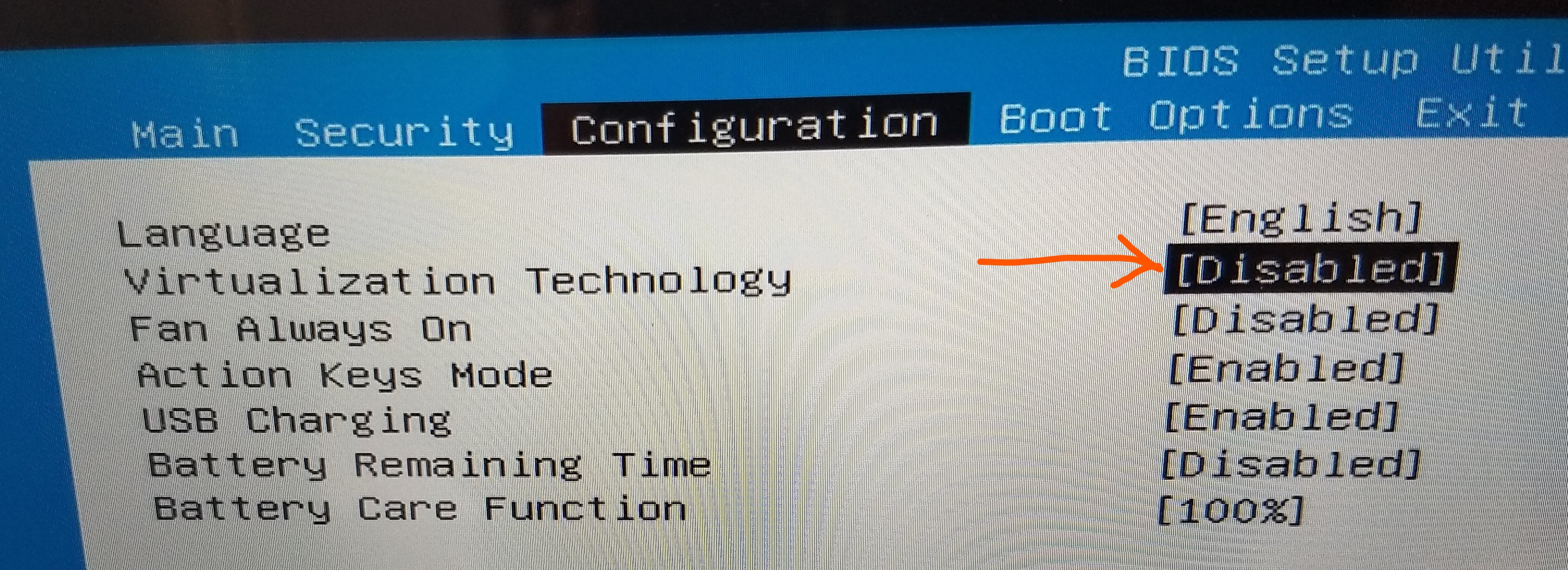
I found the solution.
The virtualization technology was disabled and had to be enabled in the BIOS:
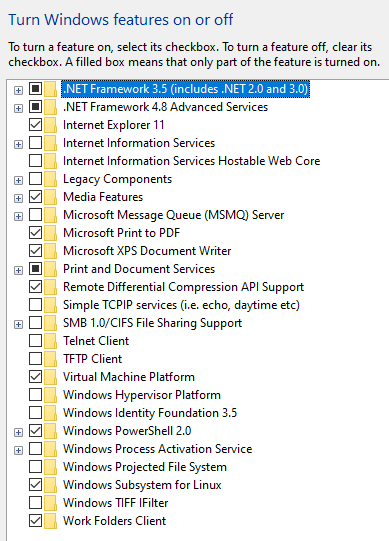
Now it works:

Btw you don't see any changes in the enabled features:
@onomatopellan Thank you again for pointing me in the right direction.
Oxfos
on 11 Sep 2020
Related issues
 aoxiangwu
·
5Comments
aoxiangwu
·
5Comments
 Lemmmy
·
9Comments
Lemmmy
·
9Comments
 m4tt72
·
4Comments
m4tt72
·
4Comments
 CeciAc
·
5Comments
CeciAc
·
5Comments
 mattgif
·
6Comments
mattgif
·
6Comments
Most helpful comment
I found the solution.
The virtualization technology was disabled and had to be enabled in the BIOS:

Now it works:

Btw you don't see any changes in the enabled features:

@onomatopellan Thank you again for pointing me in the right direction.