Wp-calypso: Can't complete install on Windows 7
Steps to reproduce
- I used git clone to download repository to my machine
- I made sure to have node 8.11.0 and npm 5.6.0
- run
npm start - get error that 'CALYPSO_SERVER' is not recognized as an internal or external command
What I expected
wp-calypso would install and I could run it on 127.0.01 calypso.localhost
What happened instead
I get this error while npm is trying to set up calypso
'CALYPSO_SERVER' is not recognized as an internal or external command,
operable program or batch file.
npm ERR! code ELIFECYCLE
npm ERR! errno 1
npm ERR! [email protected] start:npm run -s build
npm ERR! Exit status 1
npm ERR!
npm ERR! Failed at the [email protected] start script.
npm ERR! This is probably not a problem with npm. There is likely additional logging output above.
Browser / OS version
Windows 7 Home Premium SP1
Context / Source
I would like to contribute to the calypso project but I this is stopping from getting started.
 SnGrimes
All 13 comments
Hi @SnGrimes, thanks for the report. It looks like there are some problems running the Calypso build on Windows.
I've created a branch and a pull request (https://github.com/Automattic/wp-calypso/pull/25188) to try to address some of the issues I see. I'm not using Windows though, so I'll need your help testing. Can you try running again on my branch?
git fetch origin
git checkout origin/fix/build-on-windows -B fix/build-on-windows
npm start
 nylen
on 30 May 2018
nylen
on 30 May 2018
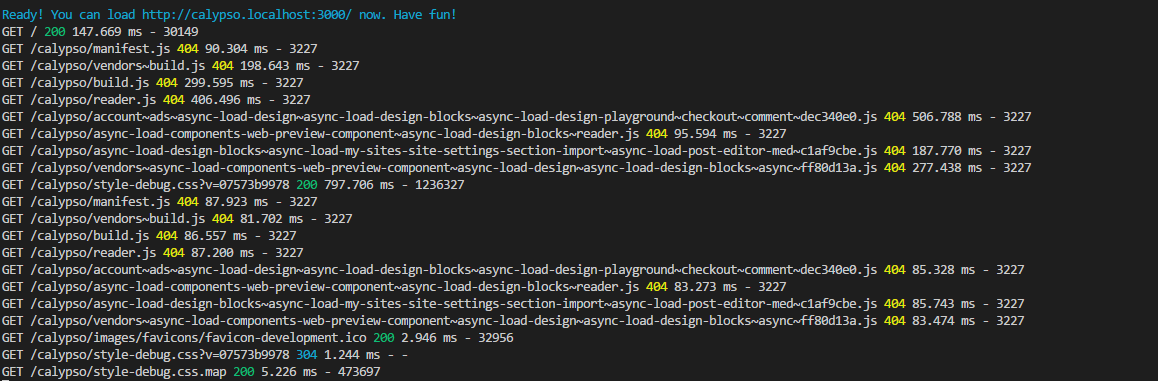
Hey @nylen, I was able to install calypso using your branch and it is loading on http://calypso.localhost:3000/ with the Wordpress logo in the center. However, there are some 404 errors:
SnGrimes
on 30 May 2018
Ok - that's good progress, but it looks like something is still not working correctly. Can you see any other errors further up in the build process?
nylen
on 30 May 2018
I've scanned the terminal and the only thing I could find was that the npm update check failed due to lack of access.
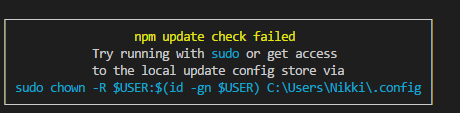
This happened before the webpack build though. There were a couple deprecation warnings:

Everything is green and [emitted] ...
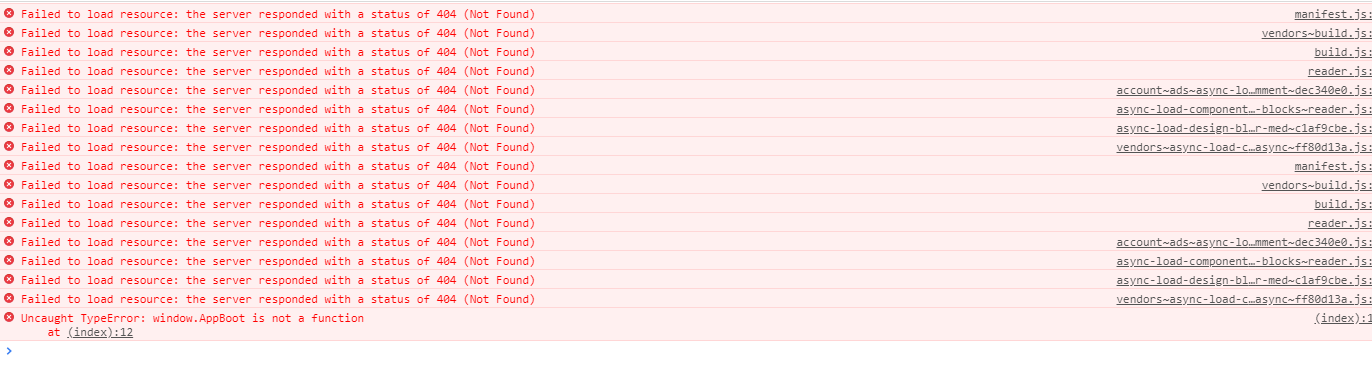
I opened the dev tools and there was a TypeError if that helps.
SnGrimes
on 30 May 2018
All of these built files like /calypso/manifest.js should be served from the public/ directory in your Calypso repository.
Is http://calypso.localhost:3000/calypso/manifest.js the URL that your browser is trying to load for manifest.js?
Does public/manifest.js exist in your repository?
nylen
on 30 May 2018
Relevant code:
https://github.com/Automattic/wp-calypso/blob/2d3ad83a/webpack.config.js#L78-L80
https://github.com/Automattic/wp-calypso/blob/2d3ad83a/server/boot/index.js#L69-L70
nylen
on 30 May 2018
Yes, the browser is trying to load from that URL. manifest.js is missing from the public folder. There is only a manifest.json.
SnGrimes
on 30 May 2018
That is pretty strange - it means that the Webpack build appears to succeed but it is failing to generate its output files.
If you run npm run build-client - does the same thing happen?
I think I am nearing the limit of what I can do to help here. I will try to get someone who runs Windows to take a look and help you out.
nylen
on 31 May 2018
That did it! You're amazing!

There aren't any errors in the console or terminal.
SnGrimes
on 31 May 2018
Great, I'm glad it's mostly working now.
The way it is supposed to work is that npm start should take care of that for you, and also watch for changed files and rebuild. I guess we'll see if anyone else running Windows has that same issue.
nylen
on 31 May 2018
There is still something not working on the master branch. npm start throws the same error again as soon as I switched back to master from the 'fix/build-on-windows' branch.
SnGrimes
on 31 May 2018
Right, because my pull request that fixes things hasn't been merged to master yet. I'll do that now.
nylen
on 31 May 2018
This issue was fixed by #25188. I pulled the new master and npm start ran without issues and I can open calypso.
SnGrimes
on 1 Jun 2018
Related issues
 jeherve
·
3Comments
jeherve
·
3Comments
 hoverduck
·
3Comments
hoverduck
·
3Comments
 kellychoffman
·
3Comments
kellychoffman
·
3Comments
 samouri
·
3Comments
samouri
·
3Comments
 spen
·
3Comments
spen
·
3Comments