Wox: Error "Everything Service is not running" if Everything service is running, but Everything UI is not running
- Wox version / commit number:
Wox v1.3.183 and v1.3.324.
Everything v1.3.4.686.x64 and v1.4.1.809b.x64 - Steps to reproduce the bug:
Everything service is running (C:\Program Files\Everything\Everything.exe -svc), Everything UI is not running.
Wox shows error: "Everything Service is not running".
If I start Everything UI, then error disappears. - Windows version:
Windows 10 x64. - whole log file (
%APPDATA%\Wox\Logs\version\date.txt):
2017-01-04 23:31:19.5323|INFO|Wox.Plugin.Program.Main.Init|Preload 161 programs from cache
2017-01-04 23:31:19.6205|INFO|Wox.App.b__8_0|Preload 200 images from cache
2017-01-04 23:31:21.4278|ERROR|Wox.App+<>c.b__13_0|First Chance Exception:
2017-01-04 23:31:21.4383|ERROR|Wox.Plugin.Everything.Everything.EverythingAPI+d__43.MoveNext|Ошибка в приложении.
2017-01-04 23:31:21.4383|ERROR|Wox.Plugin.Everything.Everything.EverythingAPI+d__43.MoveNext|
в Wox.Plugin.Everything.Everything.EverythingAPI.d__43.MoveNext() в C:\projects\wox\Plugins\Wox.Plugin.Everything\Everything\EverythingAPI.cs:строка 222
 Vanav
Vanav
All 15 comments
I had the similar issue when Wox was installed. So i installed Everything 64 bit again from downloads since my PC was 64bit (Everything-1.3.4.686.x64-Setup.exe) and after that Everything was running fine. Maybe its not the same issue but thought i would post what got it working for me.
 anilpalepu
on 6 Jan 2017
anilpalepu
on 6 Jan 2017
I have this issue with distributions from official Everything site. Have not tried attached to Wox version.
Vanav
on 6 Jan 2017
If you are still running into issues with Everything search not being available through Wox, try going into the actual settings window of Everything and setting it to run as a service there. After that try restarting Everything and Wox.
 lances101
on 10 Jan 2017
lances101
on 10 Jan 2017
Everything UI must also be running, not only Everything service?
Vanav
on 10 Jan 2017
Just make sure you don't "exit" Everything and just close the window instead. If you are quitting it by clicking File -> Exit it actually stops the service too.
lances101
on 10 Jan 2017
I exit from tray icon, but service is running. I thought that running service should be enough?
Vanav
on 10 Jan 2017
We use the official library for integrating with Everything, but apparently, yes, you are right, if the GUI is not running it does not get detected by the library.
Edit: this is a bug, but I don't see a straightforward way of fixing it right now.
lances101
on 10 Jan 2017
any news on this topic? i still have the same problem
 gtassara
on 23 Aug 2017
gtassara
on 23 Aug 2017
I hope there is some way to fix this soon because the Everything UI consumes a lot of memory (73MB) compared to the service (0.8MB):

Wox seems to function just fine even if you quit the UI, so I just ignore the warning.
 thdoan
on 28 Sep 2017
thdoan
on 28 Sep 2017
How can I check that Everything service is even loading? Because I can't see it in Task Manager
 stereokai
on 30 Nov 2017
stereokai
on 30 Nov 2017
Any chance of this getting resolved on the roadmap? I see this issue has been open for almost a year now.
@stereokai If it's not running under Task Manager > Services, you might want to check services.msc
 ChaosZero112
on 15 Dec 2017
ChaosZero112
on 15 Dec 2017
This works if you install Everything Search Engine (64-bit)
 vincegiordano
on 7 Aug 2018
vincegiordano
on 7 Aug 2018
This works if you install Everything Search Engine (64-bit)
No it doesn't. I have it installed (the last version), the Service is running (under services) and VOX says that it's not running.
 mardulas
on 12 Apr 2019
mardulas
on 12 Apr 2019
I had the similar issue when Wox was installed. So i installed Everything 64 bit again from downloads since my PC was 64bit (Everything-1.3.4.686.x64-Setup.exe) and after that Everything was running fine. Maybe its not the same issue but thought i would post what got it working for me.
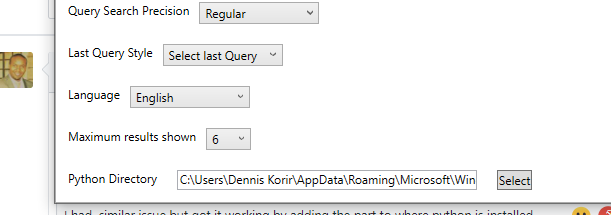
I had a similar issue but got it working by adding the part to where python is installed
 korirdennis
on 6 May 2020
korirdennis
on 6 May 2020
the info is misleading, both everything service and everything client need running.
if you don't want everything client ui running, please use Everything Client Service
http://voidtools.com/forum/viewtopic.php?f=2&t=1982
@Vanav @anilpalepu @thdoan @mardulas @ChaosZero112
please let me know if you still have issue.
 bao-qian
on 15 May 2020
bao-qian
on 15 May 2020
Related issues
 lgjmac
·
6Comments
lgjmac
·
6Comments
 appel
·
5Comments
appel
·
5Comments
 Bourne-M
·
3Comments
Bourne-M
·
3Comments
 rumingruyue
·
3Comments
rumingruyue
·
3Comments
 NickSeagull
·
6Comments
NickSeagull
·
6Comments
Most helpful comment
I had the similar issue when Wox was installed. So i installed Everything 64 bit again from downloads since my PC was 64bit (Everything-1.3.4.686.x64-Setup.exe) and after that Everything was running fine. Maybe its not the same issue but thought i would post what got it working for me.