Wordpress-seo: [Classic editor] Post pre-check items are missing since 14.6(.1)
Please give us a description of what happened.
After updating Yoast to 14.6, the pre-checks for SEO and readability are missing from the publish box when using the classic editor.
Please describe what you expected to happen and why.
When using the classic editor, I expect to see Yoast readability and SEO checks in the "Publish" box in the sidebar on my edit page. Examples:
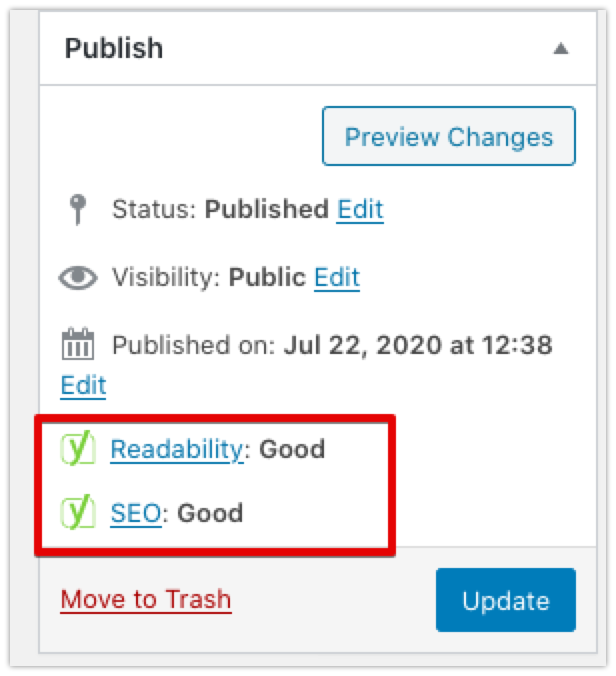
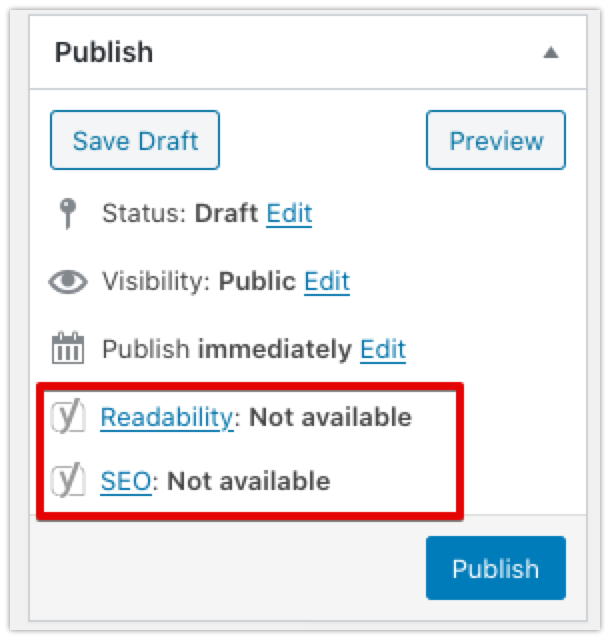
How can we reproduce this behavior?
- Install the Yoast SEO 14.6 and Classic editor plugins
- Create a new post
- Observe that the pre-checks are missing from the "Publish" box.
Technical info
- If relevant, which editor is affected (or editors):
- [x] Classic Editor
- [ ] Gutenberg
- [x] Classic Editor plugin
Used versions
- WordPress version: 5.4.2
- Yoast SEO version: 14.6.1
- Classic Editor plugin version: 1.5
- Tested with theme: Twentytwenty
 Djennez
All 18 comments
Please inform the customer of conversation # 632773 when this conversation has been closed.
 michaelbriantina
on 23 Jul 2020
michaelbriantina
on 23 Jul 2020
Ok, waiting to be advised when solved.
Thank you.
 jumborex2
on 23 Jul 2020
jumborex2
on 23 Jul 2020
Please inform the customer of conversation # 631979 when this conversation has been closed.
 mayada-ibrahim
on 23 Jul 2020
mayada-ibrahim
on 23 Jul 2020
Please inform the customer of conversation # 633527 when this conversation has been closed.
 suascat
on 25 Jul 2020
suascat
on 25 Jul 2020
Good afternoon,
I have the same problem. I tried uninstalling all the plugins and installing the twenty twenty theme, but nothing. Effectively the error disappears when the classic editor plugin is disabled.
I am also waiting for a solution.
Thank you.
 emidez
on 26 Jul 2020
emidez
on 26 Jul 2020
A user is experiencing the same issue: https://wordpress.org/support/topic/indicator-under-publish-missing-in-version-14-6/#post-13173916
 Jerparx
on 27 Jul 2020
Jerparx
on 27 Jul 2020
Please inform the customer of conversation # 633169 when this conversation has been closed.
mayada-ibrahim
on 28 Jul 2020
Please inform the customer of conversation # 634395 when this conversation has been closed.
michaelbriantina
on 29 Jul 2020
Please inform the customer of conversation # 634697 when this conversation has been closed.
michaelbriantina
on 30 Jul 2020
Please inform the customer of conversation # 634406 when this conversation has been closed.
 rmarcano
on 30 Jul 2020
rmarcano
on 30 Jul 2020
Please inform the customer of conversation # 634506 when this conversation has been closed.
michaelbriantina
on 31 Jul 2020
Please inform the customer of conversation # 634339 when this conversation has been closed.
 Pcosta88
on 31 Jul 2020
Pcosta88
on 31 Jul 2020
Seems to be fixed in https://github.com/Yoast/wordpress-seo/pull/15739
mayada-ibrahim
on 31 Jul 2020
Seems to be fixed in #15739
Good afternoon,
The truth is that I have not seen the way to solve it in the thread, in my case I still have the same problem.
Do you have any other information about this error?
Thank you.
emidez
on 31 Jul 2020
@emidez You can expect the issue to be fixed in v14.7 of Yoast SEO. We are not sure when we will get that released exactly but a fix is expected to be in it.
Pcosta88
on 31 Jul 2020
I've added a proper milestone as this fix is included in the 14.7 (august 4, 2020) release of the plugin.
Djennez
on 31 Jul 2020
Please inform the customer of conversation # 636112 when this conversation has been closed.
michaelbriantina
on 4 Aug 2020
Fixed with the release today, closing this issue.
Djennez
on 5 Aug 2020
Related issues
 qmdev
·
6Comments
qmdev
·
6Comments
 stayallive
·
4Comments
stayallive
·
4Comments
 haroldangenent
·
4Comments
haroldangenent
·
4Comments
 szepeviktor
·
6Comments
szepeviktor
·
6Comments
 cristopherrosenberg
·
3Comments
cristopherrosenberg
·
3Comments
Most helpful comment
I've added a proper milestone as this fix is included in the 14.7 (august 4, 2020) release of the plugin.