Wordpress-seo: An error occurred loading the Yoast SEO primary taxonomy picker
Please give us a description of what happened.
Installed YOAST on new Wordpress site migrated old posts to new database as well as YOAST table data. Edit article post view get the following errors:
react-dom.min.js?ver=16.8.4:117 TypeError: Cannot read property 'getPrimaryTaxonomyId' of undefined
    at wp-seo-metabox-category-1121.min.js?ver=11.2.1:1
    at n (data.min.js?ver=4.4.0:1)
    at new r (data.min.js?ver=4.4.0:1)
    at Yf (react-dom.min.js?ver=16.8.4:67)
    at qg (react-dom.min.js?ver=16.8.4:92)
    at hi (react-dom.min.js?ver=16.8.4:104)
    at Qg (react-dom.min.js?ver=16.8.4:144)
    at Rg (react-dom.min.js?ver=16.8.4:145)
    at Sc (react-dom.min.js?ver=16.8.4:158)
    at Z (react-dom.min.js?ver=16.8.4:156)
Please describe what you expected to happen and why.
The Yoast plugin for Gutenburg editor shows.
How can we reproduce this behavior?
- Install latest Yoast
- Edit article
Technical info
* If relevant, which editor is affected (or editors):
- [ ] Classic Editor
- [y] Gutenberg
- [ ] Classic Editor plugin
* Which browser is affected (or browsers):
- [y] Chrome
- [ ] Firefox
- [ ] Safari
- [ ] Other
Used versions
- WordPress version: 5.2
- Yoast SEO version: 11.2.1
- Gutenberg plugin version:
- Classic Editor plugin version:
- Relevant plugins in case of a bug: Themes Security, Wordfence Security
- Tested with theme: Twenty Nineteen
 aliceathens
All 32 comments
Looks like https://github.com/Yoast/wordpress-seo/issues/12644
Can you provide a bit more information?
- Does reinstalling Yoast help?
- Are there any plugin conflicts?
- Was this issue there before importing any of the data?
- Is reproducing only "opening a post edit page", or do any additional steps have to be taken?
 Djennez
on 27 May 2019
Djennez
on 27 May 2019
I managed to resolve this issue - I migrated from an old blog. So in the Yoast settings I exported the settings data via the plugin into the new install of Yoast this broke the plugin. I removed all references to wpseo in the wp_options table then reactive the plugin and now it works.
aliceathens
on 30 May 2019
Allright, good to hear that you were able to get it to work again! I will close the issue as it seems there are no further questions.
Djennez
on 3 Jun 2019
Allright, good to hear that you were able to get it to work again! I will close the issue as it seems there are no further questions.
It is fixed for author, but actually the issue is still exists in the latest version of plugin. Don't want to create a new issue, so I add here repro steps to help:
- Go to Yoast SEO settings => Search Appearance => Content Types => Posts section => set "Yoast SEO Meta Box" to "Hide"
- Then go to WordPress "Posts" => "Add new" page
- Check the category section in Gutenberg
I guess frontend script expects Yoast SEO meta box on the page, which is actually not there... Hope this will help.
 vladivanovrf
on 21 Jun 2019
vladivanovrf
on 21 Jun 2019
I'll have a look at this, thanks for adding!
Djennez
on 21 Jun 2019
Using @vladivanovrf 's method I was able to consistently recreate an error in the primary category picker in Gutenberg.
Console:
11:06:38.708 TypeError: yoastData is undefined wp-seo-metabox-category-116-RC2.js:363:3
    default PrimaryTaxonomyPicker.js:283
    getNextMergeProps data.js:1953
    ComponentWithSelect data.js:1971
    constructClassInstance react-dom.js:11446
    updateClassComponent react-dom.js:14776
    beginWork react-dom.js:15733
    performUnitOfWork react-dom.js:19401
    workLoop react-dom.js:19441
    callCallback react-dom.js:143
    invokeGuardedCallbackDev react-dom.js:193
    invokeGuardedCallback react-dom.js:250
    replayUnitOfWork react-dom.js:18667
    renderRoot react-dom.js:19557
    performWorkOnRoot react-dom.js:20431
    performWork react-dom.js:20343
    performSyncWork react-dom.js:20317
    requestWork react-dom.js:20186
    scheduleWork react-dom.js:20000
    enqueueSetState react-dom.js:11279
    setState react.js:423
    onStoreChange data.js:2060
    onStoreChange self-hosted:1001
    unsubscribe data.js:2071
    globalListener data.js:1362
    forEach self-hosted:266
    globalListener data.js:1361
    subscribe data.js:685
    dispatch data.js:3467
    promiseMiddleware data.js:558
    createResolversCacheMiddleware data.js:613
    createMiddleware Redux
    dispatch data.js:3852
    Redux 2
        unhandledActionControl
        next
    some self-hosted:216
    Redux 2
        next
        yieldValue
    run wp-polyfill.js:4399
    notify wp-polyfill.js:4416
    flush wp-polyfill.js:1501
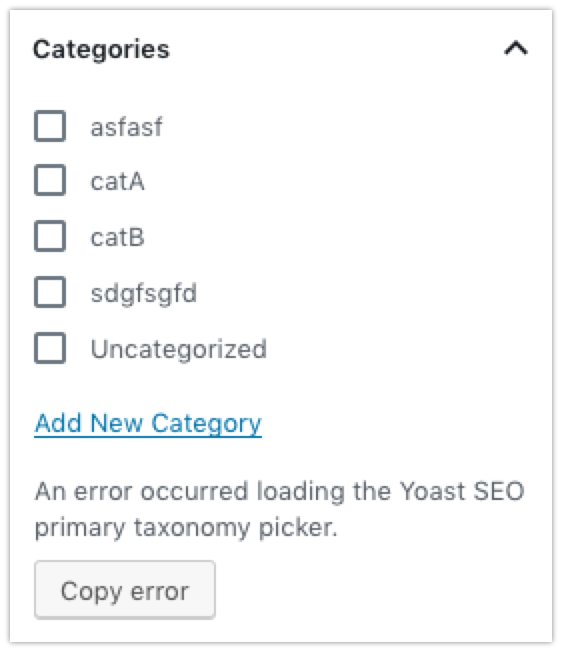
On gutenberg, this shows:
On classic:
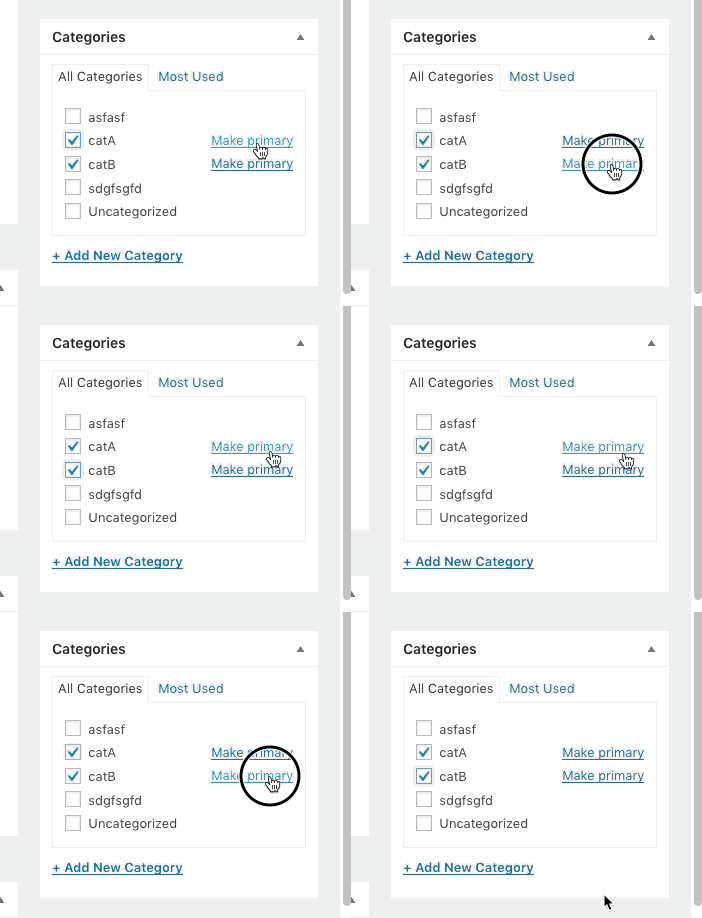
(clicking the links doesn't do anything)
This means that whenever the Yoast metabox is disabled for a posttype, the primary category selector for that posttype will throw errors and is non-functional.
Note: I have seen a similar issue before, but I was unable to find it.
Djennez
on 27 Jun 2019
Please inform the customer of conversation # 519219 when this conversation has been closed.
 Pcosta88
on 28 Jun 2019
Pcosta88
on 28 Jun 2019
We have almost same issue:
When 'publicly_queryable' is set to false in register_post_type and 'Yoast SEO Meta Box' to hide for the specific post type, we see the following issue:
TypeError: Cannot read property 'setPrimaryTaxonomyId' of null
    at https://localhost/cscd/wp-content/plugins/wordpress-seo/js/dist/wp-seo-metabox-category-1160.min.js?ver=11.6:1:27739
    at Object.current (https://localhost/cscd/wp-content/plugins/gutenberg/build/data/index.js?ver=1563437633:1:20335)
    at https://localhost/cscd/wp-content/plugins/gutenberg/build/data/index.js?ver=1563437633:1:19908
    at Object.useMemo (https://localhost/cscd/wp-content/plugins/gutenberg/vendor/react-dom.min.fa9ca8c8.js:205:23)
    at useMemo (https://localhost/cscd/wp-content/plugins/gutenberg/vendor/react.min.f4c1469c.js:31:253)
    at Ot (https://localhost/cscd/wp-content/plugins/gutenberg/build/data/index.js?ver=1563437633:1:19888)
    at https://localhost/cscd/wp-content/plugins/gutenberg/build/data/index.js?ver=1563437633:1:20311
    at Td (https://localhost/cscd/wp-content/plugins/gutenberg/vendor/react-dom.min.fa9ca8c8.js:82:11)
    at hi (https://localhost/cscd/wp-content/plugins/gutenberg/vendor/react-dom.min.fa9ca8c8.js:102:385)
    at Qg (https://localhost/cscd/wp-content/plugins/gutenberg/vendor/react-dom.min.fa9ca8c8.js:144:217)
When 'publicly_queryable' is set to true, the error disappears but now we have public content.
 nuvoPoint
on 19 Jul 2019
nuvoPoint
on 19 Jul 2019
Please inform the customer of conversation # 532142 when this conversation has been closed.
 amboutwe
on 12 Aug 2019
amboutwe
on 12 Aug 2019
Please inform the customer of conversation # 532080 when this conversation has been closed.
amboutwe
on 4 Sep 2019
Please inform the customer of conversation # 541848 when this conversation has been closed.
amboutwe
on 20 Sep 2019
Please inform the customer of conversation # 542291 when this conversation has been closed.
amboutwe
on 20 Sep 2019
Please inform the customer of conversation # 554405 when this conversation has been closed.
amboutwe
on 31 Oct 2019
Please inform the customer of conversation # 555093 when this conversation has been closed.
 iamazik
on 2 Nov 2019
iamazik
on 2 Nov 2019
I'm also facing the same issue on my site and unable to load yoast settings
 SardarGhazanfar
on 8 Dec 2019
SardarGhazanfar
on 8 Dec 2019
Please inform the customer of conversation # 574076 when this conversation has been closed.
 monbauza
on 9 Jan 2020
monbauza
on 9 Jan 2020
Hi guys, here's the fix that worked for me here:
add_filter( 'wpseo_primary_term_taxonomies', '__return_empty_array' );
 alijaffar
on 10 Jan 2020
alijaffar
on 10 Jan 2020
Hi guys, here's the fix that worked for me here:
add_filter( 'wpseo_primary_term_taxonomies', '__return_empty_array' );
It should probably be noted that this "fix" simply makes the error message go away. The ability to define primary categories is still missing on the edit page.
 dmchale
on 14 Jan 2020
dmchale
on 14 Jan 2020
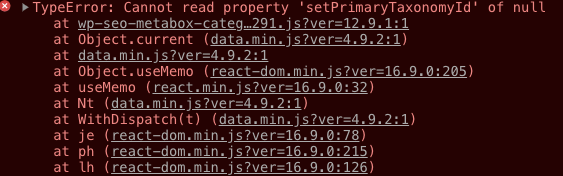
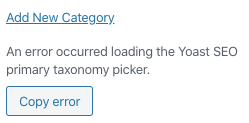
I'm having the same issue when creating or editing a post. Using Wordpress 5.3.2 with Yoast 12.9.1. Disabled all plugins but Yoast and still had the same issue. Yoast bar is also missing not allowing any changes.
 0404040404
on 22 Jan 2020
0404040404
on 22 Jan 2020
Please inform the customer of conversation # 587186 when this conversation has been closed.
Pcosta88
on 20 Feb 2020
Please inform the customer of conversation # 589323 when this conversation has been closed.
 rmarcano
on 27 Feb 2020
rmarcano
on 27 Feb 2020
Please inform the customer of conversation # 589323 when this conversation has been closed.
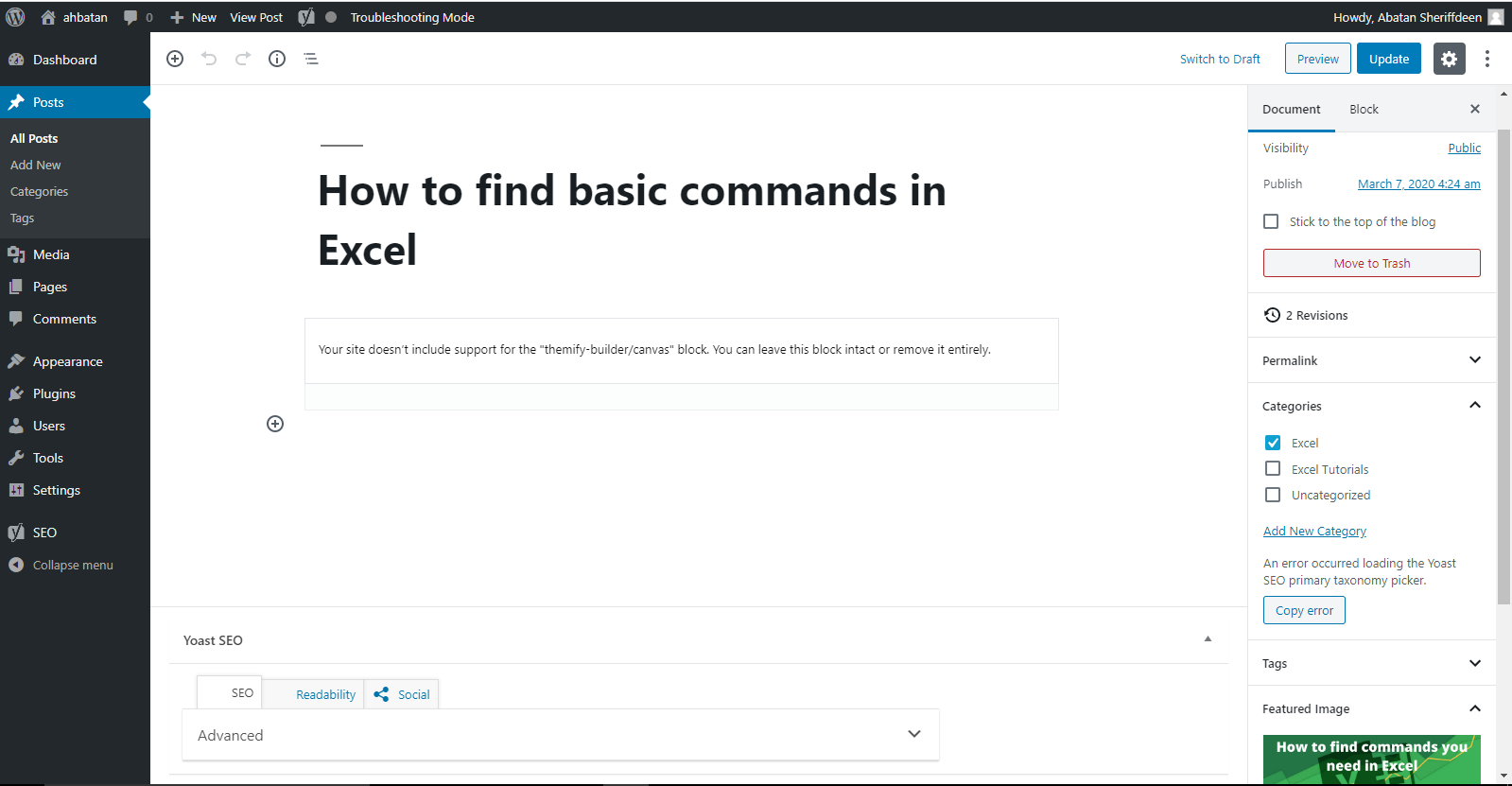
An error occurred loading the Yoast SEO primary taxonomy picker.
How should solve this problem
 Johncloud-24
on 11 Mar 2020
Johncloud-24
on 11 Mar 2020
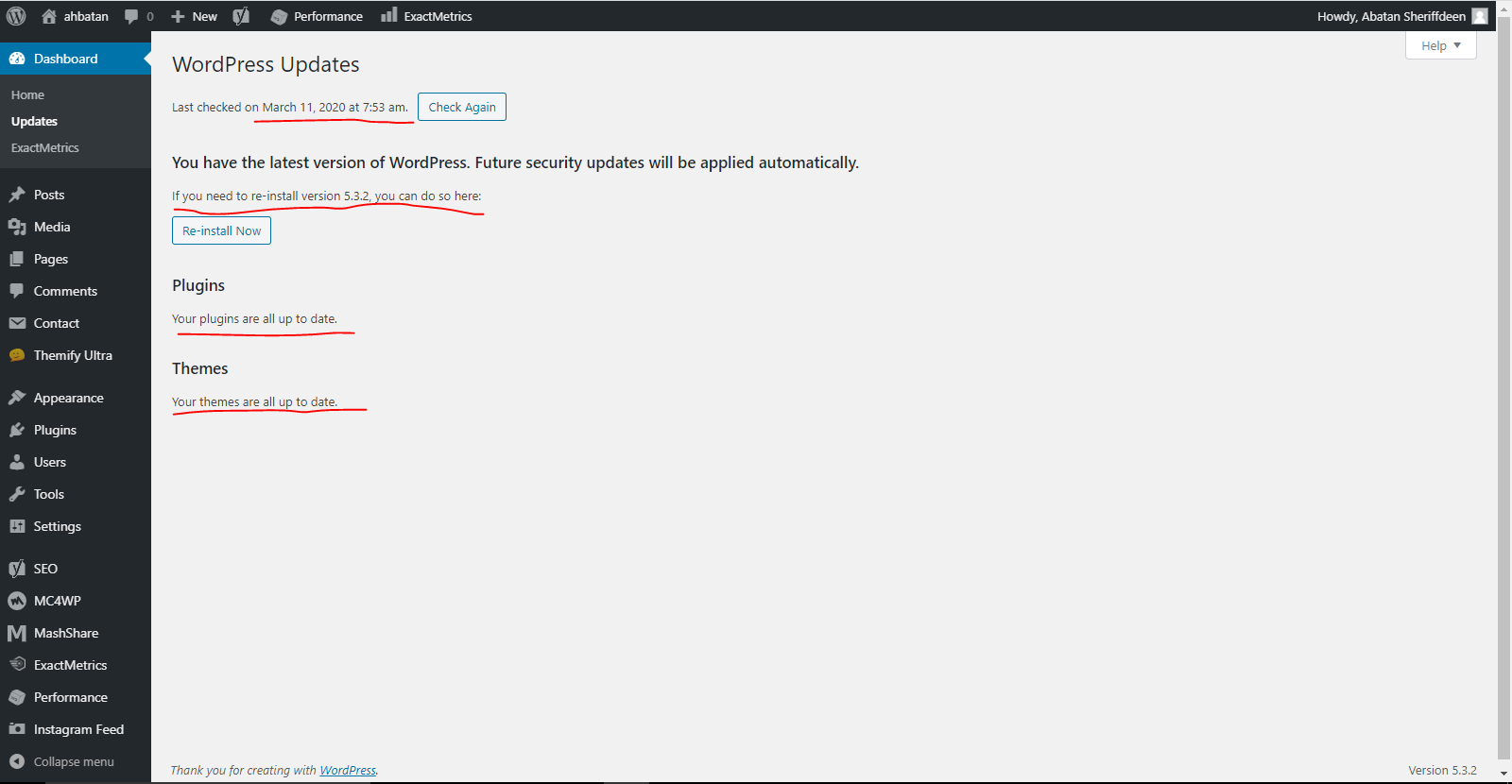
My name Abatan Sheriffdeen, I'M currently on the Free Yoast Premium Plugin, recently have being getting this error 'An error occurred loading the Yoast SEO primary taxonomy picker' i can't optimize my Blog post, the Yoast Snippet isn't coming up to blog optimization.
Please note, all my plugins are updated, including the version of word press, find below screen shots for details of my plugins and word press version.
I have also change my Yoast Mata Box content type, to Show and Hide, the issue is not yet resolved, please anyone to help me out please, Thanks.
I await your response, i have tried solving this and reading you Knowledge archives, i can't find solutions there, have used all free help resources, still no response, and I'm not happy at all, kindly assist please. thanks.
 Analyst-Sheriff
on 12 Mar 2020
Analyst-Sheriff
on 12 Mar 2020
Please inform the customer of conversation # 594298 when this conversation has been closed.
 mayada-ibrahim
on 17 Mar 2020
mayada-ibrahim
on 17 Mar 2020
This problem still exists. Wordpress 5.4 and Yoast SEO 13.5.
 turansadri
on 21 Apr 2020
turansadri
on 21 Apr 2020
No. Problem has been solved
On Tue 21. Apr 2020 at 15:37 Turan Sadri notifications@github.com wrote:
This problem still exists. Wordpress 5.4 and Yoast SEO 13.5.
—
You are receiving this because you commented.
Reply to this email directly, view it on GitHub
https://github.com/Yoast/wordpress-seo/issues/13032#issuecomment-617185001,
or unsubscribe
https://github.com/notifications/unsubscribe-auth/AOZLB7I7MWGBKIBHGLZ2NCTRNWORPANCNFSM4HPY4RUQ
.
Johncloud-24
on 21 Apr 2020
I have this issue as well - problem is NOT solved.
 pitchpublications
on 2 May 2020
pitchpublications
on 2 May 2020
Can i help you ?
On Sat 2. May 2020 at 20:13 pitchpublications notifications@github.com
wrote:
I have this issue as well - problem is NOT solved.
—
You are receiving this because you commented.
Reply to this email directly, view it on GitHub
https://github.com/Yoast/wordpress-seo/issues/13032#issuecomment-622993445,
or unsubscribe
https://github.com/notifications/unsubscribe-auth/AOZLB7PLVDSVBAILKNMZ2KTRPRPFJANCNFSM4HPY4RUQ
.
Johncloud-24
on 3 May 2020
iamazik
on 3 May 2020
Please inform the customer of conversation # 618649 when this conversation has been closed.
iamazik
on 5 Jun 2020
I'm am also still seeing a problem when the Yoast SEO meta box is hidden for a post type. In my case I needed the primary category picker for some post types so couldn't use https://github.com/Yoast/wordpress-seo/issues/13032#issuecomment-572840392.
However the filter does get passed the post type so this worked for me:
add_filter('wpseo_primary_term_taxonomies', function ($all_taxonomies, $post_type) {
  return $post_type === '<post type>' ? array() : $all_taxonomies;
}, 10, 2);
EDIT: Oh actually I hadn't updated my plugin :upside_down_face:
 wpf500
on 4 Aug 2020
wpf500
on 4 Aug 2020
If you're running a filter on wpseo_primary_term_taxonomies, make sure that your filter returns this sort of array:
array(
    'taxonomy' => get_taxonomy( 'taxonomy' ),
)
The array is associative, with the slug of the taxonomy being the key for the WP_Taxonomy object.
 benlk
on 17 Nov 2020
benlk
on 17 Nov 2020
Related issues
 haroldangenent
·
4Comments
haroldangenent
·
4Comments
 adrianleira
·
6Comments
adrianleira
·
6Comments
 JoshuaPotter
·
4Comments
JoshuaPotter
·
4Comments
 Chouby
·
4Comments
Chouby
·
4Comments
 szepeviktor
·
6Comments
szepeviktor
·
6Comments
Most helpful comment
It is fixed for author, but actually the issue is still exists in the latest version of plugin. Don't want to create a new issue, so I add here repro steps to help:
I guess frontend script expects Yoast SEO meta box on the page, which is actually not there... Hope this will help.