Wordpress-seo: Bug with date format timezone in the Schema
Please give us a description of what happened.
The date shown in the property meta _article:published_time_ of all WordPress post is incorrect if Wordpress has a non-GMT timezone.
This is the WordPress date and timezone configuration:
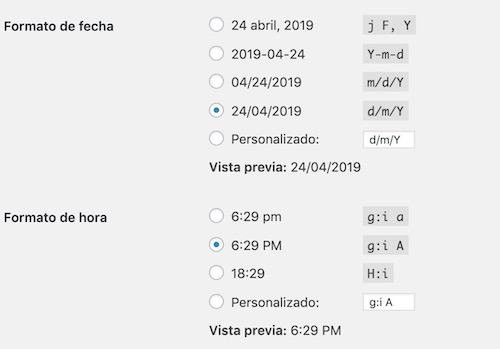
and
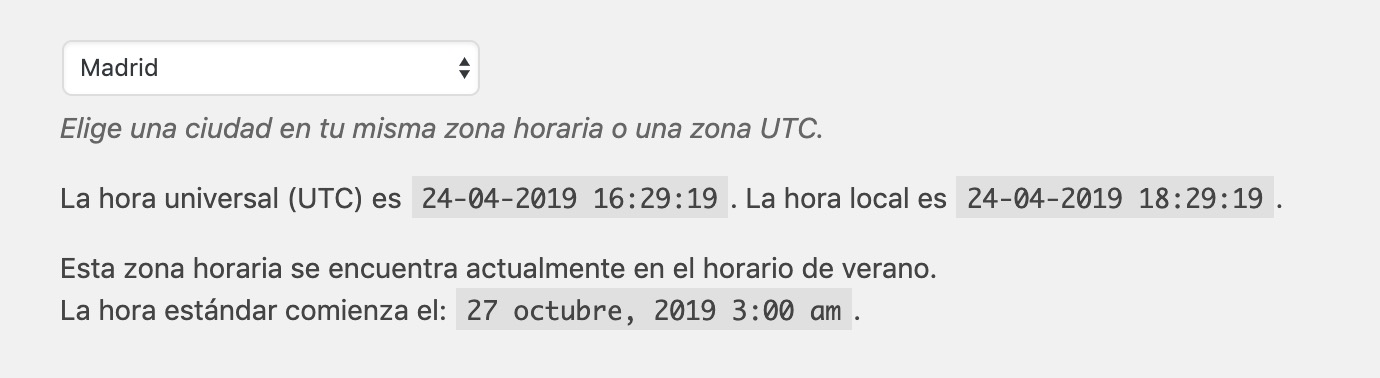
Madrid = UTC+02:00
The mysql data (table posts of WordPress database) of this sample post is:

The server has the correct timezone configured in the PHP settings. I cheked it.
WordPress and theme shows ... "correct" time:

At least, a more correct date than Yoast. Because the correct hour must be:
2019-04-24T13:30:30+02:00
But in the _article:published_time_, generated by Yoast SEO, this is the meta property result:

Wrong date with timezone +00:00.
This causes that Googlebot indexes the article with the wrong date. This is the result of Google Data Structured Tool (Article):

Please describe what you expected to happen and why.
According to the W3C specifications and the Google requirements, the timezone must be added to the date:
https://support.google.com/webmasters/answer/9253249?hl=en
4) If specifying a time, specify the correct time zone. If you choose to specify a time, be sure to provide the correct timezone, taking into account daylight saving time as appropriate.
Then, the correct result of meta property _article:published_time_ and _article:modified_time_ have to be like this:
<meta property="article:published_time" content="2019-04-24T13:30:30+02:00">
<meta property="article:modified_time" content="2019-04-24T13:52:22+02:00">
(in the case of Madrid )
Yoast obtains the published time and modified time from the "posts" table, specifically from the columns post_date and post_gmt.
The query to the database it is produced in class-schema-article.php (line 64) and class-schema-webpage.php (line 74)
'datePublished' => mysql2date( DATE_W3C, $post->post_date_gmt, false ),
'dateModified' => mysql2date( DATE_W3C, $post->post_modified_gmt, false ),
These columns are not saved in an ISO format, so you could create a slightly more complex function that calculates the timezone.
Maybe subtracting both dates and getting a number + HH:00 or -HH:00
How can we reproduce this behavior?
- Install a clean WordPress with Yoast SEO.
- Configure the WordPress timezone to Madrid.
- Publish an Post and compare the article_published meta with the WordPress date.
Technical info
- Classic Editor plugin 1.4
Used versions
- Yoast SEO Version 11.0
- WordPress version 5.1.1
 adrianleira
All 6 comments
Hi @adrianleira, thank you for the very advanced report of this issue. I was able to reproduce it locally and will mark it for our product team to have a look at.
 Djennez
on 25 Apr 2019
Djennez
on 25 Apr 2019
@jono-alderson would you mind having a look here to see if this might bring substantial issues regarding SEO?
Djennez
on 25 Apr 2019
Yep, this is a problem; we should resolve it ASAP.
 jono-alderson
on 25 Apr 2019
jono-alderson
on 25 Apr 2019
Ok, while at first there was some confusion, this question has come across here before and luckily one of our devs picked up on this. It seems that our output is correct, and this is a case of an (apparently often) misinterpretation of the datetime notation.
The way it should be notated is with the +zone part describing the hours that already have been counted towards the time. So 10:00:00+00:00 is 10:00 UTC/GMT, whilst 11:00:00+01:00 is also 10:00 UTC/GMT and not 12:00.
Our output on a post that is published on 18:29:19 on GMT+2 (Madrid, Paris, Amsterdam) is 16:29:19+00:00 because we revert the time back to GMT. This is the correct ISO notation of the timestamp.
Since this isn't an issue anymore, I will close this thread. But please feel free to leave any feedback or thoughts on the matter.
Djennez
on 25 Apr 2019
First of all, thank you for your response and your time.
Secondly, after reading your answer, ISO 8601 and the Google documentation, I think that you and the developers that you have consulted are absolutely right.
I started to investigate this topic because I noticed that during the first hours of indexing in Google, the hour shown in SERP did not correspond to the time of publication.

And now I see why. Look at this:

The modified time (GMT) is earlier than the published time (GMT). And in the database too:

And the local time, too:
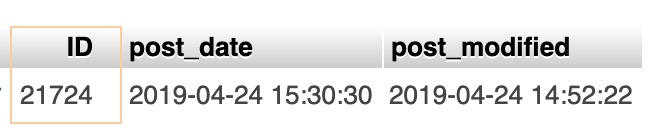
This goes against the Google and WordPress documentation:
https://developers.google.com/search/docs/data-types/article?hl=en
The value for dateModified should be more recent than the value for datePublished.
https://codex.wordpress.org/Function_Reference/the_modified_date
If the post or page is not yet modified, the modified date is the same as the creation date.
It's just a theory, but I think that Googlebot, by reading the date given by Yoast in the meta attributes and finding a modification date earlier than the publication date, has taken the WordPress date in "local" format that is show by the theme, and not the correct in format GMT....
However, it would be really interesting that Yoast always filtered the modification date, and if it is earlier to the date of publication, that equals it. It is an important SEO restriction.
Going back to the problem ...
It is clear that it is some WordPress error related to the incompatibility of a plugin or hosting.
In principle, I discard that it is a mistake related to Yoast SEO in any case.
I have done several tests with a new WordPress installation, then with WordPress + Yoast SEO and then with WordPress + Yoast SEO + Classic Editor:
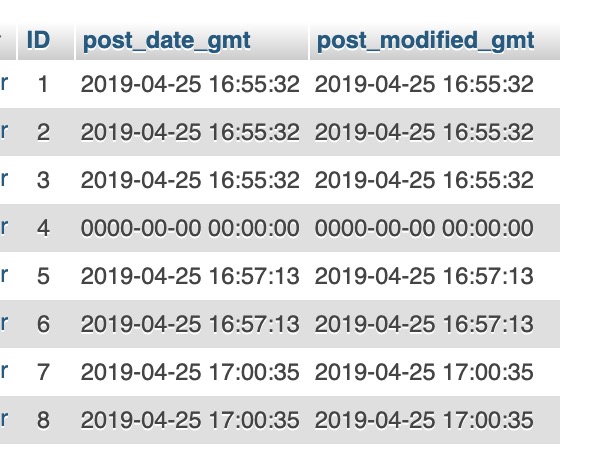
And the meta atributes created by Yoast and WordPress always respect the rule:
article:published_time >= article:modified_time
Works fine. I will continue looking for what causes the problem to report it if applicable.
Thanks @Djennez
adrianleira
on 25 Apr 2019
This issue continues with 14.0.2 and earlier releases. Sitemap also doesnt effect given timezone value.
Should fix 👍
 fatihtoprak
on 1 May 2020
fatihtoprak
on 1 May 2020
Related issues
 Pcosta88
·
6Comments
Pcosta88
·
6Comments
 stayallive
·
4Comments
stayallive
·
4Comments
 moorscode
·
6Comments
moorscode
·
6Comments
 cristopherrosenberg
·
3Comments
cristopherrosenberg
·
3Comments
 isaumya
·
4Comments
isaumya
·
4Comments
Most helpful comment
First of all, thank you for your response and your time.
Secondly, after reading your answer, ISO 8601 and the Google documentation, I think that you and the developers that you have consulted are absolutely right.
I started to investigate this topic because I noticed that during the first hours of indexing in Google, the hour shown in SERP did not correspond to the time of publication.
And now I see why. Look at this:
The modified time (GMT) is earlier than the published time (GMT). And in the database too:
And the local time, too:
This goes against the Google and WordPress documentation:
https://developers.google.com/search/docs/data-types/article?hl=en
https://codex.wordpress.org/Function_Reference/the_modified_date
It's just a theory, but I think that Googlebot, by reading the date given by Yoast in the meta attributes and finding a modification date earlier than the publication date, has taken the WordPress date in "local" format that is show by the theme, and not the correct in format GMT....
However, it would be really interesting that Yoast always filtered the modification date, and if it is earlier to the date of publication, that equals it. It is an important SEO restriction.
Going back to the problem ...
It is clear that it is some WordPress error related to the incompatibility of a plugin or hosting.
In principle, I discard that it is a mistake related to Yoast SEO in any case.
I have done several tests with a new WordPress installation, then with WordPress + Yoast SEO and then with WordPress + Yoast SEO + Classic Editor:
And the meta atributes created by Yoast and WordPress always respect the rule:
article:published_time >= article:modified_time
Works fine. I will continue looking for what causes the problem to report it if applicable.
Thanks @Djennez