Wordpress-seo: WPML conflict - Content tab in yoast disappears
- [x] I've read and understood the contribution guidelines.
- [x] I've searched for any related issues and avoided creating a duplicate issue.
Please give us a description of what happened.
When using WPML and Yoast the content tab (the first one with preview and rating) disappears. It shows while loading the read analytics (with the smiley and color) but then disappears after some time loading. If i click on edit snippet (on the preview) it disappears right away.
I made a copy of the site and tried disabling all plugins and activating one by one. That way i found out it was wpml. I used the theme: Twenty Fifteen while testing.
Please describe what you expected to happen and why.
I was expecting the normal tab where i can write title tags, see what to do better and so on.
How can we reproduce this behavior?
- Install wpml and yoast both latest version.
- Open and edit a page and scroll down to yoast
- Wait for it to load, see it disaapear.
Technical info
- WordPress version: 4,8,9
- Yoast SEO version: 9,2
- If relevant, which editor is affected (or editors):
- [ ] Classic Editor
- [ ] Gutenberg
- [ ] Classic Editor plugin
* Which browser is affected (or browsers):
- [ ] IE11
- [ ] Edge
- [ ] Chrome
- [ ] Firefox
- [ ] Safari
- Relevant plugins in case of a bug: WPML
- Tested with theme: Twenty Fifteen
 NicolaiFriis
All 147 comments
I was just about to publish the exact same bug! When I disable Yoast SEO, everything works. When I disable WPML everything works.
The conflict seems to be in:
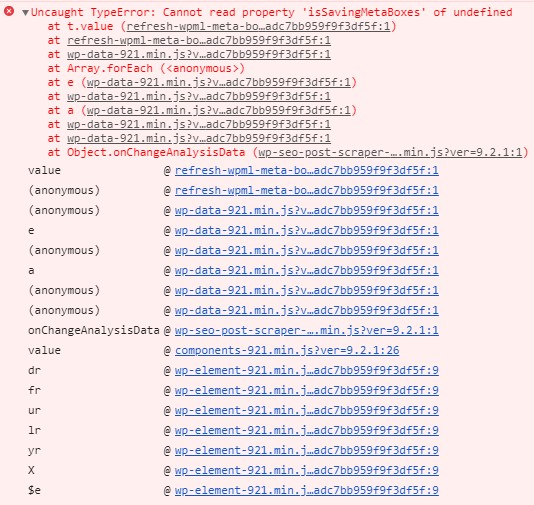
wp-content/plugins/sitepress-multilingual-cms/dist/js/wpml-meta-box/refresh-wpml-meta-box.js as this file gives an error as soon as you activate Yoast SEO plugin.
 Fidelity88
on 20 Nov 2018
Fidelity88
on 20 Nov 2018
Glad to hear im not the only one with the issue.
I just downloaded the version 9.1 and that works fine with WPML.
NicolaiFriis
on 20 Nov 2018
I just had exactly the same problem after upgrading Yoast (and several other plugins).
Thanks @NicolaiFriis I rolled back to 9.1 as well.
 viktorfw
on 20 Nov 2018
viktorfw
on 20 Nov 2018
1. Activate Yoast SEO and WPML
2. Visit a Post or Page
3. Yoast SEO Metabox Fails to Load

JS Errors that get thrown out:
TypeError: Cannot read property 'isSavingMetaBoxes' of undefined
AND
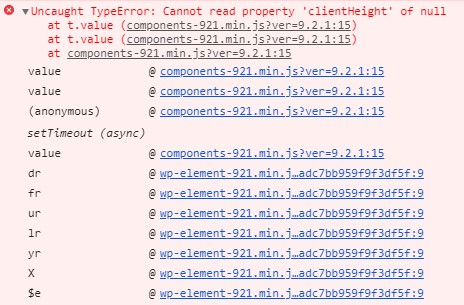
TypeError: Cannot read property 'clientHeight' of undefined
Tech Specs
WP: 4.9.8
Yoast SEO: 9.2
WPML Multilingual CMS: v4.0.8
 Pcosta88
on 20 Nov 2018
Pcosta88
on 20 Nov 2018
Please inform the customer of conversation # 445689 when this conversation has been closed.
Pcosta88
on 20 Nov 2018
Please inform the customer of conversation # 443911 when this conversation has been closed.
 amboutwe
on 20 Nov 2018
amboutwe
on 20 Nov 2018
same issue, all is messed up after the update
 sonizuro
on 20 Nov 2018
sonizuro
on 20 Nov 2018
Please inform the customer of conversation # 445610 when this conversation has been closed.
Pcosta88
on 20 Nov 2018
Please inform the customer of conversation # 445748 when this conversation has been closed.
 mayada-ibrahim
on 20 Nov 2018
mayada-ibrahim
on 20 Nov 2018
Please inform the customer of conversation # 445714 when this conversation has been closed.
 devnihil
on 20 Nov 2018
devnihil
on 20 Nov 2018
Please inform the customer of conversation # 445853 when this conversation has been closed.
 Jerparx
on 21 Nov 2018
Jerparx
on 21 Nov 2018

 monbauza
on 21 Nov 2018
monbauza
on 21 Nov 2018
I'm also getting this error with latest version of Yoast and WPML.
Also, when I change from Visual to Text editor (main post editor) the editor goes blank.
Error in console: Cannot read property 'isSavingMetaBoxes' of undefined (wp-seo-post-scraper-920.min.js?ver=9.2)
 jordif
on 21 Nov 2018
jordif
on 21 Nov 2018
Please inform the customer of conversation # 445622 when this conversation has been closed.
Jerparx
on 21 Nov 2018
Please inform the customer of conversation # 445875 when this conversation has been closed.
monbauza
on 21 Nov 2018
Same problem. Any solution?
 elemoving
on 21 Nov 2018
elemoving
on 21 Nov 2018
Please inform the customer of conversation # 445601 when this conversation has been closed.
monbauza
on 21 Nov 2018
Please inform the customer of conversation # 445896 when this conversation has been closed.
monbauza
on 21 Nov 2018
Same issue with WPML installed on our company site too. Please release a bugfix update, thank you.
 asikainl
on 21 Nov 2018
asikainl
on 21 Nov 2018
/cc @dgwatkins
 moorscode
on 21 Nov 2018
moorscode
on 21 Nov 2018
It happens only with the Classic Editor and its already fixed in WPML's development version (this morning).
Please hold on until we release this (very shortly)
 dgwatkins
on 21 Nov 2018
dgwatkins
on 21 Nov 2018
Please inform the customer of conversation # 445962 when this conversation has been closed.
Pcosta88
on 21 Nov 2018
Please inform the customer of conversation # 445986 when this conversation has been closed.
 priscillamc
on 21 Nov 2018
priscillamc
on 21 Nov 2018
Please inform the customer of conversation # 445984 when this conversation has been closed.
Pcosta88
on 21 Nov 2018
Please inform the customer of conversation # 446014 when this conversation has been closed.
Jerparx
on 21 Nov 2018
Please inform the customer of conversation # 446029 when this conversation has been closed.
Jerparx
on 21 Nov 2018
Please inform the customer of conversation # 446035 when this conversation has been closed.
Pcosta88
on 21 Nov 2018
Please inform the customer of conversation # 446049 when this conversation has been closed.
Pcosta88
on 21 Nov 2018
Please inform the customer of conversation # 446036 when this conversation has been closed.
Jerparx
on 21 Nov 2018
Please inform the customer of conversation # 445811 when this conversation has been closed.
Jerparx
on 21 Nov 2018
Please inform the customer of conversation # 445972 when this conversation has been closed.
Jerparx
on 21 Nov 2018
Please inform the customer of conversation # 446075 when this conversation has been closed.
Jerparx
on 21 Nov 2018
Please inform the customer of conversation # 446110 when this conversation has been closed.
 rmarcano
on 21 Nov 2018
rmarcano
on 21 Nov 2018
Please inform the customer of conversation # 446128 when this conversation has been closed.
rmarcano
on 21 Nov 2018
Please inform the customer of conversation # 445714 when this conversation has been closed.
rmarcano
on 21 Nov 2018
Please inform the customer of conversation # 446143 when this conversation has been closed.
rmarcano
on 21 Nov 2018
Please inform the customer of conversation # 446198 when this conversation has been closed.
 rumejan
on 22 Nov 2018
rumejan
on 22 Nov 2018
I also get the same error, already when I updated to 9.2, and the latest version 9.2.1 is not better.
Change from visual to text mode, it goes blank.
In edit "snippet" it goes blank too.
I also have wpml installed, all the latest versions.
 SimonVetterli
on 22 Nov 2018
SimonVetterli
on 22 Nov 2018
Please inform the customer of conversation # 446196 when this conversation has been closed.
 suascat
on 22 Nov 2018
suascat
on 22 Nov 2018
Please inform the customer of conversation # 445887 when this conversation has been closed.
suascat
on 22 Nov 2018
Just updated to 9.2.1 - same problems. Nothing has changed
sonizuro
on 22 Nov 2018
Please inform the customer of conversation # 446259 when this conversation has been closed.
Jerparx
on 22 Nov 2018
Just updated to 9.2.1 - same problem.
elemoving
on 22 Nov 2018
Please inform the customer of conversation # 446280 when this conversation has been closed.
Jerparx
on 22 Nov 2018
Please inform the customer of conversation # 446276 when this conversation has been closed.
Jerparx
on 22 Nov 2018
Please inform the customer of conversation # 446277 when this conversation has been closed.
Jerparx
on 22 Nov 2018
Please inform the customer of conversation # 446272 when this conversation has been closed.
Jerparx
on 22 Nov 2018
Please inform the customer of conversation # 445807 when this conversation has been closed.
Jerparx
on 22 Nov 2018
Please inform the customer of conversation # 445931 when this conversation has been closed.
Jerparx
on 22 Nov 2018
Please inform the customer of conversation # 446080 when this conversation has been closed.
Jerparx
on 22 Nov 2018
Please inform the customer of conversation # 446147 when this conversation has been closed.
Jerparx
on 22 Nov 2018
Please, inform the customer of conversation # 446186 when this conversation has been closed.
 laurasacco
on 22 Nov 2018
laurasacco
on 22 Nov 2018
Please, inform the customer of conversation # 446191 when this conversation has been closed.
Jerparx
on 22 Nov 2018
Please, inform the customer of conversation # 446349 when this conversation has been closed.
Jerparx
on 22 Nov 2018
Please, inform the customer of conversation # 446325 when this conversation has been closed.
Jerparx
on 22 Nov 2018
Please, inform the customer of conversation # 446375 when this conversation has been closed.
laurasacco
on 22 Nov 2018
Please, inform the customer of conversation of # 446411 when this conversation has been closed.
laurasacco
on 22 Nov 2018
It seems many users are having this issue. Any chance for a hotfix release?
jordif
on 22 Nov 2018
This is what I found on WPML forum:
The fix should be available in the next version of WPML.
In the meantime, if you need a workaround, update Yoast to version 9.2 and enable the Gutenberg plugin.
https://wordpress.org/plugins/gutenberg/
Or if you do not want to use the Gutenberg plugin then downgrade to Yoast version 9.1. When the new version of WPML that includes the fix will be released you will be able to update the Yoast plugin to the latest.
❌ Before proceeding, please make a full website backup!
Please note that you may also need to disable the Classic Editor plugin or enable the "Use the Block editor by default and include optional links back to the Classic editor" option in Settings -> Writing
SimonVetterli
on 22 Nov 2018
thanks @SimonVetterli ! Is it safe to downgrade from yoast 9.2 to 9.1?
jordif
on 22 Nov 2018
I am honest, I did not tried it out, as this is no myself statement, but from WPML. They write that a backup needs to get done.
It is about what is different (changes) between the 9.1 version and 9.2 version of SEO Yoast. If You give me some minutes, I will try it out.
SimonVetterli
on 22 Nov 2018
I just downgraded to Yoast version 9.1. This worked for me without any problem. As I see, and SEO Yoast might need to correct me, the most important changes to 9.2 are in the compatibility - specifically for "Gutenberg".
SimonVetterli
on 22 Nov 2018
Please inform the customer of conversation # 446420 when this conversation has been closed.
priscillamc
on 22 Nov 2018
Awesome, thanks for the info @SimonVetterli !
jordif
on 22 Nov 2018
There is a new WPML 4.1.0-b2 released today which includes this fix.
dgwatkins
on 22 Nov 2018
Please inform the customer of conversation # 446417 when this conversation has been closed.
Jerparx
on 22 Nov 2018
Please inform the customer of conversation # 446389 when this conversation has been closed.
priscillamc
on 22 Nov 2018
Please inform the customer of conversation # 284031 when this conversation has been closed.
Jerparx
on 22 Nov 2018
Please inform the customer of conversation # 446403 when this conversation has been closed.
priscillamc
on 22 Nov 2018
Please inform the customer of conversation # 446309 when this conversation has been closed.
 iamazik
on 22 Nov 2018
iamazik
on 22 Nov 2018
Closing the issue due to the released version. Thanks @dgwatkins
moorscode
on 22 Nov 2018
wait, I still do not have any option for updates. Either from WPML or Yoast
sonizuro
on 22 Nov 2018
Sorry for not being clear, its a beta release.
If you feel like trying the WPML beta you can follow these instructions:
https://wpml.org/faq/how-to-install-beta-and-development-versions-of-wpml/
dgwatkins
on 22 Nov 2018
My mistake, you were clear. Reopened the issue, will close when there is a released version.
moorscode
on 22 Nov 2018
If tested the beta version of WPML with SEO Yoast 9.2.1. And this seems to working, only in the console I have the follow error:
Uncaught TypeError: wp.apiFetch.use is not a function
at post.php?post=25397&action=edit&lang=en:287
If I search for wp.apiFetch.use, it seems as this is something from Gutenberg...
SimonVetterli
on 23 Nov 2018
Please inform the customer of conversation # 446532 when this conversation has been closed.
rumejan
on 23 Nov 2018
Please inform the customer of conversation # 446733 when this conversation has been closed.
Jerparx
on 23 Nov 2018
Please inform the customer of conversation # 446740 when this conversation has been closed.
Jerparx
on 23 Nov 2018
Please inform the customer of conversation # 446511 when this conversation has been closed.
Jerparx
on 23 Nov 2018
Please inform the customer of conversation # 446757 when this conversation has ìbeen closed.
laurasacco
on 23 Nov 2018
Thnx for inform to this post. Waiting for the official update release of the bugfix
 catapultcc
on 23 Nov 2018
catapultcc
on 23 Nov 2018
Please inform the customer of conversation # 446448 when this conversation has ìbeen closed.
Jerparx
on 23 Nov 2018
Please inform the customer of conversation # 446987 when this conversation has ìbeen closed.
mayada-ibrahim
on 23 Nov 2018
Please inform the customer of conversation # 447014 when this conversation has been closed.
Pcosta88
on 23 Nov 2018
Please inform the customer of conversation # 446464 when this conversation has been closed.
devnihil
on 23 Nov 2018
Please inform the customer of conversation # 447620 when this conversation has been closed.
rumejan
on 25 Nov 2018
Please inform the customer of conversation # 447531 when this conversation has been closed.
rumejan
on 25 Nov 2018
Please inform the customer of conversation # 447640 when this conversation has been closed.
 mariusghitulescu
on 25 Nov 2018
mariusghitulescu
on 25 Nov 2018
Please inform the customer of conversation # 447866 when this conversation has been closed.
mariusghitulescu
on 25 Nov 2018
Please inform the customer of conversation # 447871 when this conversation has been closed.
mariusghitulescu
on 25 Nov 2018
Please inform the customer of conversation # 447835 when this conversation has been closed.
mariusghitulescu
on 25 Nov 2018
Please, inform the customer of conversation # 447896 when this conversation has been closed.
laurasacco
on 26 Nov 2018
Please inform the customer of conversation # 447881 when this conversation has been closed.
laurasacco
on 26 Nov 2018
Please inform the customer of conversation # 447965 when this conversation has been closed.
Jerparx
on 26 Nov 2018
Please inform the customer of conversation # 447993 when this conversation has been closed.
Jerparx
on 26 Nov 2018
Please inform the customer of conversation # 448012 when this conversation has been closed.
Jerparx
on 26 Nov 2018
Please inform the customer of conversation # 448025 when this conversation has been closed.
Jerparx
on 26 Nov 2018
Please inform the customer of conversation # 447526 when this conversation has been closed.
Jerparx
on 26 Nov 2018
Please inform the customer of conversation # 448033 when this conversation has been closed.
Jerparx
on 26 Nov 2018
Please inform the customer of conversation # 448102 when this conversation has been closed.
laurasacco
on 26 Nov 2018
Please inform the customer of conversation # 448163 when this conversation has been closed.
Jerparx
on 26 Nov 2018
Hi, is there any ETA of the official fix being released?
 eCronik
on 26 Nov 2018
eCronik
on 26 Nov 2018
This update will be ready before WordPress 5.0 is out, but probably very close to the WP 5 release date.
You can read more about it here, under the "WPML 4.1 schedule" heading:
https://wpml.org/2018/11/wpmls-plan-for-wordpress-5-0-and-gutenberg/
dgwatkins
on 26 Nov 2018
Please inform the customer of conversation # 448290 when this conversation has been closed.
Jerparx
on 26 Nov 2018
Please inform the customer of conversation # 448183 when this conversation has been closed.
Jerparx
on 26 Nov 2018
Please inform the customer of conversation # 448203 when this conversation has been closed.
devnihil
on 26 Nov 2018
Please inform the customer of conversation # 446509 when this conversation has been closed.
Jerparx
on 26 Nov 2018
Please inform the customer of conversation # 448084 when this conversation has been closed.
Jerparx
on 26 Nov 2018
Please inform the customer of conversation # 446737 when this conversation has been closed.
Jerparx
on 26 Nov 2018
Please inform the customer of conversation # 448083 when this conversation has been closed.
rmarcano
on 26 Nov 2018
Please inform the customer of conversation # 448204 when this conversation has been closed.
Jerparx
on 26 Nov 2018
Please inform the customer of conversation # 447879 when this conversation has been closed.
Jerparx
on 26 Nov 2018
Please inform the customer of conversation # 448294 when this conversation has been closed.
devnihil
on 26 Nov 2018
Hi!
This is by far the most commented issue you've had, is it possible to consider a hotfix release?
So far solutions offered are:
1) Downgrade Yoast SEO.
Is it safe? Any DB changes we should be aware of?
2) Install Gutenberg.
This is even more scary and could lead to worse issues...
3) Wait for the next release of WPML (apparently there is no official release date as it depends on wordpress 5, which could be released as late as january...)
I totally understand a release process is not that simple, but maybe this could help many users (and avoid many tickets it seems)
Thanks!
jordif
on 26 Nov 2018
Please inform the customer of conversation # 447766 when this conversation has been closed.
amboutwe
on 26 Nov 2018
Please inform the customer of conversation # 448359 when this conversation has been closed.
Jerparx
on 26 Nov 2018
Please inform the customer of conversation # 448451 when this conversation has been closed.
devnihil
on 26 Nov 2018
Please inform the customer of conversation # 447527 when this conversation has been closed.
Pcosta88
on 26 Nov 2018
Please inform the customer of conversation # 448472 when this conversation has been closed.
Pcosta88
on 26 Nov 2018
Please inform the customer of conversation # 448484 when this conversation has been closed.
Pcosta88
on 26 Nov 2018
Please inform the customer of conversation # 448507 when this conversation has been closed.
devnihil
on 26 Nov 2018
Please inform the customer of conversation # 448664 when this conversation has been closed.
 michaelbriantina
on 27 Nov 2018
michaelbriantina
on 27 Nov 2018
Is there a temporary fix for this bug? Or just wait for a update of WPML?
catapultcc
on 27 Nov 2018
Please inform the customer of conversation # 448390 when this conversation has been closed.
Jerparx
on 27 Nov 2018
Please inform the customer of conversation # 448775 when this conversation has been closed.
laurasacco
on 27 Nov 2018
Please inform the customer of conversation # 448616 when this conversation has been closed.
 jeroenrotty
on 27 Nov 2018
jeroenrotty
on 27 Nov 2018
Please inform the customer of conversation # 448794 when this conversation has been closed.
laurasacco
on 27 Nov 2018
Please inform the customer of conversation # 448287 when this conversation has been closed.
laurasacco
on 27 Nov 2018
Please inform the customer of conversation # 445864 when this conversation has been closed.
Jerparx
on 27 Nov 2018
Please inform the customer of conversation # 448836 when this conversation has been closed.
laurasacco
on 27 Nov 2018
Please inform the customer of conversation # 448801 when this conversation has been closed.
Jerparx
on 27 Nov 2018
Please inform the customer of conversation # 448818 when this conversation has been closed.
Jerparx
on 27 Nov 2018
Please inform the customer of conversation # 448844 when this conversation has been closed.
Jerparx
on 27 Nov 2018
I was going to comment the same issue... hope it will be solved shortly.
 albe89albe
on 27 Nov 2018
albe89albe
on 27 Nov 2018
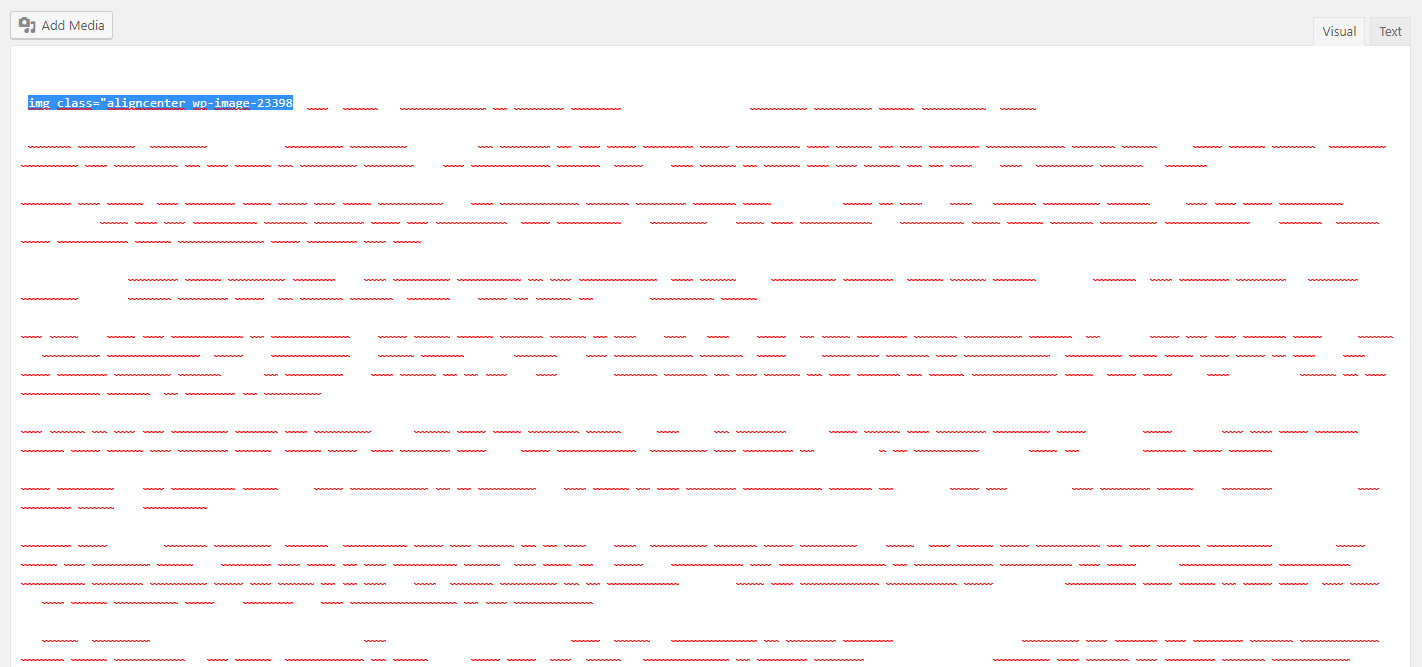
For me, this issue came also with a problem in html view of post content. In the begining I thought that is was blank too, but then I realize that actually, the problem is that the text is now white.
albe89albe
on 27 Nov 2018
Please inform the customer of conversation # 448282 when this conversation has been closed.
Jerparx
on 27 Nov 2018
Please inform the customer of conversation # 448860 when this conversation has been closed.
Jerparx
on 27 Nov 2018
same here Albe89albe with blank text content
sonizuro
on 27 Nov 2018
Please inform the customer of conversation # 448917 when this conversation has been closed.
jeroenrotty
on 27 Nov 2018
Please inform the customer of conversation # 446801 when this conversation has been closed.
jeroenrotty
on 27 Nov 2018
Please inform the customer of conversation # 448903 when this conversation has been closed.
laurasacco
on 27 Nov 2018
Please inform the customer of conversation # 448922 when this conversation has been closed.
jeroenrotty
on 27 Nov 2018
Please inform the customer of conversation # 448990 when this conversation has been closed.
Pcosta88
on 27 Nov 2018
This isn't a bug that we could fix even though it is reported in our repository. A fix for this issue has been made by WPML and is available in their beta. You can find more information on how to get access to the WPML beta here: https://wpml.org/faq/how-to-install-beta-and-development-versions-of-wpml/. Switching to the beta resolves this issue.
You can also switch to Gutenberg as a temporary workaround.
Since we can't fix this, we will close this issue. Please reach out to WPML for an ETA on their release.
 benvaassen
on 27 Nov 2018
benvaassen
on 27 Nov 2018
FYI:
we finally released: https://wpml.org/2018/11/wpml-4-1-adds-gutenberg-compatibility/
dgwatkins
on 28 Nov 2018
I just installed it - all perfect!
SimonVetterli
on 28 Nov 2018
Yeah, update WPML works! Version 4.1.1. Thnx
catapultcc
on 30 Nov 2018
Related issues
 tholu
·
3Comments
tholu
·
3Comments
 szepeviktor
·
6Comments
szepeviktor
·
6Comments
 JoshuaPotter
·
4Comments
moorscode
·
6Comments
JoshuaPotter
·
4Comments
moorscode
·
6Comments
 stayallive
·
4Comments
stayallive
·
4Comments
Most helpful comment
FYI:
we finally released: https://wpml.org/2018/11/wpml-4-1-adds-gutenberg-compatibility/