Wordpress-seo: Warning: `inc\class-wpseo-image-utils.php:203 - filesize():` stat failed for [broken link]
- [x] I've read and understood the contribution guidelines.
- [x] I've searched for any related issues and avoided creating a duplicate issue.
I'm getting a site-wide Warning: inc\class-wpseo-image-utils.php:203 - filesize(): stat failed for D:\path\to/wp-content/uploads\**D:\path\to\wp-content/uploads/**[year]/[month]/image.jpg
For some reason, the path\to\ is being output twice via get_file_size( $image ), which means the function cant find a valid image to use.
Technical info
- WordPress version: 4.9.6
- Yoast SEO version: 7.6.1
- Tested with theme: twenty-seventeen.
- Localhost (xampp) running on windows 10, PHP 7.2.x
 justlevine
All 22 comments
Thank you for reporting this issue. Unfortunately we're unable to reproduce this bug. Are you certain this is caused by Yoast SEO? And if so, how did you come to this conclusion?
 CarolineGeven
on 12 Jun 2018
CarolineGeven
on 12 Jun 2018
@CarolineGeven,
Sorry if I wasn't clear. As per the notice, the file throwing the error is part of the plugin: https://github.com/Yoast/wordpress-seo/blob/7.6.1/inc/class-wpseo-image-utils.php
Line 203:
return @filesize( self::get_absolute_path( $image['path'] ) )
And as I wrote, it happens when I switch to twenty-seventeen, and disable all other plugins...
Not sure what else you're looking for. While I read and followed the bug reporting guidelines, it's seemingly not enough. Please tell me what other info you need...
justlevine
on 12 Jun 2018
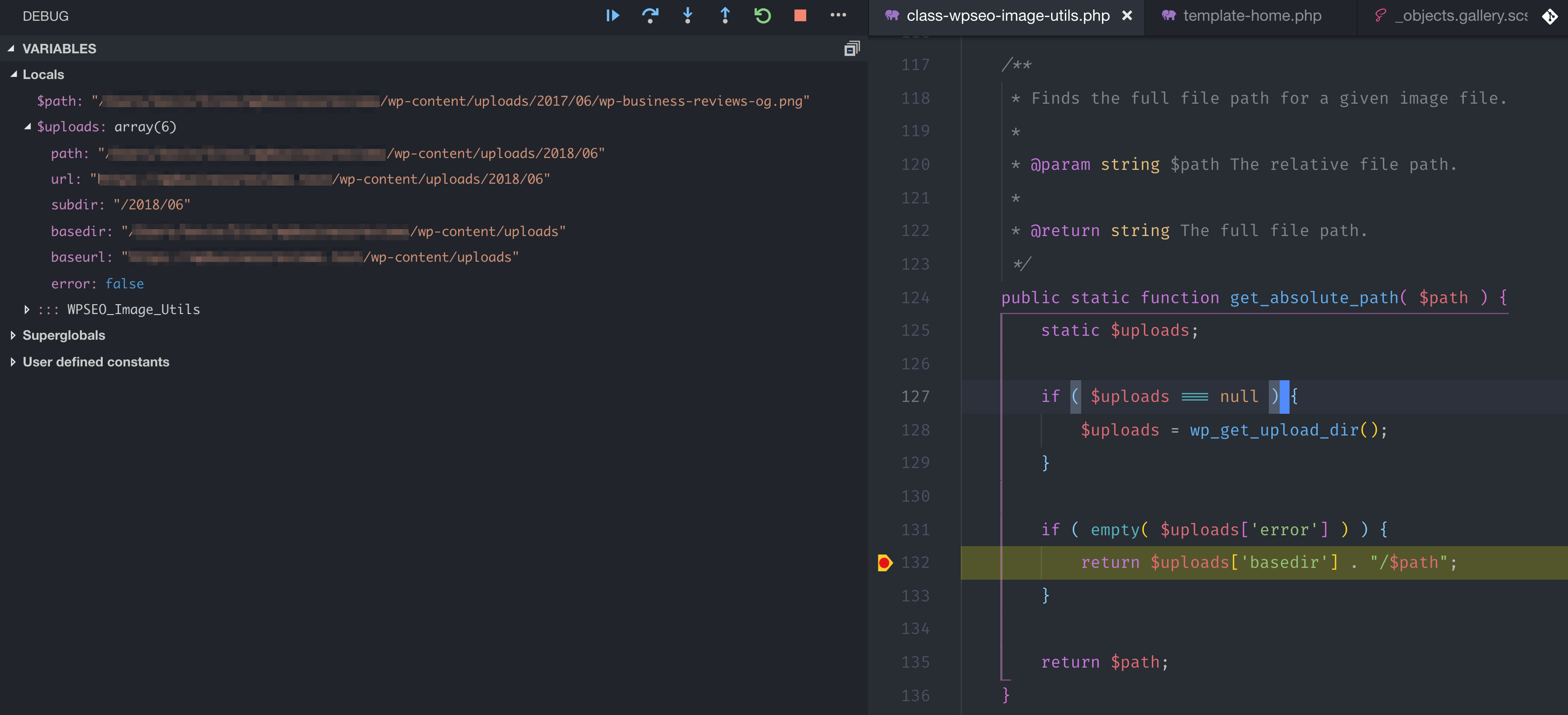
I am confirming the same behavior as @justlevine where the path is being duplicated. I've included a screenshot of the variable values when using Xdebug.
Note the following:
$uploads['basedir']includes the full path to the uploads directory.$pathincludes the full path to the image.- When you concatenate both, you end up with an invalid path that throws an exception.
In addition to the function being broken, it also halts the default execution of Xdebug, which is a pain, even though it is set to fail silently. The silent fail may explain why you are not seeing more widespread reports of this. The warning was not visible to me on the front-end, and I only caught it while step-through debugging.
Technical Info
- WP 4.9.6
- Yoast Premium 7.4.2
 kevinwhoffman
on 29 Jun 2018
kevinwhoffman
on 29 Jun 2018
In case anyone was wondering... This still persists in the latest 7.7x
justlevine
on 5 Jul 2018
Hi,
On our system, the problem appears to be in get_absolute_path( $path ), which is called by the funcation in the warning message. It checks to see if the "basedir" is contained inside the image file path. In our installation, when images are uploaded, directory delimiters in the pathname are "/" (even though we host it in Windows), and get_absolute_path() tacks on a "\" to the string "basedir", so the comparison fails - the "\" fails to match the "/" in the pathname.
This is the problematic code:
        // Add the uploads basedir if the path does not start with it.
        if ( empty( $uploads['error'] ) && strpos( $path, $uploads['basedir'] . DIRECTORY_SEPARATOR ) !== 0 ) {
            return $uploads['basedir'] . DIRECTORY_SEPARATOR . ltrim( $path, DIRECTORY_SEPARATOR );
        }
I would normalize the delimiters on ---$path--- and ---$uploads['basedir'] . DIRECTORY_SEPARATOR--- to use the same directory delimiter before comparing.
Hope this helps.
Rob Hutchison
 visualsi
on 3 Aug 2018
visualsi
on 3 Aug 2018
Hi @visualsi, you can contribute to our plugin, not just by submitting issues, but also by submitting patches. If you (or someone else) decide(s) to write a patch for this issue (how), we’ll gladly include it after some code review as it seems you already have written a fix for it.
 benvaassen
on 6 Aug 2018
benvaassen
on 6 Aug 2018
Update: in latest 8.0.3 error still exists, except the line number has changed to wp-content\plugins\wordpress-seo\inc\class-wpseo-image-utils.php:237
justlevine
on 5 Nov 2018
I host my images on a S3 bucket and having the same issue. Any updates on this issue?
 dmbostan
on 9 Nov 2018
dmbostan
on 9 Nov 2018
same issue as dmbostan, images stored on S3, wonder if that has anything to do with it
 ChristopherLMiller
on 21 Nov 2018
ChristopherLMiller
on 21 Nov 2018
The issue is not related to S3 as I experienced it with a standard WordPress install with images in uploads directory. See my comment in https://github.com/Yoast/wordpress-seo/issues/10002#issuecomment-401484389 where I show how the $uploads['base_url'] and $path are being concatenated incorrectly since they both contain paths to the uploads directory.
kevinwhoffman
on 21 Nov 2018
this is very bad. I am disappointed. take the money and get problems.
 SergiiManiuk
on 2 Feb 2019
SergiiManiuk
on 2 Feb 2019
A year later, in version 11.1.1, and this is still happening. Wow :-(
justlevine
on 12 May 2019
@kevinwhoffman the code you're referencing has been changed since (it has an additional check). Are you (or anyone else for that matter) able to replicate this issue? And if so, can you share the variables involved?
I have difficulties reproducing this on a Linux filesystem (and don't have a Windows server readily available). I have the feeling that the moment that this errors somewhere, something is passing wrong / unexpected values which causes issues and I don't know if we can / should make exceptions for those cases.
 Djennez
on 13 May 2019
Djennez
on 13 May 2019
@Djennez I replicated it last night when I reposted. it's exactly what @visualsi describes (that part still hasn't changed).
For some reason, strpos in get_absolute_path() evaluates as 1, instead of zero, so $uploads[ 'basedir' ] gets prepended to it.
justlevine
on 13 May 2019
And what are the values for $path and $uploads[ 'basedir' ] at that moment, in your case?
Djennez
on 13 May 2019
error_log() outputs:
D:\www\testsite/wp-content/uploads/2014/06/home-site_featured-1200x675.jpg for $path
D:\www\testsite/wp-content/uploads for $uploads[' basedir ']
Tbh im not sure how to visualize the invisible "", other than by seeing that strpos() returns 1.
justlevine
on 13 May 2019
So we found the cause of this issue, and it is the directory separators of the Windows filesystem that are throwing off a strpos()function.
In the get_absolute_path() function at: https://github.com/Yoast/wordpress-seo/blob/9712dee7459c553fbac506e1e36477c911f62db6/inc/class-wpseo-image-utils.php#L199 we check 2 conditions of which the second one is the one that breaks. The strpos of the basedir key gets looked up in the $path variabe, but it is first appended with a directory separator. This is a Windows directory seperator, which is a backslash instead of a forward slash.
So, with some test data we get this:
$path =                                     string(75) "C:\xampp\htdocs\testsite/wp-content/uploads/2019/05/head-659652_960_720.png"
$uploads['basedir'] =                       string(43) "C:\xampp\htdocs\testsite/wp-content/uploads"
$uploads['basedir'] . DIRECTORY_SEPARATOR = string(44) "C:\xampp\htdocs\testsite/wp-content/uploads\"
Comparing line 2 with 1 would match on 0, but comparing line 3 with 1 would not match at all (because of the last backslash), so it returns false. false does not equal 0, hence the conditional is true. Since now both conditionals are true, it triggers an alternate return where strings are wrongly concatenated.
I went over this with @jcomack and we found that replacing the entire get_absolute_path()function with the following would work:
    public static function get_absolute_path( $path ) {
        static $uploads;

        if ( $uploads === null ) {
            $uploads = wp_get_upload_dir();
        }

        $path = wp_normalize_path($path);
        $base_dir = wp_normalize_path( $uploads['basedir'] . DIRECTORY_SEPARATOR );

        // Add the uploads basedir if the path does not start with it.
        if ( empty( $uploads['error'] ) && strpos( $path, $base_dir  ) !== 0 ) {
            return wp_normalize_path($base_dir . ltrim( $path, DIRECTORY_SEPARATOR ));
        }

        return $path;
    }
However, it would also work if we were to use the original function and make the conditional less strict. So instead of ... !== 0 you can do ... != 0 or ... > 0. Both of these would make the conditional work in a Windows setting.
I will leave it to the development team to decide what would be best practice to fix this issue.
Djennez
on 14 May 2019
Wow! Thanks to both of you so much for troubleshooting this!!!
justlevine
on 14 May 2019
https://github.com/Yoast/wordpress-seo/issues/10002#issuecomment-492104814
Had exactly the same problem today running in a site cloned to a local windows development environment. I only found this issue after debugging the problem.
In my solution I simply removed the concatenation of DIRECTORY_SEPARATOR in the needle parameter to the strpos(). No need for wp_normalize_path.
if ( empty( $uploads['error'] ) && strpos( $path, $uploads['basedir'] ) !== 0 ) {
This is the trace output for the $path parameter and $uploads
C:\apache\htdocs\wordpress\wp-content\plugins\wordpress-seo\inc\class-wpseo-image-utils.php(194:0) WPSEO_Image_Utils::get_absolute_path(1) 21 2019-05-19T10:06:18+00:00 0.345725 0.017665 cf=wp_head,wpseo_head,wpseo_opengraph 41 3963 6291456/6291456 256M F=593 1 C:\apache\htdocs\susancowemiller/wp-content/uploads/sites/2/2014/12/butterfly11-e1456339559137.jpg
C:\apache\htdocs\wordpress\wp-content\plugins\wordpress-seo\inc\class-wpseo-image-utils.php(194:0) WPSEO_Image_Utils::get_absolute_path(2) 22 2019-05-19T10:06:18+00:00 0.346189 0.000464 cf=wp_head,wpseo_head,wpseo_opengraph 41 3963 6291456/6291456 256M F=593 uploads Array
(
    [path] => C:\apache\htdocs\susancowemiller/wp-content/uploads/sites/2/2019/05
    [url] => https://s.b/susancowemiller/hampshire-eft/wp-content/uploads/sites/2/2019/05
    [subdir] => /2019/05
    [basedir] => C:\apache\htdocs\susancowemiller/wp-content/uploads/sites/2
    [baseurl] => https://s.b/susancowemiller/hampshire-eft/wp-content/uploads/sites/2
    [error] =>
)
Looking forward to seeing a permanent fix for this problem.
Looks like Yoast are waiting for a patch. https://github.com/Yoast/wordpress-seo/issues/10002#issuecomment-410606976
 bobbingwide
on 19 May 2019
bobbingwide
on 19 May 2019
Hi @bobbingwide, and thank you for your PR. This is a possibility that we have considered as well. However, removing the separator in the needle makes it so that it would match on other folders that would begin with this string as well. In the following example, consider 1 as needle and 2 and 3 as haystacks. The needle would match both 2 and 3 without the directory separator.
1. /var/www/site/wp/wp-content/uploads
2. /var/www/site/wp/wp-content/uploads/img/img1.jpg
3. /var/www/site/wp/wp-content/uploads-extended/09/fruit.jpg
Agree. Yes, it would match... indicating that the file has the same prefix as the uploads dir. strpos will return 0, causing the if test to be false and the original file is used. Which is what we expect.
To determine if this is the right test we have to understand whether or not the $path might contain the values in 2. or 3. And, if so, what would happen when the upload_dir is prepended.
bobbingwide
on 20 May 2019
Just want to keep the convo going, on the one-year anniversary of this ticket being opened, and so close to a solution.
@bobbingwide 's logic tracks with me... once we've hit path/to/wp-content/{anything}, there shoud never be a reason that were appending path/to/wp-content/uploads to the path.
Its definitely a simpler change than a complete function rewrite that @Djennez wrote above, and avoids using a non-strict conditional.
justlevine
on 12 Jun 2019
Related issues
 qmdev
·
6Comments
qmdev
·
6Comments
 szepeviktor
·
6Comments
szepeviktor
·
6Comments
 JoshuaPotter
·
4Comments
JoshuaPotter
·
4Comments
 garretthyder
·
5Comments
garretthyder
·
5Comments
 shanejones
·
5Comments
shanejones
·
5Comments