Wordpress-ios: Quick Start v2: "Publish a post" misplaced indicator
Expected behavior
The "Publish a post" task should show an indicator on the Floating Action Button.
Actual behavior
It is indicating on the Reader tab due to navigation changes.
Steps to reproduce the behavior
- My Sites > + button > Create WordPress.com site
- Name your site > Create > Done
- When the fancy alert appears, choose Yes, Help Me.
- Close the "Customize Your Site" tour guide.
- Choose "Grow Your Audience" tour guide.
- Choose "Publish a post" from the list.
Screenshots
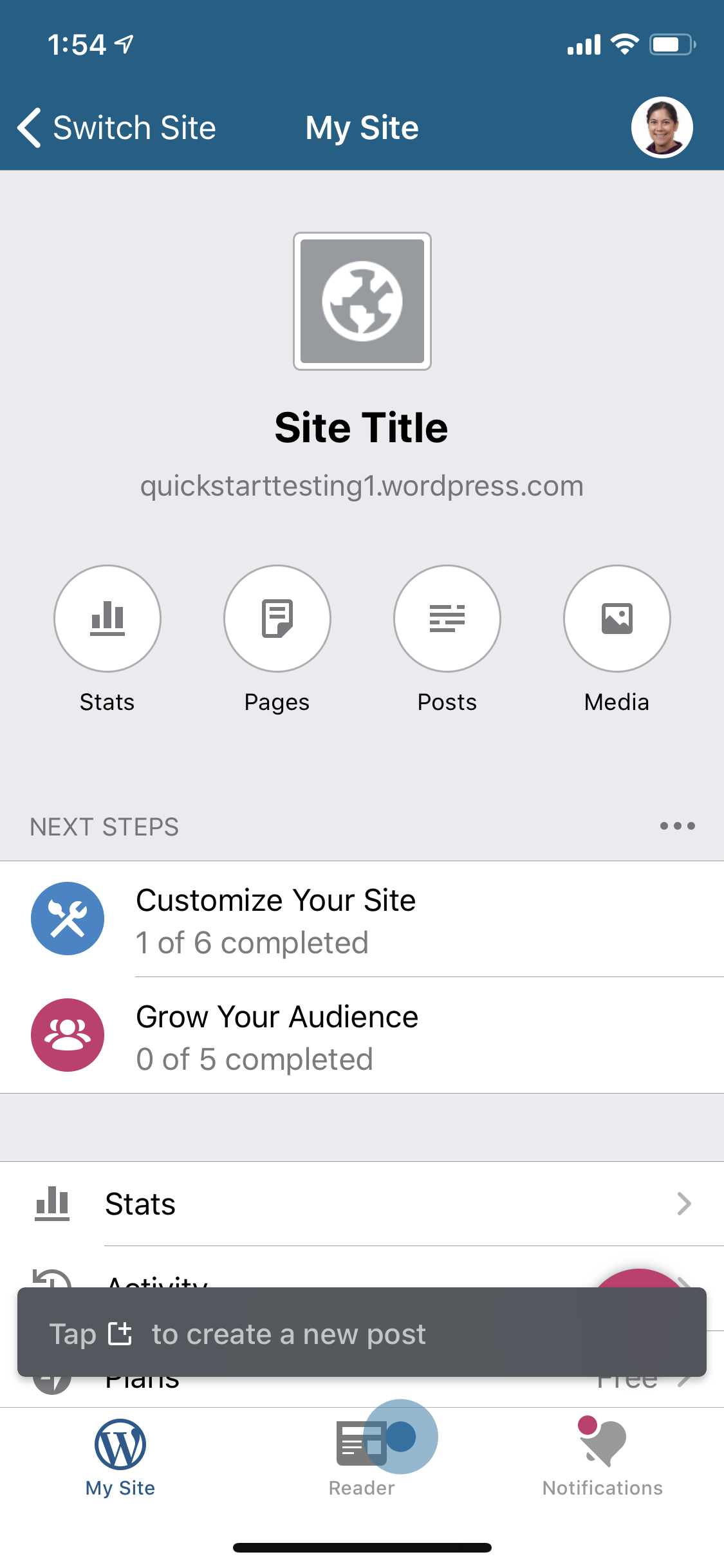
Tested on iPhone 11 Pro, iOS 13.5, WPiOS 15.0.0.2
 mindgraffiti
All 5 comments
I don't have enough context into this to propose new changes. I don't know what the old flow looked like, so I don't know what steps were assisting the user with this task. The closest I could find is Ref. p9xubY-mI-p2
mindgraffiti
on 8 Jun 2020
It looks as though this tour will now need to highlight the create FAB, as the tab bar create button that it used to reference no longer exists. However, the tour notice is overlapping the FAB... @bjtitus do you know if there's any easy way we'd be able to make the FAB avoid notices?
 frosty
on 8 Jun 2020
frosty
on 8 Jun 2020
do you know if there's any easy way we'd be able to make the FAB avoid notices?
This is going to be tricky since I ended up adding the FAB and all of its constraints to the Blog Details view. Theoretically, it could be moved manually depending on the presented notice position (which is in another window) but that doesn't seem like a great solution.
I think it would be much easier to present the new tooltip by listening to the QuickStartTourElementChangedNotification and then calling tourGuide.visited(.newpost).
Something like this in CreateButtonCoordinator:
func listenForQuickStart() {
    quickStartObserver = NotificationCenter.default.addObserver(forName: .QuickStartTourElementChangedNotification, object: nil, queue: nil) { [weak self] (notification) in
        self?.didDismissTooltip = false
        self?.showCreateButton()
    }
}

private func hideNotice() {
    if let container = noticeContainerView {
        QuickStartTourGuide.find()?.visited(.newpost)
        NoticePresenter.dismiss(container: container)
    }
}
 bjtitus
on 8 Jun 2020
bjtitus
on 8 Jun 2020
I just came here to ask if we could use the tooltip, and you beat me to it! Thanks for the advice!
frosty
on 8 Jun 2020
We also purposefully designed the Tooltip to match our SnackBars, so it shouldn't look out of place in this instance.
 osullivanchris
on 9 Jun 2020
osullivanchris
on 9 Jun 2020
Related issues
 rclations
·
3Comments
rclations
·
3Comments
 ScoutHarris
·
3Comments
ScoutHarris
·
3Comments
 designsimply
·
3Comments
designsimply
·
3Comments
 SiobhyB
·
3Comments
designsimply
·
3Comments
SiobhyB
·
3Comments
designsimply
·
3Comments