Woocommerce: Variable product display as 'out of stock' when there is stock.
Prerequisites
- [x ] I have searched for similar issues in both open and closed tickets and cannot find a duplicate
- [x ] The issue still exists against the latest
masterbranch of WooCommerce on Github - [ ] I have attempted to find the simplest possible steps to reproduce the issue
- [ ] I have included a failing test as a pull request (Optional)
Steps to reproduce the issue
Some of variable products shows as "Out of stock". However, there is stock in the variable product.


This problem occurs in some of products only. I compared with other variable product those without problem, there is no different in all the setting. (As I import them in one batch of CSV) Sometimes problem occur after a customer purchase the product.
Thank you.
Isolating the problem
- [x ] This bug happens with only WooCommerce plugin active
- [ ] This bug happens with a default WordPress theme active, or Storefront
- [ ] I can reproduce this bug consistently using the steps above
WordPress Environment
WordPress Environment
Home URL: http://bluebelloutlet.com
Site URL: http://bluebelloutlet.com
WC Version: 3.1.1
Log Directory Writable: ✔
WP Version: 4.8.1
WP Multisite: –
WP Memory Limit: 768 MB
WP Debug Mode: –
WP Cron: ✔
Language: en_US
Server Environment
Server Info: Apache
PHP Version: 7.0.22
PHP Post Max Size: 128 MB
PHP Time Limit: -1
PHP Max Input Vars: 3000
cURL Version: 7.53.0
OpenSSL/1.0.2k
SUHOSIN Installed: –
MySQL Version: 5.6.36
Max Upload Size: 128 MB
Default Timezone is UTC: ✔
fsockopen/cURL: ✔
SoapClient: ✔
DOMDocument: ✔
GZip: ✔
Multibyte String: ✔
Remote Post: ✔
Remote Get: ✔
Database
WC Database Version: 2.6.14
WC Database Prefix: wp_wzffdz1frw_
woocommerce_sessions: ✔
woocommerce_api_keys: ✔
woocommerce_attribute_taxonomies: ✔
woocommerce_downloadable_product_permissions: ✔
woocommerce_order_items: ✔
woocommerce_order_itemmeta: ✔
woocommerce_tax_rates: ✔
woocommerce_tax_rate_locations: ✔
woocommerce_shipping_zones: ✔
woocommerce_shipping_zone_locations: ✔
woocommerce_shipping_zone_methods: ✔
woocommerce_payment_tokens: ✔
woocommerce_payment_tokenmeta: ✔
MaxMind GeoIP Database: ✔
Security
Secure connection (HTTPS): ❌Your store is not using HTTPS. Learn more about HTTPS and SSL Certificates.
Hide errors from visitors: ✔
Active Plugins (20)
Better Search Replace: by Delicious Brains – 1.3
Google Analytics for WordPress by MonsterInsights: by MonsterInsights – 6.2.2
WPBakery Visual Composer: by Michael M - WPBakery.com – 4.11
Ninja Forms: by The WP Ninjas – 3.1.9
Popup Maker: by WP Popup Maker – 1.6.5
Replace Image: by Potent Plugins – 1.1.6
Search & Replace: by Inpsyde GmbH – 3.1.2
Shortcode Widget: by Gagan Deep Singh – 1.4
WooCommerce All Discounts Lite: by ORION – 1.3
Woo Checkout Field Editor Pro: by ThemeHiGH – 1.2.0
WooCommerce Email Test: by RaiserWeb – 1.9
WooCommerce PDF Invoices & Packing Slips: by Ewout Fernhout – 2.0.7
WooCommerce Shipping Tracking: by Lagudi Domenico – 12.2
WooCommerce: by Automattic – 3.1.1 – 3.1.2 is available
Hustle: by WPMU DEV – 5.1.5
WP All Export Pro: by Soflyy – 1.4.7
WP All Import Pro: by Soflyy – 4.4.9
WP Media Category Management: by DeBAAT – 1.9.1
WP All Import - WooCommerce Add-On Pro: by Soflyy – 2.3.7
Advanced Custom Fields: by Elliot Condon – 4.4.11
Settings
API Enabled: ✔
Force SSL: ✔
Currency: HKD (HK$)
Currency Position: left
Thousand Separator: ,
Decimal Separator: .
Number of Decimals: 2
Taxonomies: Product Types: external (external)
grouped (grouped)
simple (simple)
variable (variable)
Taxonomies: Product Visibility: exclude-from-catalog (exclude-from-catalog)
exclude-from-search (exclude-from-search)
featured (featured)
outofstock (outofstock)
rated-1 (rated-1)
rated-2 (rated-2)
rated-3 (rated-3)
rated-4 (rated-4)
rated-5 (rated-5)
WC Pages
Shop base: #26 - /shop/
Cart: #7 - /cart/
Checkout: #8 - /checkout/
My account: #9 - /account/
Theme
Name: Shopkeeper
Version: 2.0.10
Author URL: https://www.getbowtied.com/
Child Theme: ❌ – If you are modifying WooCommerce on a parent theme that you did not build personally we recommend using a child theme. See: How to create a child theme
WooCommerce Support: ✔
Templates
Overrides: shopkeeper/woocommerce/archive-product.php
shopkeeper/woocommerce/cart/cart-empty.php
shopkeeper/woocommerce/cart/mini-cart.php
shopkeeper/woocommerce/checkout/form-checkout.php
shopkeeper/woocommerce/checkout/form-coupon.php
shopkeeper/woocommerce/checkout/form-login.php
shopkeeper/woocommerce/content-product.php
shopkeeper/woocommerce/content-product_cat.php
shopkeeper/woocommerce/content-single-product.php
shopkeeper/woocommerce/global/quantity-input.php
shopkeeper/woocommerce/global/sidebar.php
shopkeeper/woocommerce/global/wrapper-end.php
shopkeeper/woocommerce/global/wrapper-start.php
shopkeeper/woocommerce/loop/loop-end.php
shopkeeper/woocommerce/loop/loop-start.php
shopkeeper/woocommerce/loop/no-products-found.php
shopkeeper/woocommerce/myaccount/form-login.php
shopkeeper/woocommerce/myaccount/my-downloads.php
shopkeeper/woocommerce/order/form-tracking.php
shopkeeper/woocommerce/single-product/product-image.php
shopkeeper/woocommerce/single-product/product-thumbnails.php
shopkeeper/woocommerce/single-product/tabs/tabs.php
shopkeeper/woocommerce/single-product-reviews.php
shopkeeper/woocommerce/single-product.php
 kaihchan8
All 107 comments
On the inventory tab, turn off stock management at product level. You want it to be based on variations instead.
 mikejolley
on 29 Aug 2017
mikejolley
on 29 Aug 2017
Its definitely still a bug and the inventory tab gets completely ignored despite the suggestions. To fix it you have to delete the product and add it back - making sure that you choose "Variable Product" from the beginning. You can reproduce the problem by adding a simple product and changing it to variable.
 jfksdca
on 21 Jun 2018
jfksdca
on 21 Jun 2018
@jfksdca If you're referring to the stock status dropdown, variables don't have it because they sync with variations.
mikejolley
on 21 Jun 2018
Hi, Mike. I see that this was closed sometime ago but my experience was exactly like the others and that was last night. I wasn't referring to the drop down. There is a screen print above that shows a red error "Out of Stock." No matter how I set it up last night the front it displayed that error (I don't think it was really red). That's a big deal because it prevents a user from purchasing the product.
As I understand the system, making it track stock is optional whether its simple or a variable product. "Manage Stock" was turned off and the front end still said "out of stock." The only way I could fix it was to erase the product and start over. I've given steps to reproduce it. Start as a simple product and add a variation. Then change it to variable product and one would see the error. My experience was exactly like the previous reports.
I really believe there is a legitimate issue here that still lingers. If I should start a new threat I could do that. I read through what users were reporting and the responses they got. It always concerns me when support staff try and tell users there is no problem instead of carefully "listening" and trying to reproduce what people are seeing. If 5 people report the same problem then there is either 1) a bug, 2) a lack of documentation on how it works, OR 3) an opportunity to simplify the design/process.
I approach software support from the angle that my job is to ensure the software works. It isn't my job to defend it. No one wins if someone doing support takes the position that the user is wrong. Users get frustrated and switch to a different product and whatever the issue is (usually one of the 3 above) doesn't get addressed.
jfksdca
on 25 Jun 2018
Start as a simple product and add a variation. Then change it to variable product and one would see the error. My experience was exactly like the previous reports.
Sorry but this is not technically possible. Variations cannot be added to simple products. If you want to show a screencast maybe that will help?
It always concerns me when support staff try and tell users there is no problem instead of carefully "listening" and trying to reproduce what people are seeing.
This is not a support forum, and it's not ran by support staff. There is a helpdesk and forum for that, which you are welcome to post to instead.
We have rules on Github for example, providing steps to reproduce an issue on a clean install. If this is not provided, the issue is closed.
This is not 'defending' or not listening, this for for efficiency. Spending countless hours trying to 'guess' how an issue occurred on a site we cannot access is a waste of time and resources. Following the issue template and prerequisite steps will help avoid having an issue closed without action.
Thanks
mikejolley
on 25 Jun 2018
I was unclear what your role is on this forum. I'm more than happy to
provide you with some screen prints (I'd record video if I still had a Mac
but I haven't found an easy way to do that on W10.)
I really, really don't want to be confrontational. I apologize if I sound
that way. I am a bit frustrated because I want to help. I would like to
request that you please read what I'm saying just a bit more carefully.
It is absolutely true that you can't add a variation to a simple product.
BUT you can change the product from simple to variable and then start
adding variations. That's where the issue is. Think about it from a
database perspective. it makes sense that an issue could occur there
because you are adding a relationship to a product and the interface there
gets really klugey. I haven't specifically tested this but I think you can
get all the way to variations without having hit the save button in the
publish section. So the product ID doesn't appear to exist yet to hang
those variations off.
That whole section on the bottom really needs to be redesigned. You have
tabs across the top, tabs on the left side, variations that can be dragged
to reorder and then expand with another 10 fields to input. I would get
rid of the tabs and put each tab in sections that stack from top to
bottom. It would be more linear and easier to follow. Ideally, questions
would guide the user before they make a mistake.
I would appreciate it if you would test this before we do any further. Add
a product and complete fields at the top but don't save anything until
after you get to simple or variable section. Add a simple product and save
it. Test the front end. Looks good but oh you forget there is a flavor.
Change it to variable product and add flavor as variation. Don't check the
track stock checklist.
(This next part the design sucks because flavor variations are 2 tabs
below). Add 2 flavors and test the front end. Is it in stock?
On Mon, Jun 25, 2018 at 3:25 AM Mike Jolley notifications@github.com
wrote:
Start as a simple product and add a variation. Then change it to variable
product and one would see the error. My experience was exactly like the
previous reports.Sorry but this is not technically possible. Variations cannot be added to
simple products. If you want to show a screencast maybe that will help?It always concerns me when support staff try and tell users there is no
problem instead of carefully "listening" and trying to reproduce what
people are seeing.This is not a support forum, and it's not ran by support staff. There is a
helpdesk and forum for that, which you are welcome to post to instead.We have rules on Github for example, providing steps to reproduce an issue
on a clean install. If this is not provided, the issue is closed.This is not 'defending' or not listening, this for for efficiency.
Spending countless hours trying to 'guess' how an issue occurred on a site
we cannot access is a waste of time and resources. Following the issue
template and prerequisite steps will help avoid having an issue closed
without action.Thanks
—
You are receiving this because you were mentioned.
Reply to this email directly, view it on GitHub
https://github.com/woocommerce/woocommerce/issues/16620#issuecomment-399905203,
or mute the thread
https://github.com/notifications/unsubscribe-auth/AEmnCh46MFGgqoVF9oPwKMAa_Z9TRefUks5uALq3gaJpZM4PEAKf
.
jfksdca
on 28 Jun 2018
Stock management off at the product level but on at the variation level, and this seems to have got it working for me (went from a simple product to a variable).
 SherpaDigital
on 29 Jun 2018
SherpaDigital
on 29 Jun 2018
That whole section on the bottom really needs to be redesigned. You have
tabs across the top, tabs on the left side, variations that can be dragged
to reorder and then expand with another 10 fields to input. I would get
rid of the tabs and put each tab in sections that stack from top to
bottom. It would be more linear and easier to follow. Ideally, questions
would guide the user before they make a mistake.
It will be. Not a small task though. It's being worked on probably next year. Store on WordPress.com already has some reimagining of the variations with a new UI in react.
Add a product and complete fields at the top but don't save anything until
after you get to simple or variable section. Add a simple product and save
it. Test the front end. Looks good but oh you forget there is a flavor.
Change it to variable product and add flavor as variation. Don't check the
track stock checklist.
I see, the box gets toggled on. PR incoming.
mikejolley
on 29 Jun 2018
I am having the same issue. no matter what I do, it constantly says out of stock for variable product. I've tried adding and deleting the product, no luck. I've tried adding stock for each variation, no luck. It says in stock on the backend product tab.
 brandenMB
on 29 Jun 2018
brandenMB
on 29 Jun 2018
Oh My
Same issue for me - and so frustrating. No simple answer.
I just dont want Out of Stock to show - and despite having switched it off in main settings and also the product level to test also - same issue.
Why so complicated?
 madaboutu
on 2 Jul 2018
madaboutu
on 2 Jul 2018
Hello gentlemen.
I assume it might be better to open a new issue here on github if you believe it is a bug, along with steps to reproduce the problem and system status report.
Otherwise it's difficult for us to tell if it's related to the original problem raised here some time ago, or how to reproduce the problem.
Alternatively, you can also check for other support channels we provide.
Thx.
 peterfabian
on 2 Jul 2018
peterfabian
on 2 Jul 2018
I thought i had this problem but it seems I don't...
Do the posters above realize you HAVE to set the 'Regular price ($)' for EVERY variation in order for it to work correctly? I have 12 variations and it appeared out of stock despite all the 'stock management' functions deselected. Once i set a price for each variation it worked perfect.
http://antiquewoodsllc.com/product/reclaimed-antique-oak/
 doferdude
on 4 Jul 2018
doferdude
on 4 Jul 2018
Please help. I am having the same issue. If I add a product qty without a variation it works fine. If I add a product qty with a variation for different sizes or colors, it works fine. The problem is when I add a variation for FONTS or DESIGNS. I put in the qty in the Inventory tab and not in the variations tab. I can not add a qty in the variations tab because I am wanting to give my customers the option. It will state In Stock for about 10 mins then state Out of Stock. It all started when I changed a simple product to a variation product. If this is a big, what do you suggest I do to fix the problem? I have never done anything like this before. you
 jwhite0229
on 4 Jul 2018
jwhite0229
on 4 Jul 2018
Ok so in order for it to work, you have to set a price for each variable. You can also control the inventory by checking the option.
https://snag.gy/vUYD9R.jpg
If it can save you time..
 magnoliacom
on 4 Jul 2018
magnoliacom
on 4 Jul 2018
Hi magnoliacom. I've watched all the videos and tried that too. Nothing fixed for very long. Only for about 10 mins or less and then I'm out of stock again.
jwhite0229
on 4 Jul 2018
Huh, still working for me.. Will let you know later!
magnoliacom
on 4 Jul 2018
Everything was working fine for me up until I change one of my simple products into a product, instead of deleting it and re-entering it as a variation product. And like I said above I can't the quantities in the variations because my variations are fonts and designs only. Thank you for any and all help that you can provide I'm extremely lost on the subject. I wanted to reach out to you all before I spent a lot of money trying to fix what is hopefully a much more simpler problem.
jwhite0229
on 4 Jul 2018
jwhite0229, if you haven't found a solution, I can take a quick look for you :) If you want to send me access at [email protected].
magnoliacom
on 5 Jul 2018
I have the same problem in red text 'This product is currently out of stock and unavailable.'
I believe this problem among others happened when I upgraded the woocommerce plug in. Everything was working fine before then.
I went thru the motions of deleting the woocommerce plug in and re-installing and adding 40 products, then deleted the products and currently re-adding them and still no joy.
HELP!
It's OK
When testing, I didn't specify size when clicking on add to cart button.
 BobRafto
on 6 Jul 2018
BobRafto
on 6 Jul 2018
Have you set a price for each individual variation? None of them show as in stock unless the price has been set on EVERY variation.
On 6 Jul 2018 02:25, BobRafto notifications@github.com wrote:
I have the same problem in red text 'This product is currently out of stock and unavailable.'
I believe this problem among others happened when I upgraded the woocommerce plug in. Everything was working fine before then.
I went thru the motions of deleting the woocommerce plug in and re-installing and adding 40 products, then deleted the products and currently re-adding them and still no joy.
HELP!
—
You are receiving this because you commented.
Reply to this email directly, view it on GitHubhttps://eur02.safelinks.protection.outlook.com/?url=https%3A%2F%2Fgithub.com%2Fwoocommerce%2Fwoocommerce%2Fissues%2F16620%23issuecomment-402897570&data=02%7C01%7C%7C68e6f497505d420a279908d5e2df548f%7C84df9e7fe9f640afb435aaaaaaaaaaaa%7C1%7C0%7C636664371173151538&sdata=4UfkV8GTGZO1dCv6isY27lwJbVVkkE%2BwDoButAxe0cE%3D&reserved=0, or mute the threadhttps://eur02.safelinks.protection.outlook.com/?url=https%3A%2F%2Fgithub.com%2Fnotifications%2Funsubscribe-auth%2FAm8cuVKEij_jjgMOQEoprPmI0tuRKo20ks5uDrx7gaJpZM4PEAKf&data=02%7C01%7C%7C68e6f497505d420a279908d5e2df548f%7C84df9e7fe9f640afb435aaaaaaaaaaaa%7C1%7C0%7C636664371173151538&sdata=9HYSUbzvu9E1uQu9mncwk0rVvIwcd6Fq3%2BGlUGVVL5k%3D&reserved=0.
doferdude
on 6 Jul 2018
Yes, every variation has a price.
Sent from Mail for Windows 10
From: doferdude
Sent: Friday, 6 July 2018 4:03 PM
To: woocommerce/woocommerce
Cc: BobRafto; Comment
Subject: Re: [woocommerce/woocommerce] Variable product display as 'out ofstock' when there is stock. (#16620)
Have you set a price for each individual variation? None of them show as in stock unless the price has been set on EVERY variation.
On 6 Jul 2018 02:25, BobRafto notifications@github.com wrote:
I have the same problem in red text 'This product is currently out of stock and unavailable.'
I believe this problem among others happened when I upgraded the woocommerce plug in. Everything was working fine before then.
I went thru the motions of deleting the woocommerce plug in and re-installing and adding 40 products, then deleted the products and currently re-adding them and still no joy.
HELP!
—
You are receiving this because you commented.
Reply to this email directly, view it on GitHubhttps://eur02.safelinks.protection.outlook.com/?url=https%3A%2F%2Fgithub.com%2Fwoocommerce%2Fwoocommerce%2Fissues%2F16620%23issuecomment-402897570&data=02%7C01%7C%7C68e6f497505d420a279908d5e2df548f%7C84df9e7fe9f640afb435aaaaaaaaaaaa%7C1%7C0%7C636664371173151538&sdata=4UfkV8GTGZO1dCv6isY27lwJbVVkkE%2BwDoButAxe0cE%3D&reserved=0, or mute the threadhttps://eur02.safelinks.protection.outlook.com/?url=https%3A%2F%2Fgithub.com%2Fnotifications%2Funsubscribe-auth%2FAm8cuVKEij_jjgMOQEoprPmI0tuRKo20ks5uDrx7gaJpZM4PEAKf&data=02%7C01%7C%7C68e6f497505d420a279908d5e2df548f%7C84df9e7fe9f640afb435aaaaaaaaaaaa%7C1%7C0%7C636664371173151538&sdata=9HYSUbzvu9E1uQu9mncwk0rVvIwcd6Fq3%2BGlUGVVL5k%3D&reserved=0.
—
You are receiving this because you commented.
Reply to this email directly, view it on GitHub, or mute the thread.
BobRafto
on 6 Jul 2018
BobRafto I had the same problem but I was able to solve it. There must be something you're missing out. I can take a look if you want. ;)
See here - https://snag.gy/GtaMjD.jpg
magnoliacom
on 6 Jul 2018
Great, what do you require?
Sent from Mail for Windows 10
From: magnoliacom
Sent: Saturday, 7 July 2018 3:52 AM
To: woocommerce/woocommerce
Cc: BobRafto; Comment
Subject: Re: [woocommerce/woocommerce] Variable product display as 'out ofstock' when there is stock. (#16620)
BobRafto I had the same problem but I was able to solve it. There must be something you're missing out. I can take a look if you want. ;)
—
You are receiving this because you commented.
Reply to this email directly, view it on GitHub, or mute the thread.
BobRafto
on 6 Jul 2018
Send me an email at [email protected]
magnoliacom
on 6 Jul 2018
It’s OK, I’ve resolved the matter.
When I was testing I didn’t set the size required when adding to cart.
Thanks for your offer to help.
Sent from Mail for Windows 10
From: magnoliacom
Sent: Saturday, 7 July 2018 3:52 AM
To: woocommerce/woocommerce
Cc: BobRafto; Comment
Subject: Re: [woocommerce/woocommerce] Variable product display as 'out ofstock' when there is stock. (#16620)
BobRafto I had the same problem but I was able to solve it. There must be something you're missing out. I can take a look if you want. ;)
—
You are receiving this because you commented.
Reply to this email directly, view it on GitHub, or mute the thread.
BobRafto
on 6 Jul 2018
Good!
magnoliacom
on 6 Jul 2018
This may sound obvious but also please make sure your variations are "enabled":

 tomatillodesign
on 11 Jul 2018
tomatillodesign
on 11 Jul 2018
Thank you, problem is fixed.
Sent from Mail for Windows 10
From: Chris Liu-Beers
Sent: Wednesday, 11 July 2018 9:27 PM
To: woocommerce/woocommerce
Cc: BobRafto; Comment
Subject: Re: [woocommerce/woocommerce] Variable product display as 'out ofstock' when there is stock. (#16620)
This may sound obvious but also please make sure your variations are "enabled"
—
You are receiving this because you commented.
Reply to this email directly, view it on GitHub, or mute the thread.
BobRafto
on 12 Jul 2018
Had two products with the same behavior. What fixed it for me was setting the stock to 0, saving, then back to the desired value. Setting it to a higher value and then to the intended one did not work, had to be 0.
Can anyone else confirm this?
 Aionictic
on 17 Jul 2018
Aionictic
on 17 Jul 2018
In my case, i had a crazy import script. Possibly errors occurred.
Stock status wasn't syncing, but doing it manually works.
Calling this in my script solves it:
WC_Product_Variable::sync( $variable_product,true);
http://woocommerce.wp-a2z.org/oik_api/wc_product_variablesync/
Admittedly, this is a hack.
 jdar
on 20 Jul 2018
jdar
on 20 Jul 2018
In my case WC_Product_Variable::sync( $variable_product,true); stock status wasn't syncing.
Manual update with update_post_meta($product_id, '_stock_status', 'instock'); works, status syncing.
 yunusga
on 1 Aug 2018
yunusga
on 1 Aug 2018
I'm having this exact issue with a client site. However, this only happens at complete random. All day the product will be normal. Then it will randomly remove the product-summary and display 'out of stock' even though the variations are fine. I've tested the order process and it's completely fine, it has to be something with a cron or background function mis-aligning the inventory.
- I've made sure all the products were 'stock' managed at the variation level.
- All products are enabled and working fine.
- Will at random display out of stock until i've hit the update button on that product.
@yunusga I'm curious about your fix, as it seems most similar to what i believe the issue could be. Did you set this up as a cron or a standalone replacement function?
 DLzer
on 13 Aug 2018
DLzer
on 13 Aug 2018
@DLzer try this:
If parent product has variations and variations has stock count, disable _manage_stock for parent product and enable _manage_stock for variations
yunusga
on 13 Aug 2018
@yunusga All products are managed at the variation level. Not the parent.
I've added:
// Sync the product before returning it
if( !WC_Product_Variable::sync($id, true) ) {
    exit;
}
to my content-single-product.php template to force a sync of the inventory before displaying.
DLzer
on 13 Aug 2018
Some of my variable products get out of stock randomly.
- They appear as ‘out of stock’ on front end
- When I check in wp-admin I can see them there, but if I try to re-save them then they start to appear as out of stock, then I hit another save and then they appear back to stock again
- I have checked in database what is going on but I can see no change neither in variables ‘post’ neither in product ‘post’ or postmeta on save
- When products are shown out of stock (even they should be in stock), I can notice that method $this->get_children() ( class WC_Product_Variable L:202 ) is returning empty array
I have found a workaround to fix this, by adding this part to ‘templates/single-product/add-to-cart/variable.php’:
if ( empty( $available_variations ) ) :

    $product::sync_stock_status($product, true);
    $product = null;
    $product = new WC_Product_Variable( $product_id );

    $attributes = $product->get_variation_attributes();
    $available_variations = $product->get_available_variations();

endif;
I have further found out that this method
$product->get_children() origins from WC_Product_Variable_Data_Store_CPT method read_children L:117 which tries to load variable post_id’s from transient named:
$children_transient_name = 'wc_product_children_' . $product->get_id();
and when I checked transient for my product, that transient indeed shows 0 product ID’s in there.
And if I delete that transient, when the transient gets regenerated again I can see that ID’s are populated properly and that everything is back to normal.
I’m not sure why would this fail and where could this thing be triggered to generate transient without parent product ID’s, variations are definitely in db and any WP_Query(['post_parent' => $product->get_id()]) should return these products..
 Bobz-zg
on 14 Aug 2018
Bobz-zg
on 14 Aug 2018
I would like to add one more point to the discussion:
When setting a product as variable, parent price disappears and variation price is required.
If no variation price is set, then the variation will be automatically out of stock.
I find this fundamentally wrong and illogical and I believe this confuses admins and leads them to think there is a problem with WC.
It is way more common than a variation has the same exact price as the parent, than a custom price.
Having to set the same price for 10, 30 or more variations is a waste of time and should only be necessary if the variation actually varies in price, if not, inherit the parent's "default" price.
 Jany-M
on 16 Aug 2018
Jany-M
on 16 Aug 2018
Hi,
I kind of agree the user experience for variations is suboptimal. I think there is a plan to review this somewhere in 2019.
In the meantime, users can use 'Set regular prices' from the Variations panel to set price for variations en masse.
peterfabian
on 17 Aug 2018
@peterfabian that's good news, even though I wish it would happen a little faster.
I dont see any "Set regular prices" in the Variations panel... ?!
Also, should I make a new thread about this so it can be tracked?
Jany-M
on 17 Aug 2018
Sorry, should have been clearer. You can pick different actions from the dropdown as you can see below in Admin -> Products -> edit individual product, then:
1.

2.

peterfabian
on 17 Aug 2018
Update wp_postmeta Set meta_value = 'instock' Where meta_value = 'outofstock' And meta_key = '_stock_status'
In SQl
 BrandsDropship
on 6 Sep 2018
BrandsDropship
on 6 Sep 2018
Disable Wpml Woocommerce !!!
 dima8nep
on 7 Sep 2018
dima8nep
on 7 Sep 2018
This is an issue for me too. 100 in stock but client gets a random email about low stock, checks stock and its fine. What are the odds that someone added 99 items to their cart of our same product? Hint: I think pretty low. Maybe not?
 abossola
on 24 Sep 2018
abossola
on 24 Sep 2018
I have just noticed this problem as well. I have a variable product that is set up such that the "Manage stock?" checkbox under Product Data > Inventory of the edit product page is unchecked. Under Product Data > Variations, for each variation, the "Manage stock?" box is checked, as well as the "Enabled:" box. Several of the variations are in stock. Initially, the product was displaying correctly as being in stock.
After I used WooCommerce's built-in product importer to import (update) ONLY the variable product (i.e. parent product), the product began to show as "Out of stock" on the product search page. After reimporting the product (again, set to update existing products) along with its variations, it now shows as "In stock" again.
In summary, importing updates to existing products without their variations seems to break the stock status of a variable product. This certainly seems like a bug, as one would expect to be able to update a variable product through the importer without also importing its variations.
 corey30d
on 17 Oct 2018
corey30d
on 17 Oct 2018
Hi @corey30d, please create a new bug report, ideally attaching a minimal example of a file that we can use to reproduce the problem and steps to do so.
Thanks for reporting the problem.
peterfabian
on 23 Oct 2018
I am troubleshooting a similar issue. get_children is deprecated in WC 3.x
I have used this method to reliably get variations when I pass this 'edit' parameter
->get_visible_children('edit');
 lordspace
on 26 Oct 2018
lordspace
on 26 Oct 2018
Speaking of this issue, I was experiencing the same issue. I am not sure what is happening with it. I noticed after changing that the variations are in stock, I still was getting the same out of stock message on the product.
If you log out of Wordpress and relogin, it tends to refresh and says that variation is out of stock if you update them again and save, it fixes it.
 wstrwyatt
on 2 Dec 2018
wstrwyatt
on 2 Dec 2018
@wstrwyatt yep, that was my client was experiencing. After saving the product the variable subscriptions would go back in stock. I ended up creating a plugin that created 10-15 hacks to get this fixed.
The client allowed me to publish it I am thinking of doing this at some point.
lordspace
on 2 Dec 2018
I thought i had this problem but it seems I don't...
Do the posters above realize you HAVE to set the 'Regular price ($)' for EVERY variation in order for it to work correctly? I have 12 variations and it appeared out of stock despite all the 'stock management' functions deselected. Once i set a price for each variation it worked perfect.
http://antiquewoodsllc.com/product/reclaimed-antique-oak/
Amazing, I was completely stuck with the "out of stock" error reoccurring but thanks to your note, fixed everything and it works perfect. It makes sense, the variations have to have prices. Thank you doferdude, you're a genius, straight up. You saved me!
 ScottInJupiter
on 13 Dec 2018
ScottInJupiter
on 13 Dec 2018
This may sound obvious but also please make sure your variations are "enabled":
I had that problem for many weeks now and it was annoying. I tried a lot of fixes with no luck. But hey, my variations weren't marked as «Enabled»... Works perfectly now. Thanks!
 alexannelap
on 17 Dec 2018
alexannelap
on 17 Dec 2018
I've had this issue of woocommerce variable products being in stock but displaying as out of stock, which sync's with epos now. All of my products started as simple products and were converted to variable products.
The main points are:
Manage stock is ticket for each variation
Every Variation is priced in the variation tab (regular price)
Stock management at product level is unticked
My fix was to go back in to each product and hit update. Following that, the product displays correctly on the front end.
Now to update 1100 products one by one!
 liquidpictures
on 5 Jan 2019
liquidpictures
on 5 Jan 2019
I was having a similar issue with Grouped products. I was duplicating a simple product, then changing it to a grouped product, adding the lined products; all set up with stock correctly, but the main grouped product showing as Out of Stock on the back end. I was able to fix this by using the Quick Edit option and finding a drop down labeled In Stock? And changing it from Out of Stock to In Stock. Super simple fix that took me a couple hours to figure out but will save a lot of time with not having to delete the incorrectly labeled Out Of Stock grouped products.
 tbrower07
on 7 Jan 2019
tbrower07
on 7 Jan 2019
The fix is simple, just uncheck the "Manage Stock" in Inventory tab and check the "Manage Stock" in variations instead.
 ipankajthakur
on 7 Jan 2019
ipankajthakur
on 7 Jan 2019
Same issue and nothing from this topic don't change that. it's always stay out of stock.
What is the problem?
 guytzhak
on 20 Jan 2019
guytzhak
on 20 Jan 2019
I found that this works for me everytime...
- In simple stock, uncheck the manage stock button, and select IN STOCK from the pull down menu.
- In variable menu, check the manage stock button
Works on every item i have in my store
 Indalosteve
on 4 Mar 2019
Indalosteve
on 4 Mar 2019
My solution was also to uncheck the "Manage Stock" in Inventory tab.
At first, it doesn´t work, cause another plugin (PDF Voucher) reset it after saving. So I disabled the plugin, make my changes and enabled it again. Works fine for me now.
 7einhalb
on 14 Mar 2019
7einhalb
on 14 Mar 2019
@yunusga All products are managed at the variation level. Not the parent.
I've added:
// Sync the product before returning it if( !WC_Product_Variable::sync($id, true) ) { exit; }
to mycontent-single-product.phptemplate to force a sync of the inventory before displaying.
Thank you, this was the perfect solution.
This is a big problem for Google Shopping and Dynamic Remarketing campaigns ...
Another thing that I have learned with Woocommerce, is never to duplicate a product, it always starts from 0 to create a product. You will avoid big problems and you will save time in the future.
 delacruzdesign
on 29 Mar 2019
delacruzdesign
on 29 Mar 2019
I have the same problem and it appeared suddenly!
I have 2 variations of color and size. About 6 products, all with their price, quantity, inventory management, activated, etc.
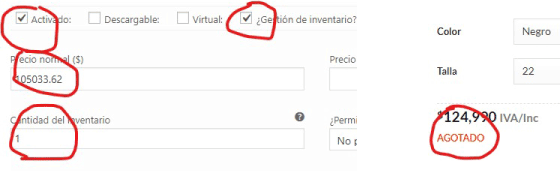
Everything worked correctly until one of the products lowered its inventory to 1. It is now shown as "out of stock". I tried placing 2, 4, 7, 10 quantities and it shows "out of stock" too. however, when I put quantity 12, it is shown in stock (It is very random. may show "in stock" with 2 units too as the following picture but not with 1 unit)
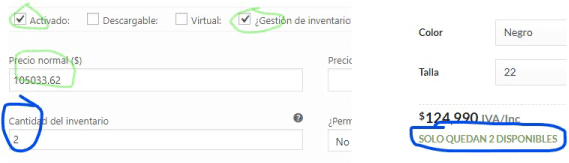
This is crazy!
 Richardmaximun
on 10 Apr 2019
Richardmaximun
on 10 Apr 2019
For me it ended up being because there were so many pending orders, inventory got tied up in them. The kicker is that even though the pendings were supposed to be cleared by the cron job wc_cancel_unpaid_orders() - the cron job wouldn't run after I updated ANY plugins. So I had to install the cron events plugin and manually run the cron job. Then the pendings get cleared and stock back to normal. Thats why it SEEMED like there was stock but there wasn't - it was tied up in pending orders. I would look at the product and see stock but there was none for customers. It was tied up in pending and cron job wasn't running properly. Kind of tricky to explain. If you save the inventory settings it does the same thing but you have to do it after every plugin update. Any and all plugins... hope that helps others...took me months to sort out.
abossola
on 11 Apr 2019
For me it ended up being because there were so many pending orders, inventory got tied up in them. The kicker is that even though the pendings were supposed to be cleared by the cron job wc_cancel_unpaid_orders() - the cron job wouldn't run after I updated ANY plugins. So I had to install the cron events plugin and manually run the cron job. Then the pendings get cleared and stock back to normal. Thats why it SEEMED like there was stock but there wasn't - it was tied up in pending orders. I would look at the product and see stock but there was none for customers. It was tied up in pending and cron job wasn't running properly. Kind of tricky to explain. If you save the inventory settings it does the same thing but you have to do it after every plugin update. Any and all plugins... hope that helps others...took me months to sort out.
In my case it is a new product, newly created, it has not even reached the sales phase. I am creating the product and already have problems showing the status correctly
Richardmaximun
on 11 Apr 2019
I have this same problem. How is this still ongoing?
 ChampagneCoffee
on 22 Apr 2019
ChampagneCoffee
on 22 Apr 2019
I have this same problem. How is this still ongoing?
I solved this issue ... going back to Magento after 4 years trying woocommerce ;)
Richardmaximun
on 24 Apr 2019
Hi
This has happened to me today but I think I know what the problem is. I think when someone adds an item to their cart and then doesn't checkout, that item can be marked as sold. This sometimes happens when you have other plugins active such as Jilt where the item is basically 'held' for you to buy later, so you could have loads of stock but it would show as out of stock.
 RetroWill
on 24 Apr 2019
RetroWill
on 24 Apr 2019
Hi
This has happened to me today but I think I know what the problem is. I think when someone adds an item to their cart and then doesn't checkout, that item can be marked as sold. This sometimes happens when you have other plugins active such as Jilt where the item is basically 'held' for you to buy later, so you could have loads of stock but it would show as out of stock.
Thats exactly my thought too. Each gateway handles it a little differently too. Check your pendings, if there are a ton of them, odds are, inventory is tied up in those.
abossola
on 24 Apr 2019
This has happened to me today but I think I know what the problem is. I think when someone adds an item to their cart and then doesn't checkout, that item can be marked as sold. This sometimes happens when you have other plugins active such as Jilt where the item is basically 'held' for you to buy later, so you could have loads of stock but it would show as out of stock.
Shouldn't this be solved when you're clearing your customer sessions at WooCommerce > Status > Tools?
 jobthomas
on 26 Apr 2019
jobthomas
on 26 Apr 2019
Not sure if doing this would clear third party plugins like Jilt etc.
RetroWill
on 26 Apr 2019
Greetings. I've found this issue can be solved (in my case, at least) by these steps:
- Edit the product
- Go to one of the variations (the first one should do)
- Checking the "Manage Stock?" option
- Save changes on the variations button
- Update the product on the main button, to the right (just in case some variables or scripts aren't loading correctly)
- Go to the same variation you edited on step 2
- Uncheck the "Manage Stock?" option
- Save changes on the variations button
- Voilá!
I hope this works for you. The idea of having to delete and create all the products with this bug was not a viable solution for us, but this worked out so far. Good luck!
 IgnacioTellez
on 10 May 2019
IgnacioTellez
on 10 May 2019
I'm having exactly the same issue but I can confirm that @IgnacioTellez 's workaround also worked for me
 petedmarsh
on 12 May 2019
petedmarsh
on 12 May 2019
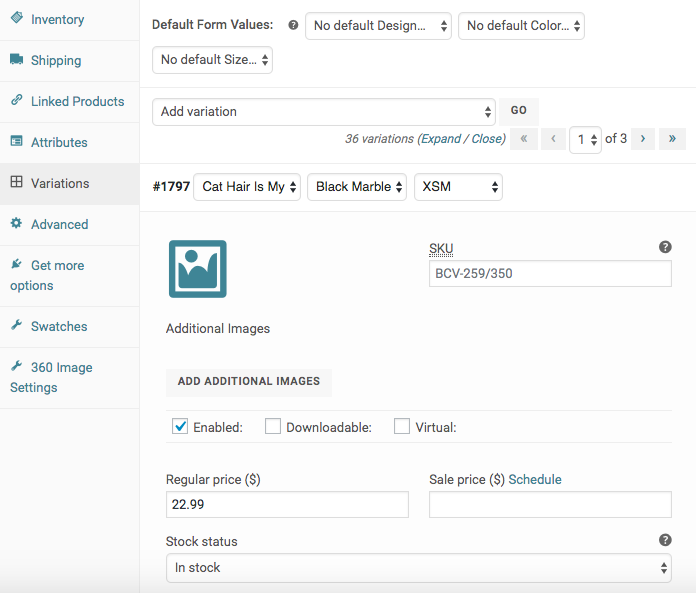
Would be cool if I even had the option to select "Manage Stock" to get rid of this Out Of Stock issue. 🙄
 triplemoons
on 13 May 2019
triplemoons
on 13 May 2019
@triplemoons
This is how it should look in current WooCommerce version.
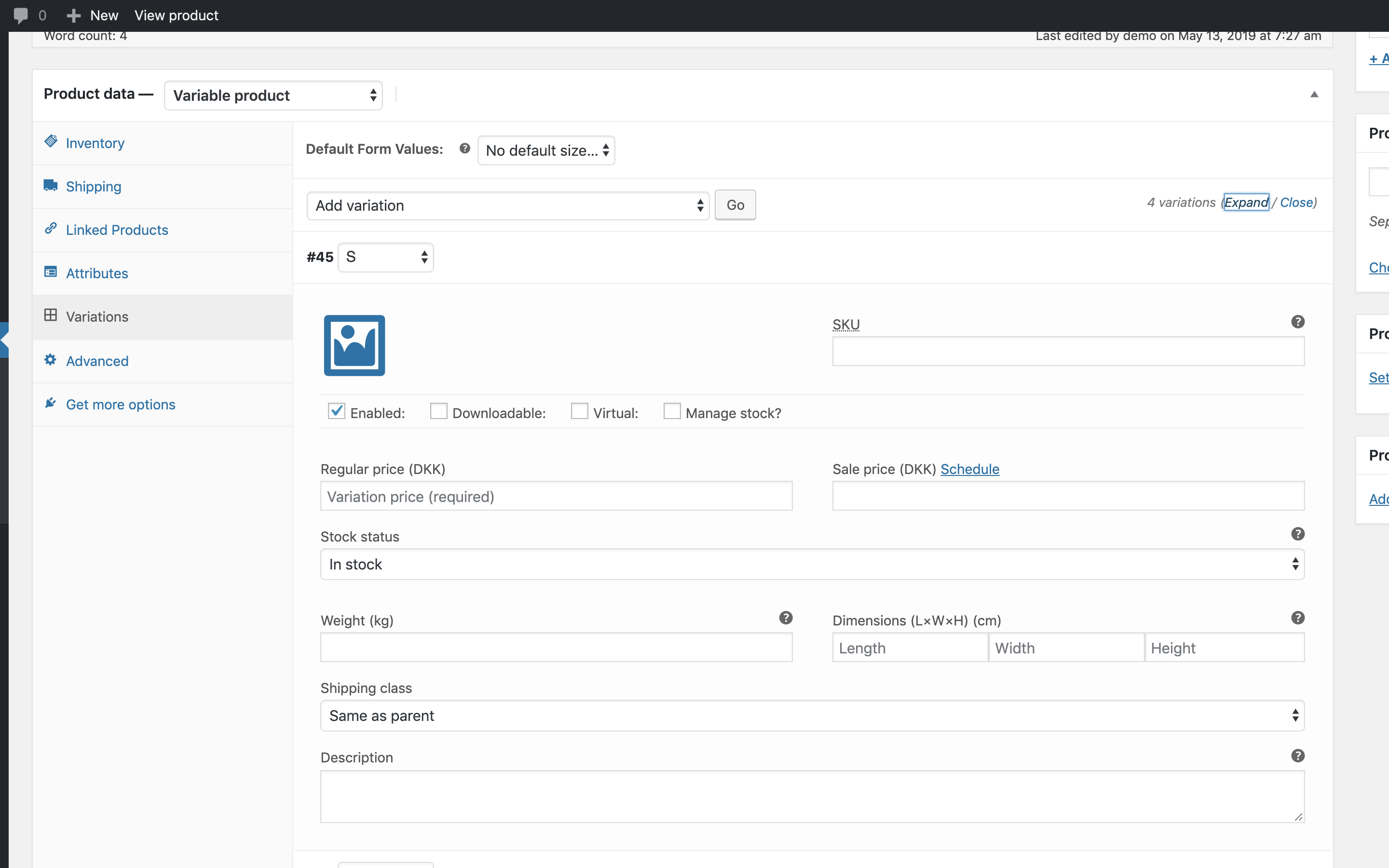
Please try to deactivate other plugins to see if the checkbox comes back.
peterfabian
on 13 May 2019
@peterfabian
I already had. That is a common troubleshooting task.
triplemoons
on 13 May 2019
My client has the same issue. I don't know why and when this happened, but manually updating the variable products that displayed a false stock status worked:
- Edit the product
- Go to "Variations"
- Take note of stock amount for all variations. They will reset to 0 when you update in step 5.
- Uncheck "Manage stock?" for all variations
- Click "Update" (blue button at the top)
- Check "Manage stock?" for all variations
- Add stock amount for all variations
- Click "Update" again.
The product is now correctly showing "In stock". I hope this change lasts.
I dove into the database to compare one of the variable products showing inaccurate stock status with a variable product I fixed using the above method.
The only difference is the postmeta row with the key _stock_status. For the problematic products the stock status is incorrectly set to "outofstock", even though all variations of that product are in stock and setup correctly. A function, cron job or whatever is responsible for updating the status must have failed at some point.
 Jeppeskovsgaard
on 13 May 2019
Jeppeskovsgaard
on 13 May 2019
@triplemoons Apologies. Yes it is. I just saw Swatches and 360 Image settings labels on the left hand side, so I assumed there might be other plugins modifying the product edit screen.
peterfabian
on 14 May 2019
I second what @IgnacioTellez and @Jeppeskovsgaard said. Without setting »Stock quantity« to non-zero it doesn't work for me though. Additionally, it was enough to do this for one of the variations.
This is a tedious task though, and completely unreasonable if we're having a lot of products to handle, so it would be amazing not having to deal with it.
Some, hopefully helpful, pointers: In my case it only happened after migrating, importing woocommerce content, post types and taxonomies. In a multisite context, to be exact. While it mostly concerns variable products, haven't dealt with grouped ones yet, it is additionally necessary to re-save on sale simple products for them being queried again as on sale.
 grossherr
on 14 May 2019
grossherr
on 14 May 2019
it is additionally necessary to re-save on sale simple products for them being queried again as on sale.
@grossherr
That's very interesting because on sale products are also a problem for my client. The shortcode [products on_sale="true"] does not return all variations on sale. In fact it only returns a fraction of the products on sale. So there is probably also an issue with saving/updating that information.
Jeppeskovsgaard
on 14 May 2019
I think i might have the answer on this one (at least it was for me). Check your Woocomerce status to see if the Database version matches the main Woocomerce version. In my case it was DB version 3.5.x and main version 3.6.x. Updating DB via admin panel was not successful, and i had to do it via WP-CLI. Actually had to do it twice, once up to3.6.0 then again to 3.6.3. after that issue was resolved
 adambarscheski
on 20 May 2019
adambarscheski
on 20 May 2019
As this is also happening, when migrating from one site in a multisite installation to another, I'd be inclined to say mismatching version like described by @adambarscheski can't be the only reasons.
grossherr
on 20 May 2019
Yep the exact same thing has started happening on my website.
I’ve been using woocommerce for over two years and I fully understand how variable products are added and how each variation has to have its own prices etc. I’ve never had stock management turned on as my products are made to order.
Last week I noticed some products were showing as out of stock in red writing on the front shop page, but when clicking on the photo and entering the product page they could be ordered with every variation type.
The only way to fix it was to delete the variations and then re add them. Luckily the products only had 6 or so variations, but some of my products have 200. I’ve noticed tonight it’s happening again on different products and there is no reason why.
If someone can let me know of an alternate to woocommerce that I can easily swap to that would be great. I enjoy website work when I want to make changes but not when there’s an obvious bug that’s affecting different people for over a year.
 ccarter12
on 21 May 2019
ccarter12
on 21 May 2019
Yep the exact same thing has started happening on my website.
I’ve been using woocommerce for over two years and I fully understand how variable products are added and how each variation has to have its own prices etc. I’ve never had stock management turned on as my products are made to order.
Last week I noticed some products were showing as out of stock in red writing on the front shop page, but when clicking on the photo and entering the product page they could be ordered with every variation type.
The only way to fix it was to delete the variations and then re add them. Luckily the products only had 6 or so variations, but some of my products have 200. I’ve noticed tonight it’s happening again on different products and there is no reason why.
If someone can let me know of an alternate to woocommerce that I can easily swap to that would be great. I enjoy website work when I want to make changes but not when there’s an obvious bug that’s affecting different people for over a year.
Hi @ccarter12, I agree.
My solution was to migrate to my clients -whose stores require inventory management or require many variations- to Magento 2; It is very easy to work with variable products, grouped, and manage inventory without spending unnecessarily on plugins (is native); I also know that very well. Just kept in Woocommerce the stores for simple, beautiful products or do not require inventory management.
Magento has not the CMS tools advantage like Wordpress but it is strong in product management. I explained to my customers and they choose.
Richardmaximun
on 21 May 2019
I think i might have the answer on this one (at least it was for me). Check your Woocomerce status to see if the Database version matches the main Woocomerce version. In my case it was DB version 3.5.x and main version 3.6.x. Updating DB via admin panel was not successful, and i had to do it via WP-CLI. Actually had to do it twice, once up to3.6.0 then again to 3.6.3. after that issue was resolved
I almost got excited when reading email notification of @adambarscheski post but I was disappointed to check my database has the same version as my woocommerce. ☹️
Another tip (160) that does not work for me 👎
Richardmaximun
on 21 May 2019
I think i might have the answer on this one (at least it was for me). Check your Woocomerce status to see if the Database version matches the main Woocomerce version. In my case it was DB version 3.5.x and main version 3.6.x. Updating DB via admin panel was not successful, and i had to do it via WP-CLI. Actually had to do it twice, once up to3.6.0 then again to 3.6.3. after that issue was resolved
I almost got excited when reading email notification of @adambarscheski post but I was disappointed to check my database has the same version as my woocommerce. ☹️
Another tip (160) that does not work for me 👎
For what it is worth, i also cleared WC cache and Optimize DB from CLI. I doubt it had anything to do with it, but yeah.
adambarscheski
on 21 May 2019
@adambarscheski
I think i might have the answer on this one (at least it was for me). Check your Woocomerce status to see if the Database version matches the main Woocomerce version. In my case it was DB version 3.5.x and main version 3.6.x. Updating DB via admin panel was not successful, and i had to do it via WP-CLI. Actually had to do it twice, once up to3.6.0 then again to 3.6.3. after that issue was resolved
I almost got excited when reading email notification of @adambarscheski post but I was disappointed to check my database has the same version as my woocommerce. ☹️
Another tip (160) that does not work for me 👎For what it is worth, i also cleared WC cache and Optimize DB from CLI. I doubt it had anything to do with it, but yeah.
@adambarscheski
I'm glad that anything works for someone. It means nobody has no idea about what causes the bug 😏
Richardmaximun
on 21 May 2019
I am posting here my solution.
It works in all the cases I've come across. I have invented the solution quite a while ago but I didn't know that so many people don't know it. So, there you go. A solution.
But first...
Diagnosis of the problem
The problem occurs when the actions below happen in this exact order:
- A simple product is created
- The product has "manage stock" option enabled
- The product has a stock quantity greater than 0
- The product is later changed to variable product
- The variable product has separate stock value for each variant
- Option "manage stock at product level" is still enabled when people purchase products
Why the problem occurs
Let's start from the begining.
Technically, when product options in the product's edit page are changed, some fields in the product settings get hidden and other show up. The important thing to remember is that hiding a field doesn't mean that the data is removed from the database (in most cases) and so some functions that use this data still work.
Now, when a single product doesn't have the manage stock option enabled, a store manager can set "stock status" to "in stock", "out of stock" or "available on backorder". Now, when the manager enables "manage stock", the field with stock status gets hidden, but it doesn't stop holding a value and the connected functions don't stop working.
In other words when a single product has the "manage stock at product level" enabled and someone purchases a product, than 1 is removed from stock quantity field and when this number reaches 0 the invisible field "stock status" is set up to "Out of Stock".
But it doesn't cause a problem because when the manager increases the stock quantity, the "Out of stock" is changed back to "in stock".
The problem is that it doesnt happen with variable products. But I will get to it later.
So far we have our single product and everything works. When we try turning on and off "manage stock" option, we toggle the visibility of the "Stock status" field.
The problem starts when the product is changed to variable.
In this case toggling the section "manage stock" (in the inventory tab) doesn't show the "stock status" field. If it did then diagnosing the problem would be so much easier, because this particular field holds the stock status that is displayed in category pages in store!
How do I know?
Because fortunately, there is a way to view what value this field holds - in the "quick edit" panel of the product list.
If you uncheck there "manage stock" than you will see the stock status. And this is exactly the same status that is shown in category pages and in "all products" list in the admin panel.
And this value is the problem (and the fact that it cannot be manually updated - try it if you like)
How to check if the problem will happen to you in the future and prevent it from happening
The quickest way to check if a problem will happen to you is to look at the "Stock status" column in "All products" admin page.
When next to a variable product you see stock status and stock quantity, than there is a big chance that this product will have problems in the future. If you find one like that, edit the product and see if it manages stock at product level or variable level. If in both of them, than disable the product level stock management and update the product. You should be safe now.
How to remove the "out of stock" label from variable products that are in stock
First of all I will tell you what doesn't work.
If you try to manually change the "stock status" in quick edit panel, you will fail. It won't update.
Solution 1
You have to:
- Duplicate the product you are having problems with. Please notice that the clone will have a proper stock status!
- Copy the URL of the original product
- Remove the original product
- Uncheck in the cloned copy "manage stock at product level"
- Remove the "-copy" suffix from the URL and from the title of the clone
- Publish the cloned product
If you did everything correctly, the new product should have exactly the same URL as the previous one and should give you no trouble in the future.
Solution 2
This solution involves deleting and recreating variable products so it is only useful when you don't have many and/or when the ID of the product needs to remain the same.
- Change product type to "simple"
- Switch off "manage product options at product level" (in the Inventory tab)
- Update product
- Change product type back to "variable"
- Recreate the variable products
And - obviously - don't enable both "manage product at product level" and "manage product at variable level" options
 ChrisPlaneta
on 31 May 2019
ChrisPlaneta
on 31 May 2019
What worked for me after hours...
SKU for variations!! I only added SKU for main product. But then randomly got "Out of stock" sign on my e-shop. Added individual (!) SKUs for every variation and problem solved.
 Salexi22
on 6 Jun 2019
Salexi22
on 6 Jun 2019
SOLUTION TO PRODUCTS THAT ARE IN STOCK SHOWING 'OUT OF STOCK' ON WOOCOMMERCE
I have been having this problem for a while now. Solution i have found to work.
Go into dashboard
Products
Filter By Out of Stock
This will bring up a list of all products showing as out of stock in your store
Click on Quick Edit
Change all to the following:-
Part 1
Put a tick in manage stock and change quantity to 1000
click update
Part 2
click on quick edit again and remove the tick from the manage stock box
make sure that the 'in stock? box stated In Stock
Click update again
This still need to be remedied by woocommerce but this is definitely an easier solution than any others that i have found. The fact you can just do a quick filter once a week or even each morning means you can keep on top of it so your products don't show out of stock for too long hence it stops the loss of sales. Hope this helps. Regards Lisa

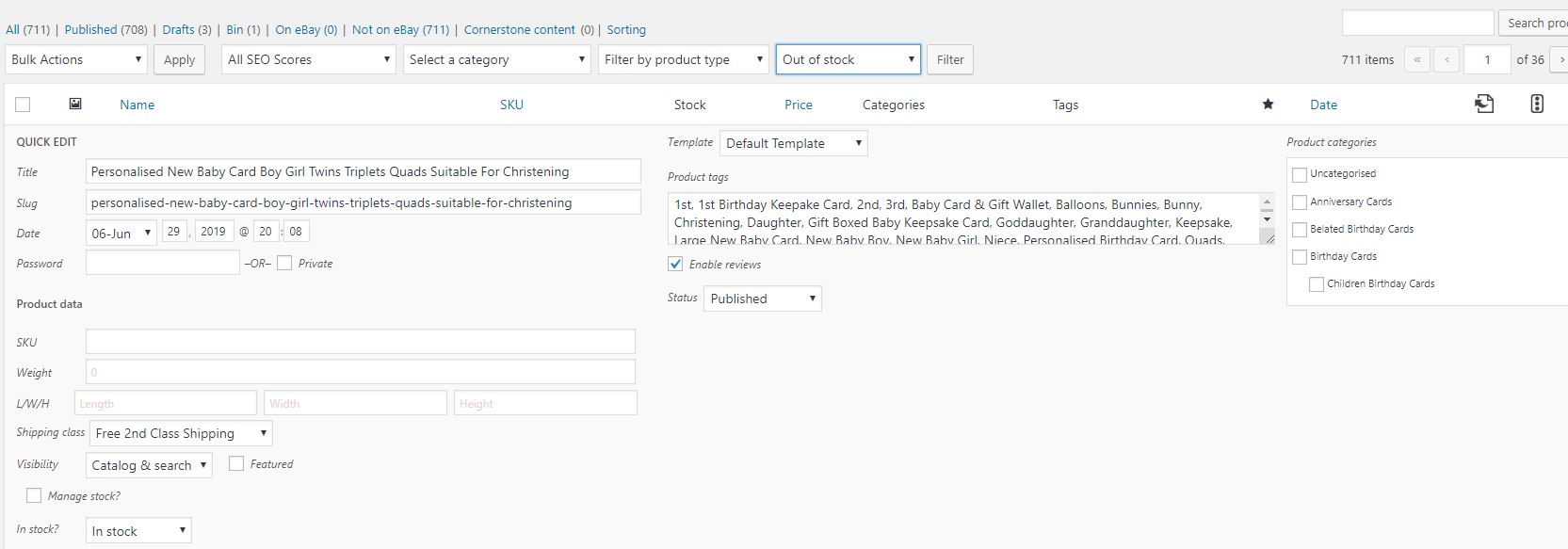
 lisadonaldcreative
on 30 Jun 2019
lisadonaldcreative
on 30 Jun 2019
Thanks to ChrisPlaneta for the detailed summary and diagnosis. Our variable products only have stock management at the product level enabled, and it is not simple for us to recreate all of our products, so the workaround approach below is suitable for us, and maybe I have found useful information to help with finding the root cause of the problem.
Quick summary of my writeup: A variable product may appear randomly out of stock (showing no price in a product listing), and re-saving the product page fixes the issue. The issue arises from the transient records in wp_options for the product, so clearing those out will solve the problem until it randomly happens again.
Summary of the Problem
On our website, Woocommerce variable products sometimes randomly appear out of stock. Such a product still shows up on a page which list all of our current products, but there is no price listed, and if we click on the item, the product page shows as out of stock for the customer.
It is NOT clear why this happens or what makes it happen. It has been happening intermittently for a couple of years. We keep our Woocommerce plugin fairly up to date. It seems to happen more frequently with higher traffic.
Logging in as admin and going to the product page and re-saving it always fixes the problem. However, this is a manual process (barring a program to automatically login and re-save the page on a schedule), so we can be caught with a popular product appearing out of stock for some time until we notice.
We began using a service which tests hourly and notifies us of differences in a web page (the main product listing page with prices, so if a price disappears we get notified), so we at least know when the problem happens.
What I am detailing here is my investigation process to identify the issue in the database, so Woocommerce developers may be able to get closer to a solution. I also explain how we have currently addressed the problem with an automated workaround.
Database contents
We knew that the key to discovering the cause of the problem was to capture the state of the database when it was showing the problem. That way, we could re-save the problematic page, and take another database dump, and compare the two. We achieved this, but with two issues initially:
The database dump was not taken in a format which permitted a useful diff comparison between versions (extra mysqldump switches were needed).
Some time passed before I had time to look into the issue.
I had reloaded the database dump into our test environment immediately and verified that I saw the issue, so I believed we had captured the situation and I could examine the details at my leisure. When I finally got around to it, about 2 months later, the problem no longer appeared in the test database on a fresh reload of the problematic database state.
A more useful command set to dump the database in an ordered fashion is as follows:
TABLES=`mysql -h my.server.name --skip-column-names -A mydatabasename -e "SHOW TABLES LIKE 'wp_%'"`
mysqldump -h my.server.name --complete-insert --skip-extended-insert --max-allowed-packet=500M --add-drop-table --skip-lock-tables mydatabasename $TABLES > database-dump-file.sql
The "--complete-insert" and "--skip-extended-insert" switches were not used previously. When the problem was observed again, this updated command was run to capture a well-formatted database dump for later comparison.
The product page for the affected product was re-saved, and another database dump was taken.
The only relevant changes in the database were the transient records for the affected product. The lines below show the initial values for these records, and those after re-saving the page.
BEFORE:
< INSERT INTO wp_options (option_id, option_name, option_value, autoload) VALUES (8472303,'_transient_timeout_wc_product_children_74065','1557519907','no');
< INSERT INTO wp_options (option_id, option_name, option_value, autoload) VALUES (8472304,'_transient_wc_product_children_74065','a:2:{s:3:\"all\";a:0:{}s:7:\"visible\";a:0:{}}','no');
AFTER:
INSERT INTO
wp_options(option_id,option_name,option_value,autoload) VALUES (8487850,'_transient_timeout_wc_product_children_74065','1558128909','no');
INSERT INTOwp_options(option_id,option_name,option_value,autoload) VALUES (8487851,'_transient_wc_product_children_74065','a:2:{s:3:\"all\";a:1:{i:0;i:74066;}s:7:\"visible\";a:1:{i:0;i:74066;}}','no');
The guts of that obfuscated string maybe hold the key to the issue, but I have not picked that apart.
This also explains why reloading a database dump into the test environment 2 months later did not exhibit the problem, because those transients expire after 1 month (see the epoch counter timestamps like "1558128909" in the data above), so the first time any affected product page or product listing page was loaded 2 months later, the transients would be automatically discarded and regenerated.
Workaround
A database-direct solution which addresses the problem is to simply delete the relevant transient records for the product (it turns out there are two transients and each has a timeout record as well, for a total of four). The next time the product page (or any page which calls on details of that product) is loaded, the transients are re-created, and the price returns and the product is no longer listed as out of stock.
This permitted an automated database solution which can be kicked off from a cron job at our desired interval, to simply delete all product transients using SQL like this:
"DELETE FROM wp_options WHERE option_name LIKE '_transient_timeout_wc_product_children%' OR option_name LIKE '_transient_wc_product_children%' OR option_name LIKE '_transient_timeout_wc_var_prices%' OR option_name LIKE '_transient_wc_var_prices%';
We started this at a frequency of 5 minutes, but ultimately reduced it to 1 minute.
The out-of-stock problem seems to happen more frequently with this transient-deletion solution in place, hence the reduction of the interval to 1 minute, but now the problem never lasts for more than one minute, so for us, this is a worthwhile tradeoff and appears to have less customer impact than products appearing to be out of stock for hours.
Conclusion
I hope that this summary and these details will help someone to track down the actual root cause of the problem so it can be fixed.
We are using Wordpress version 5.1.1, Woocommerce 3.5.7 and several Woocommerce supporting plugins and other plugins.
Wanted to cross-post to https://stackoverflow.com/questions/24639288/woocommerce-products-showing-out-of-stock-message-when-not-actually-out-of-sto but didn't have sufficient reputation.
 mdvs101
on 4 Jul 2019
mdvs101
on 4 Jul 2019
After reading all the possible fixes and the eventual randomness of the issue i was starting to freak out.
My particular case was that I made a large import via WP All Import, and after editing the parent product, it always showed as Out of Stock, even if any variation was instock.
I realized that after saving any change of a variation, the issue got fix (for good). So i made a small script to fix all of products on a new page load.
Simply comment the add_action line in order to run the function. Comment back again to make site run again normally.
Cheers
`//add_action( 'init', 'syncProducts' );
function syncProducts(){
// retrieve all products in store
$args = array(
'post_type' => 'product',
'numberposts' => -1,
'posts_per_page' => -1
);
$loop = new WP_Query( $args );
// a bit of echo doesn't hurt
echo($loop->found_posts."
");
while ( $loop->have_posts() ) : $loop->the_post();
// get an instance of the WC_product object
$product = wc_get_product( get_the_ID() );
if ($product->is_type( 'variable' )){
echo("syncing product id:".$product->id.".
");
$variations = $product->get_children();
// saving any variation via UI fixed the issue, so i will only use the first
$single_variation = new WC_Product_Variation($variations[0]);
echo("first variation id:".$single_variation->id.".
");
$single_variation->save();
}
endwhile;
exit();
}`
 dsovino
on 12 Jul 2019
dsovino
on 12 Jul 2019
@dsovino
Thank you very much for this, works for me !
 alkanna
on 7 Aug 2019
alkanna
on 7 Aug 2019
What exactly do you have to do to run that script? Do you have to go to each product or just visit the main shop page?
RetroWill
on 7 Aug 2019
@RetroWill Just put the php code in a page only you will have access so that if people open your website it won't spawn X instances of this code running on your database at the same time, go to your page, wait for it to finish running, then comment out the first line or remove the code completely from where you put it.
Otherwise it runs the code on the entirety of your products on every page load.
You can put the code on your site index but be sure to first whitelist you ip and blacklist anything else on your server config (nginx, apache...) first.
alkanna
on 7 Aug 2019
@dsovino I've had this issue for ages, and I'm sure your solution would work, because if I manually update a variable, the product shows in stock.
I've tried putting your code in a blank page with
At the risk of sounding stupid, could you please explain where exactly I can put this code.
liquidpictures
on 19 Aug 2019
@liquidpictures You have to add the script in _functions.php_ of your theme. Make sure to comment out add_action after processing the products.
As people warned above, meanwhile you have that every single page loaded will process the products. Because of that I suggest the following change:
add_action( 'init', 'syncProducts' );

function syncProducts(){
/* make sure this will go through only if the current request is for an administrative interface page */
if( !is_admin() ) return;

// retrieve all products in store
$args = array(
'post_type' => 'product',
'numberposts' => -1,
'posts_per_page' => -1
);
$loop = new WP_Query( $args );
// a bit of echo doesn't hurt
echo($loop->found_posts."
");
while ( $loop->have_posts() ) : $loop->the_post();
// get an instance of the WC_product object
$product = wc_get_product( get_the_ID() );
if ($product->is_type( 'variable' )){
echo("syncing product id:".$product->id.".
");
$variations = $product->get_children();
// saving any variation via UI fixed the issue, so i will only use the first
$single_variation = new WC_Product_Variation($variations[0]);
echo("first variation id:".$single_variation->id.".
");
$single_variation->save();
}
endwhile;
exit();
}
@liquidpictures You have to add the script in _functions.php_ of your theme. Make sure to comment out add_action after processing the products.
As people warned above, meanwhile you have that every single page loaded will process the products. Because of that I suggest the following change:
add_action( 'init', 'syncProducts' );

function syncProducts(){
/* make sure this will go through only if the current request is for an administrative interface page */
if( !is_admin() ) return;

// retrieve all products in store
$args = array(
'post_type' => 'product',
'numberposts' => -1,
'posts_per_page' => -1
);
$loop = new WP_Query( $args );
// a bit of echo doesn't hurt
echo($loop->found_posts."
");
while ( $loop->have_posts() ) : $loop->the_post();
// get an instance of the WC_product object
$product = wc_get_product( get_the_ID() );
if ($product->is_type( 'variable' )){
echo("syncing product id:".$product->id.".
");
$variations = $product->get_children();
// saving any variation via UI fixed the issue, so i will only use the first
$single_variation = new WC_Product_Variation($variations[0]);
echo("first variation id:".$single_variation->id.".
");
$single_variation->save();
}
endwhile;
exit();
}
This code is not't had a lot of buety :(
Run this code doesn't solve the problem until the admin load any admin page.
So, for website that doesn't update hourly/daily the problem should appear for customers.
I recommend to do that with cron job or something like that.
Or!
You can run this code in action like 'woocommerce_thankyou' or on order's status change
guytzhak
on 19 Aug 2019
@guytzhak it solved my problems only running it ONCE. That's why i insist on comment it back again once its done. It is something that i wouldn't suggest at all to keep running permanently.
dsovino
on 19 Aug 2019
While i see that this is closed, i found a solution and thought it might help someone out.
It is very simple.
My website uses WPML, the normal products have the currency DKK. All i did was add a price for our English site. Adding the price for one variation was enough to make everything work!
Hope it helps
 JesperKaas
on 21 Aug 2019
JesperKaas
on 21 Aug 2019
Also after closing of topic (clearly it continues to be a problem)
HERE IS MY FIX, found after reading above.... (all my products are variable, and each product has - 372 variations!!) Other background info for my situation -
- I did NOT previously have ‘Manage stock’ checked under the main variable product or its children, all of the variations. Rather – I had checked “Sold individually,......." AND
- all variations have prices associated with them.
THE FIX - 2 steps:
- (as stated above in this thread)
Edit the product
Go to one of the variations (the first one should do) << That's what I did, as I have 372 variations for each of my variable products!!)
Check the "Manage Stock?" option
Save changes on the variations button
Update the product on the main button, to the right (just in case some variables or scripts aren't loading correctly)
Go to the same variation you edited on step 2
Uncheck the "Manage Stock?" option
Save changes on the variations button
THEN:
2.
Change ‘Stock Status’ to ‘in stock’ manually for that same variation for this product. (and only that one variation - thankfully was enough)
The product now has changed from 'out of stock' to 'in stock'. Like someone else said...Let's hope it stays this way.
 CaRuGray
on 28 Aug 2019
CaRuGray
on 28 Aug 2019
IgnacioTellez - THANK YOU! Your solution above worked for me,
when I added these steps (to what you advised) for each change to one variation...
THEN:
- Change ‘Stock Status’ to ‘in stock’ manually for that same variation for this product. (and only that one variation - thankfully was enough)
- Save changes on the variations button
- Update the product on the main button
CaRuGray
on 28 Aug 2019
is there any other fix for this? can't be the solution to have to manually run this...
the store I run has all the values set correctly.
 hax1
on 24 Oct 2019
hax1
on 24 Oct 2019
Hello!
The solution which worked for me was to update the regular and sales price for each variations.
I tried 3-4 ways of updateing the Stock management at product and variations level but nothing worked.
If you have a lots of variantions and products, I suggest you to use a tool for bulk editing (eg. Advanced Bulk Edit). Steps to follow in case you use this tool:
- Select all variations from Selection manager;
- Bulk edit regular price (and sale price if the case), using 'increase by value', value = 1;
- Save changes;
- Bulk edit regular price (and sale price if the case), using 'decrese by value', value = 1;
- Save changes;
- Variable product (parrent product) has Stock Status = "instock';
Many thanks to:
https://wordpress.org/support/topic/product-with-variation-shows-out-of-stock/
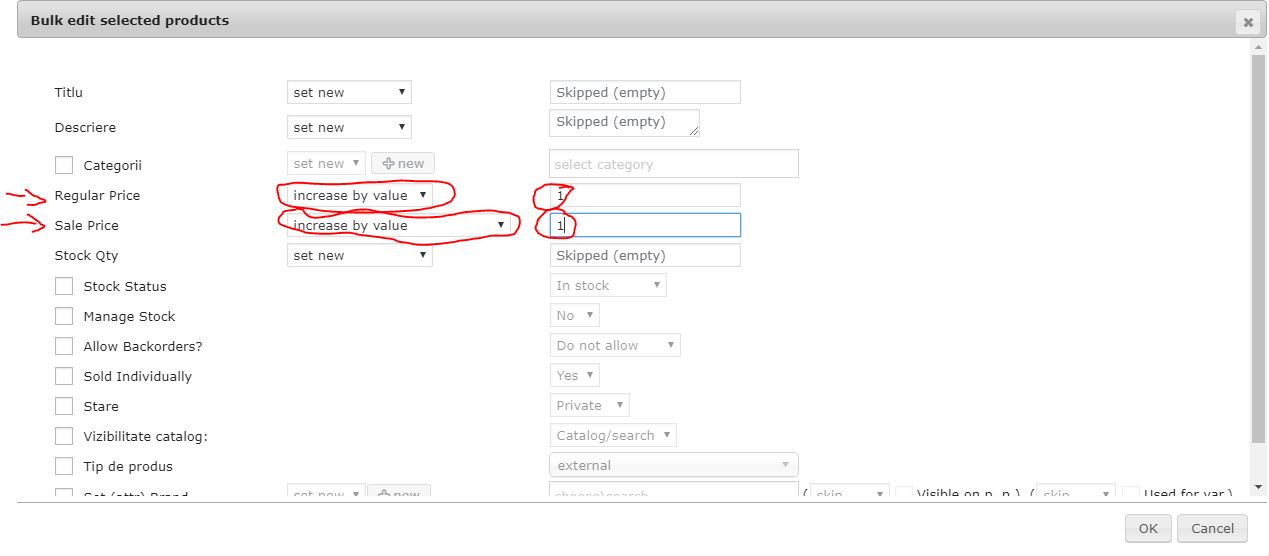
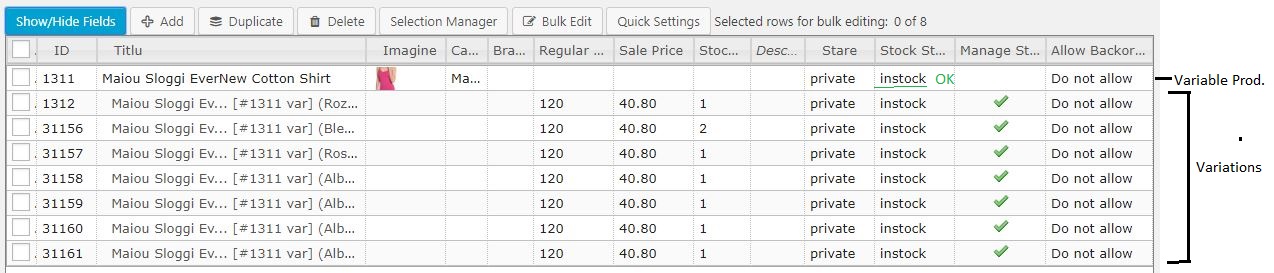
 AurelianDr
on 16 Nov 2019
AurelianDr
on 16 Nov 2019
Hi everyone,
I've just had similar problems for a long time since I created a plugin to synchronize my Woocommerce stock with my billing system. When a Variation stock is updated via:
update_post_meta($idPost, '_stock', $qty);
Then the Variable Product is not told to update its Stock.
But if you add the following code to the update process, then you'll tell Woocommerce to update the Variable Product Stock, Prices and others from its Children (variations).
$product = wc_get_product($idPost);

if ( $product->is_type( 'variation' ) ) {
    $product_variable = wc_get_product($product-> get_parent_id());
    $product_variable->sync( $product_variable );
}
I know most of you have a different problem, but this can be helpful to some.
Similarly I think this code variation from the solution provided by @dsovino in functions.php may help you fix the problem:
add_action( 'init', 'syncProducts' );

function syncProducts(){
/* make sure this will go through only if the current request is for an administrative interface page */
if( !is_admin() ) return;

// retrieve all products in store
$args = array(
'post_type' => 'product',
'numberposts' => -1,
'posts_per_page' => -1
);
$loop = new WP_Query( $args );
// a bit of echo doesn't hurt
echo($loop->found_posts."");
while ( $loop->have_posts() ) : $loop->the_post();
    // get an instance of the WC_product object
    $product = wc_get_product( get_the_ID() );
    if ($product->is_type( 'variable' )){
        echo("syncing product id:".$product->get_id().". ");
        $product->sync( $product);
}
endwhile;
exit();
}
 svenms
on 28 Mar 2020
svenms
on 28 Mar 2020
After having this problem occurring for me for months, on some products in my store, and despite searching everywhere, and finding no solution, today, I accidentally fixed it.
I was having some of my variable products showing out of stock, not all of them, which was bizarre, even though all of the variables were selected as in stock. This is how I fixed it.
- I went to inventory, and put the tick in 'Enable stock management at product level'. Added a stock amount, then saved the product.
- I went back to inventory and took the tick out of 'Enable stock management at a product level', then saved the product.
- Then I went down to each variation and low and behold, they were all set to out of stock. I then just changed them back to in stock, saved product. Then the products were showing as in stock.
 ozdog
on 11 Apr 2020
ozdog
on 11 Apr 2020
SOLUTION TO PRODUCTS THAT ARE IN STOCK SHOWING 'OUT OF STOCK' ON WOOCOMMERCE
I have been having this problem for a while now. Solution i have found to work.
Go into dashboard
Products
Filter By Out of Stock
This will bring up a list of all products showing as out of stock in your store
Click on Quick Edit
Change all to the following:-
Part 1
Put a tick in manage stock and change quantity to 1000
click update
Part 2
click on quick edit again and remove the tick from the manage stock box
make sure that the 'in stock? box stated In Stock
Click update againThis still need to be remedied by woocommerce but this is definitely an easier solution than any others that i have found. The fact you can just do a quick filter once a week or even each morning means you can keep on top of it so your products don't show out of stock for too long hence it stops the loss of sales. Hope this helps. Regards Lisa
Worked for me but woo needs to sort this out
 albertramsbottom
on 21 Jul 2020
albertramsbottom
on 21 Jul 2020
This is still an issue. If i copy a perfectly working variable product as a duplicated it goes to out of stock even though they are brackets next to it with the stock number
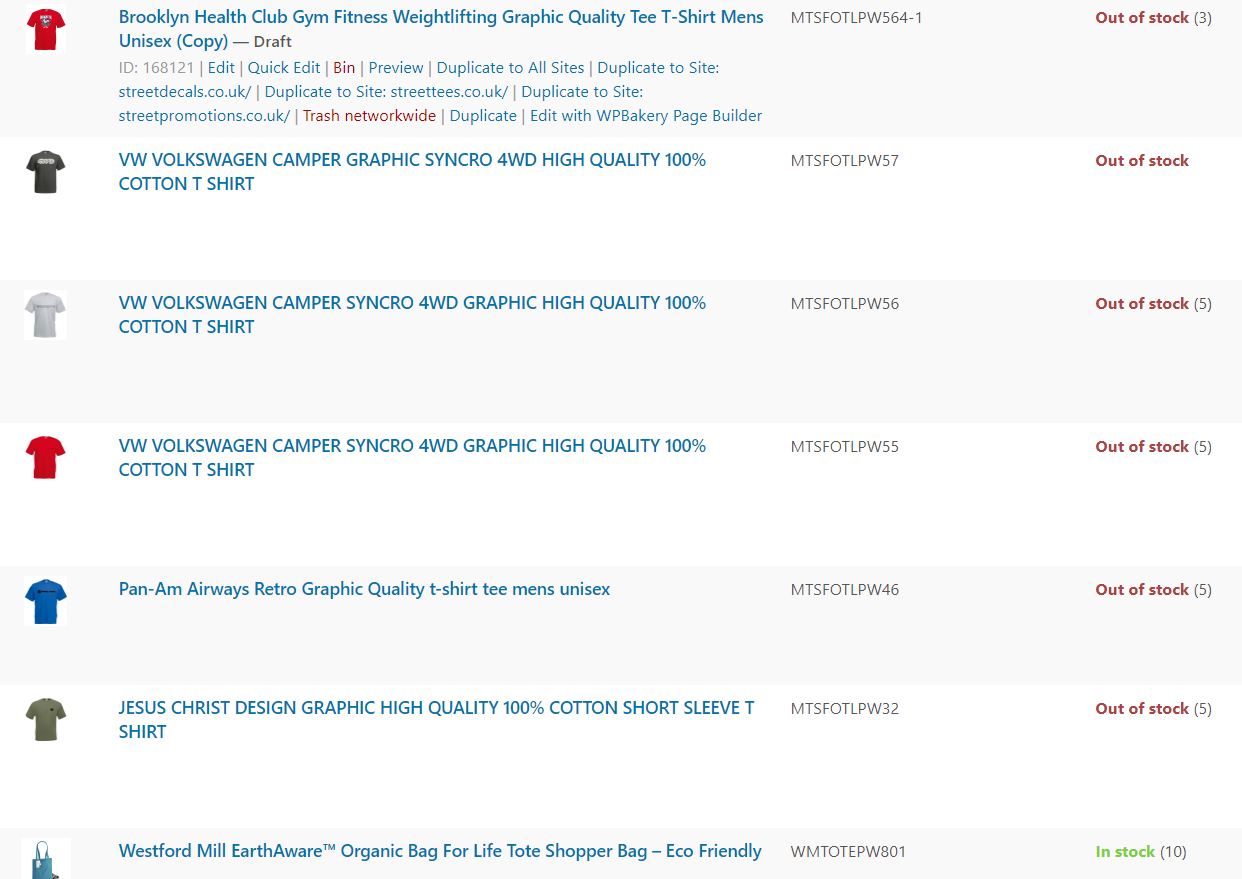
albertramsbottom
on 21 Jul 2020
NOT CLOSED. THIS IS STILL AN ONGOING AND UNACCEPTABLE ISSUE.
Have just experienced this issue myself.
Following hours of meticulous work, the export from from local dev to production server produced numerous errors in-line with previous comments.
I'd been working on a time-sensitive contract for a client that also involved purchasing the WooCommerce subscription plugin, and I had planned to advice them to add further plugins to their suite, but now I have grave reservations about WooCommerce.
That coding issues such as this are allowed to linger unresolved for over 3 years gives me very little confidence in recommending WooCommerce to future clients.
 citizensoftheworld
on 8 Nov 2020
citizensoftheworld
on 8 Nov 2020
Hi,
I had a brain wave a few weeks ago. I don’t use the official woo comm category pages for my website anymore. The products are still linked to the categories but I then just made a new shop pages manually and named them the same as the category, added the product page links to each picture and then redirect the category pages to the new page. It took some time to create the new pages but once you’ve done one you can duplicate it make the other pages. Because they’re created manually they never say out of stock
ccarter12
on 8 Nov 2020
With the increasing amount of income WP raises from the WC family of never-ending plugins to perform each, and every new task, such a workaround shouldn't be necessary, but many thanks for sharing your knowledge ccarter12. Keep those brain waves buzzing ;-)
citizensoftheworld
on 8 Nov 2020
I solved by adding 1000 as a stock level and then setting for non product stock levels, saving and the putting in the real stock and setting manage stock again. But its still a bug
I would recommend that someone disables all plugins and then, one at a time enabling them. And test, it could be a plugin
albertramsbottom
on 8 Nov 2020
I had written in July 2019 on this thread with details about how transients were somehow related to the issue and clearing them tended to fix the problem, but also caused it to happen more often. It remains true that saving/updating a product page (without changing anything) fixes the problem almost all the time.
Armed with that information, and the lack of an apparent fix coming from Woocommerce, I ended up writing a Python program that runs on our server on a frequent schedule (every 5 minutes or so) to fix the problem. It downloads a web page (requests) which lists all of the affected products, compares details on that page (BeautifulSoup) to the previous downloaded page, and if a product has changed (price missing), it uses the Python Woocommerce API (from woocommerce import API) to update just the affected products (update twice, because the first update can put it for real out of stock and a second update fixes that), and it emails (smtplib) to let us know what was broken and whether it was successfully fixed (by grabbing the page again and comparing). The Woocommerce API calls are quick, and now none of our products are ever out of stock for more than 5 minutes.
Sometimes we go days or weeks without an issue, and sometimes it happens several times a day. It seems related to traffic volume on the site, but we've never been able to figure out a pattern. But we don't have to worry about it at the top of our minds all the time anymore.
If code snippets would be useful to anyone, I can post some details. The entire program ended up pretty complicated with some proprietary stuff, but I can post some of the critical pieces.
mdvs101
on 9 Nov 2020
Related issues
 choijun
·
58Comments
choijun
·
58Comments
 ifede84
·
57Comments
ifede84
·
57Comments
 lterys
·
49Comments
lterys
·
49Comments
 waqarabro
·
122Comments
waqarabro
·
122Comments
 allendav
·
56Comments
allendav
·
56Comments
Most helpful comment
Hi, Mike. I see that this was closed sometime ago but my experience was exactly like the others and that was last night. I wasn't referring to the drop down. There is a screen print above that shows a red error "Out of Stock." No matter how I set it up last night the front it displayed that error (I don't think it was really red). That's a big deal because it prevents a user from purchasing the product.
As I understand the system, making it track stock is optional whether its simple or a variable product. "Manage Stock" was turned off and the front end still said "out of stock." The only way I could fix it was to erase the product and start over. I've given steps to reproduce it. Start as a simple product and add a variation. Then change it to variable product and one would see the error. My experience was exactly like the previous reports.
I really believe there is a legitimate issue here that still lingers. If I should start a new threat I could do that. I read through what users were reporting and the responses they got. It always concerns me when support staff try and tell users there is no problem instead of carefully "listening" and trying to reproduce what people are seeing. If 5 people report the same problem then there is either 1) a bug, 2) a lack of documentation on how it works, OR 3) an opportunity to simplify the design/process.
I approach software support from the angle that my job is to ensure the software works. It isn't my job to defend it. No one wins if someone doing support takes the position that the user is wrong. Users get frustrated and switch to a different product and whatever the issue is (usually one of the 3 above) doesn't get addressed.