Woocommerce: Either offers review or aggregateRating should be specified
Hello guys, I am sure you must be facing the same issue that I am updating in this thread. It is a recent Google Console Enhancement that throws a huge number of errors in the console. Take a look at screenshots in the end. I would be highly grateful if you guys help to fix this issue.
I am looking for a solution to fix this issue asap on my website. It affects almost all the products of my site. It will be great if you guys tell whether Woocommerce next updates gonna fix it for all store owners.
I have gone through this link https://github.com/woocommerce/woocommerce/issues/22842 that discusses the solution but probably not a solution just a discussion. After going through this link, i found a code that needs to be added in WOOCOMMERCE/INCLUDES/STRUCTURED DATA PHP file. I did that either and found it useless.
Will appreciate if the solution is listed down step by step so that everyone could utilize it and fix the issue. P.S most of the Woocommerce store owners are not developers and code friendly.


 waqarabro
All 122 comments
I have the same problem with my store. Hope Woocommerce fix this soon.
 AdamHashim
on 28 Feb 2019
AdamHashim
on 28 Feb 2019
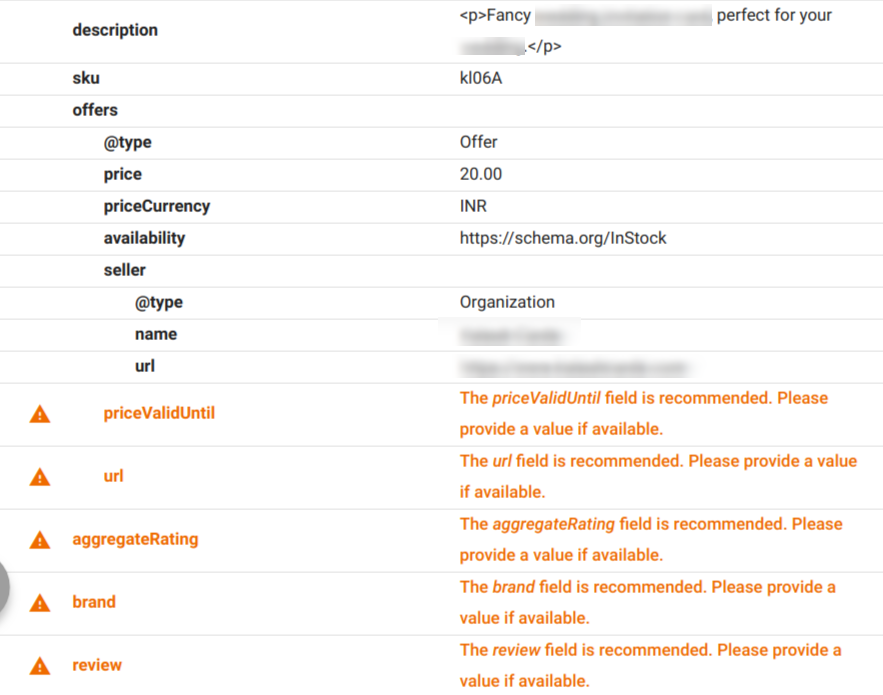
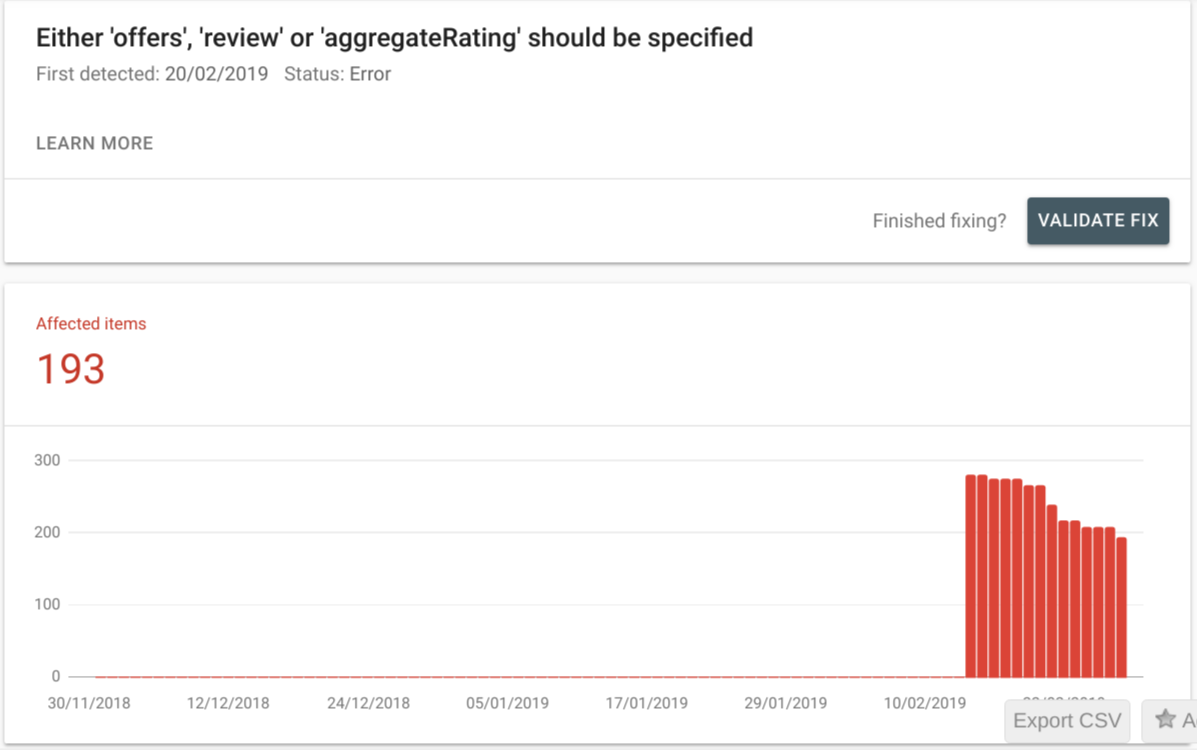
Same issue have been faced by my my store recently. I have attached the part of google structured data testing screenshot:
 itsgauravjain22
on 28 Feb 2019
itsgauravjain22
on 28 Feb 2019
I have the same but 510 affected items. I really hopes it gets solved.
 AmeliaAkh
on 28 Feb 2019
AmeliaAkh
on 28 Feb 2019
Some of the screenshots above are warnings, not errors. "please provide a value if available". FYI this is a change on the Google side, not in WC. Not all products on stores have these values.
 mikejolley
on 28 Feb 2019
mikejolley
on 28 Feb 2019
@mikejolloey
Google is referring to the "warnings" as errors in search console.
Are you suggesting if they are only warnings you should just ignore them? For how long?
They are all basic fields. Please simply fix the markups in the cart to include them.
Two weeks ago there were some changes made regarding structured data. When that happens you update the cart to comply with the new schema.
 JimmyRaz
on 28 Feb 2019
JimmyRaz
on 28 Feb 2019
This has been fixed, in https://github.com/woocommerce/woocommerce/pull/22852 By all means "simply fix" this yourself by referring to those changes if you cannot wait for the next patch release. This isn't something we should rush out - they are warnings.
mikejolley
on 28 Feb 2019
This has been fixed, in #22852 By all means "simply fix" this yourself by referring to those changes if you cannot wait for the next patch release. This isn't something we should rush out - they are warnings.
Could you tell WC will send patch update to fix it?
waqarabro
on 28 Feb 2019
This has been fixed, in #22852 By all means "simply fix" this yourself by referring to those changes if you cannot wait for the next patch release. This isn't something we should rush out - they are warnings.
I made those changes in the file of Structured Data and initiated validation but it didnot work and validation failed. So i believe those changes did not work at all given in
https://github.com/woocommerce/woocommerce/pull/22852
thx
waqarabro
on 28 Feb 2019
Some of the screenshots above are warnings, not errors. "please provide a value if available". FYI this is a change on the Google side, not in WC. Not all products on stores have these values.
Relating to this issue
Why would the url parameter is empty, if permalinks are available for my published product available?
How could I set brand value in schema. I couldn't find any setting to set the brand value globally or in product section of woocommerce.
itsgauravjain22
on 28 Feb 2019
Chiming in here after the Slack dev chat :)
From the research I've done on structured data in the past, structured data is designed to tell you about the information directly being presented on a page. Google notes this:
You should not create blank or empty pages just to hold structured data; nor should you add structured data about information that is not visible to the user, even if the information is accurate.
When generating structured data, WooCommerce includes a lot of data that's not shown in the product archive, so this data should not be present according to the guidelines.
So what about limiting the structured data in archives -- should we do that or remove it completely?
Google indicates in a few places that structured data should not be included in an archive that lists links to full listings.
Don’t mark up a page that lists all engineering jobs in Mountain View, CA, with links to individual job pages.
Source
Use markup for a specific product, not a category or list of products. For example, “shoes in our shop” is not a specific product. See also our structured data guidelines for multiple entities on the same page.
Source
A category page listing several different products (or recipes, videos, or any other type). Each entity should be marked up using the relevant schema.org type, such as schema.org/Product for product category pages. However, if one item is marked, all items should be marked. Also, unless this is a carousel page, the marked items should not link out to separate details pages.
Source
(Emphasis mine on this last one.) So for WooCommerce archives, given they list all products _and_ link out to full details pages, they should not be marked up. My vote is to remove this line for generated structured data on archives.
 bekarice
on 28 Feb 2019
bekarice
on 28 Feb 2019
@bekarice
Hello I don't know much about this, but is it possible to just remove it? Should we also remove the code snippet that was given here before?
With kind regards, Amelia
AmeliaAkh
on 28 Feb 2019
this should work, but I haven't tested it, so use with caution:
remove_action( 'woocommerce_shop_loop', array( WC()->structured_data, 'generate_product_data' ), 10 );
@bekarice
Thank you very much Beka! It's so nice of you, there was code snippet and I implemented it via code snippet plugin I can do the same with this one? Should this code be deleted
**
- Filter the woocommerce_structured_data_product_limit if statment to always add the full structure.
* - @param boolean $is_archive_page returns true or false based on is_product_taxonomy() || is_shop() WooCommerce Conditionals.
- @return boolean Return false to force the function to continue and not limit the product data on the archvie page.
*/
function wc_unlimit_product_structed_data( $is_archive_page ) {
return false;
}
add_filter( 'woocommerce_structured_data_product_limit', 'wc_unlimit_product_structed_data', 10, 1 );
/**
- Add items to the product schema markup.
* - @param array $markup Array of the product scheme markup.
- @param WC_Product $product Product data (default: null).
- @return array Altered $markup.
*/
function wc_add_product_structed_data( $markup, $product ) {
// Add the brand to the product schema markup.
$markup['brand'] = '';
// If is it a product archive page add the URL to the product schema markup.
if ( is_product_taxonomy() || is_shop() ) {
    $markup['url'] = get_permalink( $product->get_id() );
}

return $markup;
}
add_filter( 'woocommerce_structured_data_product', 'wc_add_product_structed_data', 10, 2 );
AmeliaAkh
on 28 Feb 2019
FAO Mike Jolley - most are warnings but the "Either offers, review, or aggregateRating should be specified” is not (category/archive page). That is a hard error on the google search. However, the error does not appear in the structured testing page (as of yet). The category page entries I have with errors have been dropped by Google and no longer appear in their listings. Not good news for me as I currently have over 150 of them marked as being in error.
So, I disagree, I think an urgent fix is needed ie remove the schema from the category/archive pages. Maybe revert later when the situation is clear and stable.
 AlCalder
on 28 Feb 2019
AlCalder
on 28 Feb 2019
FAO Mike Jolley - most are warnings but the "Either offers, review, or aggregateRating should be specified” is not (category/archive page). That is a hard error on the google search. However, the error does not appear in the structured testing page (as of yet). The category page entries I have with errors have been dropped by Google and no longer appear in their listings. Not good news for me as I currently have over 150 of them marked as being in error.
So, I disagree, I think an urgent fix is needed ie remove the schema from the category/archive pages. Maybe revert later when the situation is clear and stable.
have you removed that code? Could you guide which file and which line should we consider removing to test?
thx
waqarabro
on 28 Feb 2019
FAO Mike Jolley - most are warnings but the "Either offers, review, or aggregateRating should be specified” is not (category/archive page). That is a hard error on the google search. However, the error does not appear in the structured testing page (as of yet). The category page entries I have with errors have been dropped by Google and no longer appear in their listings. Not good news for me as I currently have over 150 of them marked as being in error.
So, I disagree, I think an urgent fix is needed ie remove the schema from the category/archive pages. Maybe revert later when the situation is clear and stable.
Same impact here. My pages are seriously dropped by google and not visible even where they used to be the top performers. Urgent Fix is needed asap. I don't know whether its a warning or error issue but this appear to be seriously page ranking issue by google.
itsgauravjain22
on 28 Feb 2019
As discussed in the Slack Dev Chat today removing the product schema markup from the Shop/Product Category pages seems to be the best solution.
To do that you can add the following code to your themes function.php file.
/**
 * Remove the generated product schema markup from the Product Category and Shop pages.
 */
function wc_remove_product_schema_product_archive() {
    remove_action( 'woocommerce_shop_loop', array( WC()->structured_data, 'generate_product_data' ), 10, 0 );
}
add_action( 'woocommerce_init', 'wc_remove_product_schema_product_archive' );
If you had previously added the other suggested snippets from
https://github.com/woocommerce/woocommerce/issues/22842#issuecomment-467133160
https://github.com/woocommerce/woocommerce/issues/22842#issuecomment-467575935
they can be removed, but the one above should prevent them from running. As always if you are not comfortable editing the code please consult a developer.
I'm going to try and work on PR to fix the issue for a future release. Hope this helps.
 TimBHowe
on 28 Feb 2019
TimBHowe
on 28 Feb 2019
@itsgauravjain22
Same impact here. My pages are seriously dropped by google and not visible even where they used to be the top performers. Urgent Fix is needed asap. I don't know whether its a warning or error issue but this appear to be seriously page ranking issue by google.
@mikejolley
Yes, This is what I was afraid of. I have been trying to warn people for several days. These "warnings" are causing some major problems. It is really not something that can wait. There are thousands of people, who do not even know about this yet, whose sites may also be negatively impacted.
JimmyRaz
on 28 Feb 2019
@TimBHowe
Thank you Tim, I implemented this code, is it safe to request validation for the problem on google search console?
AmeliaAkh
on 28 Feb 2019
@TimBHowe
Thank you Tim, I implemented this code, is it safe to request validation for the problem on google search console?
Try validation if you get successful in passing the test, do let us know thx please
waqarabro
on 28 Feb 2019
@waqarabro
I requested the validation and it's now in queue for validation. I will let you know about this when they validate :)
AmeliaAkh
on 28 Feb 2019
@waqarabro
I requested the validation and it's now in queue for validation. I will let you know about this when they validate :)
Glad to know. Hope you pass the validation. Could you tell me, did you add that code in function.php file ?
To do that you can add the following code to your themes function.php file.
>
> ```
> /**
>  * Remove the generated product schema markup from the Product Category and Shop pages.
>  */
> function wc_remove_product_schema_product_archive() {
>   remove_action( 'woocommerce_shop_loop', array( WC()->structured_data, 'generate_product_data' ), 10, 0 );
> }
> add_action( 'woocommerce_init', 'wc_remove_product_schema_product_archive' );
> ```
>
@waqarabro I added it via the plugin "code snippets".
AmeliaAkh
on 28 Feb 2019
@waqarabro I added it via the plugin "code snippets".
I added it directly in the functions.php file and i can see in the structured data testing tool that archives pages removed the warnings but products still show the warnings. Can you send the link of plugin please? i would like to analyze either. And, i recommend you, you should also check single product structured data in testing tool https://search.google.com/structured-data/testing-tool/u/0/
waqarabro
on 28 Feb 2019
@waqarabro
https://nl.wordpress.org/plugins/code-snippets/
I checked it and it's different on new search console it does not show any warnings, on the old version it shows only the review as the only detected item, no products. I don't see warnings
AmeliaAkh
on 28 Feb 2019
@waqarabro i have tried the code above. i think it worked out. i tried to test the schema markup of the product category page after updated the code in the function.php in the Google Schema Tester and i found the "product" markup has just gone. in the past, the error of either offer review or aggregaterating should be specified error existed in that "product markup", now i assume the error has gone along with the "product markup". finger crossed, cheers!
 thestronggoat
on 1 Mar 2019
thestronggoat
on 1 Mar 2019
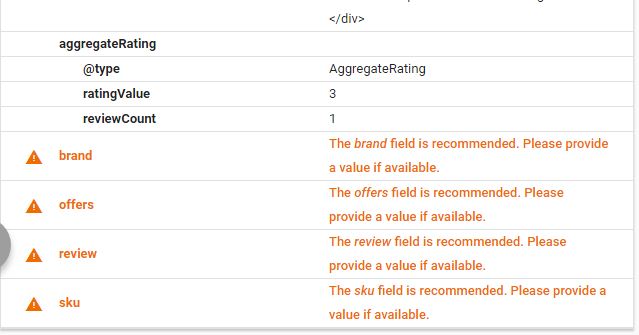
sir i have put the above code it works for archive pages but product page is still showing error what other code should i put there please help me i m not a developer i m sending you the link and screenshort where error is shown
https://search.google.com/structured-data/testing-tool/u/0/#url=https%3A%2F%2Fwww.mygizmoprice.com%2Fproduct%2Fallcall-s5500-buy-online-price%2F
``
 ronikbhauryal
on 1 Mar 2019
ronikbhauryal
on 1 Mar 2019
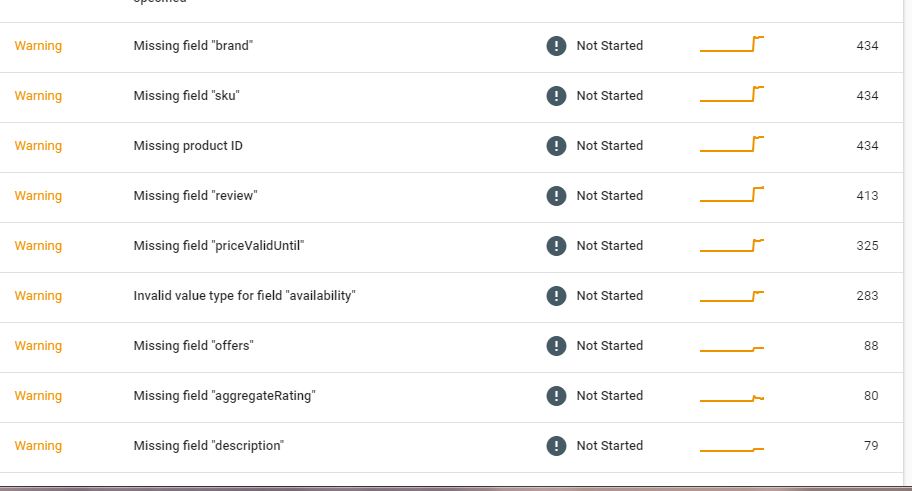
sir there 11 warning still showing on product page although the error Either "offers", "review", or "aggregateRating" should be specified is gone but these warnings are still available on product page please help me on this issue
ronikbhauryal
on 1 Mar 2019
sir i have put the above code it works for archive pages but product page is still showing error what other code should i put there please help me i m not a developer i m sending you the link and screenshort where error is shown
https://search.google.com/structured-data/testing-tool/u/0/#url=https%3A%2F%2Fwww.mygizmoprice.com%2Fproduct%2Fallcall-s5500-buy-online-price%2F
``
I second you. I did placed the code correctly and i see now that Product page is still having Scheme 4 errors like yours. While, we are loosing traffic quickly and all the rankings we built up also lost. Hope someone helps us asap or WC launches a new update patch addressing this google glitch
waqarabro
on 1 Mar 2019
@waqarabro
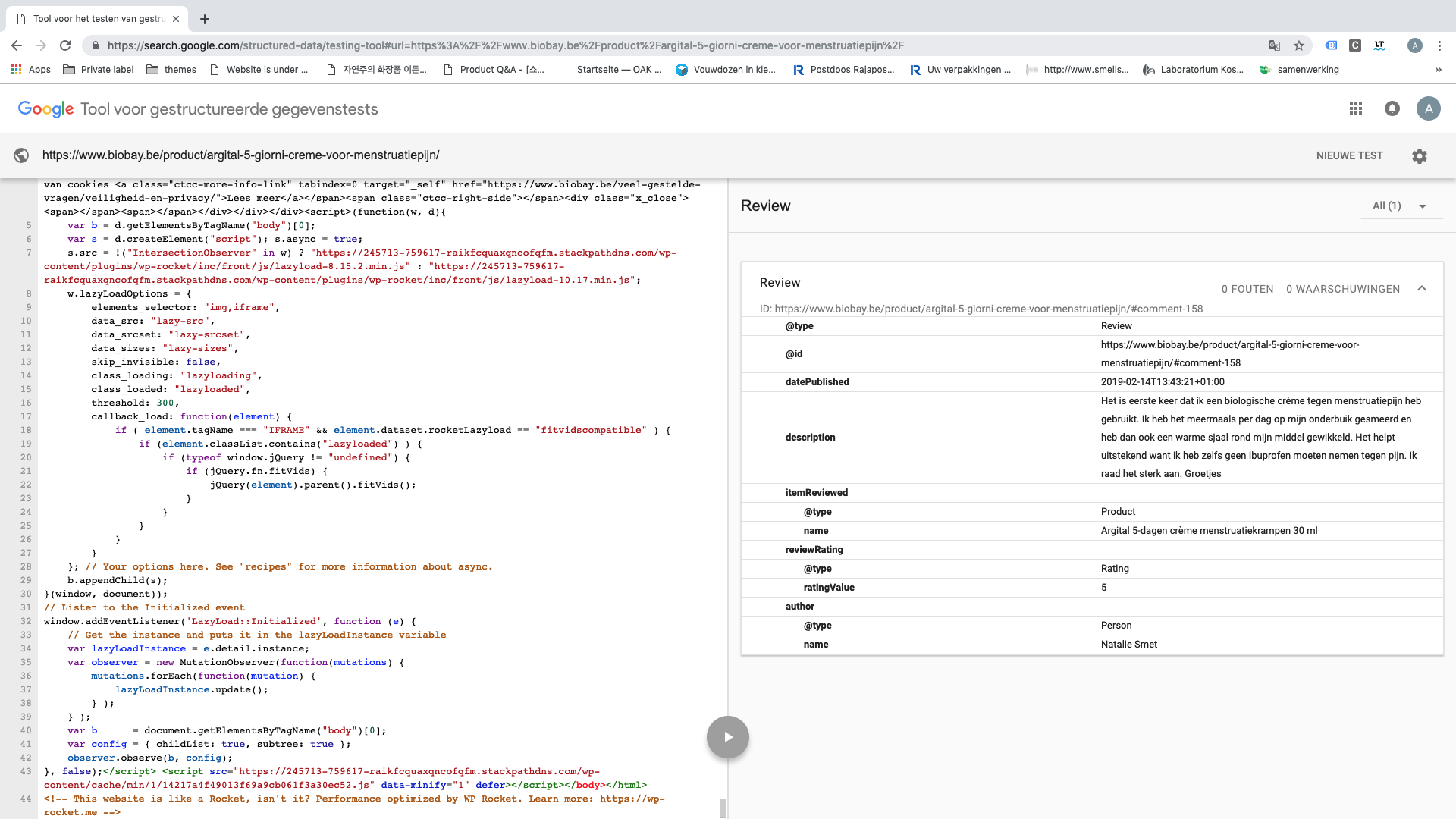
In new version of google search console it detects my product like this after
live url test
In old testtool it shows only the review of the product it does not show the markup
AmeliaAkh
on 1 Mar 2019
@waqarabro
In new version of google search console it detects my product like this after
live url testIn old testtool it shows only the review of the product it does not show the markup
Cool. Your issue is fixed. Cheers. I have archive pages fixed while single product entry still shows errors though i have validated. I think, i need to remove the code i had placed before in WC/Includes/Structured Data php file to test if the new code works.
waqarabro
on 1 Mar 2019
That is not a fix that is hack. It is just removing all the structure data. WC needs to fix the structure data markup so it conforms properly. The fix on #22852 is only for product categories. New products to not have aggregateRating so they give Error (not warning). On products with rating, Review is a warning. In addition, there are warnings on "brand" and others. There is no reason why WC cant add a Brand to the product. Or is it because they sell a "brand" plugin?
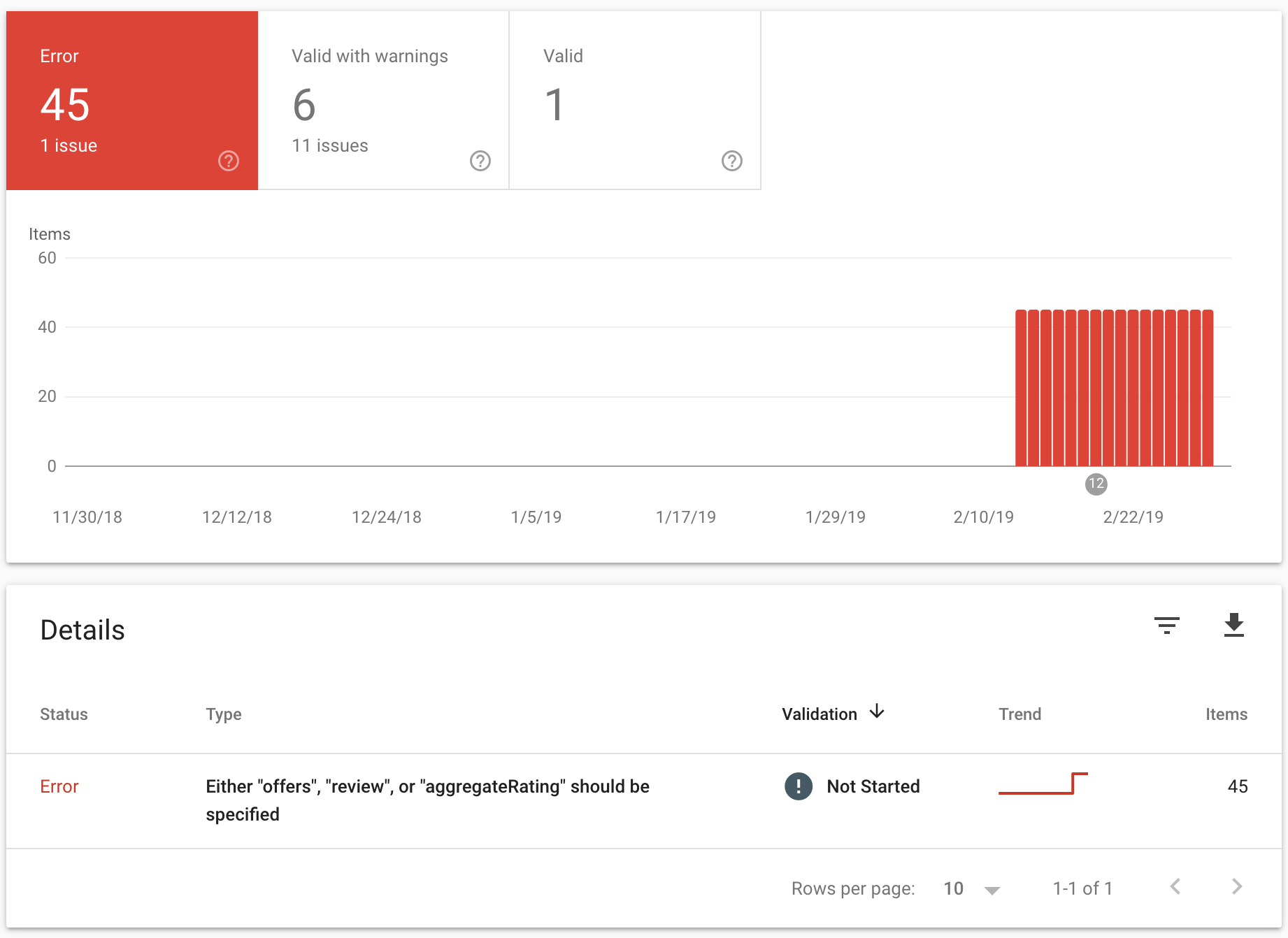
 marvinsolano
on 1 Mar 2019
marvinsolano
on 1 Mar 2019
yes, it only solves the problem for product categories page. for each individual product, the warning is still there, such as aggregatingrating and review, i think at this moment you can only fix these warnings if you actually give the aggregatingrating and review information to each individual product. as to the brand section, i think perhaps using a Schema plugin may solve this problem. Some Schema plugin can deactivate all default woocommerce schema setting, so that you can somehow customize the schema information for your product page. i haven't tested this method yet, i only read and watched some relevant tutorials regarding this.
thestronggoat
on 2 Mar 2019
actually i m using product brand using attributes
ronikbhauryal
on 2 Mar 2019
Yes single product issue still exist and i have more than 6k products. If i were to edit single product one by one, its gonna take a lot of time. Secondly, plugins and individual mark up wont fix this either. I hope Woocommerce guys gonna release update soon addressing this issue completely.
waqarabro
on 2 Mar 2019
@mikejolley the structured data testing tool shows warnings, but Search Console shows errors (Google changed this about 2 weeks ago). The way around this which usually works is to expose more data in archive pages, but rolling a fix for core should not be rushed, as different product types require different handling. I can chip in a PR when I have something which works for all occassions. At present, I've overseen fixes in most situations, and they tend to differ based on whether listings have prices or ratings (because this error is not present if you can just show aggregateRating for a product - including in archive pages).
 robin-scott
on 2 Mar 2019
robin-scott
on 2 Mar 2019
Anyone who cannot wait is recommended to use the filters which are present for this, specifically, the following will get this done in all occasions, but the "core" fix will take more head scratching:
woocommerce_structured_data_product
and also
woocommerce_structured_data_product_limited (for non single product pages - like product cat / shop home)
It is worth noting, for anyone following this thread along, that this is very new, and Google has not even got this in their own guidance. The solution is therefore down to individual stores and their developers while the documentation lags behind Google Search Console!
robin-scott
on 2 Mar 2019
@robin-scott
How can you show aggregateRating for a product? I'm trying to markup schema for product type and I cannot find how to markup rating. In my case when I open a url for markups it shows only stars not the count. Do you have a code snippet that would help us to get this aggregate rating on single product pages. if I check a single page url with testing tool it shows only the review, it does nto show that there is a product with price and everything. Only thing it recognizes is the review.
AmeliaAkh
on 2 Mar 2019
1) Your product must have at least 1 rating against it - you cannot show this as a 0 value.
2) You would then use code similar to the following (please do your own tests, as this I have cut from a larger block without testing!)
// This filters the structured data for a product
add_filter( 'woocommerce_structured_data_product', 'filter_woocommerce_structured_data_product', 10, 2 );
// This below adds aggregateRating information if this has not already been set in the JSON data and if the average rating is not zero
function filter_woocommerce_structured_data_product( $markup, $product ) {
    if ( empty( $markup[ 'aggregateRating' ] )&& ($product->get_average_rating()!= 0)) {
        $markup['aggregateRating'] = array(
                '@type'       => 'AggregateRating',
                'ratingValue' => $product->get_average_rating(),
                'reviewCount' => $product->get_review_count(),
            );
    }
    return $markup;
}
There are other things you may like to add... as I have implemented for most clients. I highly highly recommend setting site-specific structured data using these filters. The benefits are huge. This is borderline "not for core" in my opinion. Structured data is so important for the web - it literally tells search engines "what is this?".
robin-scott
on 2 Mar 2019
@robin-scott
Thank you very much Robin, I do not understand this very well, but what if you have zero rating? It's not possible? I'm doing schema markup and have to indicate amount of ratings, best possible score and the rating. In case when there are 0 reviews ,the best possible score is 5, what should be in the rating then? Maybe it's the wrong place to ask this, I don't know, maybe someone has an answer or suggestion
AmeliaAkh
on 2 Mar 2019
There are other things you may like to add... as I have implemented for most clients. I highly highly recommend setting site-specific structured data using these filters. The benefits are huge. This is borderline "not for core" in my opinion. Structured data is so important for the web - it literally tells search engines "what is this?".
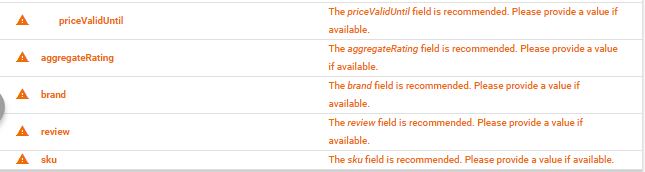
Hi robin, I have implemented a code shared in this thread in the woocommerce/includes/structured-data file and all the errors in the archive page appear to be fixing. But in my single product entry, i still see 5 warnings in the Data Structure Tool. I attach screenshot take a look and suggest how do i fix these 5 warnings of single page entry thx
waqarabro
on 2 Mar 2019
@robin-scott
What do you think in regards to the structured data being removed from the category and shop pages?
Google very clearly states that you should only put product schema on individual product pages and the purpose of product schema is basically to showcase an individual product. At least that was the case 6 months ago when we were doing all of our schema via html.
However, if you were to use Googles structured data markup tool on a category page, they would put schema markups on all of the products.
I do not know what the best action to take here is. Get rid of it or stay on the safe side, make it compliant with the lasted schema, and keep it.
@mikejolley and @claudiosanches have been having a hard time grasping the fact that search console is calling these errors "errors". We only have 23 products up on the site now and we have 21 errors in search console.
JimmyRaz
on 3 Mar 2019
I used a plugin called, "rollback" and downgraded woocommerce to version 3.5.3. I do not have any errors. Both versions of Woocommerce 3.5.4 and 3.5.5 gave me the same errors as waqarabro.
My product search results have plummeted in the last week compared with my competitors dropping more than 20 spots. This is unacceptable.
 brock39
on 3 Mar 2019
brock39
on 3 Mar 2019
@brock39 I tried rollback to 3.5.3, I still can't get rid of this. Have you done anything more than just rolling back woocommerce? I've got about 1400 Errors and 400 warnings on the subject. panic-face.gif
 fdanell
on 3 Mar 2019
fdanell
on 3 Mar 2019
@fdanell
Yes,
First I removed the snippet from AmeilaAKH. Purged Caches, did a backup. Downgraded to 3.5.3 and then purged caches again and optimized and restored databases. Then did another purge all caches.
I'm running a litespeed server.
Just a guess, but you probably need to do a 'purge all' to your websites caches.
brock39
on 3 Mar 2019
Well it's not my snippet guys, I also copied it from here.
It would be kind of those people at least to say when it's going to be fixed if it's going to be fixed. Inform people... it's the bare minimum.
AmeliaAkh
on 3 Mar 2019
@brock39 I'm using wp-rocket so I cleared that cache and OPcache whatever that is just to be sure. I still get the same errors when I re-check with search console. Are there any other caches?
fdanell
on 4 Mar 2019
Such a huge issue and not one person of Woocommerce says anything about this. It's crazy. I see how my site dropped ranking in two weeks time. More than 490 errors not warnings, like Mike said. It will affect your site SEO for sure. How can we trust actually it in the future? Two weeks people addressing you and nothing really happened yet... Does anyone here tried to work with other shopping cart than woocommerce? I only started in February and everything was going very well, after google detected those schema markups my sales dropped. Who says they going to fix this? They knew it already and did not do anything. Maybe they cannot solve this?
AmeliaAkh
on 4 Mar 2019
@fdanell
Every setup is different, you might want to optimize and restore your database. I did that as well. I can confirm that my issues were fixed downgrading to woocommerce 3.5.3. So it's very possible these issues were there in woocommece 3.5.4 as well.
I don't check my structured data as often as I should. But, in the last month, I've noticed that my top 5 keywords, all of which I have ranked #1 for on Google for the last 4 years have dropped about 5 spots in the last month.
Which led me to believe something was seriously wrong and led me to this web page.
brock39
on 4 Mar 2019
@brock39
Where did you get the idea to roll back your woocommerce install? After over a week of this nonsense, I thought this was caused by a change that google made. Are you stating that this situation was directly caused by woocommerce?
@mikejolley and @claudiosanches Hey guys how do you think rolling back your install could have solved this. Do you now see that these are serious errors that are starting to cost hard working people money? Including us. We just put up a new site and it started to climb. Now it has stalled and started falling back.
JimmyRaz
on 4 Mar 2019
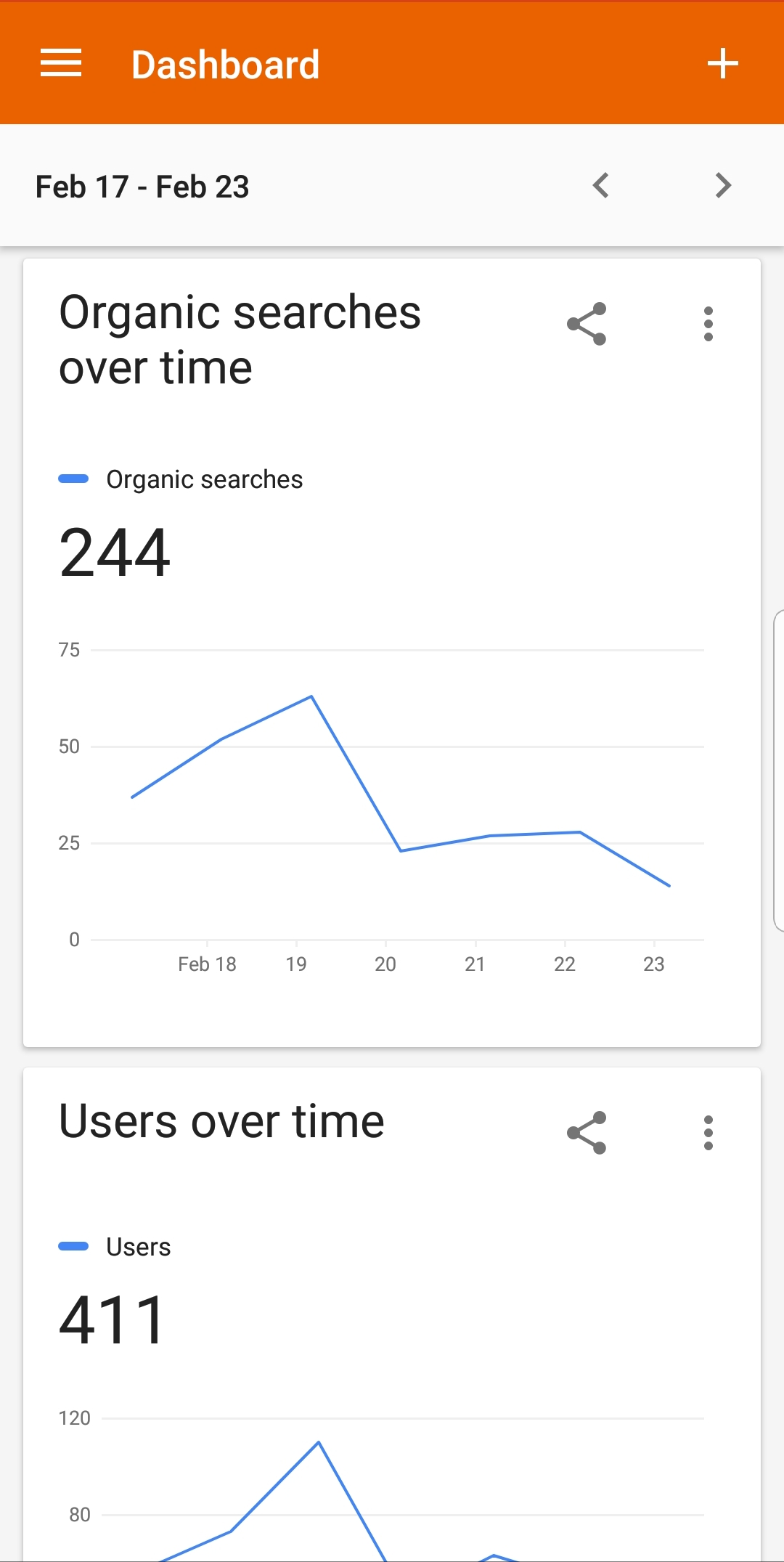
All those who are taking this issue lightly, there is significant organic search drop after updating woocommece 3.5.5. This is the first significant drop on my website. Today I finally fix the schema error by reverting back to woocommece 3.5.4 and implementing the category fix. Still awaiting for validation. By the way my organic search is now around 3 search per day compared to average of 50 searches before 3.5.5. Sales drop drastically.
 sicarioxy
on 4 Mar 2019
sicarioxy
on 4 Mar 2019
All those who are taking this issue lightly, there is significant organic search drop after updating woocommece 3.5.5. This is the first significant drop on my website. Today I finally fix the schema error by reverting back to woocommece 3.5.4 and implementing the category fix. Still awaiting for validation. By the way my organic search is now around 3 search per day compared to average of 50 searches before 3.5.5. Sales drop drastically.
I was the person who first brought this to the attention of woocommerce, over a week ago, and I have been trying to follow it since. From what I have gathered we have been told that is issue was created by a change made by google.
Where did you get the idea to revert back? How would that work if the sever errors were caused by google?
Is this an issue that was create by woocommerce and has nothing to do with changes made by google?
JimmyRaz
on 4 Mar 2019
I have joined up here as I have been affected badly by this issue. Someone up there must not like me because I switched from an old Opencart site to Woocommerce on the 11th February, taking meticulous steps to ensure that everything was as close to the OC site as possible, and faster of course.
Imagine my horror as rankings have tanked over the last couple of weeks, leaving my business that I have run for 15 years on the brink. I blamed myself but now see that I am not the problem.
So, I have rolled back to 3.5.4, bought WP Schema Pro to fix the other issues (plus a couple more unique to my setup). I have implemented the filter that strips out the Schema in archive / category pages. The review is submitted and we shall see.
There will be many more businesses out there who have also been affected but just aren't aware of the cause. That this does not appear to be the #1 priority for Woocommerce makes me wonder whether I should have gone with Magento or something else. At no stage in my research did anything suggest that Woocommerce could critically damage my long standing business.
Fix it - immediately.
 dttc
on 4 Mar 2019
dttc
on 4 Mar 2019
I'm locking the comments here until the team has had time to review. Demanding fixes and general rudeness is not helpful.
Thanks to the users above who shared insights towards the issue raised in dev chat and/or shared code snippets. We'll go through it asap.
mikejolley
on 4 Mar 2019
Regarding downgrading, don't. You can see the history of the file here:
https://github.com/woocommerce/woocommerce/commits/master/includes/class-wc-structured-data.php
The most recent changes were giving structured data unique IDs, and stripping tags from descriptions. These changes do not cause this issue so rolling back will not fix anything. Also note, 3.5.5 was a security release so rolling back is not advisable. The changes are on Google end around the data it requires.
mikejolley
on 4 Mar 2019
Looks like other platforms also skip data on archives which corroborates the above findings. We'll patch core to skip structured data generation on archives.
As for the more strict checking of data for things like reviews, I'll see if there is a way to send some data, however, we need to take care to not surface data that is not visible on the page so as to follow the guidelines:
The structured data on the page should describe the content of that page. You should not create blank or empty pages just to hold structured data; nor should you add structured data about information that is not visible to the user, even if the information is accurate.
Someone also asked about brands being missing because it's extension. Yes in part. There is no way to enter a branch in core so it doesn't make sense to include this in the structured data. There may be a workaround to supress the error such as sending a blank value or using site as the brand in the absense of real data, but that won't be easily solvable.
Reopening comments now. Please keep on topic.
mikejolley
on 4 Mar 2019
@mikejolley Why is my comment marked as spam? What was rude about this, please explain me?
I used this code below, without any rollback on 3.5.5 and requested a validation for google, but what about single product markups?
/**
- Remove the generated product schema markup from the Product Category and Shop pages.
*/
function wc_remove_product_schema_product_archive() {
remove_action( 'woocommerce_shop_loop', array( WC()->structured_data, 'generate_product_data' ), 10, 0 );
}
add_action( 'woocommerce_init', 'wc_remove_product_schema_product_archive' );
AmeliaAkh
on 4 Mar 2019
@AmeliaAkh This is not a support forum. This is not the place to ask for code or customisation.
mikejolley
on 4 Mar 2019
@mikejolley Ok, I did not ask anything different from all other people here. Mike, we are grown up people running our companies. It's not because we are not developers that you have to treat people like children. Have a little respect.
AmeliaAkh
on 4 Mar 2019
@AmeliaAkh If you look above, all support questions have been marked offtopic or as spam. I have not singled you out. Besides, the spam comment was complaining about no comments and calling WC devs crazy. I fail to see how that contributes in any way to the resolution of this problem.
This discussion should be around solving the issue, not requests for custom code. When there is an update, it will be posted. And when that happens you can take the fix and apply it to your site manually.
mikejolley
on 4 Mar 2019
Mr. Jolley, I am flabbergasted that you have deleted posts, mine included.
When my site tanks in the rankings, my income falls, we in the UK are seeing falls in sales anyway due to the political turmoil, and I have to suffer financial stress to keep going, you will forgive me for being "rude". Which, quite honestly, I wasn't.
I don't know exactly what you do for a living, but my ecommerce site has been my income for the last 15 years and I would hate to lose everything because of this. This is not a game.
My issue is not that it is Woocommerce, or Google who created this situation, I don't care - it is that it would appear this issue was raised 2 weeks ago and quite honestly it is the attitude here that is at fault. Just put yourself in the shoes of people who have lost rankings and thousands in sales. Please.
I am very disappointed by your comments.
dttc
on 4 Mar 2019
@dttc The comments are still there, just toggled hidden. You can see them above. The volume of off-topic comments makes it extreemely difficult for contributors to come in and read about the problem so I went through and left only those with new or useful information open.
Again, GitHub is not a support forum. It is a place to log issues so developers can resolve these issues. Any other discussion, such as posting "me too" or signing up to order _"fix it immedietely"_ is not helpful, and yes, it does come across as rude.
The issue was raised 8 days ago. It was discussed in last weeks dev chat. And now has a fix in place pending review. _Don't assume no one cares about this._
See https://github.com/woocommerce/woocommerce/pull/22925 You are welcome to test this out on your site to ensure it resolves the problem. If you, or anyone else reading, could do this and comment back, that will be useful, and it would give us more confidence to release this in 3.5.6 which we were planning on doing later this week.
Thanks for understanding.
mikejolley
on 4 Mar 2019
After implementing the code of Archive pages, i validated some pages. But still i have almost 4 k products single page errors. I have attached results of google validation for archive pages thx.
Lastly, we are not here to offend anyone. We highly respect dev, friends and Woocommerce team who tireless working to fix this issue and looking forward to positive outcomes.
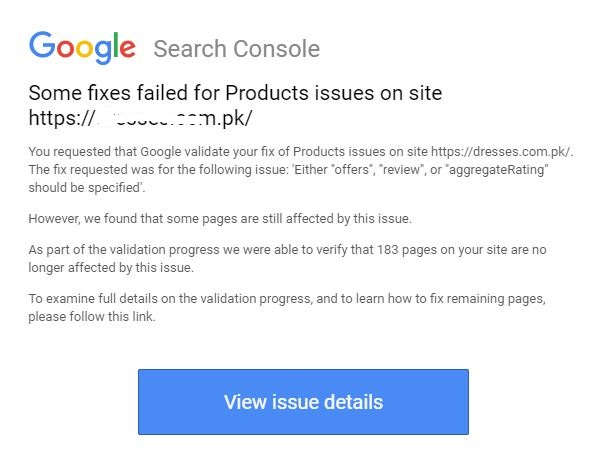
waqarabro
on 4 Mar 2019
@waqarabro Can you give an example of a URL which is failing validation from that report? Then we can run it through validator and see why.
mikejolley
on 4 Mar 2019
@waqarabro Can you give an example of a URL which is failing validation from that report? Then we can run it through validator and see why.
Product pages. Can i have your email / gmail? i can invite you to my console and you thoroughly check what does not qualify?
https://dresses.com.pk/shop/chiffon/pakistani-party-chiffon-dresses/
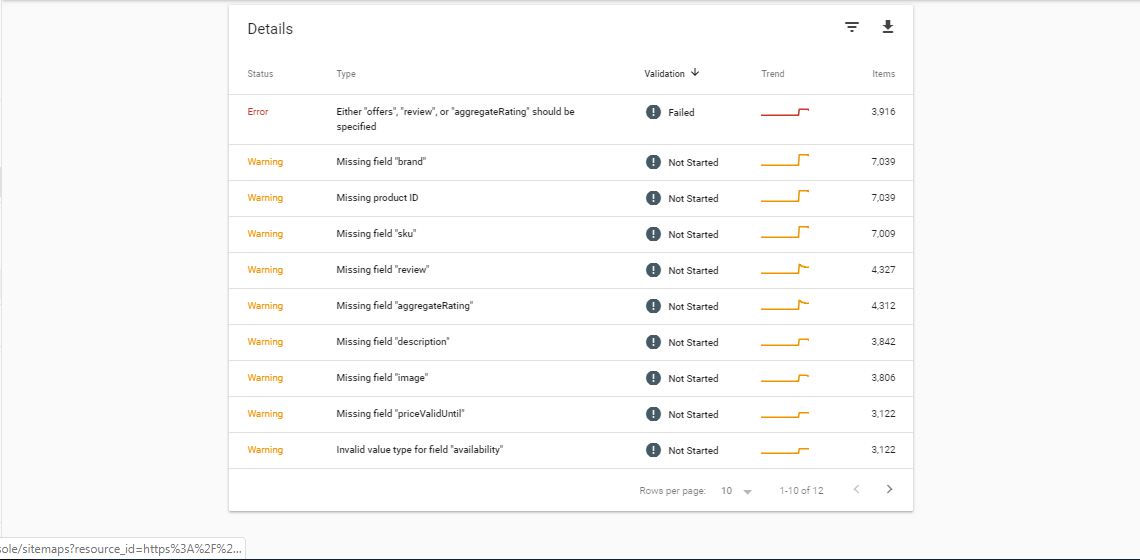
waqarabro
on 4 Mar 2019
@waqarabro email is on my profile. I don't need access to that, just an example URL.
mikejolley
on 4 Mar 2019
@waqarabro email is on my profile. I don't need access to that, just an example URL.
https://dresses.com.pk/shop/chiffon/pakistani-party-chiffon-dresses/
waqarabro
on 4 Mar 2019
Validator shows 1 error - WPFooter - this is not WooCommerce.
The product only has warnings - no missing price:
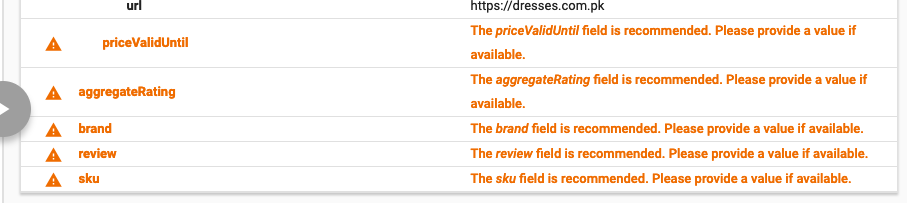
If you apply the changes I made in https://github.com/woocommerce/woocommerce/pull/22925 it will get rid of the SKU and priceValidUntil warning.
The others cannot be resolved because:
- there is no brand info available
- there are no reviews
But these are not required fields.
mikejolley
on 4 Mar 2019
@mikejolley
Mike, Thanks for clarifying the cause of this and giving us an update on a date for a potential fix.
It would be helpful for me and possibly others to know exactly what you plan on doing regarding these single product errors.
Are you going to include the fields? When we did schema in html, that is all it took to resolve these problems.
JimmyRaz
on 5 Mar 2019
@JimmyRaz We're not going to include BRAND (this is not required and has no data in WC), and we cannot include ratings unless there are actually ratings present.
Offers however, which are in the errors, are included.
mikejolley
on 5 Mar 2019
I have made all the changes recommended and found all warnings gone. Just 3 left that i attach in the screenshot. Will appreciate if dev could guide how could i solve these 3 before i start validation or i should validate in console now?

waqarabro
on 5 Mar 2019
@waqarabro The brand one can only be resolved with an extension (WC Brands or an SEO plugin). This shouldn't be required to pass validation...
Same for rating/review. These are only present if the product has reviews.
mikejolley
on 5 Mar 2019
@waqarabro The brand one can only be resolved with an extension (WC Brands or an SEO plugin). This shouldn't be required to pass validation...
Same for rating/review. These are only present if the product has reviews.
which SEO Plugin? I have Yoast already running btw. Yes i tried and test that either. We have to give reviews in order to resolve other two warnings but question is that how could we do that when we have more than 6 k products and secondly is brand is wc paid extension?
waqarabro
on 5 Mar 2019
WC Brands is. https://docs.woocommerce.com/document/wc-brands/ There are other solutions if you search "add brand to woocommerce structured data".
As for reviews, if you don't have any reviews then you shouldn't have it in the structured data. Google guidelines are clear; only data on your page should be marked up. There is no value available, so ignore the warning.
mikejolley
on 5 Mar 2019
@waqarabro Hello, I would like to ask something when you test a single product url, does it look like this? When I check with the new search console it shows a product and name and with the other testing tool it shows the review first.
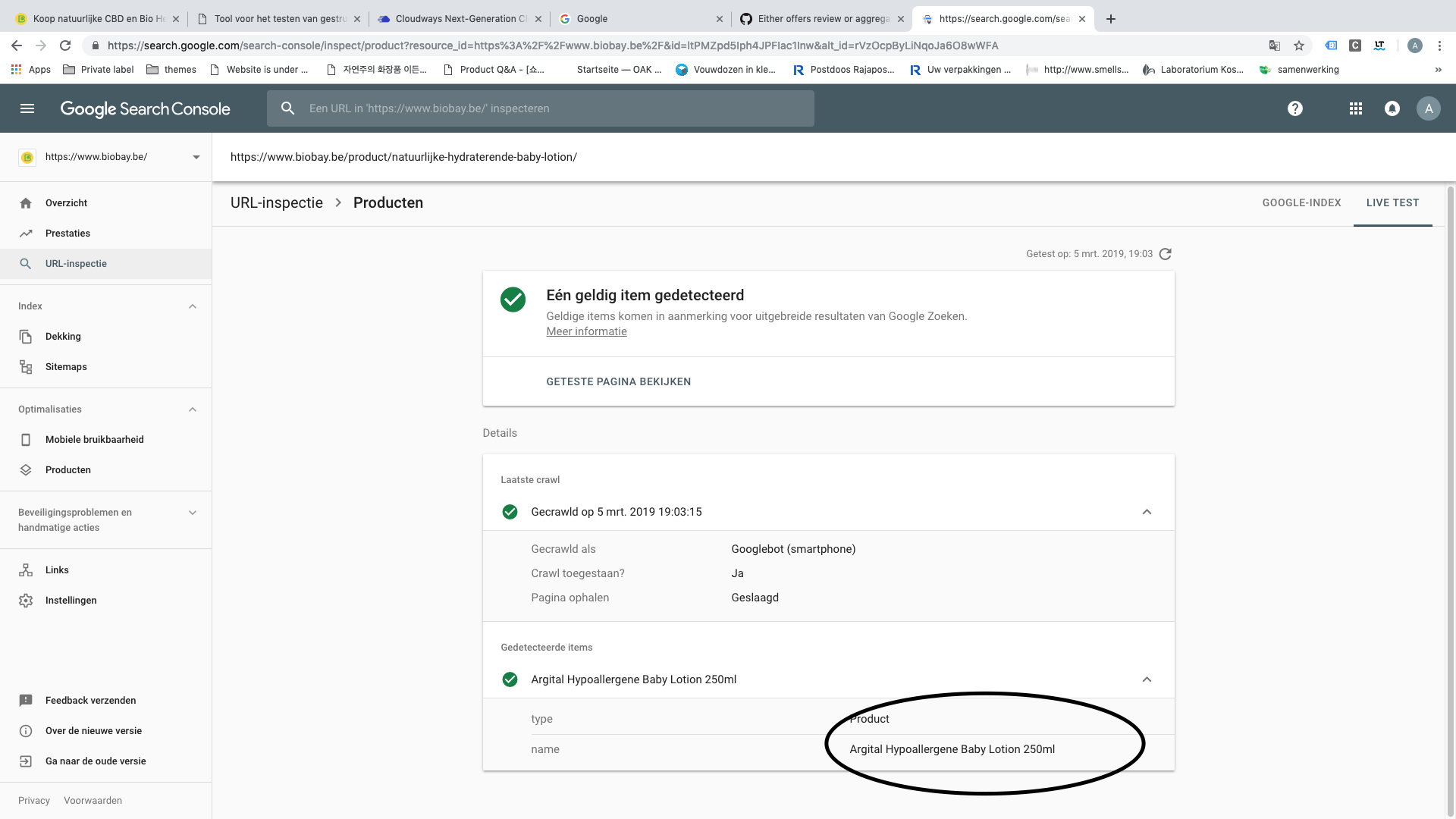
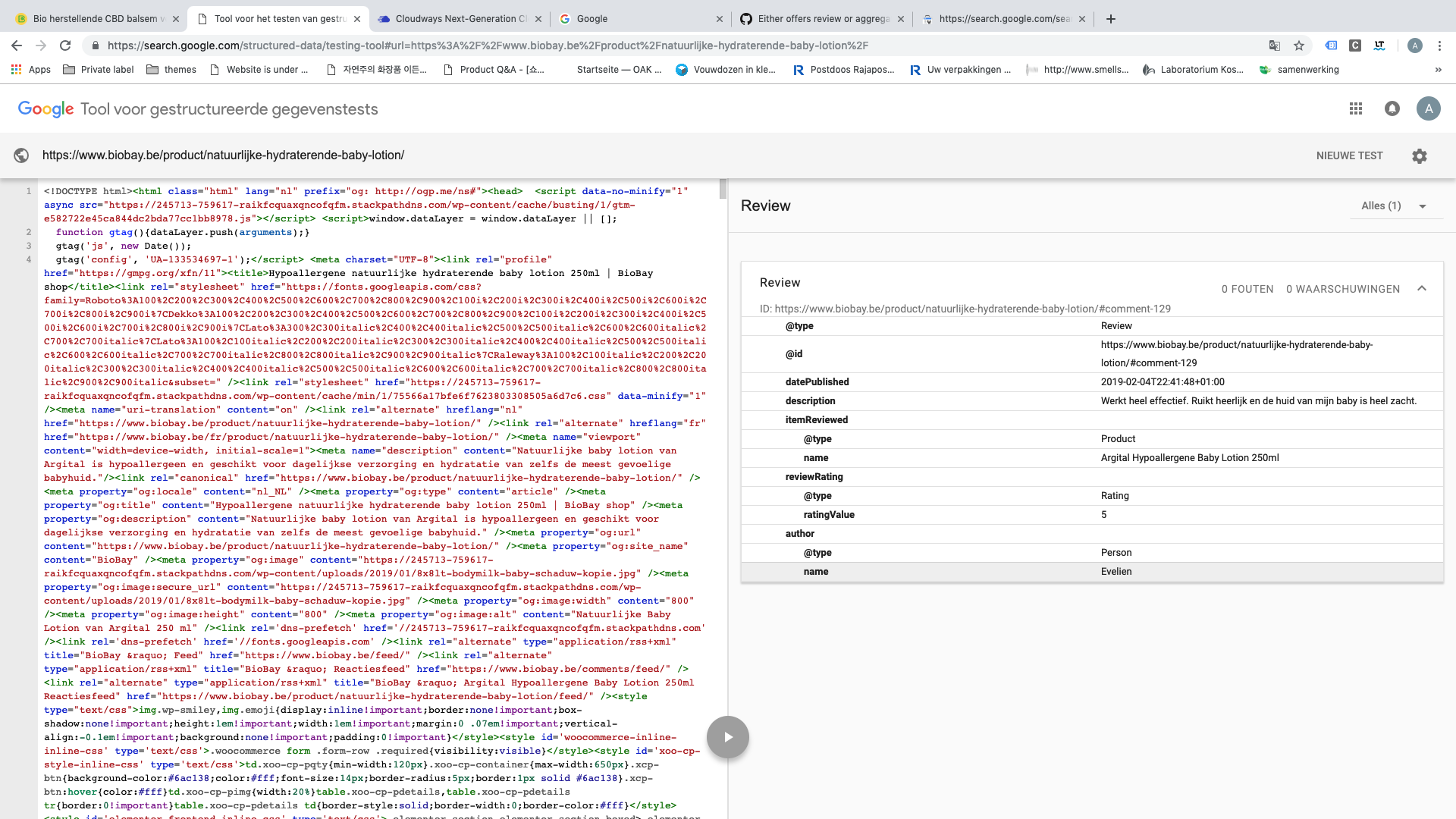
AmeliaAkh
on 5 Mar 2019
No in the structured data testing tool after manually giving a review, it looks like as follow
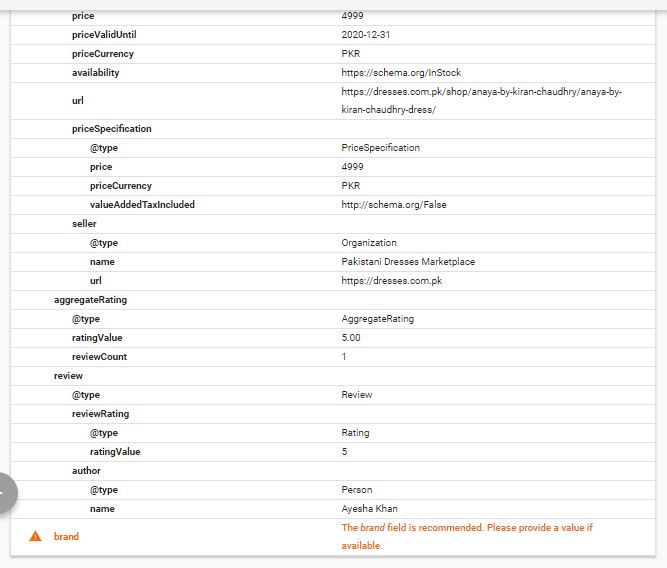
If i do not have review, it looks like as follow single product :
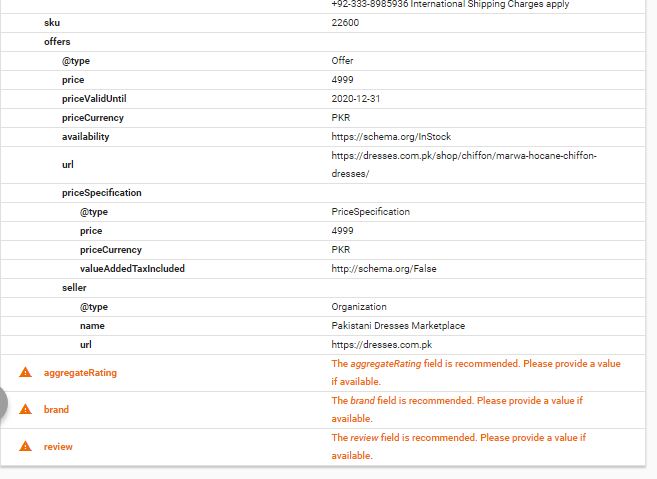
waqarabro
on 5 Mar 2019
@waqarabro Did you markup those single products yourself? It only sees reviews on my products.
AmeliaAkh
on 5 Mar 2019
@waqarabro Did you markup those single products yourself? It only sees reviews on my products.
Yeah. I made changes in the Structured Data File as per given addition and deletion in the required fields https://github.com/woocommerce/woocommerce/pull/22925/files
waqarabro
on 5 Mar 2019
@waqarabro Ah ok! Thank you very much for your detailed answer. I'm afraid I will do something wrong changing this, so I will wait till the new release. They said it was end this week, right?
AmeliaAkh
on 5 Mar 2019
I am also receiving a whole bunch of error messages in Search Console for my category pages "Either "offers", "review", or "aggregateRating" should be specified".
 bondimedical3
on 6 Mar 2019
bondimedical3
on 6 Mar 2019
i am also reviving this message please fix this problem
 shm379
on 6 Mar 2019
shm379
on 6 Mar 2019
I am also receiving a whole bunch of error messages in Search Console for my category pages "Either "offers", "review", or "aggregateRating" should be specified".
If you do not have reviews on your page this will show as error.
@mikejolley , Thanks a lot for the Fixes
sicarioxy
on 6 Mar 2019
Hey Jolley i tried to add a plugin which added "Brand" as taxonomy perhaps. Please look at the images, it is still throwing errors.
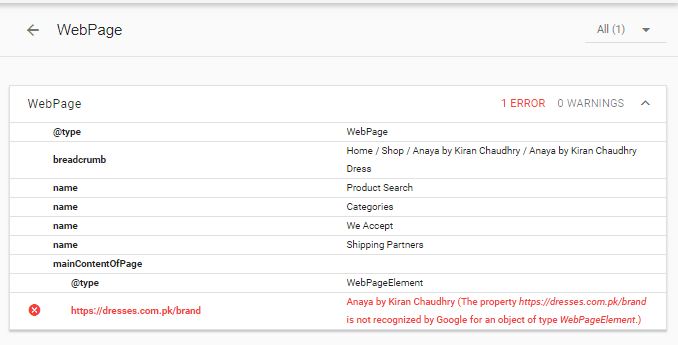
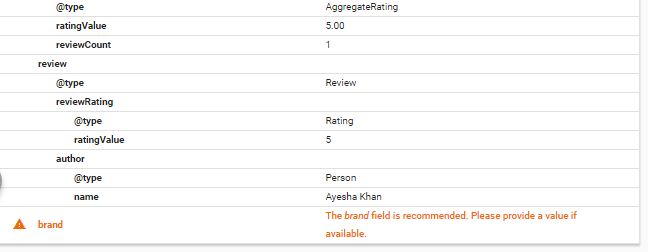
link to test: https://dresses.com.pk/shop/anaya-by-kiran-chaudhry/anaya-by-kiran-chaudhry-dress/
can you tell why is it still throwing error?
waqarabro
on 6 Mar 2019
quick question in order to skip the aggregate rating and review, can't we just send blank info? For example, my employer doesn't want to have reviews and rating open for customers. Is it not possible to add if no rating (or review) then "-" else add the actual rating and review? Or will this way google will see the - or 0 as irrelevant and mark it as an error anyway?
 JohnDost
on 7 Mar 2019
JohnDost
on 7 Mar 2019
New WooCommerce update seems to fix the errors, thank you.
bondimedical3
on 8 Mar 2019
No. New update does not fix it. Check out. I have upgraded and it still throws errors. Even it throws a new error now. See in the pic below
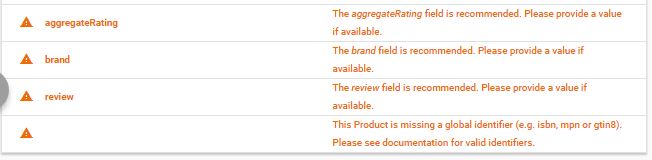
waqarabro
on 8 Mar 2019
Those are only warnings, you can safely ignore them.
bondimedical3
on 8 Mar 2019
Those are only warnings, you can safely ignore them.
But they show errors in the google console and ranks are plummeting
waqarabro
on 8 Mar 2019
First try to validate the pages with errors in Google Search Console, this will take a few days. Second, the ranks of pages in Google are not affected by structured data errors. Too many errors will only affect the structured data portion of the URL.
bondimedical3
on 8 Mar 2019
No. New update does not fix it. Check out. I have upgraded and it still throws errors. Even it throws a new error now. See in the pic below
I have exactly the same warnings in Structured data testing tool on single product pages after the update. And errors on category pages are still here.
 Laurentyzy
on 8 Mar 2019
Laurentyzy
on 8 Mar 2019
We include SKU for certain. If you're not seeing a SKU in your markup, perhaps you have other plugins generating schema instead of WooCommerce.
The other warnings are expected if your product lacks a brand (no brand extension) or lacks reviews. WC will not make up values for these fields, and empty values still produce a warning.
This issue is resolved. The "Either offers review or aggregateRating should be specified" error is gone.
mikejolley
on 8 Mar 2019
We include SKU for certain. If you're not seeing a SKU in your markup, perhaps you have other plugins generating schema instead of WooCommerce.
The other warnings are expected if your product lacks a brand (no brand extension) or lacks reviews. WC will not make up values for these fields, and empty values still produce a warning.
This issue is resolved. The "Either offers review or aggregateRating should be specified" error is gone.
After updating, I see a new error "Global Identifier" and it does not fix other problems. Yes, i enabled Brand Plugin extension but it does not fix the problem. I can still see brand issue
waqarabro
on 8 Mar 2019
You need to also add brands to the products :)
The global ID warning is new, it wasn't in the validator last week. We won't be pushing an update out for that yet so you'll need to extend the schema manually if you want those warnings gone. Google makes change to these requirements frequently.
mikejolley
on 8 Mar 2019
You need to also add brands to the products :)
The global ID warning is new, it wasn't in the validator last week. We won't be pushing an update out for that yet so you'll need to extend the schema manually if you want those warnings gone. Google makes change to these requirements frequently.
Bro i have added brands and tested either. SEE YOURSELF
Hey Jolley i tried to add a plugin which added "Brand" as taxonomy perhaps. Please look at the images, it is still throwing errors.
link to test: https://dresses.com.pk/shop/anaya-by-kiran-chaudhry/anaya-by-kiran-chaudhry-dress/
can you tell why is it still throwing error?
waqarabro
on 8 Mar 2019
sigh you are using YITH brands. I don't even know if that adds schema. The WooCommerce.com does. Contact the developer.
mikejolley
on 8 Mar 2019
After re-reading the thread, the fix from @TimBHowe does indeed solve the problem. https://github.com/woocommerce/woocommerce/issues/22896#issuecomment-468435668
 mitchellkrogza
on 8 Mar 2019
mitchellkrogza
on 8 Mar 2019
Check this one https://github.com/woocommerce/woocommerce/issues/22896#issuecomment-468374447. This could be the solution to your Brand error, as it does add the brand into the schema. I am not sure if you can see the actual comment via the link so I will paste the code.
/**
- Filter the woocommerce_structured_data_product_limit if statment to always add the full structure.
* - @param boolean $is_archive_page returns true or false based on is_product_taxonomy() || is_shop() WooCommerce Conditionals.
- @return boolean Return false to force the function to continue and not limit the product data on the archvie page.
*/
function wc_unlimit_product_structed_data( $is_archive_page ) {
return false;
}
add_filter( 'woocommerce_structured_data_product_limit', 'wc_unlimit_product_structed_data', 10, 1 );
/**
- Add items to the product schema markup.
* - @param array $markup Array of the product scheme markup.
- @param WC_Product $product Product data (default: null).
- @return array Altered $markup.
*/
function wc_add_product_structed_data( $markup, $product ) {
// Add the brand to the product schema markup.
$markup['brand'] = '';
// If is it a product archive page add the URL to the product schema markup.
if ( is_product_taxonomy() || is_shop() ) {
    $markup['url'] = get_permalink( $product->get_id() );
}

return $markup;
}
add_filter( 'woocommerce_structured_data_product', 'wc_add_product_structed_data', 10, 2 );
JohnDost
on 8 Mar 2019
@mikejolley I have just received the Validation results from Google Search console and the latest update does NOT fix the errors.
PS - all my structured data, reviews, ratings etc have now disappeared from Google search results.
bondimedical3
on 12 Mar 2019
@mikejolley I have just received the Validation results from Google Search console and the latest update does NOT fix the errors.
PS - all my structured data, reviews, ratings etc have now disappeared from Google search results.
hi @mikejolley
which Errors still remaining ?
As discussed in the Slack Dev Chat today removing the product schema markup from the Shop/Product Category pages seems to be the best solution.
To do that you can add the following code to your themes function.php file.
/**
 * Remove the generated product schema markup from the Product Category and Shop pages.
 */
function wc_remove_product_schema_product_archive() {
  remove_action( 'woocommerce_shop_loop', array( WC()->structured_data, 'generate_product_data' ), 10, 0 );
}
add_action( 'woocommerce_init', 'wc_remove_product_schema_product_archive' );
If you had previously added the other suggested snippets from
#22842 (comment)
#22842 (comment)
they can be removed, but the one above should prevent them from running. As always if you are not comfortable editing the code please consult a developer.I'm going to try and work on PR to fix the issue for a future release. Hope this helps.
thank you @TimBHowe , I test this but still got same result in google schema test tool . ;(
I got more than 7000 errors and my ranking are dropping . I wish woocommerce / wordpress had stable release (with no major changes )
 mohamm4d
on 12 Mar 2019
mohamm4d
on 12 Mar 2019
Same here, "Either "offers", "review", or "aggregateRating" should be specified" errors are not fixed after validation on category pages. Above solution don't work for me.
Laurentyzy
on 12 Mar 2019
@bondimedical3 @Laurentyzy double check that your theme doesn't add "schema" stuff. When I looked at the structured data of my product page, there I had two quite similar product-objects. one of them still had the error after upgrade but it wasn't woocommerce fault, it was in the theme.
fdanell
on 12 Mar 2019
I am using the Storefront theme. To my knowledge it doesn't add any structured data.
bondimedical3
on 13 Mar 2019
@mikejolley I take back what I said about the update. It appears the errors started to reduce yesterday in my Google Search Console.

bondimedical3
on 13 Mar 2019
@bondimedical3 I think i'ts possible that you have 2 schema objects on your products. you have 7 warnings on some and 14 warnings on some which is an exact double, which is what you would see if some warnings are the same in one if two objects. If you paste one of your product URL in search console you will see the warnings, clic on the warnings and you will see where they stem from in the url.
Related issues
 jondavy
·
59Comments
jondavy
·
59Comments
 justlevine
·
52Comments
justlevine
·
52Comments
 peterfabian
·
73Comments
peterfabian
·
73Comments
 choijun
·
58Comments
choijun
·
58Comments
 hannahswain
·
97Comments
hannahswain
·
97Comments
Most helpful comment
Chiming in here after the Slack dev chat :)
From the research I've done on structured data in the past, structured data is designed to tell you about the information directly being presented on a page. Google notes this:
When generating structured data, WooCommerce includes a lot of data that's not shown in the product archive, so this data should not be present according to the guidelines.
So what about limiting the structured data in archives -- should we do that or remove it completely?
Google indicates in a few places that structured data should not be included in an archive that lists links to full listings.
(Emphasis mine on this last one.) So for WooCommerce archives, given they list all products _and_ link out to full details pages, they should not be marked up. My vote is to remove this line for generated structured data on archives.