Woocommerce-ios: Variants: Manage Product Variations
API Spike: p99K0U-1Mb-p2
NOTE: The steps and screenshots below are outdated as we've updated the design to address a few issues. Please check the latest design (variations i2) for the reference.
[ ] Step 1: add a "..." action to the navigation bar that brings up an action sheet with just "Edit Options" for M3 - maybe we should just show an "Edit" action instead?
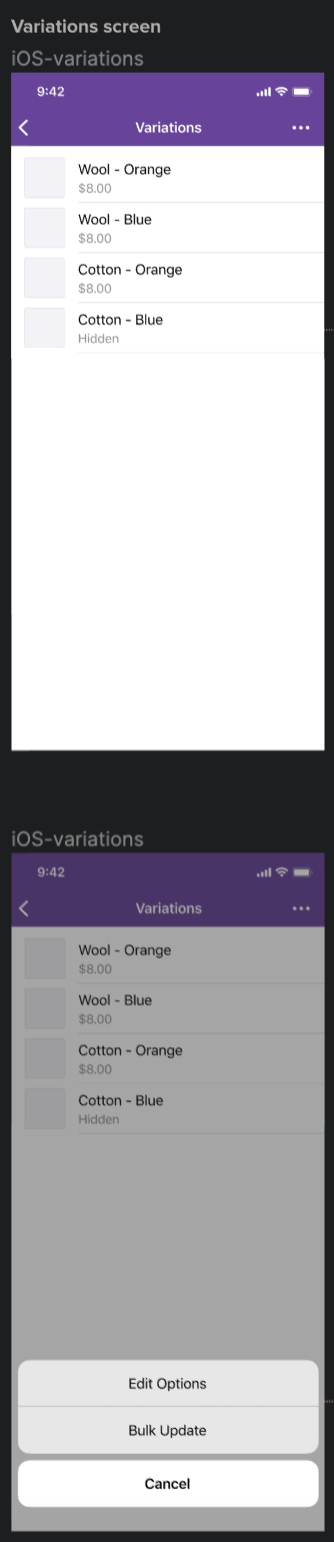
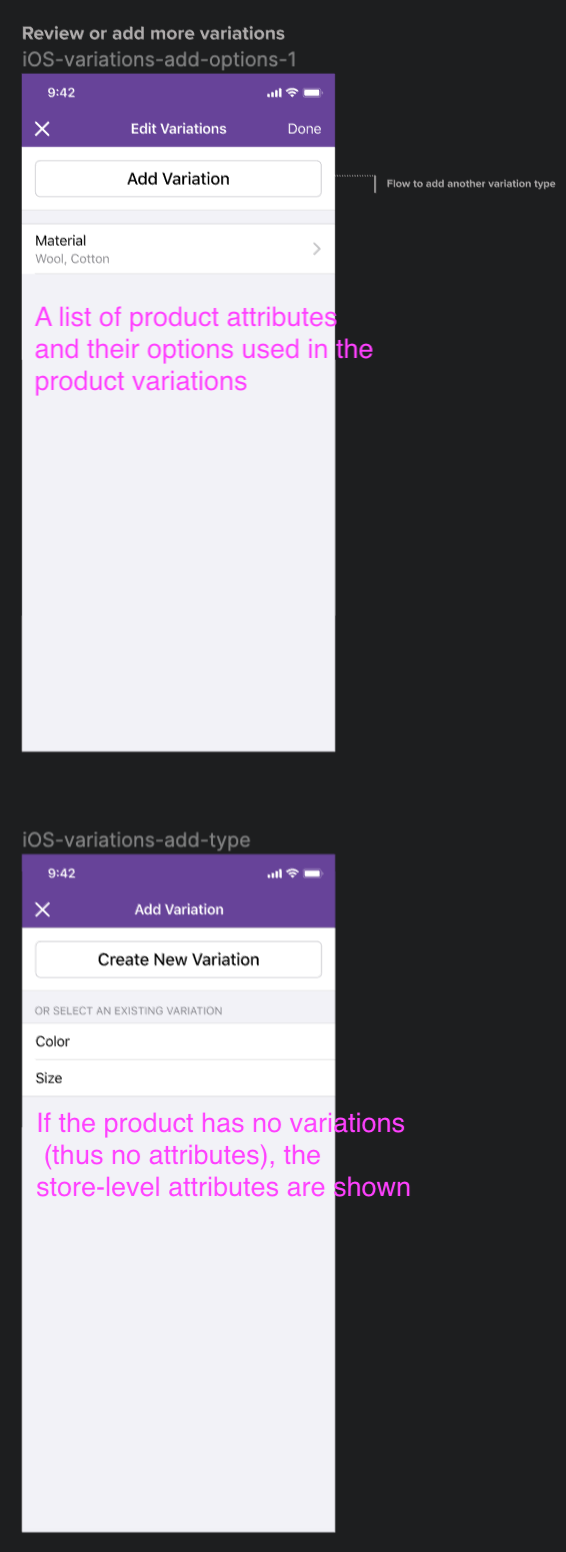
[ ] Step 2: when the user taps on the "Edit Options", it navigates to one of the following screens:
- (Top) If the product has non-empty product attributes, we list the attributes and options with a CTA to add a new product attribute
- (Bottom) If the product has no product attributes, we list the global attributes at the store level with a CTA to add a new product attribute
[ ] Step 3-1: when the user taps to add a new product attribute, it navigates to a set of 2 screens:
- The first screen is to input the attribute name. If there are any existing attributes that match the text, we list them below
- The second screen is to input a list of attribute options

[ ] Step 3-2: when the user taps to add an existing global attribute, it navigates to a screen where the user can edit the available options:
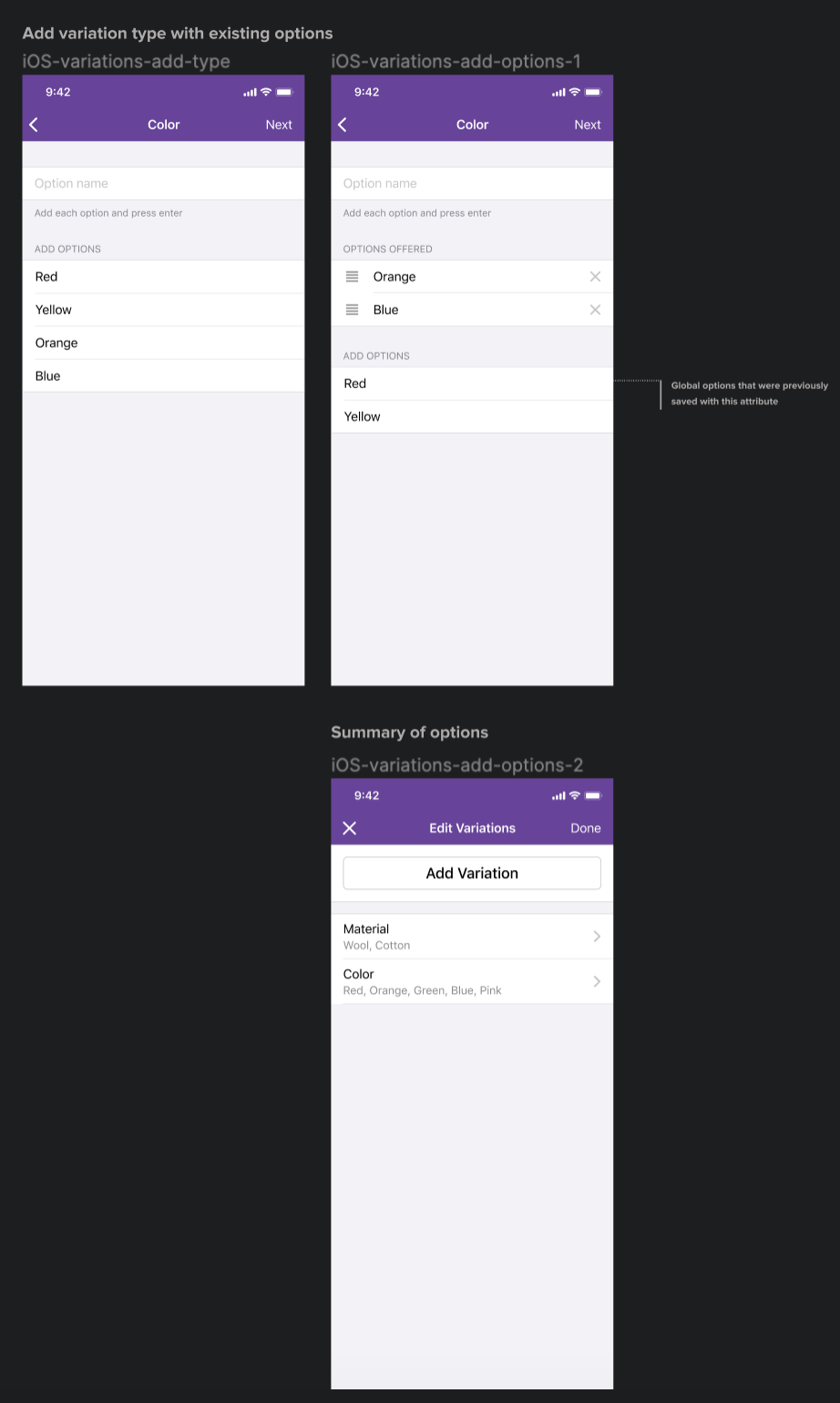
[ ] Step 4: when the user taps "Done" on the edit variations screen, we need to update the existing product variations carefully since variations of any combination of attributes are possible in core. Let's write a p2 with more details about this.
 jaclync
All 6 comments
Hi @jaclync, which Figma page are you looking at? Having a hard time finding those screenshots in the "Variations i2" Figma page :)
 Garance91540
on 2 Sep 2020
Garance91540
on 2 Sep 2020
I removed myself from this task since it will be moved to another Milestone.
 pmusolino
on 2 Sep 2020
pmusolino
on 2 Sep 2020
Hi @jaclync, which Figma page are you looking at? Having a hard time finding those screenshots in the "Variations i2" Figma page :)
Hi @Garance91540! Since this issue was created in May, it was most likely written based on the "Variations i1" at the time. Once the variations UX is finalized, the description can be updated! If I remember correctly from the last meeting in July, we found "variation" in the copy a bit confusing because it meant "attribute" in core and we want to consider the behavior in core where you can generate any combination of attributes including "any".
jaclync
on 3 Sep 2020
Sounds good, @pmusolino reached out to me because he started working on this issue and couldn't find it in the Figma file, Paolo I hope it's clearer now?
And yes @jaclync the changes you brought up have been addressed in the latest designs of the variations flow which is finalized. Cf variations i2 in Figma. I'll also share a screencast of the complete flow when I get the chance as it's quite complex and have changed a lot
Garance91540
on 3 Sep 2020
sounds good! I also moved this issue to M5, thanks @pmusolino for creating the M5 project 💟
jaclync
on 4 Sep 2020
I have split this up into multiple tasks in the M5 board. I excluded the parts that are no longer part of the new design and plan (p91TBi-2Ur-p2). I will close this issue.
 shiki
on 20 Nov 2020
shiki
on 20 Nov 2020
Related issues
jaclync
·
4Comments
![sentry-io[bot] picture](https://avatars.githubusercontent.com/in/12637?v=4&s=40) sentry-io[bot]
·
3Comments
shiki
·
3Comments
sentry-io[bot]
·
3Comments
shiki
·
3Comments
 rachelmcr
·
4Comments
pmusolino
·
4Comments
rachelmcr
·
4Comments
pmusolino
·
4Comments
Most helpful comment
Sounds good, @pmusolino reached out to me because he started working on this issue and couldn't find it in the Figma file, Paolo I hope it's clearer now?
And yes @jaclync the changes you brought up have been addressed in the latest designs of the variations flow which is finalized. Cf variations i2 in Figma. I'll also share a screencast of the complete flow when I get the chance as it's quite complex and have changed a lot