Hi, this is not an issue.
Does anyone have already directly integrated WLED with an openhab server and has a documentation on this? Would like to avoid using any hub to be able to change colors and FX... ;)
Cheers, David
 wcbuerste
All 15 comments
Hi David,
do you know if openhab can send standard HTTP GET requests? If so, you can easily use the WLED API. If not, we need to find another protocol or way to interface between the projects :)
Thank you for your support!
 Aircoookie
on 5 Aug 2018
Aircoookie
on 5 Aug 2018
Yes, http get should work. Was hoping someone has already written the whole definitions. ;)
Will see if I have some time the next weeks to give it a try.
Maybe I can get the color picker to work https://docs.openhab.org/configuration/sitemaps.html#element-type-slider
wcbuerste
on 5 Aug 2018
Hey, i don't know if it is still relevant.
I want to do the same and my solution is to create a virtual hue bulb in openhab and let wled poll the state of this bulb
 LindezaGrey
on 20 Nov 2018
LindezaGrey
on 20 Nov 2018
Hey, I've done it using mqqt/node-red:
Code for node-red:
[
    {
        "id": "9edc785.11aae88",
        "type": "openhab2-in",
        "z": "d8064cf4.205b5",
        "name": "",
        "controller": "ab848a1c.534098",
        "itemname": "BedEffect",
        "x": 80,
        "y": 220,
        "wires": [
            [
                "3566af9d.825df"
            ],
            []
        ]
    },
    {
        "id": "3566af9d.825df",
        "type": "function",
        "z": "d8064cf4.205b5",
        "name": "SetEffect",
        "func": "var newMsg = { payload: \"FX=\" + msg.payload};\n\n\n\nreturn newMsg;",
        "outputs": 1,
        "noerr": 0,
        "x": 240,
        "y": 220,
        "wires": [
            [
                "8cd05ccb.51a98"
            ]
        ]
    },
    {
        "id": "8cd05ccb.51a98",
        "type": "mqtt out",
        "z": "d8064cf4.205b5",
        "name": "BedApi",
        "topic": "wled/bed/api",
        "qos": "",
        "retain": "",
        "broker": "339eafc.88bf45",
        "x": 380,
        "y": 220,
        "wires": []
    },
    {
        "id": "64de1ea0.a96cf",
        "type": "openhab2-in",
        "z": "d8064cf4.205b5",
        "name": "",
        "controller": "ab848a1c.534098",
        "itemname": "RollerRGBvalue",
        "x": 540,
        "y": 220,
        "wires": [
            [
                "314a219a.31491e"
            ],
            []
        ]
    },
    {
        "id": "314a219a.31491e",
        "type": "switch",
        "z": "d8064cf4.205b5",
        "name": "",
        "property": "payload",
        "propertyType": "msg",
        "rules": [
            {
                "t": "neq",
                "v": "",
                "vt": "prev"
            }
        ],
        "checkall": "true",
        "repair": false,
        "outputs": 1,
        "x": 690,
        "y": 220,
        "wires": [
            [
                "3aa1e798.9701a8"
            ]
        ]
    },
    {
        "id": "3aa1e798.9701a8",
        "type": "mqtt out",
        "z": "d8064cf4.205b5",
        "name": "RollerColor",
        "topic": "wled/roller/col",
        "qos": "",
        "retain": "",
        "broker": "339eafc.88bf45",
        "x": 830,
        "y": 220,
        "wires": []
    },
    {
        "id": "c59ca440.53a898",
        "type": "openhab2-in",
        "z": "d8064cf4.205b5",
        "name": "Bed",
        "controller": "ab848a1c.534098",
        "itemname": "BedLeds",
        "x": 990,
        "y": 100,
        "wires": [
            [
                "dfda1b77.78c0c8"
            ],
            []
        ]
    },
    {
        "id": "dfda1b77.78c0c8",
        "type": "mqtt out",
        "z": "d8064cf4.205b5",
        "name": "ON/OFF",
        "topic": "wled/bed",
        "qos": "",
        "retain": "",
        "broker": "",
        "x": 1120,
        "y": 100,
        "wires": []
    },
    {
        "id": "ab848a1c.534098",
        "type": "openhab2-controller",
        "z": "",
        "name": "",
        "protocol": "http",
        "host": "",
        "port": "",
        "path": "",
        "username": "",
        "password": ""
    },
    {
        "id": "339eafc.88bf45",
        "type": "mqtt-broker",
        "z": "",
        "name": "",
        "broker": "IP",
        "port": "",
        "clientid": "",
        "usetls": false,
        "compatmode": true,
        "keepalive": "60",
        "cleansession": true,
        "birthTopic": "",
        "birthQos": "0",
        "birthPayload": "",
        "closeTopic": "",
        "closeQos": "0",
        "closePayload": "",
        "willTopic": "",
        "willQos": "0",
        "willPayload": ""
    }
]
Items:
Number BedLeds "BedLeds"
Color BedColor "BedColor"
Number BedRGBvalue "Bedrgbvalue"
Number BedEffect "RollerEffect"
rules:
rule "LED color bed"
    when
        Item BedColor changed
    then
    var HSBType hsbValueBed
    hsbValueBed = BedColor.state as HSBType
    var rgbBed = hsbValueBed.RGB
    BedRGBvalue.sendCommand(rgbBed)
end
sitemap:
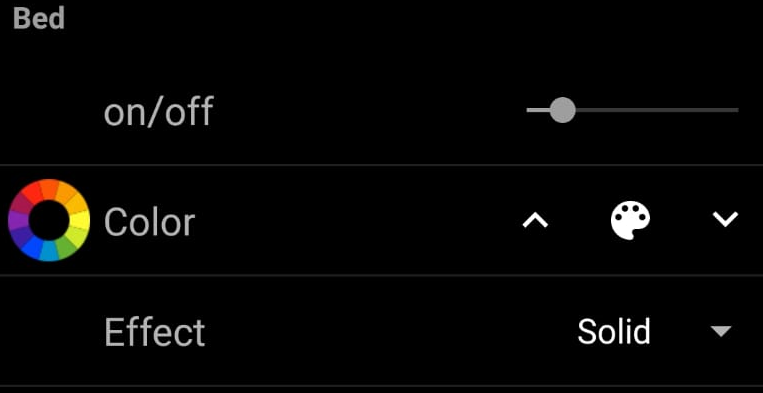
     Frame label="Bed"
                {
                    Slider item=BedLeds label="on/off"
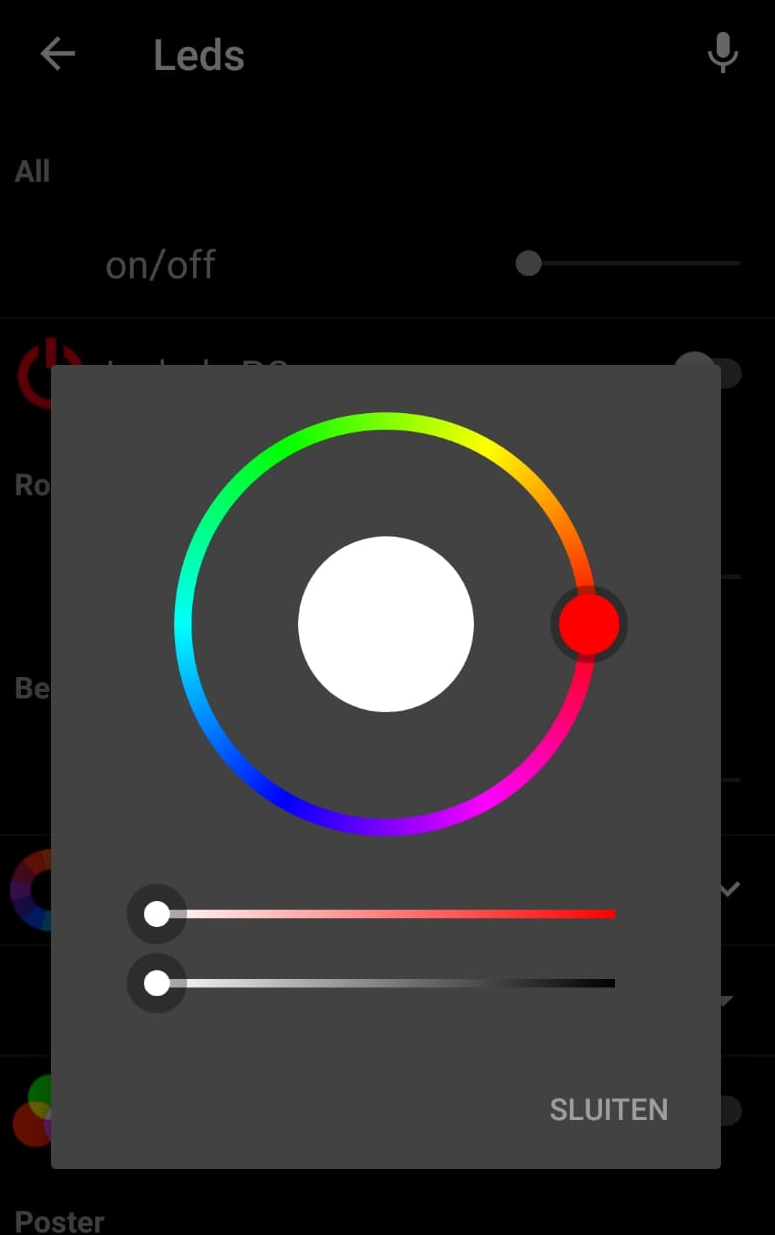
                    Colorpicker item=BedColor label="Color" icon="colorwheel" visibility=[BedLeds!=0]
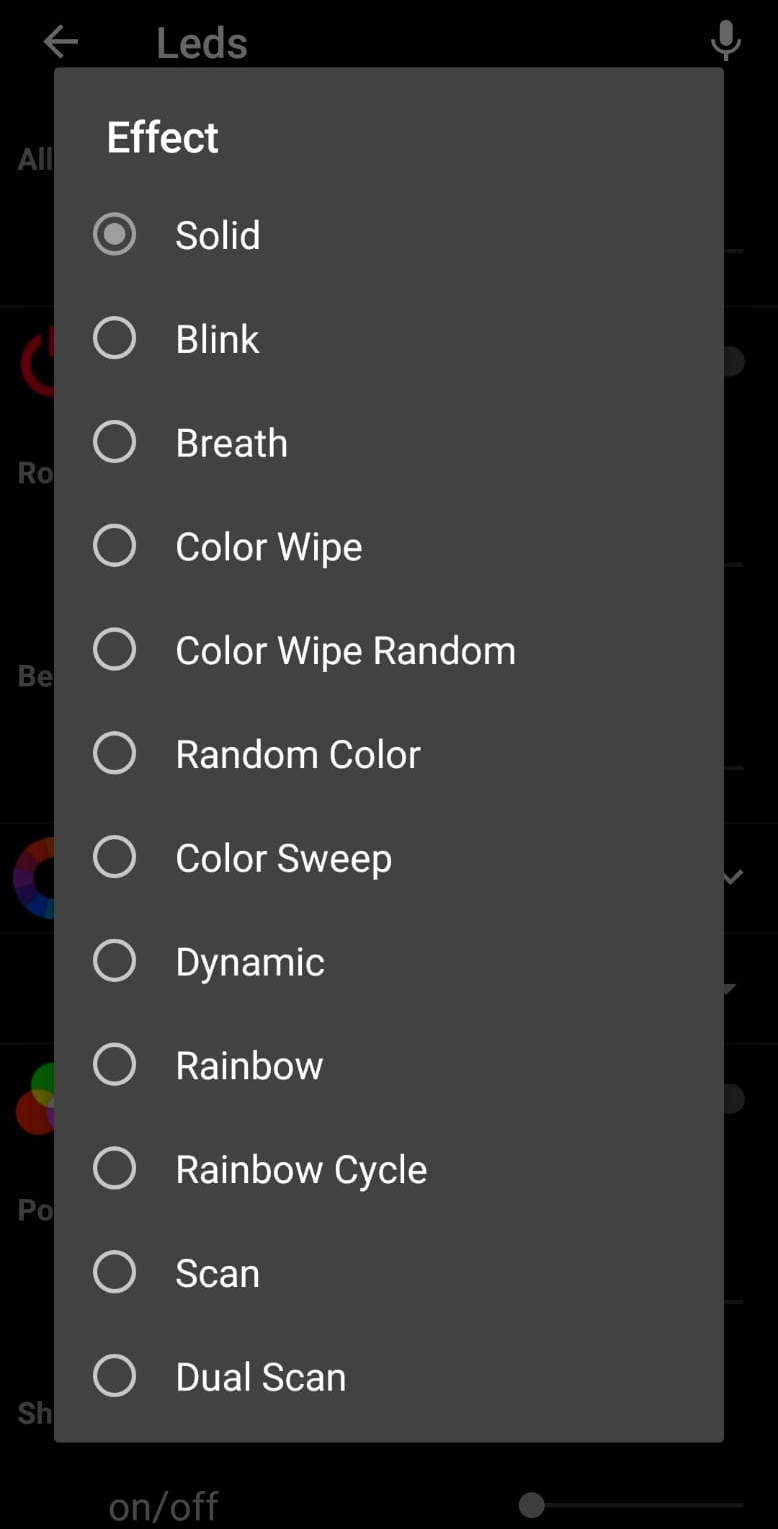
                    Selection item=BedEffect label="Effect" visibility=[BedLeds!=0] mappings=[0="Solid", 1="Blink", 2="Breath", 3="Color Wipe", 4="Color Wipe Random", 5="Random Color", 6="Color Sweep", 7="Dynamic", 8="Rainbow", 9="Rainbow Cycle", 10="Scan", 11="Dual Scan", 12="Fade", 13="Theater Chase", 14="Theater Chase Rainbow", 15="Running Lights", 16="Twinkle", 17="Twinkle Random", 18= "Twinkle Fade", 19="Twinkle Fade Random", 20="Sparkle", 21="Flash Sparkle", 22="Hyper Sparkle", 23="Strobe", 24="Strobe Rainbow", 25="Multi Strobe", 26="Blink Raibow", 27="Android", 28="Chase Color", 29="Chase Random", 30="Chase Rainbow", 31="Chase Flash", 32="Chase Flash Random", 33="Chase Rainbow White", 34="Colorful", 35="Traffic Light", 36="Color Sweep Random", 37="Running Color", 38="Running Red Blue", 39="Running Random", 40="Scanner", 41="Comet", 42="Fireworks", 43="Fireworks Random", 44="Merry Christmas", 45="Fire Flicker", 46="Gradient", 47="Loading", 48="Dual Color IN/OUT", 49="Dual Color IN/IN", 50="Dual Color OUT/OUT", 51="Dual Color OUT/IN", 52="Circus", 53="Halloween", 54="Tricolor Chase", 55="Tricolor Wipe", 56="Tricolor Fade", 57="Lightning", 58="I.C.U", 59="Multi Comet", 60="Dual Scanner", 61="Random Chase", 62="Oscillate", 63="Pride", 64="Juggle", 65="Pallete", 66="Fire", 67="Colorwaves", 68="BPM", 69="Noise Fill", 70="Noise 1", 71="Noise 2", 72="Noise 3", 73="Noise 4", 74="Color Twinkle", 75="Lake"]
                }
Not sure if importing the code to node-red works since I've removed my personal settings like, passwords and IP addresses.
Probably not the most elegant solution, but hey. It works!

 Sceptorrh
on 19 Dec 2018
Sceptorrh
on 19 Dec 2018
One More Way to integrate with Open Hab using MQTT way
Site Map UI
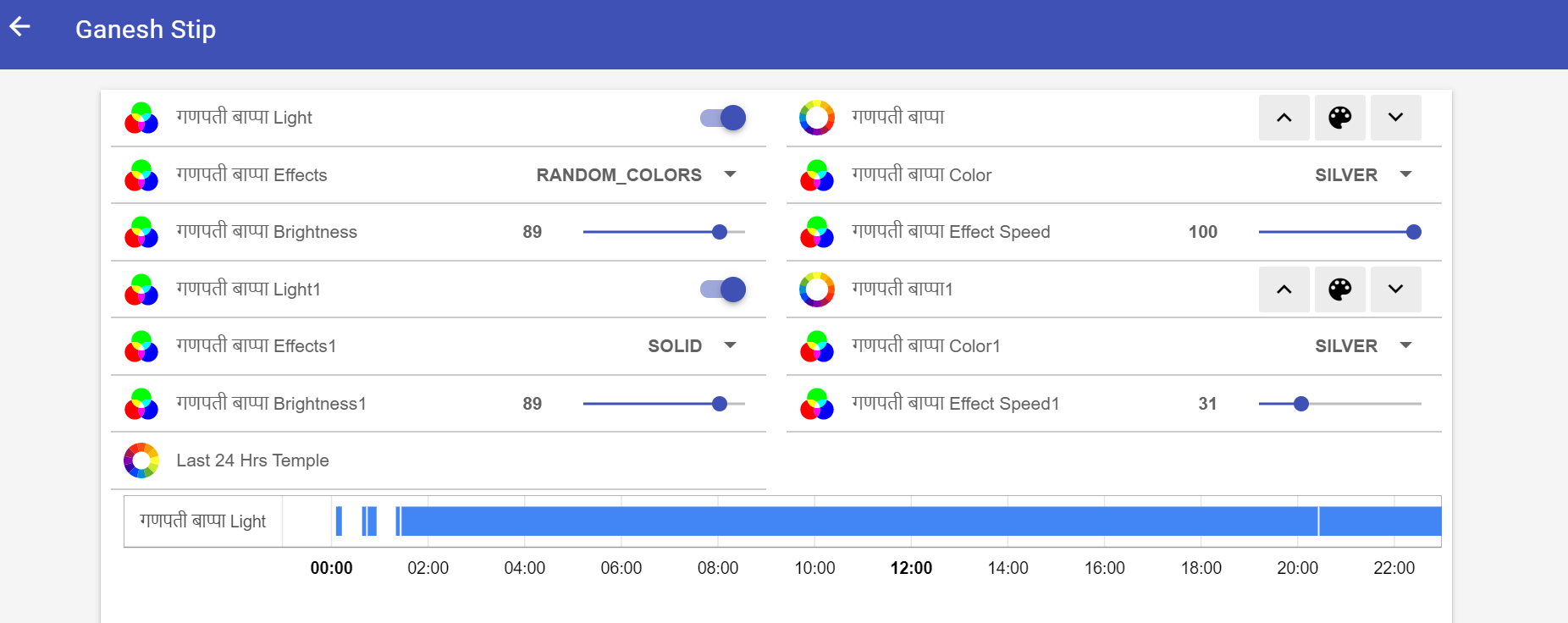
Mobile UI
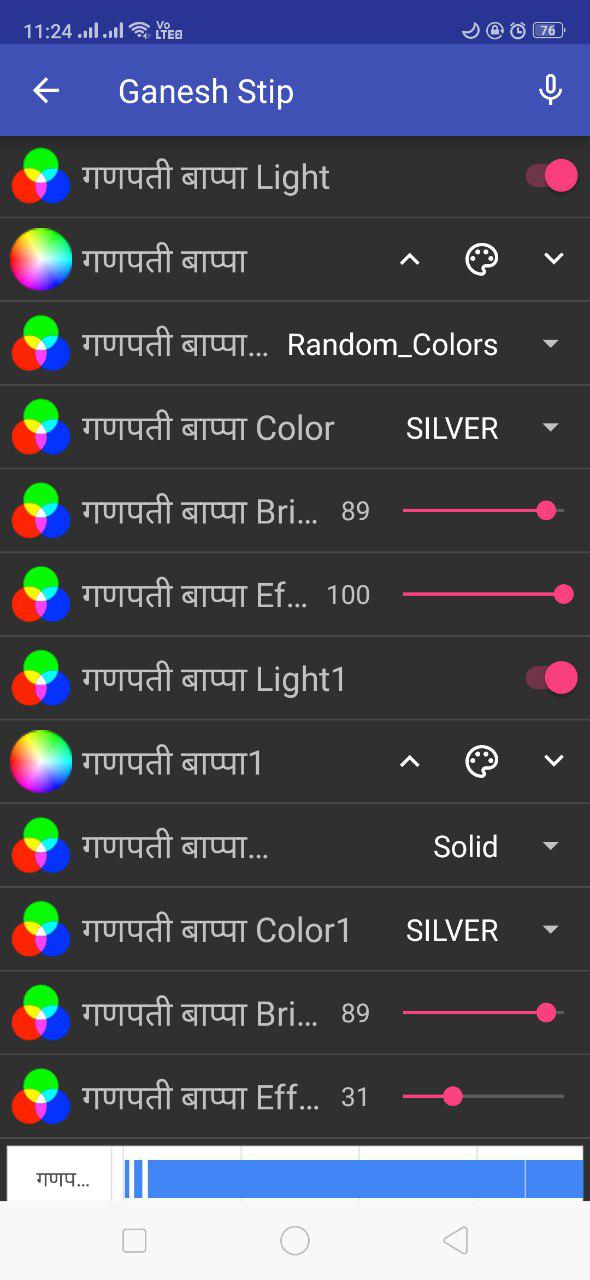
Sitemap Ui In english:
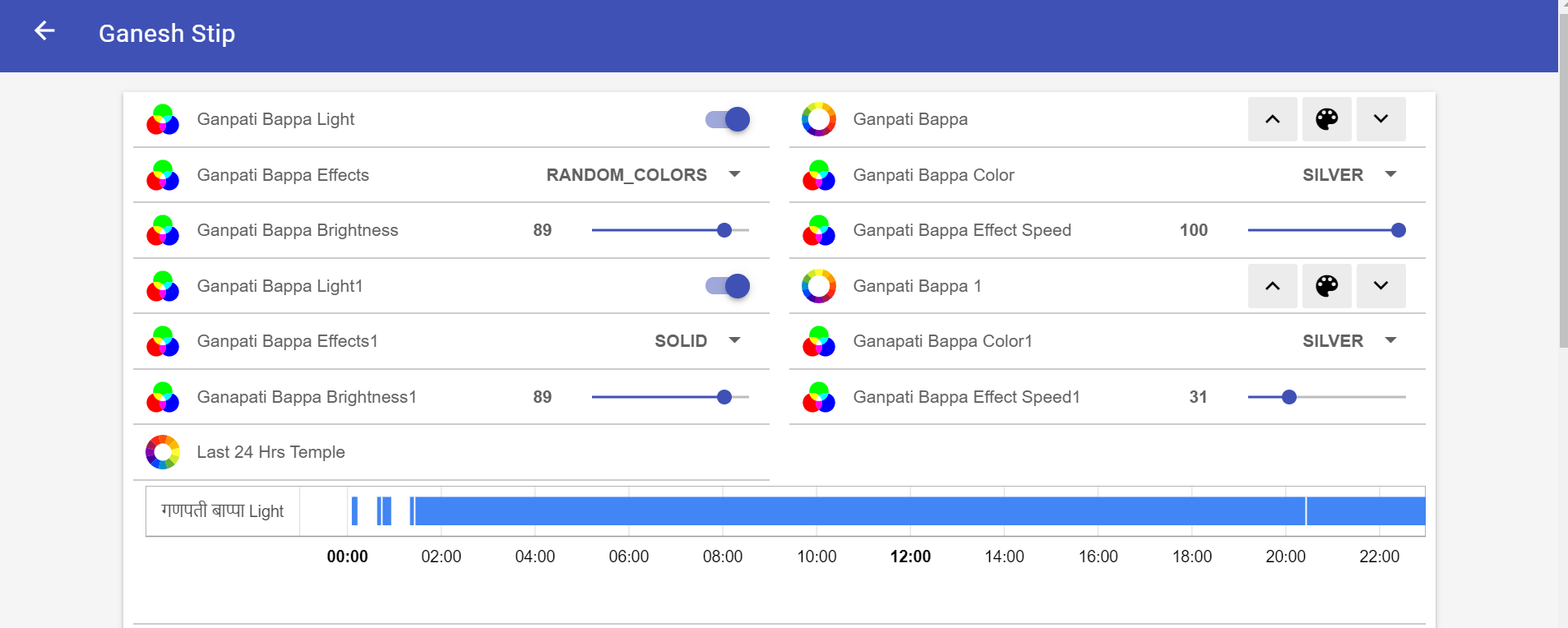
.item file
"
```
Switch ganesh_strip_wled "गणपती बाप्पा Light"
Dimmer ganesh_strip_wled_dim "गणपती बाप्पा Brightness [%d]"
Color ganesh_strip_wled_col "गणपती बाप्पा"
Number ganesh_strip_col "गणपती बाप्पा Color"
Number ganesh_strip_Coloreffects "गणपती बाप्पा Effects"
Dimmer ganesh_strip_effect_speed "गणपती बाप्पा Effect Speed [%.0f]"
Switch ganesh_strip_wled1 "गणपती बाप्पा Light1"
Dimmer ganesh_strip_wled_dim1 "गणपती बाप्पा Brightness1 [%d]"
Color ganesh_strip_wled_col1 "गणपती बाप्पा1"
Number ganesh_strip_col1 "गणपती बाप्पा Color1"
Number ganesh_strip_Coloreffects1 "गणपती बाप्पा Effects1"
Dimmer ganesh_strip_effect_speed1 "गणपती बाप्पा Effect Speed1 [%.0f]"
"
Site Map File
>
Text label="Ganesh Stip" icon=hindutemple {
Switch item=ganesh_strip_wled
Colorpicker item=ganesh_strip_wled_col icon="colorwheel"
Selection item=ganesh_strip_Coloreffects mappings=[1010='Solid',1011='Blink',1012='Breathe',1013='Wipe',1014='Wipe_Random',1015='Random_Colors',1016='Sweep',1017='Dynamic',1018='Colorloop',1019='Rainbow',10110='Scan',10111='Dual_Scan',10112='Fade',10113='Chase',10114='Chase_Rainbow',10115='Running',10116='Saw',10117='Twinkle',10118='Dissolve',10119='Dissolve_Rnd',10120='Sparkle',10121='Dark_Sparkle',10122='Sparkle+',10123='Strobe',10124='Strobe_Rainbow',10125='Mega_Strobe',10126='Blink_Rainbow',10127='Android',10128='Chase',10129='Chase_Random',10130='Chase_Rainbow',10131='Chase_Flash',10132='Chase_Flash_Rnd',10133='Rainbow_Runner',10134='Colorful',10135='Traffic_Light',10136='Sweep_Random',10137='Running_2',10138='Red_&_Blue',10139='Stream',10140='Scanner',10141='Lighthouse',10142='Fireworks',10143='Rain',10144='Merry_Christmas',10145='Fire_Flicker',10146='Gradient',10147='Loading',10148='In_Out',10149='In_In',10150='Out_Out',10151='Out_In',10152='Circus',10153='Halloween',10154='Tri_Chase',10155='Tri_Wipe',10156='Tri_Fade',10157='Lightning',10158='ICU',10159='Multi_Comet',10160='Dual_Scanner',10161='Stream_2',10162='Oscillate',10163='Pride_2015',10164='Juggle',10165='Palette',10166='Fire_2012',10167='Colorwaves',10168='BPM',10169='Fill_Noise',10170='Noise_1',10171='Noise_2',10172='Noise_3',10173='Noise_4',10174='Colortwinkle',10175='Lake',10176='Meteor',10177='Smooth_Meteor',10178='Railway',10179='Ripple']
Selection item=ganesh_strip_col mappings=[ 60='WHITE',61='SILVER',62='GRAY',63='BLACK',64='RED',65='MAROON',66='YELLOW',67='OLIVE',68='LIME',69='GREEN',70='AQUA',71='TEAL',72='BLUE',73='NAVY',74='FUCHSIA',75='PURPLE' ]
Slider item=ganesh_strip_wled_dim
Slider item=ganesh_strip_effect_speed
         Switch item=ganesh_strip_wled1
        Colorpicker item=ganesh_strip_wled_col1 icon="colorwheel"
        Selection item=ganesh_strip_Coloreffects1 mappings=[1010='Solid',1011='Blink',1012='Breathe',1013='Wipe',1014='Wipe_Random',1015='Random_Colors',1016='Sweep',1017='Dynamic',1018='Colorloop',1019='Rainbow',10110='Scan',10111='Dual_Scan',10112='Fade',10113='Chase',10114='Chase_Rainbow',10115='Running',10116='Saw',10117='Twinkle',10118='Dissolve',10119='Dissolve_Rnd',10120='Sparkle',10121='Dark_Sparkle',10122='Sparkle+',10123='Strobe',10124='Strobe_Rainbow',10125='Mega_Strobe',10126='Blink_Rainbow',10127='Android',10128='Chase',10129='Chase_Random',10130='Chase_Rainbow',10131='Chase_Flash',10132='Chase_Flash_Rnd',10133='Rainbow_Runner',10134='Colorful',10135='Traffic_Light',10136='Sweep_Random',10137='Running_2',10138='Red_&_Blue',10139='Stream',10140='Scanner',10141='Lighthouse',10142='Fireworks',10143='Rain',10144='Merry_Christmas',10145='Fire_Flicker',10146='Gradient',10147='Loading',10148='In_Out',10149='In_In',10150='Out_Out',10151='Out_In',10152='Circus',10153='Halloween',10154='Tri_Chase',10155='Tri_Wipe',10156='Tri_Fade',10157='Lightning',10158='ICU',10159='Multi_Comet',10160='Dual_Scanner',10161='Stream_2',10162='Oscillate',10163='Pride_2015',10164='Juggle',10165='Palette',10166='Fire_2012',10167='Colorwaves',10168='BPM',10169='Fill_Noise',10170='Noise_1',10171='Noise_2',10172='Noise_3',10173='Noise_4',10174='Colortwinkle',10175='Lake',10176='Meteor',10177='Smooth_Meteor',10178='Railway',10179='Ripple']
        Selection item=ganesh_strip_col1 mappings=[ 60='WHITE',61='SILVER',62='GRAY',63='BLACK',64='RED',65='MAROON',66='YELLOW',67='OLIVE',68='LIME',69='GREEN',70='AQUA',71='TEAL',72='BLUE',73='NAVY',74='FUCHSIA',75='PURPLE' ]
        Slider item=ganesh_strip_wled_dim1
         Slider item=ganesh_strip_effect_speed1


        Webview url="http://192.168.1.99:8080/static/Visualization/Timeline.html?Item=ganesh_strip_wled&ServiceId=rrd4j&Hours=24" height=3 label="Last 24 Hrs Temple" icon="colorlight"

         Webview url="http://192.168.1.25" height=20  icon="colorlight" //visibility=[temple_light_wled=="ON"] //http://192.168.1.45/
    }
.map file
60:#FFFFFF
61:#C0C0C0
62:#808080
63:#000000
64:#FF0000
65:#800000
66:#FFFF00
67:#808000
68:#00FF00
69:#008000
70:#00FFFF
71:#008080
72:#0000FF
73:#000080
74:#FF00FF
75:#800080
1010:FX=0
1011:FX=1
1012:FX=2
1013:FX=3
1014:FX=4
1015:FX=5
1016:FX=6
1017:FX=7
1018:FX=8
1019:FX=9
10110:FX=10
10111:FX=11
10112:FX=12
10113:FX=13
10114:FX=14
10115:FX=15
10116:FX=16
10117:FX=17
10118:FX=18
10119:FX=19
10120:FX=20
10121:FX=21
10122:FX=22
10123:FX=23
10124:FX=24
10125:FX=25
10126:FX=26
10127:FX=27
10128:FX=28
10129:FX=29
10130:FX=30
10131:FX=31
10132:FX=32
10133:FX=33
10134:FX=34
10135:FX=35
10136:FX=36
10137:FX=37
10138:FX=38
10139:FX=39
10140:FX=40
10141:FX=41
10142:FX=42
10143:FX=43
10144:FX=44
10145:FX=45
10146:FX=46
10147:FX=47
10148:FX=48
10149:FX=49
10150:FX=50
10151:FX=51
10152:FX=52
10153:FX=53
10154:FX=54
10155:FX=55
10156:FX=56
10157:FX=57
10158:FX=58
10159:FX=59
10160:FX=60
10161:FX=61
10162:FX=62
10163:FX=63
10164:FX=64
10165:FX=65
10166:FX=66
10167:FX=67
10168:FX=68
10169:FX=69
10170:FX=70
10171:FX=71
10172:FX=72
10173:FX=73
10174:FX=74
10175:FX=75
10176:FX=76
10177:FX=77
10178:FX=78
10179:FX=79
 sujitrp
on 3 Sep 2019
sujitrp
on 3 Sep 2019
Modified My Openhab configuration with Few additional Item :
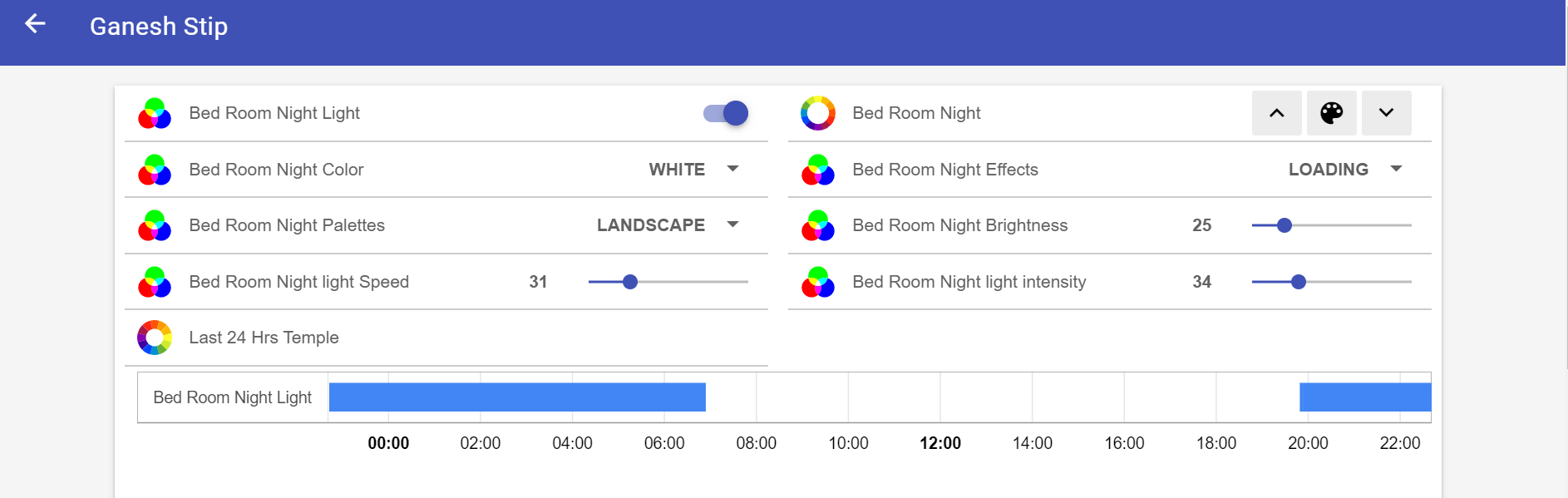
Item :
`Switch ganesh_strip_wled1 "Bed Room Night Light"
Dimmer ganesh_strip_wled_dim1 "Bed Room Night Brightness [%d]"
Color ganesh_strip_wled_col1 "Bed Room Night"
Number ganesh_strip_col1 "Bed Room Night Color"
Number ganesh_strip_Coloreffects1 "Bed Room Night Effects"
Number ganesh_strip_ColorPalettes1 "Bed Room Night Palettes"
Dimmer ganesh_strip_effect_speed1 "Bed Room Night light Speed [%.0f]"
Dimmer ganesh_strip_Effect_intensity1 "Bed Room Night light intensity [%.0f]"
`
Sitemap :
Switch item=ganesh_strip_wled1
            Colorpicker item=ganesh_strip_wled_col1 icon="colorwheel"
            Selection item=ganesh_strip_col1 mappings=[ 60='WHITE',61='SILVER',62='GRAY',63='BLACK',64='RED',65='MAROON',66='YELLOW',67='OLIVE',68='LIME',69='GREEN',70='AQUA',71='TEAL',72='BLUE',73='NAVY',74='FUCHSIA',75='PURPLE' ]
            Selection item=ganesh_strip_Coloreffects1 mappings=[1010='Solid',1011='Blink',1012='Breathe',1013='Wipe',1014='Wipe_Random',1015='Random_Colors',1016='Sweep',1017='Dynamic',1018='Colorloop',1019='Rainbow',10110='Scan',10111='Dual_Scan',10112='Fade',10113='Chase',10114='Chase_Rainbow',10115='Running',10116='Saw',10117='Twinkle',10118='Dissolve',10119='Dissolve_Rnd',10120='Sparkle',10121='Dark_Sparkle',10122='Sparkle+',10123='Strobe',10124='Strobe_Rainbow',10125='Mega_Strobe',10126='Blink_Rainbow',10127='Android',10128='Chase',10129='Chase_Random',10130='Chase_Rainbow',10131='Chase_Flash',10132='Chase_Flash_Rnd',10133='Rainbow_Runner',10134='Colorful',10135='Traffic_Light',10136='Sweep_Random',10137='Running_2',10138='Red_&_Blue',10139='Stream',10140='Scanner',10141='Lighthouse',10142='Fireworks',10143='Rain',10144='Merry_Christmas',10145='Fire_Flicker',10146='Gradient',10147='Loading',10148='In_Out',10149='In_In',10150='Out_Out',10151='Out_In',10152='Circus',10153='Halloween',10154='Tri_Chase',10155='Tri_Wipe',10156='Tri_Fade',10157='Lightning',10158='ICU',10159='Multi_Comet',10160='Dual_Scanner',10161='Stream_2',10162='Oscillate',10163='Pride_2015',10164='Juggle',10165='Palette',10166='Fire_2012',10167='Colorwaves',10168='BPM',10169='Fill_Noise',10170='Noise_1',10171='Noise_2',10172='Noise_3',10173='Noise_4',10174='Colortwinkle',10175='Lake',10176='Meteor',10177='Smooth_Meteor',10178='Railway',10179='Ripple']
            Selection item=ganesh_strip_ColorPalettes1 mappings=[20001='Default',20002='Random Cycle',20003='Primary color',20004='Based on primary',20005='Set colors',20006='Based on set',20007='Party',20008='Cloud',20009='Lava',20010='Ocean',20011='Forest',20012='Rainbow',20013='Rainbow bands',20014='Sunset',20015='Rivendell',20016='Breeze',20017='Red & Blue',20018='Yellowout',20019='Analoguous',20020='Splash',20021='Pastel',20022='Sunset 2',20023='Beech',20024='Vintage',20025='Departure',20026='Landscape',20027='Beach',20028='Sherbet',20029='Hult',20030='Hult 64',20031='Drywet',20032='Jul',20033='Grintage',20034='Rewhi',20035='Tertiary',20036='Fire',20037='Icefire',20038='Cyane',20039='Light Pink',20040='Autumn',20041='Magenta',20042='Magred',20043='Yelmag',20044='Yelblu',20045='Orange & Teal',20046='Tiamat',20047='April Night']
            Slider item=ganesh_strip_wled_dim1
            Slider item=ganesh_strip_effect_speed1
            Slider item=ganesh_strip_Effect_intensity1
Effect Map file:
60:#ffffff
61:#C0C0C0
62:#808080
63:#000000
64:#FF0000
65:#800000
66:#FFFF00
67:#808000
68:#00FF00
69:#008000
70:#00FFFF
71:#008080
72:#0000FF
73:#000080
74:#FF00FF
75:#800080
1010:FX=0
1011:FX=1
1012:FX=2
1013:FX=3
1014:FX=4
1015:FX=5
1016:FX=6
1017:FX=7
1018:FX=8
1019:FX=9
10110:FX=10
10111:FX=11
10112:FX=12
10113:FX=13
10114:FX=14
10115:FX=15
10116:FX=16
10117:FX=17
10118:FX=18
10119:FX=19
10120:FX=20
10121:FX=21
10122:FX=22
10123:FX=23
10124:FX=24
10125:FX=25
10126:FX=26
10127:FX=27
10128:FX=28
10129:FX=29
10130:FX=30
10131:FX=31
10132:FX=32
10133:FX=33
10134:FX=34
10135:FX=35
10136:FX=36
10137:FX=37
10138:FX=38
10139:FX=39
10140:FX=40
10141:FX=41
10142:FX=42
10143:FX=43
10144:FX=44
10145:FX=45
10146:FX=46
10147:FX=47
10148:FX=48
10149:FX=49
10150:FX=50
10151:FX=51
10152:FX=52
10153:FX=53
10154:FX=54
10155:FX=55
10156:FX=56
10157:FX=57
10158:FX=58
10159:FX=59
10160:FX=60
10161:FX=61
10162:FX=62
10163:FX=63
10164:FX=64
10165:FX=65
10166:FX=66
10167:FX=67
10168:FX=68
10169:FX=69
10170:FX=70
10171:FX=71
10172:FX=72
10173:FX=73
10174:FX=74
10175:FX=75
10176:FX=76
10177:FX=77
10178:FX=78
10179:FX=79
20001:FP=0
20002:FP=1
20003:FP=2
20004:FP=3
20005:FP=4
20006:FP=5
20007:FP=6
20008:FP=7
20009:FP=8
20010:FP=9
20011:FP=10
20012:FP=11
20013:FP=12
20014:FP=13
20015:FP=14
20016:FP=15
20017:FP=16
20018:FP=17
20019:FP=18
20020:FP=19
20021:FP=20
20022:FP=21
20023:FP=22
20024:FP=23
20025:FP=24
20026:FP=25
20027:FP=26
20028:FP=27
20029:FP=28
20030:FP=29
20031:FP=30
20032:FP=31
20033:FP=32
20034:FP=33
20035:FP=34
20036:FP=35
20037:FP=36
20038:FP=37
20039:FP=38
20040:FP=39
20041:FP=40
20042:FP=41
20043:FP=42
20044:FP=43
20045:FP=44
20046:FP=45
20047:FP=46
sujitrp
on 11 Sep 2019
Hey Sceptorrh
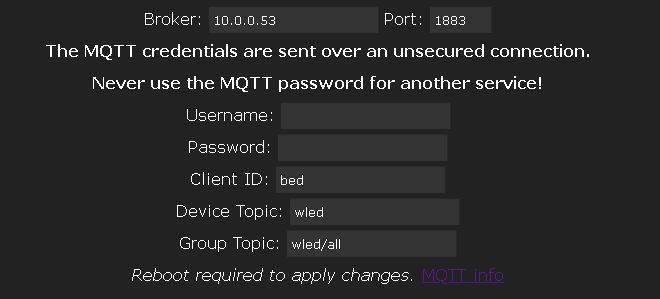
In wled interface ,how is mqtt to be filled out ? can you show yours ?
i have nodered to recive from openhab and publish in mqtt ,but i gues wrong topic and id
becurse nothing happings in wled
 Simonthorsted
on 1 Oct 2019
Simonthorsted
on 1 Oct 2019
@Simonthorsted Hey, I'm still running wled 0.8.4. I currently have this set in the settings.
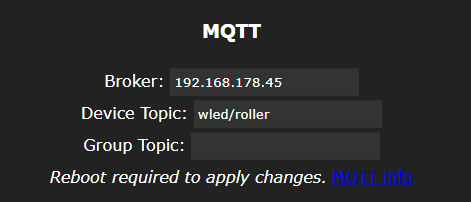
Note that in your settings the Client ID should be different for every device your using. Otherwise it should work just fine.
You can also use: https://mqttfx.jensd.de to test your mqtt broker. If you subscribe to "#" you should see every mqtt message that is send over your network.
I'll also try to update my wled device to the latest version. I'll let you know if I run into any problems myself.
Sceptorrh
on 3 Oct 2019
Allright, works as aspected
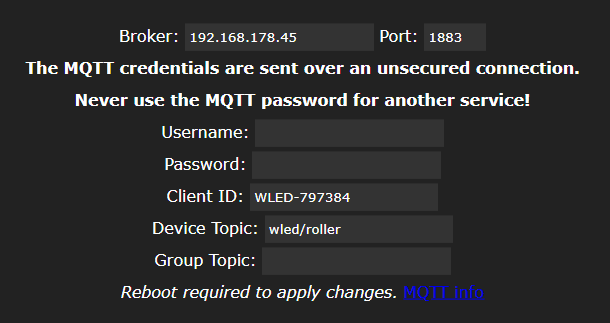
Sceptorrh
on 3 Oct 2019
Just in case:
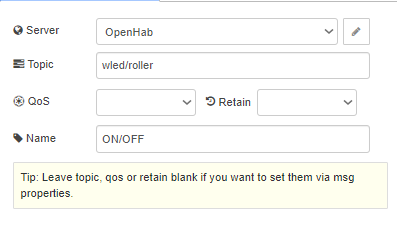
Sceptorrh
on 3 Oct 2019
Could you please post your js transform files @sujitrp?
 nichtmax
on 5 Oct 2019
nichtmax
on 5 Oct 2019
please show so we can do the cool stof whit openhab please : @sujitrp?
wledintensityscale100-255.js
wledspeedscale100-255.js
genscale255-100.js
colour.js
LEDONOFF.map
ps : how did you make the timeline for night lights
Simonthorsted
on 8 Oct 2019
Hi Sorry for Delay please find the project files here
https://github.com/sujitrp/OPenHab-WLED-configuration-
I am not a technical guy so please forgive my nonconventional code files.
@ timelIne I followed this tutorial from Open hab community https://community.openhab.org/t/timeline-for-basic-ui/31803
sujitrp
on 15 Oct 2019
Thank you sujitrp. I'll try your code this week ! Quick question for you : what is temple_light_wled_col that I see in temple_light_wled_col.state.toString ? I don't see temple_light_wled_col anywhere except in the sitemap for the timeline.
 jfauger
on 17 Oct 2019
jfauger
on 17 Oct 2019
Hey! This issue has been open for quite some time without any new comments now. It will be closed automatically in a week if no further activity occurs.
Thank you for using WLED!
![stale[bot] picture](https://avatars3.githubusercontent.com/in/1724?v=4&s=40) stale[bot]
on 29 Mar 2020
stale[bot]
on 29 Mar 2020
Related issues
 jonny190
·
70Comments
jonny190
·
70Comments
 toyotaspeed90
·
31Comments
toyotaspeed90
·
31Comments
 raymiec
·
52Comments
raymiec
·
52Comments
 N1nja98
·
212Comments
Aircoookie
·
33Comments
N1nja98
·
212Comments
Aircoookie
·
33Comments
Most helpful comment
Hi Sorry for Delay please find the project files here
https://github.com/sujitrp/OPenHab-WLED-configuration-
I am not a technical guy so please forgive my nonconventional code files.
@ timelIne I followed this tutorial from Open hab community https://community.openhab.org/t/timeline-for-basic-ui/31803