Hi,
On Windows Vista and higher, the Task Dialog is available that provides many more features than a Message Box. While you can show a Message Box in WinForms and WPF, there is no "official" implementation of the Task Dialog yet in .NET WinForms/WPF.
There was an implementation in the Windows API Code Pack 1.1, but it is no longer available/updated, it did not implement all features (like navigation or modifying common/standard buttons), and I believe it had some memory management issues (like not calling Marshal.DestroyStructure() after calling Marshal.StructureToPtr() in order to free allocated strings for custom/radio buttons) and a few other issues.
At my company, we currently use the Task Dialog in a (commercial) WPF application to show a marquee progress bar while an operation (like database backup) is running, and then navigate it to one showing a green header to indicate the operation is finished.
Visual Studio is also using a Task Dialog:
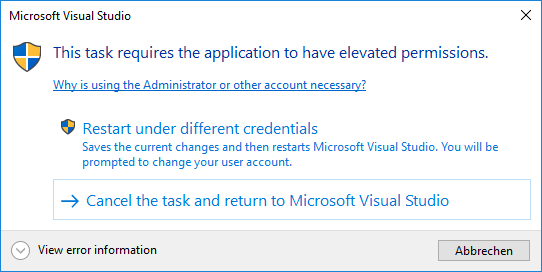
Also, the Windows Design Guidelines (Desktop Apps) for Messages and Dialog Boxes show features of the task dialog.
Do you think a Task Dialog could also be added directly to WinForms/WPF? Thank you!
Edit:
Rationale and Usage
The Windows Task Dialog (which is available since Windows Vista) has a lot of configuration options comparing to a regular Message Box, can show additional controls like a progress bar, and supports event handling. However, it has not yet been integrated officially into WinForms/WPF, so if you wanted to use it, you had to implement the native APIs yourself, or use a 3rd party library.
Implementing the Task Dialog directly in WinForms allows users to directly use the Task Dialog in any new WinForms/WPF .NET Core application, just like a MessageBox. You can then either use the simple static Show() method (similar to a MessageBox), or you can create an instance of the TaskDialog, configure its TaskDialogPage and then show it.
Features of the proposed Task Dialog:
- Supports all of the native Task Dialog elements (like custom buttons/command links, progress bar, radio buttons, checkbox, expanded area, footer)
- Some dialog elements can be updated while the dialog is displayed, and the dialog can be closed from code
- Additionally to standard icons, supports shield icons that show a green, yellow, red, gray or blue bar
- Can navigate to a new page (by reconstructing the dialog from current properties) by calling
TaskDialogPage.Navigate(TaskDialogPage)while the dialog is displayed - Can be shown modal or non-modal (when showing modal, can be centered to the parent)
- Exposes its window handle (
hWnd) through theHandleproperty so that the dialog window can be further manipulated (or used as owner for another window)
See also the Task Dialog Demo App for examples.
Show a simple Task Dialog
```c#
TaskDialogButton resultButton = TaskDialog.ShowDialog(new TaskDialogPage()
{
Text = "Hello World!",
Heading = "Hello Task Dialog! 👍",
Caption = "Dialog Title",
Buttons = {
TaskDialogButton.Yes,
TaskDialogButton.Cancel
},
Icon = TaskDialogIcon.ShieldSuccessGreenBar
});
if (resultButton == TaskDialogButton.Yes)
{
    // Do something...
}

### Dialog similar to the Visual Studio dialog
```c#
TaskDialogCommandLinkButton buttonRestart = new TaskDialogCommandLinkButton()
{
Text = "&Restart under different credentials",
DescriptionText = "This text will be shown in the second line.",
ShowShieldIcon = true
};
TaskDialogCommandLinkButton buttonCancelTask = new TaskDialogCommandLinkButton()
{
Text = "&Cancel the Task and return"
};
var page = new TaskDialogPage()
{
Icon = TaskDialogIcon.Shield,
Heading = "This task requires the application to have elevated permissions.",
// TODO - Hyperlinks will be possible in a future version
Text = "Why is using the Administrator or other account necessary?",
// TODO - will be possible in a future version
//EnableHyperlinks = true,
Buttons =
{
TaskDialogButton.Cancel,
buttonRestart,
buttonCancelTask
},
DefaultButton = buttonCancelTask,
// Show a expander.
Expander = new TaskDialogExpander()
{
Text = "Some expanded Text",
CollapsedButtonText = "View error information",
ExpandedButtonText = "Hide error information",
Position = TaskDialogExpanderPosition.AfterFootnote
}
};
// Show the dialog and check the result.
TaskDialogButton result = TaskDialog.ShowDialog(page);
if (result == buttonRestart)
{
Console.WriteLine("Restarting...");
}

Show a multi-page dialog that shows current progress, then navigates to a result
See also: Multi-page dialog boxes
```c#
// Disable the "Yes" button and only enable it when the check box is checked.
// Also, don't close the dialog when this button is clicked.
var initialButtonYes = TaskDialogButton.Yes;
initialButtonYes.Enabled = false;
initialButtonYes.AllowCloseDialog = false;
var initialPage = new TaskDialogPage()
{
    Caption = "My Application",
    Heading = "Clean up database?",
    Text = "Do you really want to do a clean-up?\nThis action is irreversible!",
    Icon = TaskDialogIcon.ShieldWarningYellowBar,
    AllowCancel = true,

    Verification = new TaskDialogVerificationCheckBox()
    {
        Text = "I know what I'm doing"
    },

    Buttons =
    {
        TaskDialogButton.No,
        initialButtonYes
    },
    DefaultButton = TaskDialogButton.No
};

// For the "In Progress" page, don't allow the dialog to close, by adding
// a disabled button (if no button was specified, the task dialog would
// get an (enabled) 'OK' button).
var inProgressCloseButton = TaskDialogButton.Close;
inProgressCloseButton.Enabled = false;

var inProgressPage = new TaskDialogPage()
{
    Caption = "My Application",
    Heading = "Operation in progress...",
    Text = "Please wait while the operation is in progress.",
    Icon = TaskDialogIcon.Information,

    ProgressBar = new TaskDialogProgressBar()
    {
        State = TaskDialogProgressBarState.Marquee
    },

    Expander = new TaskDialogExpander()
    {
        Text = "Initializing...",
        Position = TaskDialogExpanderPosition.AfterFootnote
    },

    Buttons =
    {
        inProgressCloseButton
    }
};

var finishedPage = new TaskDialogPage()
{
    Caption = "My Application",
    Heading = "Success!",
    Text = "The operation finished.",
    Icon = TaskDialogIcon.ShieldSuccessGreenBar,
    Buttons =
    {
        TaskDialogButton.Close
    }
};

TaskDialogButton showResultsButton = new TaskDialogCommandLinkButton("Show &Results");
finishedPage.Buttons.Add(showResultsButton);

// Enable the "Yes" button only when the checkbox is checked.
TaskDialogVerificationCheckBox checkBox = initialPage.Verification;
checkBox.CheckedChanged += (sender, e) =>
{
    initialButtonYes.Enabled = checkBox.Checked;
};

// When the user clicks "Yes", navigate to the second page.
initialButtonYes.Click += (sender, e) =>
{
    // Navigate to the "In Progress" page that displays the
    // current progress of the background work.
    initialPage.Navigate(inProgressPage);

    // NOTE: When you implement a "In Progress" page that represents
    // background work that is done e.g. by a separate thread/task,
    // which eventually calls Control.Invoke()/BeginInvoke() when
    // its work is finished in order to navigate or update the dialog,
    // then DO NOT start that work here already (directly after
    // setting the Page property). Instead, start the work in the
    // TaskDialogPage.Created event of the new page.
    //
    // This is because if you started it here, then when that other
    // thread/task finishes and calls BeginInvoke() to call a method in
    // the GUI thread to update or navigate the dialog, there is a chance
    // that the callback might be called before the dialog completed
    // navigation (*) (as indicated by the Created event of the
    // new page), and the dialog might not be updatable in that case.
    // (The dialog can be closed or navigated again, but you cannot
    // change e.g. text properties of the page).
    //
    // If that's not possible for some reason, you need to ensure
    // that you delay the call to update the dialog until the Created
    // event of the next page has occured.
    //
    //
    // (*) Background info: Although the WinForms implementation of
    // Control.Invoke()/BeginInvoke() posts a new message in the
    // control's owning thread's message queue every time it is
    // called (so that the callback can be called later by the
    // message loop), when processing the posted message in the
    // control's window procedure, it calls ALL stored callbacks
    // instead of only the next one.
    //
    // This means that even if you start the work after setting
    // the Page property (which means BeginInvoke() can only be
    // called AFTER starting navigation), the callback specified
    // by BeginInvoke might still be called BEFORE the task dialog
    // can process its posted navigation message.
};

// Simulate work by starting an async operation from which we are updating the
// progress bar and the expander with the current status.
inProgressPage.Created += async (s, e) =>
{
    // Run the background operation and iterate over the streamed values to update
    // the progress. Because we call the async method from the GUI thread,
    // it will use this thread's synchronization context to run the continuations,
    // so we don't need to use Control.[Begin]Invoke() to schedule the callbacks.
    var progressBar = inProgressPage.ProgressBar;

    await foreach (int progressValue in StreamBackgroundOperationProgressAsync())
    {
        // When we display the first progress, switch the marquee progress bar
        // to a regular one.
        if (progressBar.State == TaskDialogProgressBarState.Marquee)
            progressBar.State = TaskDialogProgressBarState.Normal;

        progressBar.Value = progressValue;
        inProgressPage.Expander.Text = $"Progress: {progressValue} %";
    }

    // Work is finished, so navigate to the third page.
    inProgressPage.Navigate(finishedPage);
};

// Show the dialog (modeless).
TaskDialogButton result = TaskDialog.ShowDialog(initialPage);
if (result == showResultsButton)
{
    Console.WriteLine("Showing Results!");
}


static async IAsyncEnumerable<int> StreamBackgroundOperationProgressAsync()
{
    // Note: The code here will run in the GUI thread - use
    // "await Task.Run(...)" to schedule CPU-intensive operations in a
    // worker thread.

    // Wait a bit before reporting the first progress.
    await Task.Delay(2800);

    for (int i = 0; i <= 100; i += 4)
    {
        // Report the progress.
        yield return i;

        // Wait a bit to simulate work.
        await Task.Delay(200);
    }
}

### Other examples from existing applications
#### "Save document" dialog from Notepad/Paint/WordPad
```c#
TaskDialogButton btnCancel = TaskDialogButton.Cancel;
TaskDialogButton btnSave = new TaskDialogButton("&Save");
TaskDialogButton btnDontSave = new TaskDialogButton("Do&n't save");
var page = new TaskDialogPage()
{
Caption = "My Application",
Heading = "Do you want to save changes to Untitled?",
Buttons =
{
btnCancel,
btnSave,
btnDontSave
}
};
// Show a modal dialog, then check the result.
TaskDialogButton result = TaskDialog.ShowDialog(this, page);
if (result == btnSave)
Console.WriteLine("Saving");
else if (result == btnDontSave)
Console.WriteLine("Not saving");
else
Console.WriteLine("Canceling");

Windows 7 Minesweeper Difficulty Selection
```c#
var page = new TaskDialogPage()
{
Caption = "Minesweeper",
Heading = "What level of difficulty do you want to play?",
AllowCancel = true,
    Footnote = new TaskDialogFootnote()
    {
        Text = "Note: You can change the difficulty level later " +
            "by clicking Options on the Game menu.",
    },

    Buttons =
    {
        new TaskDialogCommandLinkButton("&Beginner", "10 mines, 9 x 9 tile grid")
        {
            Tag = 10
        },
        new TaskDialogCommandLinkButton("&Intermediate", "40 mines, 16 x 16 tile grid")
        {
            Tag = 40
        },
        new TaskDialogCommandLinkButton("&Advanced", "99 mines, 16 x 30 tile grid")
        {
            Tag = 99
        }
    }
};

TaskDialogButton result = TaskDialog.ShowDialog(this, page);

if (result.Tag is int resultingMines)
    Console.WriteLine($"Playing with {resultingMines} mines...");
else
    Console.WriteLine("User canceled.");

#### Windows Security dialog when trying to access network files
```c#
var page = new TaskDialogPage()
{
Caption = "My App Security",
Heading = "Opening these files might be harmful to your computer",
Text = "Your Internet security settings blocked one or more files from " +
"being opened. Do you want to open these files anyway?",
Icon = TaskDialogIcon.ShieldWarningYellowBar,
// TODO - will be possible in a future version
//EnableHyperlinks = true,
Expander = new TaskDialogExpander("My-File-Sample.exe"),
Footnote = new TaskDialogFootnote()
{
// TODO - Hyperlinks will be possible in a future version
Text = "How do I decide whether to open these files?",
},
Buttons =
{
TaskDialogButton.OK,
TaskDialogButton.Cancel
},
DefaultButton = TaskDialogButton.Cancel
};
TaskDialogButton result = TaskDialog.ShowDialog(this, page);
if (result == TaskDialogButton.OK)
{
Console.WriteLine("OK selected");
}

Auto-closing Dialog (closes after 5 seconds)
```c#
const string textFormat = "Reconnecting in {0} seconds...";
int remainingTenthSeconds = 50;
var reconnectButton = new TaskDialogButton("&Reconnect now");
var cancelButton = TaskDialogButton.Cancel;

var page = new TaskDialogPage()
{
    Heading = "Connection lost; reconnecting...",
    Text = string.Format(textFormat, (remainingTenthSeconds + 9) / 10),
    ProgressBar = new TaskDialogProgressBar()
    {
        State = TaskDialogProgressBarState.Paused
    },
    Buttons =
    {
        reconnectButton,
        cancelButton
    }
};

// Create a WinForms timer that raises the Tick event every tenth second.
using var timer = new System.Windows.Forms.Timer()
{
    Enabled = true,
    Interval = 100
};

timer.Tick += (s, e) =>
{
    remainingTenthSeconds--;
    if (remainingTenthSeconds > 0)
    {
        // Update the remaining time and progress bar.
        page.Text = string.Format(textFormat, (remainingTenthSeconds + 9) / 10);
        page.ProgressBar.Value = 100 - remainingTenthSeconds * 2;
    }
    else
    {
        // Stop the timer and click the "Reconnect" button - this will
        // close the dialog.
        timer.Enabled = false;
        reconnectButton.PerformClick();
    }
};

TaskDialogButton result = TaskDialog.ShowDialog(this, page);
if (result == reconnectButton)
    Console.WriteLine("Reconnecting.");
else
    Console.WriteLine("Not reconnecting.");

## Proposed API
**TODO:** Which namespace to use for the types? In the PR I used `System.Windows.Forms` for now.
```c#
public class TaskDialog : IWin32Window
{
// Returns the window handle while the dialog is shown, otherwise returns IntPtr.Zero.
public IntPtr Handle { get; }
// Note: The ShowDialog() methods do not return until the
// dialog is closed (similar to MessageBox.Show()), regardless of whether the
// dialog is shown modal or non-modal.
public static TaskDialogButton ShowDialog(TaskDialogPage page, TaskDialogStartupLocation startupLocation = TaskDialogStartupLocation.CenterOwner);
public static TaskDialogButton ShowDialog(IWin32Window owner, TaskDialogPage page, TaskDialogStartupLocation startupLocation = TaskDialogStartupLocation.CenterOwner);
public static TaskDialogButton ShowDialog(IntPtr hwndOwner, TaskDialogPage page, TaskDialogStartupLocation startupLocation = TaskDialogStartupLocation.CenterOwner);
// Close() will simulate a click on the "Cancel" button (but you don't
// have to add a "Cancel" button for this).
public void Close();
}
```c#
public class TaskDialogPage
{
public TaskDialogPage();
public TaskDialog? BoundDialog { get; }

// Properties "Caption", "MainInstruction", "Text", "Icon" can be set
// set while the dialog is shown, to update the dialog.
public string? Caption { get; set; }
public string? Heading { get; set; }
public string? Text { get; set; }

// Icon can either be a standard icon or a icon handle.
// (In the future, we could allow to show a resource icon.)
// Note that while the dialog is shown, you cannot switch between a
// handle icon type and a non-handle icon type.
// The same applies to the footer icon.
public TaskDialogIcon? Icon { get; set; }

public bool AllowCancel { get; set; }
public bool AllowMinimize { get; set; }
public bool RightToLeftLayout { get; set; }
public bool SizeToContent { get; set; }

public TaskDialogButtonCollection Buttons { get; set; }
public TaskDialogRadioButtonCollection RadioButtons { get; set; }
public TaskDialogButton? DefaultButton { get; set; }

// Note: When creating a TaskDialogPage instance, these four properties
// contain default/empty control instances (for better Designer support) that
// do not show up in the dialog unless you modify their properties
// (because their initial "Text" is null and initial ProgressBarState is "None" -
// however when you create a new ProgressBar instance, its default State
// is "Normal"), but you can also set them to null.
public TaskDialogVerificationCheckBox? Verification { get; set; }
public TaskDialogExpander? Expander { get; set; }
public TaskDialogFootnote? Footnote { get; set; }
public TaskDialogProgressBar? ProgressBar { get; set; }

// See section "Event Cycle" for a diagram illustrating the events.

// Raised after this TaskDialogPage is bound to a TaskDialog (and therefore
// the controls have been created): after the dialog was created (directly after event
// TaskDialog.Opened/TDN_CREATED) or navigated (in the TDN_NAVIGATED handler).
public event EventHandler? Created;
// Raised when this TaskDialogPage is about to be unbound from a TaskDialog
// (and therefore the controls are about to be destroyed): when the dialog is
// about to be destroyed (directly before event TaskDialog.Closed) or about
// to navigate.
public event EventHandler? Destroyed;

// Raised when the user presses F1 or clicks the "Help" standard button
public event EventHandler? HelpRequest;

protected internal void OnCreated(EventArgs e);
protected internal void OnDestroyed(EventArgs e);
protected internal void OnHelpRequest(EventArgs e);
}
```c#
public class TaskDialogIcon : IDisposable
{
    // "Standard" icons
    public static readonly TaskDialogIcon None;
    public static readonly TaskDialogIcon Information;
    public static readonly TaskDialogIcon Warning;
    public static readonly TaskDialogIcon Error;
    public static readonly TaskDialogIcon Shield;
    public static readonly TaskDialogIcon ShieldBlueBar;
    public static readonly TaskDialogIcon ShieldGrayBar;
    public static readonly TaskDialogIcon ShieldWarningYellowBar;
    public static readonly TaskDialogIcon ShieldErrorRedBar;
    public static readonly TaskDialogIcon ShieldSuccessGreenBar;

    public TaskDialogIcon(Bitmap image);
    public TaskDialogIcon(Icon icon);
    public TaskDialogIcon(IntPtr iconHandle);

    // Note: This will throw (InvalidOperationException) if this is an
    // instance representing a standard icon.
    public IntPtr IconHandle { get; }
}
```c#
public abstract class TaskDialogControl
{
public TaskDialogPage? BoundPage { get; }
public object? Tag { get; set; }
}
```c#
public class TaskDialogButton : TaskDialogControl
{
    public TaskDialogButton();
    public TaskDialogButton(string? text, bool enabled = true, bool allowCloseDialog = true);

    public static TaskDialogButton OK { get; }
    public static TaskDialogButton Cancel { get; }
    public static TaskDialogButton Abort { get; }
    public static TaskDialogButton Retry { get; }
    public static TaskDialogButton Ignore { get; }
    public static TaskDialogButton Yes { get; }
    public static TaskDialogButton No { get; }
    public static TaskDialogButton Close { get; }
    // Note: Clicking the "Help" button will not close the dialog, but will
    // raise the TaskDialogPage.Help event.
    public static TaskDialogButton Help { get; }
    public static TaskDialogButton TryAgain { get; }
    public static TaskDialogButton Continue { get; }

    // Properties "Enabled" and "ShowShieldIcon" can be set while
    // the dialog is shown.
    public string? Text { get; set; }
    public bool AllowCloseDialog { get; set; }
    public bool Enabled { get; set; }
    public bool ShowShieldIcon { get; set; }
    // Setting "Visible" to false means the button will not be shown in the task dialog
    // (the property cannot be set while the dialog is shown). This allows you
    // to intercept button click events, e.g. "Cancel" when "AllowCancel" is true
    // and the user presses ESC, without having to actually show a "Cancel" button.
    public bool Visible { get; set; }

    // Raised when this button is clicked while the dialog is shown (either because the
    // user clicked it, or by calling PerformClick() or TaskDialog.Close()).
    public event EventHandler? Click;

    public override bool Equals(object? obj);
    public override int GetHashCode();
    public void PerformClick();
    public override string ToString();

    public static bool operator ==(TaskDialogButton? b1, TaskDialogButton? b2);
    public static bool operator !=(TaskDialogButton? b1, TaskDialogButton? b2);
}
```c#
public sealed class TaskDialogCommandLinkButton : TaskDialogButton
{
public TaskDialogCommandLinkButton();
public TaskDialogCommandLinkButton(string? text, string? descriptionText = null, bool enabled = true, bool allowCloseDialog = true);
public string? DescriptionText { get; set; }
}
```c#
public sealed class TaskDialogRadioButton : TaskDialogControl
{
    public TaskDialogRadioButton();
    public TaskDialogRadioButton(string? text);

    public string? Text { get; set; }
    // Properties "Enabled" and "Checked" can be set while the dialog is shown
    // (but "Checked" can then only be set to "true").
    public bool Checked { get; set; }
    public bool Enabled { get; set; }

    // Raised when the "Checked" property changes while the dialog is shown (because
    // the user clicked one of the radio buttons, or due to setting the "Checked"
    // property of one of the radio buttons to "true").
    public event EventHandler? CheckedChanged;

    public override string ToString();
}
```c#
public sealed class TaskDialogVerificationCheckBox : TaskDialogControl
{
public TaskDialogVerificationCheckBox();
public TaskDialogVerificationCheckBox(string? text, bool isChecked = false);
public string? Text { get; set; }
// "Checked" can be set while the dialog is shown.
public bool Checked { get; set; }

// Raised when the "Checked" property changes while the dialog is shown (because
// the user clicked it or due to setting the "Checked" property).
public event EventHandler? CheckedChanged;

public override string ToString();

public static implicit operator TaskDialogVerificationCheckBox(string verificationText);
}
```c#
public sealed class TaskDialogExpander : TaskDialogControl
{
    public TaskDialogExpander();
    public TaskDialogExpander(string? text);

     // "Text" can be set while the dialog is shown.
    public string? Text { get; set; }
    public string? ExpandedButtonText { get; set; }
    public string? CollapsedButtonText { get; set; }
    // Note: "Expanded" can NOT be set while the dialog is shown.
    public bool Expanded { get; set; }
    public TaskDialogExpanderPosition Position { get; set; }

    // Raised when the "Expanded" property changes while the dialog is shown (because
    // the user clicked the expando button).
    public event EventHandler? ExpandedChanged;

    public override string ToString();
}
```c#
public sealed class TaskDialogFootnote : TaskDialogControl
{
public TaskDialogFootnote();
public TaskDialogFootnote(string? text);
// Properties "Text",  "Icon" can be set while
// the dialog is shown (see comments for TaskDialogPage.Icon).
public string? Text { get; set; }
public TaskDialogIcon? Icon { get; set; }

public override string ToString();

public static implicit operator TaskDialogFootnote(string footnoteText);
}
```c#
public sealed class TaskDialogProgressBar : TaskDialogControl
{
    public TaskDialogProgressBar();
    public TaskDialogProgressBar(TaskDialogProgressBarState state);

    // Properties "State", "Minimum", "Maximum", "Value", "MarqueeSpeed" can
    // be set while the dialog is shown.
    public TaskDialogProgressBarState State { get; set; } // "Style"?
    public int Minimum { get; set; }
    public int Maximum { get; set; }
    public int Value { get; set; }
    public int MarqueeSpeed { get; set; }
}
```c#
// Note: The button order in this collection is not necessarily the same as the actual
// order of buttons displayed in the dialog. See:
// https://github.com/kpreisser/winforms/issues/5#issuecomment-584318609
public class TaskDialogButtonCollection : Collection
{
public TaskDialogButtonCollection();
public TaskDialogButton Add(string? text, bool enabled = true, bool allowCloseDialog = true);
protected override void ClearItems();
protected override void InsertItem(int index, TaskDialogButton item);
protected override void RemoveItem(int index);
protected override void SetItem(int index, TaskDialogButton item);
}
```c#
public class TaskDialogRadioButtonCollection : System.Collections.ObjectModel.Collection<TaskDialogRadioButton>
{
    public TaskDialogRadioButtonCollection();

    public TaskDialogRadioButton Add(string? text);

    protected override void ClearItems();
    protected override void InsertItem(int index, TaskDialogRadioButton item);
    protected override void RemoveItem(int index);
    protected override void SetItem(int index, TaskDialogRadioButton item);
}
```c#
public enum TaskDialogStartupLocation
{
CenterScreen = 0,
CenterOwner = 1
}
```c#
// Rename to "TaskDialogProgressBarStyle"?
public enum TaskDialogProgressBarState
{
    Normal = 0,
    Paused = 1,
    Error = 2,
    Marquee = 3,
    MarqueePaused = 4,
    // "None" is used for the default ProgressBar instance in the TaskDialogPage so
    // that you need to set the State to a different value (or create a new ProgressBar
    // instance) to actually show a progress bar in the dialog.
    None = 5
}
```c#
public enum TaskDialogExpanderPosition
{
AfterText = 0,
AfterFootnote = 1
}
### Event Cycle

The events in the proposed API currently have the folowing cycle at runtime (the diagram illustrates navigating the dialog in the `TaskDialogButton.Click` event):
Caller Events
TaskDialog.ShowDialog();
↓
(Calls TaskDialogIndirect())
────────────>
↓ (Window handle available now)
Callback(TDN_CREATED) ─────────> TaskDialogPage[1].Created
↓ (Window becomes visible)
↓
(...)
↓
Callback(TDN_BUTTON_CLICKED) ──> TaskDialogButton.Click
↓
TaskDialogPage.Navigate() <───────
↓
─────────────────> TaskDialogPage[1].Destroyed
↓
<──────────
↓
Callback(TDN_NAVIGATED) ───────> TaskDialogPage[2].Created
↓
(...)
↓
Callback(TDN_BUTTON_CLICKED) ──> TaskDialogButton.Click
↓ (Window closes; Dialog no longer navigable as it set a result button)
↓
Callback(TDN_DESTROYED) ───────> TaskDialogPage[2].Destroyed
↓ (Window handle no longer available)
<────────────
(TaskDialogIndirect() returns)
↓
(TaskDialog.ShowDialog() returns)
```
Implementation
The proposed API is implemented with PR #1133.
API Updates
Removed propertyTaskDialogContents.DoNotSetForegroundas it doesn't seem to have an effect- Removed base classes
TaskDialogControlCollectionandTaskDialogButtonCollection TaskDialogCustomButtonCollectionandTaskDialogRadioButtonCollectioninherit fromCollectioninstead ofKeyedCollection- Added an implicit cast operator from
TaskDialogButtonstoTaskDialogCommonButtonCollection - Removed property
ResultVerificationFlagChangedfromTaskDialog - Renamed property
ExpandedByDefaulttoExpanded(TaskDialogExpander) (so its value will be updated when the user clicks the expando button) - Removed non-predefined icons (that were used from
imageres.dll) - Class
TaskDialogextendsSystem.ComponentsModel.Component(and is disposable) - Added
Tagproperty toTaskDialogControl - Class
TaskDialogCommonButtonnow has a default constructor (like other control classes) - Renamed properties/events (e.g.
MainInstruction->Instruction,Content->Text,ButtonClicked->Click) - Properties and events of
TaskDialogRadioButtonandTaskDialogVerificationCheckboxhas been aligned with WinForms concepts (propertyChecked, eventCheckedChanged). - Renamed class
TaskDialogVerificationCheckboxtoTaskDialogCheckBox(along with properties) - Created struct
TaskDialogProgressBarRangeto be used for theTaskDialogProgressBar.Rangeproperty instead of(int min, int max)for better designer support - Restored property
TaskDialogContents.DoNotSetForegroundas it is actually working. - Removed
TaskDialogBooleanStatusEventArgs. - Remaned
TaskDialogProgressBarStateenum valueMarqueeDisabledtoMarqueePaused - Made class
TaskDialogControlabstract - Renamend enum value
TaskDialogIcon.StoptoError - Removed the
TaskDialogProgressBar.Rangeproperty (along with theTaskDialogProgressBarRangestruct) and instead added propertiesMinimumandMaximumdirectly on theTaskDialogProgressBarand also renamed propertyPositiontoValue, to simplify the API and align with the WinForms ProgressBar - Removed the WPF types
- Extracted the footer-specific properties on
TaskDialogContents(FooterText,FooterIcon,FooterIconHandle) into their ownTaskDialogFooterclass. The reasoning for this is that a separate dialog area is added for the footer when it is used (as shown in the below image), similar to the expander (and it reduces the number of properties inTaskDialogContents).
Also, when you intially don't create a footer when showing the task dialog, you cannot later add one by updating theFooterTextproperty, similar to theTextproperty of theExpander(which is different from the other text properties likeTaskDialogContents.TextandInstructionthat can be added later).
A separateTaskDialogFooterclass that inherits fromTaskDialogControlcan thus share the behavior withtaskDialogExpanderto throw anInvalidOperationExceptionwhen trying to update itsTextproperty but the control wasn't created because it was initiallynull(orstring.Empty).
- Renamed events
TaskDialog.ClosingtoClosedandTaskDialogContents.DestroyingtoDestroyed, and added a newTaskDialog.Closingevent that is called directly after aTaskDialogButton.Clickevent if the button would close the dialog, and it allows to cancel the close (similar toForm.FormClosingevent in WinForms) - see this comment (Option B). - Renamed property
TaskDialogExpander.ExpandoButtonClickedtoExpandedChanged - Renamed class
TaskDialogContentstoTaskDialogPageand propertyTaskDialog.CurrentContentstoTaskDialog.Page. This is because the documentation also talks about "navigating to a new page" - for example see Multi-page dialog boxes. - Removed the
TimerTickevent onTaskDialogPage:
This event represents theTDN_TIMERnotification that is called every 200 ms if theTDF_CALLBACK_TIMERflag was set in the task dialog config. The previous implementation specified the flag if the event handler has been set (like the implementation in the Windows API Code Pack did), but this means you could not add an event handler to theTimerTickevent after the dialog is displayed/navigated. Also, the interval of200is fixed (and a user might get the impression that the dialog can only be updated every 200 ms, which is not the case).
Instead, the user can use one of the already existing UI timer implementations likeSystem.Windows.Forms.Timer. Both the Task Dialog timer and the WinForms Timer use a Windows timer (WM_TIMERmessages), so using the WinForms timer should have the same behavior as the TaskDialog timer but with more flexibility. - Moved property
StartupLocationfromTaskDialogPagetoTaskDialogbecause it only has an effect when showing the dialog (but not when navigating it) and therefore isn't related to the page (which represents the contents of the dialog). Added eventsEdit: Removed these again because of an unresolved issue when closing the dialog.TaskDialog.ActivatedandTaskDialog.Deactivated.- Added event
TaskDialog.Shown(similar toForm.Shown). - Renamed class
TaskDialogCommonButtontoTaskDialogStandardButton(along with collections and property names). - Moved property
TaskDialogPage.DoNotSetForegroundtoTaskDialogbecause it only has an effect when showing the dialog, but not when navigating it. - Unified mutually exclusive properties
Icon+IconHandleonTaskDialogPageandTaskDialogFooterinto a singleIconproperty use subclasses to differentiate between icon types (see https://github.com/dotnet/winforms/issues/146#issuecomment-467032370).
This should avoid confusion about having two mutually exclusive properties (and it allows to initially not showing an icon but then updating it to one using a handle (without using navigation)).
Additionally, it will allow us in the future to add an additional icon type that represents integer/string resource icons (e.g. fromimageres.dllor the application's executable), which could also be shown using a colored bar (which is not possible when using a handle). - Renamed property
TaskDialogPage.CommandLinkModetoCustomButtonStyle(along with the enum). TaskDialogno longer inherits fromSystem.ComponentModel.Componentwhich was used for trying to implement designer support, but that would require additional work. It be revisited for a future version.- Renamed event
TaskDialogPage.HelptoHelpRequest(and methodOnHelptoOnHelpRequest) as discussed in #1133. - Renamed property
TaskDialog.DoNotSetForegroundtoTaskDialog.SetToForeground(the default value is still false), as per the feedback in #1133. - Enabled nullable reference types.
- Made events nullable (see dotnet/coreclr#25752).
- API Review Feedback:
- Renamed method group
TaskDialog.ShowtoShowDialog. - Renamed property
TaskDialogPage.InstructiontoMainInstruction(same with parameter names for the staticTaskDialog.Showmethods). - Renamed property
TaskDialogPage.TitletoCaption(same with parameter names for the staticTaskDialog.Showmethods). - Removed class
TaskDialogButtonClickedEventArgsand instead added boolean propertyTaskDialogButton.ShouldCloseDialogthat allows to specify whether clicking the button should close the task dialog. - Removed types
TaskDialogStandardIconandTaskDialogIconHandle, and instead added static fields onTaskDialogIconfor the standard icons, and added a constructor taking an icon or icon handle.
- Renamed method group
- Added an
intindexer toTaskDialogStandardButtonCollectionto avoid an overload resolution in the C# compiler for expressions likepage.StandardButtons[0]. See https://github.com/dotnet/winforms/pull/1133#issuecomment-557483834 - Changes from kpreisser/winforms#1:
- Added implicit cast operator from
stringtoTaskDialogFooter.
- Added implicit cast operator from
- Replaced property
TaskDialogExpander.ExpandFooterAreawithPosition(using enum typeTaskDialogExpanderPosition). - Added properties
TaskDialogPage.BoundDialogandTaskDialogControl.BoundPage, so that it is possible e.g. to access the currentTaskDialoginstance in a button click handler. See discussion here. - Renamed icons
SecurityShield,SecurityShieldBlueBar,SecurityShieldGrayBar,SecurityWarningYellowBar,SecurityErrorRedBar,SecuritySuccessGreenBartoShield,ShieldBlueBar,ShieldGrayBar,ShieldWarningYellowBar,ShieldErrorRedBar,ShieldSuccessGreenBar; as the term "security" would imply that such icons will/must be used for security purposes. - Changes from kpreisser/winforms#3:
- Renamed
TaskDialogPage.CanBeMinimizedtoAllowMinimize. - Renamed
TaskDialogButton.ShouldCloseDialogtoAllowCloseDialog. - Add optional parameters to the
TaskDialogStandardButtonandTaskDialogCustomButtonconstructors and to theTaskDialogStandardButtonCollection.AddandTaskDialogCustomButtonCollection.Addmethods.
- Renamed
- Simplified type of event
TaskDialogButton.ClickfromEventHandler<EventArgs>toEventHandler. - Removed hyperlink functionality for now - see kpreisser#4.
- Refactored Button API - see kpreisser/winforms#12
- Streamlined single/multipage API - see kpreisser/winforms#14
- Move instance property
StartupLocationto a parameter ofShowDialog()- see kpreisser/winforms#16 - Allow to create
TaskDialogIconfrom aBitmap- see kpreisser/winforms#15 - Renamed property
TaskDialogPage.MainInstructiontoHeading- see kpreisser/winforms#6 - Renamed class
TaskDialogFooter(and corresponding properties) toTaskDialogFootnote- see kpreisser/winforms#8 - Renamed
TaskDialogStartupLocation.CenterParenttoCenterOwner - Removed method
TaskDialogCheckBox.Focus() - Renamed property
TaskDialogButton.ElevationRequiredtoShowShieldIcon - Renamed class
TaskDialogCheckBox(and corresponding properties) to `TaskDialogVerificationCheckBox´ - see kpreisser/winforms#18 - Removed property
TaskDialogPage.Width
Possible API TODOs
- Maybe rename
TaskDialogProgressBarStatetoTaskDialogProgressBarStyle - Maybe add property
TagonTaskDialogPage(which is already present onTaskDialogControl) - Check how method
ShowDialog()should behave. Currently, it either shows the dialog modal (when specifying an owner) or non-modal, but in both cases the method does not return until the dialog has closed (similar toForm.ShowDialog()), which is the behavior of the nativeTaskDialogIndirectfunction.
This is the same as withMessageBox.Show(); however, theMessageBoxautomatically uses the current foreground window as owner when you don't specify the owner. For the Task Dialog however, it definitely should be possible to show it non-modal.
Note that this means you can show multiple non-modal dialogs at once, but each open dialog will add aTaskDialog.Show()entry in the call stack.
API Usage Notes
- Because some parts of the Task Dialog can be updated while it is shown (while others cannot), properties that cannot be updated while the dialog is shown will throw an
InvalidOperationException(this was also the behavior of the task dialog implementation in the Windows API Code Pack).
false to theTaskDialogRadioButton.Checkedproperty (while the radio button is shown in a task dialog) will throw. - The button order in the
TaskDialogButtonCollectiondoes not necessarily reflect the order in which the task dialog actually displays the buttons (since common buttons are specified by flags in theTASKDIALOGCONFIGstructure, whereas custom buttons are stored in an array).
The native task dialog displays buttons from the collection in the following order:
- Custom Buttons/Command Links in their relative order from the collection
- Standard Buttons in an OS-defined order:
OKYesNoAbortRetryCancelIgnoreTryAgainContinueCloseHelp
TaskDialog.ShowDialog()can return aTaskDialogButtonwhich was not added to the dialog in the following cases (which results from the native task dialog implementation):
- No button has been added to the dialog, in which case it automatically gets an OK button, and so the
TaskDialogButton.OKbutton is returned when the user clicks it. - No Cancel button has been added to the dialog, but the dialog is programmatically closed by calling the
Close()method, orTaskDialogPage.AllowCancelhas been set and the dialog is closed by the user by pressing ESC or Alt+F4 or clicking the X button in the title bar. In these cases theTaskDialogButton.Cancelbutton will be returned.
This can also happen when a non-modal task dialog is shown but the main window of the app is closed, in which case the task dialog is also closed and returns aCancelresult.
- No button has been added to the dialog, in which case it automatically gets an OK button, and so the
- It is possible to use a color bar with a different icon (one of the predefined icons or an icon resource from
imageres.dll), by initially specifying one of theShield...Baricons, and when the dialog is shown, update it to a different icon:

However, it isn't possible to use a color bar with a icon handle, because after showing the dialog you can only update the icon member that was initially used to show a dialog, and specifying a color bar requires to use the non-handle icon member.
This means currently you can only use one of the standard icons with a color bar, but in a later version we could add support for showing icons from integer/string resources of DLLs/EXEs (e.g. fromimageres.dll) (by specifying thehInstancefield of the nativeTASKDIALOGCONFIGstruct), which would then allow you to show a custom icon with a colored bar.
 kpreisser
All 94 comments
I like this idea in general. What I'd like to suggest first though is an additional and more detailed concept as a separate issue which depicts the rationale/business value, public surface area (Class, Methods, Properties, etc.), small code samples, maybe along with a link to a repo fork which would include the work that you already did (probably with way fewer partial classes/code files ;-) ). Something I could put the label _api-suggestion_ on.
Thoughts?
 KlausLoeffelmann
on 5 Dec 2018
KlausLoeffelmann
on 5 Dec 2018
@KlausLoeffelmann I might want to take a stab at integrating @kpreisser's library into WinForms core. I'm not too good at writing formal rationales, though. I hope this won't be a problem. 😄
One other question before I begin, however. Where should I put the native types when I start work on this branch? I know WinForms uses three separate classes: NativeMethods, SafeNativeMethods, and UnsafeNativeMethods. I never understood why one would want three different classes for holding P/Invoke code, or what the criteria are for choosing between them. (Some legacy reason involving CAS, no doubt.) CoreFX uses a partial Interop class in the root namespace that is subdivided by the DLL being called into using nested partial classes. Moving one approach into another is of course _way_ outside the scope of this issue; I just was wondering what the design guidance is. Thanks!
 wjk
on 5 Dec 2018
wjk
on 5 Dec 2018
@KlausLoeffelmann BTW: I suggest to put api-suggestion on any issue which will most likely require API process. api-suggestions are enhancements which require additional process of API review and explicit approval on the API shape.
 karelz
on 5 Dec 2018
karelz
on 5 Dec 2018
Hi @KlausLoeffelmann and @wjk,
thanks, that's good to hear!
I would be happy to contribute my implementation of the Task Dialog, but note that there are some areas in the API which I think are not yet ideal from an OOP point of view. Also, I implemented some unofficial features which probably shouldn't be in the public API.
I have created the branch apiProposal
The workflow that I used in my Task Dialog implementation is something like this:
- Create a
TaskDialoginstance - Set properties on the instance, add controls like custom buttons
Show()the dialog (making it "active"); then while it is displayed:
- Set properties, then call
Update()to update the currently displayed elements to the new property values - Call
Reset(), set new property values, then callNavigate()to reconstruct the dialog from the current properties
- Set properties, then call
- After the dialog is closed, retrieve the
Resultproperties.
The TaskDialog supports both standard/common buttons (like Yes, No, Cancel etc) that are supplied as flags to the native API, and custom buttons where you can set your own string, which are supplied as array in the native API.
In my library, custom buttons are represented by ITaskDialogCustomButton instances where you can set properties or add a Click event handler. E.g. you can set the Enabled and ElevationRequired properties either before displaying/navigating the dialog, or while it is shown (in which case the displayed dialog is updated).
However, common buttons are currently not represented as objects, as I wasn't sure how to ideally do that.
For example, you can use custom buttons like this:
```c#
// Create and add the buttons.
var button1 = taskDialog.AddCustomButton("My Button 1");
var button2 = taskDialog.AddCustomButton("My Button 2");
// Set properties.
button1.Enabled = false;
button2.ElevationRequired = true;

// Add click event handlers.
button1.ButtonClicked += (sender, e) => { /* ... */ };
button2.ButtonClicked += (sender, e) => { /* ... */ };

// While the dialog is shown: Click the button.
button1.Click();
However, when using standard/common buttons, you have to use the "raw" methods (and you cannot set the `Enabled` and `ElevationRequired` properties before the dialog is shown):

```c#
    // Specify the buttons.
    taskDialog.CommonButtons = TaskDialogButtons.Yes | TaskDialogButtons.No;

    // Cannot set Enabled/ElevationRequired until the dialog is shown, so
    // need to use the Opened event:
    taskDialog.Opened += (sender, e) =>
    {
        taskDialog.SetCommonButtonEnabled(TaskDialogResult.Yes, false);
        taskDialog.SetCommonButtonElevationRequired(TaskDialogResult.No, true);
    };

    // Add click event handlers.
    taskDialog.CommonButtonClicked += (sender, e) =>
    {
        if (e.Button == TaskDialogResult.Yes) { /* ... */ }
        else if (e.Button == TaskDialogResult.No) {  /* ... */ }
    };

    // While the dialog is shown: Click the button.
    taskDialog.ClickCommonButton(TaskDialogResult.Yes);
I think this should be changed to also represent standard/common buttons as objects, but I'm not sure how to do that when keeping the CommonButtons flags property.
One idea that I had was to create a dictionary-like class that maps a TaskDialogResult to an ITaskDialogButton instance, and use an implicit cast operator from TaskDialogButtons, so you could so something like this:
```c#
// Specify the buttons.
taskDialog.CommonButtons = TaskDialogButtons.Yes | TaskDialogButtons.No;
// We now can retrieve the button instances.
var buttonYes = taskDialog.CommonButtons[TaskDialogResult.Yes];
var buttonNo = taskDialog.CommonButtons[TaskDialogResult.No];

// or maybe:
//var buttonYes = taskDialog.CommonButtons.Add(TaskDialogResult.Yes);
//var buttonNo = taskDialog.CommonButtons.Add(TaskDialogResult.No);

// Set properties.
buttonYes.Enabled = false;
buttonNo.ElevationRequired = true;

// Add event handler
buttonYes.ButtonClicked += (sender, e) => { /* ... */ };
buttonNo.ButtonClicked += (sender, e) => { /* ... */ };

// While the dialog is shown: Click the button.
buttonYes.Click();
```
(this would require refactoring so that the TaskDialog can accept button instances that were created outside of the class (whereas currently you can only add custom buttons by calling TaskDialog.AddCustomButton().)
Also, the properties and methods related to a progress bar should probably be refactored into a separate ProgressBar class (because currently you have to set either property ShowProgressBar or ShowMarqueeProgressBar to true before displaying the dialog, and then call one of SwitchProgressBarMode(), SetProgressBarMarquee(), SetProgressBarState(), SetProgressBarRange(), SetProgressBarPos() methods to update it while the dialog is shown.
What do you think?
Thanks!
kpreisser
on 5 Dec 2018
Sounds great, modulo the following:
- I would greatly prefer the second approach to adding common buttons (
var buttonYes = taskDialog.CommonButtons.Add(TaskDialogResult.Yes);). - Don't care about the removal of the "unofficial" TaskDialog icons (Lock, Defrag, et al), as I can easily accomplish the same thing by setting the
MainIconHandleproperty. However, please _don't_ get rid of the icons that provide the colored status bars. Those are way cool, and no other TaskDialog implementation I've seen exposes this functionality.
wjk
on 5 Dec 2018
It seems like your .NET solution (which is nice) is a fairly literal translation of the C++ API. The C++ API is a bit nasty, though. I think we can make the .NET API nicer and abstract away certain nastiness. For example, why does the dialog need to be opened to be configured? I think the native API likely does it this way because it's the only reasonable way to do it in native code. In object based .NET code we are less constrained. We don't have lifetimes and memory management issues for example. We don't need the ITaskDialogCustomButton interface just to have callbacks.
Some more concrete points:
- There should be a
ShowandShowDialogmethod. - Can the
ShowDialogmethod return some kind of result? - It should be possible to determine how the dialog was closed (e.g. using the Window X button).
- Is there a need for
ITaskDialogCustomButtonat all? Maybe justnew TaskDialogButton() { Text = ..., Clicked += ... }. - It is not idiomatic for WinForms to require a
Updatemethod to apply property values. Is it not possibly the apply changes immediately? - That said I wonder how to build the
Navigatemodel without a delayed update. What does navigate do actually? From the Windows docs it seems that it just replaces the old contents with new contents? Is this not equivalent to just setting all properties to new desired values? I admit I am not too experienced with task dialogs so I might misunderstand this concept.
 GSPP
on 5 Dec 2018
GSPP
on 5 Dec 2018
Hi @wjk,
thanks! Yes, the second approach seems better, but I think it might still be good to also support assigning the flags, so that you can assign them in the object initializer (if you just want to add standard buttons but don't need to customize them), just as you can specify button flags in the static Show() methods.
Thinking about it, it probably should also be possible to manually create a TaskDialogButton instance (not using the interface, which is also what @GSPP described) and then add it to the collection:
```c#
var button = new TaskDialogCustomButton("Hello World") {
ElevationRequired = True
}
taskDialog.CustomButtons.Add(button)
var standardButton = new TaskDialogCommonButton(TaskDialogResult.Yes);
taskDialog.CommonButtons.Add(standardButton);
```
I also like the colored status bar icons, but I have to admit I didn't find the values myself (I think I found them on pinvoke.net).
Hi @GSPP,
thank you for your feedback, much appreciated!
You are right, I simply looked at the native Windows API (TaskDialogIndirect) and then built a .NET API around it. I agree it has room for improvement, to be more .NET-like.
For example, why does the dialog need to be opened to be configured? I think the native API likely does it this way because it's the only reasonable way to do it in native code. In object based .NET code we are less constrained.
Yes, it should be possible to do all the initialization before actually opening the dialog. This is currently the case with custom (and radio) buttons, where you can set properties like Enabled, and the TaskDialog automatically applies them when it is shown or navigated.
- There should be a
ShowandShowDialogmethod.
Can you elaborate on these? I know from System.Windows.Forms.Form that it has a Show() method that opens a non-modal window and returns immediately; and it has a ShowDialog() method that shows a modal window, and only returns after the window is closed.
Unfortunately, the native Task Dialog API only has one implementation where the method does not return until the dialog is closed, even when it is shown non-modal. I also described this behavior in the README (Non-modal dialog).
This means you can open multiple non-modal Task Dialogs that the same time, but each dialog will cause a new Show() call to appear on the call stack.
- Can the
ShowDialogmethod return some kind of result?
This should be possible. Currently, the static Show() methods return a TaskDialogResult because they only allow to specify standard ("common") buttons. The instance Show() methods currently don't return a result because it can either be a standard/common button or a custom button.
When we have classes that represent these buttons (e.g. TaskDialogCommonButton and TaskDialogCustomButton that inherit from TaskDialogButton), it might be possible to return the base class TaskDialogButton, but this means the user has to check if it is an instance of TaskDialogCommonButton or TaskDialogCustomButton, which might not be elegant (although with C# 8.0 pattern matching it might get better).
- It should be possible to determine how the dialog was closed (e.g. using the Window X button).
Unfortunately, with the native API it is not possible to distinguish a close through clicking on the "Cancel" button from a close caused by clicking the Window X button, as in both cases the result returned by TaskDialogIndirect is the "Cancel" result. It is however possible to check if the dialog was closed programatically (by calling the Close() method) as this can be tracked by the C# code.
- Is there a need for
ITaskDialogCustomButtonat all? Maybe justnew TaskDialogButton() { Text = ..., Clicked += ... }.
I initially used these interfaces so that I could make nested classes within TaskDialog (so they can access private methods and properties), but I don't think these are necessary (the corresponding private methods can be made internal), so I can remove them and just use a TaskDialogCustomButton.
Do you mean to use only a single class to represent both a standard/common button, and a custom button?
- It is not idiomatic for WinForms to require a
Updatemethod to apply property values. Is it not possibly the apply changes immediately?
I also thought about this, as it is not intuitive that you have to call Update() to actually update some of the GUI parts while the dialog is shown.
It should be possible to apply the changes immediately when you set the property and the dialog is shown. This has a small disadvantage however, because if you want to navigate the dialog (and therefore change the properties), the displayed Task Dialog would (unnecessarily) update its GUI even though shortly after that it will be navigated (which means it will completely reconstruct the GUI elements).
From a performance view, I think this is negligible because navigation is much more expensive than a simple update. The only visible effect would be that if you change the property, then wait some time (meaning the GUI event loop continues) and then navigate the dialog, you would see that the Task Dialog GUI is already changing before the navigation, but I think the user should be able to expect this, and only change the properties directly before navigation.
Or maybe the Reset() method (that resets all properties to their default values, which can be used for navigation because then you can set the properties as if you created a new TaskDialog instance) could have the effect that it not only resets the properties, but also disables auto-update until the dialog is navigated (or closed and shown again).
6. That said I wonder how to build the
Navigatemodel without a delayed update. What does navigate do actually? From the Windows docs it seems that it just replaces the old contents with new contents? Is this not equivalent to just setting all properties to new desired values?
Navigation basically destroys all currently displayed GUI within the Task Dialog window, and then creates a new GUI from the supplied TASKDIALOGCONFIG structure (just as if you show a new Task Dialog and pass the structure to the TaskDialogIndirect function). This also means changes to the current state are lost (e.g. the focus of a control, the state of radio buttons or the checkbox, the state of the progress bar, collapsed/expanded state etc.).
Navigation is also resource-intensive and much slower than a simple "Update". However, with an Update you can only update following GUI elements/properties:
- Main Instruction
- Content
- Footer
- Expanded information
- Main Icon
- Footer Icon
and additionally (not by calling the currentUpdate()method but setting the corresponding properties, or (in the current version) call the methods): Enabledstate of buttons/radio buttonsElevationRequiredstate of buttonsCheckedstate of the verification checkbox- Progress bar state
E.g. you cannot update the text of custom buttons, this is only possible using navigation.
My model that I implemented for navigation is like:
- Create a
TaskDialoginstance - Set properties for the initial dialog
- Call
Show()
then whileShow()is still in the call stack: - Call
Reset() - Set properties for the navigated dialog
- Call
Navigate()
This is similar to the native API, where you create a TASKDIALOGCONFIG structure with values for the initial dialog and then call TaskDialogIndirect(), and while that function is in the call stack, create a new TASKDIALOGCONFIG structure and then send the TDM_NAVIGATE message to do navigation.
Thank you! And sorry for the long text... :innocent:
kpreisser
on 6 Dec 2018
Another issue is that the parent window must be specified. MessageBox has the same issue. I believe that code like MessageBox.Show(title, text) is wrong. The first parameter must be the parent window. If this is not done then the message box can have weird behavior such as having the wrong parent and remaining locked behind another window. I do not fully remember what the problems were but I have hit this issue before.
Regarding 1, yes this is about modal/non-modal. Both should be possible. For a MessageBox a non-modal version does not seem to have much of a use case, but task dialogs are like real dialogs that can be controlled after having been opened. Many applications will want the modal version, though, and just get a result from the dialog.
Regarding 3, I guess I retract this suggestion :smile:
Do you mean to use only a single class to represent both a standard/common button, and a custom button?
Yes, that was my idea but I misunderstood the distinction between the two. They must be two distinct concepts. But custom buttons don't need any inheritance. They always have the same structure: A text string and a click event.
Thank you for describing the navigation concept. Maybe it can work like this: The task dialog contents are described by a separate class TaskDialogContents. A TaskDialog has a CurrentContents property. Individual elements can be modified through dlg.CurrentContents.SomeProperty = x;. This would immediately apply. But you can also navigate by creating an entirely new TaskDialogContents instance and assigning it to dlg.CurrentContents. That way updates are immediate and it's a nice, logical object model.
One more point: Can the dialog be hidden and reopened? That would be nice to make it consistent with any other Form. The motivating use case would be a progress dialog with a cancel button. The user can hide the progress dialog and minimize it to the systray. Double-clicking the systray icon reopens the progress dialog.
E.g. you cannot update the text of custom buttons, this is only possible using navigation.
This unfortunately means that we cannot abstract this away in the managed API. We could disallow button text changes or automatically "navigate" on text change.
I think task dialogs are going to be a very popular feature. Your work is appreciated! Once we have shipped the first version we can never again change the API. We need to get it exactly right.
GSPP
on 6 Dec 2018
Hi @GSPP,
thanks for your reply!
Another issue is that the parent window must be specified.
MessageBoxhas the same issue.
Note that the Task Dialog explicitely supports not using a parent window (documentation of the hwndParent parameter):
Handle to the parent window. This member can be NULL.
When not specifying a parent window, the Task Dialog will be displayed as non-modal window (so it does not lock/hide other windows). This is also the behavior with a native MessageBox (if you directly call the MessageBoxW API), whereas the MessageBox implemented in WinForms and WPF seem to have a logic to detect the current window and specify that as parent (which I think is the issue you mentioned).
Regarding 1, yes this is about modal/non-modal. Both should be possible. For a
MessageBoxa non-modal version does not seem to have much of a use case, but task dialogs are like real dialogs that can be controlled after having been opened. Many applications will want the modal version, though, and just get a result from the dialog.
Yes, displaying a non-modal Task Dialog is possible by specifying null as owner window as mentioned above, but the native API TaskDialogIndirect always has the behavior of not returning while the dialog is displayed, regardless of whether the Task Dialog is shown modal or non-modal. So I'm not sure if we can implement a Show() method that is different from a ShowDialog() method.
Yes, that was my idea but I misunderstood the distinction between the two. They must be two distinct concepts. But custom buttons don't need any inheritance. They always have the same structure: A text string and a click event.
Note that in a Task Dialog, there are three different kinds of "buttons":
- Common buttons (like Yes, No, Ok, Cancel etc.): These will always be displayed as normal buttons and will display a localized text from the OS.
- Custom Buttons: Like common buttons but you can specifiy you own text, and they are either displayed like the common buttons, or as "command links" if you specify the
UseCommandLinksorUseNoIconCommandLinksflag. - Radio Buttons: Shown as radio buttons where one can be selected; you can also specify your own text for them.
Common buttons are initially specified by a flags field (enum TaskDialogButtons in my implementation) when showing the dialog, and are later referenced (in events, when changing their properties or in the result variable) using a dialog result enum (TaskDialogResult).
Both custom buttons and radio buttons are initially specified by a structure containing a custom ID and the display text, and are later identified by that ID.
Common buttons, custom buttons and radio buttons have the following members (I'm using the names from my current implementation):
- Property
Enabled: To enable/disable the button (native API:TDM_ENABLE_BUTTON,TDM_ENABLE_RADIO_BUTTON) - Method
Click(): Click the button/select the radio button (native API:TDM_CLICK_BUTTON,TDM_CLICK_RADIO_BUTTON) - Event
Clicked(ButtonClicked): Raised when the button has been clicked or the radio button has been selected (by the user or by calling theClick()method) (native API:TDN_BUTTON_CLICKED,TDN_RADIO_BUTTON_CLICKED)
Custom buttons and radio buttons additionally have a Text property specifying the display text (in the structure as mentioned above). (Native field: pszButtonText)
(A common button, when represented by a class, would then have a TaskDialogResult property instead of the Text property.)
Common buttons and custom buttons additionally have the property ElevationRequired which specifies if an UAC shield symbol should be shown for the button (native API: TDM_SET_BUTTON_ELEVATION_REQUIRED_STATE).
When clicking a common button or a custom button, the dialog will close by default, but the close can be canceled in the event handler (this does not apply for radio buttons); except for the Help button where by default the Help event will be raised but the dialog will stay open.
Therefore, I was thinking to specify a base button class, and then have subclasses for these three kind of buttons.
Maybe it can work like this: The task dialog contents are described by a separate class
TaskDialogContents. ATaskDialoghas aCurrentContentsproperty. Individual elements can be modified throughdlg.CurrentContents.SomeProperty = x;. This would immediately apply. But you can also navigate by creating an entirely newTaskDialogContentsinstance and assigning it todlg.CurrentContents. That way updates are immediate and it's a nice, logical object model.
Although this has a small disadvantage of adding an additional indirection to the TaskDialog when you want to set its properties, I think I like this idea, as it removes the need for the Reset() method, it solves the problem of unnecessarily updating dialog elements when you actually want to navigate it, and it even allows you to pre-declare different TaskDialogContents instances and navigate a dialog back and forth with them by simply setting the CurrentContents property.
(However, as for naming, note that the term Content also specifies a part of the Task Dialog).
One more point: Can the dialog be hidden and reopened? That would be nice to make it consistent with any other
Form. The motivating use case would be a progress dialog with a cancel button. The user can hide the progress dialog and minimize it to the systray. Double-clicking the systray icon reopens the progress dialog.
I think the Task Dialog can not be hidden using the available Task Dialog messages, but it should be possible by using APIs like ShowWindow() to hide and show an existing Task Dialog.
Note that you can also specify the flag CanBeMinimized to show a minimize button in the Task Dialog's title bar (if the dialog is shown non-modal), so that the user can minimize it to the taskbar.
This unfortunately means that we cannot abstract this away in the managed API. We could disallow button text changes or automatically "navigate" on text change.
I would prefer to disallow text changes while the buttons are part of a currently displayed dialog, and use navigation only when actually setting the CurrentContents property to a different TaskDialogContents instance.
When I have some free time, I can try to implement the mentioned changes (TaskDialogContents) to see how they will behave.
Thank you!
kpreisser
on 6 Dec 2018
Great!
Therefore, I was thinking to specify a base button class, and then have subclasses for these three kind of buttons.
I see. These would be framework provided derived classes and there would be no option to implement your own. These buttons should then not use an interface because that can be implemented by user code. It should be an abstract base class with a private constructor and the derived classes sealed. Inheritance is used as a discriminated union type here. It's not for Liskov substitution.
Regarding TaskDialogContents, it must be ensured that each instance is only bound to a single TaskDialog at a time. While bound the two become connected and while unbound TaskDialogContents just a DTO.
GSPP
on 7 Dec 2018
Custom buttons and radio buttons additionally have a Text property specifying the display text (in the structure as mentioned above). (Native field:
pszButtonText)
My implementation also has a CommandLinkDescription property for custom buttons because when UseCommandLinks is true, up to two lines of text in pszButtonText are used. This might be nicer as an API than requiring the user to know about concatenating text + '\n' + commandLinkDescription to get what they want.
 jnm2
on 7 Dec 2018
jnm2
on 7 Dec 2018
I have now done the changes in branch apiProposalmaster.
@jnm2 Thanks for your suggestion! You are right, it is more user-friendly to have different properties so that the user doesn't need to concatenate the strings with an \n. I have implemented this in the TaskDialogCustomButton class by using a Text and DescriptionText property.
The main change that I have done is that I have extracted all properties (and events) that describe the task dialog's contents like MainInstruction, Content, Footer etc. into class TaskDialogContents. This class also also has events Created and Destroying that are raised when the GUI elements for the contents were created (when the dialog is shown, or has navigated) or destroyed (when the dialog is closed, or is about to navigate to a different TaskDialogContents).
The TaskDialog class now has a property CurrentContents where you can set a TaskDialogContents instance. When you set the property while the dialog is shown, it will do navigation (which means the Destroying event of the previous TaskDialogContents is called, then the dialog is reconstructed, and then the Created event of the new TaskDialogContents is called).
When you change updatable properties MainInstruction, Content, Footer or the Text of the TaskDialogExpander control (see below) while the contents is bound to a task dialog, the task dialog's GUI will be updated immediately (so you do no longer need to call TaskDialog.UpdateElements(...).
Otherwise (when the contents are not bound to a task dialog), nothing special will happen when setting the properties.
Regarding
TaskDialogContents, it must be ensured that each instance is only bound to a singleTaskDialogat a time. While bound the two become connected and while unboundTaskDialogContentsjust a DTO.
Yes, that's exactly what I had in mind. When the TaskDialog is shown (or navigates), the CurrentContents are bound to the TaskDialog instance, and you cannot bind the same TaskDialogContent instance to a different dialog at the same time. This also applies to all the TaskDialogControl instances that are present in the contents.
As long as the TaskDialogContents is bound to a TaskDialog, you cannot change properties that cannot be updated in the GUI (e.g. you cannot add or remove buttons or modify their text), but when you change properties that can be updated in the GUI, they will updated immediately (without having to call a separate method like UpdateElements()).
The next important change is that I have extracted properties, methods and events that belong to a specific task dialog control (like progress bar, check box, expander) into their own classes, to reduce clutter in the TaskDialogContents class and make it much more user-friendly (as this is now similar to the GUI classes in WinForms).
Also, this allows to completely pre-configure the GUI elements, without having to handle the Opened event and call methods that customize the GUI.
All the control classes inherit from TaskDialogControl.
For example, previously you had to use the following code to show an marquee progress bar in the Task Dialog (which is simply the translation of the native API):
```c#
dialog.ShowMarqueeProgressBar = true;
dialog.Opened += (s, e) =>
{
    // Actually enable the marquee.
    dialog.SetProgressBarMarquee(true);
};

// or, for navigation, handle the "dialog.Navigated" event
Now you can use this code:
```c#
    dialogContents.ProgressBar = new TaskDialogProgressBar()
    {
        State = TaskDialogProgressBarState.Marquee
    };
Or, previously if you wanted to specify a verification checkbox that is initially checked, and later programatically uncheck it (while the dialog is displayed):
```c#
dialog.VerificationText = "Checkbox Text";
dialog.VerificationFlagCheckedByDefault = true;
dialog.Show();

// Later (while the dialog is shown): Uncheck the box
dialog.ClickVerification(false);
Now:
```c#
    var checkbox = dialogContents.VerificationCheckbox = new TaskDialogVerificationCheckbox()
    {
        Text = "Checkbox Text",
        Checked = true
    };

    dialog.Show();

    // Later (while the dialog is shown): Uncheck the box
    checkbox.Checked = false;
I have also created the TaskDialogCommonButton class that represents a button created with one of the TaskDialogResult enum values (TODO: Maybe the enum should be renamed), so that both TaskDialogCommonButton and TaskDialogCustomButton inherit from class TaskDialogButton which has the properties, methods and events shared by these two types of buttons. So you also no longer need to call methods like dialog.ClickCommonButton(), dialog.SetCommonButtonElevationRequired() etc., but simply can set the properties in the TaskDialogCommonButton class.
Note that because the common button is now represented by its own class, it is no longer possible to specify the common buttons by a flags value like TaskDialogButtons.Ok | TaskDialogButtons.Yes | TaskDialogButtons.No when using the TaskDialogContents; instead, you have to add these buttons like custom buttons with e.g. contents.CommonButtons.Add(TaskDialog.Result.Yes). (However, for the simple static methods, it is still possible to specify the flags).
Note: Because radio buttons have a bit different semantics and event types, they just inherit from TaskDialogControl.
The TaskDialogContents class now has three collections: TaskDialogCommonButtonCollection, TaskDialogCustomButtonCollection and TaskDialogRadioButtonCollection where you can add these three button types.
There are now the following classes that represents controls (I have removed the interfaces):
TaskDialogControl
    TaskDialogButton
        TaskDialogCommonButton
        TaskDialogCustomButton
    TaskDialogRadioButton
    TaskDialogExpander
    TaskDialogProgressBar
    TaskDialogVerificationCheckbox
Note: I have also removed the properties DefaultButton, DefaultCustomButton and DefaultRadioButton and NoDefaultRadioButton.
Instead, to set the default common or custom button, you can simply set its Default property to true. To set the default radio button, you can simply set its Checked property to true (if no radio button is checked, none will be selected when the dialog is shown).
Also, when the Clicked event for the radio button occurs, the code will internally set its Checked property to true (and the one of all other radio buttons to false) so it's more easy for the developer to check the current states of the radio buttons.
This has one small disadvantage however: It's not possible to "uncheck" (clear the selection) of a radio button while the dialog is active. This is reflected in the code by throwing an InvalidOperationException when setting to Checked property to false while the radio button is bound.
Generally, I think with the recent commit the API is more user-friendly and .NET/OOP-like.
What do you think?
Thank you!
Edit: I had to remove the property ResultRadioButton from the TaskDialog class (and, for consistency and because Show() now returns the button, properties ResultCommonButton and ResultCustomButton) to solve a problem that can occur when using navigation within ButtonClicked event handler, but not setting CancelClose to true:
```c#
var dialogContents = new TaskDialogContents()
{
Content = "Before navigation"
};
var dialog = new TaskDialog(dialogContents);
var radioButton = dialogContents.RadioButtons.Add("My Radio 1");
radioButton.Checked = true;

var customButton = dialogContents.CustomButtons.Add("My Custom Button");
customButton.ButtonClicked += (s, e) =>
{
    // Create new contents and navigate the dialog, but do
    // NOT set e.CancelClose to true. This will cause the dialog to
    // close after this handler returns, but specifying the common
    // button as result even if is not present in the current dialog's
    // GUI (and therefore the current TaskDialogContent's button
    // collections) as the resulting button ID by TaskDialogIndirect().
    // Also, it will contain the ID of the selected radio button before
    // navigation, to which the dialog no longer has access.
    var newContents = new TaskDialogContents()
    {
        MainInstruction = "After navigation",
        Content = "Text",
        MainIcon = TaskDialogIcon.SecurityShieldGrayBar
    };
    dialog.CurrentContents = newContents;

    // Show a new dialog to delay the close of the outer dialog.
    TaskDialog.Show("Close Me");
};

var resultButton = dialog.Show();
Console.WriteLine("Resulting Button: " + resultButton);
```
In this example, when clicking the custom button, the dialog navigates to a new GUI that doesn't have a custom button (and shows another non-modal task dialog to delay the return of the event handler). However, because the event handler doesn't set CancelClose, the main dialog will close after closing the inner dialog, and TaskDialogIndirect will return the button ID of the custom button as resulting button ID, which is no longer present in the Task Dialog's CurrentContents in its CustomButtons collection. The same would happen with the resulting radio button ID, which would no longer be present in the RadioButtons collection.
I fixed the first problem by caching the last button instance with its original ID when the ButtonClicked event handler didn't set CancelClose to true (as that means that button will be set as the result of the Task Dialog). However, as for the radio buttons, I think this would be more complex, so I removed the ResultRadioButton property, as the user can retrieve the Checked property of a radio button to see if it was checked.
For consistency, I also removed the ResultCommonButton and ResultCustomButton properties as the Show() method now returns the TaskDialogButton instance.
What is also strange, that when running this code a few times, then in some cases I get an AccessViolationException in the outer dialog's TaskDialogIndirect method (or other strange behavior occurs which seems to be caused by incorrect memory access), but to me this seems to be a problem in the native implementation of the dialog - if I set CancelClose to true in the ButtonClicked event (which is what you normally should do when navigating the dialog within the event handler), everything works without problems.
Maybe we should track that the dialog was navigated within a ButtonClick event handler, and in that case act as if CancelTrue was set to true to prevent closing the dialog as result of the event handler, to avoid such situations.
kpreisser
on 9 Dec 2018
Sounds very good to me.
Maybe we should create a few succinct demos of this new TaskDialog just to see how the API feels. Both simple and elaborate use cases. Once we ship this API it's frozen forever. You already posted a few code snippets but maybe this should be done in a more systematic way. The team can then better review the API.
Is there a way to get that native code error fixed? Clearly, this requires a Windows change. If you can create a repro this could be initiated by the team.
GSPP
on 10 Dec 2018
If I might interject a question or two... is the TaskDialog you're designing only meant to be used from code, or would it be possible to at least configure it's properties from the designer (once it's up and running on Core), like ColorDialog, OpenFileDialog, and friends? How would this design affect that use case?
 gilfusion
on 10 Dec 2018
gilfusion
on 10 Dec 2018
Hi @GSPP,
good idea! I think I can edit my first post and provide the current public API surface along with a few real-world examples of the Task Dialog (e.g. the ones that we use in a commercial application and ones that I have seen on other applications) and their corresponding code for the current API state. I'm sure there still are a lot of TODOs/fine tuning for the API (especially the naming, because often I'm not sure how to name certain things).
Edit: I updated my first post to show example usages and the current public API.
About the native code error, I will need to check if it can be reproduced directly from a C++ application. However, even with that I don't think the native Windows implementation of the Task Dialog is likely to change in the near future, so I think the best way to fix is to track if the dialog was navigated from within a ButtonClicked event handler, and in that case always return S_FALSE to prevent the dialog from closing.
Hi @gilfusion,
thank you, that's a good question! My primary goal to date was to allow the API to be used from code, but we probably should check if we can add support to set its properties from the designer. Unfortunately, I only have little knowledge in that area, so I would appreciate if someone who knows how to do this can give hints what would need to be done in order to support designer scenarios.
Thank you!
kpreisser
on 10 Dec 2018
@kpreisser For proper designer support, you would need to do the following:
- Make the
TaskDialogclass inherit fromSystem.ComponentModel.Componentand annotate it with[ToolboxItem(true)]. This tells the designer that this control should appear in the toolbox. - Annotate the properties that should be editable in the designer with
[Category("...")],[Description("...")], and[DefaultValue(...)]attributes. You might also want to annotate the class with the[ToolboxBitmap(typeof(TaskDialog), "...")],[DefaultProperty(nameof(...))], and[DefaultEvent(nameof(...))]attributes. These attributes provide more information to the user as to the meaning and values of the properties. - Annotate the
TaskDialogContentsclass with[TypeConverter(typeof(System.ComponentModel.ExpandableObjectConverter))], and annotate theTaskDialog.Contentsproperty with[DesignerSerializationVisibility(DesignerSerializationVisibility.Content)]. This will instruct the designer to let the user edit the properties on theTaskDialogContentsclass, _while the_TaskDialog_class is selected in the form_.
Hope this helps!
wjk
on 11 Dec 2018
[Browsable(false)] should also be specified for any properties (including get-only properties) which you don't want visible in the properties window.
jnm2
on 11 Dec 2018
Hi @wjk and @jnm2,
thank you very much for your help! I will look into doing the necessary changes in the next few days.
kpreisser
on 11 Dec 2018
Thanks to the help of @wjk and @jnm2, I was able to having the TaskDialog appear in the Windows Forms designer toolbar and provide basic designer support:


Because the designer initially did not show the CheckBox, Expander, and ProgressBar contents (as they were null by default), I have changed the implementation to created default instances of these controls (which are not shown by default as their initial text is null and the initial progress bar state is None).
A minor issue currently is that while you can edit the button/radio button collections, the code is not generated correctly (adds the button to a new collection instead of the existing one):
```c#
new KPreisser.UI.TaskDialogCommonButtonCollection().Add(taskDialogCommonButton1);
<del>Also, for `TaskDialogProgressBar.Range` I used a structure, but the designer tries to set each properties individually instead of setting the whole structure:
```c#
this.taskDialog1.CurrentContents.ProgressBar.Range.Maximum = 100;
this.taskDialog1.CurrentContents.ProgressBar.Range.Minimum = 0;
Edit: This is no longer relevant because the struct has been removed.
Another problem (which is probably more important) is that while the designer window shows events of the TaskDialogContents and its controls, you cannot double-click to add a new event handler (probably because the controls don't exist as variables in the form):

Additionally, as you can see in the screenshot above, when editing the button collections you cannot add event handlers (e.g. for the TaskDialogButton.Click event and for the TaskDialogRadioButton.CheckedChanged event).
Edit: Regarding the AccessViolationException that occurs when a button clicked handler returns S_OK after the dialog has navigated, I was not able to reproduce it using a C++ application, but I still think it is caused by wrong memory access in the underlying native implementation, probably because this is not an expected usage of the Task Dialog.
Therefore, I implemented navigation tracking using a Stack (where each element represents a stack frame of a button click handler), to ensure to always return S_FALSE from the button click handler when the dialog was navigated since the handler has been called.
kpreisser
on 3 Jan 2019
Thank you for all the hard work on this! I'm going to have the team pick this up and review the implementation more closely. We'll circle back with questions and chat with you about anything we think needs to be polished up before we get to the formal API review with the review board. I'm excited though, this is a great addition!
Edited to add: I moved the milestone to 3.0 because I think we can get this reviewed and approved for 3.0.
 merriemcgaw
on 25 Jan 2019
merriemcgaw
on 25 Jan 2019
Hi @merriemcgaw,
thank you very much, that's really good news!
As an update, in the meanwhile I found that it would actually be possible to also update the text of custom/radio buttons while the dialog is shown (additionally to the text elements). This not possible using a regular Task Dialog message, but by retrieving the window handles (hWnd) of the buttons and then calling SetWindowText() to update their text, or sending a BCM_SETNOTE message to update the command link's description/note.
(When updating the button text, the dialog would not change its layout e.g. if the text is too long, but this can be solved by sending a TDM_SET_ELEMENT_TEXT message afterwards.)

I have also seen other implementations/applications that seem to be doing this (e.g. WinSCP when showing a dialog that will automatically close after a few seconds, where the remaining seconds are displayed in the button text).
However, this has a few drawbacks:
- Retrieving the button handles is done using EnumChildWindows() to enumerate all child window handles, and then checking if their window class name equals
"Button"(because the visible buttons don't have window IDs, soGetWindowLongPtr()withGWLP_IDwill not work). However, this relies onEnumChildWindows()always returning the buttons in the correct order and that there are no other buttons that would also be returned. I'm not sure if there could ever be a behavior change in Windows that could cause the implementation to fail, although that is probably very unlikely. - A bigger problem is that the key bindings are not updated if you changes the mnemonics of a button. For example, if you initally set a button text
"&A"but later (while the dialog is shown) update it to"&B", you would still need to pressAlt+Ainstead ofAlt+Bto select the button.
I have prepared support for updating the button text while the Task Dialog is shown in the code, but disabled it for the above reasons (to enable it, you can uncomment the AssignControlHandles() call in TaskDialogContents.ApplyInitialization()).
What do you think? Thanks!
kpreisser
on 25 Jan 2019
It's a trade-off between enabling more scenarios and introducing API "quirks" that must be documented. What is the value of those additional scenarios? What are they actually? Why would an application typically update the button texts in a live dialog?
GSPP
on 26 Jan 2019
Hi @GSPP,
thanks for your reply!
One scenario that I could imagine where you might want to update the button's text is when displaying an auto-closing dialog (that closes after a specific time), and display the remaining time in the button that is going to be selected after the time elapses (instead of displaying the remaining time in a text element). For example:

However, thinking about this a bit more, this scenario probably doesn't justify implementing such "quirks" (that rely on undocumented functionality and might require additional code to work correctly that also needs to be maintained), and an official implementation of the Task Dialog should probably only use official features. (Additionally, I found that WinSCP actually isn't using a Task Dialog where it updates the button text, but rather uses its own dialog.)
Therefore, I think I will remove the code that allows to update the button text.
Edit: Done.
Thank you!
kpreisser
on 26 Jan 2019
I like this but I would like the same icon flexibility where it would use the application's icon and similar window text like the normal MessageBoxes for if the developer wants to have them on the title bar of the TaskDialog. Currently yours does not provide that option that if no icon is explicitly asked for on it to default to the application icon though (exe file itself) like how MessageBox is.
It would also be nice if in Windows 10 only to have a control that can make the notification message without a notification icon being made (if that is even possible at all though).
And here is why I would like said class:
- I make a generic messagebox class that can use normal messageboxes.
- This class has the option to use notification messages instead, in which case the user has to pass in their NotificationIcon instance into a static property in that static class to use.
- The class also adds the option for the TaskDialogs as well if the user opts-in for it.
For which case it would be easier to just eliminate that property but not add a arg to all the methods in that static class to possibly show the notification message. However because of that it would mean I would have to manually windows api dive and experiment on constructing one of those messages (without making a notification icon first) and see if it works.
 AraHaan
on 26 Jan 2019
AraHaan
on 26 Jan 2019
Guys, did you by any chance collect sample screenshots where these style of dialogs are currently (still) used in Windows 7 and Windows 10 and how they compare in their respective styles? If not, could you do this? Thx!
KlausLoeffelmann
on 27 Jan 2019
Hi @AraHaan,
sorry, I'm not sure if I understand correctly what you mean with MessageBox using the application's icon. Can you give an example?
Hi @KlausLoeffelmann,
do you mean screenshots of existing Windows applications using the Task Dialog from both Windows 7 and Windows 10, like these?
App not responding (Windows 7)
App not responding (Windows 10)
PC needs to be restarted (Windows 7)
PC needs to be restarted (Windows 10)
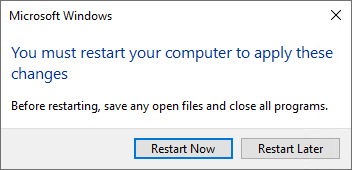
Network Access Warning (Windows 7) (when right-clicking on a .zip file within an UNC path)
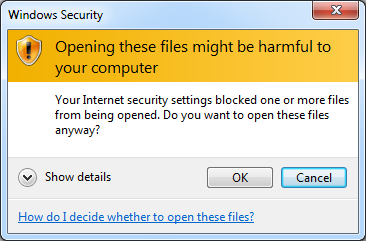
Network Access Warning (Windows 10)
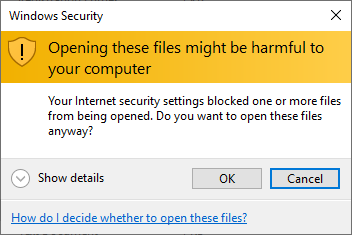
Network Access Error (Windows 7)
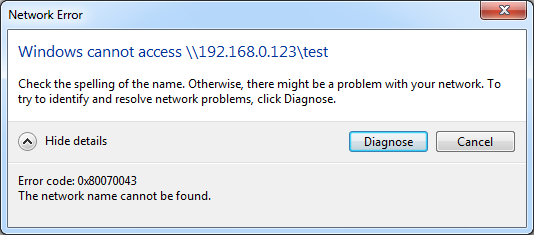
Network Access Error (Windows 10)
TortoiseGit (Windows 7)
TortoiseGit (Windows 10)
Visual Studio when app needs admin rights (Windows 7)
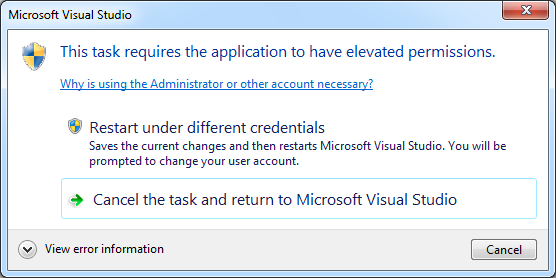
Visual Studio when app needs admin rights (Windows 10)
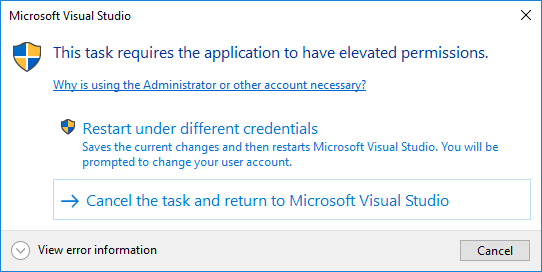
Custom Task Dialog (Windows 7)
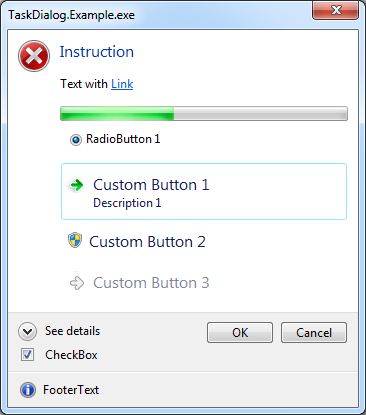
Custom Task Dialog (Windows 10)
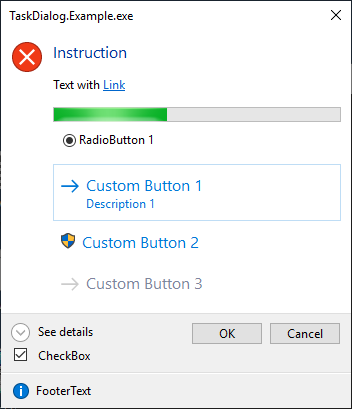
Custom Task Dialog (Windows Server 2019 Core with Server Core App Compatibility Feature on Demand)
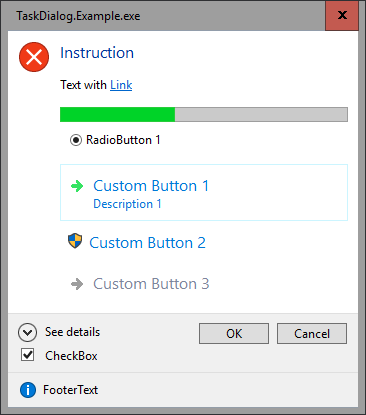
Custom Task Dialog (Windows 7, Classic Theme)
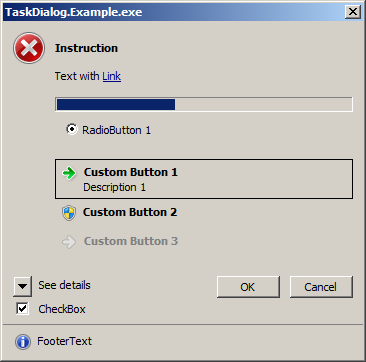
Custom Task Dialog, 200% DPI (Windows 7)
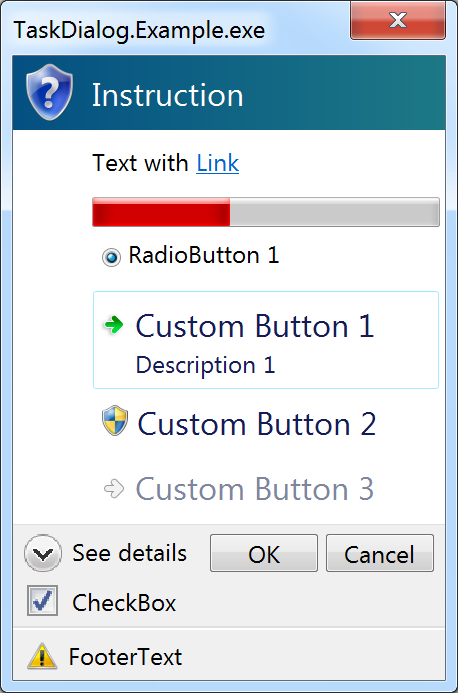
Custom Task Dialog, 200% DPI (Windows 10)
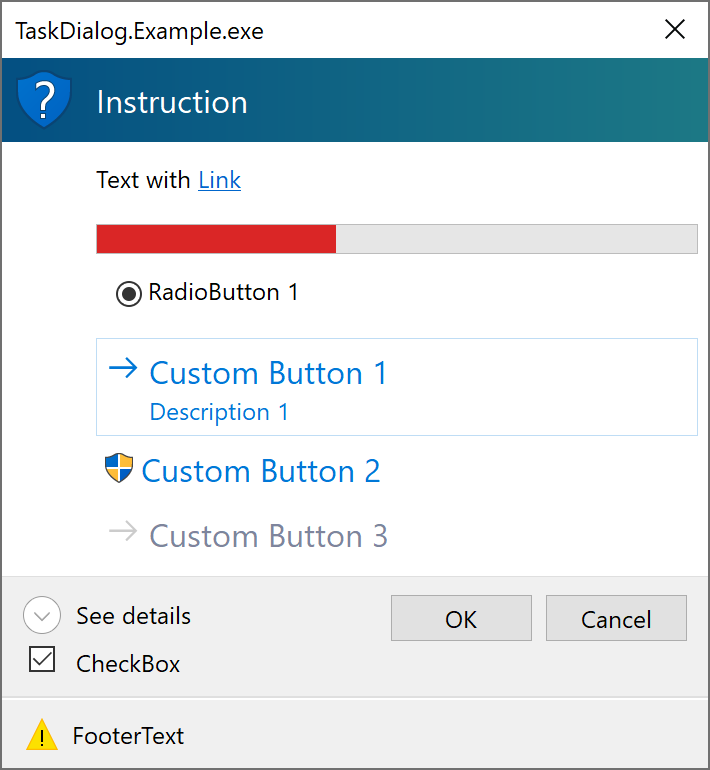
(Windows 10 did some improvements for the Task Dialog layout with higher DPI settings.)
Edit: Added screenshots of TortoiseGit, and of the custom task dialog with Windows 7 classic theme and Windows Server 2019 Core with App Compatibility FoD.
Thanks!
kpreisser
on 27 Jan 2019
Absolutely, thank you so much! (@merriemcgaw )
KlausLoeffelmann
on 27 Jan 2019
@terrajobst @karelz We are feeling good about this one -- please review the API and get back to us 😄
 zsd4yr
on 31 Jan 2019
zsd4yr
on 31 Jan 2019
Wow, that's a large API proposal - looks like it would be best for someone from WinForms team to walk us through it at API review meeting - pelase work with @terrajobst (via email) to get it on the schedule.
karelz
on 31 Jan 2019
Hi,
I have some minor things in mind that could be done before the API review:
- I renamed
TaskDialogProgressBarStateenum valueMarqueeDisabledtoMarqueePausedas I think it makes the behavior more clear (when switching fromMarqueetoMarqueePausedwhile the dialog is shown, the marquee animation will stop). - Currently the API includes some WPF types (
System.Windows.Window,System.Windows.Interop.IWin32Window) which I used in my implementation. However, since this proposal is for the WinForms repo, they probably should be removed. WPF users will still be able to use the TaskDialog with a WPF owner window by using theWindowInteropHelper:
c# Window ownerWindow = ...; var result = taskDialog.Show(new WindowInteropHelper(ownerWindow).Handle); - The icon
Stopshould probably be renamed toErrorfor consistency.
What do you think?
Edit: I have done the these changes. I also removed the TaskDialogProgressBarRange struct and instead added properties Minimum and Maximum directly on the TaskDialogProgressBar (and renamed property Position to Value), to simplify the API and align with the WinForms ProgressBar.
Note that in the API Proposal in my initial post, I did not include XML documentation of the methods/properties from my implementation. Should I add it to that post?
Edit: I added some comments with explanations in the API proposal.
Thanks!
kpreisser
on 1 Feb 2019
@kpreisser Does TaskDialog support RTL?
Would love this to be added to WPF too :clap:
 mhmd-azeez
on 1 Feb 2019
mhmd-azeez
on 1 Feb 2019
Hi @encrypt0r,
do you mean right-to-left layout? Yes, the Task Dialog supports such a flag:

However, what's a bit strange about that flag is that when you show the Task Dialog on a Windows OS with a right-to-left display language (e.g. arabic), then the Task Dialog always seems to use right-to-left layout even when this flag is not specified, e.g. for english software.
This can also be seen on other applications that use the Task Dialog, e.g. TortoiseGit:

This behavior does not occur with the Message Box, which uses RTL layout only if the corresponding flag is specified:

kpreisser
on 2 Feb 2019
@kpreisser hmmm, that does seem strange, maybe someone on the windows team can provide guidance on that issue, because windows locale should not dictate the direction of the UI of the apps.
mhmd-azeez
on 2 Feb 2019
@kpreisser is this the same behavior as the native TaskDialog APIs? Could we set the flag only when the OS is RTL and force LTR when it's an LTR OS? I think if we can mimic the same behavior as a native app with the TaskDialog then we're good. But I'd prefer to have it similar to how the MessageBox behaves.
merriemcgaw
on 19 Feb 2019
Hi @merriemcgaw,
is this the same behavior as the native TaskDialog APIs?
Yes, this is the behavior of the native TaskDialogIndirect Windows API (the TaskDialogContents.RightToLeftLayout property in the proposed API simply translates to setting the TDF_RTL_LAYOUT flag in the native structure):
When you are on a RTL OS, the native Task Dialog seems to always show as RTL layout, regardless of whether the flag TDF_RTL_LAYOUT is specified in the dwFlags member of the TASKDIALOGCONFIG structure:
| Task Dialog | LTR OS | RTL OS |
| --- | --- | --- |
| RTL flag not set | LTR | RTL |
| RTL flag set | RTL | RTL |
However, the native MessageBoxIndirectW() has the following behavior when specifying the MB_RTLREADING and MB_RIGHT flags:
| MessageBox | LTR OS | RTL OS |
| --- | --- | --- |
| RTL flag not set | LTR | LTR |
| RTL flag set | RTL | RTL |
This means that the current native Windows Task Dialog API doesn't allow to show a LTR task dialog on a RTL OS (e.g. for english software), which looks a bit like a bug in Windows to me (as I would expect to be able to show a LTR dialog on an RTL OS, just like the message box does). Unfortunately, there doesn't seem to be a way to force LTR layout even on a RTL OS.
(Notice that the Task Dialog only has a single RTL flag (TDF_RTL_LAYOUT) which has the same effect as the combination of the two RTL flags of a MessageBox, MessageBoxOptions.RightAlign (MB_RIGHT) + MessageBoxOptions.RtlReading (MB_RTLREADING).)
Could we set the flag only when the OS is RTL and force LTR when it's an LTR OS? I think if we can mimic the same behavior as a native app with the TaskDialog then we're good. But I'd prefer to have it similar to how the MessageBox behaves.
Sorry, I'm not sure if I correctly understand you here. Can you elaborate on this? (When it's an LTR OS, the task dialog will be LTS if you don't specify the flag (or set the TaskDialogContents.RightToLeftLayout in the proposed API.)
Thank you!
kpreisser
on 19 Feb 2019
I discovered an additional edge case while playing with the Task Dialog's radio buttons: It seems the native task dialog doesn't correctly support/handle the case when you want to select one of the radio buttons (TDM_CLICK_RADIO_BUTTON) from within the TDN_RADIO_BUTTON_CLICKED notification (exposed as the TaskDialogRadioButton.CheckedChanged event).
For example, imagine that you show a Task Dialog with two radio buttons, and when the second one is selected, you want to select the first one from code:
```c#
var contents = new TaskDialogContents()
{
RadioButtons =
{
new TaskDialogRadioButton("A")
{
Checked = true
},
new TaskDialogRadioButton("B")
}
};
// When the second radio button is selected by the user,
// select the first one.
// (However, do this only once...)
bool changedSelection = false;
contents.RadioButtons[1].CheckedChanged += (s, e) =>
{
    if (contents.RadioButtons[1].Checked && !changedSelection)
    {
        changedSelection = true;
        contents.RadioButtons[0].Checked = true;
    }
};

var dialog = new TaskDialog(contents);
dialog.Show();
When running this code (prior to commit https://github.com/kpreisser/TaskDialog/commit/eea2f77847b67c74dcca85f012c1440ef2c19623), and you click the second radio button in the dialog, you can see that the GUI isn't responding any more, and when debugging, you can see that the callback gets flooded with `TDN_RADIO_BUTTON_CLICKED` notifications (even though the code doesn't send any more messages to the dialog).

This may be related to the way the dialog behaves when sending a `TDM_CLICK_RADIO_BUTTON` as noted in the documentation:
> The specified radio button ID is sent to the TaskDialogCallbackProc callback function as part of a TDN_RADIO_BUTTON_CLICKED notification code. After the callback function returns, the radio button will be selected.

In my implementation, I expected that the radio button is selected *before* the callback is called. However, while that case can be handled by simply ignoring the `TDN_RADIO_BUTTON_CLICKED` notification when it is caused by code sending the `TDM_CLICK_RADIO_BUTTON` message (and then raising the events after sending the message), this doesn't solve the problem when the notification is caused by the user clicking the radio button in the UI, as shown by the above code.

Therefore, in order to avoid this problem, I'm now disallowing to set the `TaskDialogRadioButton.Checked` property from within the `TaskDialogRadioButton.CheckedChanged` event.

Additionally, I discovered that while normally you could navigate the dialog within the `TDN_RADIO_BUTTON_CLICKED` notification, this doesn't seem to work when you run the message loop between navigating the dialog and returning from the `TDN_RADIO_BUTTON_CLICKED` handler:

```c#
    var contents = new TaskDialogContents()
    {
        RadioButtons =
        {
            new TaskDialogRadioButton("A")
        }
    };
    var dialog = new TaskDialog(contents);

    // Navigate the dialog when the radio button is selected.
    contents.RadioButtons[0].CheckedChanged += (s, e) =>
    {
        dialog.CurrentContents = new TaskDialogContents()
        {
            Instruction = "Navigated!"
        };

        // Before returning, run the message loop by showing an inner dialog.
        TaskDialog.Show("Close me");
    };

    dialog.Show();
Here, when you click on the radio button, the dialog will navigate and then a separate dialog opens. When you close the separate dialog, an AccessViolationException will occur.
This could be solved by generally disallowing navigation within the TDN_RADIO_BUTTON_CLICKED notification (exposed as the TaskDialogRadioButton.CheckedChanged event).
These issues however do not occur with the TDN_VERIFICATION_CLICKED notification (TaskDialogCheckBox.CheckedChanged).
kpreisser
on 24 Feb 2019
A colleague of mine (@dscharnagl) had some interesting suggestions for the public API:
- Maybe rename
TaskDialogContentstoTaskDialogPageand have aPageproperty on theTaskDialog(the native API also talks about navigating to a page / multi-page-wizard) - Edit: Done.
- Icon properties (Edit: Updated for the current API proposal)::
Currently, TaskDialogPage and TaskDialogFooter have properties Icon and IconHandle. However, Icon and IconHandle are mutually exclusive (if IconHandle is set, Icon is ignored), so it is not so nice to have both properties. Also, when you initially don't set an icon when showing the dialog, you can later update it only by setting the Icon property, but not with setting the IconHandle (since the TDF_USE_HICON_MAIN would not have been specified in the TASKDIALOG_CONFIG struct). (This does not apply to navigation however.)
Instead, we could have an abstract TaskDialogIcon class, and then have subclasses that represent the various possible icon types (e.g. predefined icon ("Standard Icon"), icon handle, and maybe in the future: integer icon resource and string icon resource, which would work with a module handle.
For example:
```c#
public class TaskDialogPage
{
public TaskDialogIcon Icon { get; set; }
// ...
}
public class TaskDialogFooter
{
public TaskDialogIcon Icon { get; set; }
// ,,,
}
public abstract class TaskDialogIcon
{
// TODO: Maybe add an implicit cast from TaskDialogStandardIcon enum
}
public sealed class TaskDialogIconHandle : TaskDialogIcon
{
public TaskDialogIconHandle(IntPtr iconHandle);
public TaskDialogIconHandle(System.Drawing.Icon icon);
public IntPtr IconHandle { get; } // Can be null
}
// Enum naming?
public enum TaskDialogStandardIcon {
None = 0,
SecurityShieldGrayBar = 65527,
SecuritySuccessGreenBar = 65528,
SecurityErrorRedBar = 65529,
SecurityWarningYellowBar = 65530,
SecurityShieldBlueBar = 65531,
SecurityShield = 65532,
Information = 65533,
Error = 65534,
Warning = 65535
}
public static class TaskDialogStandardIcons
{
public static TaskDialogIcon None { get; }
public static TaskDialogIcon Information { get; }
public static TaskDialogIcon Warning { get; }
public static TaskDialogIcon Error { get; }
public static TaskDialogIcon SecurityShield { get; }
// and so on...
public static TaskDialogIcon Get(TaskDialogStandardIcon value);
}
// NOTE: Internal class that contains the enum value - maybe make this class public?
internal class TaskDialogStandardIconXXXX : TaskDialogIcon {
public TaskDialogStandardIcon Icon { get; }
}
```
(Alternatively, the internal class could be made public with a constructor, and then the TaskDialogStandardIcon.Get() method could be removed; and an implicit cast operator from the enum could be added to that class instead of TaskDialogIcon.)
This would avoid the need to have two mutually exlusive properties for the main icon (and footer icon), and it would allow you to initially show the dialog without an icon but then update it to an icon from a handle (by initially specifying new TaskDialogIconHandle(null).
Additionally, this would allow us in the future to add another subclass that could represent an icon from an integer resource (or string resource) that is loaded from a DLL or EXE file (e.g. imageres.dll which is the default), where the TaskDialog then would specify the corresponding hInstance value in the TASKDIALOGCONFIG structure and the pszMainIcon (or pszFooterIcon) with the corresponding integer resource or string resource value.
(Here, the restriction would still apply that you cannot change the icon from a predefined or resource icon to an icon handle, and vice versa).
What do you think?
Thanks!
kpreisser
on 25 Feb 2019
In this thread we mentioned a few native task dialog bugs already. Is it realistic to get them fixed in the OS?
If yes, we could leave them unfixed at the .NET layer, document them for .NET and simply say that a future Windows version will fix them. Windows 10 now has a fairly quick update model so most OS installations will receive the fixes rather soon.
That's a cleaner strategy than to lock in these workarounds and limitations forever.
GSPP
on 25 Feb 2019
@GSPP What will .NET apps do that find themselves running on all versions of Windows currently in use? Demand a Windows update, or work around the quirks manually?
jnm2
on 25 Feb 2019
Note that the issue about right-to-left layout being always applied on RTL OSes even though the TDF_RTL_LAYOUT flag isn't specified (which I would consider as important bug) actually cannot be worked around in .NET code, and can only be fixed in the OS (but I guess only by adding a new flag to not break existing apps).
As for the other issues/quirks, you are right that we could leave them unfixed at .NET layer. Note however, that for the first issue I discovered (navigating the dialog within a TDN_BUTTON_CLICKED notification, then showing an inner dialog, and then returning S_OK can result in in an access violation), removing the fix in .NET would actually require to introduce additional code to make sure we correctly return the TaskDialogButton that was clicked, which might originate from the pre-navigation contents (although I already had that code implemented once, so that wouldn't be a problem).
I have created a few C++ code samples that demonstrate the issues/quirks, so they could be debugged at the native OS layer:
- Access violation can occur when navigating the dialog (
TDM_NAVIGATE_PAGE) within aTDN_BUTTON_CLICKEDnotification, then running the event loop, and then returningS_OK - Weird behavior when running the event loop within an
TDN_RADIO_BUTTON_CLICKEDnotification - Endless loop occurs when sending a
TDM_CLICK_RADIO_BUTTONmessage within aTDN_RADIO_BUTTON_CLICKEDnotification - Access violation occurs when navigating the dialog (
TDM_NAVIGATE_PAGE) within aTDN_RADIO_BUTTON_CLICKEDnotification and then running the event loop
(but I must admit that I don't have much knowledege in C++.)
Thanks!
kpreisser
on 25 Feb 2019
In this thread we mentioned a few native task dialog bugs already. Is it realistic to get them fixed in the OS?
@OliaG would you mind reaching out to someone on the Windows team / in Windows shiproom to discover an answer to this?
My guess is that requests for more current releases of the OS are more likely to be serviced than older ones, and that it will be even easier to fix any issues if they hit particular tenets: accessibility, security, etc...
In the meantime, we may have to work around them, especially for older OSes, and do a good job about commenting code / writing tests for code that exists for this purpose
zsd4yr
on 25 Feb 2019
@kpreisser - Thank your very much for this feature suggestion. I apologize that it's taking a long time to review it. We are very much interested in modernization of WinForms look and feel and this feature fits in perfectly with this goal. The reason we are taking so long to review it is that it seems that there will be demand for this feature both in WinForms and WPF applications and your current implementation does not have strong dependency on WinForms. Of course, WPF depelopers could reference System.Windows.Forms.dll when they want to use this dialog, or other way around, but this seems to be overkill.
Alternatively,we could have 2 almost identical implementations, one in Winforms and another in WPF, as we already have with other common dialogs, or Clipboard. However this is not ideal as it causes confusion in developers who use the APIs, and doubles maintenance cost and code size. A better option seems to be to ship TaskDialog as a stand alone assembly in the .Net Core SDK. However, we had not done that before, and this is the cause of the delay. We are working through the options at this point.
 Tanya-Solyanik
on 27 Feb 2019
Tanya-Solyanik
on 27 Feb 2019
A better option seems to be to ship TaskDialog as a stand alone assembly in the .Net Core SDK. However, we had not done that before, and this is the cause of the delay. We are working through the options at this point.
I really like this possibility.
jnm2
on 27 Feb 2019
Hi @Tanya-Solyanik,
thank you very much for the update!
I agree that it would not be ideal to have two separate implementations for WinForms and WPF, and that it would probably be better to ship the Task Dialog in a separate assembly.
I assume this means the task dialog assembly would not depend on WinForms or WPF, but WinForms or WPF might have a dependency on the task dialog assembly?
If I understand correctly, this would mean that the Task Dialog wouldn't have access to types like IWin32Window from WinForms, so it would only have APIs e.g. to specify owner window as IntPtr. Then, WinForms users would call e.g.
```c#
TaskDialog.Show(ownerForm.Handle, ...);
and WPF users would call
```c#
TaskDialog.Show(new WindowInteropHelper(ownerWindow).Handle, ...);
If WinForms and WPF have a dependency on Task Dialog, there could be some extension methods that add additional Show() overloads for instance methods that use the WinForms/WPF types (but that would not work for the static methods).
For the implementation, there is also the question how the Task Dialog should behave for exceptions that occur in its events (and bubble up to the callback handler). Currently, they are not caught, so the runtime would unwind the stack (removing the managed -> native and native -> managed transitions) even though the dialog is still showing, which could cause a NRE or other memory access exception on the next invocation of the callback if the exception is caught by the caller of TaskDialog.Show().
For this, I was thinking to use the ThreadExceptionDialog from WinForms (similar to how NativeWindow.Callback() behaves), but this will be probably not available when the Task Dialog is in a separate assembly.
Another alternative that I could imagine would be to share the task dialog source code files for both the WinForms and WPF repo, and use conditional compilation to change the code lines that would be different for WinForms and WPF, for example:
```c#
if WinForms
namespace System.Windows.Forms
else // WPF
namespace Microsoft.Win32 // or other WPF namespace
endif
{
public class TaskDialog : Component // Maybe derive from Component only for WinForms (Designer support)
{
private ....;
public TaskDialogButton Show(IntPtr ownerHandle) { ... }
if WinForms
public TaskDialogButton Show(System.Windows.Forms.IWin32Window owner) { ... }
else
public TaskDialogButton Show(System.Windows.Window owner) { ... }
endif
    private void HandleCallbackException(Exception ex)
    {
if WinForms
new ThreadExceptionDialog(ex).ShowDialog();
else
ExceptionDispatchInfo.Capture(ex).Throw(); // TODO
endif
    }
}
}
```
This would mean there were separate TaskDialog classes in WinForms and WPF after building, without having to have two almost identical implementations that would double maintenance costs (although it would require to use preprocessor directives, but only for a small part).
However, there would still be the API confusion for developers as you mentioned.
Thank you!
kpreisser
on 28 Feb 2019
why not just implement it in a common class and then in the component controls for each type of contron constuct this class. That way it uses common code and avoids preprocessors. As for the assembly name I would name it System.Windows.TaskDialog that would contain both the WinForms amd the WPF version of it.
AraHaan
on 28 Feb 2019
I also wish the actual ThreadException event was actually in the System.Environment namespace and in the System.Runtime or System.Runtime.Extensions assemblies so console applications can catch unhandled thread exceptions. Which would make:
public sealed class Application
{
    // other code.
    public static event EventHandler ThreadException
    {
        add
        {
            Environment.ThreadException += value;
        }

        remove
        {
            Environment.ThreadException -= value;
        }
    }

    // other code including showing the ThreadExceptionDialog remain unchanged.
Said change would then allow me to make my MiniDump package on nuget to drop Windows Forms just to subscribe to that event even if it is a console application.
Besides any thread made with System.Threading.Tasks or something should not require referencing winforms just to catch a unhanled thread exception. I wish the .NET Framework/Core teams would have better thought about the ThreadException event.
AraHaan
on 28 Feb 2019
@AraHaan ThreadException is not a general thread exception handler. Specifically, it is raised by the System.Windows.Forms.Application message loop in order to keep the message loop running without swallowing the exception. It has UI-specific semantics.
jnm2
on 1 Mar 2019
Hey guys,
@kpreisser asked me to review his private project regarding different framework design guidelines which I adopt to the different projects at Traeger. As one of the fellows of @kpreisser I'm eagerly interested in his project and in the plannings of the .NET Core team to adopt this great project.
Just to be clear, I just want to suggest some design considerations, after @kpreisser asked me to dig into his architecture to make some proposals regarding the actual design of the TaskDialog API.
My following recommendations are based on the architecture used by the MessageBox API (WinForms), the MessageDialog API (UWP), the MessageBox API (WPF), the TaskDialog API (WinAPI CodePack) and some other well known API design used in WinForms (like inheritance) and WPF.
Although the final implementation of the TaskDialog, its features and functionality provided relys on the underlaying used Windows API I would make the following design suggestions, regardless whether the used System API fully supports the resulting use cases.
TaskDialog class
- NavigationWindow in WPF as template for API design
- reason: the "content" of the dialog can be changed using TaskDialogContents instances
- according events and properties can be adopted as well
- Event Bubbling for some events raised by "child" instances used by the dialog e.g.
TaskDialog.Help - provide a property to store multiple instances of TaskDialogContents being navigated
TaskDialogContents class
- rename to
TaskDialogPage - bundle properties regarding their context like:
FooterTextandFototerIconinto oneFooterproperty (using a new type of object)IconandIconHandleinto oneIconproperty (using a new type of object)CommonButtons,CustomButtons,RadioButtons,CheckBox,ExpanderandProgressBarintoControls(although a limit of some type of controls used for the dialog is existant, the dialogs controls collection can either restrict the number of such instances added or the dialog ignores additional instances)
- rename
DoNotSetForegroundtoTopMost(see Form.TopMost property) - rename
HelptoHelpRequested(see Control.HelpRequested event) - provide a (non-functional)
Heightproperty (always say B, if you say A) - rename
CanBeMinimizedtoMinimizeBox(see Form.MinimizeBox property) - rename
StartupLocationtoStartPosition(see Form.StartPosition property) - rename
HyperlinkClickedtoLinkClicked(see LinkLabel.LinkClicked event) - rename
RightToLeftLayouttoRightToLeft(see Control.RightToLeft property) - rename
EnableHyperlinkstoLinksEnabled(matches better the naming of the Control.Enabled property) - remove
SizeToContentproperty (a value of theWidthproperty unequal/equal zero is enough) - add
Destroyedevent (always say B, if you say A) - remove
TimerTickevent (there is no relevance for such an event in .NET) - remove
CommandLinkModeproperty (automatically determine the required information to provide according subclasses of the buttons used and/or a button control specific property to differ between the 'modes')
TaskDialogControl class
- add
Textproperty (see Control.Text property) - add
Nameproperty like WinAPI CodePack does - add
Enabledproperty - add
Parentproperty (see Control.Parent property)
TaskDialogCheckBox class
- use
Textproperty ofTaskDialogControl - review
Focusmethod (think about to remove it)
TaskDialogExpander class
- Expander in WPF as template for API design
- use
Textproperty ofTaskDialogControl - rename
ExpandoButtonClickedtoExpandedChanged - rename
ExpandedButtonTexttoTextExpanded - rename
CollapsedButtonTexttoTextCollapsed - rethink the use of
ExpandFooterArea(maybe provide anExpanderproperty likeTaskDialog.Footer.Expander)
TaskDialogButton class
- use
Enabledproperty ofTaskDialogControl - keep name of
ElevationRequiredproperty (suggested change after first review)
TaskDialogRadioButton class
- inherit from (new)
TaskDialogButtonBaselike WinAPI CodePack does - use
Enabledproperty of `TaskDialogControl`` - use
Textproperty ofTaskDialogControl - add
CheckedChangedevent (see RadioButton.CheckedChanged event)
TaskDialogCommonButton class
As already discussed: Think about removing this class and providing a static class TaskDialogButtons with static fields of internal initialized TaskDialogButton instances.
TaskDialogCustomButton class
The name itself and the existence of the class mediates the message there is no other way like inheritance or use of existing classes to have a 'custom' button. Additionally no known framework API exists which provides a <Ab>Custom<Xy> class. Therefore think about, as already discussed, replacing this class by custom instances of the TaskDialogButtonclass.
 dscharnagl
on 3 Mar 2019
dscharnagl
on 3 Mar 2019
Hey @dscharnagl, thanks a lot for your great suggestions!
We (@dscharnagl and me) have discussed the suggestions offline, and I want to comment on some of these with the results.
TaskDialogPage class
- provide a property to store multiple instances of TaskDialogPage being navigated
This is an interesting idea, but I think it can be implemented by an external component that doesn't need access to the internals of the Task Dialog implementation, so I think it doesn't need to be added to this proposal. Such a component could add itself to TaskDialogButton click handlers to navigate the Task Dialog through predefined pages.
FooterTextandFototerIconinto oneFooterproperty (using a new type of object)
I had the same idea, and have already done that changes and updated the proposed API (added class TaskDialogFooter which inherits from TaskDialogControl).
IconandIconHandleinto oneIconproperty (using a new type of object)
See my previous comment about a possible class model: https://github.com/dotnet/winforms/issues/146#issuecomment-467032370
CommonButtons,CustomButtons,RadioButtons,CheckBox,ExpanderandProgressBarintoControls(although a limit of some type of controls used for the dialog is existant, the dialogs controls collection can either restrict the number of such instances added or the dialog ignores additional instances)
This was also done in the Windows API Code Pack. With such a Controls property, the current properties that contain controls on the TaskDialogPage (CommonButtons, CustomButtons, RadioButtons, CheckBox, Expander, Footer, ProgressBar) would be removed and instead there would only be the Controls collection, so you would add controls like this:
```c#
var page = new TaskDialogPage()
{
Text = "...",
    Controls =
    {
        new TaskDialogFooter("My Footer"),
        new TaskDialogExpander("My Expander"),
        new TaskDialogCommonButton(TaskDialogResult.Yes),
        new TaskDialogCommonButton(TaskDialogResult.No),
        new TaskDialogRadioButton("RB1"),
        new TaskDialogRadioButton("RB2")
    },
    // ...
};
For single controls like `TaskDialogExpander`, the collection would throw an exception when you are trying to add more than one instance of such a control.
However, if the Task Dialog should support the Windows Forms designer, we would need to check if adding controls would still be possible using the `Controls` collection.
---
> * provide a (non-functional) `Height` property (always say B, if you say A)
> * remove `SizeToContent` property (a value of the `Width` property unequal/equal zero is enough)
While I agree with the symmetry for `Height`/`Width`, I think we should not add a `Height` property because the Task Dialog doesn't officially support such a property (and probably never will), and because once added we cannot remove elements from the public API so easily; whereas the other way round (adding new property) can be done later.
Instead, we might consider to remove the `Width` property for now because we think normally it wouldn't be used that much.
Note that **`SizeToContent`** can have an effect only when `Width` is set to 0: "Indicates that the width of the task dialog is determined by the width of its content area."
(The C header file says: "used by ShellMessageBox to emulate MessageBox sizing behavior")
For example, when `Width` is set to `0`:
- Short text (`SizeToContent` set to `false` or `true`):

- Long text (`SizeToContent` set to `false`):

- Long text (`SizeToContent` set to `true`):

Note also that the Task Dialog tends to truncate longer words in the text. For example if you specify the text `Test AAAABBBBCCCCDDDDEEEEFFFFGGGGHHHHIIIIJJJJKKKKLLLLMMMMNNNNOOOOPPPP\QQQQRRRRSSSSTTTT test`, the dialog will look like this (when `SizeToContent` is set to `false`):

---
> * rename `DoNotSetForeground` to `TopMost` (see [Form.TopMost property](https://docs.microsoft.com/en-us/dotnet/api/system.windows.forms.form.topmost?view=netframework-4.7.2))
These two properties actually mean different things: `TopMost` means the form/window will be displayed on top of other windows even if it is not the active window ("always-on-top").
On the Task Dialog, `DoNotSetForeground` means when the task dialog is displayed, it doesn't try to set itself as foreground window (so the taskbar button for the window will not flash orange if the application currently doesn't have focus).
---
> * rename `RightToLeftLayout` to `RightToLeft` (see [Control.RightToLeft property](https://docs.microsoft.com/en-us/dotnet/api/system.windows.forms.control.righttoleft?view=netframework-4.7.2))
Note: There is also the [`Form.RightToLeftLayout` property](https://docs.microsoft.com/en-us/dotnet/api/system.windows.forms.form.righttoleftlayout?view=netframework-4.7.2#System_Windows_Forms_Form_RightToLeftLayout). Alternatively, we could use an enum like WPF with the [`FlowDirection` enum](https://docs.microsoft.com/en-us/dotnet/api/system.windows.flowdirection?view=netframework-4.7.2) that has members `LeftToRight` and `RightToLeft`.
---
> * add `Destroyed` event (always say B, if you say A)
Currently, the events of the `TaskDialog` (`Opened`, `Navigated`, `Closing`) and the events of `TaskDialogPage` (`Created`, `Destroying`) are raised within the "life span" of the Task Dialog, meaning that the window handle (`.Handle` property) will be available within all that events.
Note: The `TaskDialog.Navigated` event could probably be removed.
### Option A
Add a `Destroyed` event to the `TaskDialogPage` and a `Closed` event to `TaskDialog` that would be called *after* the task dialog is closed (or navigated), so in case of the task dialog closing, the window handle will be available in the `Destroying`/`Closing` event but will be invalid in the `Destroyed`/`Closed` event (the implementation would raise that events after the native `TaskDialogIndirect()` function returns).
Similarly, we could add a `Creating` event to `TaskDialogPage` and `Opening` to `TaskDialog`, as the "opponent" events of `Created` and `Opened`, meaning that in the former events the window handle would not be available (in case the dialog is shown) but in the latter events it will be available.
So, the event cycle could look like the following when the dialog is navigated within a `TaskDialogButton.Click` event (I hope the diagram is not too confusing :innocent:):
Caller Events
TaskDialog.Show();
↓
────────────────────────────────────────> TaskDialog.Opening (new)
────────────────────────────────────────> TaskDialogPage[1].Creating (new)
↓
(Calls TaskDialogIndirect())
────────────>
↓ (Window handle available now)
Callback(TDN_CREATED) ─────────> TaskDialog.Opened
─────────> TaskDialogPage[1].Created
↓ (Window opens)
↓
(...)
↓
Callback(TDN_BUTTON_CLICKED) ──> TaskDialogButton.Click
↓
TaskDialog.set_Page() <───────
↓
─────────────────> TaskDialogPage[1].Destroying
─────────────────> TaskDialogPage[2].Creating (new)
↓
<──────────
↓
Callback(TDN_NAVIGATED) ───────> TaskDialogPage[1].Destroyed (new)
───────> TaskDialogPage[2].Created
↓
(...)
↓
Callback(TDN_BUTTON_CLICKED) ──> TaskDialogButton.Click
↓ (Window closes)
↓
Callback(TDN_DESTROYED) ───────> TaskDialogPage[2].Destroying
───────> TaskDialog.Closing
↓ (Window handle no longer available)
<────────────
(TaskDialogIndirect() returns)
↓
────────────────────────────────────────> TaskDialogPage[2].Destroyed (new)
────────────────────────────────────────> TaskDialog.Closed (new)
↓
(TaskDialog.Show() returns)
Note: There could still be the case that a dialog cannot be displayed by the OS due to invalid configuration, which means the native `TaskDialogIndirect()` API will return an error code. This would mean that the events within the life span of the task dialog would not be called, resulting in the following event sequence (and then an excepton would be thrown):
TaskDialog.Opening + TaskDialogPage.Creating
TaskDialog.Closed + TaskDialogPage.Destroyed
```
Edit: However, this option has the downside that the behavior doesn't match the one the user already knows e.g. from the Form.FormClosing and Form.FormClosed events: There, you can cancel the close in the FormClosing event, and if canceled, the Form will not close and the FormClosed event will not occur. Otherwise, the FormClosed event will occur when the form is just about to close.
In contrast, with the TaskDialog, the Closing event would occur if it is just about to close (and the close cannot be canceled), and the Closedevent would occur after the dialog is already closed, which means the handle is no longer valid in that event.
Also, technically, the (new) Opening/Creating and Closed/Destroyed events would not be needed since they don't involve native notifications and users could implement them on their own.
Option B (preferred)
Rename the current TaskDialog.Closing and TaskDialogPage.Destroying events (that are called from the TDN_DESTROYED notification) to Closed and Destroyed, and then add a new event TaskDialog.Closing that takes TaskDialogClosingEventArgs where you can cancel the close (and get the button that caused the close).
This event will be raised from the TDN_BUTTON_CLICKED notification handler (after raising the TaskDialogButton.Click event) when the clicked button would close the dialog. If the user canceles the close, the handler will return S_FALSE so that the dialog will not close. Otherwise, the handler will return S_TRUE so that the dialog closes, and later the TDN_DESTROYED handler will raise the TaskDialog.Closed/TaskDialogPage.Destroyed events.
This would actually match the behavior from the Form events that the user already knows. (A minor exception is that the Closed event can occur some timer after the Closing event if the dialog shows an inner dialog, but I think this should be OK.)
Thus, the event cycle would look like this (Edit: Updated for the currently proposed/implementd events):
Edit: I moved this diagram to the initial post (section "Event Cycle").
I think I'm going to implement this option and update the API proposal.
Edit: Done.
TaskDialogControl class
- add
Textproperty (see Control.Text property)- add
Enabledproperty
Note: Adding these to TaskDialogControl would mean that subclasses which don't support such properties like ProgressBar would throw an exception in the property accessors, and we would add attributes like [System.ComponentModel.Browsable(false)] to such properties, similar to the Text property of the System.Windows.Forms.ProgressBar.
- add
Parentproperty (see Control.Parent property)
For this, we either would need to make TaskDialogPage to inherit from TaskDialogControl (which however probably isn't a good idea since it would indicate that you could add a TaskDialogPage to the TaskDialogPage.Controls collection), or we could instead use a Page property to represent the TaskDialogPage to which the control has been added or bound (as there is no control hierarchy in the Task Dialog).
TaskDialogExpander class
- rethink the use of
ExpandFooterArea(maybe provide anExpanderproperty likeTaskDialog.Footer.Expander)
Note: Actually the expander is always at the same location on the Task Dialog, it is only the location of the expanded area that can be changed with this property - therefore I think there shouldn't be an Expander property in the TaskDialogFooter. However @dscharnagl mentioned we could make an Enum to specify the location instead, and rename the ExpandFooterArea property.
TaskDialogCommonButton class
As already discussed: Think about removing this class and providing a static class
TaskDialogButtonswith static fields of internal initialized TaskDialogButton instances.
Note: For proper handling a button's Click event, setting properties like Enabled or calling the PerformClick() method, we still need to have instances of TaskDialogCommonButton (created by the user).
Thank you!
kpreisser
on 4 Mar 2019
In this thread we mentioned a few native task dialog bugs already. Is it realistic to get them fixed in the OS?
My guess is that requests for more current releases of the OS are more likely to be serviced than older ones, and that it will be even easier to fix any issues if they hit particular tenets: accessibility, security, etc...
In the meantime, we may have to work around them, especially for older OSes, and do a good job about commenting code / writing tests for code that exists for this purpose
@kpreisser @GSPP After a quick discussion with Olia, we are reasonably certain that it will be up to us to work around any bugs on our end.
zsd4yr
on 6 Mar 2019
Hi @zsd4yr,
thanks for the update!
Most bugs/quirks for which I already implemented work-arounds are minor ones/edge cases and shouldn't affect the normal usage of the dialog (and it's probably too risky to fix them in the OS).
However, there is still the right-to-left bug (RTL layout is applied on RTL OSes even if the TDF_RTL_LAYOUT flag isn't specified), which actually cannot be worked-around in .NET/user code, and which I would consider as a more serious one, since it could be annoying for the user when working with english software on RTL OSes (see the screenshot of TortoiseGit as example).
Would it be possible to get that bug fixed in the OS? (Maybe it will fall into the accessbility tenet?)
Thank you!
kpreisser
on 9 Mar 2019
However, there is still the right-to-left bug (RTL layout is applied on RTL OSes even if the flag isn't specified), which actually cannot be worked-around in .NET/user code, and which I would consider as a more serious one, since it could be annoying for the user when working with english software on RTL OSes (see the screenshot of TortoiseGit as example).
Would it be possible to get that bug fixed in the OS? (Maybe it will fall into the accessbility tenet?)
@merriemcgaw @OliaG let's talk about this offline in the runtime tactical sync this week.
@kpreisser I'll do my best to come back with next-steps soon. I agree this is worth looking into. Which OSes (RS1, RS2, ..., 8.1, 7, etc...) does this affect? Is it a regression from earlier OSes which handled this as expected?
zsd4yr
on 11 Mar 2019
@dreddy-work and @Tanya-Solyanik FYI
zsd4yr
on 11 Mar 2019
Hi @zsd4yr,
Which OSes (RS1, RS2, ..., 8.1, 7, etc...) does this affect? Is it a regression from earlier OSes which handled this as expected?
I verified that this issue occurs on Windows Vista SP2 (6.0.6002), Windows 7 SP1 (6.1.7601), Windows 8.1 (6.3.9600), Windows 10 Version 1607 (Build 14393), as well as the newest Windows 10 Insider Preview (Build 18850), using "ar-SA" (Arabic, Saudi Arabia) as display language, so it seems the behavior has always been this way and it is not a regression.
(Maybe fixing this will require to add a new flag for the TASKDIALOGCONFIG.dwFlags field, in order to not break existing apps.)
Thank you!
kpreisser
on 11 Mar 2019
I verified that this issue occurs on Windows Vista SP2 (6.0.6002), Windows 7 SP1 (6.1.7601), Windows 8.1 (6.3.9600), Windows 10 Version 1607 (Build 14393), as well as the newest Windows 10 Insider Preview (Build 18850), using "ar-SA" (Arabic, Saudi Arabia) as display language, so it seems the behavior has always been this way and it is not a regression.
@kpreisser ah interesting. Sorry I should have thought of this already. Supported languages for .NET Core include:
- Czech
- German
- Spanish
- French
- Italian
- Japanese
- Korean
- Polish
- Portuguese
- Russian
- Turkish
- Simplified Chinese; and
- Traditional Chinese
I do not think any of these are RTL so this may not be an issue at all? (until such a time that the list of supported languages may change)
zsd4yr
on 11 Mar 2019
Hi @zsd4yr,
@kpreisser ah interesting. Sorry I should have thought of this already. Supported languages for .NET Core include:
Sorry, I'm not sure if I follow. I don't think the issue is related to the languages supported by .NET Core, as it relates to the text the developer wants to display in his app using a task dialog.
For example, if an (WinForms/WPF) App only supports english (but not arabic) as UI language, and the app displays a Task Dialog with english text, then the Task Dialog would (incorrectly) apply right-to-left layout on a OS with RTL display language (like arabic), making the dialog looking strange (where it should instead apply left-to-right layout for the english text).
(And if for example a task dialog is displayed with a text from the .NET Core resources, and .NET Core doesn't have support for a RTL language, I think this means it would display text from an LTR language like english, where this issue then occurs.)
In contrast, when the app supports e.g. arabic language, it can/should specify the TDF_RTL_LAYOUT flag on the task dialog, so the task dialog correctly applies right-to-left layout for the arabic text (independently of whether an RTL or LTR display language is used in the OS).
Did I misunderstand something?
Thanks!
kpreisser
on 11 Mar 2019
For example, if an (WinForms/WPF) App only supports english (but not arabic) as UI language, and the app displays a Task Dialog with english text, then the Task Dialog would (incorrectly) apply right-to-left layout on a OS with RTL display language (like arabic), making the dialog looking strange (where it should instead apply left-to-right layout for the english text).
This makes sense. Thank you for the clarification
zsd4yr
on 11 Mar 2019
Here is an additional example for better illustration:
Suppose I'm creating two WinForms apps, both showing a Form, a MessageBox and a Task Dialog.
App A uses an english UI, so I don't set any special flags.
App B uses an arabic UI, so I set RightToLeft and RightToLeftLayout on the Form, MessageBoxOptions.RightAlign | MessageBoxOptions.RtlReading flags on the MessageBox, and the TaskDialogPage.RightToLeftLayout property (which translates to the TDF_RTL_LAYOUT flag) on the Task Dialog.
Now run the apps on a LTR OS like german (left=TaskDialog, right=MessageBox):
App A (english):

App B (arabic) (note, I just used Google Translator to translate the english text into arabic):
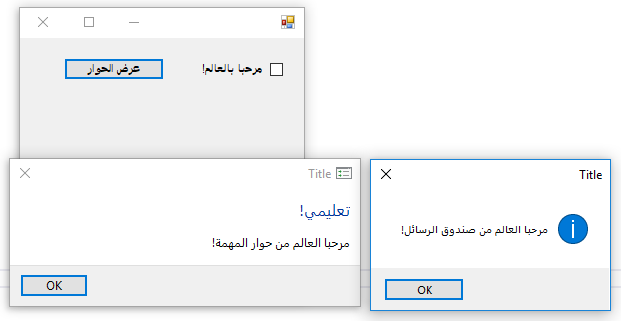
Now, run the apps on a RTL OS like arabic:
App A (english):
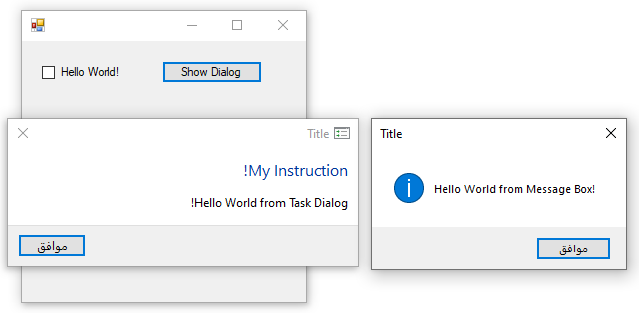
App B (arabic):

Here, we can see that when running App A (english) on the arabic OS, then the Form and MessageBox are displayed correctly using LTR layout, but the Task Dialog (incorrectly) uses RTL layout.
All other cases look OK.
Thanks!
kpreisser
on 11 Mar 2019
The bug is that " When running in an OS language which is read right-to-left (such as Arabic), left-to-right read languages (like English) are being erroneously right-aligned" Correct?
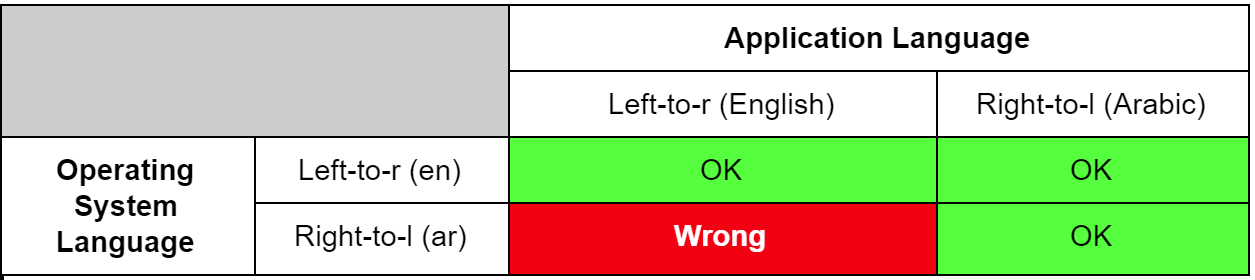
- Now, run the apps on a **RTL OS** like arabic:

- App **A** (english):
The bug is that " When running in an OS language which is read right-to-left (such as Arabic), left-to-right read languages (like English) are being erroneously right-aligned" Correct?
Yes, that's correct. :+1:
kpreisser
on 11 Mar 2019
Checking in to let you know that we've filed the Windows bug. We're also trying to determine the best ship vehicle for this code. We're evaluating the possibility of an optional 'pack' of components that are usable in both WinForms and WPF so that both technologies could use them. Stay tuned for updates, we haven't forgotten this proposal!
merriemcgaw
on 22 Mar 2019
We've made the decision to take it in the S.W.F. @merriemcgaw, @zsd4yr what are our next steps?
 OliaG
on 22 Apr 2019
OliaG
on 22 Apr 2019
Hi,
any update on this one (also regarding the ship vehicle)?
Are there some changes that need to be done to the proposed API before the API Review (e.g. removal of WinForms types)?
After watching the video The future of C# from Build, I think the proposed Extension Everything/Extension Interfaces (https://github.com/dotnet/csharplang/issues/1711) would be quite handy for the case where the TaskDialog assembly doesn't depend on WinForms/WPF, as then there could be e.g. a TaskDialog.WinForms assembly that depends on TaskDialog and WinForms, and adds an extension like this:
```c#
public extension TaskDialogExtension of TaskDialog : IWin32Window
{
IntPtr IWin32Window.Handle => this.Handle;
public static TaskDialogResult Show(
        IWin32Window owner,
        string text,
        string instruction,
        ...)
{
    return TaskDialog.Show(owner.Handle, text, instruction, ...);
}

public TaskDialogButton Show(IWin32Window owner)
{
    return this.Show(owner.Handle);
}
}
(and similarly, have a `TaskDialog.WPF` assembly that adds an extension using the WPF types).

This would allow a user to call the static method

```c#
TaskDialog.Show(myForm, "Hello World");
(like with MessageBox) instead of explicitly using myForm.Handle (or new WindowInteropHelper(myWindow).Handle for WPF), and it would allow to use the TaskDialog as owner window when showing a Form, without having the user to implement a IWin32Window wrapper himself.
Thanks!
kpreisser
on 12 May 2019
@kpreisser For now we're going to take this into the System.Windows.Forms.dll binary. If a WPF app wants to use the TaskDialog they binary will be present as it's part of the Desktop shared framework which both WPF and WinForms use. It was decided not to use this in things like Console apps, though we could see some scenarios where that might be useful - we wanted to keep it in the Desktop shared framework.
For now we can keep the WinForms types in it and not make many changes to the proposal given that we're taking it in S.W.F.dll. You'll probably want to begin the process of getting the code ready to submit. We'd like to take it as part of the .NET Core 3.0 release so our devs can get this new functionality right away. I'm adding the ready for review label and we'll reach out if there are any changes we want you to make, either before or after the API review.
Thanks!
merriemcgaw
on 14 May 2019
@kpreisser before I forget, you will want to run Accessibility Insights over the default configurations. We need to pass all tests raised by this tool in order to be a compliant Microsoft product. This shouldn't be an issue (run it on the latest Win10) given you're wrapping system APIs, but we need to have that test passing.
merriemcgaw
on 14 May 2019
Hi @merriemcgaw and @OliaG,
thanks a lot for the update and the explanations! (Sorry, I didn't realize that S.W.F. was the acronym for System.Windows.Forms... :innocent:)
I will look into preparing the code for submission.
Regarding the API Review, there are some points that I added to the Possible API TODOs list (but did not yet apply to the API proposal), about which I feel like they should probably be applied before the API is freezed:
- Unify properties
Icon+IconHandleinto oneIconproperty by using subclasses ofTaskDialogIconto differentiate between icon types (see https://github.com/dotnet/winforms/issues/146#issuecomment-467032370). (The staticShow()methods would then probably have overloads only for the enumTaskDialogStandardIcon.)
This should avoid confusion about having two mutually exclusive properties (and it would allow to initially not showing an icon but then updating it to one using a handle (without using navigation)).
Additionally, it will allow us in the future to add an additional icon type that represents integer/string resource icons (e.g. fromimageres.dllor the application's executable), which could also be shown using a colored bar (which is not possible when using a handle). - Maybe instead of property
bool RightToLeftLayout, use aFlowDirectionenum (similar to WPF), maybe initially withSystemDefaultandRightToLeftentries, where we later could addLeftToRightonce the RTL bug in Windows is fixed. - Maybe move property
TaskDialogPage.DoNotSetForegroundtoTaskDialog(like done withStartupLocation) because it only seems to have an effect when showing the dialog, but not when navigating it.
What do you think?
Additional question: What would be the namespace for the Task Dialog classes?
Thanks!
kpreisser
on 15 May 2019
Microsoft.Win32 or one from within it?
AraHaan
on 18 May 2019
Hi,
Microsoft.Win32or one from within it?
note that the Microsoft.Win32 namespace is also used by WPF (PresentationFramework) for the FileDialog, whose ShowDialog() method takes a System.Windows.Window as owner, whereas the Task Dialog as part of WinForms would use e.g. System.Windows.Forms.IWin32Window.
@kpreisser before I forget, you will want to run Accessibility Insights over the default configurations. We need to pass all tests raised by this tool in order to be a compliant Microsoft product. This shouldn't be an issue (run it on the latest Win10) given you're wrapping system APIs, but we need to have that test passing.
I have run Accessibility Insights using the FastPass test over a Task Dialog using all of the available controls on Windows 10 Build 18898, and got the following result:
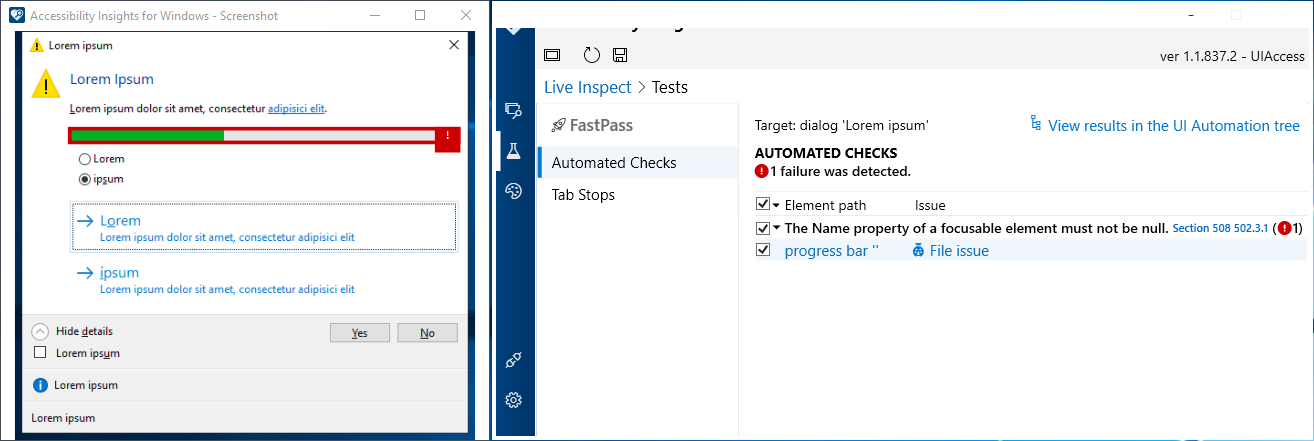
However, I'm not exactly sure what that message is saying, because when I use Inspect, it shows the progress bar as "Not Focusable":
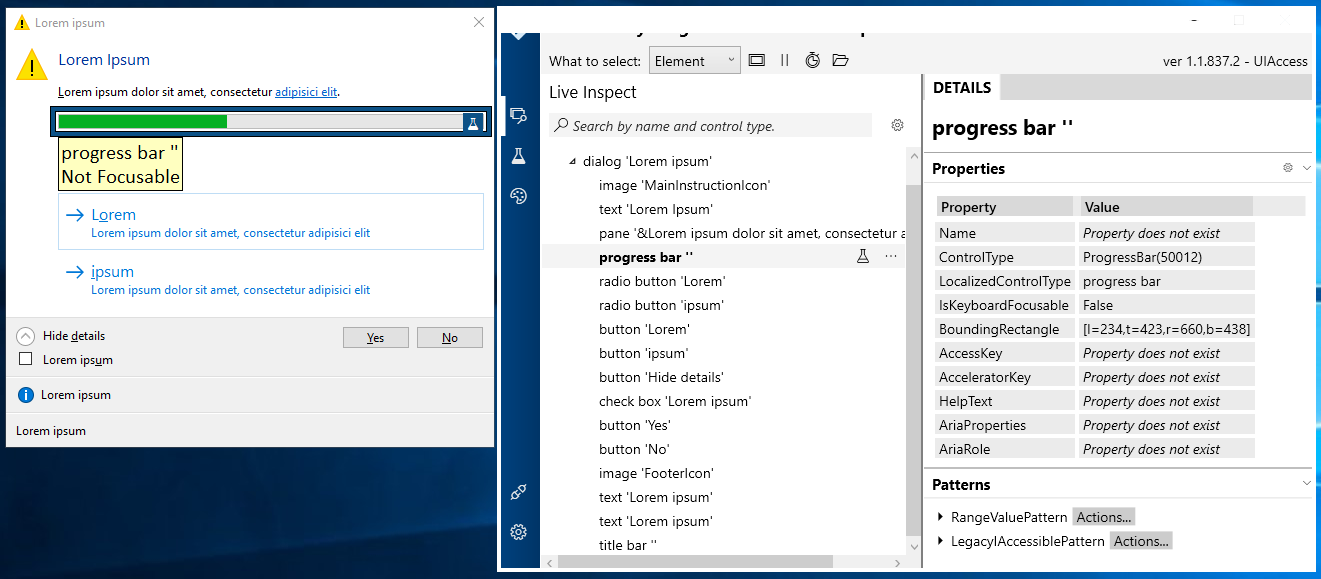
Thanks!
kpreisser
on 20 May 2019
@kpreisser looks like a possible bug in the tool. According to the second screenshot, the Name property on ProgressBar should not be required because ProgressBar is not _focusable_, so the test should not fail. I would not worry about it for now.
Our other option is to provide a small wrapper around ProgressBar which supplies only the Name property to satisfy accessability requirements, and then use that new wrapped Progress Bar in these dialogs.
zsd4yr
on 29 May 2019
@kpreisser answers inline
Regarding the API Review, there are some points that I added to the Possible API TODOs list (but did not yet apply to the API proposal), about which I feel like they should probably be applied before the API is freezed:
- Unify properties
Icon+IconHandleinto oneIconproperty by using subclasses ofTaskDialogIconto differentiate between icon types (see #146 (comment)). (The staticShow()methods would then probably have overloads only for the enumTaskDialogStandardIcon.)
This should avoid confusion about having two mutually exclusive properties (and it would allow to initially not showing an icon but then updating it to one using a handle (without using navigation)).
Additionally, it will allow us in the future to add an additional icon type that represents integer/string resource icons (e.g. fromimageres.dllor the application's executable), which could also be shown using a colored bar (which is not possible when using a handle).
I like this.
- Maybe instead of property
bool RightToLeftLayout, use aFlowDirectionenum (similar to WPF), maybe initially withSystemDefaultandRightToLeftentries, where we later could addLeftToRightonce the RTL bug in Windows is fixed.
I would stick with RTL actually, as this is what Windows Forms devs. probably expect to see, and I would personally rather elevate the windows issue so that they can get feedback than obfuscate it.
- Maybe move property
TaskDialogPage.DoNotSetForegroundtoTaskDialog(like done withStartupLocation) because it only seems to have an effect when showing the dialog, but not when navigating it.
That seems like a righteous change to me.
zsd4yr
on 29 May 2019
Hi @zsd4yr,
thanks a lot for your reply!
Our other option is to provide a small wrapper around ProgressBar which supplies only the Name property to satisfy accessability requirements, and then use that new wrapped Progress Bar in these dialogs.
I was able to get rid of the error by enumerating the child windows of the Task Dialog (after showing it) with EnumChildWindows(), finding the control with class name msctls_progress32, and then calling IAccPropServices::SetHwndPropStr() as shown in this example:
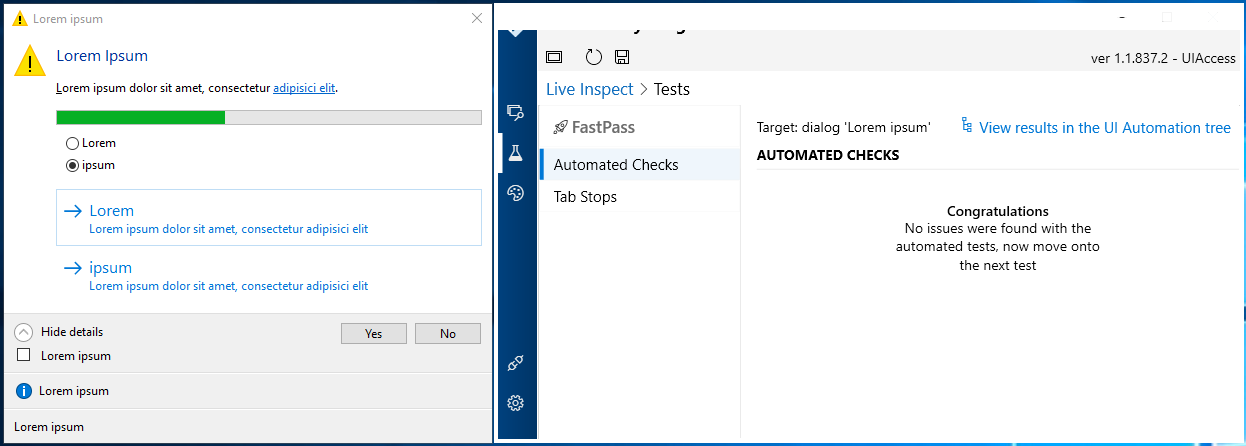

However, if that's a possible bug in the tool, I think we probably shouldn't include this in the task dialog code.
I like this.
That seems like a righteous change to me.
Should I already apply these changes to the proposed API (and the implementation)?
Is there already a schedule for the API review?
Do you know under which namespace the Task Dialog classes should be placed? I could then try to start merging the branch with WinForms and integrating the Task Dialog there.
Thank you!
kpreisser
on 30 May 2019
In the meantime, I did some improvements to the navigation handling in the code, to better reflect the actual behavior of the native task dialog: When you start navigation by sending a TDM_NAVIGATE_PAGE message, the task dialog creates the new controls and posts a message to the message queue to finish navigation when the message loop continues.
However, the the old controls are still there when SendMessage() returns, and the dialog also behaves af it is still showing the "old" page.
(For example, when the new page contains a Checkbox but the old one doesn't, and you send a TDM_CLICK_VERIFICATION before TDN_NAVIGATED occurs, an access violation occurs; whereas the other way round (when the new page doesn't have a check box), it works. Also, if you update one of the text elements with TDM_SET_ELEMENT_TEXT, these changes will be lost after navigation completes).
Then, when the event loop continues, the Task Dialog eventually processes the message that it posted earlier, and completes navigation by removing the old controls and updating its window to show the new controls, and then raising the TDN_NAVIGATED notification. Once this notification is raised, you can update the task dialog elements.
I handled this by not unbinding the previous TaskDialogPage immediately before binding the new one, but instead waiting for the TDN_NAVIGATED notification to occur before unbinding it. Also, I'm disallowing updates in both the previous and the next TaskDialogPage until the Created event is raised. (It could be made possible to update certain in the elements even if navigation is not yet completed, by buffering the changes, and then sending the corresponding messages to the dialog once the TDN_NAVIGATED notification is raised.)
I found that it is possible to send TDM_CLICK_BUTTON messages even if navigation did not yet complete, where the dialog behaves as if one of the buttons of the previous page is clicked. Therefore, I'm now allowing to close the dialog during that time by calling TaskDialog.Close() which simulates a click to the Cancel button of the previous page (this causes the dialog to close without finishing navigation).
Additionally, I found it is possible to start another navigation even if the previous navigation is not finished. This is reflected by having a Queue<TaskDialogPage> that represent the bound (but not yet ready) pages for which the dialog started navigation.
In this context, I also found that my previous assumption about the Access Violation occuring when sending a TDM_NAVIGATE_PAGE message and returning S_OK from within a TDN_BUTTON_CLICKED notification was not completely correct: The problem is not when sending a TDM_NAVIGATE_PAGE message within a TDN_BUTTON_CLICKED notification, but rather when "receiving" a TDN_NAVIGATED notification within a TDN_BUTTON_CLICKED notification, which can occur when running the message loop there. (For example, if you don't run the event loop after starting navigation within a button clicked handler, the dialog closes without completing navigation (as mentioned above), and no access violation occurs).
I have adjusted the code to reflect this.
However, when updating the code sample in my initial post that shows a multipage dialog, by adding a comment that explains a sample scenario where the user would navigate the dialog to one showing a progress bar, and starts a background thread that does some some work and eventually calls Control.BeginInvoke() to navigate the dialog to the result page, I first thought it would be OK it the user starts that thread directly after starting navigation (not before), because in that case the other thread can only post a message to the GUI message queue (from BeginInvoke()) after the task dialog posted its own message to finish navigation.
(Otherwise, when doing it in the reverse order, there would be a small chance that the background thread posts its message before the dialog posts its own one, meaning the callback specified by BeginInvoke() could be called before the dialog completed navigation, in which case updates to the task dialog would not be possible.)
Yet, I then found that while BeginInvoke() will always post a message, when that message is processed later in the Control.WndProc() which calls InvokeMarshaledCallbacks(), it does not only process the first callback in the threadCallbackList queue, but also processes all other entries.
However, this means that even if the user starts the background thread after initiating the dialog navigation, there is still a chance that the callback is called before the dialog completed navigation, in case there was already some other Invoke() call before the user navigated the dialog and that callback has not yet been processed. Therefore, I updated the comment to say that you should not start the background work directly after starting navigation, but rather in the TaskDialogPage.Created event, which ensures that the dialog has always completed navigation before the background thread wants to update it.
Edit: Here is a sample code that demonstrates the behavior:
```c#
var form = new Form();
form.Shown += (s, e) =>
{
var dialog = new TaskDialog()
{
Page =
{
CustomButtons =
{
"Navigate"
}
}
};
dialog.Page.CustomButtons[0].Click += (s2, e2) =>
{
e2.CancelClose = true;
        form.BeginInvoke(new Action(() => Console.WriteLine("Invoke 1")));
        // Navigate the dialog.
        dialog.Page = new TaskDialogPage();
        dialog.Page.Created += (s3, e3) => Console.WriteLine("Navigated");
        // This callback should be executed after the dialog finished navigation.
        form.BeginInvoke(new Action(() => Console.WriteLine("Invoke 2")));
    };

    dialog.Show();
};
Application.Run(form);
When you click on the dialog's "Navigate" button, the following is printed to the console:
Invoke 1
Invoke 2
Navigated
This means that callback specified by the second `BeginInvoke()` call is executed **before** the dialog finished navigation.

But if you now comment the first `BeginInvoke()` calll:
```c#
        dialog.Page.CustomButtons[0].Click += (s2, e2) =>
        {
            e2.CancelClose = true;

            //form.BeginInvoke(new Action(() => Console.WriteLine("Invoke 1")));
            // Navigate the dialog.
            dialog.Page = new TaskDialogPage();
            dialog.Page.Created += (s3, e3) => Console.WriteLine("Navigated");
            // This callback should be executed after the dialog finished navigation.
            form.BeginInvoke(new Action(() => Console.WriteLine("Invoke 2")));
        };
then the following is printed:
Invoke 2
which means that now the callback specified by the second BeginInvoke() call is executed after the dialog completed navigation.
This behavior doesn't seem to be the case in WPF when using Dispatcher.BeginInvoke(), and seems a bit strange to me. Does anyone know why InvokeMarshaledCallbacks() is implemented this way?
Also, doesn't that mean that [Begin]Invoke() unnecessarily posts messages if there are already elements in the threadCallbackList queue, since that must mean one message has already been posted which will eventually process all entries in the queue (including the new one)?
(Edit: OK, it is not completely unnecessary because when one of the callbacks runs the message loop, the remaining callbacks will be called when that message loop processes the next posted message.)
Thank you! (and sorry for the long text 😇)
kpreisser
on 30 May 2019
Should I already apply these changes to the proposed API (and the implementation)?
Is there already a schedule for the API review?
I have implemented these changes now and updated the API proposal (unifying properties Icon+IconHandle into a single Icon property by using subclasses of TaskDialogIcon to differentiate between icon types (see https://github.com/dotnet/winforms/issues/146#issuecomment-467032370), and moving DoNotSetForeground from TaskDialogPage to TaskDialog). Additionally, I renamed TaskDialogCommonButton to TaskDialogStandardButton.
Note: I did not create a class TaskDialogStandardIcons with public static getters as I think it isn't needed, because there is a implicit cast operator from enum TaskDialogStandardIcon to class TaskDialogIcon and a static Get(TaskDialogStandardIcon) method, and you can compare these icons, e.g. if (dialogPage.Icon == (TaskDialogIcon)TaskDialogStandardIcon.Information).
As for the progress of this issue, is the goal of including the Task Dialog in .NET Core 3.0 is still achievable, given that the feature-complete release candidate (Preview 7?) is only a few weeks away? Has the API review already been scheduled? (See https://github.com/dotnet/winforms/issues/146#issuecomment-459521292)
Should I perhaps already start a Pull Request (for review) even if the API has not yet been reviewed? (But I still would need to know in which namespace the task dialog types should be placed.)
Another open implementation issue is that I initially tried to add designer support for the Task Dialog, but there are still some things missing (see https://github.com/dotnet/winforms/issues/146#issuecomment-451130343), so maybe we should remove that support for now, and check if we can add it in a later version. In that case, maybe the TaskDialog should also no longer derive from System.ComponentModel.Component as that was only needed for designer support?
Thank you!
kpreisser
on 13 Jun 2019
Please do go ahead and start the PR. I'll poke @OliaG and @terrajobst about getting the API review done and wrapped up. I think we can still get it in if we get everything lined up. @RussKie will help with the PR review. Thank you for your patience as we're getting used to taking new big features from the community! 😀
merriemcgaw
on 14 Jun 2019
Hi @merriemcgaw,
thank you! I will start a PR then. For now, I have also removed the attributes for designer support and changed class TaskDialog to no longer inherit from System.ComponentModel.Component as mentioned in my previous comment.
Unfortunately, I just discovered a new (serious) bug in the native task dialog that is related to accessibility: When you "click" a button by pressing its access key (mnemonic), and the dialog is still open when the message loop continues (e.g. because you returned S_FALSE from the TDN_BUTTON_CLICKED handler so that the dialog doesn't close), then the TDN_BUTTON_CLICKED handler is called twice instead of once.
I encountered this behavior on the current Windows 10 Insider Preview (18917) and also on Windows Vista, so it seems this isn't a regression.
Here is a C++ code sample that shows that behavior in the native task dialog.
When you run it and you click on the button with the mouse, or press Space or Enter, you can see that the counter increments by 1 as expected. But if you press Alt+M, you can see that the counter increments by 2.
This behavior is the same for regular custom buttons, command links, and standard (common) buttons.
But fortunately, I was able to work-around this in the TDN_BUTTON_CLICKED handler by setting a flag to ignore further TDN_BUTTON_CLICKED notifications and posting a user-defined (WM_APP) message to the task dialog. Then, when this posted message is processed (by the subclass window procedure), the flag is reset, so the next TDN_BUTTON_CLICKED notifications will be processed again.
This even seems to work correctly if you press the access key multiple times while the GUI thread hangs: In that case, the next (valid) TDN_BUTTON_CLICKED notification will only occur after the custom message posted to the dialog was processed.
However, it would be good if this bug can be fixed at the OS side.
Thanks!
kpreisser
on 16 Jun 2019
Hi,
I have opened a draft PR for the Task Dialog (#1133).
Edit Post about improvements for hyperlink usage was moved to #1199.
kpreisser
on 16 Jun 2019
While working on it, I noticed there is room for improvement to the handling of hyperlinks:
Thank you for a thorough description. I propose we deal with this separately, otherwise we'll never finalise this feature.
Would you like to open a new issue and copy/move your post there?
 RussKie
on 17 Jun 2019
RussKie
on 17 Jun 2019
Unfortunately, I just discovered a new (serious) bug in the native task dialog that is related to accessibility
Let's deal with this separately as well.
Could you open a new issue please?
RussKie
on 17 Jun 2019
Maybe a helper method TaskDialog.GetHyperlinkText(string href, string text)?
GSPP
on 17 Jun 2019
Hi @GSPP,
Maybe a helper method
TaskDialog.GetHyperlinkText(string href, string text)?
Thanks, good idea! That won't require any incompatible changes to the current proposed API, so it can implemented at a later time.
I will later create a separate issue for it, as @RussKie requested.
Edit: Done (#1199)
kpreisser
on 17 Jun 2019
This probably isn't useful, but the thought struck me that you could make an API that takes a FormattableString instance:
var url1 = "https://foo";
var url2 = "https://bar";
TaskDialog.FormatWithHyperlinks($"Some text, then {url1:a link}, then {url2:another link}.");
Thank you for a thorough description. I propose we deal with this separately, otherwise we'll never finalise this feature.
Would you like to open a new issue and copy/move your post there?
I opened #1199 to deal with this issue.
This probably isn't useful, but the thought struck me that you could make an API that takes a FormattableString instance:
Thanks, I didn't know about the FormattableString produced by an interpolated string!
I added it to #1199 (Option B).
kpreisser
on 22 Jun 2019
I've added the notes of API review here. Feedback welcome!
 terrajobst
on 14 Aug 2019
terrajobst
on 14 Aug 2019
So, only in 5.0 now? Why so much delay?
 kirsan31
on 14 Aug 2019
kirsan31
on 14 Aug 2019
Because further work is required, and it won't be completed before we ship v3.0.
We expect to cut a release/3.0 again shortly and then the master will be rebranded to v5.0.
RussKie
on 14 Aug 2019
Hi @terrajobst,
thanks a lot for sharing the review notes! I will start to work on addressing them when I have time.
kpreisser
on 14 Aug 2019
I have implemented changes to the PR according to the review notes:
TaskDialog.Show()should be renamed toShowDialog()to match existing terms- Rename
instructiontomainInstruction- Rename
titletocaption
Done.
- Remove
TaskDialogButtonClickedEventArgsand add a Boolean property toTaskDialogButtonthat allows to specify whether the dialog will close when the button is clicked.
I removed class TaskDialogButtonClickedEventArgs and added a boolean property TaskDialogButton.ShouldCloseDialog (default value: true). This property can be set to false to prevent the dialog from closing when the button was clicked.
- Can we remove
TaskDialogStandardIconand replace the enum values with static
fields onTaskDialogIcon. Also instead of implicit operators, can we just
have a constructor that takes anIcon?
I removed TaskDialogStandardIcon enum and TaskDialogIconHandle class, and replaced the enum values with static fields on TaskDialogIcon, and added a public constructor where an Icon (or icon handle as IntPtr) can be supplied.
Note that this means a TaskDialogIcon instance can represent either a standard icon (when retrieved from one of the static fields) or a handle icon (when created with the public constructor).
When the instance was created by passing an Icon (or IntPtr) to the public constructor, the icon handle can be retrieved with the IconHandle property. However, when the instance represents a standard icon, that property throws an InvalidOperationException. Is this correct/desired?
- Same for `TaskDialogStandardButton`.I think that it is not that simple with
TaskDialogStandardButton. Note that that type isn't an enum but a subclass ofTaskDialogButton, so that you can create an instance ofTaskDialogButtonand customize it (like setting theEnabledproperty or add an handler to theClickevent).
I don't think it is possible to created shared instances of that button for eachTaskDialogResultvalue that could be retrieved by static fields, because then all task dialogs would share that instances (e.g. when showing multiple dialogs at the same time).
However, I think the dicussion also went into the direction of combining TaskDialogStandardButton and TaskDialogCustomButton classes into a single TaskDialogButton class that can represent either a standard or a custom button.
This would be possible, although then there are other questions e,g. should it be possible to change the type of an existing instance between a standard and custom button by setting the properties; how should properties behave when they are not applicable for the current state etc.
- We should investigate whether extending
CommonDialogmakes sense here/is
possible
I think the main issue with deriving from System.Windows.Forms.CommonDialog (which was mentioned in the review) is that it has ShowDialog() methods that return System.Windows.Forms.DialogResult. This would correspond to the TaskDialogResult enum (we could add the missing enum values in Forms.DialogResult and then remove TaskDialogResult), however the difficulty is that a task dialog result is not necessarily a simple dialog result, but can also be a custom button.
It would be possible to add a enum value like CustomButtonClicked to the DialogResult so that the task dialog could indicate a non-standard button was clicked, and this button could then be retrieved by a separate property. However, this would mean that the CustomButtonClicked value has to be added to the general DialogResult enum, which I think wouldn't make much sense, because then it would also be available for every other dialog where this task-dialog-specific value is not applicable.
Additionally, looking at the implementation (ShowDialog()) it seems to be implemented such that it needs to subclass the owner window to be able to process HELPMSGSTRING messages in order to raise the HelpRequest event. This behavior seems specific to common dialog boxes as stated in the documentation (which is not applicable to the task dialog):
A common dialog box sends the HELPMSGSTRING registered message to the window procedure of its owner window when the user clicks the Help button.
Therefore, I think TaskDialog should probably not derive from CommonDialog because it isn't actually a common dialog box in terms of the Win32 documentation.
Thanks!
kpreisser
on 22 Aug 2019
@RussKie is this ready for another pass or do you want to incorporate the feedback from the UX study first? If the latter, we should mark this issue as api-needs-work.
terrajobst
on 14 Feb 2020
Updated the label, thanks for the heads up.
We're currently working with @kpreisser through the study feedback.
RussKie
on 14 Feb 2020
Can this task dialog have textBox in it? Can it be used as an inputBox?
 ygc369
on 20 Feb 2020
ygc369
on 20 Feb 2020
Can this task dialog have textBox in it? Can it be used as an inputBox?
No, this is an implementation of https://docs.microsoft.com/en-us/windows/desktop/Controls/task-dialogs-overview
RussKie
on 21 Feb 2020
Is there an implementation of this that contains a textbox control, similar to the exception dialog that contains the stack trace with the JIT debugger (below)?

I'm working on rolling my own dialog like this to display details (collapsed unless the user clicks a Show Details button) for certain, very specific events in my application, but I'd be just as happy if I didn't have to reinvent something that's already out there.
 GHosaPhat
on 11 Oct 2020
GHosaPhat
on 11 Oct 2020
@GHosaPhat My understanding is that the underlying Windows API locks it down to only the things shown here: https://docs.microsoft.com/en-us/windows/win32/controls/task-dialogs-overview
There might be ways of getting the window handle and adding controls yourself, but I'm not sure it would interoperate well with Windows' layout logic and it would probably be pretty hacky.
jnm2
on 11 Oct 2020
All right. I guess "roll my own" it is, then. Thank you.
GHosaPhat
on 11 Oct 2020
Related issues
 weltkante
·
5Comments
weltkante
·
5Comments
 Olina-Zhang
·
5Comments
Olina-Zhang
·
5Comments
 lonitra
·
5Comments
lonitra
·
5Comments
 SergeySmirnov-Akvelon
·
3Comments
SergeySmirnov-Akvelon
·
3Comments
 Shyam-Gupta
·
4Comments
Shyam-Gupta
·
4Comments
Most helpful comment
Checking in to let you know that we've filed the Windows bug. We're also trying to determine the best ship vehicle for this code. We're evaluating the possibility of an optional 'pack' of components that are usable in both WinForms and WPF so that both technologies could use them. Stay tuned for updates, we haven't forgotten this proposal!