Winforms: MonthCalendar: UpdateBoldedDates flickers and resets DisplayRange
.NET Core Version: all
Have you experienced this same bug with .NET Framework?: yes
Problem description:
After you changed BoldedDates in MonthCalendar you need to call UpdateBoldedDates method to see visual changes. The problem is that UpdateBoldedDates simple calling RecreateHandle. That's leads to 2 problems:
- Control fully redrawing with heavy flickering.
- If
MonthCalendardisplaying more than one months, you are not on the first page and selected date not in the last month, than control will scroll one page back - reset current DisplayRange.
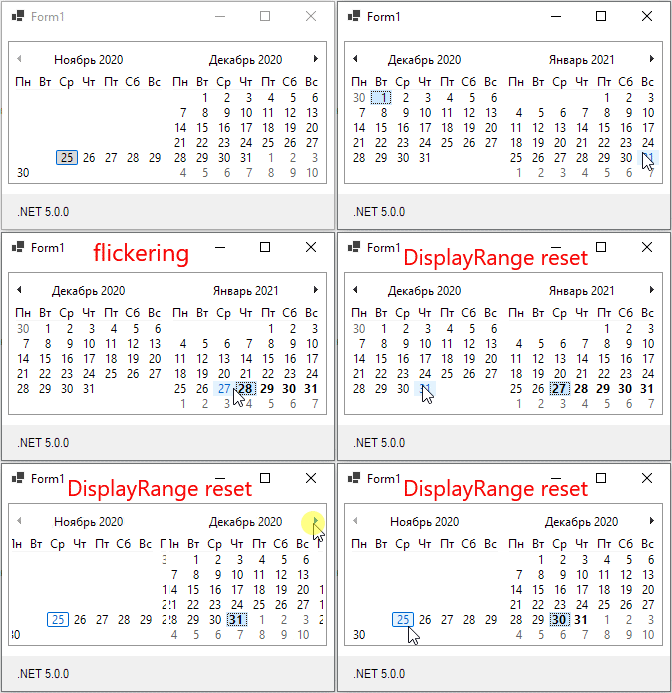
I think that the 1 problem appear due to not using MCM_SETDAYSTATE. Only MCN_GETDAYSTATE is using, so you need full redraw to process all dates.
2 problem appear due to that OnHandleCreated not care at all of DisplayRange (only SelectionRange is taken into account).
It can be workaround in user code with something like this:
monthCalendar1.SuspendLayout();
var v = monthCalendar1.GetDisplayRange(true);
var MinDate = monthCalendar1.MinDate;
var MaxDate = monthCalendar1.MaxDate;
monthCalendar1.MinDate = v.Start;
monthCalendar1.MaxDate = v.End;
monthCalendar1.UpdateBoldedDates();
monthCalendar1.MinDate = MinDate;
monthCalendar1.MaxDate = MaxDate;
monthCalendar1.ResumeLayout();
Something similar can be added to OnHandleCreated. But I think that most efficient way is to solve 1 issue - use MCM_SETDAYSTATE with all changes to BoldedDates (AnnuallyBoldedDates, BoldedDates, MonthlyBoldedDates, UpdateBoldedDates). Then 2 will be solve _automatically_.
Expected behavior:
No flickering and no DisplayRange reset.
Minimal repro:
MonthCalendar.zip
 kirsan31
All 4 comments
@vladimir-krestov can you please investigate? Thanks
 RussKie
on 26 Nov 2020
RussKie
on 26 Nov 2020
After boldeddates modification we need to use MCM_SETDAYSTATE to change appearance of current DisplayRange.
I tried implementing this (hastily) from the user side in the above example.
var DR = monthCalendar1.GetDisplayRange(false);
int Months = (DR.End.Year - DR.Start.Year) * 12 + DR.End.Month - DR.Start.Month + 1;
var BoldedDates = monthCalendar1.BoldedDates;
uint[] Monthdaystates = new uint[Months];
DateTime CurDt = DR.Start;
int curM = 0;
int DayOfMoth = CurDt.Day - 1;
while (CurDt <= DR.End)
{
    if (BoldedDates.Contains(CurDt))
        Monthdaystates[curM] |= 1U << DayOfMoth;
    else
        Monthdaystates[curM] &= ~(1U << DayOfMoth);

    var newdt = CurDt.AddDays(1);
    if (newdt.Month != CurDt.Month || newdt.Year != CurDt.Year)
    {
        curM++;
        DayOfMoth = 0;
    }
    else
        DayOfMoth++;
    CurDt = newdt;
}
fixed (uint* arr = Monthdaystates)
{
    //MCM_SETDAYSTATE 0x1008
    PInvoke.User32.SendMessage(monthCalendar1.Handle, (PInvoke.User32.WindowMessage)0x1008, (void*)Months, arr);
}
In ideal we no need to do anything if added / removed boldeddates is out of DisplayRange, but in this example we always in DisplayRange.
Left is code from 1 post (with problem 2 workaround), right is the new implementation (automatically solves problem 2):
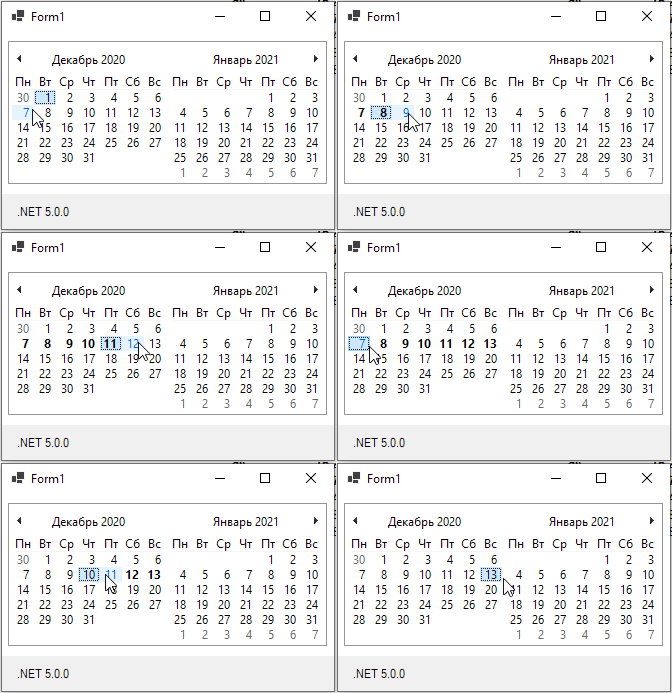
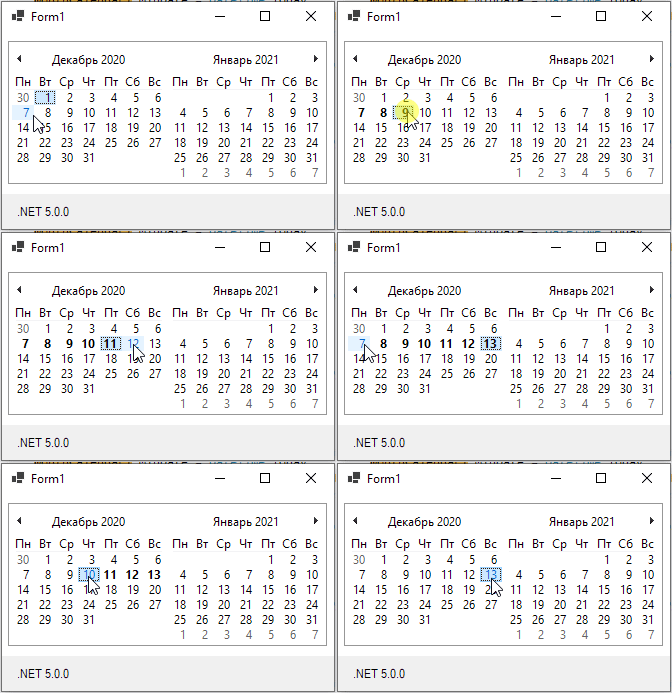
Some minor flickering is still present, but it's much much less then full redraw and may be can somehow workaround too...
------------------------UPDATE------------------------
RecreateHandle flickering does not depend on the display months count, it's flickering even with 1x1 size, but the more months the control displays, the more clearly it's noticeable.
MCM_SETDAYSTATE with 1x1 size have almost no flickering, compared to RecreateHandle it does not flicker at all.
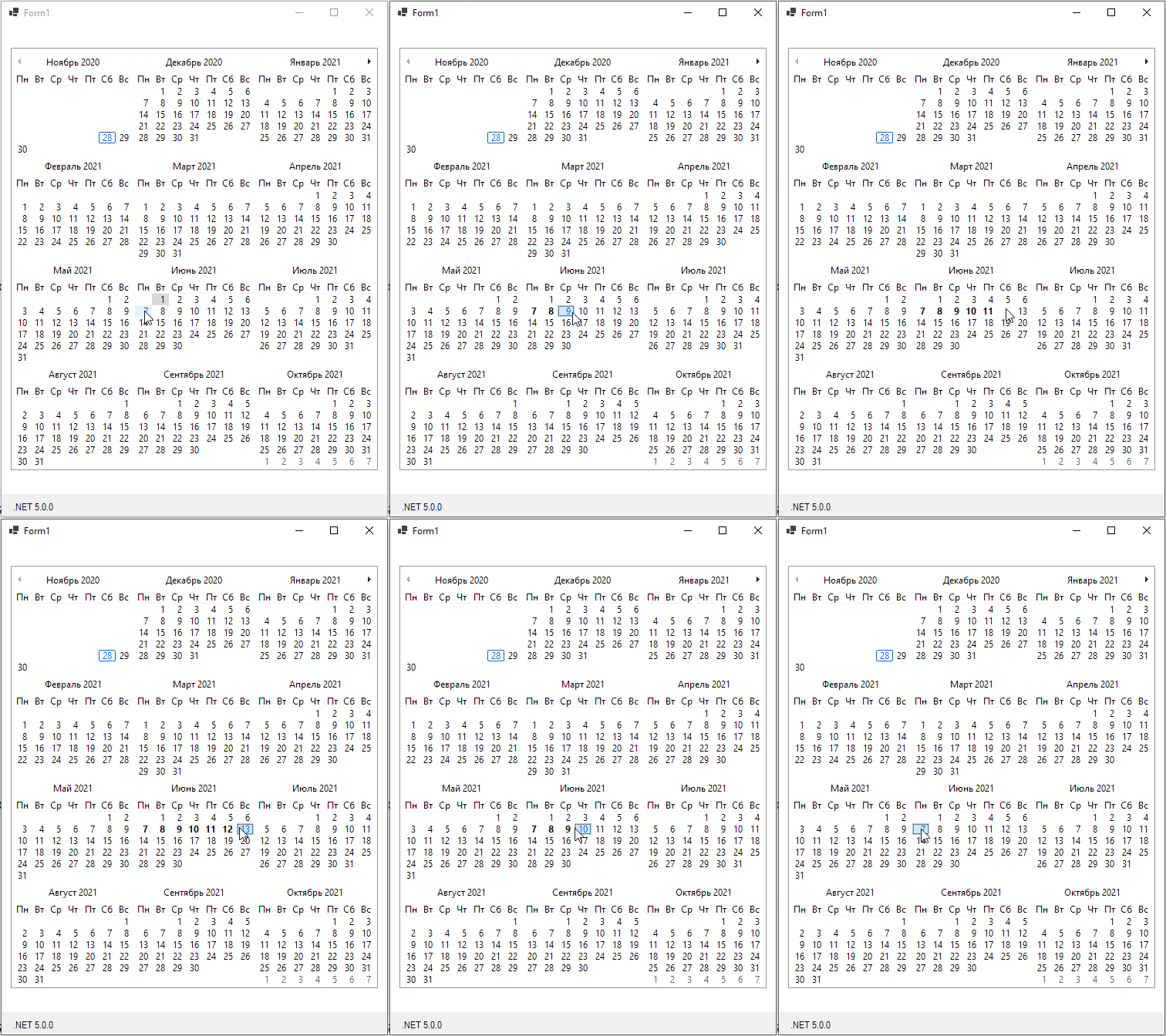
The sad thing is that the more months the control displays, the difference (between MCM_SETDAYSTATE and RecreateHandle) is smaller. With max size (3x4) - MCM_SETDAYSTATE still flickering as hell :sob:
3x4 flickering
------------------------UPDATE2------------------------
Just tried MCM_SETDAYSTATE with native Month Calendar Control in C++ - same huge flickering with 3x4 :sob: :sob: :sob:
kirsan31
on 28 Nov 2020
@kirsan31 Thanks for the great amount of information and comments. I spent the time to question your words and your implementation. But it seems that your implementation is the only thing we can do on our side. I haven't found any other way to improve MonthCalendar control to make it work as expected. Thank you so much! Your code example helped a lot in implementing the Calendar improvement. You can see this implementation in PR #4317, please review it.
 vladimir-krestov
on 3 Dec 2020
vladimir-krestov
on 3 Dec 2020
@vladimir-krestov Thank you for PR (I commented there).
Is there a chance to reach out to the native team about this flickering?
kirsan31
on 3 Dec 2020
Related issues
 Jenna-Zheng
·
3Comments
Jenna-Zheng
·
3Comments
 KlausLoeffelmann
·
3Comments
KlausLoeffelmann
·
3Comments
 jmairboeck
·
5Comments
jmairboeck
·
5Comments
 weltkante
·
5Comments
weltkante
·
5Comments
 noseratio
·
5Comments
noseratio
·
5Comments
Most helpful comment
@kirsan31 Thanks for the great amount of information and comments. I spent the time to question your words and your implementation. But it seems that your implementation is the only thing we can do on our side. I haven't found any other way to improve
MonthCalendarcontrol to make it work as expected. Thank you so much! Your code example helped a lot in implementing the Calendar improvement. You can see this implementation in PR #4317, please review it.