Winforms: NotifyIcon ContextMenuStrip is shown above taskbar
- .NET Core Version: 3.0.100
- Have you experienced this same bug with .NET Framework?: No
Problem description:
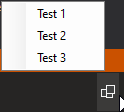
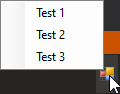
A NotifyIcons ContextMenuStrip is shown above the taskbar and not within.
I think the reason for this is that ToolStripDropDown.WorkingAreaConstrained is always returning true in .NET Core (Net.Core Source / .NET Framework Source)
.NET Core 3
.NET Framework 4.8
Actual behavior:
ContextMenu is shown above the taskbar.
Expected behavior:
ContextMenu should be shown within the taskbar.
Minimal repro:
Create a NotifyIcon, set ContextMenuStrip property, show the icon and right click.
 0x084E
All 3 comments
@0x084E but Desktop also always returns true unless you are running with restricted rights, which is no longer supported. (IsRestrictedWindow called by the if-branch does a security check and returns true unless that check failed.) So this code path looks identical between Core and Desktop to me.
oops, this was apparently very hard to follow code. There are some negations there, true is returned for the case where you have limited rights. Also there exist callers which set this explicitely, the getter should never have been simplified.
WorkingAreaConstrainedis looking at a negated flagstateNotWorkingAreaConstrainedIsRestrictedWindowreturnstruein the failure case (access not granted) - so in Core it would always return false by default- there are code paths which explicitely set
WorkingAreaConstrained, overriding the security check (so it can be constrained without the security check ever failing)
simplifying the getter was a mistake, probably when removing the no longer supported security checks
 weltkante
on 10 Oct 2019
weltkante
on 10 Oct 2019
I got the same issue in .Net Core 3.1
Here is a hacky workaround - maybe you'll need additional bounds checks, maybe also RTL will be broken, who knows. I'ts good enough for my use-case so I thought I'll share it here.
The behaviour will be a bit different as the submenu will always open at the cursor location (actually I like this behaviour more :) ). Be sure to use the provided extension method when creating submenus, otherwise you'll have the same problem again.
    public static class ToolStripDropDownItemExtensions
    {
        public static T CreateSubmenu<T>(this T item) where T : ToolStripDropDownItem
        {
            item.DropDown = new TrayMenu();
            return item;
        }
    }

    public class TrayMenu : ContextMenuStrip
    {
        [DllImport("user32.dll", SetLastError = true)]
        private static extern bool SetWindowPos(IntPtr hWnd, IntPtr hWndInsertAfter, int x, int y, int cx, int cy,
            uint uFlags);

        protected override void SetBoundsCore(int x, int y, int width, int height, BoundsSpecified specified)
        {
            var wmax = SystemParameters.VirtualScreenWidth;
            var hmax = SystemParameters.VirtualScreenHeight;

            var pos = Cursor.Position;
            x = pos.X;
            y = pos.Y;

            if (x + width > wmax) x -= width;
            if (y + height > hmax) y -= height;

            SetWindowPos(Handle, IntPtr.Zero, x, y, width, height, 0);
        }
    }
 sneusse
on 8 Jun 2020
sneusse
on 8 Jun 2020
II'll need a little more logic, but overriding SetBoundsCore was a nice hint. Thanks for sharing!
0x084E
on 8 Jun 2020
Related issues
 lonitra
·
5Comments
lonitra
·
5Comments
 vladimir-krestov
·
3Comments
vladimir-krestov
·
3Comments
 damageboy
·
4Comments
weltkante
·
5Comments
damageboy
·
4Comments
weltkante
·
5Comments
 jmairboeck
·
5Comments
jmairboeck
·
5Comments
Most helpful comment
@0x084E but Desktop also always returns true unless you are running with restricted rights, which is no longer supported. (IsRestrictedWindowcalled by the if-branch does a security check and returns true unless that check failed.) So this code path looks identical between Core and Desktop to me.oops, this was apparently very hard to follow code. There are some negations there,
trueis returned for the case where you have limited rights. Also there exist callers which set this explicitely, the getter should never have been simplified.WorkingAreaConstrainedis looking at a negated flagstateNotWorkingAreaConstrainedIsRestrictedWindowreturnstruein the failure case (access not granted) - so in Core it would always return false by defaultWorkingAreaConstrained, overriding the security check (so it can be constrained without the security check ever failing)simplifying the getter was a mistake, probably when removing the no longer supported security checks