Windowscommunitytoolkit: HamburgerMenuGlyphItem seems broken in version 1.5.1
In version 1.5.1 this code:
<ctrl:HamburgerMenu.ItemsSource>
<ctrl:HamburgerMenuItemCollection>
<ctrl:HamburgerMenuGlyphItem Glyph="" Label="Mail" Tag="Mail" />
<ctrl:HamburgerMenuGlyphItem Glyph="" Label="OneDrive" Tag="OneDrive" />
</ctrl:HamburgerMenuItemCollection>
</ctrl:HamburgerMenu.ItemsSource>
...produces this result:
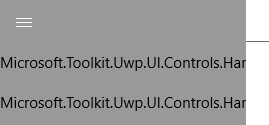
It was working perfectly in version 1.5.0, and it was rendering the specified label.
What have you done and how should we fix this?
There is lacking documentation for HamburgerMenuGlyphItem to begin with...
I am grateful I've managed to make it work the first time...
 DumboJetEngine
All 5 comments
Have you tried to set custom HamburgerMenu.ItemTemplate?
Something like that:
<ctrl:HamburgerMenu.ItemTemplate>
    <DataTemplate  x:DataType="ctrl:HamburgerMenuGlyphItem">
        <Grid>
          <Grid.ColumnDefinitions>
            <ColumnDefinition Width="48" />
            <ColumnDefinition />
          </Grid.ColumnDefinitions>
          <FontIcon Grid.Column="0"
                    FontFamily="Segoe MDL2 Assets"
                    FontSize="20"
                    Foreground="{ThemeResource AppBarItemForegroundThemeBrush}"
                    Glyph="{x:Bind Glyph}" />
          <TextBlock Grid.Column="1"
                     VerticalAlignment="Center"
                     Foreground="{ThemeResource AppBarItemForegroundThemeBrush}"
                     Text="{x:Bind Label}" />
        </Grid>
    </DataTemplate>
</ctrl:HamburgerMenu.ItemTemplate>
 maxkatz6
on 31 Jul 2017
maxkatz6
on 31 Jul 2017
The 1.5.1 release removed the default data template for the HamburgerMenuGlyphItem due to some problems with the template overriding that was discussed in #1277 . You will have to re-supply the DataTemplate for the HamburgerMenuGlyphItem` at the moment. If you are having problem with writing a DataTemplate for this, let me know (Tirraon above supplied one and it looked fine.)
Re-introducing the default template for all Hamburger Menu Items is on the radar, but only when we are confident that it would be backward compatible with the way that everybody is using it right now.
 Code-ScottLe
on 31 Jul 2017
Code-ScottLe
on 31 Jul 2017
Since I had to write the template twice (once for items and once for options) I decided to do it the "right" way with a resource.
In the process, I fell on two issues that seem like bugs in UWP development environment:
1) https://stackoverflow.com/questions/34106816/the-name-x-does-not-exist-in-the-namespace-usingy
Some hacks, rebuilds and lots of pray, solved this one, but it reappeared when I restarted VS.
2) https://stackoverflow.com/questions/39056194/uwp-compile-error-when-using-xdatatype-property-on-datatemplate
This is still not working for me when I declare a template in my resources.
This is my code (a little more complex than I expected):
        <DataTemplate x:DataType="controls:HamburgerMenuGlyphItem" x:Key="HamburgerMenuGlyphItemTemplate">
            <Grid>
                <Grid.ColumnDefinitions>
                    <ColumnDefinition Width="48" />
                    <ColumnDefinition />
                </Grid.ColumnDefinitions>
                <FontIcon Grid.Column="0"
                          FontFamily="Segoe MDL2 Assets"
                          FontSize="20"
                          Foreground="{ThemeResource AppBarItemForegroundThemeBrush}"
                          Glyph="{x:Bind Glyph}" />
                <TextBlock Grid.Column="1"
                           VerticalAlignment="Center"
                           Foreground="{ThemeResource AppBarItemForegroundThemeBrush}"
                           Text="{x:Bind Label}" />
            </Grid>
        </DataTemplate>

        <!-- ^^^^ This fails with : The XAML Binary Format (XBF) generator reported syntax error '0x09C4' : Property Not Found -->

        <local:MenuItemDataTemplateSelector x:Key="HamburgerMenuGlyphItemTemplateSelector" Template="{StaticResource HamburgerMenuGlyphItemTemplate}"/>
.
public class MenuItemDataTemplateSelector : DataTemplateSelector
{
    public DataTemplate Template
    {
        get;
        set;
    }

    protected override DataTemplate SelectTemplateCore(object item)
    {
        return Template;
    }
}
.
    <ctrl:HamburgerMenu
        ItemTemplateSelector="{StaticResource HamburgerMenuGlyphItemTemplateSelector}"
        OptionsItemTemplateSelector="{StaticResource HamburgerMenuGlyphItemTemplateSelector}"
        ....
I am sure I will find the solution soon, but this is a really stressing programming environment. It seems that the intellisense does not agree with the build process on what properties or classes are there and what not.
DumboJetEngine
on 31 Jul 2017
No need to write the template twice or for the DataTemplateSelector. You can define the template and use that for both instead.
<ctrl:HamburgerMenu
        ItemTemplate="{StaticResource HamburgerMenuGlyphItemTemplate}"
        OptionsItemTemplate="{StaticResource HamburgerMenuGlyphItemTemplate}"/>
 skendrot
on 1 Aug 2017
skendrot
on 1 Aug 2017
@skendrot Thanks.
I was trying the same but with a TemplateSelector.
The issue is that when I define the template inside App.xaml, it fails to build as reported here too: https://stackoverflow.com/questions/39056194/uwp-compile-error-when-using-xdatatype-property-on-datatemplate
It seems that it does not recognize the x:DataType part.
But when I move the template definition inside my main page resources, it works.
This is very weird and annoying.
I think defining things in App.xaml is the norm and if this does not work, what should one do?
Anyway... This is not the UWP project, so it makes no sense not to close this issue.
So, I am closing it! ;)
DumboJetEngine
on 1 Aug 2017
Related issues
 Vijay-Nirmal
·
4Comments
Vijay-Nirmal
·
4Comments
 miguelarcilla
·
4Comments
miguelarcilla
·
4Comments
 jamesmcroft
·
3Comments
jamesmcroft
·
3Comments
 tibitoth
·
3Comments
tibitoth
·
3Comments
 karmaecrivain94
·
3Comments
karmaecrivain94
·
3Comments
Most helpful comment
The 1.5.1 release removed the default data template for the
HamburgerMenuGlyphItemdue to some problems with the template overriding that was discussed in #1277 . You will have to re-supply theDataTemplatefor the HamburgerMenuGlyphItem` at the moment. If you are having problem with writing a DataTemplate for this, let me know (Tirraon above supplied one and it looked fine.)Re-introducing the default template for all Hamburger Menu Items is on the radar, but only when we are confident that it would be backward compatible with the way that everybody is using it right now.