Winappdriver: Improve documentation
Hi all,
Documentation for WinAppDriver must be improved. I find it hard to set it up on my Win machine to test a classic Windows app.
What I would like to find in the docs would be:
What I need to install and if admin rights are required
- just Appium desktop app ?
- Appium desktop app and the WinAppDriver executable?
- only the nodejs packages? as admin or not?Capabilities
- there's no list of the supported capabilities - those common with the rest of the drivers and those specific to the winDriverDo I need to run both appium server and the Visual Studio solution as admin?
How to run the tests in a CI server (automation of the automation tests)
Some guideliness for writing tests; some link to Selenium guideliness would do too.
How to write multi-platform integration tests: for example do some action on a mobile app and check that some data changed in the backend
Limits of the current version of Windows Driver
Thank you,
Simo
 savornicesei
All 7 comments
Hi @savornicesei,
Thank you for the suggestions. We absolutely want to make our documentation top notch and we greatly appreciate the list of items we can add. 👍 While we are trying to add items from the list, there are a few items you mentioned that is already in place in the README.md as laid out below. Would you have a look on the list below and provide feedback if it lacks clarity or difficult to find?
Windows Application Driver does not depend on Appium and can be installed and run on Windows 10 machine independently. The installation steps are documented in https://github.com/Microsoft/WinAppDriver/tree/v1.0#getting-started.
WinAppDriver.exeonly needs to be run as administrator if it needs administrator privilege such as listening to a non local host address or restricted port.The complete list of supported capabilities are also documented in https://github.com/Microsoft/WinAppDriver/blob/v1.0/README.md#supported-capabilities
No admin requirement is needed for
WinAppDriver.exebasic scenarios as specified aboveThis is coming. Please stay tuned!
We are thinking of having a better guidelines or tutorials to write a test case. But for the time being, please refer to our Samples and Tests.
As long as each of the remote end (server and mobile device) has Windows Application Driver installed and running, you can write a test script that create one (or more) session in each remote end and access any UI application that is active in the machine. Non-UI test is not necessarily in scope for Windows Application Driver. However, we may consider some scenarios that are useful.
Can you elaborate what you meant by limit? Would you like to see something more in the Release Notes?
 timotiusmargo
on 20 Feb 2018
timotiusmargo
on 20 Feb 2018
Hi @hassanuz,
At:
- For newcomers (including me), the relation between Appium and WinAppDriver is not clear. Scott Hanselman has a very good intro for WinAppDriver here so it would be of value to be mentioned in the README.md file.
2 & 3. True. The appium documentation is not up2date which is confusing. Perhaps you can keep in touch with them, find a working flow to synchronize documentation for WinDriver section of their documentation.
- Let it come! :smile:
5&6. It would be worth adding your comments to the WinDriver docs that can be further expanded to contain more relevant and updated info, as the driver matures.
I was thinking at features not implemented or working different than in the other selenium-like drivers.
A public roadmap would be nice to have, perhaps with some release date estimates - so we would know what (and when) to expect if we're going to embrace WinDriver for automated tests.
Best,
Simo
savornicesei
on 22 Feb 2018
It would be good to mention the list of app ID for commonly used apps (such MSWord, PPT, OneNote, System Settings, Printers & scanners etc.) so that those can be passed App Capability to launch the app in the automation.
appCapabilities.SetCapability("app", "Application ID");
 AmitVerma4HP
on 20 Mar 2018
AmitVerma4HP
on 20 Mar 2018
I think one of the key points to put in the documentation is that Appium Server is not needed when working with WinAppDriver to test only a Windows app. It took me a long time to realize this.
The only things you need are:
- WinAppDriver
- Your Windows application to automate (WPF, Winforms, UWP, etc)
- Unit Tests most likely written in C# or Python, etc.
- And finally, a corresponding Appium Client for your unit test to consume.
For Windows only development, it's easier to think of it as:
Unit Test >> Appium Client >> WinAppDriver >> Windows application
Where as in the mobile or web world:
Unit Test >> Appium Client >> Appium Server >> mobile/web app
...where Appium Server handles "translating" the automation requests to the specific device platform so that you can write one test to verify the same app that runs on multiple devices or web.
Now I assume if you had an application that was running on multiple mobile devices, multiple web browsers, AND you had a Windows App as well (wow!), then you'd use Appium Server since it's the component that decides how/where to route the requests:
Unit Test >> Appium Client >> Appium Server >> mobile
Unit Test >> Appium Client >> Appium Server >> web
Unit Test >> Appium Client >> Appium Server >> WinAppDriver >> windows
One test to test them all! ;)
 brett-burkhart
on 26 Mar 2018
brett-burkhart
on 26 Mar 2018
Added a page for this topic. Better late than never. Additional edits appreciated.
https://github.com/Microsoft/WinAppDriver/wiki/WinAppDriver-and-Appium
 yodurr
on 18 Mar 2019
yodurr
on 18 Mar 2019
i'm trying to automate Creo software.
but when i launch Creo i get dialog box, for Chose startup directory.
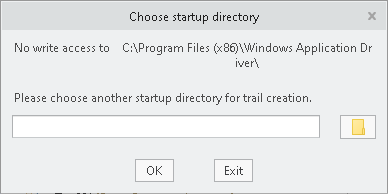
[RemoteTestNG] detected TestNG version 7.0.0
FAILED CONFIGURATION: @BeforeMethod setup
org.openqa.selenium.SessionNotCreatedException: Unable to create a new remote session. Please check the server log for more details. Original error: Failed to locate opened application window with appId: C:\Program Files\PTC\Creo 6.0.3.0\Parametric\bin\parametric.exe, and processId: 11088 (WARNING: The server did not provide any stacktrace information)
Command duration or timeout: 144.74 seconds
Build info: version: '3.141.59', revision: 'e82be7d358', time: '2018-11-14T08:17:03'
 vickymore2003
on 28 May 2020
vickymore2003
on 28 May 2020
Hey vickymore,
I am working right now on the same task and facing a similar problem when i try to open creo from the command line. can you please help with the same in case if you come up a soultion.
 ramatubs
on 26 Oct 2020
ramatubs
on 26 Oct 2020
Related issues
AmitVerma4HP
·
4Comments
 quincycs
·
3Comments
quincycs
·
3Comments
 SimonKirkhamCL4U
·
3Comments
SimonKirkhamCL4U
·
3Comments
 RajneeshK2018
·
4Comments
RajneeshK2018
·
4Comments
 didhddldlq
·
3Comments
didhddldlq
·
3Comments
Most helpful comment
I think one of the key points to put in the documentation is that Appium Server is not needed when working with WinAppDriver to test only a Windows app. It took me a long time to realize this.
The only things you need are:
For Windows only development, it's easier to think of it as:
Unit Test >> Appium Client >> WinAppDriver >> Windows application
Where as in the mobile or web world:
Unit Test >> Appium Client >> Appium Server >> mobile/web app
...where Appium Server handles "translating" the automation requests to the specific device platform so that you can write one test to verify the same app that runs on multiple devices or web.
Now I assume if you had an application that was running on multiple mobile devices, multiple web browsers, AND you had a Windows App as well (wow!), then you'd use Appium Server since it's the component that decides how/where to route the requests:
Unit Test >> Appium Client >> Appium Server >> mobile
Unit Test >> Appium Client >> Appium Server >> web
Unit Test >> Appium Client >> Appium Server >> WinAppDriver >> windows
One test to test them all! ;)