Widescreenfixespack: [SH2] Missing textures on widescreen.
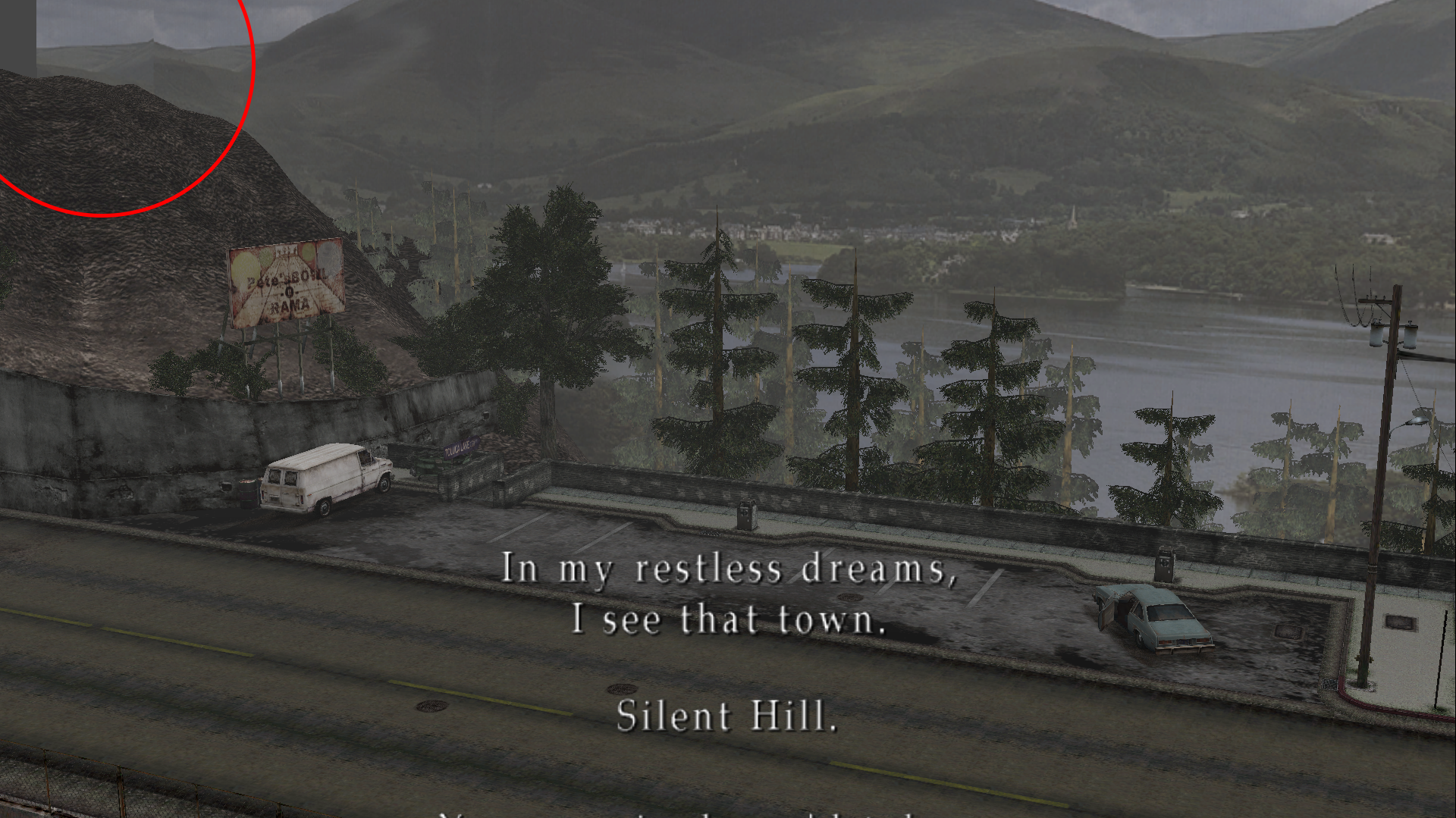
As you know, the game was made with 4:3 aspect ratio in mind. At playing on 16:9, you can see some textures missing. Like this:
https://ibb.co/jduu8w
https://ibb.co/c0XmMG
https://ibb.co/hNS31G
There are others examples like these.
Is there any chance to add an option in future updates to reduce the FOV in-game as you did with the cutscenes?
 Storm3000
All 67 comments
I think I'm going with 'no', but maybe ThirteenAG may disagree.
Vert- scaling (reduce fov) is a step backwards. I only did it for cutscenes because seeing the characters awkwardly frozen before moving was really distracting, and any loss of vertical information was compensated with the removal of borders. This is hardly an issue in comparison. Playing in vert- would give you about the same results as playing in 4:3, if not worse due to the cropping that occurs.
 AeroWidescreen
on 5 Oct 2017
AeroWidescreen
on 5 Oct 2017
Those aren't missing textures but rather the camera clipping into the wall (and with back-face culling you see through these poly planes back into the environment) or the polys simply not existing there (as the camera was never meant to show that much over).
I will play devil's advocate though, Aero, and say these issues only happen in a handful of static camera placements throughout the game. So would a slight vert- scale zoom be that bad (edit: just for these camera parts, not the whole game, if that's possible)? I'm not sure; just wondering.
One of the worst examples of this happening is in the apartments where James puts his hand in the hole for the key.
 Polymega
on 5 Oct 2017
Polymega
on 5 Oct 2017
I'm not saying it should be a mandatory option, but free choice. The player could choose whether to activate it or not. And it could be disabled by default. As jdkubiak says, it could be a slight vert- scale zoom.
Storm3000
on 6 Oct 2017
Neat fact: The camera clips through the wall in the butterfly room (where James puts his hand in the wall) in the PS2 version as well. Must've never paid attention to that when I was a teenager!

Polymega
on 15 Oct 2017
@jdkubiak Or we didn't catch that because of 480i+CRT TV+composite cables : )
 CHNSK
on 30 Oct 2017
CHNSK
on 30 Oct 2017
@AeroWidescreen check out this video around the 1:20 mark:
Is it possible to use that info to fix the camera clipping through walls in a few locations throughout the game?
I know in the video the modder says if you go to another room the camera settings get reset but is there a way to have the .cam file retain this info?
Polymega
on 10 Mar 2018
Is it possible to use that info to fix the camera clipping through walls in a few locations throughout the game?
If I could understand what the heck these values do, then maybe yeah. It's not as easy since there's no camera debug I can reference.

I don't think this would be practical for anything wider than 16:9, but I'm willing to bet most people would be OK with that.
I know in the video the modder says if you go to another room the camera settings get reset but is there away to have the .cam file retain this info?
The game reloads the data into memory from the .cam files every time you enter a new location, so any permanent changes would have to be done by hex editing those files. That's probably the safest way of doing it if you don't want any risk of changing another camera by accident.
AeroWidescreen
on 11 Mar 2018
It's not as easy since there's no camera debug I can reference.
I have an ISO of the E3 trial version of this game that the YouTuber used to access the debug menu. It'd need to be ran on a PS2 emulator. I'm not sure how involved you'd want to get with that, though, but I have the demo if you'd like. I can tell you how to access the debug menu, too, but not much more.
Here's an old video I made on it. I'm alarmingly unqualified to talk about it (also, excuse me speaking so fast; I don't record myself often and I was young so I was a bit nervous):
https://www.youtube.com/watch?v=FKnlaQBnH9s
I don't think this would be practical for anything wider than 16:9, but I'm willing to bet most people would be OK with that.
I completely agree. You can't predict and adjust the camera for a theoretical infinite amount of resolutions (especially for people who use crazy-wide resolutions... and they probably are aware of the consequences such as this when playing old-school, fixed camera horror games in ultra-wide resolutions) so adjusting for the universal, standard widescreen resolution makes sense.
so any permanent changes would have to be done by hex editing those files. That's probably the safest way of doing it if you don't want any risk of changing another camera by accident.
If you're ever able to work your magic on the .cam files, would you consider making modified .cam files perhaps as a separate download that can work injunction with the Widescreen Fix? If so, and on a related note, could that also address/fix the camera stutter in the hospital?
Polymega
on 11 Mar 2018
If you do further testings and it may be possible to do, I can do a playthrough of the game and make notes of the most egregious areas that exhibit camera clipping for 16:9.
Polymega
on 11 Mar 2018
@jdkubiak Hello. I can try modifying .cam files. Let's try fixing three angles for now. One I see on a picture above, uploaded by @AeroWidescreen. Tell me two more angles to fix and I will provide new .cam files for you to test in a day or two.
 Bigmanjapan
on 17 Mar 2018
Bigmanjapan
on 17 Mar 2018
Thank you @Bigmanjapan for joining this discussion! And thank you for your expertise and any help you can lend!
Here are some noted areas that have camera clipping (along with a Quick Save save file for each location):


 Polymega
on 17 Mar 2018
Polymega
on 17 Mar 2018
@Bigmanjapan Thank you for your help! I found that it's possible to change the directory for each cam file you modify, so we don't have to replace anything. https://i.imgur.com/nQMpEkJ.png
AeroWidescreen
on 19 Mar 2018
Awesome! This way users won't have to overwrite files. The less we have to overwrite the less chance of a user having issues with installing the mod!
Polymega
on 19 Mar 2018
Done. Adjusted using 16:9 ratio resolution. If everything's fine, then post more angles to fix.
Bigmanjapan
on 19 Mar 2018
@Bigmanjapan this is excellent work! The angles look fantastic. Thank you again! Once the camera is fixed for all areas with issues, I would like to include these files as a download on the Installation Guide. Would you like me to credit you as "Bigmanjapan" or a different name? Do you have a website or method of contact you would like for me to add to the Installation Guide as well?
I can go through the entire game later this week to find any other areas that have camera clipping and respond back.
In the meantime, could adjusting the. cam file fix the camera stutter found in the Hospital, 3F, Room S3? Here is the open ticket for the issue:
https://github.com/ThirteenAG/WidescreenFixesPack/issues/391
To everyone else: Here is Bigmanjapan's skilled work in action:


Polymega
on 19 Mar 2018
@jdkubiak Managed to fix #391 issue. Try it on your build. hp121.zip
"Bigmanjapan" is fine if you want to credit me. Right now my twitter @BigmanjapanSC is the fastest way to contact me.
@AeroWidescreen I assume you will use an external wrapper to change paths to .cam files? I tried editing sh2pc.exe directly to change .cam file paths and it is indeed works with no issues.
Bigmanjapan
on 19 Mar 2018
@jdkubiak Managed to fix #391 issue. Try it on your build. hp121.zip
Works beautifully! Thank you!
Polymega
on 19 Mar 2018
Hi @Bigmanjapan here are the remaining camera issues I've found. Note that I haven't tested all endings yet.
05: Quick Save save file
The first image shows the camera when James is all the way to the left (at the window). The second image shows ideally where the camera should be instead when James is all the way to the left.
I have received a few messages on my video asking if the window is a bug (with people thinking it's part of the white shaders bug).
Moving the camera over should alleviate this concern and also match the angle closer to the original versions.


06: Quick Save save file
This is seen on the "Maria" ending. It could also be shown on other endings (I haven't tested the other endings yet).
 Polymega
on 19 Mar 2018
Polymega
on 19 Mar 2018
05 and 07 are fixed. cam_adjusted_2.zip
06 will take more time to fix since it's a cutscene.
Bigmanjapan
on 20 Mar 2018
Thank you sir!
Polymega
on 20 Mar 2018
I also noticed, for 06 ("Maria" ending) that the power lines don't connect to anything and stop in the air. Can it be zoomed in to hide this, too? Below is how the 4:3 version looks for reference:


Polymega
on 20 Mar 2018
@Bigmanjapan
I assume you will use an external wrapper to change paths to .cam files?
Basically, yeah. I'll see if it's ok for me to add the cam files to the archive after you're done, then ThirteenAG could change the paths using the widescreen fix. I don't think he'll mind since it's all widescreen related, and he's done something similar for the NFS games before.
AeroWidescreen
on 20 Mar 2018
@AeroWidescreen @jdkubiak
Every game engine cutscene in this game is controlled via files in .\data\demo (for main scenario) and .\data\demo2 (for Born from a Wish scenario). Maria's ending consists of three separate cutscenes: mar_isho_a (a conversation with Mary before the bossfight), mar_isho_e (segment in Rosewater Park), mar_isho_i (final segment which needs to be zoomed-in). Now this is where an issue arises.
Final segment consists of two parts. First part is Mary reading her letter, second part is James and Maria walking. Unfortunately, first part doesn't have an external file that controls it due to (I assume) simplicity of it — only one static camera angle and lack of moving models on screen. The angle is controlled just like an ordinary camera angle during gameplay. Second part does have an external file that controls the camera angle (.\data\demo\mar_isho_i\end_maria_i.dds).
The problem here is that it would take enormous amount of time to set equal zoomed-in angles for both parts to ensure seemless transition of the first part into the second part.
Visual representation of what I wrote: https://youtu.be/PKFFO_f02Dc I changed the angle of the first part and you can see how second part "defaults" the angle back because it starts reading camera parameters from end_maria_i.dds file.
There is another way to solve this — using debug camera that I've found long time ago. Debug camera overrides any other camera parameters and therefore you would only need to set camera angle once. https://youtu.be/ekmbE4_rv8o As you can see here, when debug camera is used the angle stays the same throughout the whole cutscene.
In both methods a programmer would have to create a function that would change camera angle. Using debug camera would take less time to solve the overall issue. If it suits you, I will hunt for precise angle and explain what addresses / values to change / set to enable debug camera.
Bigmanjapan
on 21 Mar 2018
Hold on, this may not be so difficult after all. I never realized ReduceCutsceneFOV had no effect on the ending until I checked just now. It has its own number assigned to it like the other cutscenes, so maybe it's better to do that instead?

AeroWidescreen
on 21 Mar 2018
Sure. The simpler, the better.
Bigmanjapan
on 21 Mar 2018
I love this; collaboration to find solutions that leads to other solutions. You two are awesome. :)
So Aero, the issue was when ReduceCutsceneFOV was enabled it never affected this particular cutscene because the cutscene number was never assigned?
Additionally, could ReduceCutsceneFOV be forced off for the Eddie meat cutscene even when its enabled (for all the other cutscenes)?
Polymega
on 21 Mar 2018
By the way, if you stand on observation deck, change this address' sh2pc.exe+1B7AA20 (01F7AA20) value to 1 to trigger Maria's ending cutscene. Saves a lot of time.
Bigmanjapan
on 21 Mar 2018
Okay, great. So everything regarding this issue should be done then, right? I've already asked ThirteenAG and he gave me approval to add the cam files.
Do you guys have any suggestions for the name of this feature? WidescreenCam? The shorter the better IMO.
@jdkubiak
So Aero, the issue was when ReduceCutsceneFOV was enabled it never affected this particular cutscene because the cutscene number was never assigned?
It uses a different function that handles a bunch of other things for that cutscene. I guess it's because of how different it is compared to the others, with its stationary camera and scrolling text. Same goes for the Leave ending, which was unaffected by ReduceCutsceneFOV as well.
Additionally, could ReduceCutsceneFOV be forced off for the Eddie meat cutscene even when its enabled (for all the other cutscenes)?
I'll take a look. I want to see if there's a proper solution for that first.
By the way, do you mind if the FMVs you uploaded on your website is linked on the WFP download page? Or do you have another preferred link?
@Bigmanjapan
By the way, if you stand on observation deck, change this address' sh2pc.exe+1B7AA20 (01F7AA20) value to 1 to trigger Maria's ending cutscene. Saves a lot of time.
Couldn't get this to work unfortunately, but I appreciate the help!
So for the FOV I'll probably need to do a full playthrough to make sure it doesn't cause any issues. I can do that this weekend, it's not a problem. All I'm going to do is set the value to 0 so I'd immediately know if something was wrong.
005A18C5 fmul dword ptr [XXXXXXXX] // controls maria ending fov
XXXXXXXX = your address of choice
Original value = 1.043788195
New value = 1.391717553 (1.043788195 / 0.75 = 1.391717553)
0059FFBD fmul dword ptr [XXXXXXXX] // controls leave ending fov
XXXXXXXX = your address of choice
Original value = 1.147019982
New value = 1.529359976 (1.147019982 / 0.75 = 1.529359976)
AeroWidescreen
on 22 Mar 2018
For your convenience ThirteenAG/Aero, here are the .cam adjustments consolidated:
https://github.com/ThirteenAG/WidescreenFixesPack/files/1824678/cam_adjusted.zip
https://github.com/ThirteenAG/WidescreenFixesPack/files/1825579/hp121.zip
https://github.com/ThirteenAG/WidescreenFixesPack/files/1830053/cam_adjusted_2.zip
https://github.com/ThirteenAG/WidescreenFixesPack/files/1844647/ob01.zip
https://github.com/ThirteenAG/WidescreenFixesPack/files/1863845/ap108.zip
Please note that ma61.cam is pulled from a different directory: /data/bg2/ma/
(All other .cam files go to /data/bg/[appropriate folder]/)
Do you guys have any suggestions for the name of this feature? WidescreenCam? The shorter the better IMO.
ReduceCameraClipping, FixCameraClips, Fix16x9Clipping, CameraClipFix?
By the way, do you mind if the FMVs you uploaded on your website is linked on the WFP download page? Or do you have another preferred link?
Not at all: Link away!
Polymega
on 22 Mar 2018
Wow, fantastic work. I tested all the camera fixes, and works great. There's only one bug:
At the beginning, when you try to leave the town turning right, you can see the little wall has a texture missing. I don't know how to capture screens in-game.
Storm3000
on 23 Mar 2018
At the beginning, when you try to leave the town turning right, you can see the little wall has a texture missing. I don't know how to capture screens in-game.
Oh wow, I would've never noticed that. Good eye!

Polymega
on 23 Mar 2018
Bigmanjapan
on 24 Mar 2018
Thank you!
Polymega
on 24 Mar 2018
@Bigmanjapan Thank you. Great work.
I just found another camera bug. In the ladder of the second floor of Blue Creek Apartments. When you obtain the map on the ground. The wall is missing. I haven't try if this is hapening in Maria's scenario too, but surely it does.
Storm3000
on 30 Mar 2018
I just found another camera bug. In the ladder of the second floor of Blue Creek Apartments. When you obtain the map on the ground. The wall is missing. I haven't try if this is hapening in Maria's scenario too, but surely it does.

 Polymega
on 30 Mar 2018
Polymega
on 30 Mar 2018
Looks like I chose a bad time to upload the files I guess, but it's okay, I'll add whatever else gets modified.
AeroWidescreen
on 30 Mar 2018
Looks like I chose a bad time to upload the files I guess, but it's okay, I'll add whatever else gets modified.
:-p Thank you for getting started and having these files compiled and ready for the rest of us!
Polymega
on 30 Mar 2018
Affects both main and secondary scenario.
Bigmanjapan
on 30 Mar 2018
@Bigmanjapan Great work. Thanks again. I'll be checking if there's another camera issues, but I'm almost sure that's all.
Storm3000
on 30 Mar 2018
@jdkubiak It's funny, I've started playing SH3 and right after seeing this image, I noticed this:

I'm currently playing SH3, If you want, i'd try to check static angles for missing textures.
CHNSK
on 30 Mar 2018
@Bigmanjapan is the brains, talent, and mastermind behind the camera clip fixes. There's a chance that the tools aren't readily available to fix SH3's cameras the same as SH2's but Bigmanjapan could clarify that further.
I'd recommend opening a new support ticket for SH3 in particular if the camera clipping can be fixed for this game as well!
Polymega
on 30 Mar 2018
@Markeron I had to go see for myself because I didn't believe you at first, but sure enough there it is. I've played SH3 at least a dozen times and never noticed that until now either. Out of curiosity, I checked the HD collection and it's there too: https://youtu.be/h2UoRxOUtbw?t=10m38s
AeroWidescreen
on 31 Mar 2018
@AeroWidescreen Yes, feel the same. How come I missed this for so long, I still can't believe. You opened my eyes made me cautious about fixed angles, I don't trust them anymore.
I'm now at the beginning of the church and it seems this was the only clipping so far. If that is the only one in the whole game it's not a big deal I think.
CHNSK
on 31 Mar 2018
That pic of Silent Hill 3, that's not a missing texture or camera bug. The missing textures looks diferent. First, it should appear the entire texture's "strip" and then an empty space, just like the SH2 missing textures.
In that SH3 pic, there's a very dark texture just in front the camera. I think you should keep it that way. You'll be able to check it out if you increase the brightness of the image.
Storm3000
on 2 Apr 2018
Unlike SH2 in SH3 camera angles are stored inside .arc files. In this case bgmr.arc which is 172 MB in size. Users will have to replace the entire file or a programmer would have to make a hex injection to change a specific camera angle in that file.
I haven't worked with SH3 data structures, so finding that particular angle will take some time.
That is, if you still willing to fix it after what Storm3000 wrote.
Bigmanjapan
on 2 Apr 2018
@Bigmanjapan have you any experience/knowledge with how light sources work in Silent Hill 2? I've discovered a specific issue in one area of the game with how it interacts with James. As far as I can tell, this is the only area that exhibits this issue:
https://github.com/elishacloud/Silent-Hill-2-Enhancements/issues/2
Elisha is working diligently with another mod for the game and I was hoping continued collaboration could make finding a solution easier amongst peers.
Polymega
on 2 Apr 2018
@Bigmanjapan If it's that much of a hassle (SH3) then I wouldn't bother.
AeroWidescreen
on 2 Apr 2018
Managed to shift camera a bit to hide that window frame in SH3 toilet at 16:9 ratio resolutions.
For a quick test, download this file and put it in .\KONAMI\SILENT HILL 3\data
https://drive.google.com/open?id=15EpHueLSOfRrnJQJ5sPg-wfR2ggZHNo0
Again, the easiest way to implement this "fix" is a hex injection in bgmr.arc.
Search for array of bytes: 00 E0 BA C4 7F C3 69 C7 00 C8 91
And replace the last two bytes with 30 92
Bigmanjapan
on 3 Apr 2018
@AeroWidescreen Instead of having to patch the entire .arc archive, you could hook the function that loads .cam files. It's easy to trace loading of particular files if you turn the engine's debug logging on. There also seems to be some kind of debug functionality present similar to that of PS2 E3 builds that could be helpful, see 0x4DD390.
 07151129
on 6 Apr 2018
07151129
on 6 Apr 2018
@07151129 Could you expand on what one's supposed to see at 0x4DD390, please? Maybe make a video or something?
Bigmanjapan
on 6 Apr 2018
It's a function that increments VSlot ID and logs the result. It also maps the ID to a string:
.data:006D0FB8 F8 42 69 00       VSlots          dd offset aDefault      ; DATA XREF: DbgCurrentVSlot+3D↑r
.data:006D0FB8                                                           ; "default"
.data:006D0FBC EC 42 69 00                       dd offset aUsr03716_0   ; "usr03716_0"
.data:006D0FC0 E0 42 69 00                       dd offset aUsr03716_1   ; "usr03716_1"
.data:006D0FC4 D4 42 69 00                       dd offset aCharacter    ; "character"
.data:006D0FC8 CC 42 69 00                       dd offset aCamera       ; "camera"
.data:006D0FCC C0 42 69 00                       dd offset aCollision    ; "collision"
.data:006D0FD0 B4 42 69 00                       dd offset aHarada_0     ; "harada_0"
.data:006D0FD4 AC 42 69 00                       dd offset aShadow       ; "shadow"
.data:006D0FD8 A4 42 69 00                       dd offset aEvent        ; "event"
.data:006D0FDC 9C 42 69 00                       dd offset aSound        ; "sound"
.data:006D0FE0 94 42 69 00                       dd offset aMiya         ; "miya"
.data:006D0FE4 8C 42 69 00                       dd offset aDbg_env      ; "dbg_env"
.data:006D0FE8 84 42 69 00                       dd offset aOjima        ; "ojima"
.data:006D0FEC 78 42 69 00                       dd offset aMizuochi     ; "mizuochi"
.data:006D0FF0 6C 42 69 00                       dd offset aEvent_data   ; "event_data"
.data:006D0FF4 60 42 69 00                       dd offset aDualshock    ; "dualshock"
.data:006D0FF8 58 42 69 00                       dd offset aDemo_0       ; "demo"
.data:006D0FFC 50 42 69 00                       dd offset aDemo2        ; "demo2"
VSlot seems to correspond to a scenario used for engine debugging.
There are some other debug functions as well, for example the function at 0x5F2370 sprintf's player's coordinates into a buffer, which is then immediately discarded (supposedly, due to a macro for release configuration, similarly to debug printf at 0x41B6A0). It's likely that the pointer to this buffer was then passed to a text drawing function.
My hypothesis is that most of the debugging infrastructure is still present in the engine, and by restoring some parts of control flow, it can be utilised.
These functions also seem to be present in PS3 and PS2 E3 builds, but I don't know if the conditions of their invocation are any different from the PC build.
07151129
on 6 Apr 2018
@07151129 Many thanks. I will take a look when I have the chance since I'm focusing on SH2 for now.
@Bigmanjapan You can open a separate issue for SH3 if you want.
@ThirteenAG
CamClippingFix = 1
This feature will load custom cam files provided by Bigmanjapan to fix camera clipping for 16:9, as well as other problems.
00696314 scripts/bg/ap34.cam
006956CC scripts/bg/ap64.cam
00695374 scripts/bg/ap72.cam
00664F34 scripts/bg/hp121.cam
0065D24C scripts/bg/ob01.cam
00655E78 scripts/bg/ps97.cam
0069A358 scripts/bg/ap108.cam
0066E560 scripts/bg/er01.cam
0064B1C8 scripts/bg/rr49.cam
Note: the size of this string is 1 character shorter than the original. zero out the extra byte at 0065DE0F
0065DDFC scripts/bg/ma61.cam
There are two more pointers we missed for ReduceCutsceneFOV.
0059FFBD fmul dword ptr [] // controls leave ending fov
Same calculation as the others.
005A18C5 fmul dword ptr [] // controls maria ending fov
Original value = 1.043788195
Same calculation as the others, but take note that the original value is different here.
AeroWidescreen
on 10 Apr 2018
I'll get to it after I'm done with some other things, also the wfp page update didn't happen because I started moving it to bootstrap4 and it's kinda 50% done, but I don't know when I'll continue.
 ThirteenAG
on 10 Apr 2018
ThirteenAG
on 10 Apr 2018
There's still other SH/NFS improvements that I want to add to the milestone this month, so yeah, no problem.
AeroWidescreen
on 10 Apr 2018
@Bigmanjapan @AeroWidescreen
Apologies guys, but I found one other area:

Polymega
on 19 May 2018
Bigmanjapan
on 19 May 2018
Thank you!
Polymega
on 19 May 2018
Added
AeroWidescreen
on 27 May 2018
@Bigmanjapan @Polymega @AeroWidescreen I found another camera issue.
At the Lakeview Hotel, when James enters at the pantry to pick up one of the three musical boxes, if you look close to the north wall, there's a "missing" black texture.
Storm3000
on 11 Jul 2018
Hmm, I'm not seeing that one myself?

Polymega
on 11 Jul 2018
It's the other camera, when you enter to the pantry. Try to go to the James's right side until you see the north wall.
I don't know how to make captures in this game.
Storm3000
on 12 Jul 2018
Ahhh... here we go. Thanks for claryfing. @Bigmanjapan all the way to the left here:

Edit: I also just realized: That's one crazy door handle!
Polymega
on 12 Jul 2018
Bigmanjapan
on 12 Jul 2018
Even PS2 versions in 4:3 ratio have this issue:

Bigmanjapan
on 12 Jul 2018
Beautifully done. Thanks Bigmanjapan!

Polymega
on 12 Jul 2018
Thanks, Bigmanjapan. :)
Storm3000
on 12 Jul 2018
Hello, this issue has been moved to the Silent Hill 2 Enhancement project. Please continue the discussion there: https://github.com/elishacloud/Silent-Hill-2-Enhancements/issues/17
Changes to the ReducedCutsceneFOV for the endings we missed will still be implemented through the widescreen fix, but a new issue will be created for that.
AeroWidescreen
on 18 Jul 2018
Related issues
ThirteenAG
·
3Comments
 vrubayka
·
8Comments
vrubayka
·
8Comments
 tiwdaym
·
4Comments
tiwdaym
·
4Comments
 AlexandrR29
·
14Comments
AlexandrR29
·
14Comments
 Scar557
·
6Comments
Scar557
·
6Comments
Most helpful comment
@07151129 Many thanks. I will take a look when I have the chance since I'm focusing on SH2 for now.
@Bigmanjapan You can open a separate issue for SH3 if you want.
@ThirteenAG
This feature will load custom cam files provided by Bigmanjapan to fix camera clipping for 16:9, as well as other problems.
00696314 scripts/bg/ap34.cam
006956CC scripts/bg/ap64.cam
00695374 scripts/bg/ap72.cam
00664F34 scripts/bg/hp121.cam
0065D24C scripts/bg/ob01.cam
00655E78 scripts/bg/ps97.cam
0069A358 scripts/bg/ap108.cam
0066E560 scripts/bg/er01.cam
0064B1C8 scripts/bg/rr49.cam
Note: the size of this string is 1 character shorter than the original. zero out the extra byte at 0065DE0F
0065DDFC scripts/bg/ma61.cam
There are two more pointers we missed for ReduceCutsceneFOV.
0059FFBD fmul dword ptr [] // controls leave ending fov
Same calculation as the others.
005A18C5 fmul dword ptr [] // controls maria ending fov
Original value = 1.043788195
Same calculation as the others, but take note that the original value is different here.