Webiny-js: Add a script to initialize a cloned user project (like setupRepo)
This is:
- Feature request
Description
We need to add a script similar to our scripts/setupRepo.js to the user's project, so that new team members can quickly get the project ready for development when cloned from VCS.
Part of this problem is described in our #1099 issue and I think it would be very beneficial to include such a tool out of the box in our cwp-template-* packages.
 Pavel910
All 13 comments
@Pavel910 I would be happy to work in this issue if its still relevant. Would like to try something more challenging.
 TommyJackson85
on 27 Jul 2020
TommyJackson85
on 27 Jul 2020
@TommyJackson85 it is still relevant :) Let me know if you need more info 🚀
Pavel910
on 27 Jul 2020
Great :) looking for a more challenging task. Will looking it tomorrow. Any further suggestions on files to look at ?
TommyJackson85
on 27 Jul 2020
@TommyJackson85 The following snippet of code shows about 95% of the actual implementation. You'll need to add the generation of .env.json in the site app as well (it's missing in this code). Also, I'm thinking maybe the best way to do it, is to include this script as an actual package inside the new project, so it would look like this:
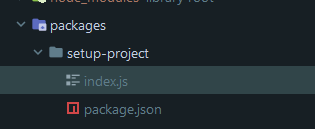
Then in the project root package.json, add a script to run it:
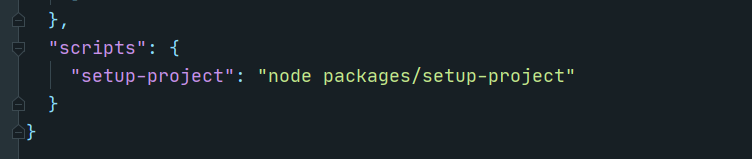
This way, whenever a developer creates a new project, his team mates will have that script ready to setup the project and it will be easy to upgrade the script with custom stuff, if the team needs it.
// packages/setup-repo/index.js
const fs = require("fs");
const path = require("path");
const { green } = require("chalk");
const crypto = require("crypto");
const loadJson = require("load-json-file");
const writeJson = require("write-json-file");
const { v4: uuidv4 } = require("uuid");
const execa = require("execa");

const s3BucketName = (projectId, appName, env) => {
    return `${projectId}-${appName.toLowerCase().replace(/_/g, "-")}-${env}`;
};

(async () => {
    const root = process.cwd();
    const webinyConfig = require(path.join(root, "webiny.root.js"));
    const appName = webinyConfig.projectName;
    const projectId = uuidv4().split("-").shift();

    console.log(`✍️  Writing environment config files...`);
    // Create root .env.json
    const rootEnvJsonPath = path.join(root, ".env.json");
    const rootExampleEnvJsonPath = path.join(root, "example.env.json");
    if (fs.existsSync(rootEnvJsonPath)) {
        console.log(`⚠️  ${green(".env.json")} already exists, skipping.`);
    } else {
        fs.copyFileSync(rootExampleEnvJsonPath, rootEnvJsonPath);
        const baseEnv = await loadJson(rootEnvJsonPath);
        baseEnv.local["MONGODB_NAME"] = `${appName}-local`;
        baseEnv.dev["MONGODB_NAME"] = `${appName}-dev`;
        baseEnv.prod["MONGODB_NAME"] = `${appName}-prod`;
        await writeJson(rootEnvJsonPath, baseEnv);
        console.log(`✅️ ${green(".env.json")} was created successfully!`);
    }

    // Create API .env.json
    const envJsonPath = path.join(root, "api", ".env.json");
    const exampleEnvJsonPath = path.join(root, "api", "example.env.json");
    if (fs.existsSync(envJsonPath)) {
        console.log(`⚠️  ${green("api/.env.json")} already exists, skipping.`);
    } else {
        fs.copyFileSync(exampleEnvJsonPath, envJsonPath);

        const apiEnvJson = path.join(root, "api", ".env.json");
        const apiEnv = await loadJson(apiEnvJson);

        const jwtSecret = () => crypto.randomBytes(128).toString("base64").slice(0, 60);

        apiEnv.local["JWT_SECRET"] = jwtSecret();
        apiEnv.local["S3_BUCKET"] = s3BucketName(projectId, appName, "local");
        apiEnv.dev["JWT_SECRET"] = jwtSecret();
        apiEnv.dev["S3_BUCKET"] = s3BucketName(projectId, appName, "dev");
        apiEnv.prod["JWT_SECRET"] = jwtSecret();
        apiEnv.prod["S3_BUCKET"] = s3BucketName(projectId, appName, "prod");
        await writeJson(apiEnvJson, apiEnv);
        console.log(`✅️ ${green("api/.env.json")} was created successfully!`);
    }

    // Create `apps/admin` .env.json
    const adminEnvJsonPath = path.join(root, "apps", "admin", ".env.json");
    const exampleAdminEnvJsonPath = path.join(root, "admin", "example.env.json");
    if (fs.existsSync(adminEnvJsonPath)) {
        console.log(`⚠️  ${green("apps/admin/.env.json")} already exists, skipping.`);
    } else {
        fs.copyFileSync(exampleAdminEnvJsonPath, adminEnvJsonPath);
        console.log(`✅️ ${green("apps/admin/.env.json")} was created successfully!`);
    }

    // Save the generated projectId to a file that will be used for naming of cloud resources
    await writeJson(path.join(root, ".webiny", "state", "_.json"), { id: projectId });

    // Build all repo packages
    console.log(`🏗  Building packages...`);
    try {
        await execa("lerna", ["run", "build", "--stream"], {
            stdio: "inherit"
        });
        console.log(`✅️ Packages were built successfully!`);
    } catch (err) {
        console.log(`🚨 Failed to build packages: ${err.message}`);
    }

    console.log(`\n🏁 Your repo is almost ready!`);
    console.log(
        `Update ${green(
            ".env.json"
        )} with your MongoDB connection string and you're ready to develop!\n`
    );
})();
How does this look to you?
Pavel910
on 28 Jul 2020
@Pavel910 Just getting around to this now. I will have a look.
TommyJackson85
on 2 Aug 2020
@Pavel910 I can't seem to find the setup-rep folder is packages so I will assume you made it up on the fly for demonstration.
I just copied your code snippet into it a new package called setup-project to keep it consistent with the package.json script.
I'm gonna create a draft PR for this while I further discuss this with you but I'm happy to keep this discussion going in the issue page instead of the PR.
TommyJackson85
on 2 Aug 2020
@TommyJackson85 you're absolutely right; in our repo we have scripts/setupRepo.js, but for new projects I wanted to make it into a package, with its own dependencies, then developers can customize it for their project needs.
Looking forward to your PR and we'll continue the discussion there 👍
Pavel910
on 2 Aug 2020
@Pavel910 checkout the PR and lets continue the discussion there so.
TommyJackson85
on 2 Aug 2020
@Pavel910 @doitadrian can I get assigned to this issue as I am working on it?
TommyJackson85
on 10 Sep 2020
This issue is stale because it has been open 30 days with no activity. Remove stale label or comment or this will be closed in 5 days.
![github-actions[bot] picture](https://avatars2.githubusercontent.com/in/15368?v=4&s=40) github-actions[bot]
on 19 Oct 2020
github-actions[bot]
on 19 Oct 2020
@doitadrian Im still looking for a review of my PR for this issue, but I'm happy to wait till webiny version 5 is released aswell. 🙂
TommyJackson85
on 28 Oct 2020
This issue is stale because it has been open 60 days with no activity. Remove stale label or comment or this will be closed in 7 days.
 webiny-bot
on 27 Dec 2020
webiny-bot
on 27 Dec 2020
Still waiting for my PR to be reviewed which will close this issue:
https://github.com/webiny/webiny-js/pull/1174
Just posting this as a Stale issue was added on.
TommyJackson85
on 27 Dec 2020
Related issues
 doitadrian
·
4Comments
doitadrian
·
4Comments
 akve
·
6Comments
TommyJackson85
·
6Comments
doitadrian
·
6Comments
akve
·
6Comments
TommyJackson85
·
6Comments
doitadrian
·
6Comments
 EmilK15
·
5Comments
EmilK15
·
5Comments