Webiny-js: Headless CMS - pressing Esc closes the edit field dialog
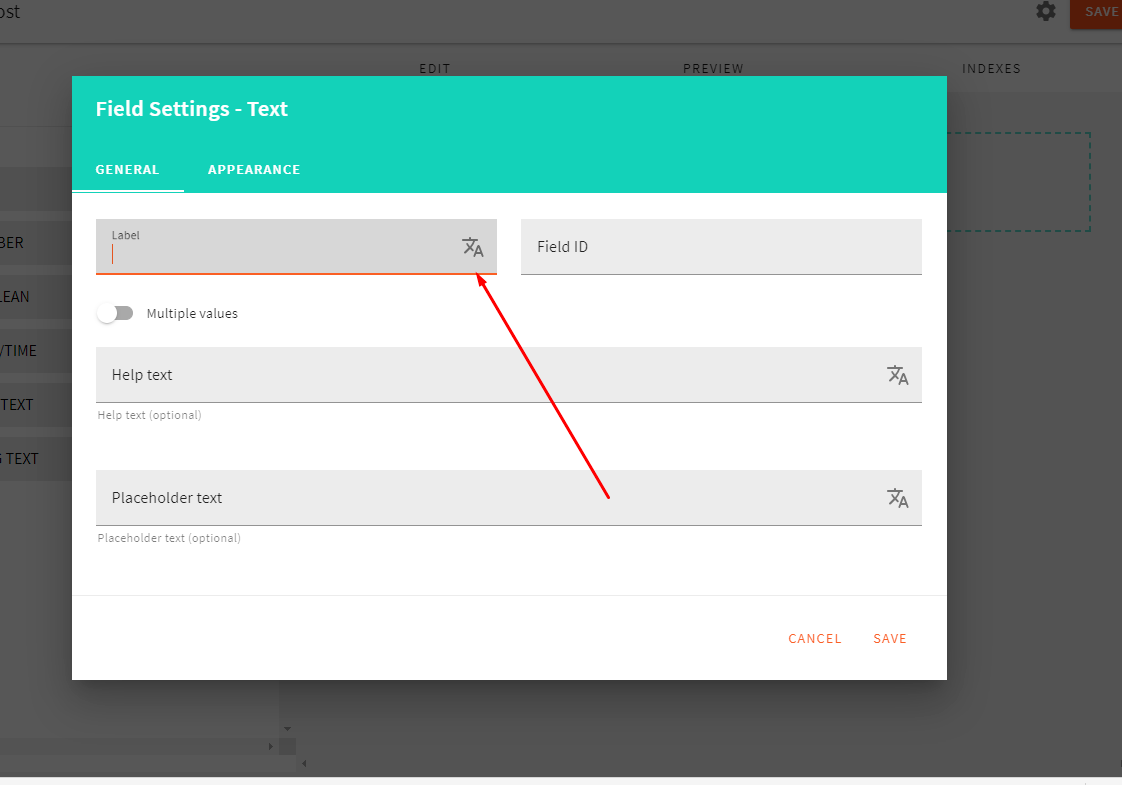
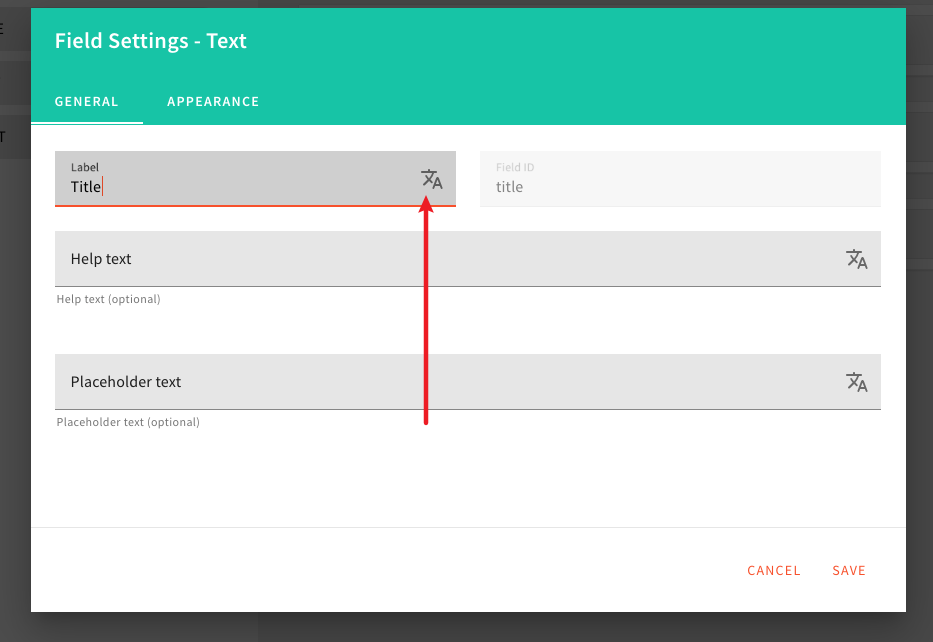
Clicking on this, shows the I18N overlay. Pressing escape, closes both the overlay, and the edit field dialog.
 doitadrian
All 22 comments
Firstly, may I know what is the intended result, and how should it happen?
P.S I still have no idea how to fix it, although I do have a lot of state change experience in React, hence may I take this to challenge myself haha?
 sunguru98
on 24 May 2020
sunguru98
on 24 May 2020
Sorry for the delay @sunguru98, we were super swamped with our new BETA release. Since it's out, all of the further fixes need to be done in the release-4.x branch.
Now, regarding the issue...
When you click the icon on which the arrow is pointing to, a full-screen UI pops up, which lets you to enter different values for all of the available locales. Once the user presses Esc key while it's opened, only it should be closed, not the Field Settings dialog which we can see in the screenshot.
These inputs can be found in the following files: packages/app-headless-cms/src/admin/components/ContentModelEditor/Tabs/EditTab/EditFieldDialog/GeneralTab.tsx:82.
The I18NInput is the component that takes care of these inputs.
doitadrian
on 26 May 2020
Aww .. I see, pretty doable I think. So may I take up on this one, BTW, I also applied to webiny for the developer role, so this would be a good chance to prove myself.
 sundeep-charan
on 26 May 2020
sundeep-charan
on 26 May 2020
If you could assign my username on to the assignees' option that would be great @doitadrian
sundeep-charan
on 26 May 2020
Didn't expect that fast of a response 👍
doitadrian
on 26 May 2020
I'll provide more instructions in an hour/two (have to jump on a couple of calls), just to give you a general idea how it might be solved.
In the meantime, feel free to install Webiny, do some exploring.
doitadrian
on 26 May 2020
Haha, pretty excited. One small question, I should be pushing this change onto the release-4.x branch right?
sundeep-charan
on 26 May 2020
Yeah, PR to that branch would be awesome.
doitadrian
on 26 May 2020
Any advices on how to start the repo (backend as well as SPA)? .. Pretty unfamiliar and overwhelmed seeing all the other files haha.
sunguru98
on 26 May 2020
Read this whole document:
https://github.com/webiny/webiny-js/blob/release-4.x/docs/CONTRIBUTING.md
And before deploying your API do just this DB setup step: https://next.webiny.com/docs/get-started/quick-start#2-setup-database-connection
 Pavel910
on 26 May 2020
Pavel910
on 26 May 2020
Hey @sunguru98,
so, the I18N overlay I mentioned can be found here packages/app-i18n/src/admin/components/I18NInputLocalesOverlay.tsx.
In it, please try to utilize this lib: https://github.com/doitadrian/react-hotkeyz lib in order to capture the Esc key, and do what's necessary.
We've used the lib on several occasions throughout app-* packages, so you should be able to find some useful examples.
Let us know if you have any questions.
Thanks! 🍻
doitadrian
on 26 May 2020
Hi @doitadrian, I am currently stuck at a place where I have to deploy from the sample_project directory. After installing webiny-cli, I am facing the following error.
Unknown arguments: deploy, api. Any ideas?
sunguru98
on 26 May 2020
@sunguru98 you don't need to install webiny-cli especially not that particular package name :)
@webiny/cli is present in the repository, in packages/cli, and all you need to do is run it using npx webiny deploy .....
npx will resolve webiny to your node_modules. So in your sample-project, run npx webiny deploy api --env=local
Pavel910
on 26 May 2020
Gotcha! Thanks for the assist @Pavel910
sunguru98
on 26 May 2020
Here comes another roadblock lol. I have successfully deployed and the cli asked me to setup my user information by creating an account. Everything is done, and I am right now at the following page.
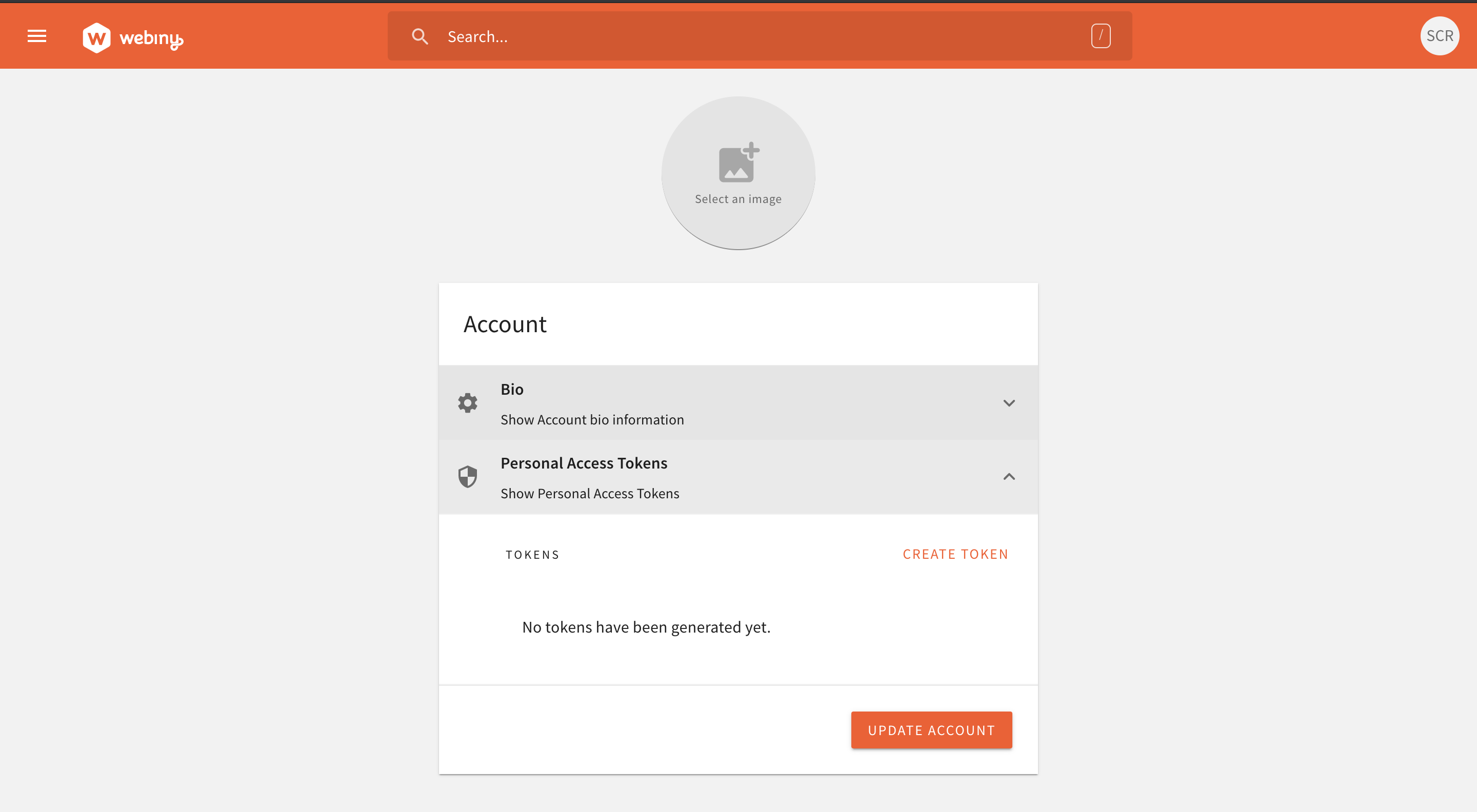
My question is how should I exactly manoeuvre towards the buggy package which has been mentioned, as this is the first time I am working on a monorepo, I am sort of confused on transitioning from the sample-project to the packages folder mentioned. How and what should I do inorder to link my process towards those said packages?
sunguru98
on 26 May 2020
Open Headless CMS app / Models section.
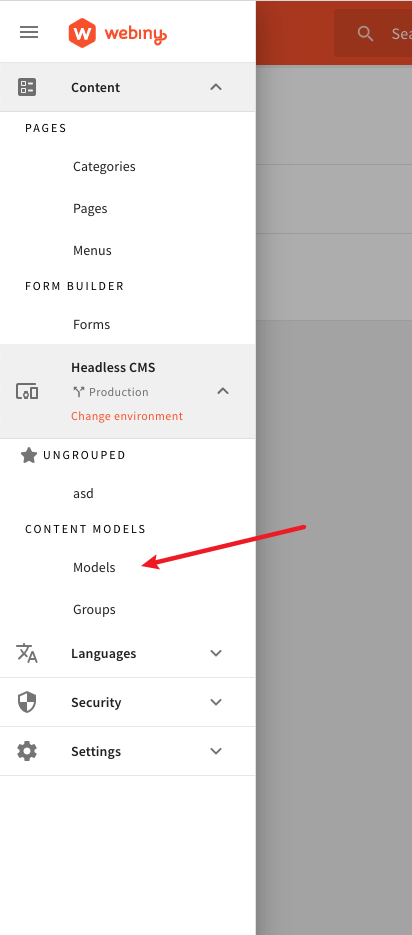
Create a new entry by clicking on the green (+) sign button, located in the bottom-right corner.
Submit the form in the shown dialog and once you're in the Content Model Editor, dragging/dropping one of these fields should open the Field Settings dialog.
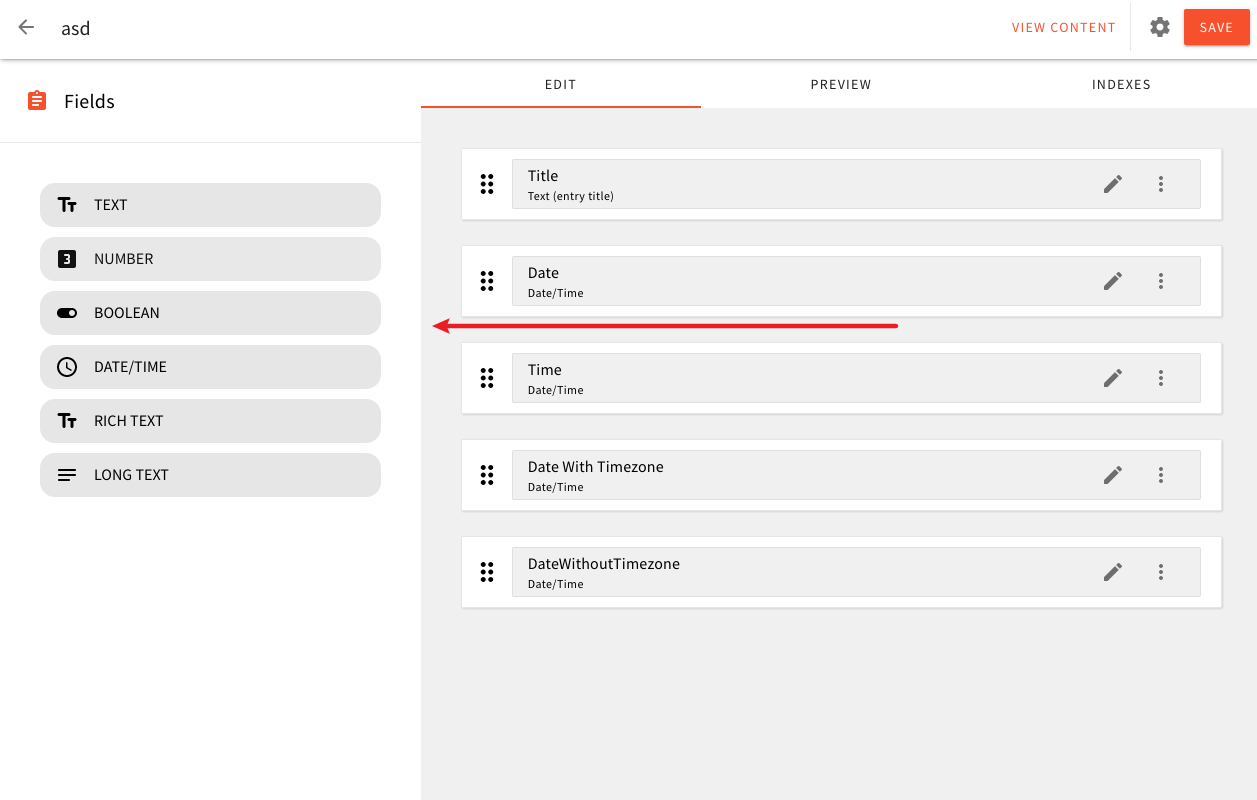
Finally, in the dialog, clicking on this icon will open the I18N overlay.
P.S. You can start by checking some of the file references I posted in my previous comments.
doitadrian
on 26 May 2020
No words to express my thankfulness. Simply amazing @doitadrian. I will check it out right away.
sunguru98
on 26 May 2020
I feel you.
The z-index, in theory, behaves like a standard z-index you might have already seen in the CSS world.
If you're on, let's say, zIndex 150, all shortcuts that were registered on lower z-indexes (e.g. 149) will not be triggered.
This is especially useful in cases like these, where you, for example, have a modal, which might have shortcuts on one zIndex, and then we are opening the I18N overlay that goes over the modal. So, hitting shortcuts that were registered on a modal should not be triggered while we're in the I18N overlay.
I believe the zIndex of 50 should suffice in your case, but try it out.
doitadrian
on 27 May 2020
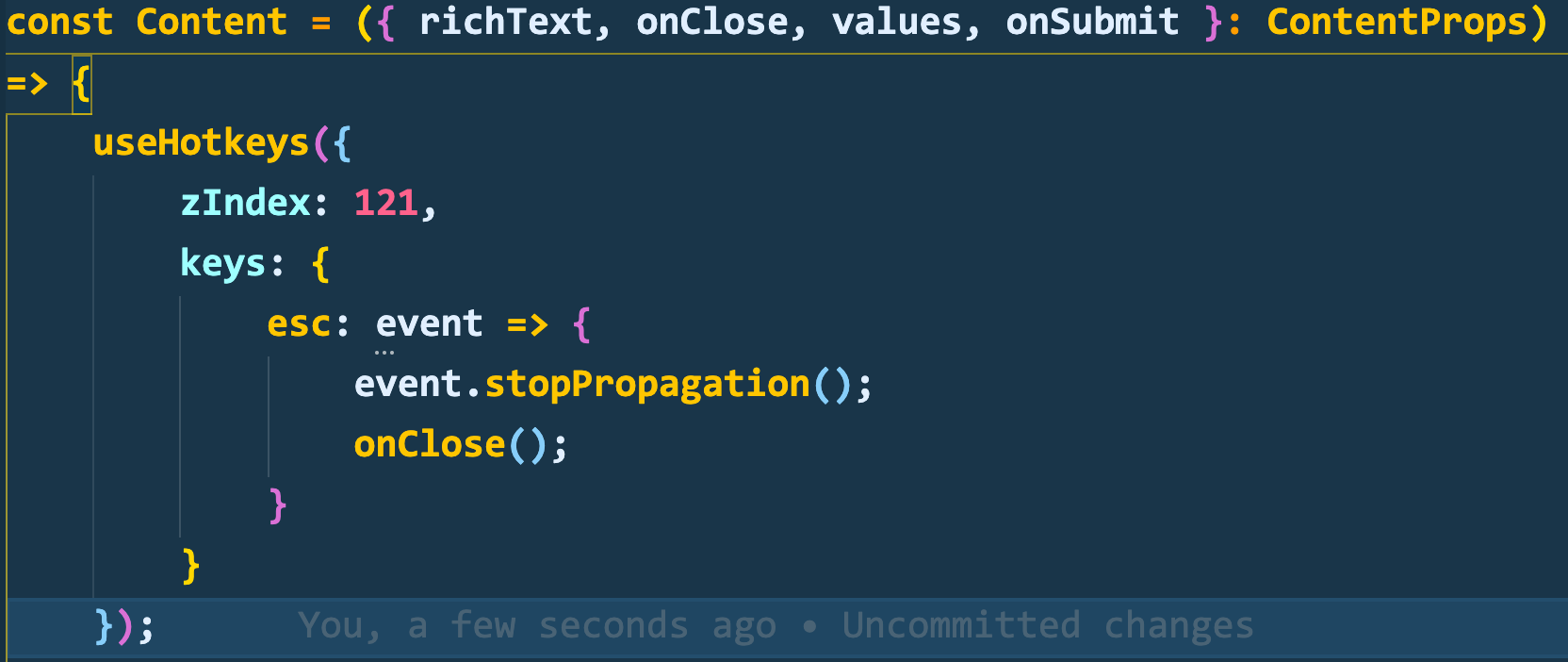
Phew!!! After 9 hours of scratching and swearing, I finally made it work. It literally boiled down to just three things, stop the propagation and close the dialog. The useHotkeys library's zIndex was a bit confusing. I thought it as the CSS's zIndex and tried to match it with the library's term. But it is working now. May I commit the changes from my side? @doitadrian & @Pavel910.
sunguru98
on 27 May 2020
Thanks @sunguru98 .
I know, the docs for the lib are lacking :)
Yeah, please create a PR so we can make a review.
Thanks a lot!
doitadrian
on 27 May 2020
I feel you.
The z-index, in theory, behaves like a standard z-index you might have already seen in the CSS world.
If you're on, let's say,
zIndex150, all shortcuts that were registered on lower z-indexes (e.g. 149) will not be triggered.This is especially useful in cases like these, where you, for example, have a modal, which might have shortcuts on one
zIndex, and then we are opening the I18N overlay that goes over the modal. So, hitting shortcuts that were registered on a modal should not be triggered while we're in the I18N overlay.I believe the zIndex of 50 should suffice in your case, but try it out.
I bumped the zIndex value all the way to 121 and checked it lol. I can change the value if you want.
The code is like this right now.
sunguru98
on 27 May 2020
Awaiting for the merging haha.
sunguru98
on 27 May 2020
Related issues
 jcode-hub
·
4Comments
doitadrian
·
4Comments
jcode-hub
·
4Comments
doitadrian
·
4Comments
 jacqui
·
6Comments
jacqui
·
6Comments
 bigb123
·
3Comments
doitadrian
·
4Comments
bigb123
·
3Comments
doitadrian
·
4Comments