Webiny-js: [UI improvement] The "i" icon that opens picture properties in File Manager is not obvious
This is:
- Improvement
Specifications
- version: @webiny/[email protected], @webiny/[email protected], @webiny/[email protected]
- OS: MacOs Catailna 10.15.3
- Browser: 73.0.1
Expected Behavior
The "i" icon that opens picture's properties panel in File Manager should be easy accessible.
Actual Behavior
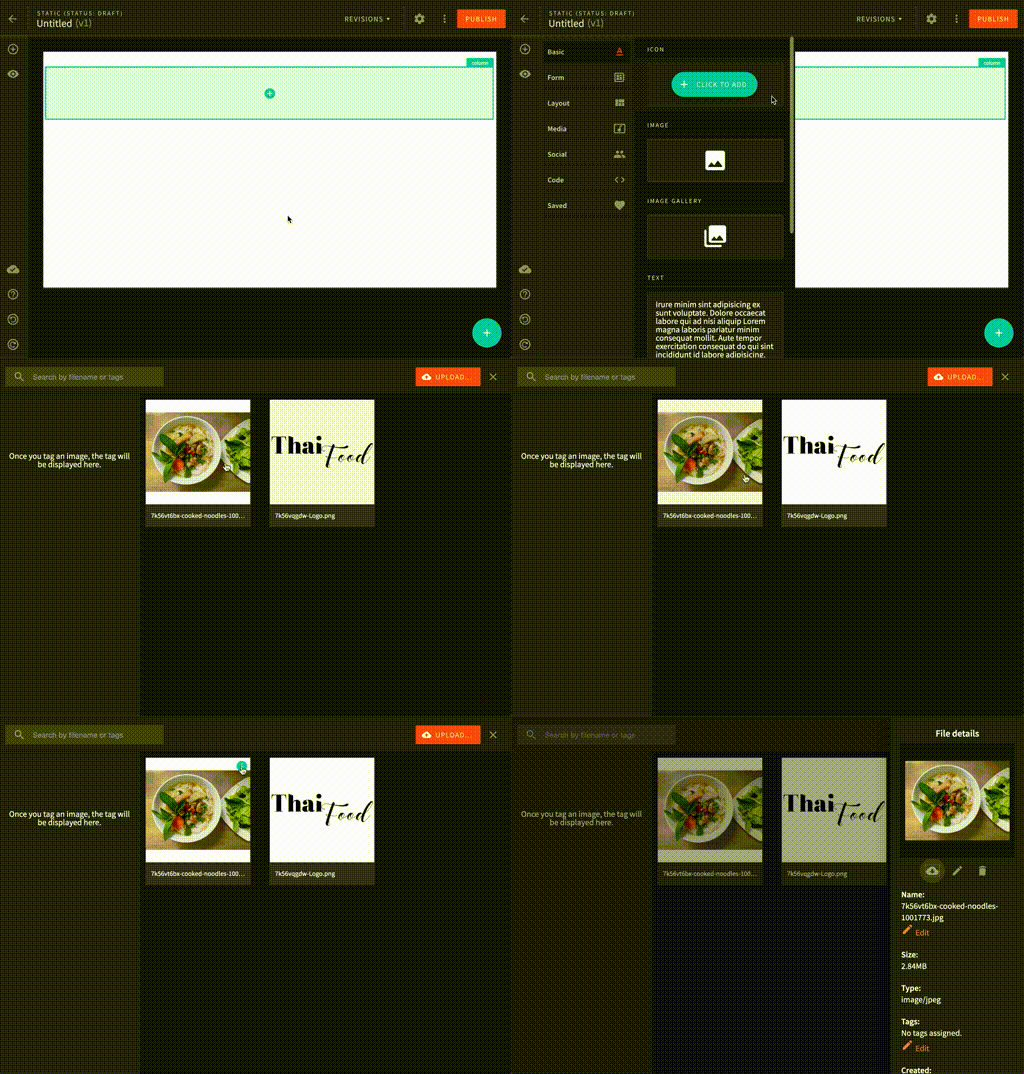
The "i" icon that shows picture properties in File Manager is hidden and it requires to know where to hover the mouse over the picture (top right corner) to open the panel on the right.
Detailed Description
I found this icon accidentally.
It took me a week or two to figure out that I don't have to remove the pictures records from the MongoDB to get rid of the photos from file manager because there's a magic "i" button that shows picture properties on the right after clicking on it.
Probably new users can struggle with the same problem.
Possible Solution
Showing the "i" icon after hovering the mouse over any part of the picture rather than on the top right corner will make access to the picture details more obvious.
 bigb123
All 3 comments
Fully agree. I need to check why the icon isn't showing on the image hover. I believe that was the original behaviour.
Thanks for reporting, we'll sort it out.
 SvenAlHamad
on 13 Mar 2020
SvenAlHamad
on 13 Mar 2020
Is anyone working on this issue? If not I would love to contribute
 Ashu96
on 19 Apr 2020
Ashu96
on 19 Apr 2020
@Ashu96 sure, go ahead! I'll assign you to this issue :)
 Pavel910
on 19 Apr 2020
Pavel910
on 19 Apr 2020
Related issues
 jsblx
·
4Comments
jsblx
·
4Comments
 doitadrian
·
4Comments
doitadrian
·
4Comments
doitadrian
·
4Comments
doitadrian
·
4Comments
 jcode-hub
·
4Comments
jcode-hub
·
4Comments
 akve
·
6Comments
akve
·
6Comments
Most helpful comment
@Ashu96 sure, go ahead! I'll assign you to this issue :)