Webannoyances: 50 px length of blank gray-colored space appears on top of an Instagram profile page
URL(s) where the issue occurs
https://www.instagram.com/instagram/
Describe the issue
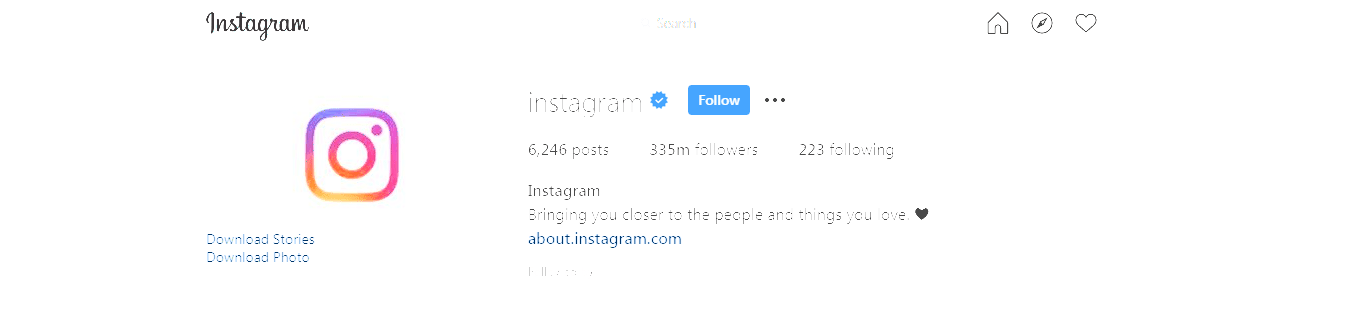
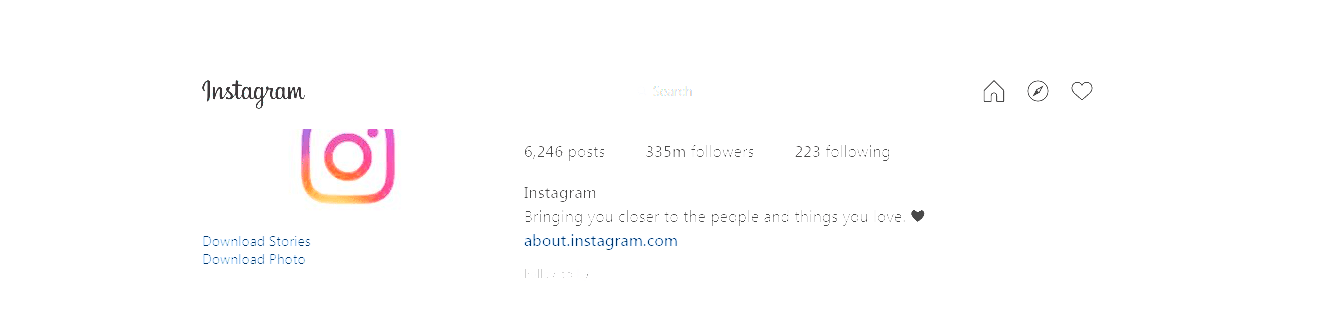
Around 50 pixels length of blank rectangular gray-colored space appears on top of an Instagram profile page pushing parts of the upper panel down making it overlap with other parts of the page.
Screenshot(s)
Web Annoyances Ultralist disabled:
Web Annoyances Ultralist enabled:
Versions
- Brave Version 1.4.95 Chromium: 80.0.3987.122 (Official Build) (64-bit) and Chrome Version 80.0.3987.122 (Official Build) (64-bit)
- uBlock Origin version: 1.24.4
Settings
In uBO, all options under 'Privacy' are enabled. Nothing under 'Default behavior' is enabled. In Filter Lists, all the filters in the Built-in, Ads, Privacy, Malware Domains, Annoyances and Multipurpose sections are enabled, except for Fanboy’s Social Blocking List and Fanboy's Cookie List. Nothing in the Regions, languages section is enabled.
Notes
Instagram profile pages appear fine if Web Annoyances Ultralist is disabled.
 AmperAndSand
All 2 comments
@AmperAndSand Thanks for the report!
I think I have fixed this, but it's difficult to test for me as it seems to only occur some of the time and on certain screen widths for me, do you mind updating your filters and letting me know if the problem seems solved for you? Will close the issue after that.
 yourduskquibbles
on 28 Feb 2020
yourduskquibbles
on 28 Feb 2020
@yourduskquibbles The issue now seems to have been solved as per my testing on both Brave and Chrome. Instagram profile pages now appear fine. Thanks!
AmperAndSand
on 29 Feb 2020
Related issues
 RedDragonWebDesign
·
3Comments
RedDragonWebDesign
·
3Comments
 prediscover
·
9Comments
prediscover
·
9Comments
 Jose1971AB
·
9Comments
Jose1971AB
·
9Comments
 rd-su
·
5Comments
rd-su
·
5Comments
 elypter
·
4Comments
elypter
·
4Comments