Web-stories-wp: Element border-radius panel
Feature Description
As an editor, I want to be able to define the border-radius of the various corners of an element - with or without an actual border.
- New section in design panel according to design in Figma
- Direct manipulation of border-radius should be possible according to this design.
- Only the default rectangular shape can have border-radius applied. All other shapes can never have border-radius
_Do not alter or remove anything below. The following sections will be managed by moderators only._
Acceptance Criteria
Implementation Brief
 barklund
All 11 comments
If a text element has border-radius applied, will the text be cut off at the text element edges? This does not happen currently.
@barklund Can you clarify or add a screenshot because I'm not understanding this? The border shouldn't change any of the text selection rules.
Do we want to be able to manipulate the border-radius directly on the element as discussed here?
Yes, I replied on 1115
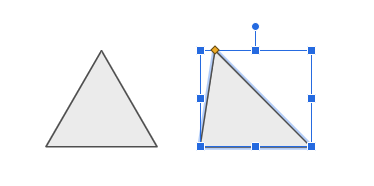
Does this also apply to non-rectangular shapes? What does a heart or a triangle with border-radius look like?
Border radius only applies to rectangles. Very early on Dima and I chatted about making the shapes smarter (similar to shapes in google slides) where similar controls (the one used for border radius) allow you to modify the shape of the element (ie I can move the apex of this triangle). But I think svg support is sufficient enough.
 samitron7
on 10 Oct 2020
samitron7
on 10 Oct 2020
@barklund Description here all looks fine, just removed the "text overflow bit"
samitron7
on 12 Oct 2020
@samitron7 Some additional questions:
- Is the radius in px or %?
- How does the lock work -- does locking unify all the values (as in the case of padding) or does it just lock the ratio (as width/height)?
- Do the values have a maximum?
- Where is the panel positioned for each element in the design panel?
 miina
on 15 Oct 2020
miina
on 15 Oct 2020
- Is the radius in px or %?
In px unit
- How does the lock work -- does locking unify all the values (as in the case of padding) or does it just lock the ratio (as width/height)?
Locking should unify all the values (as in the case of padding)
Do the values have a maximum?
Answered in #1051 so pasting here: In most design tool, a setting a value of 100 on all corners gives you a circle. I do notice that when you scale, the border requires you to manually increase pass 100 if you want to maintain the perfect circle edges. Not sure how this would work on our system.**
- Where is the panel positioned for each element in the design panel?
Position under the Style section
samitron7
on 16 Oct 2020
@samitron7 / @o-fernandez On changing the border-radius on the element directly:
The feature that we could use from Moveable is a bit more sophisticated border-radius than the inputs currently allow, it allows assigning border-radius for each corner with two values, using up to 8 handles in total, for example:
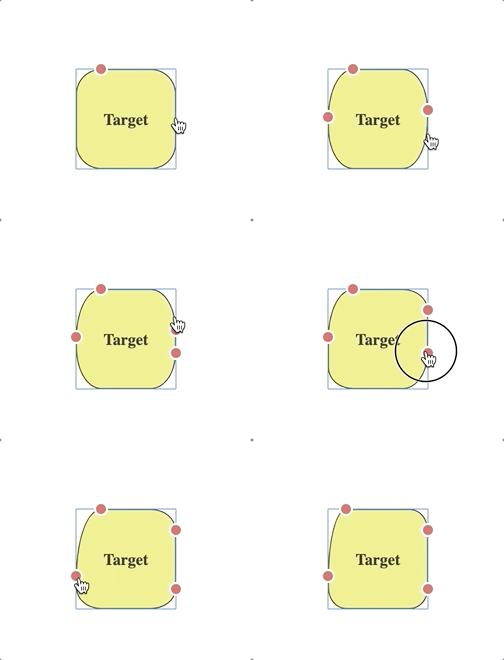
The result of the border-radius is something like this: border-radius: 18px 24px / 34.1854px 21px 20px 65.8146px; instead of just the 4 values that the design is currently supporting.
Should we skip the feature for now or adjust the panel to support these values? I've also reached out to the author of the library we're using to see if the controls can be configured to allow only 1 or 4 controls instead of 8 but that doesn't seem to be available at this moment.
Thoughts?
miina
on 23 Oct 2020
I agree with deprioritizing the direct manipulation feature (sadly) if it will cause conflicts/more issues - we can split that into another ticket.
 o-fernandez
on 23 Oct 2020
o-fernandez
on 23 Oct 2020
Oh huh, that is not the behavior we want at all. +1 to splitting out the ticket. When we do implement direct manipulation, it should be a single control that changes border radius for all 4 corners simultaneously.
samitron7
on 25 Oct 2020
Some diff behaviour re: resizing when set to "outside":
 csossi
on 18 Nov 2020
csossi
on 18 Nov 2020
@csossi Thanks for finding that, should be fixed now.
miina
on 18 Nov 2020
Verified in QA
csossi
on 19 Nov 2020
Verified in UAT
samitron7
on 26 Nov 2020
Related issues
 jauyong
·
4Comments
jauyong
·
4Comments
 swissspidy
·
3Comments
swissspidy
·
3Comments
 wassgha
·
3Comments
wassgha
·
3Comments
 injainja
·
4Comments
injainja
·
4Comments
 Maverick283
·
3Comments
Maverick283
·
3Comments