Web-stories-wp: Images served via http despite being available as https
Bug Description
Adding images that were uploaded before the website was switched over to https from http loads them via http. They are, however, available via https.
Expected Behaviour
When on a website that is served via https, the uploaded images should be requested via https to avoid browsers like chrome reporting the page as "not secure"
Steps to Reproduce
On a https website, insert an image uploaded before the website was switched to https into a story.
Screenshots
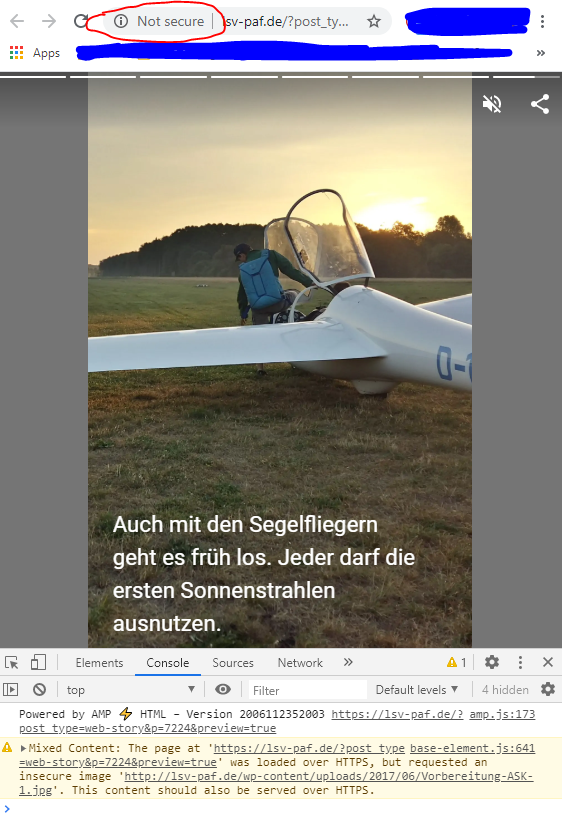
Please ignore the beautifully crafted photo edits. But as you can see the website is served via https, the image is however loaded via http. But it'd be available via https.
Additional Context
- Plugin Version: 1.0.0-beta.1
- Operating System: Windows 10
- Browser: Chrome (Version 83.0.4103.116 (Official Build) (64-bit))
_Do not alter or remove anything below. The following sections will be managed by moderators only._
Acceptance Criteria
Implementation Brief
 Maverick283
All 3 comments
Thanks for your report!
Does this happen for all images or just this one?
All our image handling is pretty much standard WordPress functionality. So if an image is served over HTTP, it means we get an HTTP URL from WordPress. This could be the case when your site is behind a load balancer, for example.
 swissspidy
on 7 Jul 2020
swissspidy
on 7 Jul 2020
Thanks for the quick reply.
There is no load balancer involved, at least not that i know of. Website is hosted and only they know what they put in front of it.
As for your question: I could have sworn it happened on all of them when I started editing the story. Yet now, after a reload of the page, it is only the one that is also throwing the warning in the screenshot. So I probably misconceived that since the warning is thrown multiple times in the story edit window.
Further investigation (amateur mistake, opened the issue to quickly, eager to try to improve such a cool plugin!) shows that it only happens to files uploaded before https was introduced to the website. So of course you're right and this is a "problem" with wordpress rather than the plugin.
Of course it is up to you to decide if that's something that you'd want to address.
What I don't understand: On a post where the same image is used and where even in the editor the "src" of the image is "http://...." the image is then loaded via https. So I'm guessing there is a way to just "ignore" the http part and replace it with https. The image should be available anyways if it is hosted on the same domain, shouldn't it?
Summing up: The reason for the inconsistent behavior lies within images being uploaded prior to switching the hosted wordpress site over to https. I'll edit the initial report accordingly. I'd love it if the plugin could take care of that. As a quickfix: Reupload the image and insert the newly uploaded instead.
Thanks for your work, just got started with the plugin and it is great! Easy, fast and convenient. Nice job!
Maverick283
on 7 Jul 2020
Glad to hear you were able to resolve the issue and find the root cause!
Migrating from HTTP to HTTPS is a tricky thing to do in WordPress because you have to essentially replace URLs across the whole database to prevent issues like this one.
And when you want to do this automatically as a plugin, there are many things to consider (being behind a load balancer / proxy, expired certificates, etc.).
It's not really something we can fix as part of this plugin, but there are ongoing efforts to improve this in WordPress core itself. For example, the PWA feature plugin has built-in HTTPS detection & correction, and will eventually be merged into WordPress core.
I'm closing this issue for now. Hope you continue to use & test the plugin. If you encounter any more issues, please open a new ticket. Thanks!
swissspidy
on 9 Jul 2020
Related issues
 wassgha
·
3Comments
swissspidy
·
4Comments
wassgha
·
3Comments
swissspidy
·
4Comments
 ernee
·
4Comments
ernee
·
4Comments
 obetomuniz
·
3Comments
obetomuniz
·
3Comments
 3pgarro
·
4Comments
3pgarro
·
4Comments
Most helpful comment
Thanks for the quick reply.
There is no load balancer involved, at least not that i know of. Website is hosted and only they know what they put in front of it.
As for your question: I could have sworn it happened on all of them when I started editing the story. Yet now, after a reload of the page, it is only the one that is also throwing the warning in the screenshot. So I probably misconceived that since the warning is thrown multiple times in the story edit window.
Further investigation (amateur mistake, opened the issue to quickly, eager to try to improve such a cool plugin!) shows that it only happens to files uploaded before https was introduced to the website. So of course you're right and this is a "problem" with wordpress rather than the plugin.
Of course it is up to you to decide if that's something that you'd want to address.
What I don't understand: On a post where the same image is used and where even in the editor the "src" of the image is "http://...." the image is then loaded via https. So I'm guessing there is a way to just "ignore" the http part and replace it with https. The image should be available anyways if it is hosted on the same domain, shouldn't it?
Summing up: The reason for the inconsistent behavior lies within images being uploaded prior to switching the hosted wordpress site over to https. I'll edit the initial report accordingly. I'd love it if the plugin could take care of that. As a quickfix: Reupload the image and insert the newly uploaded instead.
Thanks for your work, just got started with the plugin and it is great! Easy, fast and convenient. Nice job!