Web-stories-wp: WP Fastest Cache Compatibility: Search Console Errors
Request
I have installed Web Stories & created my first story at https://halophotographystudio.com/stories/wedding-tips/
It has brought up the following errors in Google Search Console.
Tag 'amp-story' is not allowed to have any sibling tags ('body' should only have 1 child).
Tag found outside the document head which is only allowed as a direct child of the document head.
Custom JavaScript is not allowed.
Not a coder so have no clue what this means.
Have I done something wrong?
-- | -- | --
Additional Context
- Plugin Version: Version 1.0.0-beta.1
- Operating System: Windows 10
- Browser: Firefox
_Do not alter or remove anything below. The following sections will be managed by moderators only._
Acceptance Criteria
Implementation Brief
 HaloPhoto
All 18 comments
Hi there
It appears that you are using WP Fastest Cache, which adds some markup to the generated stories which is not allowed. Is there a way for you to disable the cache for the web stories post type? This might help resolve the issue.
 swissspidy
on 10 Aug 2020
swissspidy
on 10 Aug 2020
This is a problem will ALL caching plugins. I run WP Rocket, and it is the "Combine JavaScript files" functionality in WP Rocket that breaks Web Stories. You can turn it off for each page/post, but I'm not sure how you would turn it off for the custom post type for Web Stories except in the code, so I turned it off globally. IMHO, the title of this request should not have been changed. It happens in all of Google's testing tools.
There is also another plugin that is breaking Web Stories, Squirrly SEO. I've sent the issue to the developer as I couldn't find a setting to turn off in it.
 kkuhlman
on 10 Aug 2020
kkuhlman
on 10 Aug 2020
@kkuhlman thanks for the additional information and feedback. We're currently looking into ways to address these errors/ prevent them as well so this is helpful. In the meantime, for WP Rocket you can also exclude the "/stories/" URL in their settings to prevent optimization on those posts under _Advanced Rules > Never Cache URL(s_). We'll check the Squirrly SEO plugin too.
The reason why these errors occur is because the Web Story post is an AMP document. AMP is a framework built with its own optimizations. AMP documents must also adhere to certain specifications in the code, including no custom JavaScript, to be valid AMP. Search Console will flag the URL when valid code is being altered or invalid code is added, which is most likely what you experienced.
 ernee
on 11 Aug 2020
ernee
on 11 Aug 2020
I seem to be having the same issues/errors reported in the Google Search Console described by HaloPhoto. I'm using WP Super Cache, and have added a rule to exclude any pages with "/stories/" in the URL, but still seeing the errors. Here's my story:
https://clintonwoodsphotography.com/stories/rafiki-nkuringo-gorillas/
 ugaclint
on 11 Aug 2020
ugaclint
on 11 Aug 2020
@ugaclint thanks for reporting!
I actually don't see WP Super Cache's footprint in the source code of the story so your exclusion may have worked here. However, there are validation errors that look to be caused by potentially a few other plugins. We'll look into this further as well.
ernee
on 12 Aug 2020
Thanks all, I’ve put https://halophotographystudio.com/stories/ into the the exclusions of WP Fastest Cache and I’m waiting to see how that effects validation. I used the “starts with” option so I assume that will turn it off for all stories in the future.
HaloPhoto
on 12 Aug 2020
Thanks all, I’ve put https://halophotographystudio.com/stories/ into the the exclusions of WP Fastest Cache and I’m waiting to see how that effects validation. I used the “starts with” option so I assume that will turn it off for all stories in the future.
Search Console has now cleared the errors. Thanks for all your advice. Now full steam ahead thinking of new story ideas.
HaloPhoto
on 12 Aug 2020
@ernee thanks for confirming. I am using a few additional (reputable) plugins as it is a photography focused site with a rather large inventory of images. I'm using the Image Accelerator feature of Jetpack as well as Yoast SEO...wondering if one of those might be a culprit in this case? I certainly appreciate all the great work you guys are doing with this plugin!
Let me know if I can provide any more info - perhaps the Site Health Info...
ugaclint
on 12 Aug 2020
Thanks so much @ugaclint !
We're trying to find a way to prevent these validation errors from Web Stories plugin side where possible. I've noted a few plugins that could be involved in the source code of your site, but I'll definitely follow up if we need more confirmation.
In the meantime, could you try this in-development version of the beta and let us know if some these errors resolve (without the exclusions you've made): web-stories.zip ?
@kkuhlman @HaloPhoto if you have an opportunity to try that would be great too.
ernee
on 12 Aug 2020
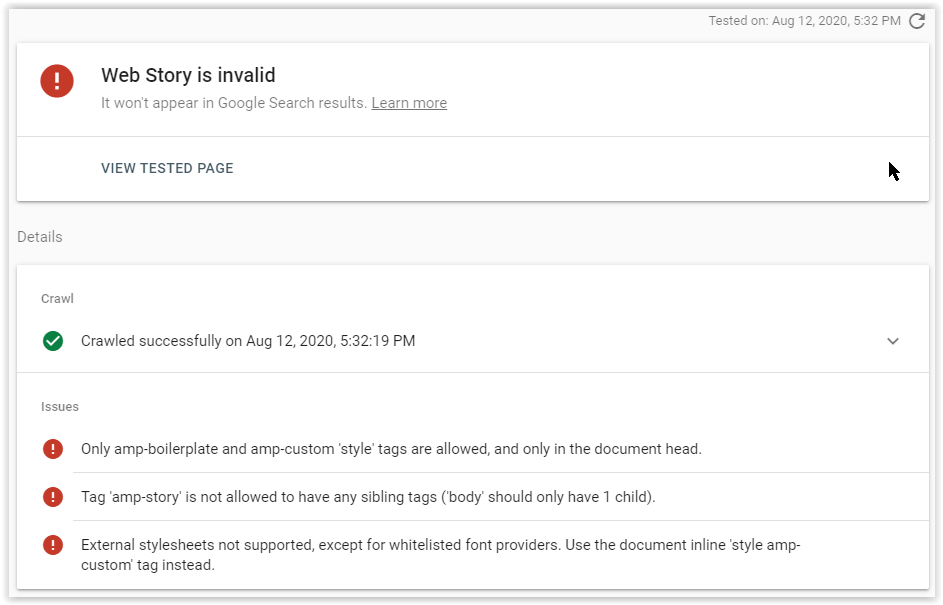
I've dropped in the updated code and removed the exclusions for caching. I'm no longer seeing the custom JavaScript error, but looks like the other three persist (screenshot attached). Of course, check me on any of this as I'm stumbling my way through trying to troubleshoot and assist as best I can. Cheers!
ugaclint
on 13 Aug 2020
@ugaclint this is very much appreciated!
Were you testing the same story URL or a different one?
ernee
on 13 Aug 2020
same
@ugaclint this is very much appreciated!
Were you testing the same story URL or a different one?
same
ugaclint
on 13 Aug 2020
The issues I'm seeing on https://clintonwoodsphotography.com/stories/rafiki-nkuringo-gorillas/:
- WordPress emoji inline CSS being printed — not sure why, as this is not added by default for stories.
- Atomic Blocks Font Awesome CSS being printed - unnecessary, as Atomic Blocks won't work for stories.
- Jetpack Related Posts CSS being printed - again unnecessary, because there are no related posts being printed here.
Can you perhaps turn that feature off for stories? - Some arbitrary
<style type="text/css" media="screen"></style>being printed in the body - unclear where this is coming from - Jetpack Stats
<amp-pixel>being printed in the body - this would need to go inside the<amp-story>element
swissspidy
on 13 Aug 2020
@swissspidy These are great findings. Is the intention to document those findings here so that the Web Stories team can work to resolve in a build release or in the official release? It is my goal to assist in that effort by sharing bugs/issues with the plugin based on my live site, which is what I've attempted to do here. By the way, I did see these same errors when I created a net new story.
Please let me know if there is any other info I can provide, or if there is something you would like me to try in an effort to help you all troubleshoot. Cheers!
ugaclint
on 19 Aug 2020
@ugaclint Any help is much appreciated, so thank you! Our goal is to prevent these issues from happening in the first place, not documenting them. We will do this by removing offending markup and/or reaching out to plugin developers so they can adapt their code.
swissspidy
on 19 Aug 2020
Hi @ugaclint ! I hope you're well. I've been doing some testing of the plugins we flagged previously, and while I didn't see the validation errors with using them alone, activating the NextGen gallery plugin which I see you're using on the site causes the errors to surface.
Would you happen to be able to safely deactivate NextGen (perhaps on a test site) to see if the errors go away for you?
ernee
on 5 Sep 2020
Hi Renee, I can't do that on my clintonwoodsphotography.com site, but I'll see if I can add NextGen to another site along with Web Stories to see if I can reproduce the issue. I can then try to deactive NextGen and will share the results. Cheers!
ugaclint
on 5 Sep 2020
@ugaclint I've opened this issue to track compatibility with NextGen. Feel free to add your findings there.
Also, opened this issue to track compatibility with WP Rocket.
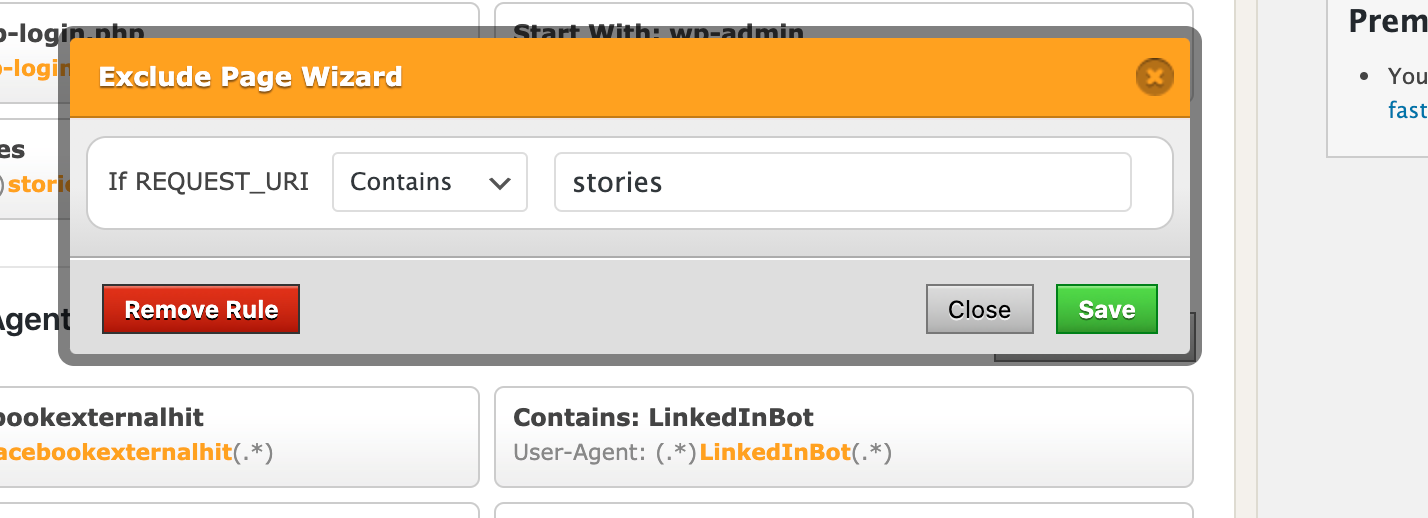
In terms of WP Fastest Cache, the issue occurs with the premium version of the plugin. These options currently look to be involved:

As noted above, a workaround is to exclude the story URL in the settings (or disabling the options):
ernee
on 15 Sep 2020
Related issues
swissspidy
·
3Comments
swissspidy
·
3Comments
 Maverick283
·
3Comments
Maverick283
·
3Comments
 o-fernandez
·
3Comments
o-fernandez
·
3Comments
 jauyong
·
4Comments
jauyong
·
4Comments
Most helpful comment
Search Console has now cleared the errors. Thanks for all your advice. Now full steam ahead thinking of new story ideas.