Web-bugs: jeancharlot.org - design is broken
URL: https://jeancharlot.org/20191119_stylesheet.css.html
Browser / Version: Firefox 68.0
Operating System: Linux
Tested Another Browser: Yes Safari
Problem type: Design is broken
Description: Items are misaligned
Steps to Reproduce:
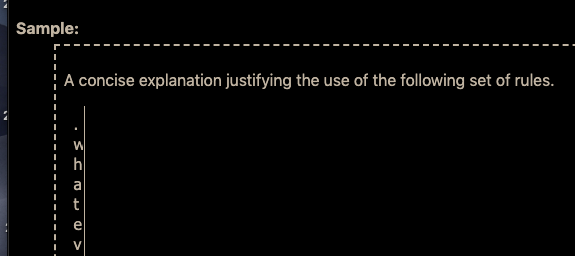
In Firefox, the columns of text are too narrow. In Safari, the columns are perfectly fine.
One workaround is to change the zoom level in Firefox to either greater or less. Then the columns are no longer too narrow. Interestingly, change the zoom level back to default 100% maintains the corrected column width. However, reloading the page makes the columns too narrow again (normal 100%).
Safari seems to have no problem whatsoever with the columns.
Browser Configuration
- None
_From webcompat.com with ❤️_
 webcompat-bot
All 8 comments
Chrome is also consistent with Firefox's rendering, but there does seem to be an interop problem here.
 miketaylr
on 20 Jul 2020
miketaylr
on 20 Jul 2020
Here's what the broken behavior looks like:
miketaylr
on 20 Jul 2020
so yes there is a difference.
the boxes of pre are set with display: inline-block, so they will behave like inline block and the characters for code are being asked to wrap at any opportunities.
<pre class="css">
  <code>*/ @media print { * {background-color:#fff!important ;color:#000!important} } /*</code>
</pre>
.css {
    display: inline-block;
    vertical-align: top;
    white-space: pre-wrap;
    overflow-x: visible;
    overflow-y: hidden;
    padding: .5em .5em 0;
    border-right-style: solid;
    border-width: .1em;
    margin-top: 1em;
    margin-bottom: 0;
}
.css > code, .css-list pre > code {
    display: block;
    font-size: 1em;
    word-wrap: break-word;
    overflow-wrap: break-word;
    padding-right: .1em;
    padding-left: .1em;
    margin-right: 0;
    margin-bottom: -1.25em;
    margin-left: 0;
}
This can be fixed by removing the pre-wrap
.css {
    display: inline-block;
    vertical-align: top;
    /* white-space: pre-wrap; */
    overflow-x: visible;
    overflow-y: hidden;
    padding: .5em .5em 0;
    border-right-style: solid;
    border-width: .1em;
    margin-top: 1em;
    margin-bottom: 0;
}
I'm not sure if safari/chrome or Firefox is right wrong here.
What do you think @dholbert ?
 karlcow
on 27 Jul 2020
karlcow
on 27 Jul 2020
Oh and Safari is the outlier…
so I guess this is a bug of Safari!
karlcow
on 27 Jul 2020
Nothing obvious with regards to pre-wrap.
https://bugs.webkit.org/buglist.cgi?quicksearch=pre-wrap
karlcow
on 27 Jul 2020
Whichever sizing behavior is correct, there's definitely a Firefox bug here...
As noted in the initial comment (and as I can confirm), zooming in & out fixes the problem in Firefox (i.e. the code block becomes wide on zoom-in and stays wide on zoom-out), which indicates we're not being internally consistent. Also notable: I can reproduce in a fresh Firefox profile but cannot reproduce in my main browsing profile -- so there may be some sort of race condition here (i.e. maybe in my normal profile, the page loads partway, and then an incremental reflow at some point "fixes" the layout in the same way that a zoom operation does).
I do see the problem in Chrome, but importantly, zooming doesn't impact the character positioning there, so at least they're consistently broken. :)
We probably need a reduced testcase to really figure out what's going on here. I'll file a bug but can't commit to making a reduced testcase at the moment (I'm pretty slammed this week).
 dholbert
on 28 Jul 2020
dholbert
on 28 Jul 2020
I filed https://bugzilla.mozilla.org/show_bug.cgi?id=1655799 and @emilio noted that this is really just an instance of https://bugzilla.mozilla.org/show_bug.cgi?id=860666
(Interesting that Chrome has the same bug, but worse/more-persistent.)
dholbert
on 28 Jul 2020
Duplicate of https://bugzilla.mozilla.org/show_bug.cgi?id=1655799
Thanks 🙇♂️
karlcow
on 29 Jul 2020
Related issues
 massic80
·
5Comments
massic80
·
5Comments
 lolrepeatlol
·
4Comments
webcompat-bot
·
4Comments
lolrepeatlol
·
4Comments
webcompat-bot
·
4Comments
 IngrownMink4
·
3Comments
IngrownMink4
·
3Comments
 Ezio916
·
4Comments
Ezio916
·
4Comments
Most helpful comment
I filed https://bugzilla.mozilla.org/show_bug.cgi?id=1655799 and @emilio noted that this is really just an instance of https://bugzilla.mozilla.org/show_bug.cgi?id=860666
(Interesting that Chrome has the same bug, but worse/more-persistent.)