Web-bugs: www.rome2rio.com - design is broken
URL: https://www.rome2rio.com/
Browser / Version: Firefox Mobile 80.0
Operating System: Android
Tested Another Browser: Yes Chrome
Problem type: Design is broken
Description: Items are overlapped
Steps to Reproduce:
After using the auto complete menu the items remain squashed to the left.
View the screenshot

Browser Configuration
- None
_From webcompat.com with ❤️_
 emilio
All 8 comments
Thanks for the report, but I'm not able to reproduce the issue. For me the search results are displayed correctly and no elements are overlapped.

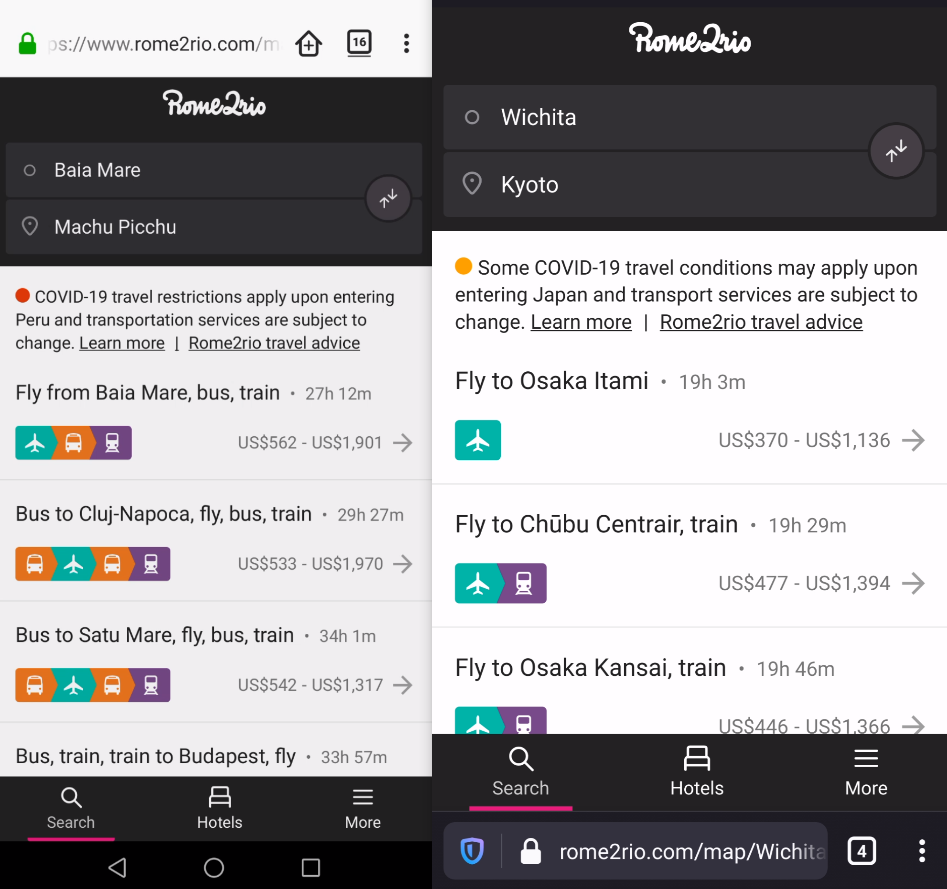
Tested with:
Browser / Version: Firefox Preview Nightly 200706 (🦎 80.0a1-20200702094606), Firefox Release 68.10.1
Operating System: Huawei P20 Lite (Android 8.0.0) - 1080 x 2280 pixels, 19:9 ratio (~432 ppi density), Samsung Galaxy S6 Edge (Android 7.0) - 1440 x 2560 pixels (~577 ppi pixel density)
@emilio could you try clearing cache/data/cookies, disable Ad-blocker (if available), or use a clean profile, and check again?
 softvision-oana-arbuzov
on 9 Jul 2020
softvision-oana-arbuzov
on 9 Jul 2020
@softvision-oana-arbuzov I can repro this on a clean profile on all of Fenix Beta, Fenix Nightly, and Fennec. But I can only repro this on my phone rather than e.g. the Android emulator, which is pretty odd.
emilio
on 10 Jul 2020
Ah, I can repro on an emulator, but only if I use the touch screen somehow rather than the mouse.
emilio
on 10 Jul 2020
I can repro on the latest nightly quite easily like that, from the android emulator, so I'm pretty sure it's broken and not just for me. @softvision-oana-arbuzov mind re-opening?
emilio
on 10 Jul 2020
@emilio would you mind creating a video/gif, maybe I'm missing some steps there.
softvision-oana-arbuzov
on 10 Jul 2020
I'm able to reproduce on my Pixel 3 just by searching for Madrid, Spain and selecting it. Let's move to needsdiagnosis.
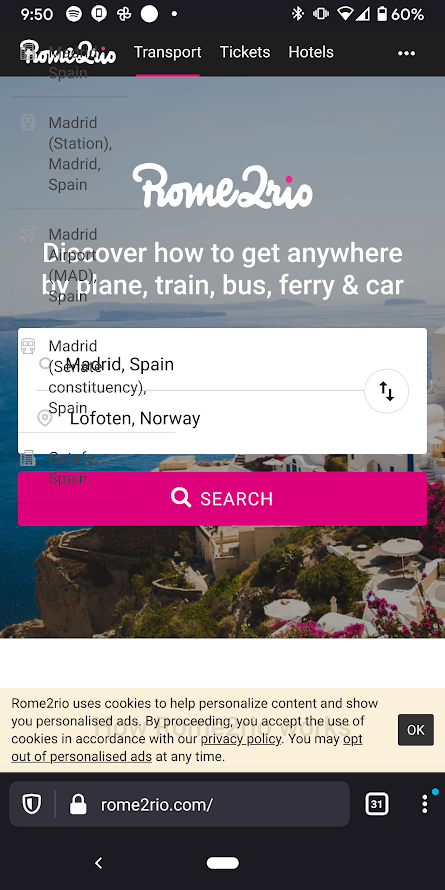
 miketaylr
on 10 Jul 2020
miketaylr
on 10 Jul 2020
I can see in the devtools inspector that the .autocomplete-menu is hidden when I tap on a city-name in the selector, but then it's shown again afterward (which would explain this).
I see two spots in their code which have this.$dropdown.show(), and adding logpoints confirms that the one in displayDropdown is called. The only place which calls it is updateDropdown:
  t.prototype.updateDropdown = function (n, t) {
    n.length >= this.settings.displayDropdownMinimumCharacters ? this.displayDropdown(n, t)  : this.hideDropdown()
  };
Logging the values passed into it, n is the text the user is typing, and this is what I see as I type "Toronto":
Toro
// I select `Toronto, ON, Canada` here, and it's called again:
Toronto, ON, Canada
if I add a conditional breakpoint to catch that last value (say, n.length > 8), then I notice that Chrome never gets that last call, but Firefox does.
This is the stack trace I see (with jquery bits indented):
updateDropdown (https://static.r2r.io/HTML/Default.202007082304.js:formatted#476)
t (https://static.r2r.io/HTML/Default.202007082304.js:formatted#326)
  c (https://code.jquery.com/jquery-3.4.1.min.js:formatted#1338)
  fireWith (https://code.jquery.com/jquery-3.4.1.min.js:formatted#1393)
  t[0] (https://code.jquery.com/jquery-3.4.1.min.js:formatted#1509)
onRequest (https://static.r2r.io/HTML/Default.202007082304.js:formatted#733)
  c (https://code.jquery.com/jquery-3.4.1.min.js:formatted#1338)
  fireWith (https://code.jquery.com/jquery-3.4.1.min.js:formatted#1393)
  t[0] (https://code.jquery.com/jquery-3.4.1.min.js:formatted#1509)
sendRequest (https://static.r2r.io/HTML/Default.202007082304.js:formatted#900)
  c (https://code.jquery.com/jquery-3.4.1.min.js:formatted#1338)
  fireWith (https://code.jquery.com/jquery-3.4.1.min.js:formatted#1393)
  l (https://code.jquery.com/jquery-3.4.1.min.js:formatted#3783)
  o (https://code.jquery.com/jquery-3.4.1.min.js:formatted#3904)
  send (https://code.jquery.com/jquery-3.4.1.min.js:formatted#3912)
  ajax (https://code.jquery.com/jquery-3.4.1.min.js:formatted#3713)
  i (https://code.jquery.com/jquery-3.4.1.min.js:formatted#3816)
sendRequest (https://static.r2r.io/HTML/Default.202007082304.js:formatted#899)
onRequest (https://static.r2r.io/HTML/Default.202007082304.js:formatted#730)
  i (https://code.jquery.com/jquery-3.4.1.min.js:formatted#4204)
t (https://static.r2r.io/HTML/Default.202007082304.js:formatted#322)
r (https://static.r2r.io/HTML/Default.202007082304.js:formatted#340)
i (https://static.r2r.io/HTML/Default.202007082304.js:formatted#343)
request (https://static.r2r.io/HTML/Default.202007082304.js:formatted#357)
onInput (https://static.r2r.io/HTML/Default.202007082304.js:formatted#314)
  i (https://code.jquery.com/jquery-3.4.1.min.js:formatted#4204)
  dispatch (https://code.jquery.com/jquery-3.4.1.min.js:formatted#2088)
  handle (https://code.jquery.com/jquery-3.4.1.min.js:formatted#2011)
  val (https://code.jquery.com/jquery-3.4.1.min.js:formatted#3319)
  each (https://code.jquery.com/jquery-3.4.1.min.js:formatted#153)
  each (https://code.jquery.com/jquery-3.4.1.min.js:formatted#75)
  val (https://code.jquery.com/jquery-3.4.1.min.js:formatted#3315)
select (https://static.r2r.io/HTML/Default.202007082304.js:formatted#466)
clickDropdownItem (https://static.r2r.io/HTML/Default.202007082304.js:formatted#453)
bindDropdownEvents (https://static.r2r.io/HTML/Default.202007082304.js:formatted#276)
  dispatch (https://code.jquery.com/jquery-3.4.1.min.js:formatted#2088)
  handle (https://code.jquery.com/jquery-3.4.1.min.js:formatted#2011)
  add (https://code.jquery.com/jquery-3.4.1.min.js:formatted#2031)
  Ae (https://code.jquery.com/jquery-3.4.1.min.js:formatted#1965)
  each (https://code.jquery.com/jquery-3.4.1.min.js:formatted#153)
  each (https://code.jquery.com/jquery-3.4.1.min.js:formatted#75)
  Ae (https://code.jquery.com/jquery-3.4.1.min.js:formatted#1964)
  on (https://code.jquery.com/jquery-3.4.1.min.js:formatted#2278)
bindDropdownEvents (https://static.r2r.io/HTML/Default.202007082304.js:formatted#273)
That is, it gets into this mousedown handler added in bindDropdownEvents, and calls clickDropdownItem:
    this.$dropdown.on('mousedown', '.autocomplete-item', function (n) {
      r2r.logging.nonInteractionEvent(t.settings.gaEventCategory, 'SelectMethod', 'Click');
      n.stopPropagation();
      t.clickDropdownItem(this)
    });
That ultimately calls this.select(i, "click"):
  t.prototype.select = function (n, t) {
    var i, r;
    if (  r2r.logging.nonInteractionEvent(this.settings.gaEventCategory, 'QueryLengthBeforeSelect', 'QueryLength ' + this.state.query.length),
          this.ignoreRequestResponse = !0,
          this.itemJustSelected = !0,
          this.state.value = this.$input.val(),
        i = this.shadowSuggestionExists() &&
          (n === - 1 || !n),
        !n || i ? n = 0 : this.settings.resolveAutomatically &&
        n === - 1 &&
          (n = 0),
        r = this.state.filteredItems &&
          this.state.filteredItems.length,
        n >= 0 &&
        r &&
        !this.state.selectedItem &&
        (this.state.selectedItem = this.state.filteredItems[n], this.state.value = this.state.selectedItem.longName, this.$input.val(this.state.value)),
        this.settings.onSelect
    ) {
      this.settings.onSelect({
        item: this.state.selectedItem,
        value: this.state.value,
        query: this.state.query,
        selectMethod: t
      });
    }
    this.hideDropdown();
    this.hideShadow()
  };
Both Firefox and Chrome then call this.settings.onSelect:
GeocoderAutocomplete.prototype.onSelect = function(n) {
    this.logSelectedItemType(n);
    this.value = n.value;
    this.setCanonicalName(null);
    var t = this;
    if (this.options.onSelect && n.item && !this.settings.onlySearchPlaceIds)
        this.service.getPlaceDetails(n.item).done(function(i) {
            t.setValue(i.longName);
            t.setCanonicalName(i.canonicalName);
            n.item = i;
            t.options.onSelect(n)
        });
    else if (this.options.onSelect) {
        t.setValue(n.value);
        this.options.onSelect(n)
    }
But Firefox ends up in the last else-if clause, while Chrome runs the first one, because n.item == null in Firefox, while in Chrome it's an object like this:
{
  canonicalName: "Toronto",
  kind: "city",
  kinds: ["city"],
  longName: "Toronto, ON, Canada",
  shortName: "Toronto",
}
n is set to this.state.selectedItem in select(), which is null in Firefox, so that's the bug.
Now, it appears that it ought to be setting the value in the big if-statement above:
        n >= 0 &&
        r &&
        !this.state.selectedItem &&
        (this.state.selectedItem = this.state.filteredItems[n], this.state.value = this.state.selectedItem.longName, this.$input.val(this.state.value)),
In my testing, all the values here check out, so selectedItem should be correct. However it turns out that selectedItem is somehow reset to null just after the if-statement, and just before the onSelect call is made in the if-clause:
  t.prototype.onInput = function () {
    if (clearTimeout(this.updateDropdownTimeout), this.$input.is(':focus')) {
      this.userCancelled = !1;
      this.ignoreRequestResponse = !1;
      this.itemJustSelected = !1;
      this.state.indexOfSelectedDropdownItem = - 1;
      this.state.selectedItem = null;
Indeed, Firefox is sending a trusted input event during the mousedown, according to a logpoint to jQuery's handle function (which is reflected in the stack trace above):
        (a = v.handle = function (e) { // gets a trusted `input` event with target == input#fullscreen-input.autocomplete__input
          return 'undefined' != typeof k && k.event.triggered !== e.type ? k.event.dispatch.apply(t, arguments)  : void 0
        }),
So to summarize, what's happening is that it gets to the big if-statement during the mousedown, sets the selectedItem, but then before the call to onSelect can read the selectedItem, an input event interrupts everything and resets selectedItem to null, before resuming the mousedown handling, thus breaking the site.
I have no idea where that input event is coming from, but Chrome does not fire it. But I do see that Chrome and Firefox both fire input events as I actyally type, all with inputType="insertCompositionText" and event.isComposing=true and event.data being whatever it in the input at the time.
But then Firefox provides a final insertCompositionText input event during the subsequent mousedown event when I tap on my selection, which is the same as the last input while I was typing, except with isComposing=false. Even though there's a mousedown happening, and event.target.value has already been changed.
That all seems ... weird.
I'll ping Masayuki on this one, because I'm not at all sure if this is spec-compliant. If so, will Chrome follow suit? Then the site should also break for Chrome...
 wisniewskit
on 11 Jul 2020
wisniewskit
on 11 Jul 2020
@wisniewskit Sorry for the delay to reply. And ccing @makotokato
Even though there is no recommendation, I thought the Chrome's behavior is buggy. Chrome sends input events to the editable element (or editing host if in contenteditable) when you commit composition except moving focus.
Sending input event is conformed to Input Event Level 2 draft's 7.5, although Chrome is now supports Level 1. At least, it does not violate any standards (UI Events 5.7.6 still document the old discussion's result, but it should be removed).
Even though there's a
mousedownhappening, andevent.target.valuehas already been changed.
This is a good point. However, Chrome for Windows does not prevent input event when setting value from mousedown event handler, but does prevent input event when setting value from mousemove event handler, additionally, if setting value from keypress event handler, dispatching input event and adding the input character too. Only with this result, it might be reasonable to stop sending input event after value has already been modified by web apps.
However, as far as I've investigated the event order of Firefox for Androind, then, mousedown event is fired at last, i.e., after compositionend and input. So, the value is modified after committing composition on Gecko, but on Blink, setting value cancels the composition. So, even if we just stop dispatching input event from editor, it seems that the website won't work as expected.
This is really annoying result. If we need to get Blink-compat behavior, content needs to dispatch mousedown event for a tap before committing composition. I don't know whether the committing composition with mousedown is done by widget level or not. @makotokato -san, do you know it? Even if we change the event order, we need to add new flag to WidgetCompositionEvent or TextComposition to make editor ignore composition events to prevent to modify the changed value.
 masayuki-nakano
on 16 Jul 2020
masayuki-nakano
on 16 Jul 2020
Related issues
 scheinercc
·
6Comments
scheinercc
·
6Comments
 webcompat-bot
·
4Comments
webcompat-bot
·
5Comments
webcompat-bot
·
4Comments
webcompat-bot
·
5Comments
 IngrownMink4
·
3Comments
IngrownMink4
·
3Comments
 vickychin
·
4Comments
vickychin
·
4Comments
Most helpful comment
I can see in the devtools inspector that the
.autocomplete-menuis hidden when I tap on a city-name in the selector, but then it's shown again afterward (which would explain this).I see two spots in their code which have
this.$dropdown.show(), and adding logpoints confirms that the one indisplayDropdownis called. The only place which calls it isupdateDropdown:Logging the values passed into it,
nis the text the user is typing, and this is what I see as I type "Toronto":if I add a conditional breakpoint to catch that last value (say,
n.length > 8), then I notice that Chrome never gets that last call, but Firefox does.This is the stack trace I see (with jquery bits indented):
That is, it gets into this
mousedownhandler added inbindDropdownEvents, and callsclickDropdownItem:That ultimately calls
this.select(i, "click"):Both Firefox and Chrome then call
this.settings.onSelect:But Firefox ends up in the last else-if clause, while Chrome runs the first one, because
n.item == nullin Firefox, while in Chrome it's an object like this:nis set tothis.state.selectedIteminselect(), which isnullin Firefox, so that's the bug.Now, it appears that it ought to be setting the value in the big if-statement above:
In my testing, all the values here check out, so
selectedItemshould be correct. However it turns out thatselectedItemis somehow reset tonulljust after the if-statement, and just before theonSelectcall is made in the if-clause:Indeed, Firefox is sending a trusted
inputevent during themousedown, according to a logpoint to jQuery'shandlefunction (which is reflected in the stack trace above):So to summarize, what's happening is that it gets to the big if-statement during the
mousedown, sets theselectedItem, but then before the call toonSelectcan read theselectedItem, aninputevent interrupts everything and resetsselectedItemtonull, before resuming themousedownhandling, thus breaking the site.I have no idea where that input event is coming from, but Chrome does not fire it. But I do see that Chrome and Firefox both fire
inputevents as I actyally type, all withinputType="insertCompositionText"andevent.isComposing=trueandevent.databeing whatever it in the input at the time.But then Firefox provides a final insertCompositionText
inputevent during the subsequentmousedownevent when I tap on my selection, which is the same as the last input while I was typing, except withisComposing=false. Even though there's amousedownhappening, andevent.target.valuehas already been changed.That all seems ... weird.
I'll ping Masayuki on this one, because I'm not at all sure if this is spec-compliant. If so, will Chrome follow suit? Then the site should also break for Chrome...