Web-bugs: imgur.com - see bug description
URL: https://imgur.com/a/F67doQi
Browser / Version: Firefox 76.0
Operating System: Windows 10
Tested Another Browser: No
Problem type: Something else
Description: Closed bug is not fixed
Steps to Reproduce:
The bug was closed by a useless bot even though nobody ever said that it was fixed. It is indeed not fixed, the page is still broken. FOR OVER A YEAR at this point, imgur nsfw images just can't be viewed in Firefox.
Initially reported on https://github.com/webcompat/web-bugs/issues/53675
Browser Configuration
- None
_From webcompat.com with ❤️_
 webcompat-bot
All 13 comments
Thanks for the report. I was able to reproduce the issue when accessing the site and also with a clean profile.
URL: https://imgur.com/a/F67doQi

Console:

Note:
- After 4-5 clicks in the "Yes, I'm over 18" button the confirmation check is dismissed and I can enter the site.
- On Chrome instead of "Yes, I'm over 18" there is "Sign in" button.

Tested with:
Browser / Version: Firefox Nightly 79.0a1 (2020-06-03)
Operating System: Windows 10 Pro
Moving to Needsdiagnosis for further investigation.
 softvision-oana-arbuzov
on 4 Jun 2020
softvision-oana-arbuzov
on 4 Jun 2020
@softvision-oana-arbuzov, I am able to reproduce the issue in Firefox Nightly on macOS.
The button for confirming the age is not working.
Tested with:
Browser / Version: Firefox Nightly 79.0a1 (2020-06-03), Chrome 83.0.4103.61
Operating System: macOS 10.15.3
 cipriansv
on 4 Jun 2020
cipriansv
on 4 Jun 2020
This is sameSite=lax fallout. They're using a jQuery Cookie plugin that's unmaintained since 2014, and that one doesn't even have support for sameSite.
The over18-dialog breaks in Chrome as well if you toggle the sameSite pref in Canary, so... they'll eventually have to fix that. Let's close as a duplicate of https://bugzilla.mozilla.org/show_bug.cgi?id=1618610.
 denschub
on 4 Jun 2020
denschub
on 4 Jun 2020
Has sameSite=lax landed in stable yet? I can reproduce this on stable and about:config lists network.cookie.sameSite.laxByDefault as false (which is default).
 AgentOak
on 4 Jun 2020
AgentOak
on 4 Jun 2020
Well, I can break it in Chrome by turning on sameSite in Canary, and in Nightly the over18 cookie fails for exactly the same reason.
When trying in stable, are you re-using a profile that already has cookies set? This absolutely works for me in stable, hence me asking.
If it's not sameSite, because it also breaks in stablef or some users, it's possible that the reload is racing the document.cookie assignment, because the latter is actually not quite sync. We've had rare issues about this before, but that wouldn't really change the fact that there isn't much we can do - but then we'd need to reach out to imgur instead.
denschub
on 4 Jun 2020
I can consistently reproduce it on fresh profiles.
I created a new profile, opened Devtools to Storage, then went straight to the URL used in the reproduction above. Do not interact with the Devtools in any way at this point. This is the list of cookies I have after I click "Yes" a few times:

Every time I click "Yes", the cookies over18 and retina flash up.
However, if I click into the cookies list, e.g. clicking on any cookie to show details, then press "Yes" again, suddenly I get a lot more cookies and it works:

I've tried with several fresh profiles, and retried on the last profile several times by clearing the history and force-reload with Ctrl+Shift+F5 and the behavior is consistent.
I've never investigated this before but I'm pretty sure I've never been able to get past the age gate since it was introduced.
System is Windows 10 Pro x64 1909. Let me know if I can do anything else to help reproduce this.
AgentOak
on 5 Jun 2020
Mh. Something is racy there. Let's reopen.
denschub
on 12 Jun 2020
This is the markup for the button
<a class="btn btn-wall--yes"
  onclick="$.cookie('over18', '1', { expires: 1 }); window.location.reload()"
  href="#">Yes, I'm Over 18</a>
Something on the console, a flood of errors as soon as we move the cursor across the window.
window.jQuery().jquery
"2.1.1"
Uncaught TypeError: Imgur.Util.jafoLog is not a function
    a https://s.imgur.com/min/global.js?1592606165:17
    g https://s.imgur.com/min/global.js?1592606165:12
    reset https://s.imgur.com/min/global.js?1592606165:12
    handleUserActivity https://s.imgur.com/min/global.js?1592606165:12
    value https://d1fh3f0kkan5vq.cloudfront.net/script.js:1
    g https://s.imgur.com/min/global.js?1592606165:12
    initIdleMonitor https://s.imgur.com/min/global.js?1592606165:17
    <anonymous> https://imgur.com/a/F67doQi:391
global.js:17:2662
    a https://s.imgur.com/min/global.js?1592606165:17
    g https://s.imgur.com/min/global.js?1592606165:12
    reset https://s.imgur.com/min/global.js?1592606165:12
    handleUserActivity https://s.imgur.com/min/global.js?1592606165:12
    handleUserActivity self-hosted:835
    (Async: EventListener.handleEvent)
    value https://d1fh3f0kkan5vq.cloudfront.net/script.js:1
    g https://s.imgur.com/min/global.js?1592606165:12
    initIdleMonitor https://s.imgur.com/min/global.js?1592606165:17
    <anonymous> https://imgur.com/a/F67doQi:391
indeed…

        produceJafo: function () {
            var a = this.getConfig('analytics'),
                b = new Imgur.Analytics,
                c = new Imgur.AmplitudeProvider(this.produceAmplitudeClient());
            b.use(c);
            var d = new Imgur.Jafo(Imgur.Environment.auth.id, a.logPixel, b);
            d.bindDataAttr(),
                Imgur.Util.jafoLog = _.bind(d.logAction, d),
                Imgur.Util.jafoLogEvent = d.logEvent.bind(d),
                Imgur.Util.jafoLog.direct = _.bind(d.directFire, d),
                Imgur.Util.registerExperiment = _.bind(d.registerExperiment, d),
                Imgur.Util.registerExperimentData = _.bind(d.registerExperimentData, d),
                Imgur.Util.registerUserWallet = _.bind(d.registerUserWallet, d),
                Imgur.Dev.DebugVar('jafo', d)
        },
and
        logAction: function (a) {
            if (this._.shouldFire) {
                var b = this._mergeData(a);
                if ('object' == typeof b) {
                    this.consoleDebug(b);
                    var c = this._.interanaAdapter.getTranslatedAnalyticData(b.action.event, b.action.meta);
                    return this.logEvent(c.category, c.name, c.meta),
                        this._queue(b)
                }
            }
            return !1
        },
What is surprising is that I can access the content without the over18 cookie after deleting the cookies. So something must be stored elsewhere.
Also
https://blog.imgur.com/2019/10/14/discontinuing-support-for-nsfw-reddit-subsections/
As of October 14, 2019, Imgur will no longer display NSFW Imgur r/subsections associated with Reddit subreddits. Over the years, these pages have put Imgur’s user growth, mission, and business at risk. We want Imgur to be a fun and entertaining place that brings happiness to the Internet for many, many years to come. Thus, we have made the difficult decision to discontinue support for these subsections on Imgur.
Additionally, any pages that we know to contain NSFW content will now require that a user log in and acknowledge that they are 18+ years of age in order to view.
Users need to be logged in
That said I can see without logged in, so it's all weird and broken.
The best would be to contact directly imgur.
 karlcow
on 22 Jun 2020
karlcow
on 22 Jun 2020
@clickyotomy Do you know who could help us find the right person for the "over 18" Javascript logic of imgur which is breaking in Firefox and Chrome?
Thanks.
karlcow
on 22 Jun 2020
@clickyotomy Do you know who could help us find the right person for the "over 18" Javascript logic of imgur which is breaking in Firefox and Chrome?
Thanks.
@karlcow - ACK; I will open a ticket with our internal bug tracker for addressing this and update here when it is fixed. Thanks for letting me know.
 clickyotomy
on 22 Jun 2020
clickyotomy
on 22 Jun 2020
@karlcow - The issue has been fixed.
clickyotomy
on 10 Jul 2020
Thanks so much <3
denschub
on 10 Jul 2020
Indeed, I can no longer reproduce the issue either.
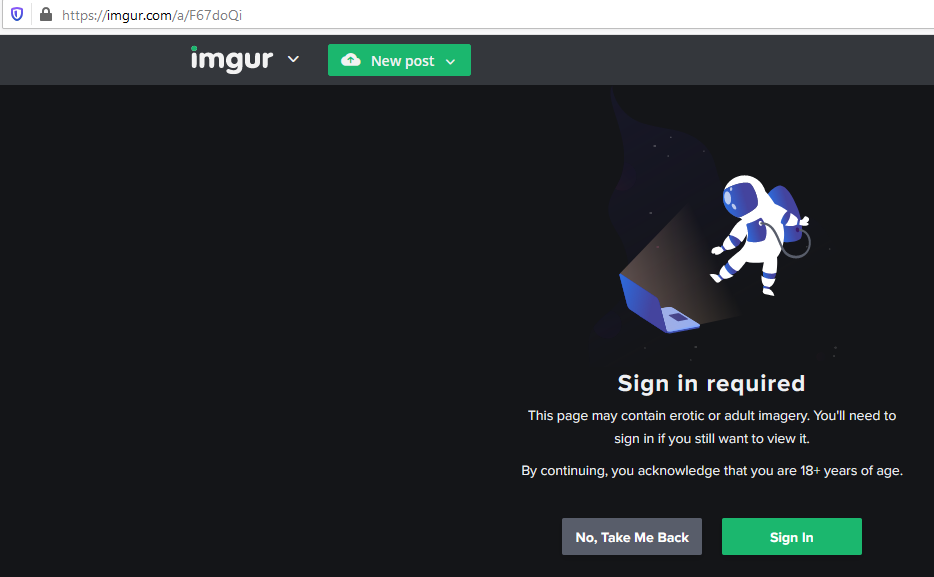
Tested with:
Browser / Version: Firefox Nightly 80.0a1 (2020-07-26)
Operating System: Windows 10 Pro
softvision-oana-arbuzov
on 27 Jul 2020
Related issues
 lolrepeatlol
·
4Comments
lolrepeatlol
·
4Comments
 vickychin
·
4Comments
vickychin
·
4Comments
 scheinercc
·
6Comments
webcompat-bot
·
5Comments
scheinercc
·
6Comments
webcompat-bot
·
5Comments
 oksas
·
5Comments
oksas
·
5Comments
Most helpful comment
@karlcow - The issue has been fixed.