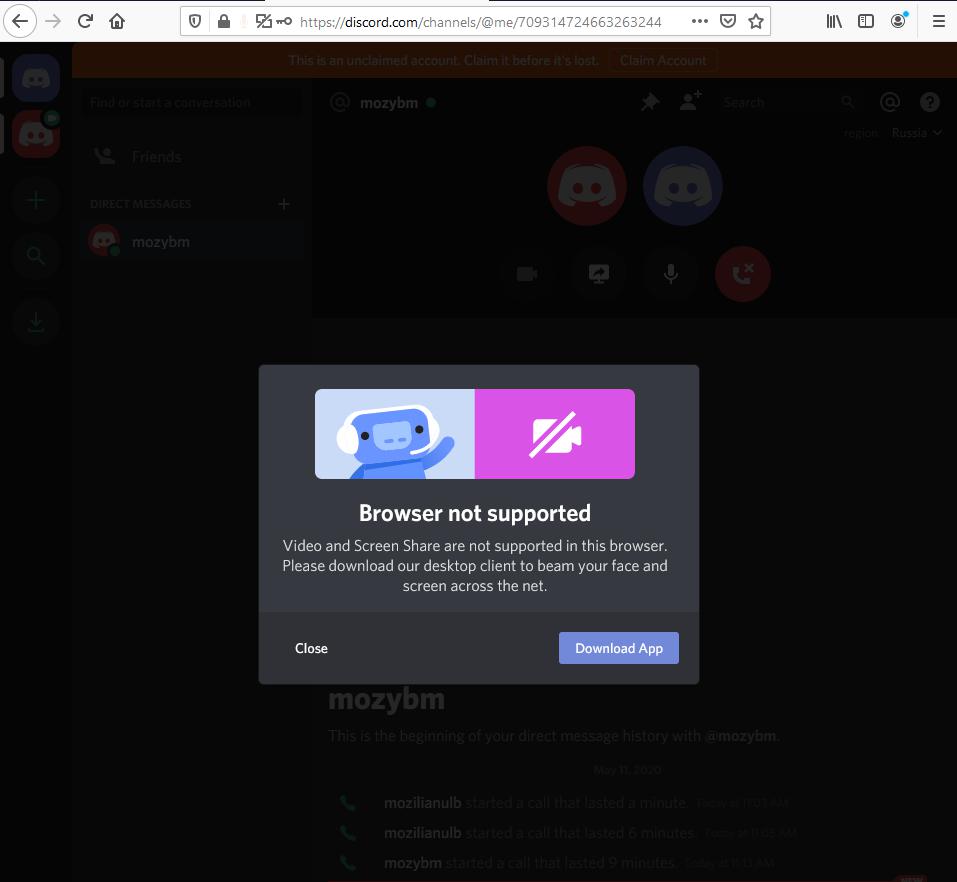
Web-bugs: discord.com - Video and Screen share are not supported on Firefox browser
URL: https://discord.com/
Browser / Version: Firefox 78.0
Operating System: Windows 10
Tested Another Browser: Yes Chrome
Problem type: Site is not usable
Description: Browser unsupported
Prerequisites:
- Discord account created and signed in.
- Friends available.
Steps to reproduce:
- Navigate to https://discord.com/
- Start a Voice call with someone (allow microphone).
- After the call is started, click the "Video" icon.
Expected Behavior:
Video call starts.
Actual Behavior:
"Browser not supported" message is displayed informing that Video and Screen share are not supported.
Notes:
- Screenshot attached.
- The issue is not reproducible on Chrome 81.0.4044.138.
Watchers:
@softvision-oana-arbuzov
@cipriansv
View the screenshot
Browser Configuration
- None
_From webcompat.com with ❤️_
 softvision-oana-arbuzov
All 9 comments
Just tested video call with useragent set to Chrome 80 and it worked, the other party was able to see my webcam. I was however not able to see the other party.
 Mel34
on 13 May 2020
Mel34
on 13 May 2020
Close as duplicate of https://bugzilla.mozilla.org/show_bug.cgi?id=1446642
 karlcow
on 3 Jun 2020
karlcow
on 3 Jun 2020
Close as duplicate of https://bugzilla.mozilla.org/show_bug.cgi?id=1446642
With all due respect, how is that bug even remotely related to this? Discord voice works, it's just video calls that are borked.
Mel34
on 3 Jun 2020
ooops I misread.
Thanks for the heads up @Mel34
karlcow
on 4 Jun 2020
This reminds me of another similar issue, but I can't find it right now.
https://bugzilla.mozilla.org/show_bug.cgi?id=1623863
So
- Discord is blocking firefox because it doesn't work
- Faking the UA shows that it doesn't work
@Mel34
- the other party was on a different browser? If yes which one?
- Does it work with firefox 77 (faking the ua to be chrome)
Thanks.
karlcow
on 4 Jun 2020
Another issue with video teleconference being assymetrical
https://github.com/webcompat/web-bugs/issues/25070
karlcow
on 4 Jun 2020
I just tested it on same PC with official discord client. What actually happens is:
- on firefox nightly 79, spoofing chrome 80 useragent I can see the video I'm supposed to be sending to the bogus account I created to test this.
- The recipient on the official discord client sees infinite loading animation and camera stream is never broadcast.
likewise, if I enable the camera on the official discord client, firefox spoofing chrome 80 sees infinite loading animation
My earlier assertation that the other person was able to see me was done with discord on iphone, but the person that helped me test this isn't available for me to repeat the test.

Mel34
on 4 Jun 2020
@Mel34 thanks.
Another similar report.
https://support.discord.com/hc/en-us/community/posts/360061930411-Video-Chat-on-Firefox
I will push to contactready
I wonder if @adamopenweb knows if we try to contact them in the past.
karlcow
on 7 Jul 2020
Yes we have in the past and they were looking for RTX support in Firefox, which is coming https://bugzilla.mozilla.org/show_bug.cgi?id=1164187 (you can try it in Firefox 79). They'll likely have some changes and testing to do after this lands.
I think this bug is a duplicate of #9066.
 adamopenweb
on 7 Jul 2020
adamopenweb
on 7 Jul 2020
Related issues
 tGstep
·
3Comments
tGstep
·
3Comments
 webcompat-bot
·
5Comments
webcompat-bot
·
4Comments
webcompat-bot
·
5Comments
webcompat-bot
·
4Comments
 Ezio916
·
4Comments
Ezio916
·
4Comments
 oksas
·
5Comments
oksas
·
5Comments
Most helpful comment
Just tested video call with useragent set to Chrome 80 and it worked, the other party was able to see my webcam. I was however not able to see the other party.