Web-bugs: support.logmeininc.com - site is not usable
URL: https://support.logmeininc.com/gotomeeting/help/join-a-test-session-g2m050001
Browser / Version: Firefox 68.0
Operating System: Linux
Tested Another Browser: Yes
Problem type: Site is not usable
Description: Sites says I should download Chrome
Steps to Reproduce:
- click on "Join Now" button
- In window that appears, it says
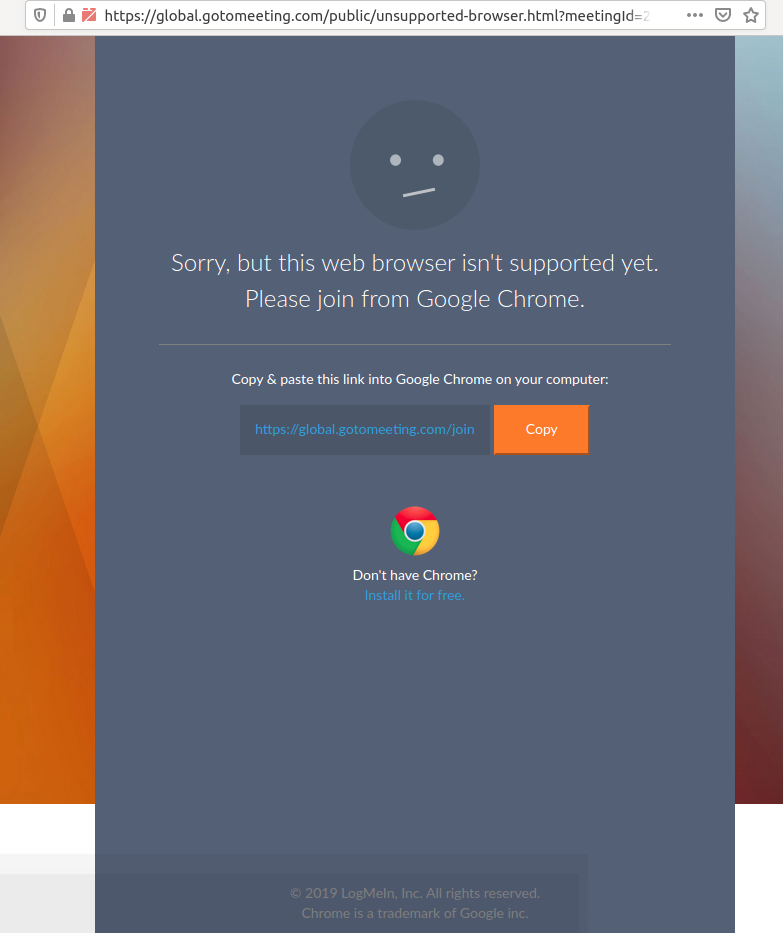
Sorry, but this web browser isn't supported yet.
Please join from Google Chrome.
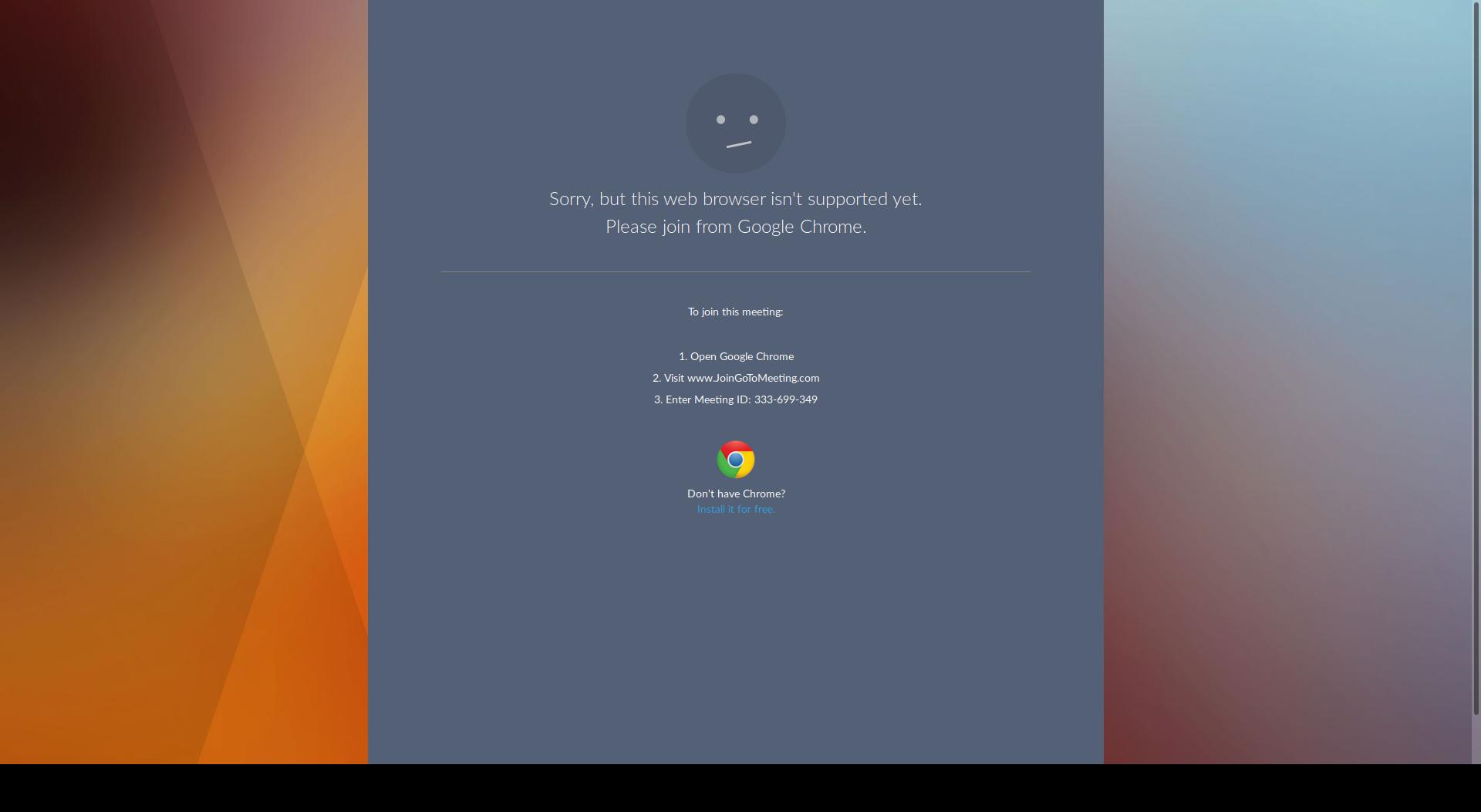
Browser Configuration
- mixed active content blocked: false
- image.mem.shared: true
- buildID: 20190322164604
- tracking content blocked: false
- gfx.webrender.blob-images: true
- hasTouchScreen: true
- mixed passive content blocked: false
- gfx.webrender.enabled: false
- gfx.webrender.all: true
- channel: nightly
Console Messages:
[u'[JavaScript Warning: "The resource at https://www.google-analytics.com/analytics.js was blocked because content blocking is enabled." {file: "https://support.logmeininc.com/gotomeeting/help/join-a-test-session-g2m050001" line: 0}]', u'[JavaScript Warning: "The script from https://www.surveygizmo.com/s3/3508692/BrightSpot-Side-Survey?__output=embedjs&__ref=https%3A%2F%2Fsupport.logmeininc.com%2Fgotomeeting%2Fhelp%2Fjoin-a-test-session-g2m050001 was loaded even though its MIME type (text/html) is not a valid JavaScript MIME type." {file: "https://support.logmeininc.com/gotomeeting/help/join-a-test-session-g2m050001" line: 0}]', u'[JavaScript Warning: "Synchronous XMLHttpRequest on the main thread is deprecated because of its detrimental effects to the end users experience. For more help http://xhr.spec.whatwg.org/" {file: "https://support.logmeininc.com/assets/scripts/care/stand-alone-scripts/care-modified-auth.js?_=1548726240000" line: 360}]', u'[console.log(JQMIGRATE: Migrate is installed, version 1.4.1) https://www.surveygizmo.com/2019.03.22.00/runtimejs/dist/survey/js/jssurvey.js:40:17]', u'[JavaScript Warning: "onmozfullscreenchange is deprecated." {file: "https://www.surveygizmo.com/2019.03.22.00/runtimejs/dist/survey/js/jssurvey.js" line: 2938}]', u'[JavaScript Warning: "onmozfullscreenerror is deprecated." {file: "https://www.surveygizmo.com/2019.03.22.00/runtimejs/dist/survey/js/jssurvey.js" line: 2938}]', u'[JavaScript Warning: "The resource at https://www.google-analytics.com/analytics.js was blocked because content blocking is enabled." {file: "https://support.logmeininc.com/gotomeeting/help/join-a-test-session-g2m050001" line: 0}]', u'[JavaScript Warning: "Request to access cookie or storage on https://www.youtube.com/iframe_api was blocked because it came from a tracker and content blocking is enabled." {file: "https://support.logmeininc.com/gotomeeting/help/join-a-test-session-g2m050001" line: 0}]', u'[JavaScript Warning: "Cross-Origin Request Blocked: The Same Origin Policy disallows reading the remote resource at https://dpm.demdex.net/id?d_visid_ver=3.0.0&d_fieldgroup=AAM&d_rtbd=json&d_ver=2&d_orgid=16323DDB5A5732970A495D95%40AdobeOrg&d_nsid=0&d_mid=67743166102244751566635648070136826472&ts=1553362702553. (Reason: CORS request did not succeed)."]', u'[JavaScript Warning: "The resource at https://dpm.demdex.net/id?d_visid_ver=3.0.0&d_fieldgroup=AAM&d_rtbd=json&d_ver=2&d_orgid=16323DDB5A5732970A495D95%40AdobeOrg&d_nsid=0&d_mid=67743166102244751566635648070136826472&ts=1553362702553 was blocked because content blocking is enabled." {file: "https://support.logmeininc.com/gotomeeting/help/join-a-test-session-g2m050001" line: 0}]', u'[JavaScript Warning: "Cross-Origin Request Blocked: The Same Origin Policy disallows reading the remote resource at https://dpm.demdex.net/id?d_visid_ver=3.0.0&d_fieldgroup=AAM&d_rtbd=json&d_ver=2&d_orgid=16323DDB5A5732970A495D95%40AdobeOrg&d_nsid=0&d_mid=67743166102244751566635648070136826472&ts=1553362702911. (Reason: CORS request did not succeed)."]', u'[JavaScript Warning: "The resource at https://dpm.demdex.net/id?d_visid_ver=3.0.0&d_fieldgroup=AAM&d_rtbd=json&d_ver=2&d_orgid=16323DDB5A5732970A495D95%40AdobeOrg&d_nsid=0&d_mid=67743166102244751566635648070136826472&ts=1553362702911 was blocked because content blocking is enabled." {file: "https://support.logmeininc.com/gotomeeting/help/join-a-test-session-g2m050001" line: 0}]', u'[JavaScript Warning: "The resource at https://lmi.sc.omtrdc.net/b/ss/lmiglobal/1/JS-2.8.2/s98130834030994?AQB=1&ndh=1&pf=1&t=23%2F2%2F2019%2013%3A38%3A23%206%20240&sdid=112516C2CCC8A73A-51BF6FA9E46A8FFD&mid=67743166102244751566635648070136826472&ce=UTF-8&ns=lmi&pageName=g2m%3Asupport%3Agotomeeting%2Fhelp%2Fjoin-a-test-session-g2m050001&g=https%3A%2F%2Fsupport.logmeininc.com%2Fgotomeeting%2Fhelp%2Fjoin-a-test-session-g2m050001&cc=USD&ch=support&server=support.logmeininc.com&c1=en_us&v1=en_us&c2=D%3Dv2&v2=g2m&c3=CI_Articles&c5=g2m050001&c8=D%3Dg&v8=D%3Dg&c11=4&c12=Less%20than%201%20day&c14=1&c15=New&v15=%2Fgotomeeting%2Fhelp%2Fjoin-a-test-session-g2m050001&c16=https%3A%2F%2Fsupport.logmeininc.com%2Fgotomeeting%2Fhelp%2Fjoin-a-test-session-g2m050001&c17=0-25ms&c18=150-250ms&c19=2-3s&c20=0-25ms&c22=D%3Dv15&v22=cd8faa3fefd840edb80c&c24=content&c25=g2m_G2M050001&c26=D%3DpageName&c29=lmi%2Flmii%2F201903061908%7Cut4.45.201903061908%7C2.8.2%7Cprod%7Cview&c45=D%3Dv45&v45=https%3A%2F%2Fsupport.logmeininc.com%2Fgotomeeting%2Fhelp%2Fjoin-a-test-session-g2m050001&v52=D%3Dg&s=1920x1080&c=24&j=1.6&v=N&k=Y&bw=1920&bh=991&mcorgid=16323DDB5A5732970A495D95%40AdobeOrg&AQE=1 was blocked because content blocking is enabled." {file: "https://support.logmeininc.com/gotomeeting/help/join-a-test-session-g2m050001" line: 0}]', u'[JavaScript Warning: "The resource at https://lmi.sc.omtrdc.net/b/ss/lmiglobal/1/JS-2.8.2/s99487456086709?AQB=1&ndh=1&pf=1&t=23%2F2%2F2019%2013%3A38%3A23%206%20240&sdid=549E9AB253E7330B-6F8DC3AA7B39437E&mid=67743166102244751566635648070136826472&ce=UTF-8&ns=lmi&pageName=g2m%3Asupport%3Agotomeeting%2Fhelp%2Fjoin-a-test-session-g2m050001&g=https%3A%2F%2Fsupport.logmeininc.com%2Fgotomeeting%2Fhelp%2Fjoin-a-test-session-g2m050001&cc=USD&ch=support&server=support.logmeininc.com&events=event84&c1=en_us&v1=en_us&c2=D%3Dv2&v2=g2m&c3=CI_Articles&c5=g2m050001&c7=homepage&c8=D%3Dg&v8=D%3Dg&c11=5&c12=Less%20than%201%20day&c14=1&c15=New&v15=%2Fgotomeeting%2Fhelp%2Fjoin-a-test-session-g2m050001&c16=https%3A%2F%2Fsupport.logmeininc.com%2Fgotomeeting%2Fhelp%2Fjoin-a-test-session-g2m050001&c17=0-25ms&c18=150-250ms&c19=2-3s&c20=0-25ms&c22=D%3Dv15&v22=cd8faa3fefd840edb80c&c24=home&c25=g2m_G2M050001&c26=D%3DpageName&c29=lmi%2Flmii%2F201903061908%7Cut4.45.201903061908%7C2.8.2%7Cprod%7Cview&c45=D%3Dv45&v45=https%3A%2F%2Fsupport.logmeininc.com%2Fgotomeeting%2Fhelp%2Fjoin-a-test-session-g2m050001&v52=D%3Dg&v62=join%20a%20test%20session&s=1920x1080&c=24&j=1.6&v=N&k=Y&bw=1920&bh=991&mcorgid=16323DDB5A5732970A495D95%40AdobeOrg&AQE=1 was blocked because content blocking is enabled." {file: "https://support.logmeininc.com/gotomeeting/help/join-a-test-session-g2m050001" line: 0}]']
_From webcompat.com with ❤️_
 webcompat-bot
All 20 comments
Reddit discussion suggests that this problem was caused because the user had uBlock Origin's "Prevent WebRTC from leaking local IP addresses" option enabled, which broken GoToMeeting's WebRTC feature detection.
https://www.reddit.com/r/firefox/comments/b4guyl/gotowebmeeting_same_unsupported_bs/ej6w4mq/
I wasn't able to reproduce the uBlock Origin problem on macOS because, in both Firefox and Chrome, the site insists I download GoToMeeting's native macOS application.
 cpeterso
on 24 Mar 2019
cpeterso
on 24 Mar 2019
Thanks for the report, but I'm not able to reproduce the issue.
After clicking the "Join Now" button I was redirected to the page presented in the image below.
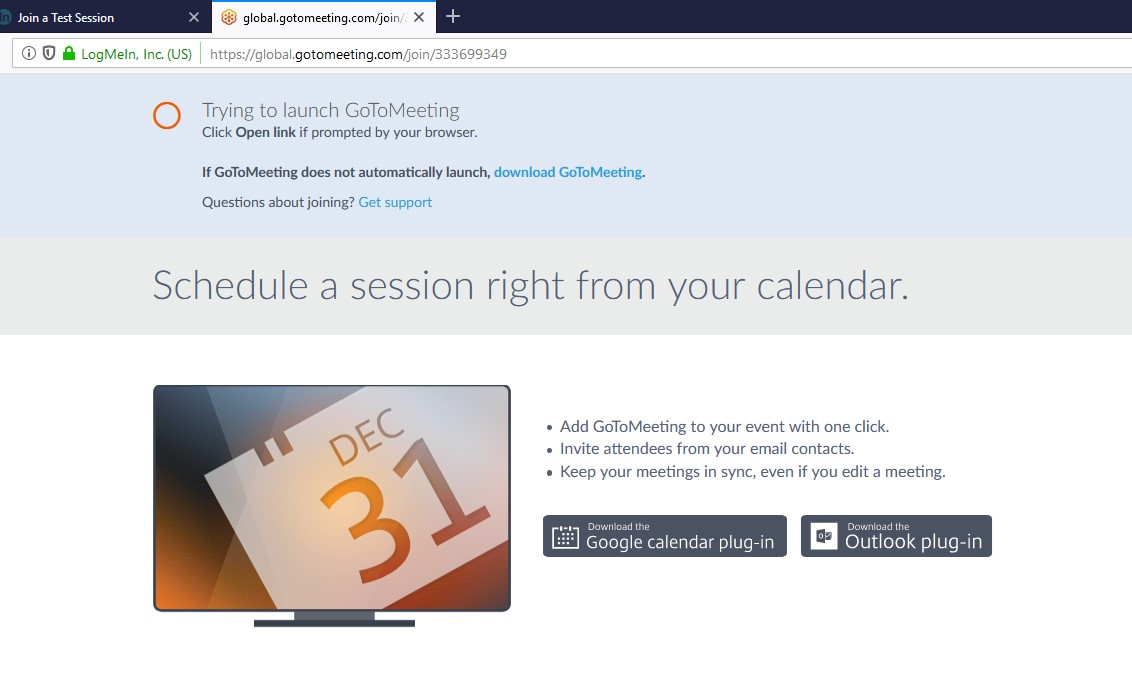
Tested with:
Browser / Version: Firefox Nightly 68.0a1 (2019-03-27)
Operating System: Ubuntu 18.04.2 LTS
Reporter, could you please update to the latest Firefox version, and give it another try?
Also, could you try clearing cache/data/cookies, disable Ad-blocker (if available), or use a clean profile (about:profiles), and check again?
 cipriansv
on 29 Mar 2019
cipriansv
on 29 Mar 2019
@cipriansv This still happens. Please try https://www.gotomeet.me/lizdavis and click "Join my meeting". Your screenshot is from the main site.

 lnicola
on 29 Mar 2019
lnicola
on 29 Mar 2019
@lnicola, after retesting I got the same result.
After clicking the "Join my meeting" button I was redirected to the same page as in my previous test.
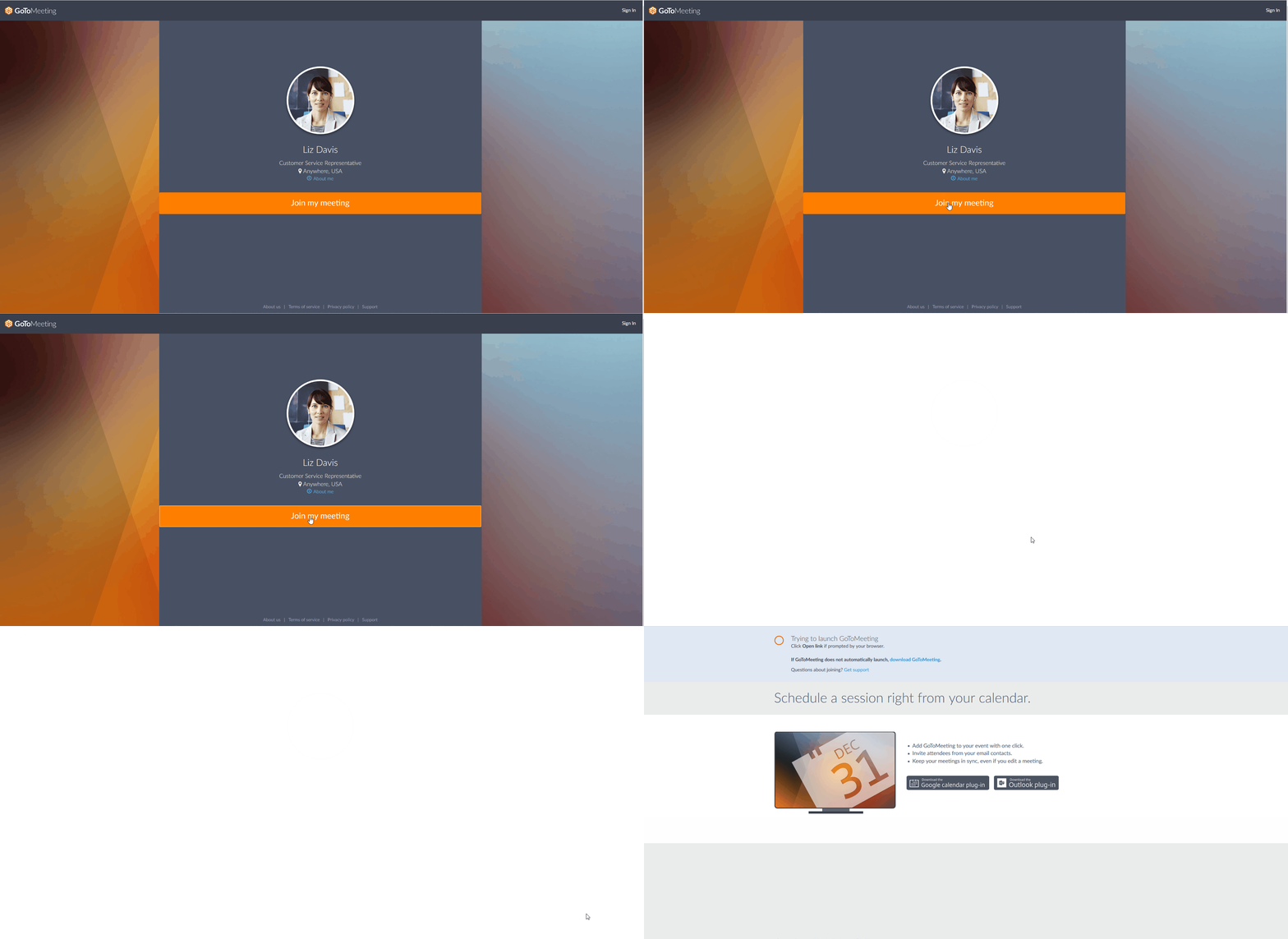
cipriansv
on 29 Mar 2019
Still happens to me on the latest Nightly. Arch Linux / Gnome. What is your user agent? Mine is Mozilla/5.0 (X11; Linux x86_64; rv:68.0) Gecko/20100101 Firefox/68.0.
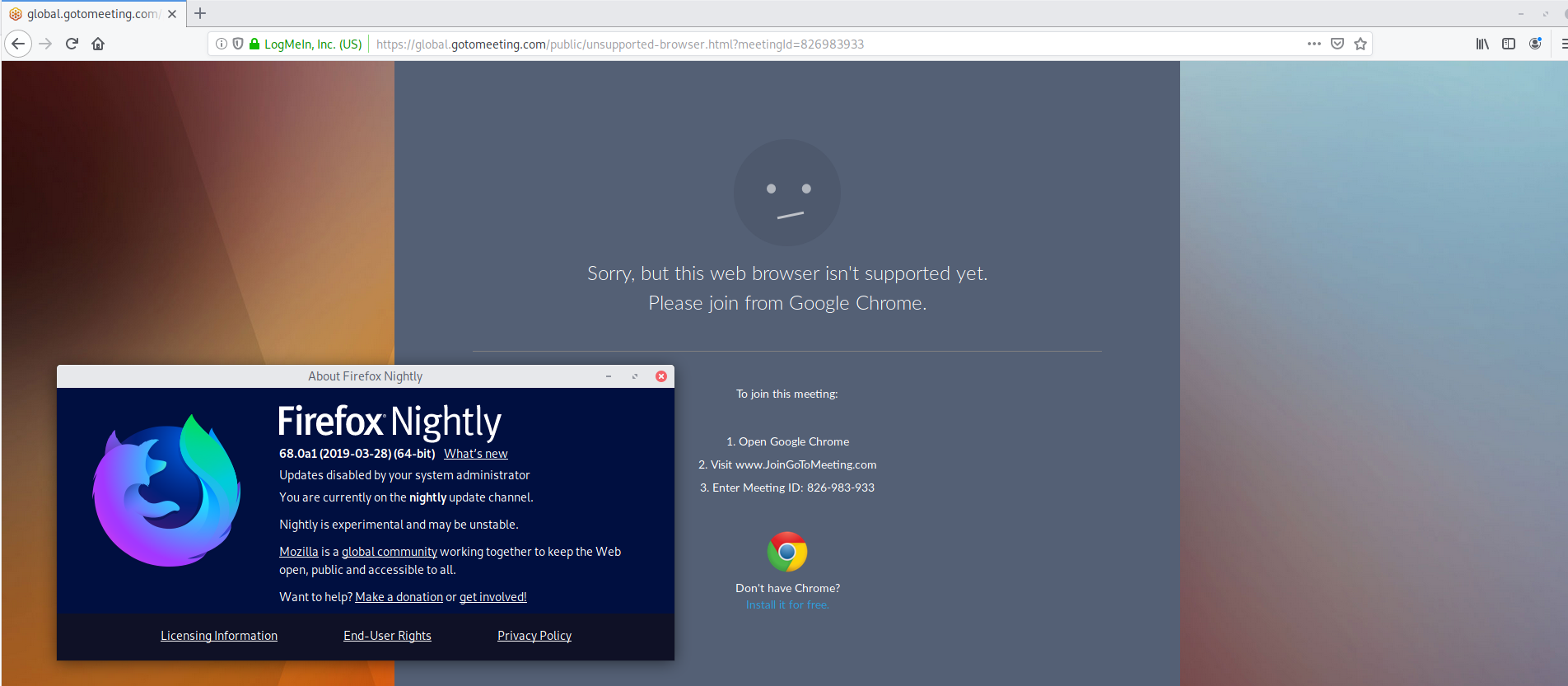
EDIT: I had some errors in the console because of Content Blocking. I disabled it, but without any luck.
lnicola
on 29 Mar 2019
This issue has been automatically locked since there has not been any recent activity after it was closed. Please open a new issue at https://webcompat.com/issues/new if you are experiencing a similar problem.
![lock[bot] picture](https://avatars1.githubusercontent.com/in/6672?v=4&s=40) lock[bot]
on 5 Apr 2019
lock[bot]
on 5 Apr 2019
See also https://bugzilla.mozilla.org/show_bug.cgi?id=1528148.
If I click on https://www.gotomeet.me/lizdavis, then Join my meeting in Chrome, I get taken to a prompt to select audio:
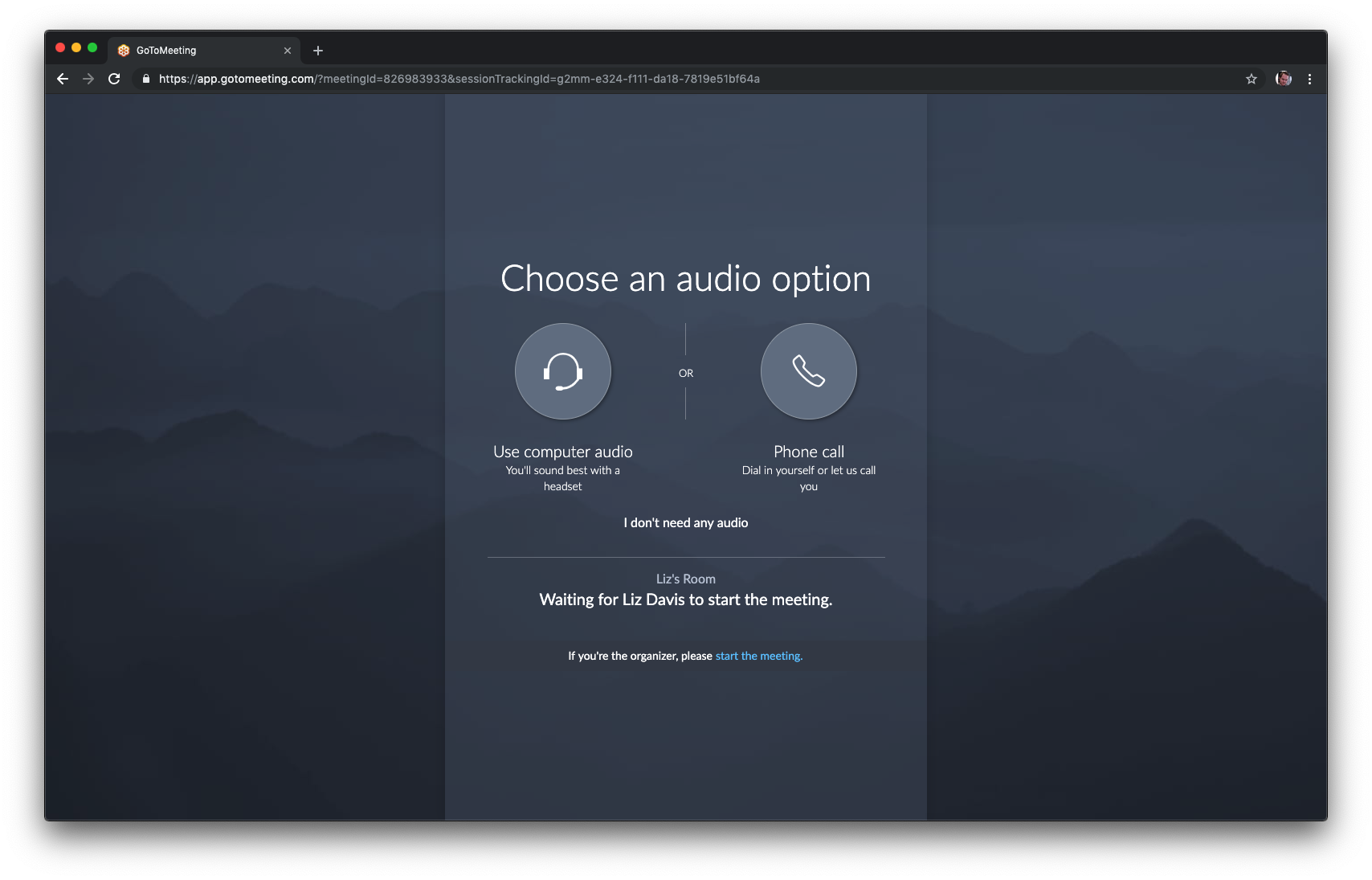
In Firefox, I get the screenshot that @cipriansv got, but that seems to be a prompt to launch from the native app.
It doesn't seem like the "not supported" thing exists anymore, but it would be good to see if there's some kind of UA sniffing or feature detection check so we can escalate with gotomeeting.
 miketaylr
on 19 Apr 2019
miketaylr
on 19 Apr 2019
In Firefox, I get the screenshot that @cipriansv got, but that seems to be a prompt to launch from the native app.
(which is pretty much what Chris is saying here: https://github.com/webcompat/web-bugs/issues/28261#issuecomment-475926519)
miketaylr
on 19 Apr 2019
@miketaylr Thanks for reopening. I tested on three different computers, with old and new profiles, and different Firefox versions (Release and Nightly). All I got was "Sorry, but this browser isn't supported yet".
Are you testing on Linux or MacOS?
lnicola
on 19 Apr 2019
@lnicola I was testing MacOS... oops! I think @wisniewskit runs arch (or has in the past). Tom, can you check it out?
https://support.logmeininc.com/gotomeeting/help/system-requirements-for-organizers-g2m010024 mentions Linux/Ubuntu, so I wonder if they're discriminating on distro here?
miketaylr
on 19 Apr 2019
They discriminate against the browser: https://twitter.com/GoToMeeting/status/1118916262669602816, https://twitter.com/GoToMeeting/status/1118919771506921472.
lnicola
on 19 Apr 2019
Asked a bit more context about it.
https://twitter.com/MozWebCompat/status/1120567877499801600
 karlcow
on 23 Apr 2019
karlcow
on 23 Apr 2019
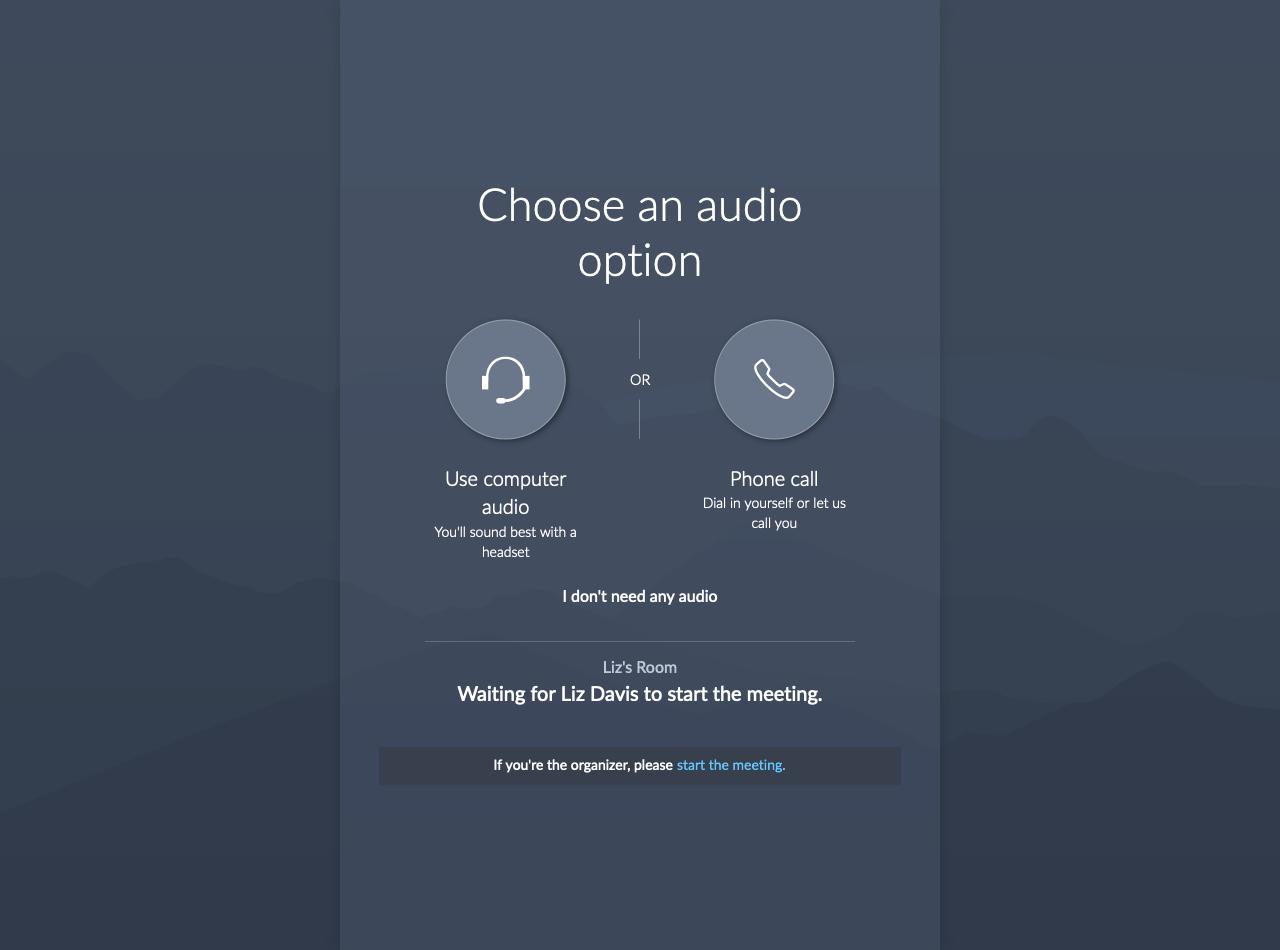
Using a Chrome UA on Firefox desktop,
I get the right screen.
Failed to execute ‘postMessage’ on ‘DOMWindow’: The target origin provided (‘https://launch.getgo.com’) does not match the recipient window’s origin (‘https://global.gotomeeting.com’).
          var f = a(),
            m = o.userAgent(),
            g = !(s.insideIframe() && s.isLaunchByIframeBroken());
          g && m.is.CHROME && !f
            ? (c ||
                ((c = e(
                  '<input id="launcher-focus" style="display: none; position: fixed; z-index: 9999; min-width: 1px; min-height: 1px; max-width: 1px; max-height: 1px; top: 0; left: 0;">'
                )),
                c.appendTo(e("body"))),
              l.log(
                "launcher.js: join-chrome: Chrome detected (without plugin)"
              ),
              window.setTimeout(h, 250))
            : (l.log(
                "launcher.js: join-chrome: skipping ",
                g,
                m.is.CHROME,
                !!f
              ),
              n());
        };
The different screens are created through UA sniffing. This doesn't tell us if they had a reason to do it.
moving to sitewait given that the contact has been initiated.
karlcow
on 1 Jul 2019
The issue is still reproducible but they changed the layout a bit.
URL: https://global.gotomeeting.com/join/826983933
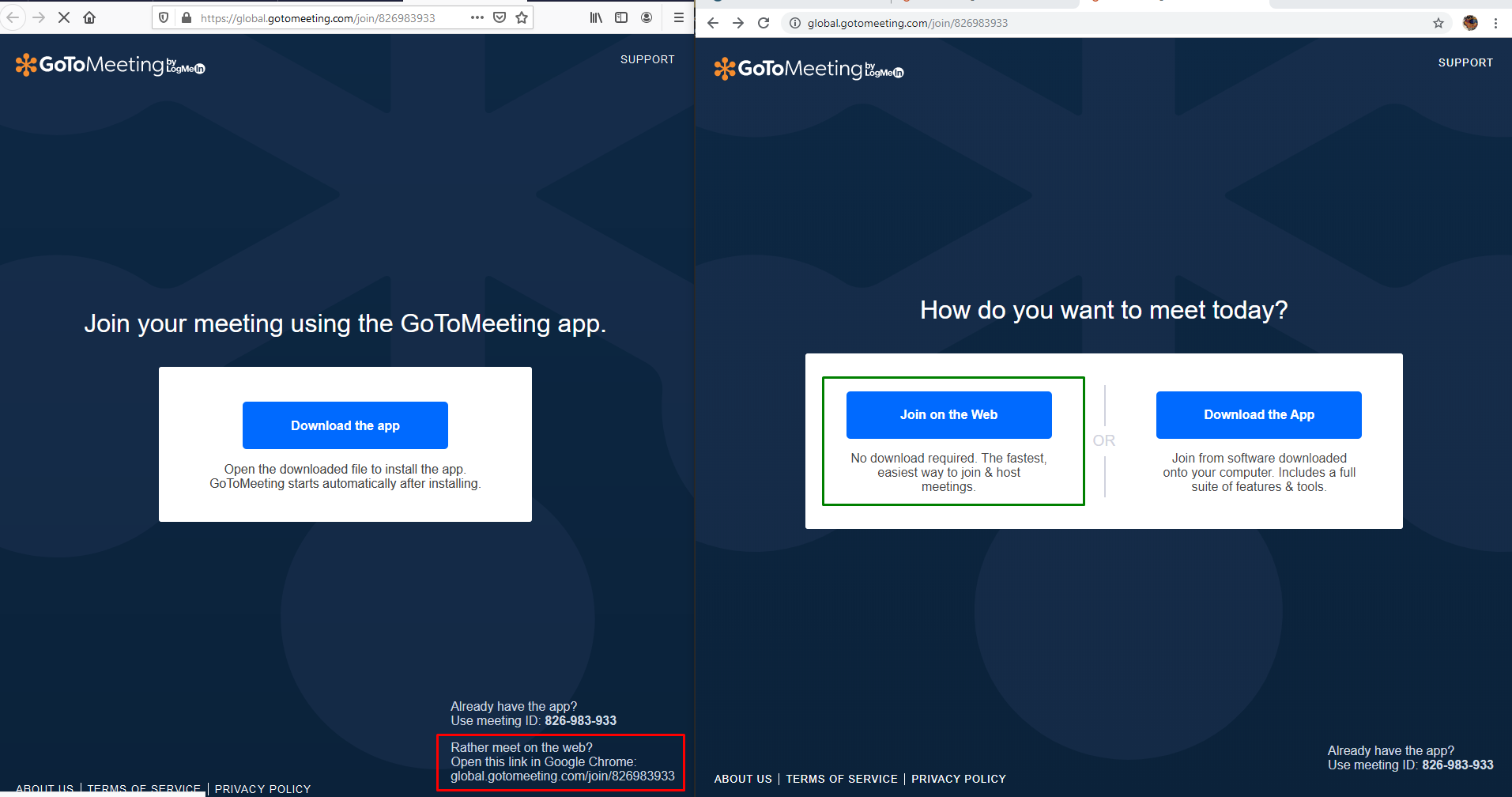
Tested with:
Browser / Version: Firefox Nightly 71.0a1 (2019-09-11)
Operating System: Windows 10 Pro
 softvision-oana-arbuzov
on 12 Sep 2019
softvision-oana-arbuzov
on 12 Sep 2019
I've created an account and created a meeting. There is no notification to use Chrome only.
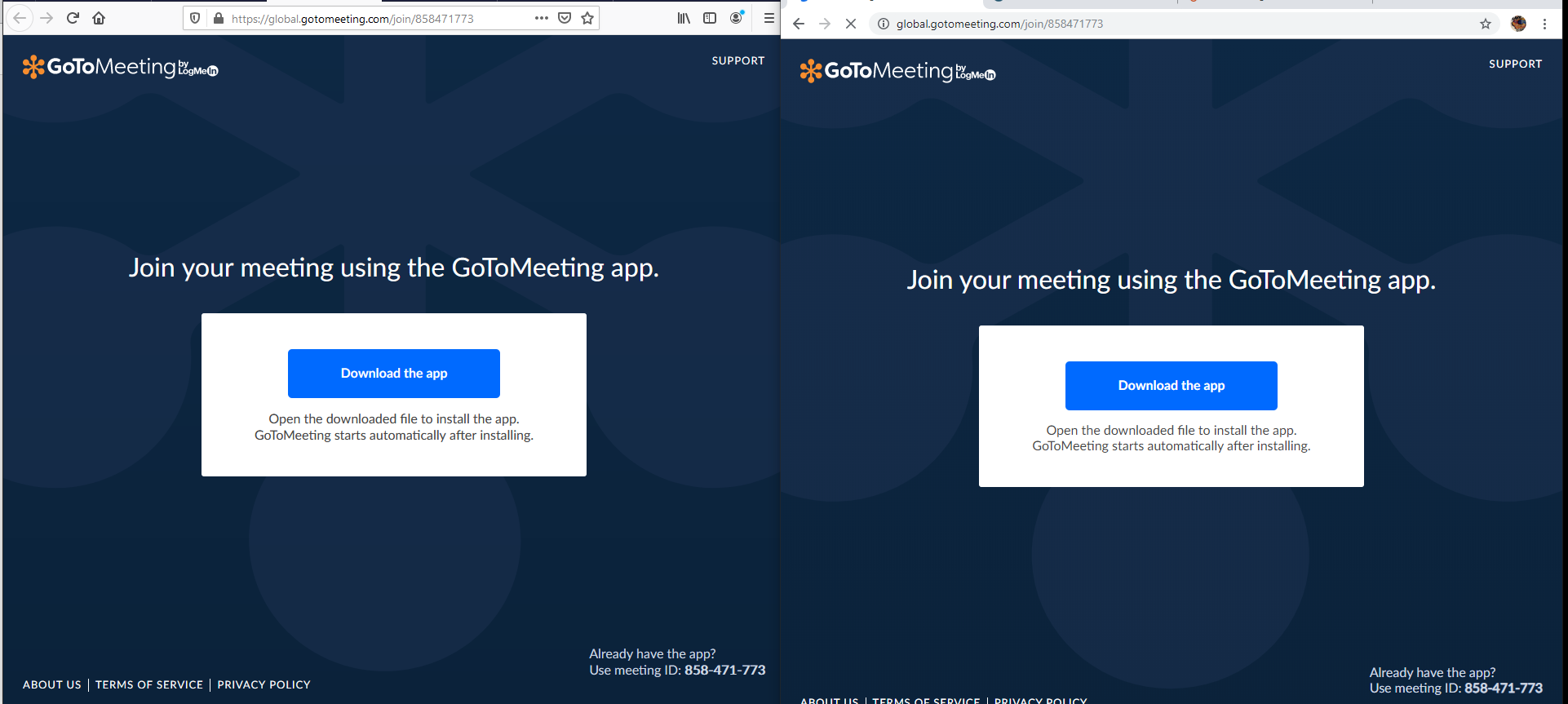
After installing the app I was able to connect and start the meeting.
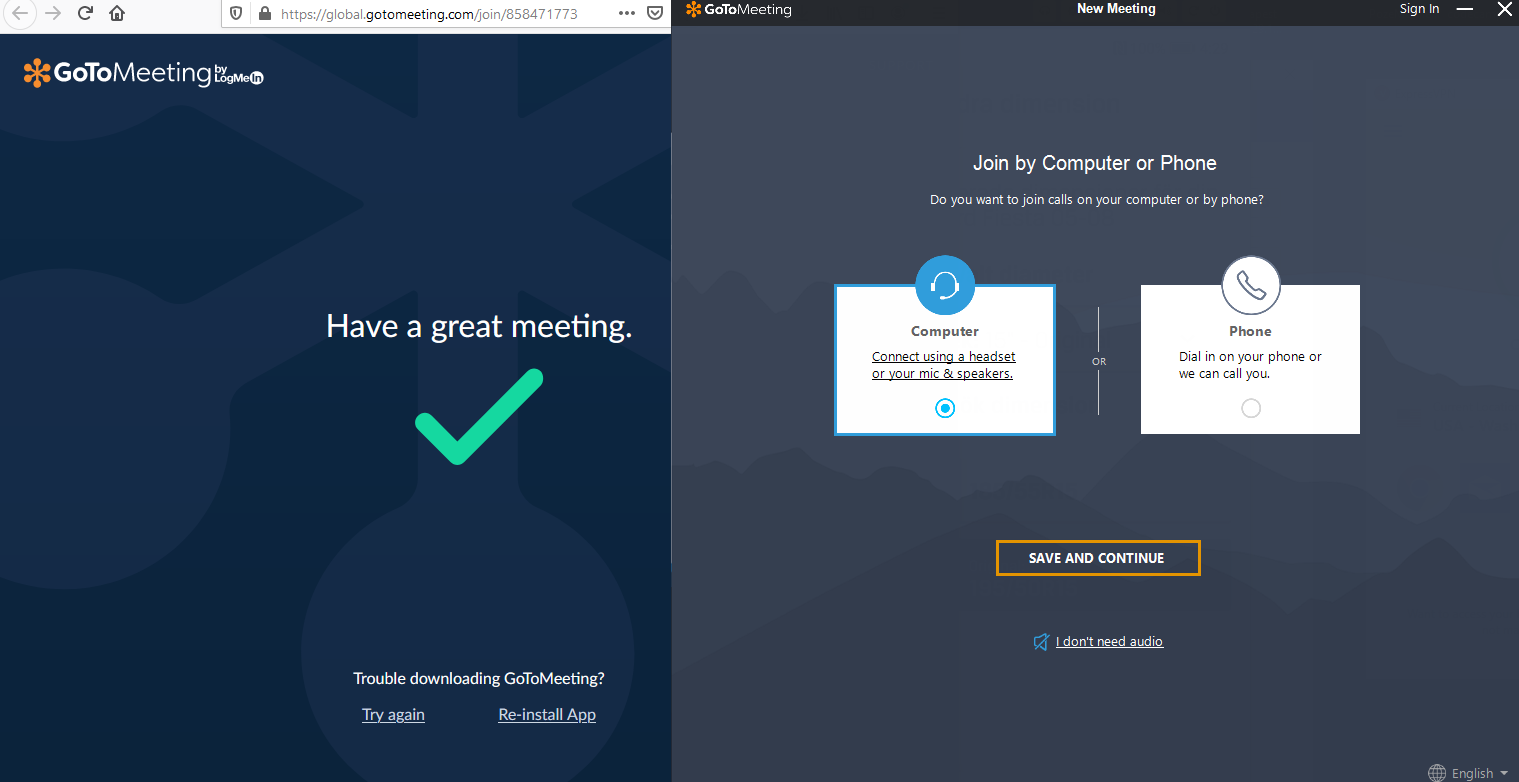
The issue has been fixed on Windows.
URL: https://global.gotomeeting.com/join/333699349?_ga=2.90531418.1764323222.1574173053-931772987.1574173053
Tested with:
Browser / Version: Firefox Nightly 72.0a1 (2019-11-18)
Operating System: Windows 10 Pro
VPN active poiting to USA
softvision-oana-arbuzov
on 19 Nov 2019
@softvision-oana-arbuzov Can you please test on Linux? That's how the issue was reported, and there's no app there.
The app is even mentioned in the Twitter post I linked to a while ago:
Adding full support requires additional development work which has to be prioritized against all other development work. So for now, if you are using a system that cannot run our native software we ask you to use Chrome.
I don't see how this is fixed.
lnicola
on 19 Nov 2019

lnicola
on 19 Nov 2019
Previously I reproduced it on Windows, but I will retest on Linux too. I'll reopen the issue for further investigation.
@lnicola thank you for your input.
softvision-oana-arbuzov
on 19 Nov 2019
Sigh. Am I the only one still seeing this?
lnicola
on 20 Nov 2019
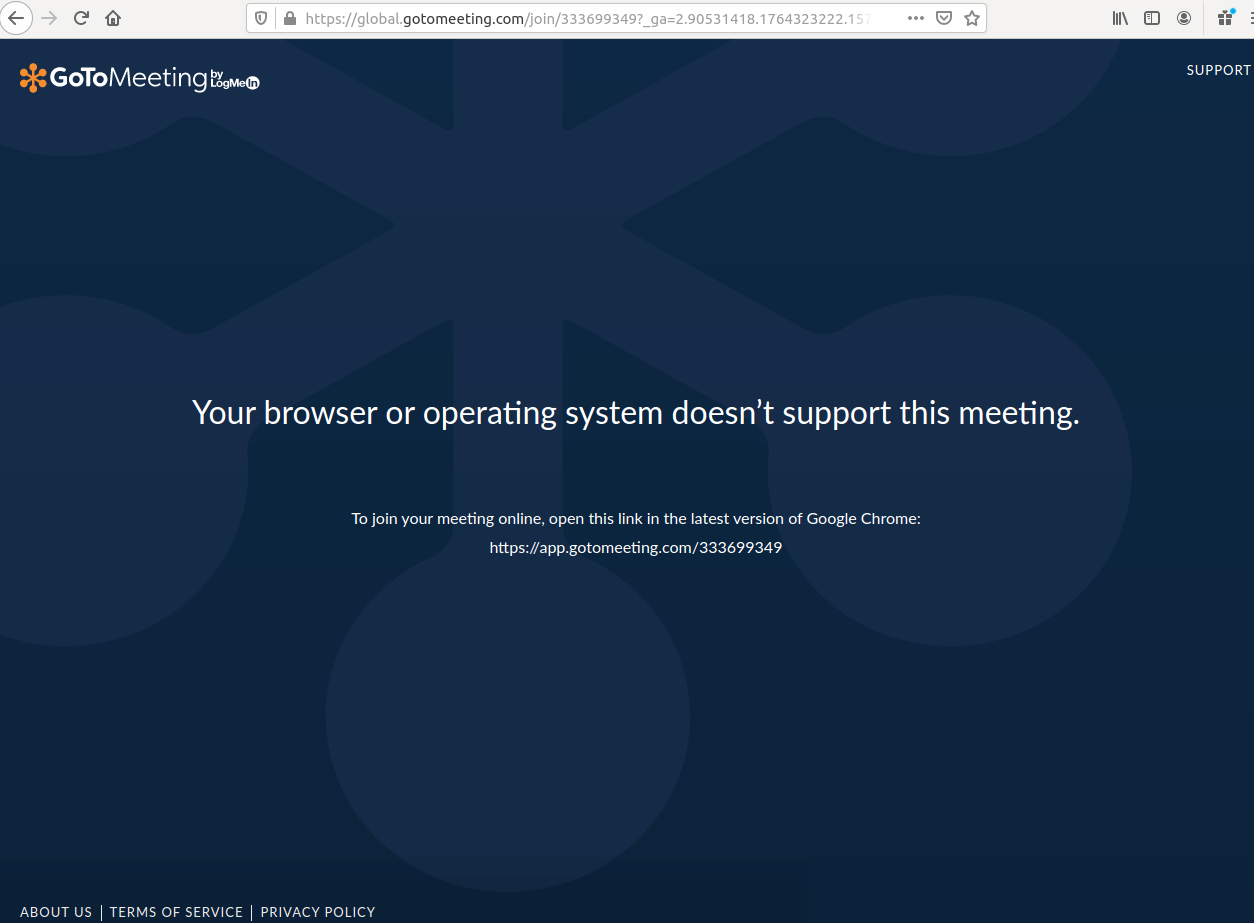
I'm back with good news, I was able to reproduce the issue on Linux.
URL: https://global.gotomeeting.com/join/333699349?_ga=2.90531418.1764323222.1574173053-931772987.1574173053
URL: https://global.gotomeeting.com/public/unsupported-browser.html?meetingId=264540053
Tested with:
Browser / Version: Firefox Nightly 72.0a1 (2019-11-19)
Operating System: Linux Ubuntu 16.04
VPN active poiting to USA
Reopening the issue.
softvision-oana-arbuzov
on 20 Nov 2019
Related issues
 bull500
·
5Comments
bull500
·
5Comments
 IngrownMink4
·
3Comments
webcompat-bot
·
5Comments
webcompat-bot
·
4Comments
IngrownMink4
·
3Comments
webcompat-bot
·
5Comments
webcompat-bot
·
4Comments
 christantoan
·
4Comments
christantoan
·
4Comments