Web-bugs: google.com - site is not usable
URL: https://google.com
Browser / Version: Firefox iOS 14.0
Operating System: iOS 12.0.1
Tested Another Browser: Yes
Problem type: Site is not usable
Description: The search bar is not visible
Steps to Reproduce:
When you click on the input the seach goes on the top on the screen, but on Firefox iOS the input is no more visible
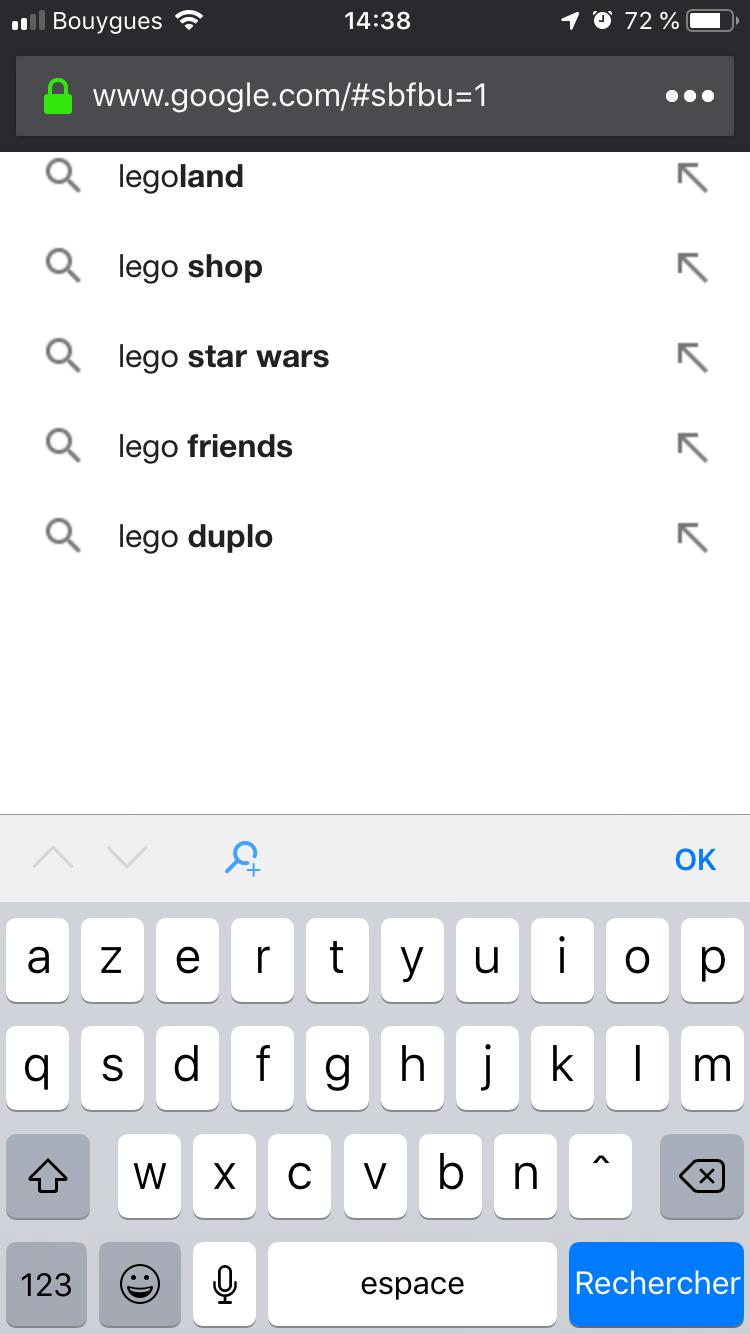
Browser Configuration
- None
_From webcompat.com with ❤️_
 magsout
All 33 comments
On safari, no issue
magsout
on 28 Oct 2018
@csuciu mind having a look at this one, please?
 softvision-sergiulogigan
on 1 Nov 2018
softvision-sergiulogigan
on 1 Nov 2018
@softvision-sergiulogigan I am unable to reproduce this on iPhone 7, iOS 12.0.1 with Firefox 14.0 released. Tried with Tracking protectio On/Off, Strict/Basic, in Normal and Private browsing. Also tried with the French locales and with a AZERTY French keyboard.
 SimonBasca
on 14 Nov 2018
SimonBasca
on 14 Nov 2018
@SimonBasca I'm on iPhone 6S..
Tried with Tracking protectio On/Off, Strict/Basic, in Normal and Private browsing. Also tried with the French locales and with a AZERTY French keyboard.
Same issue for me..
magsout
on 14 Nov 2018
@magsout can you try going to Settings - > Data Management -> Website Data and delete all google-related entries. Let us know if this fixes your issue.
SimonBasca
on 14 Nov 2018
This appears to be related to some sort of Google A/B experiment as there are other similar reports from users experiencing the same problem in Safari on iOS when #sbfbu=1 appears in the address bar.
https://productforums.google.com/forum/#!topic/websearch/JSwd21OYYf8
https://productforums.google.com/forum/#!topic/websearch/kZpPldiCFN8
Please try Simon's suggestion with deleting all Google-related website data. This should clear out any cookies, etc. that may be the cause for the broken UI continuing to show up for you.
 justindarc
on 14 Nov 2018
justindarc
on 14 Nov 2018
@SimonBasca @justindarc thanks, it working now
magsout
on 14 Nov 2018
+1. Same issue for me, updated to FF14, deleted all google data, still unresolved...
 brendonmartino
on 12 Jan 2019
brendonmartino
on 12 Jan 2019
@brendonmartino can you try tapping on the page actions menu (the "..." in the top-right next to the address bar) and select "Request Desktop Site", then "Request Mobile Site" to see if this resolves your issue? If I remember correctly when I last looked into this issue, the problem seemed to be due to google.com serving up the wrong version of their search page.
justindarc
on 12 Jan 2019
@brendonmartino can you try tapping on the page actions menu (the "..." in the top-right next to the address bar) and select "Request Desktop Site", then "Request Mobile Site" to see if this resolves your issue? If I remember correctly when I last looked into this issue, the problem seemed to be due to google.com serving up the wrong version of their search page.
Confirmed that this action does not solve the issue on Firefox 14 (12646, mobile).
brendonmartino
on 13 Jan 2019
Furthermore, there is no way to set desktop mode permanently in IOS for Firefox, only on Android. So this is not really a solution for this known bug.
brendonmartino
on 13 Jan 2019
Another question is: why would google roll out “some sort of Google A/B experiment” and beta test that on the general public? Doubtful. I think this is a Firefox bug.
brendonmartino
on 13 Jan 2019
Clearing cookies fixed this issue for the original reporter and it does not reproduce on a clean install. Somehow the wrong version of the search UI was served up (likely due to UA sniffing) and was persisting across sessions. Please re-check that you've cleared all website data (cookies, etc.) for Google domains. Also note, make sure you close any open tabs that have Google open in them before clearing website data for Google domains.
justindarc
on 14 Jan 2019
@brendonmartino FYI, there's already an open bug to implement the persisted desktop site mode you're talking about: https://bugzilla.mozilla.org/show_bug.cgi?id=1473884
justindarc
on 14 Jan 2019
Yup, I followed those steps. I guess I'm the only unlucky one who still sees this issue?? There's gotta be more people who can reproduce this...
Good to know that the persistent bugzilla issue is already there, thats good. But it doesnt make this any more usable in the meantime...
brendonmartino
on 14 Jan 2019
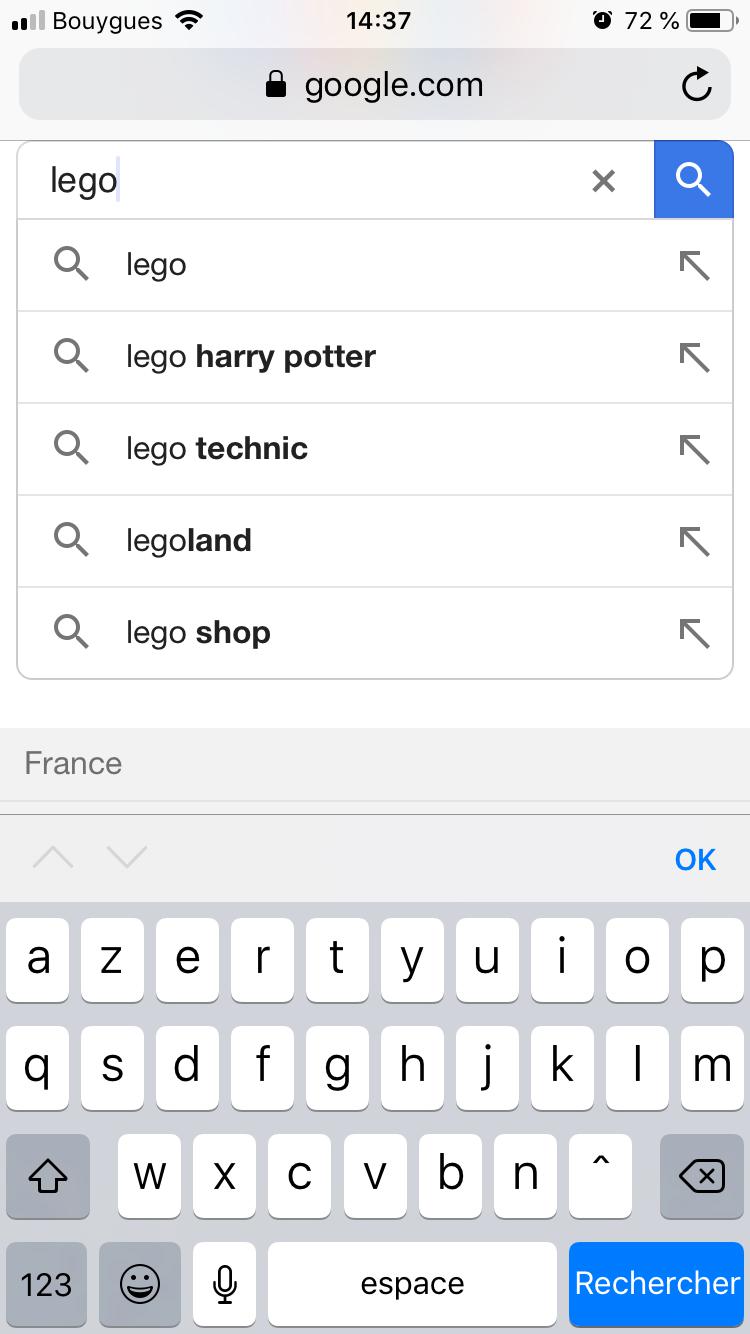
Out of curiosity, are you seeing the #sbfbu=1 get appended to the end of the google.com URL in the address bar like in the screenshots above?
justindarc
on 14 Jan 2019
I would also like to point out that this is definitely not a Firefox issue. There are numerous reports of this very same issue happening in Safari as well such as this one: https://productforums.google.com/forum/#!topic/websearch/kZpPldiCFN8
I'm not sure what else to suggest for you to try though since clearing the cookies is what helped with other users in the past. :-/
justindarc
on 14 Jan 2019
One other thought... if you're signed into Google, try signing out and signing back in again maybe?
justindarc
on 14 Jan 2019
@justindarc Yes, I am seeing the #sbfbu=1 get appended to the end of the google.com URL in the address bar like in the screenshots above.
And yes, I have tried signing in and out of my account, closing the browser and clearing the cache and rebooting in the middle of it all. Nothing worked. :( Thanks for your help, anyway. Hopefully a future browser update will get rid of it somehow..
brendonmartino
on 14 Jan 2019
Ugh... That sucks. This is what makes me think it was some sorta failed A/B test or cookie persisting the wrong version of the UI. Anyhow, the only other thing I can recommend is uninstalling and reinstalling. Its a bit of a nuclear option and unfortunate, but I'm pretty much out of ideas. Sorry I don't have better news for you. If I can somehow repro this myself, I might be able to dig in a little more to find the root cause.
justindarc
on 14 Jan 2019
Yeah, I hear ya. I really dont want to uninstall firefox as I have quite a bit of bookmarks and stuff...it's just a pain to do all over again on mobile...I guess I can try that if all else fails after the next update...
brendonmartino
on 14 Jan 2019
If you don't want to lose your data, you can sign into Firefox Sync, sync your bookmarks, then uninstall/reinstall. If you sign back in again after reinstalling, it will pull all your bookmarks back onto your device.
justindarc
on 14 Jan 2019
Yeah, unfortunately I have a different session for PC that I sign into but my mobile bookmarks are not synced to that. There's no way to export them: https://support.mozilla.org/en-US/questions/1118978
I'll just have to do it the old fashioned way I guess. Such a hassle, and for what? Who was responsible for this? If not the browser, then Google?? Did Google do this to us somehow?? I would find it hard to believe...
brendonmartino
on 14 Jan 2019
Well, if its happening to some users in Safari as well as Firefox for iOS, then yes. Firefox is using the same version of WebKit on iOS as Safari. Bugs happen. If you look closely at the two screenshots at the top of this thread, you can see that its a completely different Google search UI. The correct/working UI has a border around the search suggestions and lines between them. The broken UI does not have any border or separator lines between the search suggestions.
justindarc
on 14 Jan 2019
Well, @justindarc I just went with the nuclear option anyway and uninstalled/reinstalled. Signed back into google account. Still happening. Unbelievable. Screenshot attached.

I give up. :(
brendonmartino
on 14 Jan 2019
:-( :-( :-(
I just tried doing about a dozen custom builds with various user-agent strings hard-coded in to see if I could get Google to serve me the broken UI and no luck. However, I was able to see at least 4 different Google search UIs, just not the one in question. Something really strange going on here.
justindarc
on 14 Jan 2019
Did you happen to check the behavior before you signed back in to Google?
justindarc
on 14 Jan 2019
@SimonBasca maybe you have some more ideas here on how to get this to repro? I've tried everything I could think of on iPad and iPhone (both real devices and simulators). I even tried hard-coding various UA strings to get different Google search UIs, but none look like the broken one.
justindarc
on 14 Jan 2019
@justindarc yes, I tried it both before and after signing in. I’m a senior software engineer of 20+ Yes so trust me when I tell you that I have it the ol’ Rigorous testing :) thanks for the suggestions. Need to find the root cause before I waste any more time trying things and getting the same result. :-P
brendonmartino
on 14 Jan 2019
@brendonmartino I see in your screenshot that you're connected to a VPN. Did you happen to try to see what happens when you're disconnected from it? You may need to go through and clear the cookies for google.com once more after you disconnect.
justindarc
on 15 Jan 2019
@justindarc Yea, thats just cloudflare, I tried it with it disabled, like you said. Didnt make a difference..
brendonmartino
on 15 Jan 2019
I once was a super hacked individual. I continue to work my way out of my unfortunate cyber adventures in tam daily basis.
I leave no stone unturned. When I saw #sbfbu=1 I freaked out. I compare it to other iPhone users. Of course they’d never seen this issue.
I really hope my hunch is correct and I can clear this up.
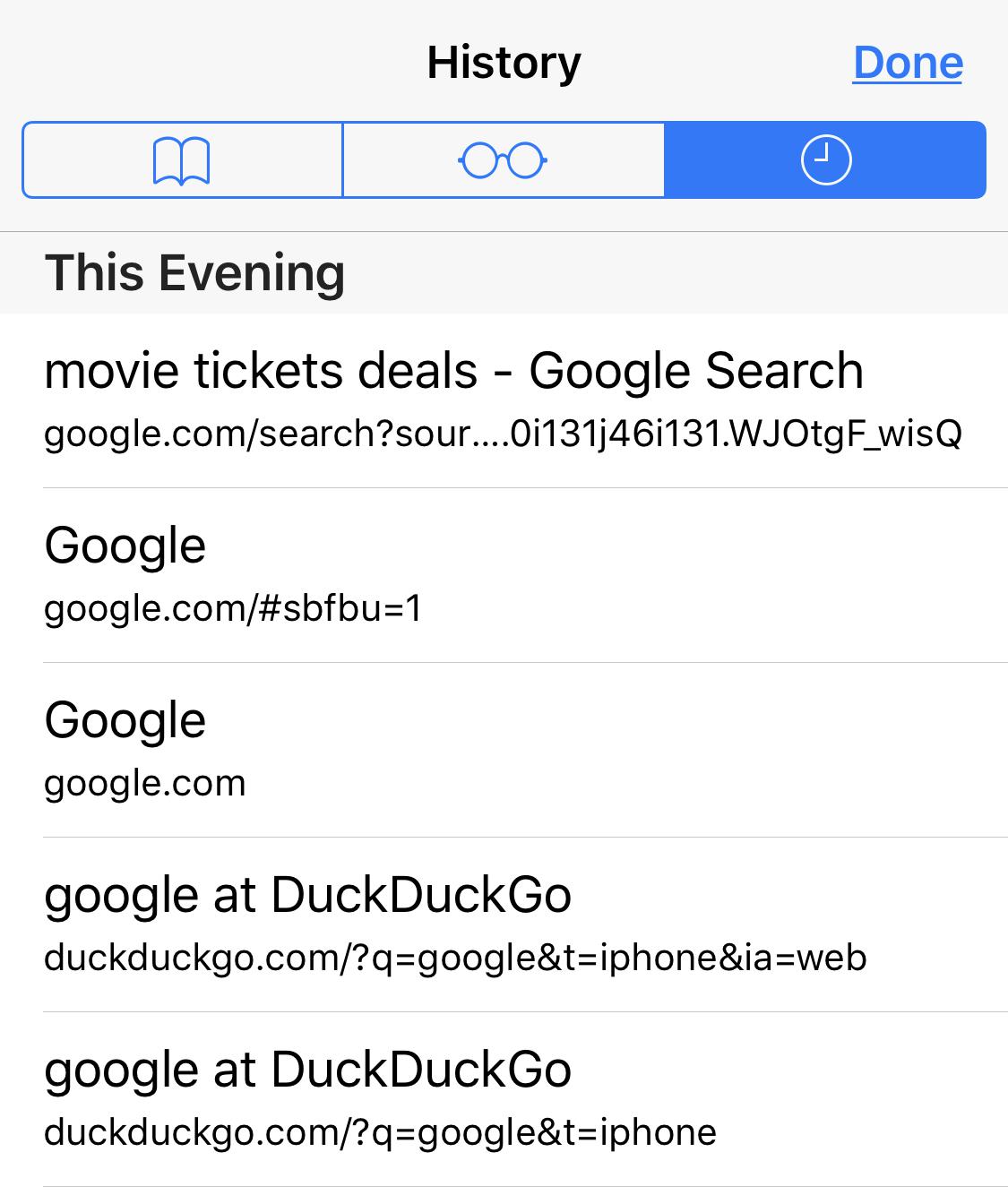
What is your search engine set to? If your search engine is set to anything other than Google you will experience this issue. It will happen when you type Google into Safarie search bar while using any search engine is set to a browser other than Google. (check what you set your search engine to). Once you enter your desired search (puppies + enter) in the Google browser, you will see that the Google search, you will get a result.
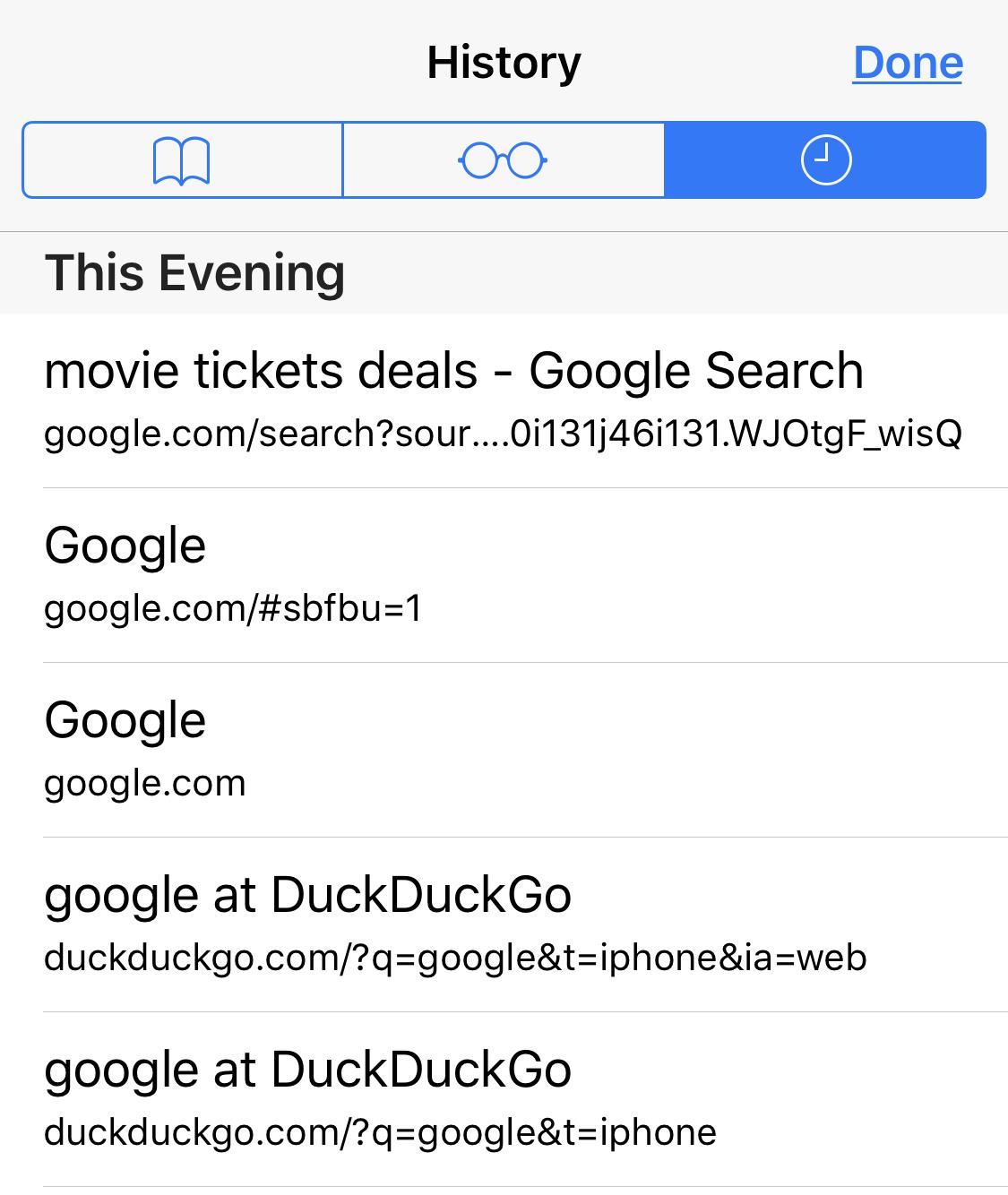
I was able to recreate results by checking my selected search engine and Safari search history.
You will see events when check your history and see that the #sbfbu happened in this order.
- You type Google into Safari search bar
2.Your chosen search engine Id’s your iPhone.
3.Chosen search engine reports you want to search web via Google.
4.You are redirected to Google.com
5.You enter search into google search - Google tracks.and reports the search results were submitted through their browser instead of your selected search engine.
- You will see #sbfbu=
7.Next you will see search rendered results
I’m guessing this acronym means:
Substitute Browser For Browser Users


 weDunno
on 31 Mar 2019
weDunno
on 31 Mar 2019
@weDunno umm...yeah....none of that made any sense. Sorry, I don’t think that’s the solution..
brendonmartino
on 31 Mar 2019
Related issues
 karlcow
·
5Comments
karlcow
·
5Comments
 webcompat-bot
·
5Comments
webcompat-bot
·
5Comments
 oksas
·
5Comments
oksas
·
5Comments
 massic80
·
5Comments
massic80
·
5Comments
 IngrownMink4
·
3Comments
IngrownMink4
·
3Comments
Most helpful comment
@SimonBasca @justindarc thanks, it working now