Web-bugs: start.duckduckgo.com - see bug description
URL: https://start.duckduckgo.com/
Browser / Version: Firefox Mobile (Tablet) 64.0
Operating System: Android 7.1.1
Tested Another Browser: Yes
Problem type: Something else
Description: korean language writeen twice or more
Steps to Reproduce:
ex.) 가나나다다라라마마바사사아아자자차차카카타타파하
_From webcompat.com with ❤️_
 webcompat-bot
All 17 comments
Description: korean language writeen twice or more
@karlcow do you know if this happens for Japanese too? Or just Korean?
(sorry, I'm being lazy...)
 miketaylr
on 23 Oct 2018
miketaylr
on 23 Oct 2018
What is written twice? When typing in the search form? or text from the site in the page. Let's assume this is the form. This is not happening if I type Japanese in the form. I don't have Korean input mode on my keyboard. But if someone would know about this issue it would be @tagawa
 karlcow
on 23 Oct 2018
karlcow
on 23 Oct 2018
I don't have Firefox on an Android tablet to test, but on desktop I'm not able to reproduce with Japanese, which I assume would be similar. I've also not heard any other reports of this from DuckDuckGo users. My instinct is it could be because of a Korean IME/keyboard bug. Happy to escalate it if there are further details.
 tagawa
on 23 Oct 2018
tagawa
on 23 Oct 2018
Yes, this is reproducible when you type Hangul characters as fast as possible (as many Koreans do).

Edit: The GIF conversion seems to be choppy. I have uploaded this to https://youtu.be/Gzlys9dRr6I (Lower quality, but keystrokes can be seen clearly) to prove this issue.
 reinhart1010
on 24 Oct 2018
reinhart1010
on 24 Oct 2018
@karlcow let's put this back on track and move forward.
Yes, this is reproducible when you type Hangul characters as fast as possible (as many Koreans do).
Moving to Needsdiagnosis.
 softvision-sergiulogigan
on 12 Nov 2018
softvision-sergiulogigan
on 12 Nov 2018
@tagawa did you see this?
karlcow
on 13 Nov 2018
I haven't seen any other DuckDuckGo-specific reports of this, but now I think it might be related to a separate issue mentioned by a Twitter friend, also Firefox on Android:
I wonder if Firefox has fixed that bug where the words repeated on a cellphone. They've had soso many weeks and numerous updates. Well, looks like the answer to thatthat isis nono. Back to Microsoft EdgeEdge thenthen, actually proving more reliable on a phonephone!
https://twitter.com/jackyan/status/1061979547967512576
He filed a Bugzilla report for it here:
https://bugzilla.mozilla.org/show_bug.cgi?id=1498777
The current status is resolved as "Incomplete" due to lack of info, but perhaps this Korean occurrence helps, if it's the same cause.
tagawa
on 13 Nov 2018
Thanks a lot @tagawa This is super helpful.
karlcow
on 13 Nov 2018
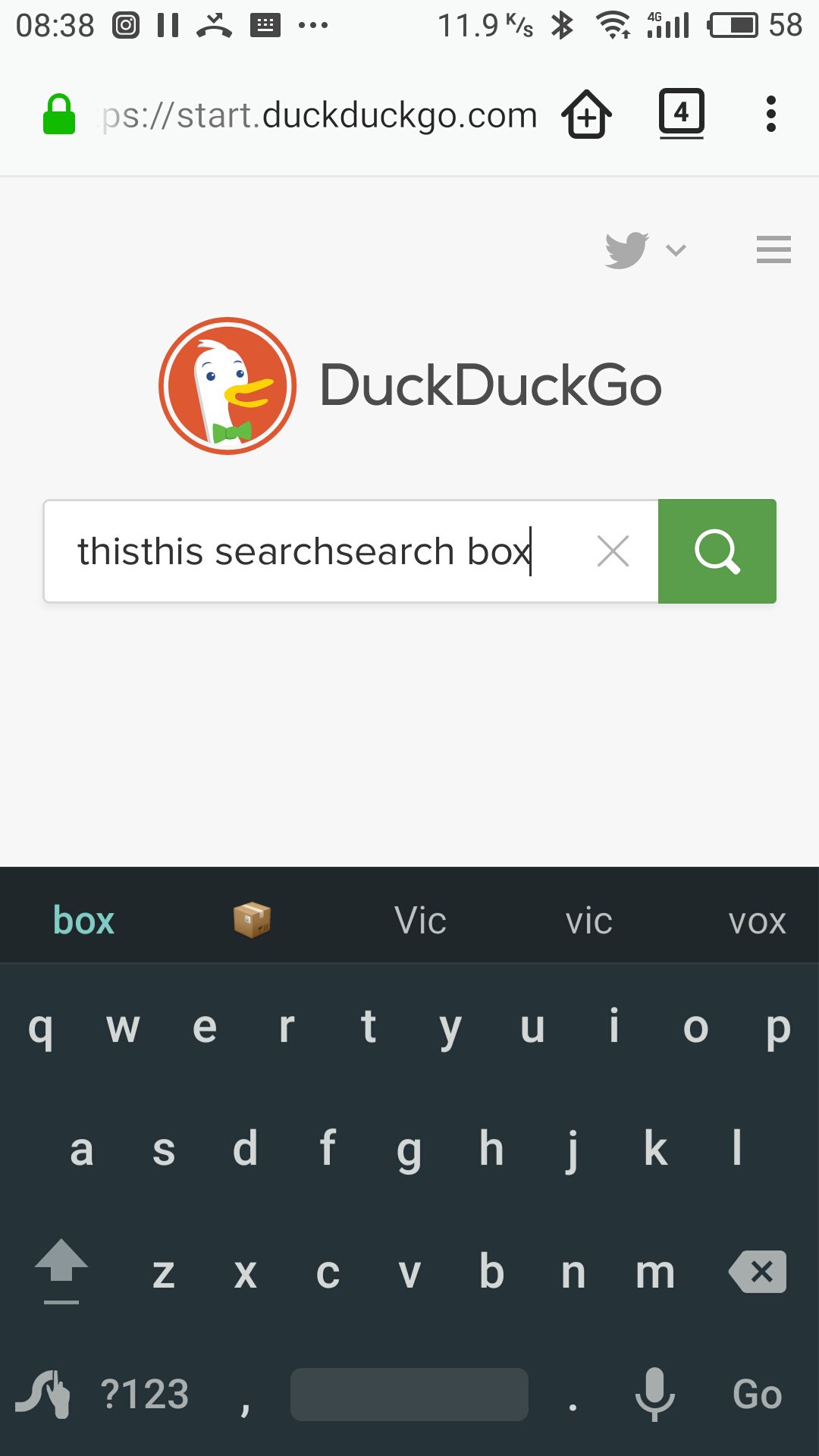
Thanks to @tagawa for linking me into this thread (I’m the person reporting the bug at Mozilla). I was able to repeat the bug on start.duckduckgo.com but typing in English. The initial words are usually fine but as you go on, the words begin repeating.
I use a Swype keyboard on a Meizu M2 Note running the Flyme flavour of Android 5·1.
I would like to know if the Korean phone mentioned above has Google Services on it.
As a very loyal DDG user of nearly a decade, I don’t have any Google things on my phone (I especially ordered it from a Chinese vendor to make sure it was free of all of their stuff) and I wonder if we have this in common.
 Lucire
on 13 Nov 2018
Lucire
on 13 Nov 2018
PS.: This bug did happen in English with Chrome on Android a while back, and it was eventually resolved. Here is a thread from 2013:
https://bugs.chromium.org/p/chromium/issues/detail?id=283616
Lucire
on 13 Nov 2018
Thanks @Lucire. But just to clarify - it happens on other websites with text input boxes too, e.g. https://bugzilla.mozilla.org/ ?
tagawa
on 13 Nov 2018
@tagawa Yes, that’s correct: Bugzilla itself (I actually filed the bug report using my phone there), Twitter, Mastodon, anything with a text input box.
Lucire
on 13 Nov 2018
I also reported this issue on BMO (https://bugzilla.mozilla.org/show_bug.cgi?id=1444343) about 8 months ago, but I can't specify the real cause of the issue (hence I used a generic title name). There I reported these webcompat reports: #5564 #7589 #17427 #17833 #18777
On the report I stated that autocomplete / word suggestion feature must be turned on to reproduce this issue.
reinhart1010
on 13 Nov 2018
I think that this will be fixed by https://bugzilla.mozilla.org/show_bug.cgi?id=1490391#c33.
Also, although GeckoView may still has this issue, it will be fixed by https://bugzilla.mozilla.org/show_bug.cgi?id=1510527
 makotokato
on 17 Dec 2018
makotokato
on 17 Dec 2018
@Lucire is it fixed?
karlcow
on 21 Jan 2019
Thank you, @karlcow, it appears to be OK but since I began this thread, I damaged my screen and had to replace the phone. It’s still on Swype but on a newer version of Android, so I’m not comparing apples with apples.
Lucire
on 21 Jan 2019
Let's assume that https://bugzilla.mozilla.org/show_bug.cgi?id=1490391 fixed it. Thanks a lot.
karlcow
on 21 Jan 2019
Related issues
webcompat-bot
·
4Comments
webcompat-bot
·
4Comments
 massic80
·
5Comments
massic80
·
5Comments
 bvanrijn
·
4Comments
bvanrijn
·
4Comments
 GeorgeWL
·
5Comments
GeorgeWL
·
5Comments
Most helpful comment
I think that this will be fixed by https://bugzilla.mozilla.org/show_bug.cgi?id=1490391#c33.
Also, although GeckoView may still has this issue, it will be fixed by https://bugzilla.mozilla.org/show_bug.cgi?id=1510527