Web-bugs: www.google.com - Empty screen displayed in “Games” after scrolling the “News” tab page
Browser / Version: Firefox Mobile Nightly 57.0a1 (2017-08-02) with Chrome UA
Operating System: LG G5 (Android 7.0) - Resolution 1440 x 2560 pixels (~554 ppi pixel density), Samsung Galaxy S7 Edge (Android 7.0) - 1440 x 2560 pixels (~534 ppi pixel density)
Tested Another Browser: Yes
Problem type: Site is not usable
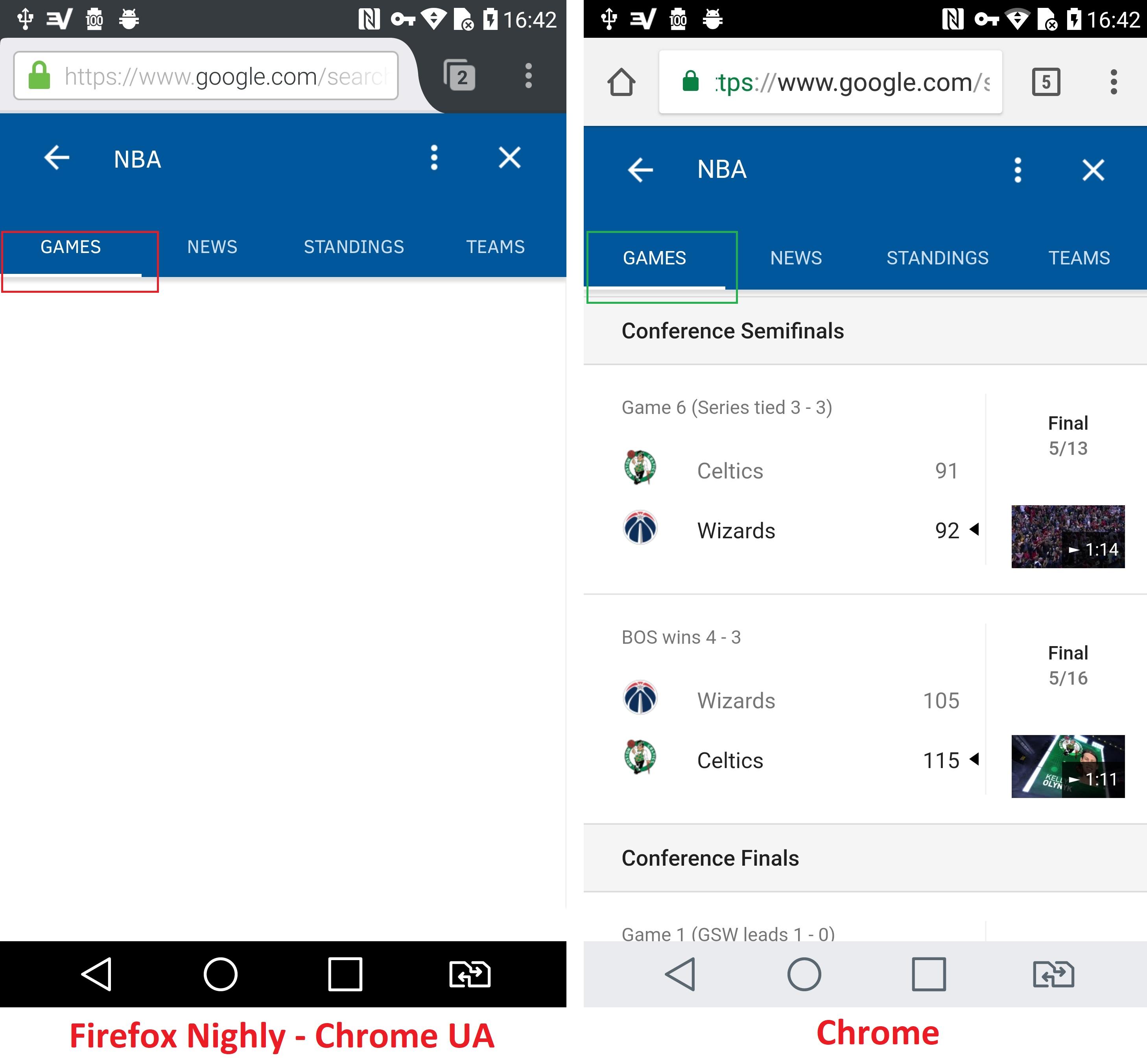
Description: Empty screen displayed in “Games” after scrolling the “News” tab page
Steps to Reproduce:
- Navigate to: https://www.google.com/search?biw=360&bih=236&ei=gyKDWbmlBYT_aJ_PlugK&q=nba+standings&oq=Nba+sta&gs_l=mobile-gws-serp.1.0.0j0i20k1j0l3.5253.10195.0.11758.11.9.2.0.0.0.1343.4507.3-4j1j2j0j1.8.0....0...1.1.64.mobile-gws-serp..3.8.3835.3..35i39k1j0i131k1.pfpGAXi1R-w.
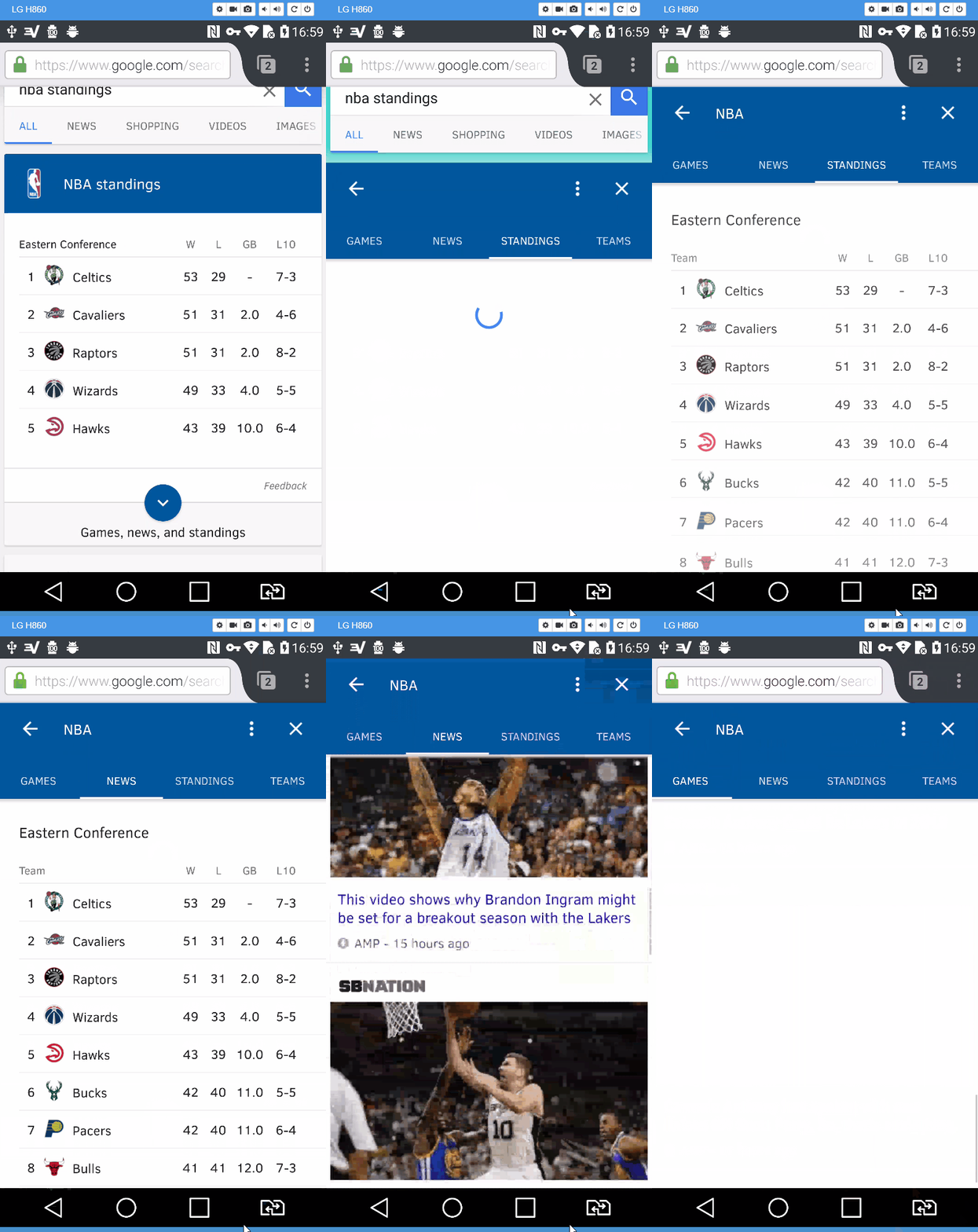
- Tap the “More” arrow (“Chervon” button).
- Tap the “News” tab and scroll down the page.
- Tap “Games” tab and observe displayed.
Expected Behavior:
“Games” information is displayed.
Actual Behavior:
Empty screen is displayed.
Note:
- Workaround: Navigating to a different tab and back, "Games" information is loaded.
- Not reproducible on Chrome (Mobile) 59.0.3071.125, on Firefox 54.0.1 Release and Firefox Nightly 57.0a1 (2017-08-02) without Chrome UA.
- Not reproducible on Nexus 5 (Android 6.0.1) - Resolution 1080 x 1920 pixels (~445 ppi pixel density).
- Screenshot attached.
Watchers:
@softvision-sergiulogigan
@softvision-oana-arbuzov
sv; gs
_From webcompat.com with ❤️_
 softvision-oana-arbuzov
All 16 comments
so I was not able to reproduce this on Firefox desktop with responsive design and Chrome UA.
Let's try on a device.
I can't reproduce it on the device either.
 karlcow
on 4 Aug 2017
karlcow
on 4 Aug 2017
This behavior is reproducible only the first time when performing the scenario.
In order to reproduce it again, navigate back to main search page (https://www.google.com/search?biw=360&bih=236&ei=gyKDWbmlBYT_aJ_PlugK&q=nba+standings&oq=Nba+sta&gs_l=mobile-gws-serp.1.0.0j0i20k1j0l3.5253.10195.0.11758.11.9.2.0.0.0.1343.4507.3-4j1j2j0j1.8.0....0...1.1.64.mobile-gws-serp..3.8.3835.3..35i39k1j0i131k1.pfpGAXi1R-w) and perform the described scenario.
I was able to reproduce it on multiple devices that display 4tabs Knowledge Panel (Games/News/Standing/Teams).
softvision-oana-arbuzov
on 4 Aug 2017
I can get 4 tabs only if I get through sports home and requests NBA.
but then I still can not replicate the issue on my device.
karlcow
on 14 Aug 2017
@adamopenweb can you reproduce this. I'm at lost. I tried many ways.
karlcow
on 18 Aug 2017
I can reproduce this issue on a Nexus 6 running Android 7. I was able to get News to show up blank as well, just by switching back and forth between menu items a few times.
 adamopenweb
on 23 Aug 2017
adamopenweb
on 23 Aug 2017
Alleluiah! I wonder if geoloc has influence on this.
@adamopenweb Thanks a lot.
karlcow
on 23 Aug 2017
I can reproduce this on my phone, but not on desktop Firefox emulating a phone. I don't see anything in the console log that would imply an error, so this is going to require deeper investigation.
 wisniewskit
on 17 Oct 2017
wisniewskit
on 17 Oct 2017
I can reproduce this issue on a Nexus 6 running Android 7. I was able to get News to show up blank as well, just by switching back and forth between menu items a few times.
Yeah, same for me. @wisniewskit, can you dig into this one please?
 miketaylr
on 29 Nov 2017
miketaylr
on 29 Nov 2017
On it. It looks as though when the problem manifests, the news section's <div class="tb_c immersive-container tb_stc"> still has the CSS transform:translate3d(-100%,0,0), when it should have 0% (so it's not off-screen).
wisniewskit
on 29 Nov 2017
I found one site bug so far, but it's not the end of the story. This code is reading the CSS transform3d value, but does not expect any fractional values in a regular expression:
qs_Kse = function (a) {
return (a = qs_md(a, 'transform').match(/translate3d\([^,]*, ?(-?[0-9]*)px,/)) ? a[1] : 0
}
So when Firefox returns a value like translate3d(-100%, -1567.33px, 0px), the regular expression fails. The expression should be revised:
return (a = qs_md(a, 'transform').match(/translate3d\([^,]*, ?(-?\d+([/.]\d+)?)px,/)) ? a[1] : 0
I'll continue investigating to see why the -100% is still where it is.
wisniewskit
on 29 Nov 2017
Unfortunately this is too difficult to reason about in minified form. What I'm seeing is that when you switch to the News "tab", the Games tab is pushed off-screen by setting translate3d(-100%,...) on it. Then when you switch to the Games tab, it usually sets it to 0% to slide it on-screen (and shifts the other tabs off to the right by likewise setting them to 100%).
However, when things don't work (when you scroll down the News tab before tapping on the Games tab), the Games tab ultimately isn't set to 0%, but stays at -100%. In fact the code seems to actually be sliding the parent element to slide the Games tab into view instead, from another script entirely. It actually does shift the parent element properly, setting it with translate3d(360px,...) (my screen width), which should be enough to leave the Games tab visible.... but then the rest of the code continues and strips that same translate off the parent element. This of course leaves the Games tab at -100%, so it's off-screen.
It's almost as though there are two competing bits of code trying to manage the tabs.
This all seems to be triggered when this function is called in this script:
l = function (a) {
this.Pa == l && (this.Pa = void 0, !a && c && f && !this.Sa || qs_ahb(this), this.ma++, qs_Qu(this.Uf, qs_jw, this, {
Br: k,
abc: a
}), this.ma--)
};
@denschub, maybe you have an idea? (Note that they're setting transform in some functions to change the transform3d value, while elsewhere they're setting it via webkitTransform).
wisniewskit
on 30 Nov 2017
I made another attempt at this today, finally with success! Of course, I'll torture everyone with the details before giving the results :)
Luckily, I could do this in Response Design Mode as a Galaxy S7, saving a lot of time.
Given that the breakage was causing the Games "tab" to have its transform style set to a value starting with translate3d(-100%, I used Tinker Tester Developer Spy to detect when that tab (.tb_c:first-child) started with that value for transform.
Unfortunately, that caused it to start always working, which scared me as it implied this was some sort of timing-related issue. Since the value was correct, I tried to detect where the correct value was being set with translate3d(0 instead, hoping that it would be the same stack trace whether the value was set correctly or not.
Frustratingly, that made it break again, almost like the issue was actively trying to avoid being figured out. And so I switched to using debugger breakpoints instead of logging to console, hoping to avoid timing issues that way. The debugger tripped three times after I clicked the "Games" tab, revealing where the script was trying to set the transform value.
From there, I created a local copy of the script and began carefully adding console.logging statements around those places in the code, to generate a straightforward "report" of the state of the "Games" panel's current transform value at different times as the code ran through those spots the debugger has found, and what values it was trying to set it to.
This finally revealed the actual problem: when the code went through the last of the three code-paths the debugger had revealed (the one beginning at the function qs_jY.prototype.Ia), it ultimately ended up calling the function qs_Xu to set the transform style of the Games panel:
qs_Xu = function (a, b, c) {
  a.style[qs_Ub] = qs_Wu(b, c)
},
And the value it was trying to set it to was: translate3d(0%,-2855,0).
That is, it was actually trying to set the value to 0% to bring it into view, away from the -100% it was currently set to. Unfortunately the attempt was silently failing because there were no units on the second parameter. As such the value stayed at its original value of -100%, neatly leaving the Games panel off-screen (and that's why the panel sometimes does "appear"; it depends on what it's initial value is, and sometimes it's already set to 0%).
Finally a real lead!
From there I realized that the code is supposed to add "px" units to the number, as long as it's actually typeof === "number". But a strategic console.log revealed that it was a string instead, meaning that the code would leave it as-is, assuming it already had a unit. Woof.
As one might expect, hacking the function to append "px" to strings ending with a digit worked:
qs_Wu = function (a, b) {
  if (typeof b == "string" && b.slice(-1).match(/\d/)) { // add this check, receive bacon
    b += "px";
  }
  a = qs_ja(a) ? a + 'px' : a || '0';
  b = qs_ja(b) ? b + 'px' : b || '0';
  return qs_Jbb ? 'translate3d(' + a + ',' + b + ',0)' : 'translate(' + a + ',' + b + ')'
},
But that wasn't likely to be a proper fix, so I added a debugger call inside that if-statement. That way I could work up the stack trace to find out where that string was coming from. And here it is:
qs_fhb = function (a, b) {
 var c = a.Fu[b];
  b == a.Ka ? (c.style.position = 'static', c.style.display = 'block', c.setAttribute('aria-hidden', 'false'))  : (c.style.position = 'absolute', c.style.display = 'block', c.setAttribute('aria-hidden', 'true'));
  var d = c.style[qs_Ub];
  d = qs_ia(d) && d.match(/translate(3d)?\(-?[0-9]*(%|px)?, ?(-?[0-9][0-9]*(%|px)?)/);
  qs_Xu(c, 100 * (b - a.Ka) * a.aX + '%', d ? d[3] : '0px')
}
When it gets into this code, d = "translate3d(-100%, -2570.55px, 0px)", so their regular expression returns: ["translate3d(-100%, -2570", "3d", "%", "-2570", undefined]
Problem found! They aren't considering that the numbers returned by the style check can be floats as well as integers. Here's a regex which works (using -?\d*\.?\d+ rather than -?[0-9]*):
d = qs_ia(d) && d.match(/translate(3d)?\(-?\d*\.?\d+(%|px)?, ?(-?\d*\.?\d+(%|px)?)/);
And that's that. Tinker Tester confirms that this fix also works consistently on Firefox for Android.
I don't think it's correct to assume that only integer values will be returned when grabbing element.style.transform, so I'm chalking this one up to site error. @miketaylr, do you suspect that's true? I'm not sure where in the specs this is formalized.
wisniewskit
on 5 Jul 2018
I don't think it's correct to assume that only integer values will be returned when grabbing element.style.transform, so I'm chalking this one up to site error. @miketaylr, do you suspect that's true? I'm not sure where in the specs this is formalized.
translate3dtakes a<length-percentage>: https://drafts.csswg.org/css-transforms-2/#funcdef-translate3d, which starts with a<length>: https://drafts.csswg.org/css-values-4/#length-value, which a dimension: https://drafts.csswg.org/css-values-4/#dimension, which is a number: https://drafts.csswg.org/css-values-4/#number-value, which is defined as:
When written literally, a number is either an integer, or zero or more decimal digits followed by a dot (.) followed by one or more decimal digits and optionally an exponent composed of "e" or "E" and an integer.
So yeah, it's a bug to not expect any decimal values. There's nothing in https://drafts.csswg.org/cssom/#serialize-a-css-component-value that says to remove decimals when serializing <number> or <length>.
miketaylr
on 5 Jul 2018
Alright then, I've set this one to contactready.
wisniewskit
on 5 Jul 2018
Reaching out via partner mailing list.
adamopenweb
on 6 Jul 2018
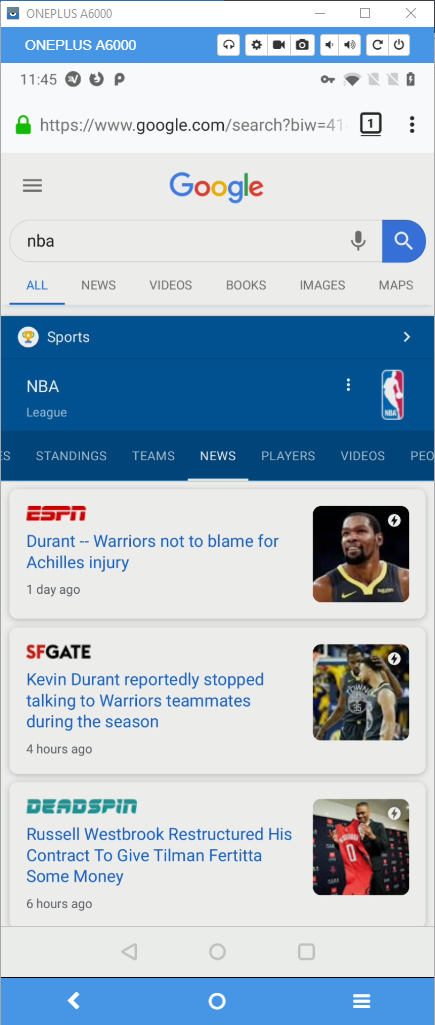
The layout has changed, and the issue is no longer reproducible.
Now we have several more tabs available, and instead of "NBA Standings" search, a more simple "NBA" search needs to be performed in order to get the rich cards information.
Tested with a Chrome UA and a US VPN connection.
 softvision-sergiulogigan
on 9 Aug 2019
softvision-sergiulogigan
on 9 Aug 2019
Related issues
 webcompat-bot
·
5Comments
webcompat-bot
·
4Comments
webcompat-bot
·
5Comments
webcompat-bot
·
5Comments
webcompat-bot
·
4Comments
webcompat-bot
·
5Comments
 vickychin
·
4Comments
vickychin
·
4Comments
 IngrownMink4
·
3Comments
IngrownMink4
·
3Comments
Most helpful comment
I made another attempt at this today, finally with success! Of course, I'll torture everyone with the details before giving the results :)
Luckily, I could do this in Response Design Mode as a Galaxy S7, saving a lot of time.
Given that the breakage was causing the Games "tab" to have its
transformstyle set to a value starting withtranslate3d(-100%, I used Tinker Tester Developer Spy to detect when that tab (.tb_c:first-child) started with that value fortransform.Unfortunately, that caused it to start always working, which scared me as it implied this was some sort of timing-related issue. Since the value was correct, I tried to detect where the correct value was being set with
translate3d(0instead, hoping that it would be the same stack trace whether the value was set correctly or not.Frustratingly, that made it break again, almost like the issue was actively trying to avoid being figured out. And so I switched to using debugger breakpoints instead of logging to console, hoping to avoid timing issues that way. The debugger tripped three times after I clicked the "Games" tab, revealing where the script was trying to set the
transformvalue.From there, I created a local copy of the script and began carefully adding console.logging statements around those places in the code, to generate a straightforward "report" of the state of the "Games" panel's current
transformvalue at different times as the code ran through those spots the debugger has found, and what values it was trying to set it to.This finally revealed the actual problem: when the code went through the last of the three code-paths the debugger had revealed (the one beginning at the function
qs_jY.prototype.Ia), it ultimately ended up calling the functionqs_Xuto set thetransformstyle of the Games panel:And the value it was trying to set it to was:
translate3d(0%,-2855,0).That is, it was actually trying to set the value to
0%to bring it into view, away from the-100%it was currently set to. Unfortunately the attempt was silently failing because there were no units on the second parameter. As such the value stayed at its original value of-100%, neatly leaving the Games panel off-screen (and that's why the panel sometimes does "appear"; it depends on what it's initial value is, and sometimes it's already set to0%).Finally a real lead!
From there I realized that the code is supposed to add "px" units to the number, as long as it's actually
typeof === "number". But a strategicconsole.logrevealed that it was a string instead, meaning that the code would leave it as-is, assuming it already had a unit. Woof.As one might expect, hacking the function to append "px" to strings ending with a digit worked:
But that wasn't likely to be a proper fix, so I added a
debuggercall inside that if-statement. That way I could work up the stack trace to find out where that string was coming from. And here it is:When it gets into this code,
d = "translate3d(-100%, -2570.55px, 0px)", so their regular expression returns:["translate3d(-100%, -2570", "3d", "%", "-2570", undefined]Problem found! They aren't considering that the numbers returned by the
stylecheck can be floats as well as integers. Here's a regex which works (using-?\d*\.?\d+rather than-?[0-9]*):And that's that. Tinker Tester confirms that this fix also works consistently on Firefox for Android.
I don't think it's correct to assume that only integer values will be returned when grabbing
element.style.transform, so I'm chalking this one up to site error. @miketaylr, do you suspect that's true? I'm not sure where in the specs this is formalized.