Web-bugs: video.vice.com - Unable to use the Video player controls
URL: https://video.vice.com/de/video/the-chinese-friends/56b4e8162f91349469c7df00?latest=1
Browser / Version: Firefox Mobile Nightly 56.0a1 (2017-07-30)
Operating System: Samsung Galaxy S7 Edge (Android 7.0) - 1440 x 2560 pixels (~534 ppi pixel density)
Tested Another Browser: Yes
Problem type: Site is not usable
Description: Unable to use the Video player controls
Steps to Reproduce:
- Navigate to: https://video.vice.com/de/video/the-chinese-friends/56b4e8162f91349469c7df00?latest=1
- Play the video.
- Wait for the advertisment to finish playing.
- Tap the video placeholder to activate the Video controls.
Expected Behavior:
The Video controls are displayed.
Actual Behavior:
The Video controls are not displayed.
Notes:
- The issue is not reproducible on Firefox 54.0 Release (Mobile).
- The issue is not reproducible on Chrome (Mobile) 59.0.3071.125.
- Screen Capture attached (zipped GIF).
Watchers:
@softvision-oana-arbuzov
@softvision-sergiulogigan
sv; country: de
_From webcompat.com with ❤️_
 softvision-sergiulogigan
All 17 comments
Interesting, I can't reproduce or even play the video on Firefox 56 desktop in responsive design with HLS error message:
HTTP “Content-Type” of “application/vnd.apple.mpegurl” is not supported. Load of media resource https://content-ause1.uplynk.com/preplay2/48d03265ca80449aa8cbfcc4348f461d/5f210cb1cc4e52650c378a6aff97eae4/3lWpS5LlYbjXewWQo2Mc1i2GokCsPRKo1VMbGRwpHuyc.m3u8?pbs=57def13ab3c54013836f20f7310555cd failed.
But I can reproduce this issue using Firefox 56 mobile. The video element is embedded in an iFrame:
<iframe class="watch-hub__embed" src="/de/embed/56b4e8162f91349469c7df00?autoplay=1&channelName=i-d&channelUrl=i-d.vice.com&locked=0&nextVideoId=5968b0f2e3178093226000b8&showInfo=0&watchHub=1" allowfullscreen=""></iframe>
Move to needsdiagnosis.
 MDTsai
on 1 Aug 2017
MDTsai
on 1 Aug 2017
ok maybe something related with what's coming before the video, which is a video ad.
 karlcow
on 1 Aug 2017
karlcow
on 1 Aug 2017
Looks like something got broken here.
I get this now:
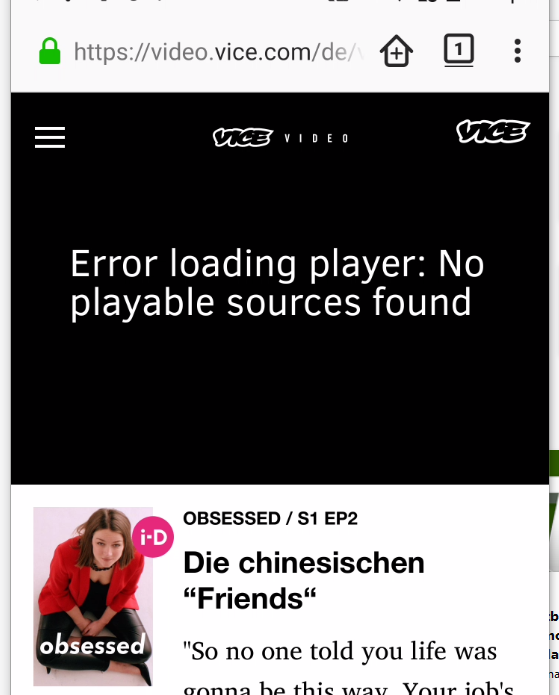
Console says:
Script 'https://web-scripts.vice.com/v1.0.4/ads.js' failed to load in 2000 script-loader.ts:18:14
This is the affected part:
<iframe class="watch-hub__embed" src="/de/embed/56b4e8162f91349469c7df00?debug=&autoplay=1&onsite=1&continuous=1&adobedebug=0" allowfullscreen=""></iframe>
This one took some sleuthing, but it's ultimately just an outdated UA sniff (Firefox for Android now supports HLS) in their player-vendors.js script:
        }, function(e, t, n) {
            function r(e) {
                return "hls" === e.type && i.OS.android ? !1 !== e.androidhls && !i.Browser.firefox && parseFloat(i.OS.version.version) >= 4.1 : null
            }
            t.a = r;
            var i = n(12)
        },
When I drop the && !i.Browser.firefox clause, the video seems to work fine for me with native Android HLS, so that would be my recommended fix.
 wisniewskit
on 22 Jan 2018
wisniewskit
on 22 Jan 2018
@wisniewskit thanks for the breakdown, the video does play with a Chrome UA spoof. I found there are no controls to exit full screen mode in Firefox. In Chrome there are controls visible to pause / exit full screen, but it doesn't work either.
Also the player-vendors.js script appears to be JWPlayer. I wonder if this script is just an outdated version, or if the library should be updated.
 adamopenweb
on 2 Mar 2018
adamopenweb
on 2 Mar 2018
// Allow Android hls playback on versions 4.1 and above, excluding Firefox (which does not support HLS in any version)
adamopenweb
on 2 Mar 2018
Since HLS is not working in release fennec right now, let's figure out when that will happen before contacting anyone.
Edit: It's being released in Firefox 59. Scheduled for 3/13/2018, asking around internally as we may have JW Player contacts already.
adamopenweb
on 3 Mar 2018
@adamopenweb Hey, JW person here. Not quite sure what's going on but we do not officially support Firefox mobile. So it looks like there's two issues here: controls don't work, and FF android doesn't play hls content.
The first issue is tricky and I'm not sure what's happening there, but I'd be happy to take a look. The second fix is straigtforward and would just require us to ungate FF+Android for Hls playback. We use a hybrid feature detection/UA parsing approach so it would require a small change from us. Even though we don't officially support it I think it'd make sense for us to fix it anyway.
 johnBartos
on 6 Mar 2018
johnBartos
on 6 Mar 2018
Hi @johnBartos thanks for your response!
In this comment Firefox is excluded due to not having HLS support.
The current Firefox for Android release version is 58, when version 59 launches next week it will support HLS video. You can test this out now by using Firefox Nightly for Android.
In our testing HLS videos with JWPlayer have been working as expected in Firefox Nightly, if we change our user agent string to the same as Chrome.
It would be great if JW could change the user agent detection, so Firefox users can consume this content as well.
adamopenweb
on 6 Mar 2018
@adamopenweb I agree. Let me bring this up with the rest of the team before I promise anything, but I think is a sensible change to make
johnBartos
on 6 Mar 2018
@adamopenweb Just to be clear, does Firefox 59 support MSE or does it play back HLS natively? And can you provide me any docs which outline this support? Couldn't find anything through google.
johnBartos
on 7 Mar 2018
@johnBartos cpearce here, I'm a software engineer on the Firefox Media Playback team. We support HLS in Firefox 59 via the content types "application/vnd.apple.mpegurl", "application/x-mpegurl", "audio/mpegurl", and "audio/x-mpegurl". The best way to check whether Firefox supports HLS is to ask the browser by calling HTMLMediaElement.canPlayType() with one of those MIME types. We support HLS on Android API version > 16, so if you want to sniff server side you could use that, but I recommend you just call canPlayType() client side if possible.
Our HLS implementation is "native" and fully integrated and with out media playback stack, so you can just set a url to an m3u8 resource in HTMLMediaElement.src and it should just work.
Firefox on Android has supported MSE for a while now.
 cpearce
on 7 Mar 2018
cpearce
on 7 Mar 2018
Firefox on Android has supported MSE for a while now.
Oops! Thanks for the correction. I'm afraid I may have potentially misdiagnosed the issue; I'll come back with an update when I've studied the code and done some tests myself.
johnBartos
on 7 Mar 2018
@adamopenweb Ok I did some digging. Vice is using an old version of the Player (8.0.0-beta.3) which gated Hls.js playback (via MSE) if a specific flag was not set (hlsjsdefault). We gated it because wanted to use Android's native HLS playback over Hlsjs. Vice does not set this flag, and because the "regular" flavor of FF does not support native Hls playback, you see the no playable sources error.
We have since made Hlsjs default for Android, and I have confirmed that playback works as expected in the latest version (8.1.12). I have poked some people internally and hopefully our Vice account manager will get them to upgrade soon.
I assume the frozen controls bug is related to this (the controls may show while the player is working out this error, but won't do anything). But if a video plays and the controls are not working please make an issue in our repo.
johnBartos
on 7 Mar 2018
OK so the video is playing as expected now in Firefox Android 59+ 🎉
There are still two issues:
- The controls do not display in full screen mode Firefox Android.
- The controls display but are not responsive in Chrome Android.
Filed https://github.com/jwplayer/jwplayer/issues/2829 for the controls issue.
adamopenweb
on 6 Apr 2018
I've closed https://github.com/jwplayer/jwplayer/issues/2829
The video controls on vice.com are not the controls provided by jwplayer.js (.vp__controls sits on top of the JW Player element). Maybe they didn't implement tap listeners or have some other issues related to fullscreen mode?
 robwalch
on 10 Apr 2018
robwalch
on 10 Apr 2018
Thanks for the help @robwalch!
Closing this report and filed a new webcompat report for the controls issue #16412.
adamopenweb
on 11 Apr 2018
Related issues
 oksas
·
5Comments
oksas
·
5Comments
 Gravydigger
·
4Comments
Gravydigger
·
4Comments
 webcompat-bot
·
5Comments
webcompat-bot
·
5Comments
 lolrepeatlol
·
4Comments
lolrepeatlol
·
4Comments
 Ezio916
·
4Comments
Ezio916
·
4Comments
Most helpful comment
@adamopenweb I agree. Let me bring this up with the rest of the team before I promise anything, but I think is a sensible change to make