Creating this issue based on a thread started by @WayneEDick, who said:
There is one thing you that would make a big difference for people with low vision. Change Reflow 1.4.10 from AA to A. This can be done with WCAG 2.2, we don't have to wait for Silver.
There are two good reasons to do this. It is vitally important for almost everyone with low vision. It is as important to low as text-to-speech is to blindness. The second reason is that the overwhelming majority of sightes nearly meet 1.4.10. So, no cutting edge technology is required. It is dead simple to make a case that works at 320 by 768.
The main reason AG got this wrong in the first place is that the Low Vision support communnity grossly underestimated the print size needed to read with low vision. The simple fact is that the print size needed to read is almost a linear function 1/(visual acuity). If your vision is 20/80 you need print that is 4 times as big. We already worked out how to make 400% into 1000% by varying viewing distance.
The second reason everyone got this wrong is reflow itself. Almost nobody, including me, realized
that horizontal scrolling takes as much work as it does. I was probably the most startled by my own discovery.I suppose we didn’t make it Level A because we didn’t think it could be met so easily. It can.
Moving it to level A would be to give it the status it needs.
Charles H replied:
I am not sure where that linear function math and print target reside, but +1 to moving to A.
Bi-directional scroll effort is only part of the concern. I believe it also requires additional cognitive processing and reduces readability to track progress through a passage of text that requires scrolling to see. There also seems to be a case where scale does correctly reflow without a need for bi-directional scroll, but the result is still unreadable due to a large volume of word breaks.
Regarding the feasibility, @patrickhlauke said:
I would say this is heavily dependent on the type of site. Functionality- and information-dense sites, particularly complex web applications, will have more trouble making a working/workable version at 320 CSS px width. It is not just the technology side that matters - as yes, technologies like responsive/adaptive web design are now fairly mature ... but it can be a challenge actually having to rethink how complex content and interactions can be made available in small-sized viewport.
And as most companies/sites (at least in my auditing experience) target a base of WCAG AA, changing the SC to A won't make that much of a difference in practice (and sites/applications that actively choose to ignore it for AA will likewise ignore it if it was A).
@WayneEDick replied:
I think that the difficulties you cite concerning reflow for current websites are not harder than implementing any Level A criterion in 1.3. That is, if the developer hasn't designed for it.
I think raising 1.4.10 to level A would demonstrate how much more useful it is, compared to 1.4.4.
It seems like a good discussion to have during the normative updates to 2.2.
 alastc
All 61 comments
Changing the success criterion level is a breaking change. I'm against such a change. See the conversation about it here: https://github.com/w3c/wcag/issues/1041
 WilcoFiers
on 26 Feb 2020
WilcoFiers
on 26 Feb 2020
I'd still note that I don't believe "There is one thing you that would make a big difference for people with low vision. Change Reflow 1.4.10 from AA to A" will have any actual real-world impact on a site/application's willingness to adhere to the SC.
whether the SC is A or AA is possibly more of a "signal" than anything that influences developers to implement something or not. as said, if a developer has been unable to meet/ignored the SC when at AA, it won't make them more keen to rethink their approach if it was A. also, this kind of thinking also reinforces what we keep trying to say ISN'T the case...that A is more important than AA which in turn is more important than AAA.
there's other factors that supposedly influence what level is given to an SC, including how much impact it would have to adhere to an SC in terms of layout/functionality. and for complex web apps (imagine something like a fully-fledged code editor/word processor/3D visualisation tool) i'd say the requirement of "must work without scrolling/without dropping any functionality even at mobile-sized viewport" is a not-inconsiderable ask.
 patrickhlauke
on 26 Feb 2020
patrickhlauke
on 26 Feb 2020
I want to ask the same question I'm posing in #1041; what has changed since we published WCAG 2.1 to justify such a change?
WilcoFiers
on 26 Feb 2020
Same point I just made in #1041: Look at WCAG 2.x Priority levels discussion and the patterns for which SC landed at A versus AA. As a requirement that is Essential but _not_ Easy and _not_ Invisible, 1.4.10 fits the AA grouping. The few single A SC which break this pattern are the requirements for captioning and alternative formats.
 bruce-usab
on 26 Feb 2020
bruce-usab
on 26 Feb 2020
Given that most policies include level A and AA I don’t believe a change will make that much of a positive difference and it will cause more problems for tooling and tracking. Id vote to keep at AA.
 mraccess77
on 26 Feb 2020
mraccess77
on 26 Feb 2020
The reason I wanted to tackle this at the same time as other reflow issues is updating / adding an SC for reflow 'down to' rather than 'at' 320px:
https://github.com/w3c/wcag/issues/698#issuecomment-487768701
Assuming we thought it was a good requirement to add/increase, we have various options:
- Update reflow to A and make it down-to.
- Update reflow to A and add a new SC for reflow (enhanced) at level AA for down-to.
- Leave reflow at AA and add a new SC for reflow (enhanced) at level AA for down-to.
- Depricate reflow and add a new SC for reflow at A for down-to.
- Depricate reflow and add a new SC for reflow at AA for down-to.
My personal priority of concerns for updates to 2.2 (chair hat off) is:
- Backwards compatible in the sense of passing 2.2 means you pass 2.1.
- Aligns with priority levels discussion.
- Makes sense on the face of the spec, i.e. to people reading it fresh.
- Makes sense to people moving from 2.1 to 2.2.
- Makes it easy for tools to incorporate 2.2.
All the options for reflow updates meet 1.
Having two at AA doesn't help with 2 or 3.
Of the options I could think of (feel free to point out if I've missed something), I think my preferences would be either: Update reflow to A and add another at AA (like the current focus-visible update), or depricate/supercede reflow and add a new 'down-to' SC at AA.
alastc
on 26 Feb 2020
I think the change from "at 320 px" to "down to 320 px" is very important. I don't care which way is chosen, but I would prefer the last one: "Depricate reflow and add a new SC for reflow at AA for down-to"
 JAWS-test
on 26 Feb 2020
JAWS-test
on 26 Feb 2020
I agree that “down to 320px” is very important. It is also much more difficult, and I remain skeptical that it is testable in any practical sense. My vote would be to keep 1.4.10 as-is and at AA. Then add a new SC very much like 1.4.10 but it uses “down to” instead of “at” at AAA.
The new AAA SC should also drop the “Except for parts of the content which require two-dimensional layout for usage or meaning” bit.
If we want to try and make 2.2 a little bit more coherent, and I think we should, we could promote 1.4.4 to single A.
bruce-usab
on 26 Feb 2020
It is also much more difficult, and I remain skeptical that it is testable in any practical sense.
I'm not sure why? If you are testing for text-sizing and text-spacing over different page variations then the only extra bit is watching for missing info/functionality or horizontal scrolling.
Also worth reading through this for the implications of page variations on text-sizing tests:
https://github.com/w3c/wcag/issues/704
alastc
on 27 Feb 2020
^ But how many "different" page variations are sufficient? By comparison, the "at 320px" is very specific.
bruce-usab
on 27 Feb 2020
it may be specific to say "at 320px". but it's practically useless for any users whose viewport is not exactly 320px.
per https://www.w3.org/TR/WCAG21/#cc2 each variation needs to be tested for other SCs. i'd say a sensible initial assumption would be that to test you'd start at the largest of those variations and work your way down until you reach 320 CSS px as the lowest bound.
[ed: to clarify, "work your way down" meaning you then from that largest dimension keep decreasing the window/viewport size in 1 CSS px decrements until you reach 320 CSS px]
patrickhlauke
on 27 Feb 2020
Yikes, I missed that change to CC2! The sentiment is good, but I am not sure that is the best fit for the requirement. Also, the formatting and the emphasis on the word NEW was lost.
meaning you then from that largest dimension keep decreasing the window/viewport size in 1 CSS px decrements until you reach 320 CSS px
Exactly. This is the implication that I find onerous.
bruce-usab
on 27 Feb 2020
That change was from back in 2017, survey results, and had a lot of discussion in #391
We do test across variations (generally breakpoints) by zooming or window manipulation. I wouldn't say we view every pixel increment, but it is pretty easy to spot things as you zoom in /out. If you see things get too close, you can adjust the window between zoom-points to narrow in for that instance. We generally find that sites either fail in a big way, or you just find the odd bug.
alastc
on 27 Feb 2020
@alastc I so very much appreciate your ability to point to survey results!
Right, you wouldn't view every pixel increment. But it seems to me that people are asserting that this is what "down to 320px" requires. Which is why I am of the opinion that keeping 1.4.10 at AA and "at 320px" is the correct choice at this moment in time.
CC#2 already lets testers fail 1.4.10 for sizes "down to" 320px, so there is no compelling reason to bake that sort of minutia into 1.4.10 explicitly.
bruce-usab
on 27 Feb 2020
CC#2 already lets testers fail 1.4.10 for sizes "down to" 320px
No, sorry, I should have been clearer: We test _and fail_ across page variations for text-size & text-spacing.
For reflow we can only _fail_ that at 320px wide.
In most cases something that triggers scrolling or disappears at 900px or 600px wide will also do so at 320px wide. However, given that we are already testing the others across variations it is easy to note reflow issues that only occur above 320px under 'best practice'.
What we are really talking about (with 'down-to') is catching those relatively rare instances of things that fail between no zoom and 400% (or equivalent) zoom.
alastc
on 27 Feb 2020
and with my suggested process of decrementing by 1px down to 320 I was outlining the test procedure IF we changed the "at 320 CSS px" to "down to 320 CSS px" (as that's the only way to catch "those relatively rare instances")
patrickhlauke
on 27 Feb 2020
An implied or explicit process of decrementing by 1px down to 320 is exactly the sort of test procedure that is counter-productive, IMHO.
bruce-usab
on 27 Feb 2020
how else are you going to catch things if we change things to "down to"?
and just exclusively making 320 CSS px the only size at which reflow must be met (for vertical-scrolling content) only helps users that started off with 1280 width screen resolution and zoomed to 400%. if they have a different-sized screen (e.g. they do use 1600x1080 or something else, because they do have a physically large enough screen that allow them to still go for that size) and then zoom to 400%, or if they do have a 1280 sized screen but only need 300% magnification, a site can quite happily have two-dimensional scrollbar and/or loss of content/functionality and still be perfectly fine in light of 1.4.10 as it currently stands...
[edit: and to clarify, in practice the test is would be executed by opening a test page/sample with the browser window on desktop at full large size, and then dragging/resizing the window progressively down to 320 and checking if two-dimensional scrollbars happen/stuff gets lost or cut off]
patrickhlauke
on 27 Feb 2020
it is pretty easy to spot things as you zoom in /out. If you see things get too close, you can adjust the window between zoom-points to narrow in for that instance. We generally find that sites either fail in a big way, or you just find the odd bug.
in practice the test is would be executed by opening a test page/sample with the browser window on desktop at full large size, and then dragging/resizing the window progressively down to 320 and checking if two-dimensional scrollbars happen/stuff gets lost or cut off
I don’t disagree that, _in actual practice as an experienced tester_, testing for “down-to” can be quick and efficient.
My concern is for scripts getting written, _as has happened in this very thread_, that call for testing pixel-by-pixel. Which is why, absent a better alternative, I am arguing for keeping 1.4.10 as-is and adding a new AAA SC.
bruce-usab
on 28 Feb 2020
the test is would be executed by opening a test page/sample with the browser window on desktop at full large size, and then dragging/resizing the window progressively down to 320 and checking
Actually it isn't as easy as that. On a small page yes, you could just drag it smaller and watch for anything that starts to go wrong. But large commercial sites usually have very long pages, going down several times the height of the average screen. You may have to scroll the whole page seven or eight times to check from top to bottom. It wouldn't be any good looking at the top of the a clean page if something is going wrong below the fold.
Theoretically you would have to scroll down or back up each time you make the check (scroll down or up every pixel??? - we'd be there for forever and a day - and that would have to be repeated for every page being tested!)
The usual way is to look for breakpoints and check nothing has gone wrong just before one of them is triggered. Not so bad if there are just two breakpoints, for tablet and mobile. But if the developer has multiple breakpoints on different pieces of content, then it becomes tricky.
So while you should check for all widths of screen, not just the 320px end point (and many consultants will do that), we need some way of limiting the amount of testing that has to be done.
 guyhickling
on 28 Feb 2020
guyhickling
on 28 Feb 2020
I'm a bit concerned with some of the assumptions above, particularly comments like this:
It is dead simple to make a case that works at 320 by 768.
(I assume that last number was supposed to be 256)
It is _extremely_ hard to overstate how much work is required to both interpret and try to meet Reflow for anything beyond a basic content-centered website. I don't believe there is a single other criterion that imposes the same level of burden that Reflow does on complex web apps. It has been very frustrating to watch people become demoralized about working on accessibility when they realize they'll never meet WCAG AA, just because of Reflow. Particularly when the criterion can seem so entirely divorced from a good user experience for their product.
I also personally have doubts about whether the enormous amount of work required to meet Reflow has a corresponding payoff, when talking about an interface past a certain level of UI complexity. I don't mean that in the sense of "it's not worth it to do the necessary work to make products accessible for people with low vision," I mean that in the sense of "I find it difficult to imagine any possible way for an app like Visual Studio or a complex interrelated analytics dashboard to be usable at a screen size of 320x256px, especially compared to the experience with magnification software."
The "Except for parts of the content which require two-dimensional layout for usage or meaning" doesn't help in the above cases, both because it both only applies to those individual parts, and also often nothing in the app strictly depends on two-dimensional layout; it is the overall complexity of the UI that is responsible for the difficulty meeting Reflow. Unfortunately "overall UI complexity" is hard to measure.
There is certainly work that complex web apps could do to be more accessible to low vision users, but I am increasingly convinced that Reflow, as written today, is a distraction to that work. Rather than moving it to level A, I would strongly suggest considering moving it to AAA, and introducing a new requirement that centers around the reflow of text content, or pages whose primary purpose is to present static content.
Please forgive me if this comes off a bit strong; I'd like to think that if anyone else in this thread had been involved in the same months upon months of torturous discussions around reflow that I have, they would be equally frustrated today :).
 smhigley
on 29 Feb 2020
smhigley
on 29 Feb 2020
Rather than moving it to level A, I would strongly suggest considering moving it to AAA, and introducing a new requirement that centers around the reflow of text content
I totally agree. Level A should become part of SC 1.4.8:
Text can be resized without assistive technology up to 200 percent in a way that does not require the user to scroll horizontally to read a line of text on a full-screen window
200% could be replaced by 400%.
JAWS-test
on 29 Feb 2020
Hi All,
I was a little flippant about the ease of Reflow. It is as hard as
implementing any level A or AA criterion if your website hasn't addressed
that problem before. Let's be honest. All WCAG is hard if you never planned
for it. Even if you have met WCAG 2.0 Level AA, you likely haven't planned
for reflow.
When we discussed requirements for low vision in the LVTF, there was one
requirement that every member supported enthusiastically. That was reflow.
It serves people with tunnel vision by enabling short lines that word wrap.
It serves people with poor visual acuity because it enables sufficient
enlargement with word wrapping.
Accessibility guidelines change for two reasons: technology changes and our
understanding of disability changes.
When WCAG 2.0 was adopted there was no responsive design and our
understanding of low vision accommodation was taken from a paper
prospective. 200% enlargement is all that is possible for print on paper.
Also, nobody realized just how much overhead was caused by 2-dimensional
scrolling. Nobody liked it, but nobody really realized it was as terrible
as my calculations revealed.
When 2.1 came around it was time to adjust these earlier shortcomings of
2.0. The 400% enlargement of 1.4.10 is sufficient for a wide range of low
vision. For vision better than 20/100, one can read efficiently without
excessive errors at near the intended reading distance. If the reading
distance is cut in half or a little more the enlargement is sufficient up
to 20/200. The reflow is simply a necessity for reading intelligently.
With WCAG 2.0 we didn't have an SC that ranked as Level A importance for
low vision. With 2.1 we do have one, 1.4.10.
While Level A has little impact for conformance among experts, it does have
a strong psychological impact. People value Level A criteria more. That is
a reality.
Hard or easy, it is the most necessary criterion for low vision.
Best, Wayne
On Sat, Feb 29, 2020 at 12:52 AM JAWS-test notifications@github.com wrote:
Rather than moving it to level A, I would strongly suggest considering
moving it to AAA, and introducing a new requirement that centers around the
reflow of text contentI totally agree. Level A should become part of SC 1.4.8:
Text can be resized without assistive technology up to 200 percent in a
way that does not require the user to scroll horizontally to read a line of
text on a full-screen window200% could be replaced by 400%.
—
You are receiving this because you were mentioned.
Reply to this email directly, view it on GitHub
https://github.com/w3c/wcag/issues/1050?email_source=notifications&email_token=AB6Q4F2LMQI33GYFMIVVVGDRFDGGRA5CNFSM4K4A6CM2YY3PNVWWK3TUL52HS4DFVREXG43VMVBW63LNMVXHJKTDN5WW2ZLOORPWSZGOENLUH2A#issuecomment-592921576,
or unsubscribe
https://github.com/notifications/unsubscribe-auth/AB6Q4F6YDKPVDSQFMCAZUCTRFDGGRANCNFSM4K4A6CMQ
.
 WayneEDick
on 2 Mar 2020
WayneEDick
on 2 Mar 2020
The 400% enlargement of 1.4.10 is sufficient for a wide range of low
vision.
1.4.10 does not require a 400% zoom. It only requires reflow. Zoom is required at most 200% (SC 1.4.4)
I also think reflow is very important, but not for the whole page, but only for the lines of a text column. Someone with visual impairment has hardly any disadvantage, because it is necessary to scroll horizontally to read the next column.
Therefore I would require reflow for a text column with level A and reflow for the whole page to level AAA. I would also remove the 200% exception for reflow and require that at 400% all content is also enlarged by 400%. However, a minimum size can be defined (e.g. for already large headlines) that do not need to be enlarged by 400%.
JAWS-test
on 2 Mar 2020
"1.4.10 does not require a 400% zoom. It only requires reflow. "
This misses the main point. 1.410 enables effective enlargement using
browser zoom. I quote from Understanding 1.4.10.
"320 CSS pixels is equivalent to a starting viewport width of 1280 CSS
pixels wide at 400% zoom. For web content which is designed to scroll
horizontally (e.g., with vertical text), 256 CSS pixels is equivalent to a
starting viewport height of 1024 CSS pixels at 400% zoom."
1.4.10 was designed to solve the size and reflow problem in one place using
simple browser zoom. It works.
Best, Wayne
WayneEDick
on 2 Mar 2020
1.410 enables effective enlargement using browser zoom
That was the intention, but unfortunately does not correspond to the wording of the SC and the understanding:
https://www.w3.org/WAI/WCAG21/Understanding/reflow.html#the-relation-of-reflow-to-the-success-criterion-1.4.4-resize-text
In an implementation where text does not consistently increase its size as people zoom in (such as when it is tranformed based on a media query to adapt to small-screen usage), it must still be possible to get to 200% enlargement in order to satisfy the Resize Text criterion
If we really want to support 400% zoom, we should
- have a SC, which explicitly requires zoom up to 400% (analog to 1.4.4)
- and in the same or a different SC require that no horizontal scrolling for text blocks is necessary when zooming up to 400.
The exception for two-dimensional content should also be more clearly formulated. For example, while tables in their entirety are an exception, the exception should not apply to table cells and their contents. This is currently not clearly regulated (see https://github.com/w3c/wcag/issues/932#issuecomment-552081926).
A height should also be specified (see https://github.com/w3c/wcag/issues/987)
JAWS-test
on 2 Mar 2020
"That was the intent but unfortunately does not correspond to the
wording..."
I was in on the writing of this SC and I am not sure what loophole you are
asserting. If such an unintended loophole exists we should close it.
Wayne
On Sun, Mar 1, 2020 at 10:50 PM JAWS-test notifications@github.com wrote:
1.410 enables effective enlargement using
browser zoomThat was the intention, but unfortunately does not correspond to the
wording of the SC and the understanding:https://www.w3.org/WAI/WCAG21/Understanding/reflow.html#the-relation-of-reflow-to-the-success-criterion-1.4.4-resize-text
In an implementation where text does not consistently increase its size as
people zoom in (such as when it is tranformed based on a media query to
adapt to small-screen usage), it must still be possible to get to 200%
enlargement in order to satisfy the Resize Text criterion—
You are receiving this because you were mentioned.
Reply to this email directly, view it on GitHub
https://github.com/w3c/wcag/issues/1050?email_source=notifications&email_token=AB6Q4F77D3GRVRVLS3VJM6DRFNJMZA5CNFSM4K4A6CM2YY3PNVWWK3TUL52HS4DFVREXG43VMVBW63LNMVXHJKTDN5WW2ZLOORPWSZGOENOD6XI#issuecomment-593248093,
or unsubscribe
https://github.com/notifications/unsubscribe-auth/AB6Q4F6YUDTNDTLR5ITLH7LRFNJMZANCNFSM4K4A6CMQ
.
WayneEDick
on 2 Mar 2020
@WayneEDick I feel like perhaps I'm not explaining myself well enough, so if you'll humor me I'll try again 🙂.
I completely agree with your statement here:
It serves people with tunnel vision by enabling short lines that word wrap.
It serves people with poor visual acuity because it enables sufficient
enlargement with word wrapping.
I really want to emphasize that the issues I'm talking about surface with applications, not content-centered websites. Even within the category of apps, it's primarily an issue for the ones on the complex end of the spectrum. Fortunately or not, those make up a large part of my day job.
The use cases I'm trying to get at do not involve reading screen-width text content; usually complex UI like analytics dashboards or a graphical website builder do not have large blocks of text. It would be a much simpler ask to require all text content to not span more than the screen width, down to 320px (or height, to 256px).
That's more or less what I'm suggesting, and I think it would take most of the pain points out of Reflow while still addressing what you have mentioned is the primary reason for this criterion -- the ability to read text. I do stand by what I wrote earlier -- that I increasingly doubt that Reflow benefits the experience of low-vision users attempting to interact with complex applications. I would certainly be open to changing my mind if you have research or feedback to the contrary (not just about websites or reading text, though 🙂).
I'd be particularly interested if members of the Low Vision TF commonly use operating system-level DPI scaling up to 400%, both because EN 301 549 applies Reflow to desktop apps, and also because complex web apps often have more in common with desktop apps than websites.
Does that help clarify? And do you feel like a reflow requirement more tightly centered around text content would meet the needs expressed by the LVTF?
(as an aside, I believe this is what @JAWS-test was referring to re: Reflow and text size: https://github.com/w3c/wcag/issues/658#issuecomment-474127528)
Thanks!
smhigley
on 2 Mar 2020
Dear Sarah,
I am a mathematician. I earned my PhD with low vision. I was a professional
programmer at a very high level for many years. So, I have used very
complex applications with GUI interfaces.
Currently I use the JetBrains development platforms for programming. They
are complex IDEs. Yes this platform does not present in one column, but it
does word wrap code and respect indentation levels with very serious
enlargement. It has vertical and horizontal partitions that collapse. The
point is that you can do each discrete piece of work in a viewport that
does not require scrolling off the page to read lines.
Is it difficult to work with only seeing a small portion of an analytic
space when the author intended it to be seen globally? Yes, it is
difficult, but it is not impossible for a talented person to do it.
If the problem of navigating the space is complicated by a combinatorially
complex task like horizontal scrolling to read lines of text, code or data,
then the task becomes impossible.
I support any technique that partitions an application space into a
detectable sequence of blocks that can be read and referenced in a form
that excludes horizontal scrolling to read lines of information. In terms
of pixels, 320px by 180px will contain sufficient information to sustain
mental focus. So, I would claim that the block size should be about that
size. If 1.4.10 cannot be interpreted to meet that practice, then we stated
it wrong.
Best, Wayne
PS. Right now your chances of getting a PhD in science, engineering,
technology or mathematics with any disability are about 1 in 300,000. The
tools are obstructing achievement, not the intelligence of the students. (I
cannot remember the NSF report where we go that. We used it for a grant
around 2010.)
On Mon, Mar 2, 2020 at 1:28 AM Sarah Higley notifications@github.com
wrote:
@WayneEDick https://github.com/WayneEDick I feel like perhaps I'm not
explaining myself well enough, so if you'll humor me I'll try again 🙂.I completely agree with your statement here:
It serves people with tunnel vision by enabling short lines that word wrap.
It serves people with poor visual acuity because it enables sufficient
enlargement with word wrapping.I really want to emphasize that the issues I'm talking about surface with
applications, not content-centered websites. Even within the category of
apps, it's primarily an issue for the ones on the complex end of the
spectrum. Fortunately or not, those make up a large part of my day job.The use cases I'm trying to get at do not involve reading screen-width
text content; usually complex UI like analytics dashboards or a graphical
website builder do not have large blocks of text. It would be a much
simpler ask to require all text content to not span more than the screen
width, down to 320px (or height, to 256px).That's more or less what I'm suggesting, and I think it would take most of
the pain points out of Reflow while still addressing what you have
mentioned is the primary reason for this criterion -- the ability to read
text. I do stand by what I wrote earlier -- that I increasingly doubt that
Reflow benefits the experience of low-vision users attempting to interact
with complex applications. I would certainly be open to changing my mind if
you have research or feedback to the contrary (not just about websites or
reading text, though 🙂).I'd be particularly interested if members of the Low Vision TF commonly
use operating system-level DPI scaling up to 400%, both because EN 301 549
applies Reflow to desktop apps, and also because complex web apps often
have more in common with desktop apps than websites.Does that help clarify? And do you feel like a reflow requirement more
tightly centered around text content would meet the needs expressed by the
LVTF?(as an aside, I believe this is what @JAWS-test
https://github.com/JAWS-test was referring to re: Reflow and text size: #658
(comment) https://github.com/w3c/wcag/issues/658#issuecomment-474127528)Thanks!
—
You are receiving this because you were mentioned.
Reply to this email directly, view it on GitHub
https://github.com/w3c/wcag/issues/1050?email_source=notifications&email_token=AB6Q4F67OYKWMCAD6JMA3GLRFN32VA5CNFSM4K4A6CM2YY3PNVWWK3TUL52HS4DFVREXG43VMVBW63LNMVXHJKTDN5WW2ZLOORPWSZGOENOSEZY#issuecomment-593306215,
or unsubscribe
https://github.com/notifications/unsubscribe-auth/AB6Q4F5R2ZM25SXQX7PGIX3RFN32VANCNFSM4K4A6CMQ
.
WayneEDick
on 2 Mar 2020
I was in on the writing of this SC and I am not sure what loophole you are
asserting. If such an unintended loophole exists we should close it
The SC says nothing at all about zoom, but about 320 px width. At 320 px I can scale down all contents so that they are visible without scrolling. But they become so small that they are not readable.
In the Understanding there is a lot about zoom, but not in the normative SC. Furthermore, the Understanding restricts that up to 200% zoom is sufficient.
JAWS-test
on 2 Mar 2020
"1.4.10 does not require a 400% zoom. It only requires reflow. "
The whole reason for having the Reflow SC was to enable 400% zoom on a desktop PC without the need for horizontal scrolling to read text. It is based on the premise that when you go to 400% zoom, you are actually seeing the media query layout that a mobile user sees on a 320 x 256px screen, assuming responsive design has been used, of course. (An arbitrary size had to be chosen to make the SC testable, and that was the size set for the mobile layout requirement.)
In fact, the Reflow SC effectively enforces responsive design, and we knew that when we were creating the SC. At one stage we even discussed whether to include the words "responsive design" but decided it wasn't generic enough. Nevertheless, to get 400% zoom, without going off the right edge of the average desktop screen, responsive design media queries is how to do it. (Again for the sake of having a measurable standard to work to, the desktop size was specified to be 1280 x 1024px.) This is
We spent months discussing how to word the Reflow SC, and myself and others argued strongly for actually using a wording of "400% zoom" instead of this back-to-front approach of talking about mobile screen sizes, precisely because we thought bringing mobiles into it would cause exactly the kind of misunderstanding that we are seeing now, that people would not read it as applying to 400% zoom! However the wording is as it is, and cannot be changed - and should not be changed in order to uphold the WCAG's basic principle of backwards compatibility with the earlier versions.
The SC doesn't tackle, and was never intended to tackle, the matter of individual bits of content of content going wrong for reasons other than zooming and responsive design, such as text in a fixed container, so long as they don't go so badly wrong as to lose any content, or lose functionality, due to the responsive design. The primary aim of the SC was really twofold. The first aim was to ensure that all the content could be seen on screen without the need for horizontal scrolling (or vertical scrolling for the top-to-bottom languages). The second aim was to stop, the then quite common practice, of designers saying, "oh well, we'll drop that bit of content from the mobile layout because it's not necessary for them and we don't need to show everything to our mobile users" - totally unaware that in doing so they were also depriving low vision users using 400% zoom or even higher of that same piece of supposedly "not necessary" content.
What I think is needed now is:
1) For the first green note under the Reflow SC to be reworded to specifically say, outright, in as many words, in a way that cannot be misunderstood, that this SC is intended to apply to the situation of 400% zoom on a desktop PC! (I know, it's a bit of an ask, but one day we should try being comprehensible to the rest of the world!!)
2) Another SC to cover matters of content items within the page and how they can be upset in some circumstances.
guyhickling
on 2 Mar 2020
@smhigley The SC does not require content fit into 320x256. For example, if you have no horizontal scrolling at a width of 320 CSS pixels -- then there is no limit on vertically scrolling content. The SC is also focused on the content -- not the page as a whole. If you have horizontally scrolling content -- it can scrolled infinitely horizontally -- but you are then restricted for that piece of content to a height of 256 CSS pixels. There are also exceptions in the SC for when the particular presentation is needed.
You can always meet WCAG requirements with conforming alternatives as well - table of values for a chart, etc.
In the case of Visual Studio given that you could implement disclosure widgets or resizing widgets I don't see why this can't be met. For example, I've used many IDEs including VS And Xcode and I expand and collapse and resize and reconfigure the window for my needs -- but I can't have everything open at the same time. But the SC can be met by allowing the user to expand and disclose things independently thus allowing an option to remove the scrollbars. Nothing in the SC says it all must occur concurrently. Hiding, closing, and resizing things is allowed by my read.
I use 800x600 on a 4:3 aspect monitor at 100% scale-- so that's likely over 200% equivalent scale to what fully sighted folks typically use.
mraccess77
on 2 Mar 2020
We did not fail sites that make font size smaller as the pixel width
decreases because publications that use print size smaller than the
critical print size of normal readers fail as business enterprises. If your
original site uses 16px at full size, then is must use 16px at smaller
widths or lose the narrow width marked.
16px is a benchmark because it fits the largest market at the distance a
device is expected to be used. This concept is explained in Understanding
1.4.1.
On Mon, Mar 2, 2020 at 6:11 AM Jonathan Avila notifications@github.com
wrote:
@smhigley https://github.com/smhigley The SC does not require content
fit into 320x256. For example, if you have no horizontal scrolling at a
width of 320 CSS pixels -- then there is no limit on vertically scrolling
content. The SC is also focused on the content -- not the page as a whole.
If you have horizontally scrolling content -- it can scrolled infinitely
horizontally -- but you are then restricted for that piece of content to a
height of 256 CSS pixels. There are also exceptions in the SC for when the
particular presentation is needed.You can always meet WCAG requirements with conforming alternatives as well
- table of values for a chart, etc.
In the case of Visual Studio given that you could implement disclosure
widgets or resizing widgets I don't see why this can't be met. For example,
I've used many IDEs including VS And Xcode and I expand and collapse and
resize and reconfigure the window for my needs -- but I can't have
everything open at the same time. But the SC can be met by allowing the
user to expand and disclose things independently thus allowing an option to
remove the scrollbars. Nothing in the SC says it all must occur
concurrently. Hiding, closing, and resizing things is allowed by my read.I use 800x600 on a 4:3 aspect monitor at 100% scale-- so that's likely
over 200% equivalent scale to what fully sighted folks typically use.—
You are receiving this because you were mentioned.
Reply to this email directly, view it on GitHub
https://github.com/w3c/wcag/issues/1050?email_source=notifications&email_token=AB6Q4FZNFTQRBDJEKDEMELDRFO5C3A5CNFSM4K4A6CM2YY3PNVWWK3TUL52HS4DFVREXG43VMVBW63LNMVXHJKTDN5WW2ZLOORPWSZGOENPOE4A#issuecomment-593420912,
or unsubscribe
https://github.com/notifications/unsubscribe-auth/AB6Q4F76A74SEB6XI6244OTRFO5C3ANCNFSM4K4A6CMQ
.
WayneEDick
on 2 Mar 2020
I am willing to drop the Level A idea as impractical at this time. I think
it would be good to have Level A to show that the AGWG really backs it. It
is critically important if we are ever to have more than a handful of
people succeed in STEM subjects.
That includes visual applications like IDE and CAD (web and platform
based). If one cannot use the scientific tools, one cannot enter STEM
fields.
Students also need STEM textbooks that meet 1.4.10. In mathematics,
physics, chemistry, engineering and even computer science upper division
textbooks are dominated by fixed format texts. Those books are as hard to
read on a computer as they are using a CCTV.
For people with partial sight an exclusive audio interface is impractical.
An adapted visual interface is necessary.
When I taught computer science about 1 in 1000 students had low vision.
That is taken from a general population that is 1% overall.
Best, Wayne
On Mon, Mar 2, 2020 at 5:35 AM Wayne Dick wayneedick@gmail.com wrote:
Dear Sarah,
I am a mathematician. I earned my PhD with low vision. I was a
professional programmer at a very high level for many years. So, I have
used very complex applications with GUI interfaces.Currently I use the JetBrains development platforms for programming. They
are complex IDEs. Yes this platform does not present in one column, but it
does word wrap code and respect indentation levels with very serious
enlargement. It has vertical and horizontal partitions that collapse. The
point is that you can do each discrete piece of work in a viewport that
does not require scrolling off the page to read lines.Is it difficult to work with only seeing a small portion of an analytic
space when the author intended it to be seen globally? Yes, it is
difficult, but it is not impossible for a talented person to do it.If the problem of navigating the space is complicated by a combinatorially
complex task like horizontal scrolling to read lines of text, code or data,
then the task becomes impossible.I support any technique that partitions an application space into a
detectable sequence of blocks that can be read and referenced in a form
that excludes horizontal scrolling to read lines of information. In terms
of pixels, 320px by 180px will contain sufficient information to sustain
mental focus. So, I would claim that the block size should be about that
size. If 1.4.10 cannot be interpreted to meet that practice, then we stated
it wrong.Best, Wayne
PS. Right now your chances of getting a PhD in science, engineering,
technology or mathematics with any disability are about 1 in 300,000. The
tools are obstructing achievement, not the intelligence of the students. (I
cannot remember the NSF report where we go that. We used it for a grant
around 2010.)On Mon, Mar 2, 2020 at 1:28 AM Sarah Higley notifications@github.com
wrote:@WayneEDick https://github.com/WayneEDick I feel like perhaps I'm not
explaining myself well enough, so if you'll humor me I'll try again 🙂.I completely agree with your statement here:
It serves people with tunnel vision by enabling short lines that word
wrap.
It serves people with poor visual acuity because it enables sufficient
enlargement with word wrapping.I really want to emphasize that the issues I'm talking about surface with
applications, not content-centered websites. Even within the category of
apps, it's primarily an issue for the ones on the complex end of the
spectrum. Fortunately or not, those make up a large part of my day job.The use cases I'm trying to get at do not involve reading screen-width
text content; usually complex UI like analytics dashboards or a graphical
website builder do not have large blocks of text. It would be a much
simpler ask to require all text content to not span more than the screen
width, down to 320px (or height, to 256px).That's more or less what I'm suggesting, and I think it would take most
of the pain points out of Reflow while still addressing what you have
mentioned is the primary reason for this criterion -- the ability to read
text. I do stand by what I wrote earlier -- that I increasingly doubt that
Reflow benefits the experience of low-vision users attempting to interact
with complex applications. I would certainly be open to changing my mind if
you have research or feedback to the contrary (not just about websites or
reading text, though 🙂).I'd be particularly interested if members of the Low Vision TF commonly
use operating system-level DPI scaling up to 400%, both because EN 301 549
applies Reflow to desktop apps, and also because complex web apps often
have more in common with desktop apps than websites.Does that help clarify? And do you feel like a reflow requirement more
tightly centered around text content would meet the needs expressed by the
LVTF?(as an aside, I believe this is what @JAWS-test
https://github.com/JAWS-test was referring to re: Reflow and text
size: #658 (comment)
https://github.com/w3c/wcag/issues/658#issuecomment-474127528)Thanks!
—
You are receiving this because you were mentioned.
Reply to this email directly, view it on GitHub
https://github.com/w3c/wcag/issues/1050?email_source=notifications&email_token=AB6Q4F67OYKWMCAD6JMA3GLRFN32VA5CNFSM4K4A6CM2YY3PNVWWK3TUL52HS4DFVREXG43VMVBW63LNMVXHJKTDN5WW2ZLOORPWSZGOENOSEZY#issuecomment-593306215,
or unsubscribe
https://github.com/notifications/unsubscribe-auth/AB6Q4F5R2ZM25SXQX7PGIX3RFN32VANCNFSM4K4A6CMQ
.
WayneEDick
on 2 Mar 2020
The whole reason for having the Reflow SC was to enable 400% zoom on a desktop PC without the need for horizontal scrolling to read text
I have followed the entire history of SC 1.4.10 in the making of WCAG 2.1 and I think the result is a big mistake because it does not clearly state the intention (400% zoom).
I think the best would be a combination of 1.4.4 and 1.4.8: No horizontal scrolling of text blocks at zoom to 400% with 2 exceptions:
- Text of a certain size (like headlines with ??? px) does not need to be enlarged up to 400%.
- Scrolling is permitted from a screen width of less than 320 px
JAWS-test
on 2 Mar 2020
@WayneEDick I'm reading this paragraph:
I support any technique that partitions an application space into a
detectable sequence of blocks that can be read and referenced in a form
that excludes horizontal scrolling to read lines of information. In terms
of pixels, 320px by 180px will contain sufficient information to sustain
mental focus. So, I would claim that the block size should be about that
size. If 1.4.10 cannot be interpreted to meet that practice, then we stated
it wrong.
As implying you do support changing the requirement, since your version is significantly different, and more achievable, than the normative text 🙂. I'd also argue that the dire statistics around higher education and employment for people with disabilities is the reason all of us are having this conversation, myself included. The only reason I've been spending time here discussing this criterion is because I've seen it have a negative impact on accessibility work, particularly when it is applied in ways that seem divorced from the original intent (captured in your words), but that are still required by the normative text.
I'd also like to add, since both you and @mraccess77 mentioned JetBrains and VS as examples of good usability, that neither WebStorm nor Visual Studio meet Reflow. I've attached some screenshots of WebStorm at 320x256px for reference. I do want applications like these, and complex web apps, to do work to improve access for people with low vision; I just don't think that the normative text of Reflow captures that work. That's why I'm writing this at all :).
@mraccess77 disclosure widgets and resizing options can do a lot to a certain point, but 800x600 is a world away from 320x256. Two collapsed panels at a screen width of 320px could easily take up a quarter of that width. Fixed header/footer toolbars and menus further reduce the available working area, often enough to be practically unworkable. Desktop applications like Visual Studio allow you to customize the workspace and remove panels entirely, but that is both much more work for the user to frequently switch between panels and also not really a feasible option for web apps.
I'm also not entirely sure if by this: "The SC does not require content fit into 320x256" you're saying that 320x256 is not the correct screen dimensions for testing, or if you're saying that a single dimension of scrolling is allowed. If the former, I'm a bit confused; if the latter, I already know 🙂.
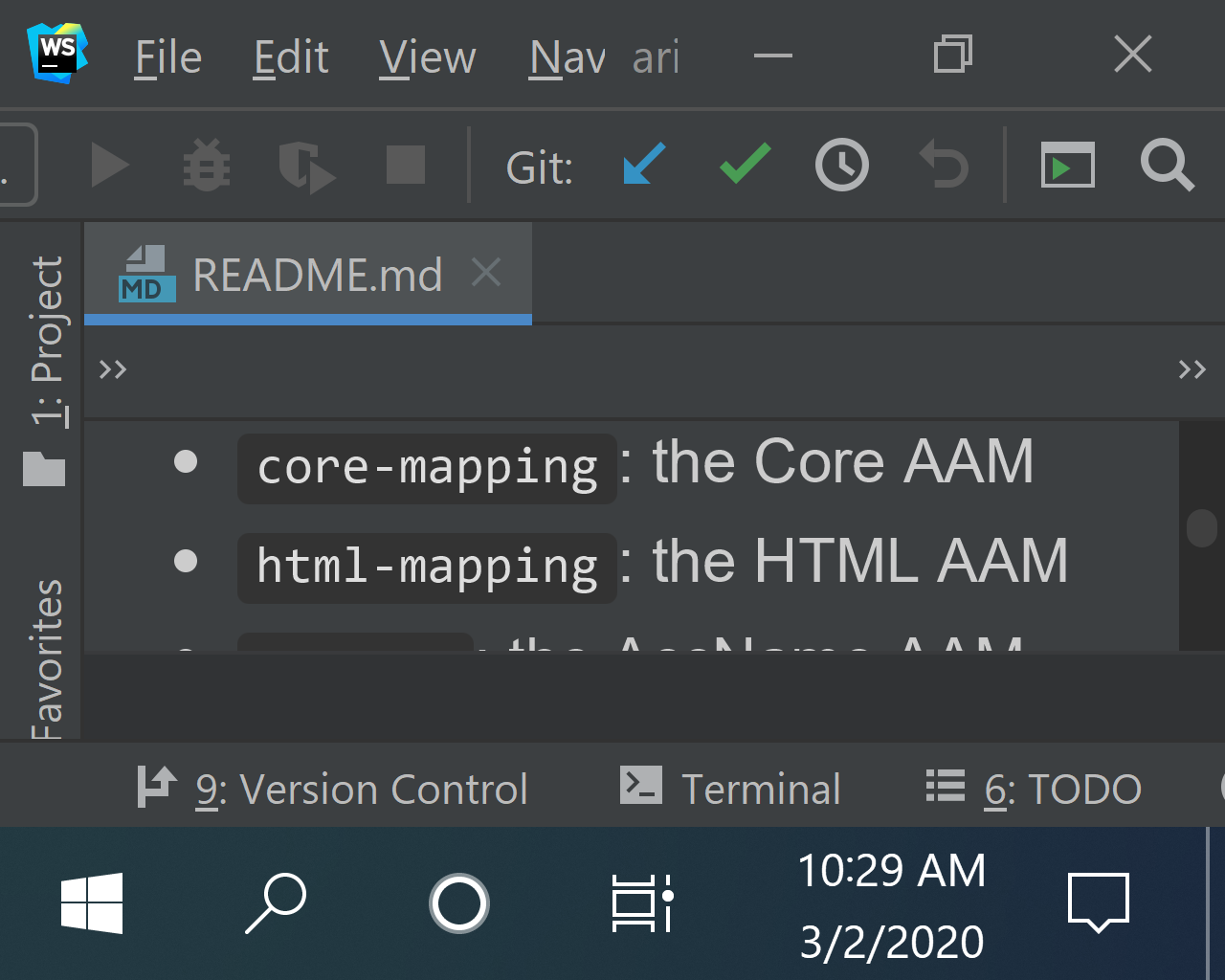
The most simple configuration of the webstorm editor likely meets Reflow, even though the code editor only displays about 2 lines and perhaps 32 characters in each line.
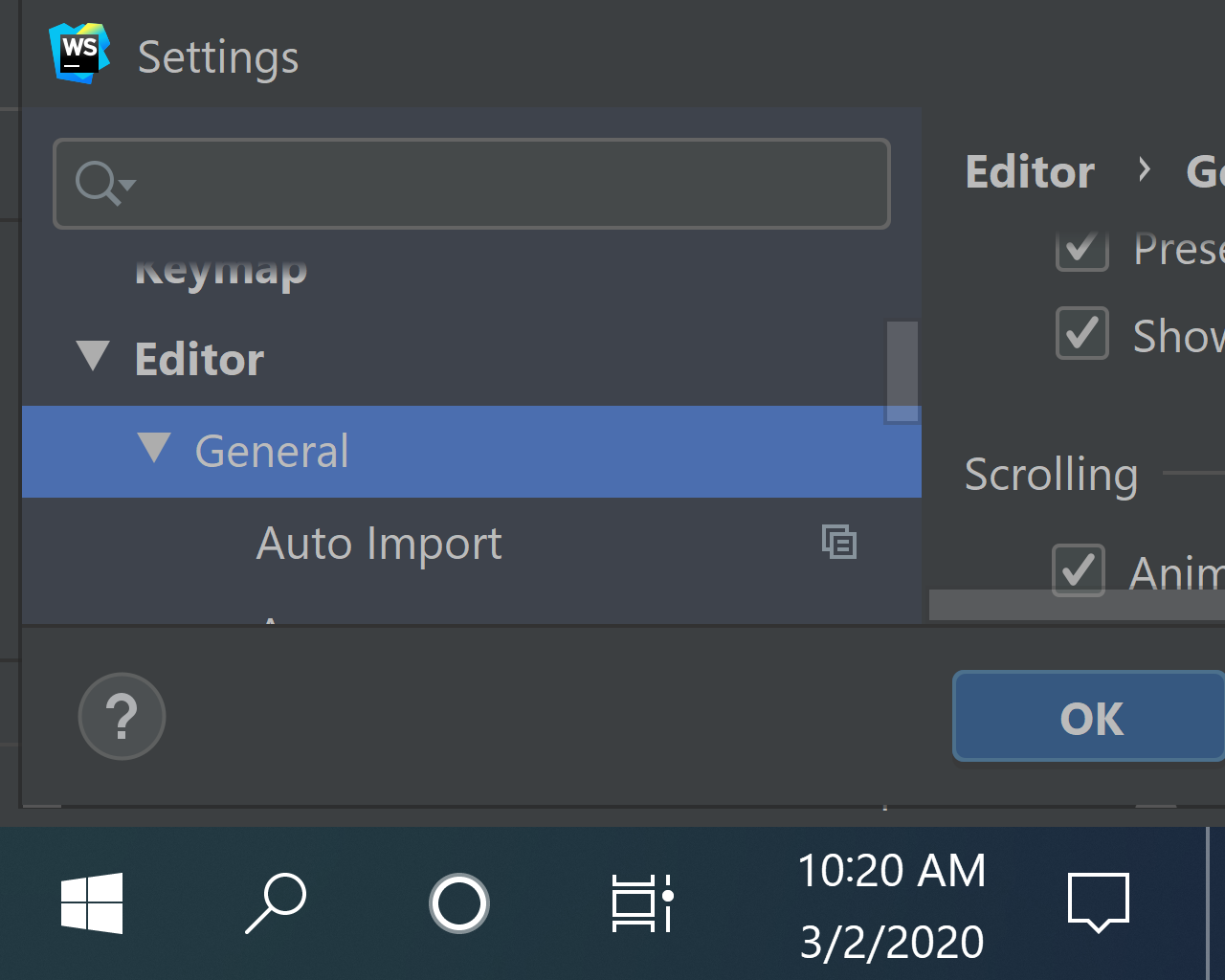
The settings panel does not meet Reflow, and is quite difficult to use. The tree view panel cannot be collapsed or adjusted.
smhigley
on 2 Mar 2020
@smhigley Nowhere in the SC does it say contents must fit into 320x256 CSS pixels. That is a misreading of the criterion. If you support 320 CSS width with no horizontal scrolling you can have a content block that is 1 million pixels tall -- there is no limit. This criterion allows for one directional infinite scrolling. In your IDE screenshots I notice there is a lot of empty space around content that could be condensed. In Outllook and other apps I use condensed modes (when supported) to minimize extra white space that is put into layouts for higher resolution.
mraccess77
on 2 Mar 2020
@mraccess77 I'm aware that the criterion doesn't explicitly say 320x256px, but if we're not testing for that, then what exactly are we testing? Everyone seems to agree that this is formulated to support 400% zoom on a desktop, and not for mobile users.
A standard desktop monitor at an effective screen width of 320px is not likely to have a height of greater than 256px, so if we don't do the work to support that screen size, who are we helping? If we only have a usable experience at 320px width if the user has a theoretical 1000px-tall viewport (requiring an unrealistic starting height of 4000px), then why bother doing the work at all, apart from checking a box?
re: screenshots and empty space -- I don't have anything to do with WebStorm, I only provided the screenshots to show that a program mentioned in this thread as having good usability at high zoom still does not meet Reflow.
smhigley
on 2 Mar 2020
@smhigley There is value is testing for 320 CSS width content that doesn't scroll horizontally. This provides value to users as it means the content will generally be sufficiently sized without horizontal scrolling and with reflow (as needed). While I understand you can game the system by using small text and so forth and I understand you still may need to scroll vertically this is progress. I understand that the number of lines in a viewport can also be problematic and is not caught by this SC. In your example the number of lines of content is problematic -- but that is where collapsable controls, compact layouts, etc. can also be used - although as you point out they are not required by this SC. The challenge is that this SC provides benefit although it doesn't solve all of the needs of users with low vision. We have to start somewhere and getting this SC was better than getting nothing.
mraccess77
on 3 Mar 2020
Nowhere in the SC does it say contents must fit into 320x256 CSS pixels
This is true and that's another problem of the criterion when it focuses only on reflow and not on 400% zoom.
- because if I have to scroll horizontally at 400%, I have a lot more work to do, but I can still see all the content
- but if I can't recognize content at 400% due to fixed areas (like header and footer), this is much more problematic
JAWS-test
on 3 Mar 2020
Hi everyone,
Sorry, I’ve been out & about and not had time to catchup on this.
@WayneEDick and @JAWS-test:
We’ve been through this discussion before:
- 1.4.10 doesn’t “require” responsive design but it is a strong nudge in that direction.
- 1.4.10 doesn’t “require” text become 400% bigger due to instances of a very large starting point, but again it is a strong nudge in that direction and a lot of body text will be x4.
- We considered an addition for table-cells but it added complexity and we wanted to see how 1.4.10 bedded in.
- We know sticky headers/footers are a problem, but we need a way to define ‘too big’ that works across various scenarios before we can create normative text for that.
@smhigley wrote:
It is extremely hard to overstate how much work is required to both interpret and try to meet Reflow for anything beyond a basic content-centered website.
We did go through various connotations of this (including WG members from companies like Microsoft & Oracle) and that’s where the exception came from.
I’ve worked on some applications and dashboards that go beyond the content-centred scenario, and it hasn’t generally been a problem. Admittedly I work on websites & mobile apps, and in each case a small-screen device has been part of the scope. However, even for dashboards, most components in a dashboard would fit to mobile width and could be linearised.
It would be a much simpler ask to require all text content to not span more than the screen width, down to 320px (or height, to 256px).
That was considered early on (from a distant memory!), but I think we kept it as a more holistic requirement because it is too easy to get lost. E.g. you are reading through an article (or block of code), and the navigation is out of view to one side or the other, you can get completely lost in blank columns. Also, with the responsive sites coming in, and mobile versions of complex apps being created, it appears to be a feasible requirement.
neither WebStorm nor Visual Studio meet Reflow
I use VS code (mostly to edit WCAG!), although I don’t need much enlargement I do appreciate the easy zoom-ability. IMHO it isn’t far off meeting reflow because the areas of content are quite discrete.
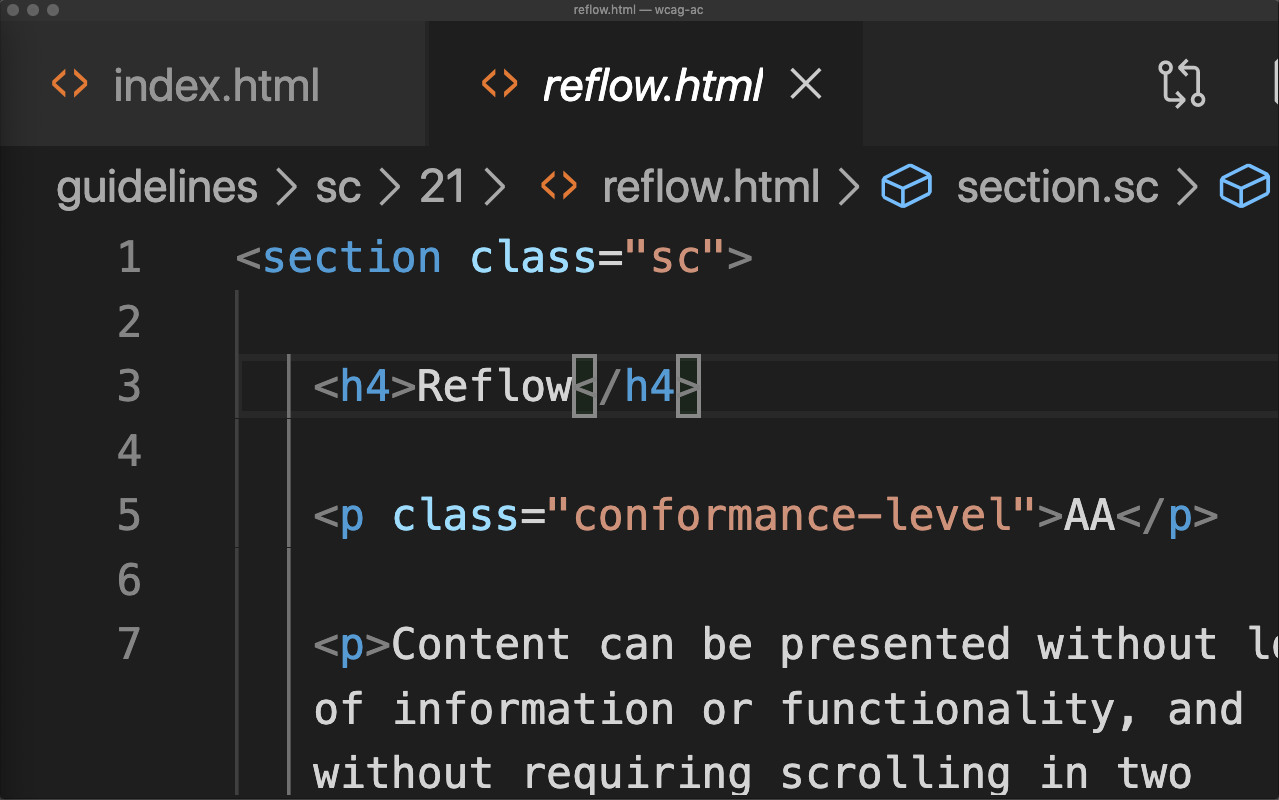
- The main area can word wrap, and as Wayne said that’s quite effective.
- Toolbars can be turned on/off.
- The file tabs at the top scroll horizontally, not vertically.
- The sidebar can be opened/closed, and scrolls vertically when open.
- The actions in the top-right (e.g. split editor) go out of view, but are available from the app menu (so not lost).
The bit that stood out to me at first was the status bar, which loses content to the right when zoomed in. If that was available by horizontal scrolling, or by having a “more” drop-down (like the sidebar options), that would pass to.
Also, whilst I think it is almost there, the exception “for parts of the content which require two-dimensional layout for usage or meaning” was aimed at this sort of interface. If the word-wrapping gets to the point of losing meaning, that can horizontally scroll (I don’t think that’s necessary here, but I imagine it could be in some circumstances). If a toolbar is needed to be in view at the same time as the content (e.g. the status bar) that allows for 2D scrolling.
and not for mobile users
Just to note that iOS does now support a zoom option in Safari. If you have a device larger than 320px wide, you can set a zoom level that equates to 320px (or more!).
alastc
on 3 Mar 2020
Coding with low vision does not look like it was represented above:
Here are shots of my pyCharm windows.
Images of pyCharm pages. Sorry, I don't know how to do alt text in google
mail.
Below are 3 screen shots. One of edit mode, one of project view, one of
project plus structure.
[image: Screenshot 2020-03-03 at 1.46.17 PM.png]
[image: Screenshot 2020-03-03 at 1.48.32 PM.png]
[image: Screenshot 2020-03-03 at 1.50.05 PM.png]
All of these are shrunk 27-inch images.
The first is the view I use while I am coding. This example shows that the
locus definition of a hyperbola is represented by the relation
(x/a)2+(y/b)2=1.
The second is the project tree view. I have pulled out some menus to show
how that works
Finally we have the structure view added to show the object structure.
You should note that many visual toolbars are missing. I operate from
menus, because toolbars are clutter.
Now, pyCharm is a little less stupid than forcing you to zoom the whole
screen. You can zoom edit text with a command+mouse move.
I function as follows. I use mono fonts because they have a smaller
critical print size (9pt or 12px). Nw 4x12 is 48px. I work on a 27in.
monitor with a standard resolution of 2560x1440 = 2(1280x720). So, I
operate at 1280x720. That automatically makes 12px into 24px. Inside
pyCharm I set the font size to 24px. That creates an actual 48px given my
2x enlargement. Therefore my operating font is effectively 4(critical
print size).
That is how it works.
Notice how line 2, the "symbols" definition, word wraps the string "('x y A
B c d e')". I like the little soft-wrap indicator. Horizontal scrolling in
the coding window is horrible. I can't do it. Maybe one of you can do it.
If I need a toolbar or status bar I can always add it in for my action and
then delete it.
As I said, it is not easy. But it is possible.
It is true, I did not use zoom only. Unfortunately, we could not get SC's
to enable me to change size at the element level. PyCharm let me do that.
Best, Wayne
On Tue, Mar 3, 2020 at 4:22 AM Alastair Campbell notifications@github.com
wrote:
Hi everyone,
Sorry, I’ve been out & about and not had time to catchup on this.
@WayneEDick https://github.com/WayneEDick and @JAWS-test
https://github.com/JAWS-test:
We’ve been through this discussion before:
- 1.4.10 doesn’t “require” responsive design but it is a strong nudge
in that direction.- 1.4.10 doesn’t “require” text become 400% bigger due to instances of
a very large starting point, but again it is a strong nudge in that
direction and a lot of body text will be x4.- We considered an addition for table-cells but it added complexity
and we wanted to see how 1.4.10 bedded in.- We know sticky headers/footers are a problem, but we need a way to
define ‘too big’ that works across various scenarios before we can create
normative text for that.@smhigley https://github.com/smhigley wrote:
It is extremely hard to overstate how much work is required to both
interpret and try to meet Reflow for anything beyond a basic
content-centered website.We did go through various connotations of this (including WG members from
companies like Microsoft & Oracle) and that’s where the exception came from.I’ve worked on some applications and dashboards that go beyond the
content-centred scenario, and it hasn’t generally been a problem.
Admittedly I work on websites & mobile apps, and in each case a
small-screen device has been part of the scope. However, even for
dashboards, most components in a dashboard would fit to mobile width and
could be linearised.It would be a much simpler ask to require all text content to not span
more than the screen width, down to 320px (or height, to 256px).That was considered early on (from a distant memory!), but I think we kept
it as a more holistic requirement because it is too easy to get lost. E.g.
you are reading through an article (or block of code), and the navigation
is out of view to one side or the other, you can get completely lost in
blank columns. Also, with the responsive sites coming in, and mobile
versions of complex apps being created, it appears to be a feasible
requirement.neither WebStorm nor Visual Studio meet Reflow
I use VS code (mostly to edit WCAG!), although I don’t need much
enlargement I do appreciate the easy zoom-ability. IMHO it isn’t far off
meeting reflow because the areas of content are quite discrete.[image: Screenshot from VS code at roughly 400% showing the reflow SC edit
view.]
https://user-images.githubusercontent.com/216630/75774793-9d852a80-5d48-11ea-8e79-dd1c1f120fbb.png
- The main area can word wrap, and as Wayne said that’s quite
effective (although you could argue that some 2D-ness is required there).- Toolbars (whilst exempted) can be turned on/off.
- The file tabs at the top scroll horizontally, not vertically.
- The sidebar can be opened/closed, and scrolls vertically when open.
- The actions in the top-right (e.g. split editor) go out of view, but
are available from the app menu (so not lost).The bit that stood out to me at first was the status bar, which loses
content to the right when zoomed in. If that was available by horizontal
scrolling, or by having a “more” drop-down (like the sidebar options), that
would pass to.Also, whilst I think it is almost there, the exception “for parts of the
content which require two-dimensional layout for usage or meaning” was
aimed at this sort of interface. If the word-wrapping gets to the point of
losing meaning, that can horizontally scroll (I don’t think that’s
necessary here, but I imagine it could be in some circumstances). If a
toolbar is needed to be in view at the same time as the content (e.g. the
status bar) that allows for 2D scrolling.and not for mobile users
Just to note that iOS does now support a zoom option in Safari. If you
have a device larger than 320px wide, you can set a zoom level that equates
to 320px (or more!).—
You are receiving this because you were mentioned.
Reply to this email directly, view it on GitHub
https://github.com/w3c/wcag/issues/1050?email_source=notifications&email_token=AB6Q4FYU5Z7BV4JC3DBVBM3RFTZCBA5CNFSM4K4A6CM2YY3PNVWWK3TUL52HS4DFVREXG43VMVBW63LNMVXHJKTDN5WW2ZLOORPWSZGOENTI56Q#issuecomment-593923834,
or unsubscribe
https://github.com/notifications/unsubscribe-auth/AB6Q4F5LYHGQAGSGTMDYQK3RFTZCBANCNFSM4K4A6CMQ
.
WayneEDick
on 4 Mar 2020
Hi Wayne,
I'm afraid the images don't come through from an email, can you forward them to me please? I'lltr y and add.
I didn't mean to suggest my simple example was realistic of your usage, it was just an example to think-through reflow for that type of interface.
Cheers,
-Alastair
alastc
on 4 Mar 2020
Coding with low vision does not look like it was represented above:There are two reasons. 1) People with full sight or blindness cannot imagine how people with low vision work without visual or audio cues that guide the work of the fully sighted or blind. 2) People with low vision learn their base system very well so they can use every tool available to create a screen that is visible and useable.
Here are shots of my PyCharm windows. PyCharm has tools that make personalisation possible. That is really what accessibility is all about. Making it possible for other views of programs to support the entire scope of disability.
Images of PyCharm pages.
Sorry, I don't know how to do alt text in google
mail.Below are 3 screen shots. One of edit mode, one of project view, one of project plus structure.


The first is the view I use while I am coding. This example shows that the
locus definition of a hyperbola is represented by the relation
(x/a)2+(y/b)2=1.
The second is the project tree view. I have pulled out some menus to show
how that works
Finally we have the structure view added to show the object structure.
You should note that many visual toolbars are missing. I operate from
menus, because toolbars are clutter.
Now,PyCharm is a little less stupid than forcing you to zoom the whole
screen. You can zoom edit text with a command+mouse move.
I function as follows. I use mono fonts because they have a smaller
critical print size (9pt or 12px). Nw 4x12 is 48px. I work on a 27in.
monitor with a standard resolution of 2560x1440 = 2(1280x720). So, I
operate at 1280x720. That automatically makes 12px into 24px. Inside
PyCharm I set the font size to 24px. That creates an actual 48px given my
400% enlargement. Therefore my operating font is effectively 4(critical
print size).
That is how it works.
Notice how line 2, the "symbols" definition, word wraps the string "('x y A
B c d e')". I like the little soft-wrap indicator. Horizontal scrolling in
the coding window is horrible. I can't do it. Maybe one of you can do it. PyCharm is not perfect. The settings menu and opening screen are not usable at pixel sizes bigger than 36px.
If I need a toolbar or status bar I can always add it in for my action and
then delete it.
As I said, it is not easy. But it is possible.
Think of PyCharm as a system that has designed a system of drawers that can be opened and shut as needed. I believe this is the true accessibility model for professional desktop applications.
It is true, I did not use zoom only. Unfortunately, we could not get SC's
to enable me to change size at the element level. PyCharm let me do that.
Best, Wayne
WayneEDick
on 4 Mar 2020
Dear Sarah,
I hope you found my images and use method for enlargement useful. That is
how I code, and do mathematics.
I think having panels and toolbars that open and shut is a viable way to
meet 1.4.10 with applications. I know this problem is difficult. It is like
going back 10 when we were just starting.
As you know as a programmer, we learn things in shells, one layer at a
time. WCAG really looked at inter-modal access. ARIA, the accessibility
API's, the barrier between the assistive technology and the page (or app)
code were taken as essential. They worked as long as you wanted to map text
to a rich audio interface or voice to print, but with people like me and
those with cognitive issues the translation we need is intra-modal. I need
a different print interface. People with cognitive disabilities need less
clutter interfaces.
These differences are difficult for a person with full sight and no
cognitive issues to visualise. My wife used to tell me when I'd get
frustrated with the pace of change, "Wayne, people cannot see what they
cannot see." I'm glad I have my wife. She's a nurse, and she keeps me in
reality.
I do think we need to define the tools for achieving enlargement with
reflow. It is a profound problem. We will work on some techniques that will
help developers. I promise, before I retire completely (I'm 72) I help with
some useful techniques.
Please forgive us for throwing this curveball to all you who did your best
to conform to accessibility. We just learned new stuff. I didn't even prove
the complexity involve in reading with horizontal scrolling until a year
before WCAG 2.1 came out. Know body knew just how bad it was before.
I went all the way through grad school and taught computer science for 30
years before I calculated the operational overhead. When I read the
Algorithms book from MIT for teaching a graduate class, I made over 100,000
horizontal scrolls. I'm glad I didn't know that before I started.
Best, Wayne
On Sat, Feb 29, 2020 at 12:47 AM Sarah Higley notifications@github.com
wrote:
I'm a bit concerned with some of the assumptions above, particularly
comments like this:It is dead simple to make a case that works at 320 by 768.
(I assume that last number was supposed to be 256)
It is extremely hard to overstate how much work is required to both
interpret and try to meet Reflow for anything beyond a basic
content-centered website. I don't believe there is a single other criterion
that imposes the same level of burden that Reflow does on complex web apps.
It has been very frustrating to watch people become demoralized about
working on accessibility when they realize they'll never meet WCAG AA, just
because of Reflow. Particularly when the criterion can seem so entirely
divorced from a good user experience for their product.I also personally have doubts about whether the enormous amount of work
required to meet Reflow has a corresponding payoff, when talking about an
interface past a certain level of UI complexity. I don't mean that in the
sense of "it's not worth it to do the necessary work to make products
accessible for people with low vision," I mean that in the sense of "I find
it difficult to imagine any possible way for an app like Visual Studio or a
complex interrelated analytics dashboard to be usable at a screen size of
320x256px, especially compared to the experience with magnification
software."The "Except for parts of the content which require two-dimensional layout
for usage or meaning" doesn't help in the above cases, both because it both
only applies to those individual parts, and also often nothing in the app
strictly depends on two-dimensional layout; it is the overall complexity of
the UI that is responsible for the difficulty meeting Reflow. Unfortunately
"overall UI complexity" is hard to measure.There is certainly work that complex web apps could do to be more
accessible to low vision users, but I am increasingly convinced that
Reflow, as written today, is a distraction to that work. Rather than moving
it to level A, I would strongly suggest considering moving it to AAA, and
introducing a new requirement that centers around the reflow of text
content, or pages whose primary purpose is to present static content.Please forgive me if this comes off a bit strong; I'd like to think that
if anyone else in this thread had been involved in the same months upon
months of torturous discussions around reflow that I have, they would be
equally frustrated today :).—
You are receiving this because you were mentioned.
Reply to this email directly, view it on GitHub
https://github.com/w3c/wcag/issues/1050?email_source=notifications&email_token=AB6Q4FZM64765XFPWWGMPOLRFDFTTA5CNFSM4K4A6CM2YY3PNVWWK3TUL52HS4DFVREXG43VMVBW63LNMVXHJKTDN5WW2ZLOORPWSZGOENLUEVI#issuecomment-592921173,
or unsubscribe
https://github.com/notifications/unsubscribe-auth/AB6Q4F6U7ISVI6ACOYMKHQ3RFDFTTANCNFSM4K4A6CMQ
.
WayneEDick
on 5 Mar 2020
@alastc
1.4.10 doesn’t “require” text become 400% bigger due to instances of a very large starting point, but again it is a strong nudge in that direction and a lot of body text will be x4.
That's not in the Understanding. Can that be added? Can we agree on a minimum size that a text must reach at 400% zoom?
We considered an addition for table-cells but it added complexity and we wanted to see how 1.4.10 bedded in.
Unfortunately, I cannot see what should be complex about this. Furthermore, the requirement that a block of text does not have to be scrolled,
- is much more important than the prohibition that the entire page does not have to be scrolled in 2 directions
- is already in SC 1.4.8 (but only with level AAA).
I think this requirement should be added in the Understanding.
We know sticky headers/footers are a problem, but we need a way to define ‘too big’ that works across various scenarios before we can create normative text for that.
Too big:
- in any case, if header and footer cover the entire page content.
- in any case also if I have to scroll to each line (because that's what this SC is all about)
- otherwise see my proposal
Can this be added in the Understanding?
JAWS-test
on 5 Mar 2020
@WayneEDick I appreciate you sharing those screenshots, and also your commitment to making things better for low vision users. I think we're actually aiming for the same thing, and your screenshots and description of how you use PyCharm actually match pretty well with what I've been hearing and observing from other low vision users in similar use cases.
(everything below is my personal opinion and observation, not my approach as a Microsoft employee)
The accessibility features you're using, and the way you combine screen zoom with selective text resizing are actually the exact sort of use cases I would like to spend time targeting and improving, because those seem to be how actual people are using products like PyCharm. Work could be done on features like the following:
- better personalization settings, both for cognitive and low vision use cases
- better support for OS font size settings, and per-product tailored font size settings
- more research into how people use applications with a magnification software running, and what the pain points are
- and, obviously, more than I'm listing here
This is actually the very reason I commented on this issue, and the reason I think we actually agree. I have not found any indication that people actually use products like Visual Studio or Photoshop or PowerPoint at an effective screen size of 320x256px. They use other methods, like what you shared. Techniques like collapsing or resizing panels, and allowing line wrapping in a code editor (which actually is not required by reflow) are extremely helpful to real users, but do not enable products to meet Reflow.
This is my worry. We're making product teams chase their tails to meet a legal requirement that doesn't reflect how people with low vision actually use their product. I personally would like them to
not spend time on that, and instead spend time on researching and improving the experience for setups like what you have, or other variations of zoom/text size/UI customization, or for use with magnification software, and so on. Right now, my personal impression is that that work is being actively harmed by the Reflow criterion, in the cases of applications like these.
My position has never been that we shouldn't be doing work to make products better for low vision users, or that "it's just too much work"; it has always been specifically that Reflow is the wrong work when considering a certain type of product; and worse, it's a significant amount of wrong work. The decisions made to improve experience at a 600x400px screen, or a 800x600px screen with text size increases are not the same decisions that would be made to target a 320x256px screen. The Reflow criterion pushes teams towards implementing the latter, targeting a form factor that it appears is not actually used in the real world (at least not beyond in-browser zoom on websites and simpler apps). I want to incentivize product designers to make decisions that are best for disabled users, not best for legal risk.
I'm not comfortable highlighting specifics of our products in a github thread, but let's just say that there are certain features in certain products that are not possible to make functional at a 320x256px screen, even when allowing multiple areas to have 2-dimensional scroll. The technique that works in those cases is to drastically reduce text size. This is allowed by Reflow, therefore teams are incentivized to reduce text size on zoom. In other cases, there are interrelated regions that do not strictly "require" 2-D layout for meaning, but still significantly decrease usability if stacked. There are potential better solutions that involve e.g. expand/collapse controls, and those would work with a target screen width of 500px or 600px, but not a target width of 320px. Reflow incentivizes teams to stack those components instead of investigating whether that is best for real users.
@alastc I can't really think of a way to phrase this that doesn't risk coming off poorly (not my intention), so I'll just ask directly: are you aware that Visual Studio and VS Code are entirely separate products? VS Code is not a good example of where Reflow falls apart, largely for the reasons you outlined above.
I don't think there's much more I can add here that would be useful, so I'm going drop after this; if you feel like you still don't understand where I'm coming from, I'd be happy to chat outside this thread in real time. Otherwise, I hope you at least consider the possibility that the normative text of Reflow is working against usability in certain cases.
Thanks for your time :)
smhigley
on 5 Mar 2020
I have not found any indication that people actually use products like Visual Studio or Photoshop or PowerPoint at an effective screen size of 320x256px.
If you look at Wayne's (or my) screenshot, the desktop is not that size, but the interface window (including zoom level) is in that ballpark.
Also, the SC doesn't require that the entire interface fits into that size view. It requires that for vertically scrolling content it works in a 320px width, and for horizontally scrolling content it works in a 256px height. Which leads to the next bit:
Techniques like collapsing or resizing panels... do not enable products to meet Reflow.
I'm not sure where that comes from, the first example in the understanding page shows the main menu being automatically hidden at higher zoom. The section on visibility/availability talks about that as well. Collapsing/re-sizing panels, automatically or manually is a valid technique. It doesn't come up much for more content-oriented websites, but I don't see why that wouldn't conform.
The requirement for conformance of full pages has this note:
For the purpose of determining conformance, alternatives to part of a page's content are considered part of the page when the alternatives can be obtained directly from the page, e.g., a long description or an alternative presentation of a video.
I.e. if you can access an alternative form of that content from the interface, that is a method of conforming. The user being able to customise the interface to adapt for smaller viewports / higher zoom is an appropriate approach.
are you aware that Visual Studio and VS Code are entirely separate products?
Yes, but I only use VS code and might conflate them sometimes, apologies.
there are certain features in certain products that are not possible to make functional at a 320x256px screen, even when allowing multiple areas to have 2-dimensional scroll.
If the reason those areas have to be onscreen at the same time is due to the relationship between them (e.g. there is an edit area on one side, and the status of that thing is shown on the other), that would fit the exception and scrolling would be allowed.
It is hard to make that call without specifics, but that was the intent of the exception.
alastc
on 5 Mar 2020
Hi @JAWS-test,
1.4.10 doesn’t “require” text become 400% bigger ... That's not in the Understanding. Can that be added?
It is under the "The relation of Reflow to the Success Criterion 1.4.4 Resize Text" heading.
Regarding table cells and blocks of text, we had that discussion in (around) 2016. Yes it's important, but so is not hunting around a layout (as you have to with magnification-style size increases).
Adding a sub-clause to reflow for items that fit the exception (like table cells) and adding a requirement that they are not bigger than the height/width would be more complex for people to understand. Also, once we can see people applying reflow it is easier to see how big an issue it is.
I think this requirement should be added in the Understanding.
We can add clarity, possibly advice, but we can't add requirements directly in the understanding.
in any case, if header and footer cover the entire page content.
in any case also if I have to scroll to each line (because that's what this SC is all about)
For what viewport height? At the minimim outlined in the SC (256px)? What if the viewport is a bit higher, go with a percentage? What if the width affects how high the header/footer is due to wrapping? (quite a common thing). We'll deal with that in #987, I'm just pointing out it is not straightforward.
alastc
on 6 Mar 2020
Hi @alastc
1.4.10 doesn’t “require” text become 400% bigger ... That's not in the Understanding. Can that be added?
It is under the "The relation of Reflow to the Success Criterion 1.4.4 Resize Text" heading.
This chapter says:
In an implementation where text does not consistently increase its size as people zoom in (such as when it is tranformed based on a media query to adapt to small-screen usage), it must still be possible to get to 200% enlargement in order to satisfy the Resize Text criterion
What I think is missing at this point is the hint that this exception (that's how I understood the GitHub discussions on the subject) should not apply to small text, but to large text such as headlines. So my question would still be whether this can be added in the Understanding and whether we can define a minimum size for which 200% instead of 400% zoom is sufficient
JAWS-test
on 6 Mar 2020
This SC is not targeting a 320x256 screen. What it's attempting to do is target the veiwport a user with low vision might see when using magnification at 400%. If you were using 1280 as a user you would essentially have 4 screens of content horizontally compared to 1 at 1280. Within that viewport is content readable without horizontal scrolling.
mraccess77
on 6 Mar 2020
I agree with JAWS-test. This wording in the Understanding doc could actually be misused, should a designer be perversely minded enough, to ensure that whole sections of text content on a page zoomed to 400% remained the same size text as in the unzoomed view! Clearly not what was intended. So I support the idea of rewording some of the text in these two Understanding paragraphs to make them more specific and less ambiguous.
While we can't lay down a requirement in the Understanding, we could add something along the lines of the following to make things clear. It adds no restriction not already in the SCs, but clarifies that, in this "Relation of Reflow to SC1.4.4" section of the Understanding, we are only thinking about text that starts off very large before zooming. So:
"However text may sometimes start with a size so big, without zoom, that at 400% zoom just a few words may entirely fill the average PC screen. Some headings are an obvious example of this. If the design counteracts this, in the small screen layouts, by reducing the initial text size of such portions of large font using the media queries, it should still achieve a text size of 200% of its size in the desktop PC layout, without losing content or functionality as required by Success Criterion 1.4.4."
The above would replace the last sentence of the first paragraph of the section, ("In an implementation where.....etc").
To fully meet JAWS-test's point and be still clearer, it could perhaps even append the words "...but we would not recommend this kind of size reduction for any text under [30px?] in font size" [we would have to decide the actual figure in that].
guyhickling
on 6 Mar 2020
@mraccess77 is there a common real-world setup where a desktop user at 400% zoom and 320px width is going to have a viewport height greater than 256px?
You end up with lots and lots of cases like this, where someone zooms to a 320px width, and it is compliant according to your interpretation, but it is still completely unusable (there is an entire clipped form in that vertical scroll region):

Or even worse, where the content is completely obscured by the fixed elements. You could have an entire app or website that is compliant according to this interpretation of Reflow, and yet have all its information and functionality completely missing. This isn't even an edge case; most complex apps I've worked with have some variant of this problem, as do many basic websites. Again, if this is allowed, what is the point of investing lots of work to make this the experience at 320px? Who is this helping?
@WayneEDick are you ok with the user experience above? Is there something I'm missing here, such as that vertically oriented monitors are common and an easy workaround for this kind of issue?
This type of use case comes up far more often than the sort of complex app interface I was talking about before. Many websites and web apps that could otherwise be made accessible at 1280x1024 at 400% zoom will not be, if this is interpreted as passing the criterion.
smhigley
on 6 Mar 2020
is there a common real-world setup where a desktop user at 400% zoom and 320px width is going to have a viewport height greater than 256px?
This depends on the ratio of screen width and height, but normally not: If you have 320 px at 400% in width, you also have about 256 px in height.
Or even worse, where the content is completely obscured by the fixed elements. You could have an entire app or website that is compliant according to this interpretation of Reflow, and yet have all its information and functionality completely missing
The problem would not arise if in SC 1.4.10 we defined not only a width but also a height. Then it would be a violation of "without loss of information or functionality"
JAWS-test
on 6 Mar 2020
Hi @smhigley We agree that the situation of short scrolling areas is an issue for users -- I run into that almost every day -- but we were not able to get it into WCAG 2.1 -- we had wanted to get it into WCAG 2.2 -- but that hasn't occurred. However, just because that is a gap doesn't mean what SC 1.4.10 requires is not beneficial -- it's just not complete. Yes, perhaps things could have been solved in different ways and a solution worded differently might have more impact -- but it's what we could get consensus on. I argued that the wording left loopholes for people to shrink content -- and that does happen - but overall it has been helpful in my opinion.
mraccess77
on 7 Mar 2020
@mraccess77:
we had wanted to get it into WCAG 2.2 -- but that hasn't occurred
I thought WCAG 2.2 was in the early stages of drafting right now... Is it already decided what new SCs will be? Where can I find them?
JAWS-test
on 7 Mar 2020
Hi @alastc is there a public list of SCs being considered for 2.2?
mraccess77
on 8 Mar 2020
On the same subject, is there time to propose another SC? I have a very simple one that I'd like to add (by simple I mean very short, not likely to be at all controversial, and with a simple solution for developers to satisfy it).
guyhickling
on 8 Mar 2020
@mraccess77, @JAWS-test - our wiki has the links, or directly it is this spreadsheet. This covers the ones being drafted, once in the editors draft it is all deal with in github.
@guyhickling - Not for 2.2, but please do create an issue and tag it with "wcag.next". That's what happened with icon description.
alastc
on 8 Mar 2020
Regarding how we chose levels in WCAG 2.0. While some of the reasons SCs ended up at various levels is discussed in 2.1, the bottom line reason that something ended up at one level or another was based on where we able to get consensus for it. If most of the group agreed something could go at level A, without blocking objections, that is where it went.
 DavidMacDonald
on 27 Apr 2020
DavidMacDonald
on 27 Apr 2020
Hi everyone,
There was a fair bit of back and forth on this one, but the upshot was there was enough concern with the testing & impact of changing it to 'down to' that it would not have passed a CFC.
https://www.w3.org/2020/07/21-ag-minutes.html#item02
It was not due to doubts about user-requirement, it was more to do with the burden of testing given that sites which do meet 14.10 generally do work at the inbetween points. By burden, that includes the effects of missing issues at particular pixel-widths that one tester did not find, but which are there.
To raise this issue again, it would help to be able to demonstrate that there is language we could use that means it is not a per-pixel-width check.
alastc
on 29 Jul 2020
Related issues
patrickhlauke
·
8Comments
 vavroom
·
6Comments
patrickhlauke
·
8Comments
alastc
·
7Comments
vavroom
·
6Comments
patrickhlauke
·
8Comments
alastc
·
7Comments
 DanteGagne
·
9Comments
DanteGagne
·
9Comments
Most helpful comment
I'd still note that I don't believe "There is one thing you that would make a big difference for people with low vision. Change Reflow 1.4.10 from AA to A" will have any actual real-world impact on a site/application's willingness to adhere to the SC.
whether the SC is A or AA is possibly more of a "signal" than anything that influences developers to implement something or not. as said, if a developer has been unable to meet/ignored the SC when at AA, it won't make them more keen to rethink their approach if it was A. also, this kind of thinking also reinforces what we keep trying to say ISN'T the case...that A is more important than AA which in turn is more important than AAA.
there's other factors that supposedly influence what level is given to an SC, including how much impact it would have to adhere to an SC in terms of layout/functionality. and for complex web apps (imagine something like a fully-fledged code editor/word processor/3D visualisation tool) i'd say the requirement of "must work without scrolling/without dropping any functionality even at mobile-sized viewport" is a not-inconsiderable ask.