Waveboxapp: Wavebox prompting to update snap, but there is no update
- Wavebox Version: 4.10.1
- Operating System & Version: Ubuntu 19.04
- (Linux only) Install method: snap
Expected & actual behavior
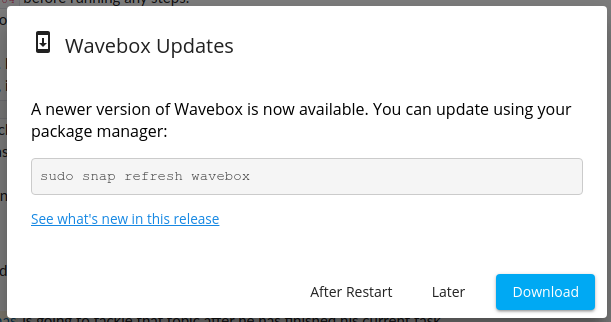
When I start Wavebox, I get a popup letting me know that there is an update and that I should run sudo snap refresh wavebox. Yet, when I do that, snap tells me snap "wavebox" has no updates available.
I would expect not to see any update prompts since snaps are self-updating (unless there is a critical security patch I'd need to apply right away, outside the time when snapd updates the snaps)
Steps to reproduce
Start wavebox.
Is the bug persistent or intermittent?
This seems to happen every time I start Wavebox.
Screenshots
Additional information
I think maybe there is actually an update but it did not hit the snap store yet?
 sztomi
All 9 comments
This can happen on Linux if you change the update channel in settings, but not change update channel of the snap repo. (The app is unable to do this automatically).
There are two things you can do
- Go back to stable, by going to Settings > Update and changing the update channel to stable
- Go to beta by running
sudo snap refresh wavebox --channel=betafrom the command line.
There's some more info here https://wavebox.io/kb/beta-channel
 Thomas101
on 2 Jul 2019
Thomas101
on 2 Jul 2019
Oh, this was a new installation, but apparently this setting was synchronized from my profile? I switched to the beta on another machine some time ago.
sztomi
on 2 Jul 2019
Ah it could be that! We should look at stripping this setting on Linux as we can't action it automatically :)
Thomas101
on 2 Jul 2019
I think the beta flag should not be synced at all - as a user of many operating systems, I would prefer to only install a beta version on one of the platforms (if I have a problem that's resolved in Beta).
sztomi
on 2 Jul 2019
I'm having a similar problem in Ubuntu 18.04 using the beta deb repo. Wavebox prompts me to update each time it starts, but no update is available.
 mike-zipit
on 26 Jul 2019
mike-zipit
on 26 Jul 2019
@mike-zipit which version of Wavebox are you using and what's your update channel set to under Settings > Updates?
Thomas101
on 26 Jul 2019
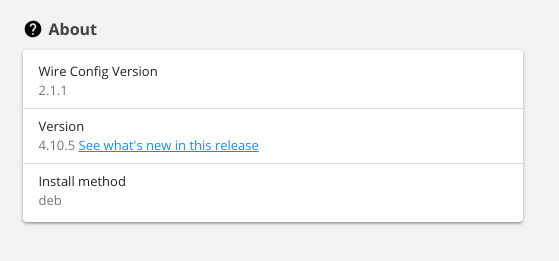
I had the channel set to beta in settings, but I switched it to stable to see if that stops this issue
mike-zipit
on 26 Jul 2019
4.10.5 is the most recent stable version. The beta channel is currently on 4.10.6. I suspect you haven't changed the update channel in your apt repository as per https://wavebox.io/kb/beta-channel
Linux: Installed via apt repository
- Add the archive Key
sudo wget -qO - https://wavebox.io/dl/client/repo_beta/archive.key | sudo apt-key add - - Edit your sources file in
/etc/apt/sources.list.d/wavebox.listor/etc/apt/sources.list.d/repo.listdepending where you set the source
2.a Remove the previous Wavebox repository
2.b Adddeb https://wavebox.io/dl/client/repo_beta/ x86_64/for 64-bit installs - Update apt and install
sudo apt update && sudo apt install wavebox
Thomas101
on 26 Jul 2019
:+1: Yep, you were right. I was using /repo instead. Sorry for the confusion
mike-zipit
on 26 Jul 2019
Related issues
 cdeutsch
·
3Comments
cdeutsch
·
3Comments
 atrasatti
·
3Comments
Thomas101
·
3Comments
atrasatti
·
3Comments
Thomas101
·
3Comments
 dzg
·
4Comments
dzg
·
4Comments
 dep
·
4Comments
dep
·
4Comments
Most helpful comment
I think the beta flag should not be synced at all - as a user of many operating systems, I would prefer to only install a beta version on one of the platforms (if I have a problem that's resolved in Beta).