Waveboxapp: Gmail Unverified Apps will have limited access after 8 July
- Wavebox Version: 4.10.1
- Operating System & Version: Windows 10
- Account type (if applicable): Gmail
I've received an email from Gmail explaining that I have Unverified Apps in my domain and due to the authentication used they _may_ be limited as of 8 July. The Unverified App is Wavebox:

I've not had anything from Wavebox around this. The email explains what I need to do / not do but this only applies because I installed the app before 8 July. If I (or a new user) installs it after 8 July there may be other steps needed before Wavebox will work.
I am happy to add the text of the email here, but it's long so I don't want to do unless you guys have no idea what I'm talking about. Happy to forward it onto somebody in Wavebox if need be.
 pauby
pauby
All 4 comments
Thanks for reporting. This will not impact your use of Wavebox in any way and relates to a historic API token that is no longer in use.
If you installed Wavebox before version 4.0.0, you will have this old API token in your account, hence the email to some Gsuite admins from Google. Version 4.0.0 onwards already has the latest Google update and will continue working as normal beyond July the 8th.
If you've got any more questions, I'm more than happy to help :)
 Thomas101
on 14 Jun 2019
Thomas101
on 14 Jun 2019
@Thomas101 Just to clarify I can remove that 'Unverified App' listed in the email?
While this has proved to be a moot issue hopefully it helps somebody else!
pauby
on 14 Jun 2019
@pauby if you want to remove the Unverified App, you can. There are two ways of doing it...
From the Gsuite Admin screens
- From the Gsuite Admin screens, go to your User Management and then the Security section.
- Locate
Connected Applicationsand you should see a set of entries forWavebox App. You can either remove just the entry that Google has emailed you about (this will haveaccess to Gmaillisted in theAccess levelfield) or remove all three.

- If you Sign back into Wavebox, or re-add your Gmail account the unaffected
basic account infoentries for Wavebox App` will be added back in.
From your account
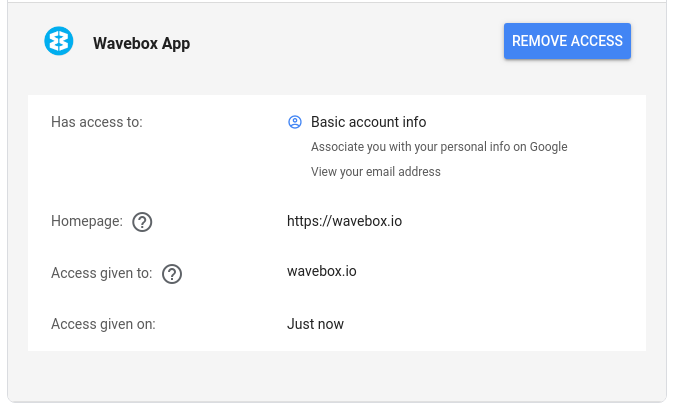
- Visit https://myaccount.google.com/permissions
From there, locate Wavebox (which will have the historic permission set) and click
remove access

The app will continue to work without the API access, but if you sign into you Wavebox account using Google, or re-add the Gmail account to the app, the Wavebox app will be reauthorized with the new permission set
Just as a side note, the Gsuite admin screens seem to take a while to update, so in our case the user counts remain whether you remove the app or not.
Thomas101
on 14 Jun 2019
Great! You should make a blog post about this!!! took me a while to find the info, and was about to submit a support ticket!
 stefanocrosta
on 17 Jun 2019
stefanocrosta
on 17 Jun 2019
Related issues
 MichaelTunnell
·
3Comments
MichaelTunnell
·
3Comments
 cdeutsch
·
3Comments
cdeutsch
·
3Comments
 Tahini-123
·
4Comments
Tahini-123
·
4Comments
 Ash258
·
3Comments
Ash258
·
3Comments
 phcyso
·
4Comments
phcyso
·
4Comments