Waveboxapp: MacOS back/forward shortcuts
- Wavebox Version:
4.9.0 - Operating System & Version:
Mac OSX 10.14.4
Is your feature request related to a problem? Please describe.
To navigate back/forward third party mouse buttons typically default to use cmd+[/cmd+] because they have better support for osx native apps such as finder, instead of cmd+left-arrow/cmd+right-arrow.
Is your feature request related to an account type?
gmail, but I think applicable to all account types
Describe the solution you'd like
With OSX:
back: cmd+[ and cmd+left-arrow
forward: cmd+] and cmd+right-arrow
Additional info
Mac keyboard shortcuts
 chrisblossom
All 6 comments
I am not following this feature request. Can you explain a bit more about it?
One problem I can see is non english keyboards that uses a different layout so a [ would mean to be Cmd+Right Alt+[
So if possible can you describe the request a bit more?
 nmat
on 28 Mar 2019
nmat
on 28 Mar 2019
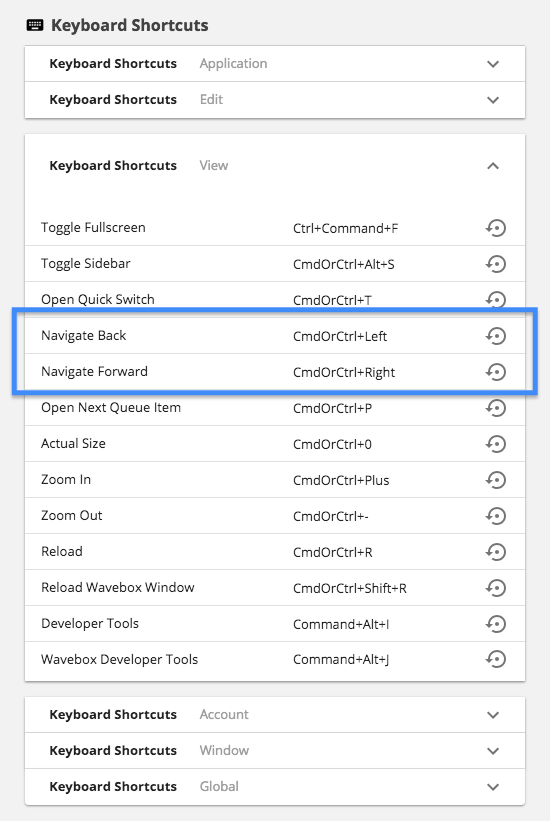
The app will let you change these :-).
Under Settings > Keyboard Shortcuts change Navigate Back and Navigate Forward to be Cmd+[ and Cmd+]
 Thomas101
on 29 Mar 2019
Thomas101
on 29 Mar 2019
I am not following this feature request. Can you explain a bit more about it?
Currently default on on OSX:
back: cmd+left-arrow
forward: cmd+right-arrow
I am proposing that the default be changed to:
back: cmd+[ or cmd+left-arrow (both should work)
forward: cmd+] or cmd+right-arrow (both should work)
This is because external devices that map keys to forward back, such as a mouse, typically use cmd+[ / cmd+] shortcuts because it works with more applications (such as finder, which cmd+left-arrow / cmd+right-arrow does not work).
One problem I can see is non english keyboards that uses a different layout so a [ would mean to be Cmd+Right Alt+[
I don't understand what you mean here probably because I'm not familiar with non-english keyboards.
@Thomas101 I've already updated my shortcut, but am unable to have both shortcuts work (that I know of). By default I think both should work just like they do in Chrome/Firefox/Safari.
chrisblossom
on 2 Apr 2019
I've already updated my shortcut, but am unable to have both shortcuts work
Fair point. I've added that in to the next release :)
Thomas101
on 3 Apr 2019
Hi, we’ve just released this to the beta channel of Wavebox in version 4.9.4. If you want to give it a try there are some instructions on how to use the beta channel here. Thanks
Thomas101
on 11 Apr 2019
Hi, this has just been released in the latest version of Wavebox. You can get the update by using the Application/File menu and clicking Check for Update or by downloading the latest version from our download page. Thanks!
Thomas101
on 14 May 2019
Related issues
Thomas101
·
3Comments
 bashfulrobot
·
4Comments
bashfulrobot
·
4Comments
 tnaseem
·
4Comments
tnaseem
·
4Comments
 atrasatti
·
3Comments
atrasatti
·
3Comments
 phcyso
·
4Comments
phcyso
·
4Comments
Most helpful comment
Fair point. I've added that in to the next release :)