Waveboxapp: Support CSS variables for accounts/services colors for better CSS styling
Before knowing about Wavebox I used Franz and overall I prefer the UI style for selected account:
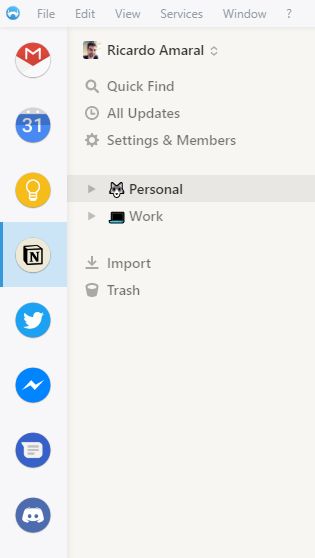
I'm referring to the light blue background and blue left border. But I'd like to tweak this to go even further (which Franz doesn't allow at all), by using the account color instead of defaulting to blue for all accounts. Unfortunately, this is not currently possible.
To make this possible, we'd need to have access to color variables inside the CSS tweak box, preferably in RGB format so we could apply transparency. Although I'm not sure CSS variables are the way to go because we'd need to have a single variable for "account color" that would be replaced by the proper account color.
Currently I can tweak the little dot CSS and transform it into a border but I'd like to have a lighter background with the account color when the account is selected, and for that I need access to the account color inside the CSS tweak box.
Also, I don't think it's currently possible to apply a CSS tweak to the selected account only. We'd need a class (applied to selected account container only) to indicate that.
The same could be implemented for services for even further CSS styling.
Is this a lot of work? Could this be considered for a future version?
 rfgamaral
All 15 comments
Ideally we should use css attr variables, but browser support is still at 0%. With this we could get the app to just drop the colour into the dom as a data attribute and you're good to go.
What about if we I put the mailbox & service id along with the active state into the class name. You'd have to hard-code your colours into the css and you're selectors would be really long, but it would allow you to change them per account. For example...

You could style up as...
.WB-SidelistItemServiceAvatar.WB-Id-724d1589-7f14-4821-8ec1-1f470204cf60-0c7da4b9-d61d-4072-9248-1cf67af2e9ec {
  background-color: rgba(255, 0, 0, 0.5);
}
.WB-SidelistItemServiceAvatar.WB-Id-724d1589-7f14-4821-8ec1-1f470204cf60-0c7da4b9-d61d-4072-9248-1cf67af2e9ec.WB-Active {
  background-color: rgba(255, 0, 0, 1.0);
}
...etc
 Thomas101
on 3 Dec 2018
Thomas101
on 3 Dec 2018
That could work as a workaround and it's probably quick to implement right?
I don't mind the long selectors, my only "problem" would be with the hard-coded colors because we'd have to keep them in sync with the account colors defined for each account. On the other hand, it gives you the flexibility to pick different colors.
If that's easy/quick to implement for v4.5.0, go for it 👍
Also, if you could add an "active" class of sorts to the selected account that would be great too :)
rfgamaral
on 3 Dec 2018
I've added that into the latest beta 4.4.3. Not sure if you're on the beta channel or not, but there are some instructions on how to use it here https://wavebox.io/kb/beta-channel
You should be able to style them up with....
WB-SidelistItemMailboxAvatarandWB-SidelistItemServiceAvatarapplied to each depending on the variantWB-Id-153a22ff-da77-42b1-b588-484ae92beb80applied to each with its IDWB-Activeto indicate it's active
I'll let you take a look around - if you need any additional classes adding in, let me know or open a PR and I'll take a look :)
Thomas101
on 4 Dec 2018
I'm not on the beta channel but as I mentioned on another issue I'm trying to build my own custom Wavebox version from the latest commits and when successful I'll be able to test those changes and report back. By your description, it seems to be more than enough for what I'm trying to achieve. Thank you very much!
rfgamaral
on 4 Dec 2018
Hi, this has just been released in the latest version of Wavebox (4.5.0). You can get the update by using the Application/File menu and clicking Check for Update or by downloading the latest version from our download page. Thanks!
Thomas101
on 4 Dec 2018
Just tried it, it's working great. Awesome work, thank you so much 😄
rfgamaral
on 4 Dec 2018
@Thomas101 Just noticed something on your changes that is not that flexible. For instance:

That WB-ServiceIcon-{Id} should probably be on the parent element which controls the background and the blue bottom border when the service is selected. From the parent element we can easily select a child element, but not the other way around.
Also, I'd change .is-active to .WB-Active for consistency with previous changes.
What do you think?
EDIT: Also, how about a .WB-Sleeping class for accounts/services/mailboxes currently sleeping?
rfgamaral
on 4 Dec 2018
I've just added a few more in https://github.com/wavebox/waveboxapp/commit/83396a6631680389025d6d4dc8592df5a307a356
As suggested added some classes a div above in a similar format to some of the previous release. The WB-ServiceIcon-{} is more legacy now as we've done a lot of work to the UI but left it there for compatability.
is-active is used internally, we've been trying to prefix themable hooks with WB- so added that in. Also added WB-Sleeping
Thomas101
on 5 Dec 2018
Awesome. Thanks so much for this :)
rfgamaral
on 5 Dec 2018
Since you are working so well 😁 here's another small request:
- Add an
.WB-Xclass to the account/service notification indicator (badge) when it's a number. - Add an
.WB-Yclass to the account/service notification indicator (badge) when it's a dot.
So that we can tweak different styles according to the type of notification.
PS: X and Y are just examples, name them whatever you see fit to distinguish between them.
rfgamaral
on 5 Dec 2018
@Thomas101 What do you think of adding the active account/service id class to the <html> (or <body> element to allow sidebar and toolbar personalization based on the active account/service?
What would this be useful for? We could tweak the sidebar color based on that id to better match the service style. By default I have a light sidebar, with dark themed services (like Discord), it looks weird. If I could know which is the service active, I could tweak the sidebar colors to better match that.
The downside of this, the sidebar will look like a Christmas tree when switching between services quickly. But hey, this is advanced CSS tweaks, not something users will get by default so... 😁
Just a though.
rfgamaral
on 5 Dec 2018
Hi, I've just released these out as 4.5.3.
I haven't added the class into the body in this release as we need to make sure it doesn't needlessly update the UI. I'll keep this issue open to do that :)
Thomas101
on 7 Dec 2018
Ok, great work, as usual :)
rfgamaral
on 7 Dec 2018
I've added a top-level id to the .WB-Provider element in 4.5.5 so you should be able to style the sidebar per account now :)
Thomas101
on 11 Dec 2018
Awesome, this is going to take a while to customize 😆
Thanks.
rfgamaral
on 11 Dec 2018
Related issues
 CheechGe
·
4Comments
CheechGe
·
4Comments
 phileasb
·
3Comments
phileasb
·
3Comments
 texelate
·
3Comments
texelate
·
3Comments
 dep
·
4Comments
Thomas101
·
3Comments
dep
·
4Comments
Thomas101
·
3Comments