Waveboxapp: When Mojave turns to Dark Mode, the menubar icon doesn't automatically invert its colors
- Wavebox Version: 4.4.0
- Operating System & Version: macOS 10.14
Expected behavior
When I turn on dark mode in Mojave, all the icons in the menubar invert their colors. I would expect Wavebox to do the same.
Actual behavior
Wavebox's icon stays black with a transparent background, which essentially makes it invisible.
Steps to reproduce
Just turn on Dark Mode
Is the bug persistent or intermittent?
Always
Screenshots


 Evertt
All 9 comments
Thanks, the next beta release has some additional fixes for Mojave, but this one is still to be resolved.
 Thomas101
on 5 Nov 2018
Thomas101
on 5 Nov 2018
@Evertt it's not a bug, its a feature
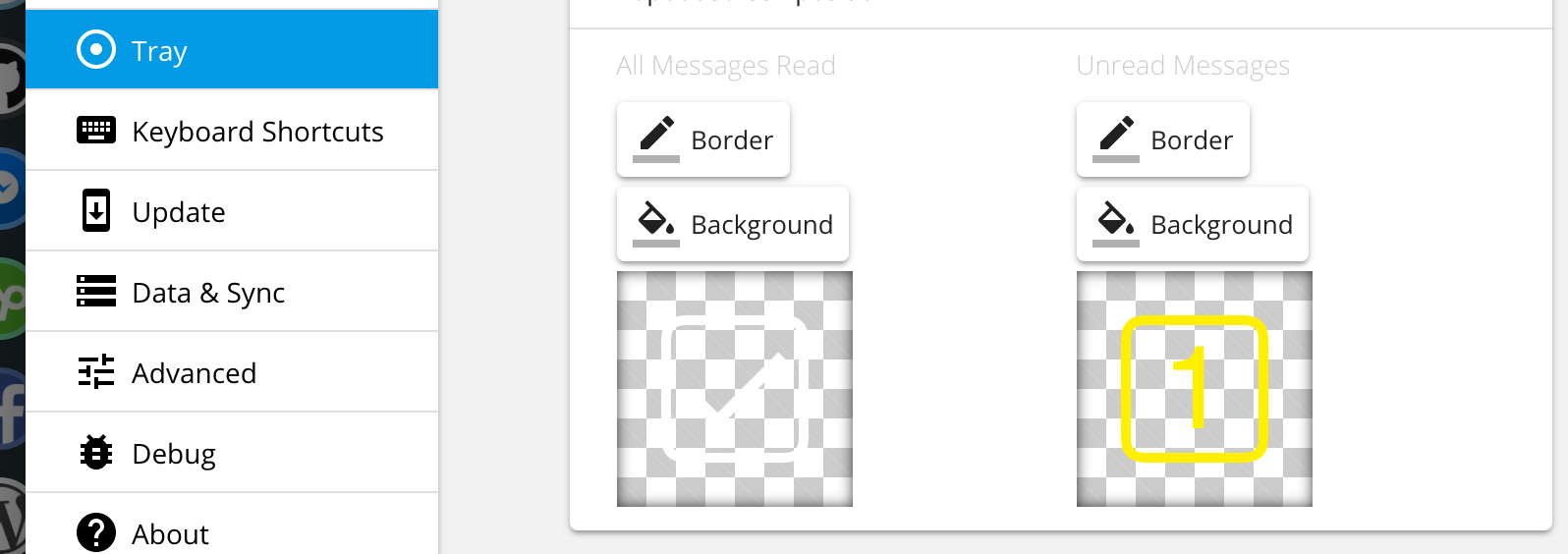
For example, if you use Ubuntu or other Linux with Gnome in dark mode, you have to update icons manually, it's an easy step, just open settings, and choose a color which you want!
 reatlat
on 14 Nov 2018
reatlat
on 14 Nov 2018
To me it's not a feature, because I have an app running that automatically changes my OS from light mode to dark mode and back twice a day. And I don't want to have to manually change the icon twice a day...
Evertt
on 14 Nov 2018
To me it's not a feature, because I have an app running that automatically changes my OS from light mode to dark mode and back twice a day. And I don't want to have to manually change the icon twice a day...
temporary solution: use neutral color like grey #CCCCCC
reatlat
on 14 Nov 2018
Hi, we’ve just released this to the beta channel of Wavebox in version 4.4.2. If you want to give it a try there are some instructions on how to use the beta channel here. Thanks
Thomas101
on 23 Nov 2018
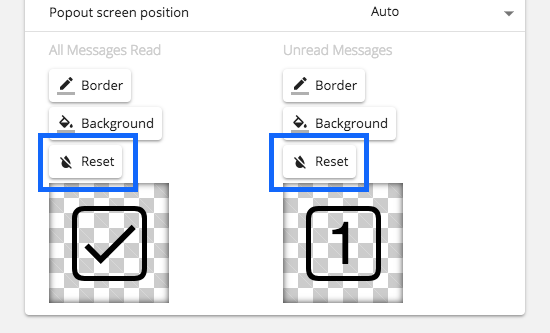
If you have changed the tray icon colors, you will need to reset them back to their defaults for the app to auto change them. To do this head into Settings > Tray and under the colorpicker click the reset buttons.
Thomas101
on 23 Nov 2018
Thank you, that seems to work. Except now the DPI multiplier is broken, because when I now said it to 2x it doesn't double the DPI, it just doubles the icon size.
Evertt
on 23 Nov 2018
@Evertt thanks, looks like a regression from the electron update. I've opened an issue here to track the fix https://github.com/wavebox/waveboxapp/issues/859
Thomas101
on 23 Nov 2018
Hi, this has just been released in the latest version of Wavebox (4.5.0). You can get the update by using the Application/File menu and clicking Check for Update or by downloading the latest version from our download page. Thanks!
Thomas101
on 4 Dec 2018
Related issues
 dctucker
·
4Comments
dctucker
·
4Comments
 cdeutsch
·
3Comments
cdeutsch
·
3Comments
 yermulnik
·
3Comments
yermulnik
·
3Comments
 atrasatti
·
3Comments
atrasatti
·
3Comments
 Ash258
·
3Comments
Ash258
·
3Comments
Most helpful comment
To me it's not a feature, because I have an app running that automatically changes my OS from light mode to dark mode and back twice a day. And I don't want to have to manually change the icon twice a day...